-
JS模块化
JS模块化
什么是模块化?
将一个复杂的程序依据一定的规则(规范)封装成几个块(文件),并进行组合在一起。
块的内部数据/实现是私有的,只是向外部暴露一些接口(方法)与外部其它模板通信。
把所有的js代码写在一起,功能点不明确,耦合度不够,很难维护。
模块化的优点
- 避免命名冲突,减少命名空间污染
- 更好的分离,按需加载
- 更高复用性
- 高可维护性
页面引入加载script
引入的过多,发的请求就会过多 依赖模糊 并且要注意引用的顺序 难以维护
常见的模块化规范和工具
CommonJS(通用模块化规范)
规范
说明
- 每个文件都可以当作一个模块
- 在服务器端:模块的加载时运行时同步加载的-->会发生阻塞
- 在浏览器端:模块需要提前编译打包处理
实现
服务器端实现
基本语法
暴露模块
- //value可以是任意的数据类型
- 1.module.exports = value
- 2.exports.xxx = value
- //暴露的模块到底是什么? 暴露的本质都是exports这个对象
- //原本exports就是空的对象
引入模块
- require(xxx)
- 第三方模块 :xxx为模块名
- 自定义模块:xxx为模块文件路径
下载第三方模块 npm install xx
模块化编码


- ##app.js
- //引入第三方库时要放到自定义库的上面
- let uniq = require('uniq')
- //将其他模块汇聚到主模块
- let module1 =require('./modules/module1')
- let module2 =require('./modules/module2')
- let module3 =require('./modules/module3')
- //如何使用
- module1.foo()
- module2()
- module3.bar()
- module3.foo()
- let result = uniq(module3.arr)
- console.log(result)
- ##module1.js
- //module.exports = value
- module.exports ={
- msg:'module1',
- foo(){
- console.log(this.msg);
- }
- }
- ##module2.js
- //暴露一个函数 module.exports =function(){}
- module.exports=function(){
- console.log('module2');
- }
- //再写一个的话 module1.exports对象会被覆盖
- ##module3.js
- //exports.xxx = value
- //用这种方式暴露就是无限的给对象添加属性
- exports.foo=function (){
- console.log('foo()module3');
- }
- exports.bar=function (){
- console.log('bar()module3');
- }
- exports.arr=[1,1,2,3,4,5,1]
浏览器端实现
- |-js
- |-dist //打包生成文件的目录
- |-src //源码所在的目录
- |-module1.js
- |-module2.js
- |-module3.js
- |-app.js //应用主源文件
- |-index.html
- |-package.json
- {
- "name": "browserify-test",
- "version": "1.0.0"
- }
- ## module1.js
- module.exports = {
- foo() {
- console.log('moudle1 foo()')
- }
- }
- ## module2.js
- module.exports = function () {
- console.log('module2()')
- }
- ## module3.js
- exports.foo = function () {
- console.log('module3 foo()')
- }
- exports.bar = function () {
- console.log('module3 bar()')
- }
- ## app.js
- //引用模块
- let module1 = require('./module1')
- let module2 = require('./module2')
- let module3 = require('./module3')
- let uniq = require('uniq')
- //使用模块
- module1.foo()
- module2()
- module3.foo()
- module3.bar()
- console.log(uniq([1, 3, 1, 4, 3]))

AMD(异步模块定义)
规范
说明
专门用于浏览器端,模块的加载是异步的。
基本语法
定义暴露模块
- //定义没有依赖的模块
- define(function(){
- return 模块
- })
- //定义有依赖的模块
- //第一个参数必须是一个数组,数组里面放置的是依赖的模块 第二个参数是函数 函数要有形参
- define(['module1','module2'],function(m1,m2){
- return 模块
- })
引入使用模块
- require(['module1','module2'],function(m1,m2){
- 使用m1/m2
- })
实现
非AMD实现

- ## dataService.js
- // 定义一个没有依赖的模块
- (function(window){
- let name='dataService.js';
- function getName(){
- return name
- }
- window.dataService={getName};
- })(window)
- ## alerter.js
- // 定义一个有依赖的模块
- (function(window,dataService){
- let msg='alerter.js'
- function showMsg(){
- console.log(msg,dataService.getName());
- }
- window.alerter={showMsg};
- })(window,dataService)
- ## app.js
- (function (alerter) {
- alerter.showMsg();
- })(alerter)
- ## test.html
- <script src="./js/dataService.js"></script> //由于alerter.js依赖于dataService,所以也要在引入alerter之前引入dataService.js文件
- <script src="./js/alerter.js"></script> //引入alerter.js文件
- <script src="./app.js"></script> //单独引入app.js找不到alerter文件
AMD实现
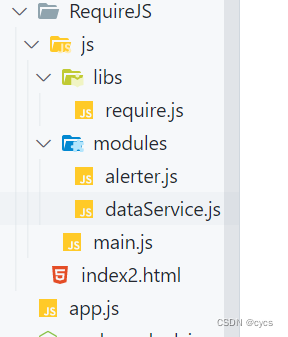
- ##dataService.js
- // 定义没有依赖的模块
- define(function () {
- let msg = 'atguigu.com'
- function getMsg() {
- return msg
- }
- // 暴露模块
- return { getMsg }
- })
- ##alerter.js
- // 定义有依赖模块
- define(['dataService'], function (dataService) {
- let name = 'Tom2'
- function showMsg() {
- console.log(name, dataService.getMsg());
- }
- // 暴露模块
- return { showMsg }
- })
- ##main.js
- // 引入模块
- (function () {
- // 配置
- require.config({
- //映射: 模块标识名: 路径
- paths: {
- //自定义模块
- alerter: './modules/alerter',
- dataService: './modules/dataService',
- },
- })
- // 引入模块使用
- requirejs(['alerter'], function (alerter) {
- alerter.showMsg();
- })
- })()
- ##index.html
- <script data-main="js/main.js" src="js/libs/require.js"></script>
- ##先加载require.js文件,然后加载main.js
CMD (简单了解即可)
ES6(目前应用最广泛)
ES6 模块的设计思想是尽量的静态化,使得编译时就能确定模块的依赖关系,以及输入和输出的变量。CommonJS 和 AMD 模块,都只能在运行时确定这些东西。比如,CommonJS 模块就是对象,输入时必须查找对象属性
- 依赖模块需要编译打包处理;
- 导出模块: export;
- 引入模块: import;
- 使用Babel将ES6编译为ES5代码;(有的浏览器不支持)
- 使用Browserify编译打包js;(require语法)
1.定义package.json文件
- {
- "name" : "es6-babel-browserify",
- "version" : "1.0.0"
- }
2.安装
- npm install babel-cli browserify -g
- npm install babel-preset-es2015 --save-dev
3。定义.babelrc文件
- {
- "presets": ["es2015"]
- }
4.编码
- ##js/src/module1.js
- // 暴露模块 分别暴露
- export function foo(){
- console.log('foo() module1');
- }
- export function bar(){
- console.log('bar() module1');
- }
- export let arr=[1,2,3,4,5]
- ## js/src/module2.js
- // 统一暴露
- function fun() {
- console.log('fun() module2');
- }
- function fun2() {
- console.log('fun2() module2');
- }
- export { fun, fun2 };
- ## js/src/module3.js
- //默认暴露 可以暴露任意数据类型,暴露什么数据类型,暴露什么数据接收到的就是什么数据
- // export default value
- // 方式一:
- /* export default ()=>{
- console.log('我是默认暴露的箭头函数');
- } */
- // 方式二:
- export default {
- msg: '默认暴露',
- foo() {
- console.log(this.msg);
- }
- }
- ## js/src/app.js
- //引入其他的模块
- //语法:import xxx from '路径'
- import module1 from './module1'
- import module2 from './module2'
- console.log(module1,module2); //undefined undefined
译并在index.html中引入
使用Babel将ES6编译为ES5代码(但包含CommonJS语法) :babel js/src -d js/lib
使用Browserify编译js :browserify js/lib/app.js -o js/lib/bundle.js
然后在index.html文件中引入<script type="text/javascript" src="js/lib/bundle.js"></script>参考:
视频-尚硅谷
博客
-
相关阅读:
【Python 实战】---- 使用 RemoveBg 实现一键批量抠图
【Adversarial Robustness Toolbox (ART)】对抗性防御工具
从 AI 代码生成模型到 AI 编程助手应用实战
设计模式——结构型模式
MySQL到底大小写敏感还是不敏感?
SQL Server内置的HTAP技术
【python】python进行debug操作
Chrome开发工具与js加密
【校招VIP】产品经理行测之数列题
JSON vs. CSV vs. YAML vs. XML vs. HDF5vs. XLS:数据格式之争
- 原文地址:https://blog.csdn.net/m0_74033724/article/details/133041341
