-
Flink-CDC 抽取SQLServer问题总结
Flink-CDC 抽取SQLServer问题总结
背景
flink-cdc 抽取数据到kafka 中,使用flink-sql进行开发,相关问题总结- 1
- 2
flink-cdc 配置SQLServer cdc参数
- 1.创建CDC 使用的角色, 并授权给其查询待采集数据数据库
-- a.创建角色 create role flink_role; -- b.授权给角色 grant select on SCHEMA::dbo to flink_role; -- c. 角色添加给数据库登陆用户 alter role flink_role add member 登陆用户;- 1
- 2
- 3
- 4
- 5
- 6
- 创建文件组,用于存储CDC捕获SQLServer需要的数据文件
-- a. 查询文件组是否存在 select name AS filegroup_name ,type as filegroup_type from sys.filegroups; -- b.添加文件组 use 数据库 go alter database 数据库 add filegroup flinkFG go alter database 数据库 add file ( NAME = rytbdat1, FILENAME = 'D:\MSSQL\Data\rtybdat1.ndf', SIZE = 50MB, MAXSIZE = 500MB, FILEGROWTH = 50MB ), ( NAME = rytbdat2, FILENAME = 'D:\MSSQL\Data\rtybdat2.ndf', SIZE = 50MB, MAXSIZE = 500MB, FILEGROWTH = 50MB ) TO FILEGROUP flinkFG; --- 查看文件组 SELECT name AS '文件逻辑名称', physical_name AS '物理文件路径', (size * 8 / 1024) AS '文件大小(MB)', max_size AS '最大文件大小(MB)', growth AS '文件增长量(MB)', type_desc AS '文件类型' FROM sys.database_files;- 1
- 2
- 3
- 4
- 5
- 6
- 7
- 8
- 9
- 10
- 11
- 12
- 13
- 14
- 15
- 16
- 17
- 18
- 19
- 20
- 21
- 22
- 23
- 24
- 25
- 26
- 27
- 28
- 29
- 30
- 31
- 32
- 33
- 34
- 35
- 36
- 37
- 38
- 39
- 40
- 41
- 42
- 43
- 44
- 执行CDC配置,并检查是否成功
--- enable cdc operation for datbase 数据库 ------- -- ****** m_rec_save ****** -- USE 数据库 GO EXEC sys.sp_cdc_enable_table @source_schema = N'数据表名所在schema', -- Specifies the schema of the source table. @source_name = N'数据表名', -- Specifies the name of the table that you want to capture. @role_name = N'flink_role', -- Specifies a role MyRole to which you can add users to whom you want to grant SELECT permission on the captured columns of the source table. Users in the sysadmin or db_owner role also have access to the specified change tables. Set the value of @role_name to NULL, to allow only members in the sysadmin or db_owner to have full access to captured information. @filegroup_name = N'flinkFG',-- Specifies the filegroup where SQL Server places the change table for the captured table. The named filegroup must already exist. It is best not to locate change tables in the same filegroup that you use for source tables. @supports_net_changes = 0 GO -- 检查数据库是否开启CDC配置 USE 数据库; GO EXEC sys.sp_cdc_help_change_data_capture GO -- 检查数据库下开启CDC配置的数据表 select is_cdc_enabled from sys.databases where name = '数据库';- 1
- 2
- 3
- 4
- 5
- 6
- 7
- 8
- 9
- 10
- 11
- 12
- 13
- 14
- 15
- 16
- 17
- 18
- 19
- 20
- 21
- 22
- 23
- 24
- 工具版本
Flink 1.15 Flink-CDC 2.3.0 SQLServer 2012- 1
- 2
- 3
问题一: flink-cdc 参数不支持增量快照

- 解决:选择合适的Flink-CDC文档,部分版本不支持增量快照
flink-cdc 2.3.0 : schema-name未指定
- 解决,cdc参数添加 schema-name参数,指定SQLServer中数据库下面的schema名称
'connector' = 'sqlserver-cdc' , > 'hostname' = 'localhost' , > 'port' = '1433' , > 'username' = 'user', > 'password' = 'password', > 'database-name' = 'schema-name', > 'schema-name' = 'dbo', > 'table-name' = 'table_name'- 1
- 2
- 3
- 4
- 5
- 6
- 7
- 8
- 9
锁超时
-
Caused by: com.microsoft.sqlserver.jdbc.SQLServerException: 已超过了锁请求超时时段。

-
定位思路
- SQLServer查询阻塞进程
- 1
SELECT blocking_session_id ‘阻塞进程的ID’, wait_duration_ms ‘等待时间(毫秒)’, session_id ‘(会话ID)’ FROM sys.dm_os_waiting_tasks
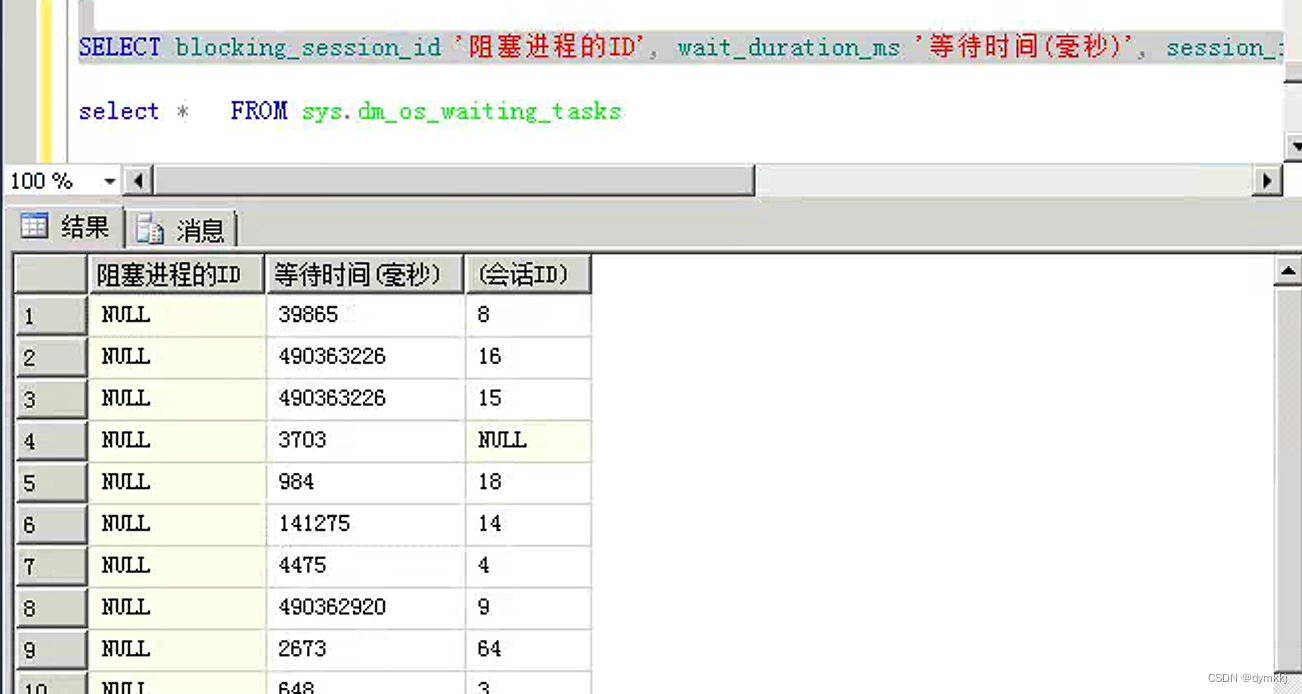 - 确定所在服务器,假设上述阻塞进程ID为56 ``` sp_who2 56- 1
- 2
- 3
- 4
- 5
- 6

- 登陆所在服务,杀死所在服务器进程
因为是sql-client提交的flink-cdc作业,所以从yarn-ui作业找到application_id,然后kill yarn app -kill applicationid- 1
- 2
- 3
-
相关阅读:
【Linux】Linux常用指令
基于STM32实现USB组合设备CDC+MSC正确打开方式
“世界首台USB-C iPhone”被拍卖,目前出价63万人民币
IPSec NAT穿越原理
AEB强制标配?今年乘用车前装搭载率预计突破50%
数据结构-快速排序
我又和redis超时杠上了
.NET 6学习笔记(1)——通过FileStream实现不同进程对单一文件的同时读写
2022“杭电杯” 中国大学生算法设计超级联赛(3)2 9题解
【目标检测算法】YOLO-V5训练结果的分析与评价
- 原文地址:https://blog.csdn.net/dymkkj/article/details/132969958
