-
day27IO(异常&File&综合案例)
1. 异常
1.1 异常概念
异常,就是不正常的意思。在生活中:医生说,你的身体某个部位有异常,该部位和正常相比有点不同,该部位的功能将受影响.在程序中的意思就是:
- 异常 :指的是程序在执行过程中,出现的非正常的情况,最终会导致JVM的非正常停止。
在Java等面向对象的编程语言中,异常本身是一个类,产生异常就是创建异常对象并抛出了一个异常对象。Java处理异常的方式是中断处理。
异常指的并不是语法错误,语法错了,编译不通过,不会产生字节码文件,根本不能运行.
1.2 异常体系
异常机制其实是帮助我们找到程序中的问题,异常的根类是
java.lang.Throwable,其下有两个子类:java.lang.Error与java.lang.Exception,平常所说的异常指java.lang.Exception。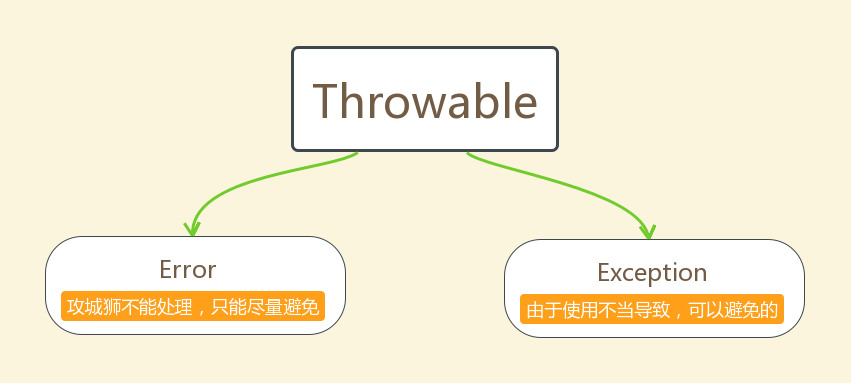
Throwable体系:
- Error:严重错误Error,无法通过处理的错误,只能事先避免,好比绝症。
- Exception:表示异常,异常产生后程序员可以通过代码的方式纠正,使程序继续运行,是必须要处理的。好比感冒、阑尾炎。
Throwable中的常用方法:
-
public void printStackTrace():打印异常的详细信息。包含了异常的类型,异常的原因,还包括异常出现的位置,在开发和调试阶段,都得使用printStackTrace。
-
public String getMessage():获取发生异常的原因。提示给用户的时候,就提示错误原因。
-
public String toString():获取异常的类型和异常描述信息(不用)。
出现异常,不要紧张,把异常的简单类名,拷贝到API中去查。

1.3 异常分类
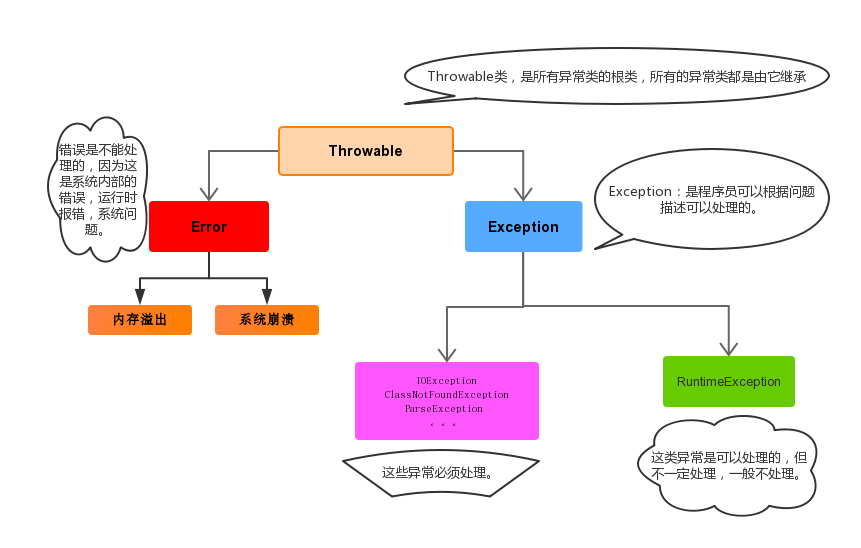
我们平常说的异常就是指Exception,因为这类异常一旦出现,我们就要对代码进行更正,修复程序。
异常(Exception)的分类:根据在编译时期还是运行时期去检查异常?
- 编译时期异常:checked异常。在编译时期,就会检查,如果没有处理异常,则编译失败。(如日期格式化异常)
- 运行时期异常:runtime异常。在运行时期,检查异常.在编译时期,运行异常不会编译器检测(不报错)。(如数学异常)
1.4 异常的产生过程解析
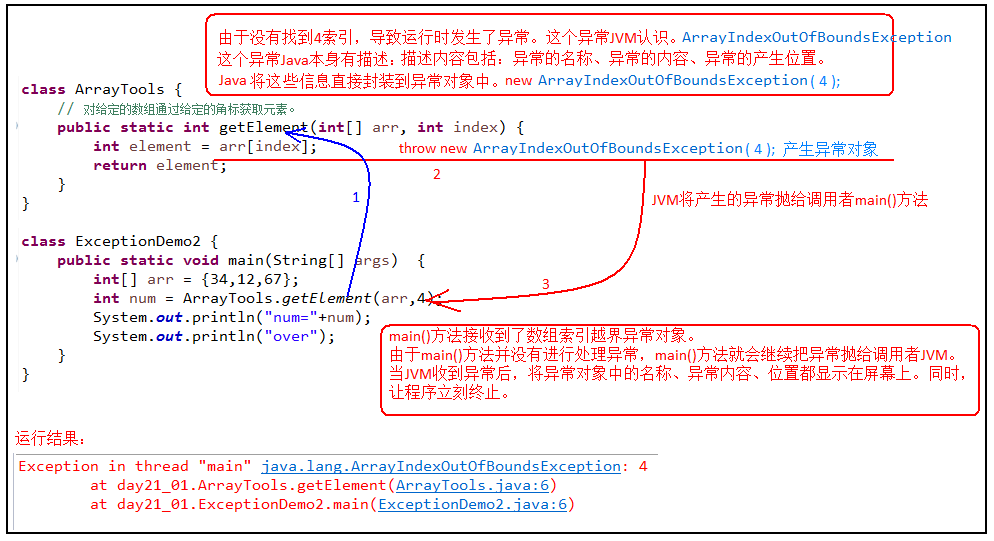
先运行下面的程序,程序会产生一个数组索引越界异常ArrayIndexOfBoundsException。我们通过图解来解析下异常产生的过程。
工具类
public class ArrayTools { // 对给定的数组通过给定的角标获取元素。 public static int getElement(int[] arr, int index) { int element = arr[index]; return element; } }- 1
- 2
- 3
- 4
- 5
- 6
- 7
测试类
public class ExceptionDemo { public static void main(String[] args) { int[] arr = { 34, 12, 67 }; intnum = ArrayTools.getElement(arr, 4) System.out.println("num=" + num); System.out.println("over"); } }- 1
- 2
- 3
- 4
- 5
- 6
- 7
- 8
上述程序执行过程图解:
1.5 抛出异常throw
在编写程序时,我们必须要考虑程序出现问题的情况。比如,在定义方法时,方法需要接受参数。那么,当调用方法使用接受到的参数时,首先需要先对参数数据进行合法的判断,数据若不合法,就应该告诉调用者,传递合法的数据进来。这时需要使用抛出异常的方式来告诉调用者。
在java中,提供了一个throw关键字,它用来抛出一个指定的异常对象。那么,抛出一个异常具体如何操作呢?
-
创建一个异常对象。封装一些提示信息(信息可以自己编写)。
-
需要将这个异常对象告知给调用者。怎么告知呢?怎么将这个异常对象传递到调用者处呢?通过关键字throw就可以完成。throw 异常对象。
throw用在方法内,用来抛出一个异常对象,将这个异常对象传递到调用者处,并结束当前方法的执行。
使用格式:
throw new 异常类名(参数);- 1
例如:
throw new NullPointerException("要访问的arr数组不存在"); throw new ArrayIndexOutOfBoundsException("该索引在数组中不存在,已超出范围");- 1
- 2
- 3
学习完抛出异常的格式后,我们通过下面程序演示下throw的使用。
public class ThrowDemo { public static void main(String[] args) { //创建一个数组 int[] arr = {2,4,52,2}; //根据索引找对应的元素 int index = 4; int element = getElement(arr, index); System.out.println(element); System.out.println("over"); } /* * 根据 索引找到数组中对应的元素 */ public static int getElement(int[] arr,int index){ //判断 索引是否越界 if(index<0 || index>arr.length-1){ /* 判断条件如果满足,当执行完throw抛出异常对象后,方法已经无法继续运算。 这时就会结束当前方法的执行,并将异常告知给调用者。这时就需要通过异常来解决。 */ throw new ArrayIndexOutOfBoundsException("哥们,角标越界了```"); } int element = arr[index]; return element; } }- 1
- 2
- 3
- 4
- 5
- 6
- 7
- 8
- 9
- 10
- 11
- 12
- 13
- 14
- 15
- 16
- 17
- 18
- 19
- 20
- 21
- 22
- 23
- 24
- 25
- 26
- 27
注意:如果产生了问题,我们就会throw将问题描述类即异常进行抛出,也就是将问题返回给该方法的调用者。
那么对于调用者来说,该怎么处理呢?一种是进行捕获处理,另一种就是继续讲问题声明出去,使用throws声明处理。
1.6 声明异常throws
声明异常:将问题标识出来,报告给调用者。如果方法内通过throw抛出了编译时异常,而没有捕获处理(稍后讲解该方式),那么必须通过throws进行声明,让调用者去处理。
关键字throws运用于方法声明之上,用于表示当前方法不处理异常,而是提醒该方法的调用者来处理异常(抛出异常).
声明异常格式:
修饰符 返回值类型 方法名(参数) throws 异常类名1,异常类名2…{ }- 1
声明异常的代码演示:
public class ThrowsDemo { public static void main(String[] args) throws FileNotFoundException { read("a.txt"); } // 如果定义功能时有问题发生需要报告给调用者。可以通过在方法上使用throws关键字进行声明 public static void read(String path) throws FileNotFoundException { if (!path.equals("a.txt")) {//如果不是 a.txt这个文件 // 我假设 如果不是 a.txt 认为 该文件不存在 是一个错误 也就是异常 throw throw new FileNotFoundException("文件不存在"); } } }- 1
- 2
- 3
- 4
- 5
- 6
- 7
- 8
- 9
- 10
- 11
- 12
- 13
throws用于进行异常类的声明,若该方法可能有多种异常情况产生,那么在throws后面可以写多个异常类,用逗号隔开。
public class ThrowsDemo2 { public static void main(String[] args) throws IOException { read("a.txt"); } public static void read(String path)throws FileNotFoundException, IOException { if (!path.equals("a.txt")) {//如果不是 a.txt这个文件 // 我假设 如果不是 a.txt 认为 该文件不存在 是一个错误 也就是异常 throw throw new FileNotFoundException("文件不存在"); } if (!path.equals("b.txt")) { throw new IOException(); } } }- 1
- 2
- 3
- 4
- 5
- 6
- 7
- 8
- 9
- 10
- 11
- 12
- 13
- 14
- 15
1.7 捕获异常try…catch
如果异常出现的话,会立刻终止程序,所以我们得处理异常:
- 该方法不处理,而是声明抛出,由该方法的调用者来处理(throws)。
- 在方法中使用try-catch的语句块来处理异常。
try-catch的方式就是捕获异常。
- 捕获异常:Java中对异常有针对性的语句进行捕获,可以对出现的异常进行指定方式的处理。
捕获异常语法如下:
try{ 编写可能会出现异常的代码 }catch(异常类型 e){ 处理异常的代码 //记录日志/打印异常信息/继续抛出异常 }- 1
- 2
- 3
- 4
- 5
- 6
**try:**该代码块中编写可能产生异常的代码。
**catch:**用来进行某种异常的捕获,实现对捕获到的异常进行处理。
注意:try和catch都不能单独使用,必须连用。
演示如下:
public class TryCatchDemo { public static void main(String[] args) { try {// 当产生异常时,必须有处理方式。要么捕获,要么声明。 read("b.txt"); } catch (FileNotFoundException e) {// 括号中需要定义什么呢? //try中抛出的是什么异常,在括号中就定义什么异常类型 System.out.println(e); } System.out.println("over"); } /* * * 我们 当前的这个方法中 有异常 有编译期异常 */ public static void read(String path) throws FileNotFoundException { if (!path.equals("a.txt")) {//如果不是 a.txt这个文件 // 我假设 如果不是 a.txt 认为 该文件不存在 是一个错误 也就是异常 throw throw new FileNotFoundException("文件不存在"); } } }- 1
- 2
- 3
- 4
- 5
- 6
- 7
- 8
- 9
- 10
- 11
- 12
- 13
- 14
- 15
- 16
- 17
- 18
- 19
- 20
- 21
如何获取异常信息:
Throwable类中定义了一些查看方法:
-
public String getMessage():获取异常的描述信息,原因(提示给用户的时候,就提示错误原因。 -
public String toString():获取异常的类型和异常描述信息(不用)。 -
public void printStackTrace():打印异常的跟踪栈信息并输出到控制台。
包含了异常的类型,异常的原因,还包括异常出现的位置,在开发和调试阶段,都得使用printStackTrace。
在开发中呢也可以在catch将编译期异常转换成运行期异常处理。
多个异常使用捕获又该如何处理呢?
- 多个异常分别处理。
- 多个异常一次捕获,多次处理。
- 多个异常一次捕获一次处理。
一般我们是使用一次捕获多次处理方式,格式如下:
try{ 编写可能会出现异常的代码 }catch(异常类型A e){ 当try中出现A类型异常,就用该catch来捕获. 处理异常的代码 //记录日志/打印异常信息/继续抛出异常 }catch(异常类型B e){ 当try中出现B类型异常,就用该catch来捕获. 处理异常的代码 //记录日志/打印异常信息/继续抛出异常 }- 1
- 2
- 3
- 4
- 5
- 6
- 7
- 8
- 9
注意:这种异常处理方式,要求多个catch中的异常不能相同,并且若catch中的多个异常之间有子父类异常的关系,那么子类异常要求在上面的catch处理,父类异常在下面的catch处理。
1.8 finally 代码块
finally:有一些特定的代码无论异常是否发生,都需要执行。另外,因为异常会引发程序跳转,导致有些语句执行不到。而finally就是解决这个问题的,在finally代码块中存放的代码都是一定会被执行的。
什么时候的代码必须最终执行?
当我们在try语句块中打开了一些物理资源(磁盘文件/网络连接/数据库连接等),我们都得在使用完之后,最终关闭打开的资源。
finally的语法:
try…catch…finally:自身需要处理异常,最终还得关闭资源。
注意:finally不能单独使用。
比如在我们之后学习的IO流中,当打开了一个关联文件的资源,最后程序不管结果如何,都需要把这个资源关闭掉。
finally代码参考如下:
public class TryCatchDemo4 { public static void main(String[] args) { try { read("a.txt"); } catch (FileNotFoundException e) { //抓取到的是编译期异常 抛出去的是运行期 throw new RuntimeException(e); } finally { System.out.println("不管程序怎样,这里都将会被执行。"); } System.out.println("over"); } /* * * 我们 当前的这个方法中 有异常 有编译期异常 */ public static void read(String path) throws FileNotFoundException { if (!path.equals("a.txt")) {//如果不是 a.txt这个文件 // 我假设 如果不是 a.txt 认为 该文件不存在 是一个错误 也就是异常 throw throw new FileNotFoundException("文件不存在"); } } }- 1
- 2
- 3
- 4
- 5
- 6
- 7
- 8
- 9
- 10
- 11
- 12
- 13
- 14
- 15
- 16
- 17
- 18
- 19
- 20
- 21
- 22
- 23
当只有在try或者catch中调用退出JVM的相关方法,此时finally才不会执行,否则finally永远会执行。
1.9 异常注意事项
- 运行时异常被抛出可以不处理。即不捕获也不声明抛出。
- 如果父类抛出了多个异常,子类覆盖父类方法时,只能抛出相同的异常或者是他的子集。
- 父类方法没有抛出异常,子类覆盖父类该方法时也不可抛出异常。此时子类产生该异常,只能捕获处理,不能声明抛出
- 当多异常处理时,捕获处理,前边的类不能是后边类的父类
- 在try/catch后可以追加finally代码块,其中的代码一定会被执行,通常用于资源回收。
1.10 概述
为什么需要自定义异常类:
我们说了Java中不同的异常类,分别表示着某一种具体的异常情况,那么在开发中总是有些异常情况是SUN没有定义好的,此时我们根据自己业务的异常情况来定义异常类。,例如年龄负数问题,考试成绩负数问题。
在上述代码中,发现这些异常都是JDK内部定义好的,但是实际开发中也会出现很多异常,这些异常很可能在JDK中没有定义过,例如年龄负数问题,考试成绩负数问题.那么能不能自己定义异常呢?
什么是自定义异常类:
在开发中根据自己业务的异常情况来定义异常类.
自定义一个业务逻辑异常: LoginException。一个登陆异常类。
异常类如何定义:
- 自定义一个编译期异常: 自定义类 并继承于
java.lang.Exception。 - 自定义一个运行时期的异常类:自定义类 并继承于
java.lang.RuntimeException。
1.11 自定义异常的练习
要求:我们模拟登陆操作,如果用户名已存在,则抛出异常并提示:亲,该用户名已经被注册。
首先定义一个登陆异常类LoginException:
// 业务逻辑异常 public class LoginException extends Exception { /** * 空参构造 */ public LoginException() { } /** * * @param message 表示异常提示 */ public LoginException(String message) { super(message); } }- 1
- 2
- 3
- 4
- 5
- 6
- 7
- 8
- 9
- 10
- 11
- 12
- 13
- 14
- 15
- 16
模拟登陆操作,使用数组模拟数据库中存储的数据,并提供当前注册账号是否存在方法用于判断。
public class Demo { // 模拟数据库中已存在账号 private static String[] names = {"bill","hill","jill"}; public static void main(String[] args) { //调用方法 try{ // 可能出现异常的代码 checkUsername("nill"); System.out.println("注册成功");//如果没有异常就是注册成功 } catch(LoginException e) { //处理异常 e.printStackTrace(); } } //判断当前注册账号是否存在 //因为是编译期异常,又想调用者去处理 所以声明该异常 public static boolean checkUsername(String uname) throws LoginException { for (String name : names) { if(name.equals(uname)){//如果名字在这里面 就抛出登陆异常 throw new LoginException("亲"+name+"已经被注册了!"); } } return true; } }- 1
- 2
- 3
- 4
- 5
- 6
- 7
- 8
- 9
- 10
- 11
- 12
- 13
- 14
- 15
- 16
- 17
- 18
- 19
- 20
- 21
- 22
- 23
- 24
- 25
- 26
- 27
2. File类
2.1 概述
java.io.File类是文件和目录路径名的抽象表示,主要用于文件和目录的创建、查找和删除等操作。2.2 构造方法
public File(String pathname):通过将给定的路径名字符串转换为抽象路径名来创建新的 File实例。public File(String parent, String child):从父路径名字符串和子路径名字符串创建新的 File实例。public File(File parent, String child):从父抽象路径名和子路径名字符串创建新的 File实例。- 构造举例,代码如下:
// 文件路径名 String pathname = "D:\\aaa.txt"; File file1 = new File(pathname); // 文件路径名 String pathname2 = "D:\\aaa\\bbb.txt"; File file2 = new File(pathname2); // 通过父路径和子路径字符串 String parent = "d:\\aaa"; String child = "bbb.txt"; File file3 = new File(parent, child); // 通过父级File对象和子路径字符串 File parentDir = new File("d:\\aaa"); String child = "bbb.txt"; File file4 = new File(parentDir, child);- 1
- 2
- 3
- 4
- 5
- 6
- 7
- 8
- 9
- 10
- 11
- 12
- 13
- 14
- 15
- 16
- 17
小贴士:
- 一个File对象代表硬盘中实际存在的一个文件或者目录。
- 无论该路径下是否存在文件或者目录,都不影响File对象的创建。
2.3 常用方法
获取功能的方法
-
public String getAbsolutePath():返回此File的绝对路径名字符串。 -
public String getPath():将此File转换为路径名字符串。 -
public String getName():返回由此File表示的文件或目录的名称。 -
public long length():返回由此File表示的文件的长度。方法演示,代码如下:
public class FileGet { public static void main(String[] args) { File f = new File("d:/aaa/bbb.java"); System.out.println("文件绝对路径:"+f.getAbsolutePath()); System.out.println("文件构造路径:"+f.getPath()); System.out.println("文件名称:"+f.getName()); System.out.println("文件长度:"+f.length()+"字节"); File f2 = new File("d:/aaa"); System.out.println("目录绝对路径:"+f2.getAbsolutePath()); System.out.println("目录构造路径:"+f2.getPath()); System.out.println("目录名称:"+f2.getName()); System.out.println("目录长度:"+f2.length()); } } 输出结果: 文件绝对路径:d:\aaa\bbb.java 文件构造路径:d:\aaa\bbb.java 文件名称:bbb.java 文件长度:636字节 目录绝对路径:d:\aaa 目录构造路径:d:\aaa 目录名称:aaa 目录长度:4096- 1
- 2
- 3
- 4
- 5
- 6
- 7
- 8
- 9
- 10
- 11
- 12
- 13
- 14
- 15
- 16
- 17
- 18
- 19
- 20
- 21
- 22
- 23
- 24
- 25
API中说明:length(),表示文件的长度。但是File对象表示目录,则返回值未指定。
绝对路径和相对路径
- 绝对路径:从盘符开始的路径,这是一个完整的路径。
- 相对路径:相对于项目目录的路径,这是一个便捷的路径,开发中经常使用。
public class FilePath { public static void main(String[] args) { // D盘下的bbb.java文件 File f = new File("D:\\bbb.java"); System.out.println(f.getAbsolutePath()); // 项目下的bbb.java文件 File f2 = new File("bbb.java"); System.out.println(f2.getAbsolutePath()); } } 输出结果: D:\bbb.java D:\idea_project_test4\bbb.java- 1
- 2
- 3
- 4
- 5
- 6
- 7
- 8
- 9
- 10
- 11
- 12
- 13
- 14
判断功能的方法
public boolean exists():此File表示的文件或目录是否实际存在。public boolean isDirectory():此File表示的是否为目录。public boolean isFile():此File表示的是否为文件。
方法演示,代码如下:
public class FileIs { public static void main(String[] args) { File f = new File("d:\\aaa\\bbb.java"); File f2 = new File("d:\\aaa"); // 判断是否存在 System.out.println("d:\\aaa\\bbb.java 是否存在:"+f.exists()); System.out.println("d:\\aaa 是否存在:"+f2.exists()); // 判断是文件还是目录 System.out.println("d:\\aaa 文件?:"+f2.isFile()); System.out.println("d:\\aaa 目录?:"+f2.isDirectory()); } } 输出结果: d:\aaa\bbb.java 是否存在:true d:\aaa 是否存在:true d:\aaa 文件?:false d:\aaa 目录?:true- 1
- 2
- 3
- 4
- 5
- 6
- 7
- 8
- 9
- 10
- 11
- 12
- 13
- 14
- 15
- 16
- 17
创建删除功能的方法
public boolean createNewFile():当且仅当具有该名称的文件尚不存在时,创建一个新的空文件。public boolean delete():删除由此File表示的文件或目录。public boolean mkdir():创建由此File表示的目录。public boolean mkdirs():创建由此File表示的目录,包括任何必需但不存在的父目录。
方法演示,代码如下:
public class FileCreateDelete { public static void main(String[] args) throws IOException { // 文件的创建 File f = new File("aaa.txt"); System.out.println("是否存在:"+f.exists()); // false System.out.println("是否创建:"+f.createNewFile()); // true System.out.println("是否存在:"+f.exists()); // true // 目录的创建 File f2= new File("newDir"); System.out.println("是否存在:"+f2.exists());// false System.out.println("是否创建:"+f2.mkdir()); // true System.out.println("是否存在:"+f2.exists());// true // 创建多级目录 File f3= new File("newDira\\newDirb"); System.out.println(f3.mkdir());// false File f4= new File("newDira\\newDirb"); System.out.println(f4.mkdirs());// true // 文件的删除 System.out.println(f.delete());// true // 目录的删除 System.out.println(f2.delete());// true System.out.println(f4.delete());// false } }- 1
- 2
- 3
- 4
- 5
- 6
- 7
- 8
- 9
- 10
- 11
- 12
- 13
- 14
- 15
- 16
- 17
- 18
- 19
- 20
- 21
- 22
- 23
- 24
- 25
- 26
- 27
- 28
API中说明:delete方法,如果此File表示目录,则目录必须为空才能删除。
2.4 目录的遍历
public String[] list():返回一个String数组,表示该File目录中的所有子文件或目录。public File[] listFiles():返回一个File数组,表示该File目录中的所有的子文件或目录。
public class FileFor { public static void main(String[] args) { File dir = new File("d:\\java_code"); //获取当前目录下的文件以及文件夹的名称。 String[] names = dir.list(); for(String name : names){ System.out.println(name); } //获取当前目录下的文件以及文件夹对象,只要拿到了文件对象,那么就可以获取更多信息 File[] files = dir.listFiles(); for (File file : files) { System.out.println(file); } } }- 1
- 2
- 3
- 4
- 5
- 6
- 7
- 8
- 9
- 10
- 11
- 12
- 13
- 14
- 15
- 16
小贴士:
调用listFiles方法的File对象,表示的必须是实际存在的目录,否则返回null,无法进行遍历。
2.5 综合练习
练习1:创建文件夹
在当前模块下的aaa文件夹中创建一个a.txt文件
代码实现:
public class Test1 { public static void main(String[] args) throws IOException { //需求:在当前模块下的aaa文件夹中创建一个a.txt文件 //1.创建a.txt的父级路径 File file = new File("myfile\\aaa"); //2.创建父级路径 //如果aaa是存在的,那么此时创建失败的。 //如果aaa是不存在的,那么此时创建成功的。 file.mkdirs(); //3.拼接父级路径和子级路径 File src = new File(file,"a.txt"); boolean b = src.createNewFile(); if(b){ System.out.println("创建成功"); }else{ System.out.println("创建失败"); } } }- 1
- 2
- 3
- 4
- 5
- 6
- 7
- 8
- 9
- 10
- 11
- 12
- 13
- 14
- 15
- 16
- 17
- 18
- 19
- 20
练习2:查找文件(不考虑子文件夹)
定义一个方法找某一个文件夹中,是否有以avi结尾的电影(暂时不需要考虑子文件夹)
代码示例:
public class Test2 { public static void main(String[] args) { /*需求: 定义一个方法找某一个文件夹中,是否有以avi结尾的电影。 (暂时不需要考虑子文件夹) */ File file = new File("D:\\aaa\\bbb"); boolean b = haveAVI(file); System.out.println(b); } /* * 作用:用来找某一个文件夹中,是否有以avi结尾的电影 * 形参:要查找的文件夹 * 返回值:查找的结果 存在true 不存在false * */ public static boolean haveAVI(File file){// D:\\aaa //1.进入aaa文件夹,而且要获取里面所有的内容 File[] files = file.listFiles(); //2.遍历数组获取里面的每一个元素 for (File f : files) { //f:依次表示aaa文件夹里面每一个文件或者文件夹的路径 if(f.isFile() && f.getName().endsWith(".avi")){ return true; } } //3.如果循环结束之后还没有找到,直接返回false return false; } }- 1
- 2
- 3
- 4
- 5
- 6
- 7
- 8
- 9
- 10
- 11
- 12
- 13
- 14
- 15
- 16
- 17
- 18
- 19
- 20
- 21
- 22
- 23
- 24
- 25
- 26
- 27
- 28
- 29
- 30
练习3:(考虑子文件夹)
找到电脑中所有以avi结尾的电影。(需要考虑子文件夹)
代码示例:
public class Test3 { public static void main(String[] args) { /* 需求: 找到电脑中所有以avi结尾的电影。(需要考虑子文件夹) 套路: 1,进入文件夹 2,遍历数组 3,判断 4,判断 */ findAVI(); } public static void findAVI(){ //获取本地所有的盘符 File[] arr = File.listRoots(); for (File f : arr) { findAVI(f); } } public static void findAVI(File src){//"C:\\ //1.进入文件夹src File[] files = src.listFiles(); //2.遍历数组,依次得到src里面每一个文件或者文件夹 if(files != null){ for (File file : files) { if(file.isFile()){ //3,判断,如果是文件,就可以执行题目的业务逻辑 String name = file.getName(); if(name.endsWith(".avi")){ System.out.println(file); } }else{ //4,判断,如果是文件夹,就可以递归 //细节:再次调用本方法的时候,参数一定要是src的次一级路径 findAVI(file); } } } } }- 1
- 2
- 3
- 4
- 5
- 6
- 7
- 8
- 9
- 10
- 11
- 12
- 13
- 14
- 15
- 16
- 17
- 18
- 19
- 20
- 21
- 22
- 23
- 24
- 25
- 26
- 27
- 28
- 29
- 30
- 31
- 32
- 33
- 34
- 35
- 36
- 37
- 38
- 39
- 40
- 41
- 42
- 43
- 44
- 45
- 46
- 47
练习4:删除多级文件夹
需求: 如果我们要删除一个有内容的文件夹
1.先删除文件夹里面所有的内容
2.再删除自己代码示例:
public class Test4 { public static void main(String[] args) { /* 删除一个多级文件夹 如果我们要删除一个有内容的文件夹 1.先删除文件夹里面所有的内容 2.再删除自己 */ File file = new File("D:\\aaa\\src"); delete(file); } /* * 作用:删除src文件夹 * 参数:要删除的文件夹 * */ public static void delete(File src){ //1.先删除文件夹里面所有的内容 //进入src File[] files = src.listFiles(); //遍历 for (File file : files) { //判断,如果是文件,删除 if(file.isFile()){ file.delete(); }else { //判断,如果是文件夹,就递归 delete(file); } } //2.再删除自己 src.delete(); } }- 1
- 2
- 3
- 4
- 5
- 6
- 7
- 8
- 9
- 10
- 11
- 12
- 13
- 14
- 15
- 16
- 17
- 18
- 19
- 20
- 21
- 22
- 23
- 24
- 25
- 26
- 27
- 28
- 29
- 30
- 31
- 32
- 33
- 34
- 35
- 36
练习5:统计大小
需求:统计一个文件夹的总大小
代码示例:
public class Test5 { public static void main(String[] args) { /*需求: 统计一个文件夹的总大小 */ File file = new File("D:\\aaa\\src"); long len = getLen(file); System.out.println(len);//4919189 } /* * 作用: * 统计一个文件夹的总大小 * 参数: * 表示要统计的那个文件夹 * 返回值: * 统计之后的结果 * * 文件夹的总大小: * 说白了,文件夹里面所有文件的大小 * */ public static long getLen(File src){ //1.定义变量进行累加 long len = 0; //2.进入src文件夹 File[] files = src.listFiles(); //3.遍历数组 for (File file : files) { //4.判断 if(file.isFile()){ //我们就把当前文件的大小累加到len当中 len = len + file.length(); }else{ //判断,如果是文件夹就递归 len = len + getLen(file); } } return len; } }- 1
- 2
- 3
- 4
- 5
- 6
- 7
- 8
- 9
- 10
- 11
- 12
- 13
- 14
- 15
- 16
- 17
- 18
- 19
- 20
- 21
- 22
- 23
- 24
- 25
- 26
- 27
- 28
- 29
- 30
- 31
- 32
- 33
- 34
- 35
- 36
- 37
- 38
- 39
- 40
- 41
- 42
- 43
练习6:统计文件个数
需求:统计一个文件夹中每种文件的个数并打印。(考虑子文件夹)
打印格式如下:
txt:3个
doc:4个
jpg:6个代码示例:
public class Test6 { public static void main(String[] args) throws IOException { /* 需求:统计一个文件夹中每种文件的个数并打印。(考虑子文件夹) 打印格式如下: txt:3个 doc:4个 jpg:6个 */ File file = new File("D:\\aaa\\src"); HashMap<String, Integer> hm = getCount(file); System.out.println(hm); } /* * 作用: * 统计一个文件夹中每种文件的个数 * 参数: * 要统计的那个文件夹 * 返回值: * 用来统计map集合 * 键:后缀名 值:次数 * * a.txt * a.a.txt * aaa(不需要统计的) * * * */ public static HashMap<String,Integer> getCount(File src){ //1.定义集合用来统计 HashMap<String,Integer> hm = new HashMap<>(); //2.进入src文件夹 File[] files = src.listFiles(); //3.遍历数组 for (File file : files) { //4.判断,如果是文件,统计 if(file.isFile()){ //a.txt String name = file.getName(); String[] arr = name.split("\\."); if(arr.length >= 2){ String endName = arr[arr.length - 1]; if(hm.containsKey(endName)){ //存在 int count = hm.get(endName); count++; hm.put(endName,count); }else{ //不存在 hm.put(endName,1); } } }else{ //5.判断,如果是文件夹,递归 //sonMap里面是子文件中每一种文件的个数 HashMap<String, Integer> sonMap = getCount(file); //hm: txt=1 jpg=2 doc=3 //sonMap: txt=3 jpg=1 //遍历sonMap把里面的值累加到hm当中 Set<Map.Entry<String, Integer>> entries = sonMap.entrySet(); for (Map.Entry<String, Integer> entry : entries) { String key = entry.getKey(); int value = entry.getValue(); if(hm.containsKey(key)){ //存在 int count = hm.get(key); count = count + value; hm.put(key,count); }else{ //不存在 hm.put(key,value); } } } } return hm; } }- 1
- 2
- 3
- 4
- 5
- 6
- 7
- 8
- 9
- 10
- 11
- 12
- 13
- 14
- 15
- 16
- 17
- 18
- 19
- 20
- 21
- 22
- 23
- 24
- 25
- 26
- 27
- 28
- 29
- 30
- 31
- 32
- 33
- 34
- 35
- 36
- 37
- 38
- 39
- 40
- 41
- 42
- 43
- 44
- 45
- 46
- 47
- 48
- 49
- 50
- 51
- 52
- 53
- 54
- 55
- 56
- 57
- 58
- 59
- 60
- 61
- 62
- 63
- 64
- 65
- 66
- 67
- 68
- 69
- 70
- 71
- 72
- 73
- 74
- 75
- 76
- 77
- 78
- 79
-
相关阅读:
TsingHua:FPT: Improving Prompt Tuning Efficiency via Progressive Training
大学毕业一年 - 北漂生活
JAVA基于web的学校工资管理系统计算机毕业设计Mybatis+系统+数据库+调试部署
VUE学习
WebGL:基础练习 / 简单学习 / demo / canvas3D
冰冰学习笔记:进程控制
The Sandbox 归属周来啦!
C语言练习百题之#include应用
贪心算法与活动选择问题和背包问题
Linux·【ftp】【nfs】【ssh】服务器搭建
- 原文地址:https://blog.csdn.net/WU3087676106/article/details/133118943
