-
Centos系统常见配置(详细)总结
一、简介
本文主要在centos系统下进行常见的环境搭建问题进行详细整理,具体内容如下:
1、设置静态ip
2、重启网络
3、ssh登录时自动运行命令
4、新增用户并创建家目录
5、终端显示bash-4.2#
6、更换yum源
7、centos系统串口终端自动登陆
8、系统启动通过rc.local自动执行脚本
9、关闭防火墙
10、设置samba
11、设置打开终端快捷键
12、搭建VNC服务端
13、搭建samba服务端二、具体内容
1、设置静态ip
vim /etc/sysconfig/network-scripts/ifcfg-enP1p129s0u1 auto enP1p129s0u1 iface enP1p129s0u1 inet static address 192.168.22.235 netmask 255.255.255.0 gateway 192.168.22.1- 1
- 2
- 3
- 4
- 5
- 6
2、重启网络
//方法1:重启服务 service network restart //方法2:重启网口 ifdown eth0 //对应网口 ifup eth0- 1
- 2
- 3
- 4
- 5
3、ssh登录时自动运行命令
vim ~/.bashrc if [[ -n $SSH_CONNECTION ]] ; then echo “I’m logged in remotely” fi- 1
- 2
- 3
- 4
4、新增用户并创建家目录
//新增test用户,并创建/home/test目录 useradd -d "/home/test" -m -s "/bin/bash" test- 1
- 2
5、终端显示bash-4.2#
//将.bashrc 和 .bash_profile复制到~目录下 cp /etc/skel/.bashrc ~ cp /etc/skel/.bash_profile ~- 1
- 2
- 3
6、更换yum源
//备份原有源 cp /etc/yum.repos.d/CentOS-Base.repo /etc/yum.repos.d/CentOS-Base.repo_bak //替换旧源 wget http://mirrors.aliyun.com/repo/Centos-altarch-7.repo -O /etc/yum.repos.d/CentOS-Base.repo yum clean all yum update- 1
- 2
- 3
- 4
- 5
- 6
注意:如果依然报错,首先检查下载的repo是否为对应的系统版本,然后将/etc/yum.repos.d/目录下的文件都删掉,重新下载repo执行即可。
7、centos系统串口终端自动登陆
//打开系统对应的串口服务 vim /lib/systemd/system/ttyXXX0.service //新增-a root ExecStart=-/sbin/agetty -p -a root -8 -L 115200 ttyXXX0 vt102- 1
- 2
- 3
- 4
8、系统启动通过rc.local自动执行脚本
//新增执行的shell命令 vim /etc/rc.local chmod a+x /etc/rc.local //开机自动启动 systemctl restart rc-local.service systemctl enable rc-local.service- 1
- 2
- 3
- 4
- 5
- 6
9、关闭防火墙
service iptables stop iptables -F systemctl stop firewalld.service systemctl disable firewalld.service- 1
- 2
- 3
- 4
- 5
10、设置samba
vim /etc/samba/smb.conf [share_eric] path = /home/test/shared public = yes available = yes writeable = yes browseable = yes guest ok = yes- 1
- 2
- 3
- 4
- 5
- 6
- 7
- 8
//重启samba服务 cd /etc/init.d/ smbd restart- 1
- 2
- 3
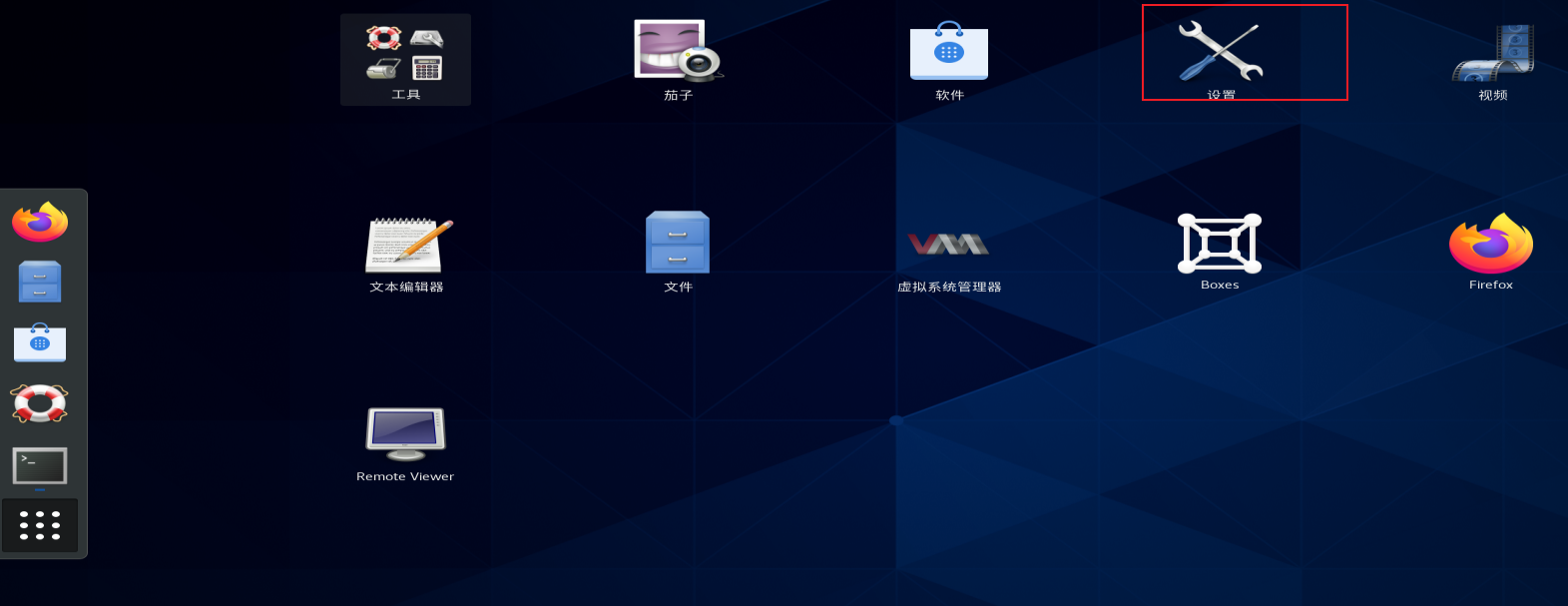
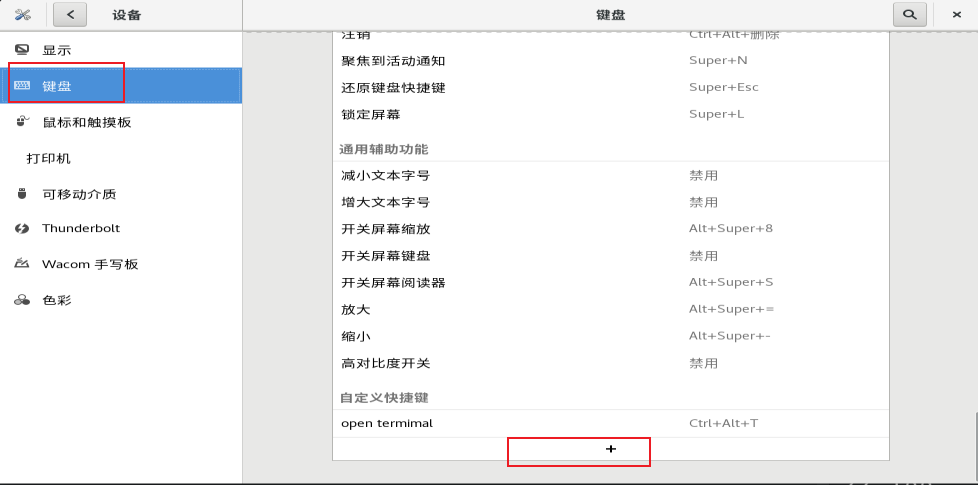
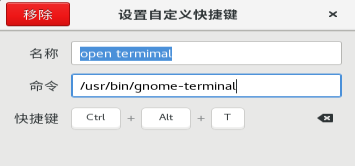
11、设置打开终端快捷键
点设置添加快捷键
12、搭建VNC服务端
1、安装包
[root@localhost /]# yum install tigervnc-server tigervnc-server-module -y- 1
2、设置VNC连接密码
[root@localhost /]# vncpasswd- 1

3、关闭防火墙[root@localhost /]# systemctl stop firewalld.service [root@localhost /]# systemctl disable firewalld.service- 1
- 2
4、开启VNC
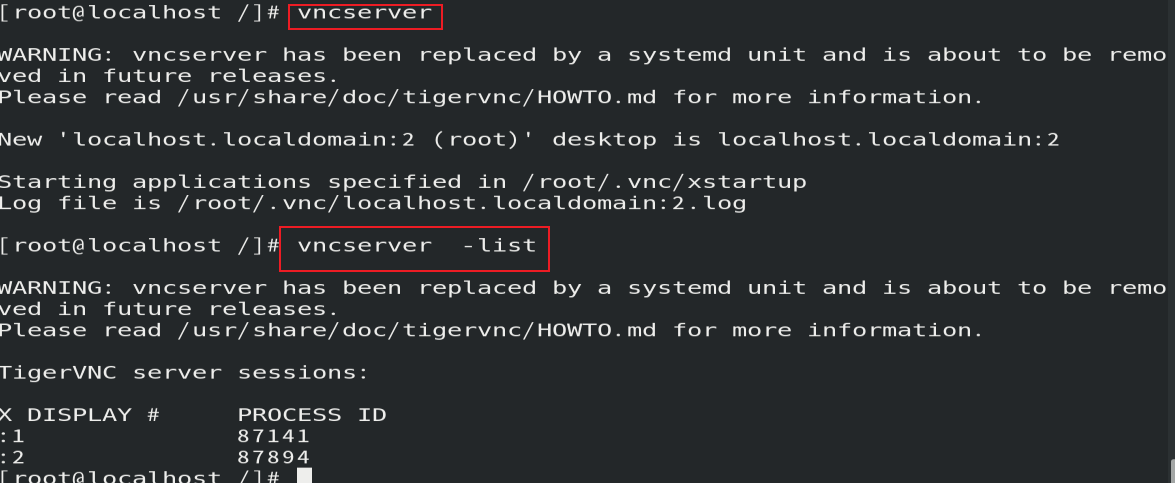
5、查看开启的VNC端口号
[root@localhost /]# ss -ntl- 1

6、连接VNC
下载VNC客户端输入IP:PORT方式进行连接

7、关闭VNC
[root@localhost /]# vncserver -kill :1 [root@localhost /]# vncserver -kill :2- 1
- 2
13、搭建samba服务端
1、安装samba包 [root@localhost ~]# yum install samba -y- 1
- 2
2、创建用户
[root@localhost ~]# useradd test [root@localhost ~]# passwd test [root@localhost ~]# smbpasswd -a test- 1
- 2
- 3
3、关闭防火墙
[root@localhost ~]# systemctl stop firewalld [root@localhost ~]# systemctl disable firewalld [root@localhost ~]# setenforce 0 //临时关闭 //永久关闭:输入命令vim /etc/selinux/config,将SELINUX=enforcing改为SELINUX=disable- 1
- 2
- 3
- 4
4、创建配置文件
[root@localhost ~]# mkdir /mnt/shared [root@localhost ~]# vim /etc/samba/smb.conf- 1
- 2
[shared] comment = Shared Folder path = /mnt/shared browseable = yes writable = yes guest ok = no valid users = test,root- 1
- 2
- 3
- 4
- 5
- 6
- 7
5、重启samba服务
[root@localhost ~]# systemctl restart smb- 1
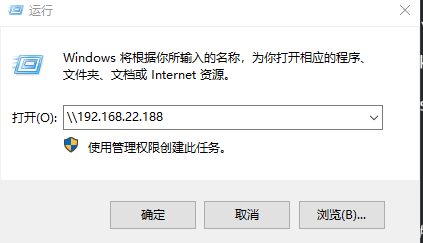
6、windows下连接
根据主机ip连接
三、其他相关链接
Ubuntu系统设置常见问题处理详细总结
-
相关阅读:
问题 D: Wall Clocks
rust &String 和 &str 区别
uniapp小程序点击按钮直接退出小程序效果demo(整理)
js实现图片懒加载
pdf怎么合并在一起?
2024三掌柜赠书活动第十三期:API安全技术与实战
如何使用 React 和 Docusaurus 编写的一些自定义钩子(Hook)
最全解决:微服务之间调用出现Load balancer does not have available server for client
【面经】Thoughtworks 大数据开发面经
Golang实现一个一维结构体,根据某个字段排序
- 原文地址:https://blog.csdn.net/Luckiers/article/details/126490262