-
11、Kubernetes核心技术 - Service
目录
5.2.2、集群外通过NodeIP+nodePort端口访问
一、概述
在k8s中,Pod是应用程序的载体,我们可以通过Pod的IP地址来访问应用程序,但是当Pod宕机后重建后,其IP地址等状态信息可能会变动,也就是说Pod的IP地址不是固定的,这也就意味着不方便直接采用Pod的IP地址对服务进行访问。
为了解决这个问题,k8s提供了Service资源,Service会对提供同一个服务的多个Pod进行聚合,并且提供一个统一的入口地址,通过访问Service的入口地址就能访问到后面的Pod服务 ,并且将请求负载分发到后端的各个容器应用上 。
Service引入主要是解决Pod的动态变化,提供统一的访问入口:
- 1、防止Pod失联,准备找到提供同一服务的Pod(服务发现)
- 2、定义一组Pod的访问策略(负载均衡)
Service通常是通过Label Selector访问一组Pod,如下图:

其实 Service 只是一个概念,真正起到转发数据的是 kube-proxy 服务进程,kube-proxy 是集群中每个节点上运行的网络代理,每个节点之上都运行一个 kube-proxy 服务进程。当创建 Service 的时候,首先API Server向 etcd 写入 Service 的信息,然后kube-proxy会监听API Server,监听到etcd中 Service 的信息,然后根据Service的信息生成对应的访问规则。

二、Endpoint
Endpoint是kubernetes中的一个资源对象,存储在etcd中,用来记录一个Service对应的所有Pod的访问地址,它是根据Service配置文件中的label selector(标签选择器)生成的。
一个Service由一组Pod组成,这些Pod通过Endpoints暴露出来,Endpoints是实现实际服务的端点集合。换言之,Service和Pod之间的联系是通过Endpoints实现的。
当我们创建Service的时候,如果Service有指定Label Selector(标签选择器)的话,Endpoints控制器会自动创建一个名称跟Service名称一致的Endpoint对象。可简单理解为,Endpoint是一个中间对象,用来存放Service与Pod的映射关系,在Endpoint中,可以看到,当前能正常提供服务的Pod以及不能正常提供的Pod。
例如:
- $ kubectl get pod -o wide --show-labels
- NAME READY STATUS RESTARTS AGE IP NODE NOMINATED NODE READINESS GATES LABELS
- nginx-7f456874f4-c7224 1/1 Running 0 20m 192.168.1.3 node01
app=nginx,pod-template-hash=7f456874f4 - nginx-7f456874f4-v8pnz 1/1 Running 0 20m 192.168.0.6 controlplane
app=nginx,pod-template-hash=7f456874f4 - $ kubectl get svc -o wide
- NAME TYPE CLUSTER-IP EXTERNAL-IP PORT(S) AGE SELECTOR
- kubernetes ClusterIP 10.96.0.1
443/TCP 14d - nginx ClusterIP 10.109.113.53
80/TCP 12m app=nginx - $ kubectl get ep
- NAME ENDPOINTS AGE
- kubernetes 172.30.1.2:6443 14d
- nginx 192.168.0.6:80,192.168.1.3:80 12m
- # 查看endpoint资源清单
- $ kubectl get ep nginx -o yaml
- apiVersion: v1
- kind: Endpoints
- metadata:
- annotations:
- endpoints.kubernetes.io/last-change-trigger-time: "2023-01-06T06:33:26Z"
- creationTimestamp: "2023-01-06T06:33:27Z"
- name: nginx # Endpoint名称,跟service的名称一样
- namespace: default
- resourceVersion: "2212"
- uid: 5c1d6639-c27a-4ab5-8832-64c9d618a209
- subsets:
- - addresses: # Ready addresses表示能正常提供服务的Pod, 还有一个NotReadyAddress表示不能提供正常服务的Pod
- - ip: 192.168.0.6 # Pod的IP地址
- nodeName: controlplane # Pod被调度到的节点
- targetRef:
- kind: Pod
- name: nginx-7f456874f4-v8pnz
- namespace: default
- uid: b248209d-a854-48e8-8162-1abd4e1b498f
- - ip: 192.168.1.3 # Pod的IP地址
- nodeName: node01 # Pod被调度到的节点
- targetRef:
- kind: Pod
- name: nginx-7f456874f4-c7224
- namespace: default
- uid: f45e4aa2-ddfd-48cd-a7d1-5bfb28d0f31f
- ports:
- - port: 80
- protocol: TCP
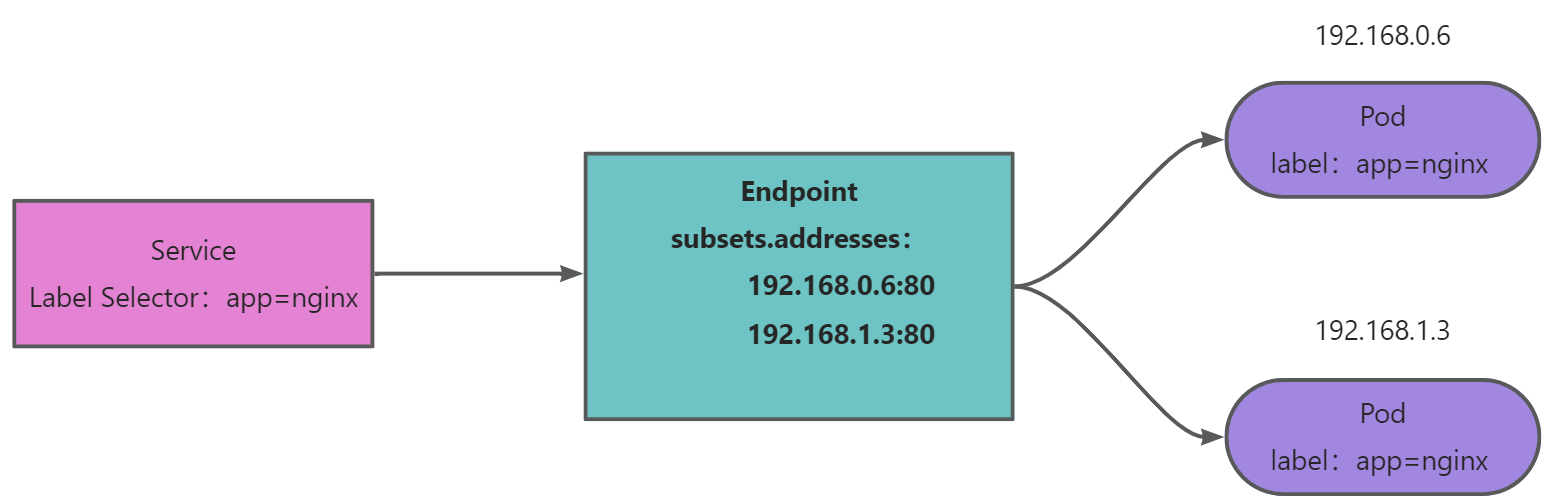
Service与Endpoints、Pod的关系大体如下:
三、Service资源清单
yaml 格式的 Service 定义文件 :kubectl get svc nginx -o yaml
- apiVersion: v1 # 版本号
- kind: Service # 资源类型,固定值Service
- metadata: # 元数据
- creationTimestamp: "2022-12-29T08:46:28Z"
- labels: # 自定义标签属性列表
- app: nginx # 标签:app=nginx
- name: nginx # Service名称
- namespace: default # Service所在的命名空间,默认值为default
- resourceVersion: "2527"
- uid: 1770ab42-bd33-4455-a190-5753e8eac460
- spec:
- clusterIP: 10.102.82.102 # 虚拟服务的IP地址,当spec.type=ClusterIP时,如果不指定,则系统进行自动分配,也可以手工指定。当spec.type=LoadBalancer时,则需要指定
- clusterIPs:
- - 10.102.82.102
- externalTrafficPolicy: Cluster
- internalTrafficPolicy: Cluster
- ipFamilies:
- - IPv4
- ipFamilyPolicy: SingleStack
- ports: # Service需要暴露的端口列表
- - nodePort: 30314 # 当spec.type=NodePort时,指定映射到物理机的端口号
- port: 80 # 服务监听的端口号
- protocol: TCP # 端口协议,支持TCP和UDP,默认值为TCP
- targetPort: 80 # 需要转发到后端Pod的端口号
- selector: # label selector配置,将选择具有指定label标签的pod作为管理范围
- app: nginx # 选择具有app=nginx的pod进行管理
- sessionAffinity: None # session亲和性,可选值为ClientIP,表示将同一个源IP地址的客户端访问请求都转发到同一个后端Pod。默认值为空【None】
- type: NodePort # Service的类型,指定service的访问方式,默认值为ClusterIP。取值范围:[ClusterIP、NodePort、LoadBalancer]
- status:
- loadBalancer: {} # 当spec.type=LoadBalancer时,设置外部负载均衡器的地址,用于公有云环境
四、Service 类型
Service在k8s中有以下三种常用类型:
4.1、ClusterIP
只能在集群内部访问,默认类型,自动分配一个仅Cluster内部可以访问的虚拟IP(即VIP)。
4.2、NodePort
在每个主机节点上启用一个端口来暴露服务,可以在集群外部访问,也会分配一个稳定内部集群IP地址。
访问地址:<任意Node节点的IP地址>: NodePort端口
默认NodePort端口范围:30000-32767
4.3、LoadBalancer
与NodePort类似,在每个节点上启用一个端口来暴露服务。除此之外,Kubernetes会请求底层云平台(例如阿里云、腾讯云、AWS等)上的负载均衡器,将每个Node ([NodeIP]:[NodePort])作为后端添加进去,此模式需要外部云环境的支持,适用于公有云。
4.4、ExternalName
ExternalName Service用于引入集群外部的服务,它通过externalName属性指定一个服务的地址,然后在集群内部访问此Service就可以访问到外部的服务了。
五、Service使用
5.1、ClusterIP
5.1.1、定义Pod资源清单
vim clusterip-pod.yaml
- apiVersion: apps/v1
- kind: Deployment
- metadata:
- name: nginx
- spec:
- replicas: 2
- selector:
- matchLabels:
- app: nginx
- template:
- metadata:
- labels:
- app: nginx
- spec:
- containers:
- - name: nginx
- image: nginx
- ports:
- - containerPort: 80
- protocol: TCP
5.1.2、创建Pod
- $ kubectl apply -f clusterip-pod.yaml
- deployment.apps/nginx created
- $ kubectl get pod -o wide
- NAME READY STATUS RESTARTS AGE IP NODE NOMINATED NODE READINESS GATES
- nginx-7f456874f4-c7224 1/1 Running 0 13s 192.168.1.3 node01
- nginx-7f456874f4-v8pnz 1/1 Running 0 13s 192.168.0.6 controlplane
- # 任意节点发起请求
- $ curl 192.168.1.3
Welcome to nginx! Welcome to nginx!
If you see this page, the nginx web server is successfully installed and
- working. Further configuration is required.
For online documentation and support please refer to
- Commercial support is available at
Thank you for using nginx.
- # 任意节点发起请求
- $ curl 192.168.0.6
Welcome to nginx! Welcome to nginx!
If you see this page, the nginx web server is successfully installed and
- working. Further configuration is required.
For online documentation and support please refer to
- Commercial support is available at
Thank you for using nginx.
由于pod节点都是nginx默认界面都是一样的,为了方便测试,我们进入Pod修改默认界面:
- $ kubectl get pod -o wide
- NAME READY STATUS RESTARTS AGE IP NODE NOMINATED NODE READINESS GATES
- nginx-7f456874f4-c7224 1/1 Running 0 2m39s 192.168.1.3 node01
- nginx-7f456874f4-v8pnz 1/1 Running 0 2m39s 192.168.0.6 controlplane
- $ kubectl exec -it nginx-7f456874f4-c7224 /bin/sh
- kubectl exec [POD] [COMMAND] is DEPRECATED and will be removed in a future version. Use kubectl exec [POD] -- [COMMAND] instead.
- # echo "hello, this request is from 192.168.1.3" > /usr/share/nginx/html/index.html
- #
- # cat /usr/share/nginx/html/index.html
- hello, this request is from 192.168.1.3
- # exit
- $ kubectl exec -it nginx-7f456874f4-v8pnz /bin/sh
- kubectl exec [POD] [COMMAND] is DEPRECATED and will be removed in a future version. Use kubectl exec [POD] -- [COMMAND] instead.
- # echo "hello, this request is from 192.168.0.6" > /usr/share/nginx/html/index.html
- # cat /usr/share/nginx/html/index.html
- hello, this request is from 192.168.0.6
- # exit
- # 发起请求
- $ curl 192.168.1.3
- hello, this request is from 192.168.1.3
- $ curl 192.168.0.6
- hello, this request is from 192.168.0.6
5.1.3、定义Service资源清单
vim clusterip-svc.yaml
- apiVersion: v1
- kind: Service
- metadata:
- name: nginx
- spec:
- selector:
- app: nginx
- type: ClusterIP
- # clusterIP: 10.109.113.53 # service IP地址 如果不写默认会生成一个
- ports:
- - port: 80 # service端口
- targetPort: 80 # 目标pod端口
5.1.4、创建Service
- $ kubectl apply -f clusterip-svc.yaml
- service/nginx created
- $ kubectl get svc -o wide
- NAME TYPE CLUSTER-IP EXTERNAL-IP PORT(S) AGE SELECTOR
- kubernetes ClusterIP 10.96.0.1
443/TCP 14d - nginx ClusterIP 10.109.113.53
80/TCP 15s app=nginx - $ kubectl get pod -o wide
- NAME READY STATUS RESTARTS AGE IP NODE NOMINATED NODE READINESS GATES
- nginx-7f456874f4-c7224 1/1 Running 0 11m 192.168.1.3 node01
- nginx-7f456874f4-v8pnz 1/1 Running 0 11m 192.168.0.6 controlplane
- # 查看svc的详细描述信息,注意Endpoints表示的就是后端真实的Pod服务节点
- $ kubectl describe svc nginx
- Name: nginx
- Namespace: default
- Labels:
- Annotations:
- Selector: app=nginx
- Type: ClusterIP
- IP Family Policy: SingleStack
- IP Families: IPv4
- IP: 10.109.113.53
- IPs: 10.109.113.53
- Port:
80/TCP - TargetPort: 80/TCP
- Endpoints: 192.168.0.6:80,192.168.1.3:80 # 后端真实的Pod服务节点【Pod的IP地址+虚端口】
- Session Affinity: None
- Events:
如上,我们可以看到,分配的ClusterIP为10.109.113.53,我们可以通过ClusterIP访问:
- $ curl 10.109.113.53:80
- hello, this request is from 192.168.0.6
- $ curl 10.109.113.53:80
- hello, this request is from 192.168.1.3
可以看到,发起两次请求,请求会被负载均衡到两个不同的Pod,这就是Service提供的负载均衡功能。
5.2、NodePort
- $ kubectl create deployment nginx --image=nginx
- # 暴露端口,让集群外部可以访问,Service类型为NodePort
- $ kubectl expose deployment nginx --port=80 --type=NodePort
- service/nginx exposed
- $ kubectl get pod -o wide
- NAME READY STATUS RESTARTS AGE IP NODE NOMINATED NODE READINESS GATES
- nginx-748c667d99-5mf49 1/1 Running 0 6m13s 192.168.1.6 node01
- $ kubectl get svc -o wide
- NAME TYPE CLUSTER-IP EXTERNAL-IP PORT(S) AGE SELECTOR
- kubernetes ClusterIP 10.96.0.1
443/TCP 14d - nginx NodePort 10.98.224.65
80:31853/TCP 6m13s app=nginx
可以看到,nginx这个service分配了一个ClusterIP为10.98.224.65,该Service的虚端口为80,K8S随机分配一个nodePort端口为31853,此时要访问nginx这个服务的话,有两种方式:
5.2.1、集群内通过ClusterIP+虚端口访问
- # ClusterIP: 10.98.224.65 虚端口: 80
- $ curl 10.98.224.65:80
Welcome to nginx! Welcome to nginx!
If you see this page, the nginx web server is successfully installed and
- working. Further configuration is required.
For online documentation and support please refer to
- Commercial support is available at
Thank you for using nginx.
5.2.2、集群外通过NodeIP+nodePort端口访问
- # Node IP地址: 192.168.1.33 nodePort端口: 31853
- $ curl 192.168.1.33:31853
Welcome to nginx! Welcome to nginx!
If you see this page, the nginx web server is successfully installed and
- working. Further configuration is required.
For online documentation and support please refer to
- Commercial support is available at
Thank you for using nginx.
5.2.3、集群内通过Pod IP + 虚端口访问
- $ kubectl get pod -o wide
- NAME READY STATUS RESTARTS AGE IP NODE NOMINATED NODE READINESS GATES
- nginx-748c667d99-5mf49 1/1 Running 0 11m 192.168.1.6 node01
- $ kubectl get svc -o wide
- NAME TYPE CLUSTER-IP EXTERNAL-IP PORT(S) AGE SELECTOR
- kubernetes ClusterIP 10.96.0.1
443/TCP 14d - nginx NodePort 10.98.224.65
80:31853/TCP 11m app=nginx - $ kubectl get ep
- NAME ENDPOINTS AGE
- kubernetes 172.30.1.2:6443 14d
- nginx 192.168.1.6:80 11m
- # Pod IP地址: 192.168.1.6 虚端口: 80
- $ curl 192.168.1.6:80
Welcome to nginx! Welcome to nginx!
If you see this page, the nginx web server is successfully installed and
- working. Further configuration is required.
For online documentation and support please refer to
- Commercial support is available at
Thank you for using nginx.
5.3、ExternalName
创建ExternalName Service:
vim externalname-service.yaml:
- apiVersion: v1
- kind: Service
- metadata:
- name: externalname-service
- spec:
- type: ExternalName # Service类型为ExternalName
- externalName: www.baidu.com
- $ kubectl apply -f externalname-service.yaml
- service/externalname-service created
- $ kubectl get svc -o wide
- NAME TYPE CLUSTER-IP EXTERNAL-IP PORT(S) AGE SELECTOR
- externalname-service ExternalName
www.baidu.com 7s - kubernetes ClusterIP 10.96.0.1
443/TCP 17d - $ kubectl describe svc externalname-service
- Name: externalname-service
- Namespace: default
- Labels:
- Annotations:
- Selector:
- Type: ExternalName
- IP Families:
- IP:
- IPs:
- External Name: www.baidu.com
- Session Affinity: None
- Events:
- # 查看DNS域名解析
- controlplane $ dig @10.96.0.10 externalname-service.default.svc.cluster.local
- ; <<>> DiG 9.16.1-Ubuntu <<>> @10.96.0.10 externalname-service.default.svc.cluster.local
- ; (1 server found)
- ;; global options: +cmd
- ;; Got answer:
- ;; WARNING: .local is reserved for Multicast DNS
- ;; You are currently testing what happens when an mDNS query is leaked to DNS
- ;; ->>HEADER<<- opcode: QUERY, status: NOERROR, id: 31598
- ;; flags: qr aa rd; QUERY: 1, ANSWER: 4, AUTHORITY: 0, ADDITIONAL: 1
- ;; WARNING: recursion requested but not available
- ;; OPT PSEUDOSECTION:
- ; EDNS: version: 0, flags:; udp: 4096
- ; COOKIE: 085781a8a4291b6d (echoed)
- ;; QUESTION SECTION:
- ;externalname-service.default.svc.cluster.local. IN A
- ;; ANSWER SECTION:
- externalname-service.default.svc.cluster.local. 7 IN CNAME www.baidu.com.
- www.baidu.com. 7 IN CNAME www.a.shifen.com.
- www.a.shifen.com. 7 IN CNAME www.wshifen.com.
- www.wshifen.com. 7 IN A 103.235.46.40
- ;; Query time: 4 msec
- ;; SERVER: 10.96.0.10#53(10.96.0.10)
- ;; WHEN: Mon Jan 09 09:43:29 UTC 2023
- ;; MSG SIZE rcvd: 279

六、Service代理模式
6.1、userspace 代理模式
在该模式下 kube-proxy 会为每一个 Service 创建一个监听端口,发送给 Cluseter IP 请求会被 iptable 重定向给 kube-proxy 监听的端口上,其中 kube-proxy 会根据 LB 算法将请求转发到相应的pod之上。
该模式下,kube-proxy充当了一个四层负载均衡器的角色。由于kube-proxy运行在userspace中,在进行转发处理的时候会增加内核和用户空间之间的数据拷贝,虽然比较稳定,但是效率非常低下。

6.2、iptables 代理模式
iptables模式下 kube-proxy 为每一个pod创建相对应的 iptables 规则,发送给 ClusterIP 的请求会被直接发送给后端pod之上。
在该模式下 kube-proxy 不承担负载均衡器的角色,其只会负责创建相应的转发策略,该模式的优点在于较userspace模式效率更高,但是不能提供灵活的LB策略,当后端Pod不可用的时候无法进行重试。
6.3、IPVS 代理模式
IPVS模式与iptable模式类型,kube-proxy 会根据pod的变化创建相应的 IPVS转发规则,与iptalbes模式相比,IPVS模式工作在内核态,在同步代理规则时具有更好的性能,同时提高网络吞吐量为大型集群提供了更好的可扩展性,同时提供了大量的负责均衡算法。
注意:当 kube-proxy 以 IPVS 代理模式启动时,它将验证 IPVS 内核模块是否可用。 如果未检测到 IPVS 内核模块,则 kube-proxy 将退回到以 iptables 代理模式运行。

下面演示如何修改代理模式为IPVS代理模式。
6.3.1、加载ipvs相关内核模块
- modprobe ip_vs
- modprobe ip_vs_rr
- modprobe ip_vs_wrr
- modprobe ip_vs_sh
6.3.2、编辑配置文件
实际上是修改kube-proxy对应的ConfingMap:
- $ kubectl get cm -n kube-system | grep kube-proxy
- NAME DATA AGE
- kube-proxy 2 14d
- $ kubectl edit cm kube-proxy -n kube-system
- configmap/kube-proxy edited
修改mode的值,将其修改为ipvs,如下图:

6.3.3、删除原有的kube-proxy代理
- $ kubectl get pod -A | grep kube-proxy
- NAMESPACE NAME READY STATUS RESTARTS AGE
- kube-system kube-proxy-xnz4r 1/1 Running 0 14d
- kube-system kube-proxy-zbxrb 1/1 Running 0 14d
- $ kubectl delete pod kube-proxy-xnz4r -n kube-system
- pod "kube-proxy-xnz4r" deleted
- $ kubectl delete pod kube-proxy-zbxrb -n kube-system
- pod "kube-proxy-zbxrb" deleted
删除完成后,k8s会自动重启kube-proxy的Pod:
- $ kubectl get pod -A | grep kube-proxy
- kube-system kube-proxy-hvnmt 1/1 Running 0 6m35s
- kube-system kube-proxy-zp6z5 1/1 Running 0 6m20s
6.3.4、查看IPVS
- $ ipvsadm -Ln
- IP Virtual Server version 1.2.1 (size=4096)
- Prot LocalAddress:Port Scheduler Flags
- -> RemoteAddress:Port Forward Weight ActiveConn InActConn
- TCP 10.96.0.1:443 rr
- -> 172.30.1.2:6443 Masq 1 1 0
- TCP 10.96.0.10:53 rr
- -> 192.168.0.5:53 Masq 1 0 0
- -> 192.168.1.2:53 Masq 1 0 0
- TCP 10.96.0.10:9153 rr
- -> 192.168.0.5:9153 Masq 1 0 0
- -> 192.168.1.2:9153 Masq 1 0 0
- TCP 10.99.58.167:80 rr
- -> 192.168.0.6:80 Masq 1 0 0
- -> 192.168.1.3:80 Masq 1 0 0
- UDP 10.96.0.10:53 rr
- -> 192.168.0.5:53 Masq 1 0 0
- -> 192.168.1.2:53 Masq 1 0 0

如上图,产生了一批转发规则。
七、HeadLiness services
在某些场景中,开发人员可能不想使用Service提供的负载均衡功能,而希望自己来控制负载均衡策略,针对这种情况,kubernetes提供了HeadLiness Service,这类Service不会分配Cluster IP,如果想要访问Service,只能通过Service的域名进行查询。
7.1、创建Pod
vim headliness-pod.yaml
- apiVersion: apps/v1
- kind: Deployment
- metadata:
- name: nginx
- spec:
- replicas: 2
- selector:
- matchLabels:
- app: nginx
- template:
- metadata:
- labels:
- app: nginx
- spec:
- containers:
- - name: nginx
- image: nginx
- ports:
- - containerPort: 80
- protocol: TCP
- $ vim headliness-pod.yaml
- $ kubectl apply -f headliness-pod.yaml
- deployment.apps/nginx created
- $ kubectl get pod -o wide
- NAME READY STATUS RESTARTS AGE IP NODE NOMINATED NODE READINESS GATES
- nginx-7f456874f4-225j6 1/1 Running 0 16s 192.168.1.3 node01
- nginx-7f456874f4-r7csn 1/1 Running 0 16s 192.168.0.6 controlplane
7.2、创建Service
vim headliness-service.yaml
- apiVersion: v1
- kind: Service
- metadata:
- name: headliness-service
- spec:
- selector:
- app: nginx
- clusterIP: None # 将clusterIP设置为None,即可创建headliness Service
- type: ClusterIP
- ports:
- - port: 80 # Service的端口
- targetPort: 80 # Pod的端口
- $ vim headliness-service.yaml
- $ kubectl get pod -o wide --show-labels
- NAME READY STATUS RESTARTS AGE IP NODE NOMINATED NODE READINESS GATES LABELS
- nginx-7f456874f4-225j6 1/1 Running 0 103s 192.168.1.3 node01
app=nginx,pod-template-hash=7f456874f4 - nginx-7f456874f4-r7csn 1/1 Running 0 103s 192.168.0.6 controlplane
app=nginx,pod-template-hash=7f456874f4 - controlplane $ kubectl apply -f headliness-service.yaml
- service/headliness-service created
- controlplane $ kubectl get svc -o wide --show-labels
- NAME TYPE CLUSTER-IP EXTERNAL-IP PORT(S) AGE SELECTOR LABELS
- headliness-service ClusterIP None
80/TCP 10s app=nginx - kubernetes ClusterIP 10.96.0.1
443/TCP 17d component=apiserver,provider=kubernetes - # 查看详情
- $ kubectl describe service headliness-service
- Name: headliness-service
- Namespace: default
- Labels:
- Annotations:
- Selector: app=nginx
- Type: ClusterIP
- IP Family Policy: SingleStack
- IP Families: IPv4
- IP: None
- IPs: None
- Port:
80/TCP - TargetPort: 80/TCP
- Endpoints: 192.168.0.6:80,192.168.1.3:80 # 能提供服务的Pod
- Session Affinity: None
- Events:
7.3、进入容器,查看服务域名
- # 查看Pod
- $ kubectl get pod -o wide
- NAME READY STATUS RESTARTS AGE IP NODE NOMINATED NODE READINESS GATES
- nginx-7f456874f4-225j6 1/1 Running 0 4m37s 192.168.1.3 node01
- nginx-7f456874f4-r7csn 1/1 Running 0 4m37s 192.168.0.6 controlplane
- # 进入Pod
- $ kubectl exec nginx-7f456874f4-r7csn -it -- bin/bash
- # 查看域名
- root@nginx-7f456874f4-r7csn:/# cat /etc/resolv.conf
- search default.svc.cluster.local svc.cluster.local cluster.local
- nameserver 10.96.0.10
- options ndots:5
- # 通过Service的域名进行查询:默认访问规则service名称.名称空间.svc.cluster.local
- # 在Pod内通过curl可以访问
- root@nginx-7f456874f4-r7csn:/# curl headliness-service.default.svc.cluster.local
Welcome to nginx! Welcome to nginx!
If you see this page, the nginx web server is successfully installed and
- working. Further configuration is required.
For online documentation and support please refer to
- Commercial support is available at
Thank you for using nginx.
- root@nginx-7f456874f4-r7csn:/# exit
- exit
- # 查看DNS
- $ apt install bind9-utils
- $ dig @10.96.0.10 headliness-service.default.svc.cluster.local
- ; <<>> DiG 9.16.1-Ubuntu <<>> @10.96.0.10 headliness-service.default.svc.cluster.local
- ; (1 server found)
- ;; global options: +cmd
- ;; Got answer:
- ;; WARNING: .local is reserved for Multicast DNS
- ;; You are currently testing what happens when an mDNS query is leaked to DNS
- ;; ->>HEADER<<- opcode: QUERY, status: NOERROR, id: 59994
- ;; flags: qr aa rd; QUERY: 1, ANSWER: 2, AUTHORITY: 0, ADDITIONAL: 1
- ;; WARNING: recursion requested but not available
- ;; OPT PSEUDOSECTION:
- ; EDNS: version: 0, flags:; udp: 4096
- ; COOKIE: b633b51a4ca3a653 (echoed)
- ;; QUESTION SECTION:
- ;headliness-service.default.svc.cluster.local. IN A
- ;; ANSWER SECTION:
- headliness-service.default.svc.cluster.local. 30 IN A 192.168.1.3
- headliness-service.default.svc.cluster.local. 30 IN A 192.168.0.6
- ;; Query time: 0 msec
- ;; SERVER: 10.96.0.10#53(10.96.0.10)
- ;; WHEN: Mon Jan 09 09:

-
相关阅读:
【C++私房菜】面向对象中的多重继承以及菱形继承
循环队列的实现
React Redux
helm tekonci 技术总结待续
SENet架构-通道注意力机制
七月集训(第26天) —— 并查集
毕设 电影网论文
一些编程的基础
C语言-联合体操作
固定文章生成易语言代码
- 原文地址:https://blog.csdn.net/Weixiaohuai/article/details/133036880
