-
91 # 实现 express 的优化处理
上一节实现 express 的请求处理,这一节来进行实现 express 的优化处理
- 让 layer 提供 match 方法去匹配 pathname,方便拓展
- 让 layer 提供 handle_request 方法,方便拓展
- 利用第三方库
methods批量生成方法 - 性能优化问题
- 进行路由懒加载,当进行
get/post...请求时,或者 listen 时,才加载 route - layer 进行加速匹配,在 layer 层判断是否请求方法在 route 里有
- 进行路由懒加载,当进行
methods 库地址:https://www.npmjs.com/package/methods
[ 'acl', 'bind', 'checkout', 'connect', 'copy', 'delete', 'get', 'head', 'link', 'lock', 'm-search', 'merge', 'mkactivity', 'mkcalendar', 'mkcol', 'move', 'notify', 'options', 'patch', 'post', 'pri', 'propfind', 'proppatch', 'purge', 'put', 'rebind', 'report', 'search', 'source', 'subscribe', 'trace', 'unbind', 'unlink', 'unlock', 'unsubscribe' ]- 1
- 2
- 3
- 4
- 5
- 6
- 7
- 8
- 9
- 10
- 11
- 12
- 13
- 14
批量生成方法测试 demo 如下
const express = require("./kaimo-express"); const app = express(); app.get("/", (req, res, next) => { res.end("get okk end"); }); app.post("/", (req, res, next) => { res.end("post okk end"); }); app.listen(3000, () => { console.log(`server start 3000`); console.log(`在线访问地址:http://localhost:3000/`); });- 1
- 2
- 3
- 4
- 5
- 6
- 7
- 8
- 9
- 10
- 11
- 12
- 13
- 14
控制台执行下面命令:
curl -v -X POST http://localhost:3000/- 1

layer 进行加速匹配 demo
const express = require("./kaimo-express"); const app = express(); app.post("/", (req, res, next) => { res.end("post okk end"); }); app.put("/", (req, res, next) => { res.end("put okk end"); }); app.delete("/", (req, res, next) => { res.end("delete okk end"); }); app.options("/", (req, res, next) => { res.end("delete okk end"); }); app.listen(3000, () => { console.log(`server start 3000`); console.log(`在线访问地址:http://localhost:3000/`); });- 1
- 2
- 3
- 4
- 5
- 6
- 7
- 8
- 9
- 10
- 11
- 12
- 13
- 14
- 15
- 16
- 17
- 18
- 19
- 20
- 21
然后去访问:
http://localhost:3000/,可以看到没有优化的时候会请求这些方法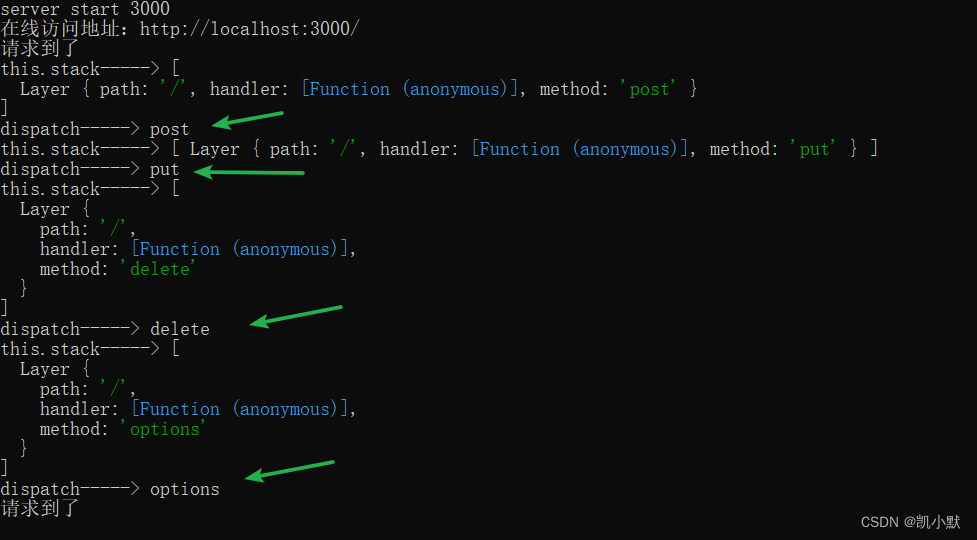
优化之后可以看到就没有请求了
优化的代码如下:
application.jsconst http = require("http"); const Router = require("./router"); const methods = require("methods"); console.log("methods----->", methods); function Application() {} // 调用此方法才开始创建,不是创建应用时直接装载路由 Application.prototype.lazy_route = function () { if (!this._router) { this._router = new Router(); } }; methods.forEach((method) => { Application.prototype[method] = function (path, ...handlers) { this.lazy_route(); this._router[method](path, handlers); }; }); Application.prototype.listen = function () { const server = http.createServer((req, res) => { function done() { res.end(`kaimo-express Cannot ${req.method} ${req.url}`); } this.lazy_route(); this._router.handle(req, res, done); }); server.listen(...arguments); }; module.exports = Application;- 1
- 2
- 3
- 4
- 5
- 6
- 7
- 8
- 9
- 10
- 11
- 12
- 13
- 14
- 15
- 16
- 17
- 18
- 19
- 20
- 21
- 22
- 23
- 24
- 25
- 26
- 27
- 28
- 29
- 30
- 31
- 32
- 33
router/index.jsconst url = require("url"); const Route = require("./route"); const Layer = require("./layer"); const methods = require("methods"); function Router() { // 维护所有的路由 this.stack = []; } Router.prototype.route = function (path) { // 产生 route let route = new Route(); // 产生 layer 让 layer 跟 route 进行关联 let layer = new Layer(path, route.dispatch.bind(route)); // 每个路由都具备一个 route 属性,稍后路径匹配到后会调用 route 中的每一层 layer.route = route; // 把 layer 放到路由的栈中 this.stack.push(layer); return route; }; methods.forEach((method) => { Router.prototype[method] = function (path, handlers) { // 1.用户调用 method 时,需要保存成一个 layer 当道栈中 // 2.产生一个 Route 实例和当前的 layer 创造关系 // 3.要将 route 的 dispatch 方法存到 layer 上 let route = this.route(path); // 让 route 记录用户传入的 handler 并且标记这个 handler 是什么方法 route[method](handlers); }; }); Router.prototype.handle = function (req, res, out) { console.log("请求到了"); // 需要取出路由系统中 Router 存放的 layer 依次执行 const { pathname } = url.parse(req.url); let idx = 0; let next = () => { // 遍历完后没有找到就直接走出路由系统 if (idx >= this.stack.length) return out(); let layer = this.stack[idx++]; // 需要判断 layer 上的 path 和当前请求路由是否一致,一致就执行 dispatch 方法 if (layer.match(pathname)) { // 将遍历路由系统中下一层的方法传入 // 加速匹配,如果用户注册过这个类型的方法在去执行 if (layer.route.methods[req.method.toLowerCase()]) { layer.handle_request(req, res, next); } else { next(); } } else { next(); } }; next(); }; module.exports = Router;- 1
- 2
- 3
- 4
- 5
- 6
- 7
- 8
- 9
- 10
- 11
- 12
- 13
- 14
- 15
- 16
- 17
- 18
- 19
- 20
- 21
- 22
- 23
- 24
- 25
- 26
- 27
- 28
- 29
- 30
- 31
- 32
- 33
- 34
- 35
- 36
- 37
- 38
- 39
- 40
- 41
- 42
- 43
- 44
- 45
- 46
- 47
- 48
- 49
- 50
- 51
- 52
- 53
- 54
- 55
- 56
- 57
- 58
- 59
route.jsconst Layer = require("./layer"); const methods = require("methods"); function Route() { this.stack = []; // 用来描述内部存过哪些方法 this.methods = {}; } Route.prototype.dispatch = function (req, res, out) { // 稍后调用此方法时,回去栈中拿出对应的 handler 依次执行 let idx = 0; console.log("this.stack----->", this.stack); let next = () => { // 遍历完后没有找到就直接走出路由系统 if (idx >= this.stack.length) return out(); let layer = this.stack[idx++]; console.log("dispatch----->", layer.method); if (layer.method === req.method.toLowerCase()) { layer.handle_request(req, res, next); } else { next(); } }; next(); }; methods.forEach((method) => { Route.prototype[method] = function (handlers) { console.log("handlers----->", handlers); handlers.forEach((handler) => { // 这里的路径没有意义 let layer = new Layer("/", handler); layer.method = method; // 做个映射表 this.methods[method] = true; this.stack.push(layer); }); }; }); module.exports = Route;- 1
- 2
- 3
- 4
- 5
- 6
- 7
- 8
- 9
- 10
- 11
- 12
- 13
- 14
- 15
- 16
- 17
- 18
- 19
- 20
- 21
- 22
- 23
- 24
- 25
- 26
- 27
- 28
- 29
- 30
- 31
- 32
- 33
- 34
- 35
- 36
- 37
- 38
- 39
- 40
- 41
layer.jsfunction Layer(path, handler) { this.path = path; this.handler = handler; } Layer.prototype.match = function (pathname) { return this.path === pathname; }; Layer.prototype.handle_request = function (req, res, next) { this.handler(req, res, next); }; module.exports = Layer;- 1
- 2
- 3
- 4
- 5
- 6
- 7
- 8
- 9
- 10
- 11
- 12
-
相关阅读:
ubuntu apt-get update 失败 server certificate verification failed
Docker
HTML5期末大作业:基于HTML+CSS+JavaScript茶文化中国水墨风格绿色茶叶销售(5页) 学生网页设计作业源码
RabbitMQ之单机多实例部署
TiDB 集群最小部署的拓扑架构
BSV 上用于通用计算的隐私非交互式赏金
Java语言怎样接入代码demo
[附源码]Python计算机毕业设计宠物寄养管理系统
天选之子C++是如何发展起来的?如何学习C++呢?
emq连接认证,订阅发布权限控制
- 原文地址:https://blog.csdn.net/kaimo313/article/details/133054601
