-
五、点击切换、滚动切换、键盘切换
简介
通过事件改变当前展示的信息组件,交互的事件有点击上下切换、鼠标轮动上下切换、键盘上下键切换。⭐️ 欢迎访问个人的简历网站预览效果
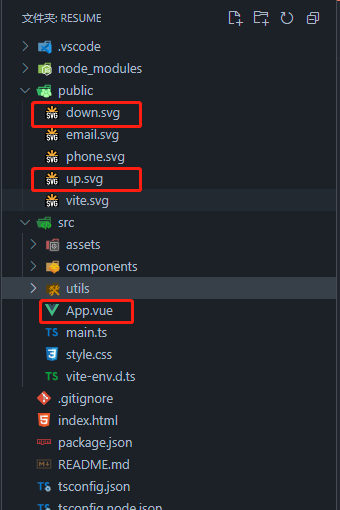
本章涉及修改与新增的文件:
App.vue、public
一、鼠标点击上下箭头切换
<template> <div class="app-background"> <!-- 上一页信息 --> <div class="absolute" @click="prev" style="top: 50px;"> <img src="/up.svg" class="logo" alt="Email" /> // 图片可以在iconfont上获取,选择svg格式 </div> <el-carousel ref="carousel" height="100vh" direction="vertical" :autoplay="false"> <el-carousel-item> <first /> </el-carousel-item> <el-carousel-item> <second /> </el-carousel-item> <el-carousel-item> <third /> </el-carousel-item> <el-carousel-item> <fourth /> </el-carousel-item> <el-carousel-item> <fifth @showProject="showProject" /> </el-carousel-item> </el-carousel> <!-- 下一页信息 --> <div class="absolute" @click="next" style="bottom: 50px;"> <img src="/down.svg" class="logo" alt="Email" /> // 图片可以在iconfont上获取,选择svg格式 </div> <!-- 项目经验详情 --> <el-dialog v-model="showDialog" center> <div class="family"> <div class="text18" style="text-align: center;font-weight: bold;">{{ projectInfo.projectName }}</div> <div class="margin-top" style="text-align: center;"> {{ projectInfo.projectStartTime }} - {{ projectInfo.projectEndTime }} </div> <div class="flex margin-top"> <div style="min-width: 100px;">项目描述:</div> <div>{{ projectInfo.projectDescription }}</div> </div> <div class="flex margin-top"> <div style="min-width: 100px;">项目职责:</div> <div>{{ projectInfo.projectDuty }}</div> </div> <div class="flex margin-top"> <div style="min-width: 100px;">技术栈:</div> <div>{{ projectInfo.projectStack }}</div> </div> <div class="flex margin-top" v-if="projectInfo.projectOnline"> <div style="min-width: 100px;">线上地址:</div> <el-link :href="projectInfo.projectOnline" target="_blank"> {{ projectInfo.projectOnline }} </el-link> </div> </div> </el-dialog> </div> </template> <script setup lang="ts"> import first from './components/First.vue' import second from './components/Second.vue' import third from './components/Third.vue' import fourth from './components/Fourth.vue' import fifth from './components/Fifth.vue' import project from './utils/Project.ts' // 引入数据 import { ref } from 'vue' const showDialog = ref(false) const projectInfo = ref(project['center']) const carousel = ref() // 获取默认项目经验数据 const showProject = (value: any) => { if (project[value]) { projectInfo.value = project[value] showDialog.value = true } } // 上一页 const prev = () => { carousel.value.prev() } // 下一页 const next = () => { carousel.value.next() } </script> <style scoped> .app-background { position: relative; width: 100%; height: 100vh; background-image: url('./assets/bgBig.png'); background-repeat: no-repeat; background-position: center 0; background-size: cover; } .el-carousel__item { min-height: 100vh; background-color: rgba(10, 10, 10, 0.3); } ::v-deep(.el-dialog) { background-color: rgb(250, 235, 215); animation: jackInTheBox; animation-duration: 1.5s; } .absolute { position: absolute; z-index: 10; left: calc(50% - 14px); opacity: .25; transition: all .4s linear 0s; } .absolute:hover { transform: scale(1.18); opacity: .85; } .logo { width: 28px; height: 28px; } </style>- 1
- 2
- 3
- 4
- 5
- 6
- 7
- 8
- 9
- 10
- 11
- 12
- 13
- 14
- 15
- 16
- 17
- 18
- 19
- 20
- 21
- 22
- 23
- 24
- 25
- 26
- 27
- 28
- 29
- 30
- 31
- 32
- 33
- 34
- 35
- 36
- 37
- 38
- 39
- 40
- 41
- 42
- 43
- 44
- 45
- 46
- 47
- 48
- 49
- 50
- 51
- 52
- 53
- 54
- 55
- 56
- 57
- 58
- 59
- 60
- 61
- 62
- 63
- 64
- 65
- 66
- 67
- 68
- 69
- 70
- 71
- 72
- 73
- 74
- 75
- 76
- 77
- 78
- 79
- 80
- 81
- 82
- 83
- 84
- 85
- 86
- 87
- 88
- 89
- 90
- 91
- 92
- 93
- 94
- 95
- 96
- 97
- 98
- 99
- 100
- 101
- 102
- 103
- 104
- 105
- 106
- 107
- 108
- 109
- 110
- 111
- 112
- 113
- 114
- 115
- 116
- 117
- 118
- 119
- 120
- 121
- 122
- 123
- 124
- 125
- 126
- 127
- 128
- 129
二、鼠标滚轮上下滚动切换
<template> // 添加 handleWheel 滚动事件 <div class="app-background" @wheel="handleWheel"> ... </div> </template> <script setup lang="ts"> import first from './components/First.vue' import second from './components/Second.vue' import third from './components/Third.vue' import fourth from './components/Fourth.vue' import fifth from './components/Fifth.vue' import project from './utils/Project.ts' // 引入数据 import { ref } from 'vue' const showDialog = ref(false) const projectInfo = ref(project['center']) const carousel = ref() // 获取默认项目经验数据 const showProject = (value: any) => { if (project[value]) { projectInfo.value = project[value] showDialog.value = true } } // 上一页 const prev = () => { carousel.value.prev() } // 下一页 const next = () => { carousel.value.next() } // 鼠标滚轮 滚动事件 防抖 let timer: any = null const handleWheel = (e: any) => { if (showDialog.value) return let lock: Boolean = !timer; if (lock) { if (e.deltaY > 0) { next() } else if (e.deltaY < 0) { prev() } timer = setTimeout(() => { timer = null; }, 500); // 防抖 } } </script> <style scoped> ... </style>- 1
- 2
- 3
- 4
- 5
- 6
- 7
- 8
- 9
- 10
- 11
- 12
- 13
- 14
- 15
- 16
- 17
- 18
- 19
- 20
- 21
- 22
- 23
- 24
- 25
- 26
- 27
- 28
- 29
- 30
- 31
- 32
- 33
- 34
- 35
- 36
- 37
- 38
- 39
- 40
- 41
- 42
- 43
- 44
- 45
- 46
- 47
- 48
- 49
- 50
- 51
- 52
- 53
- 54
- 55
- 56
三、键盘上下键切换
... <script setup lang="ts"> ... let timer: any = null const handleWheel = (e: any) => { if (showDialog.value) return let lock: Boolean = !timer; if (lock) { if (e.deltaY > 0) { next() } else if (e.deltaY < 0) { prev() } timer = setTimeout(() => { timer = null; }, 800); } } // 触发时回调事件 防抖 const handleKeyDown = (event: any) => { if (showDialog.value) return let lock: Boolean = !timer; if (lock) { if (event.key === 'ArrowUp') { prev() } else if (event.key === 'ArrowDown') { next() } timer = setTimeout(() => { timer = null; }, 800); } } // 监听键盘触发事件 document.addEventListener('keydown', handleKeyDown); </script> ...- 1
- 2
- 3
- 4
- 5
- 6
- 7
- 8
- 9
- 10
- 11
- 12
- 13
- 14
- 15
- 16
- 17
- 18
- 19
- 20
- 21
- 22
- 23
- 24
- 25
- 26
- 27
- 28
- 29
- 30
- 31
- 32
- 33
- 34
- 35
- 36
=> To Be Continued
点赞 评论 收藏 ~~ 留言讨论,如有错误,也希望大家不吝指出。 ~~ 点赞 评论 收藏 -
相关阅读:
使用gitee部署静态网页
数据结构与算法(七) 二分法
Java程序员编写代码的技巧
[数据结构]单链表(从0->1)
基于STC89C52单片机的智能车控制系统设计
线段树
mysql-隔离级别
ITIL 4指导、计划和改进—沟通和组织变革管理
计算机毕业设计ssm房源网4c6sv系统+程序+源码+lw+远程部署
leetcode0207 链表相交
- 原文地址:https://blog.csdn.net/weixin_49175501/article/details/133018817
