-
Ubuntu上安装、使用Redis的详细教程
这篇文章简单地介绍一下怎么在linux虚拟机上完成redis的安装及使用。
目录
1、安装redis
首先,访问Redis官网,点击首页的【Get Started】,然后点击Install Redis on Linux

然后按照页面内容提示,在Ubuntu上安装redis

只需要在终端依次输入以下命令,如果过程中没有错误提示,则redis安装完成。
sudo apt install lsb-release curl gpgcurl -fsSL https://packages.redis.io/gpg | sudo gpg --dearmor -o /usr/share/keyrings/redis-archive-keyring.gpgecho "deb [signed-by=/usr/share/keyrings/redis-archive-keyring.gpg] https://packages.redis.io/deb $(lsb_release -cs) main" | sudo tee /etc/apt/sources.list.d/redis.listsudo apt-get updatesudo apt-get install redis2、使用redis
在终端输入redis-cli,会进入到redis的命令行模式,这时候就可以愉快地使用redis的各种命令了。
输入exit退出redis-cli。

3、启动/关闭redis
启动redis
启动方式一
/etc/init.d/redis-server start
启动方式二
systemctl start redis-server启动方式三
service redis-server start重启redis
service redis-server restart关闭redis
service redis-server stop查看redis状态
service redis-server status4、在宿主机连接redis
根据以上步骤安装启动redis后,默认只能在虚拟机内访问redis,如果在其他机器上访问,需要修改配置文件。
默认情况下,redis的配置文件在/etc/redis/redis.conf,打开这个文件,注释掉下面的内容。
bind 127.0.0.1 -::1然后就可以在windows上通过Another Redis Desktop Manager连接ubuntu上的redis了,当然了,如果你希望给redis设置一个密码,可以在配置文件中加上以下的配置。
requirepass 你的密码
设置完之后,不输入密码连接时会提示

5、通过java连接redis
redis官方推荐通过jedis来操作redis,jedis是一个专门设计用于操作和快速使用redis的Java客户端。
Jedis is a Java client for Redis designed for performance and ease of use.
如图,点击Client quikstart,在点击展开的Java。
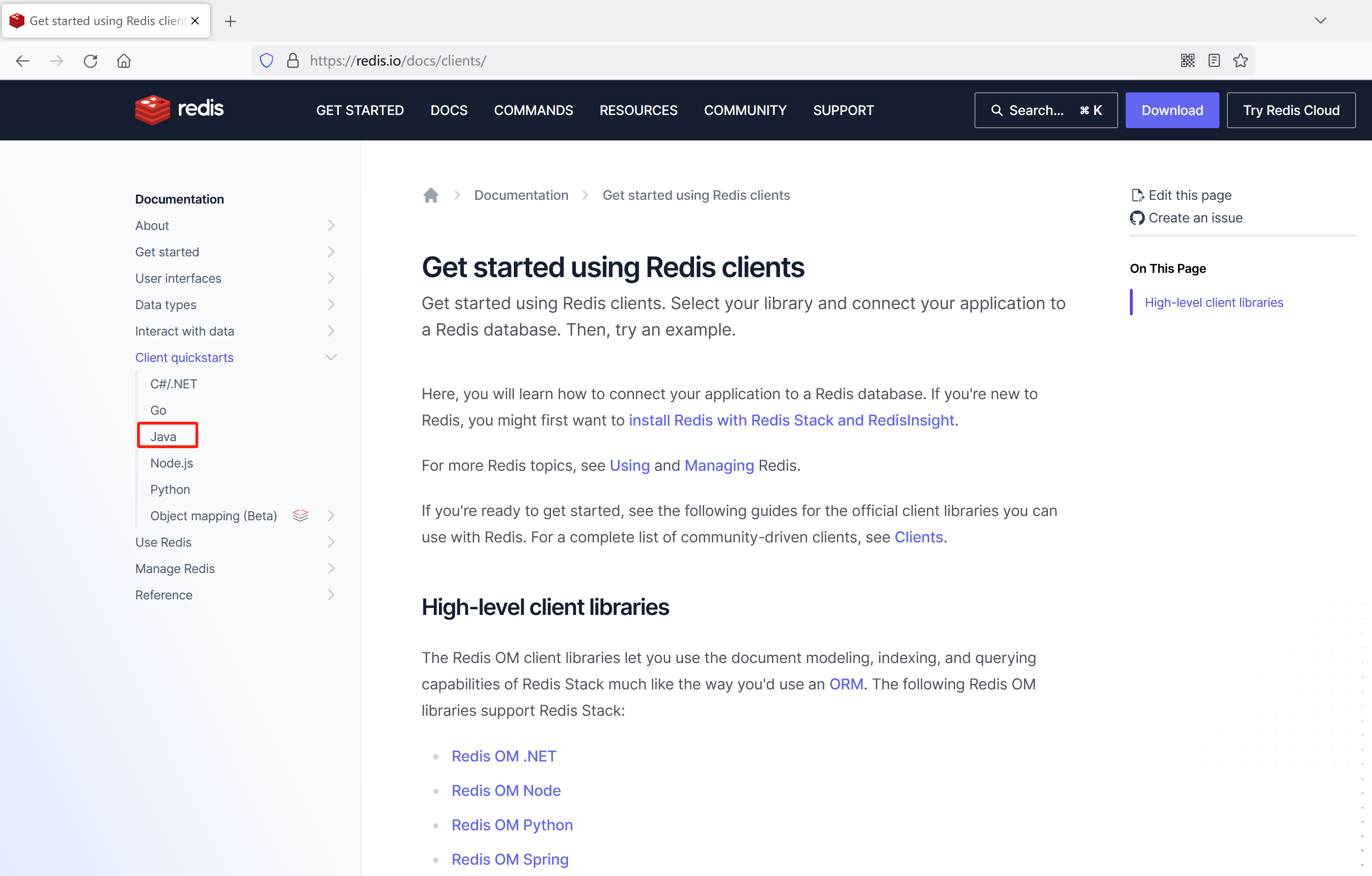
如图,官网已经给出了操作redis的方法

创建maven项目
在IntelliJ IDEA创建一个maven项目:依次File -> New -> Project...
然后在左侧选择Maven,然后点击Next

然后填写项目名和包名

最后点击Finish就完成Maven项目的创建了。
添加jedis的依赖
在pom.xml中添加jedis客户端依赖
- <dependency>
- <groupId>redis.clientsgroupId>
- <artifactId>jedisartifactId>
- <version>4.3.1version>
- dependency>
完整的pom.xml
- "1.0" encoding="UTF-8"?>
- <project xmlns="http://maven.apache.org/POM/4.0.0"
- xmlns:xsi="http://www.w3.org/2001/XMLSchema-instance"
- xsi:schemaLocation="http://maven.apache.org/POM/4.0.0 http://maven.apache.org/xsd/maven-4.0.0.xsd">
- <modelVersion>4.0.0modelVersion>
- <groupId>org.examplegroupId>
- <artifactId>redisartifactId>
- <version>1.0-SNAPSHOTversion>
- <properties>
- <maven.compiler.source>8maven.compiler.source>
- <maven.compiler.target>8maven.compiler.target>
- properties>
- <dependencies>
- <dependency>
- <groupId>redis.clientsgroupId>
- <artifactId>jedisartifactId>
- <version>4.3.1version>
- dependency>
- dependencies>
- project>
jedis的案例代码
- package com.example.redis;
- import org.junit.jupiter.api.Test;
- import org.springframework.boot.test.context.SpringBootTest;
- import redis.clients.jedis.Jedis;
- import redis.clients.jedis.JedisPool;
- import java.util.HashMap;
- import java.util.Map;
- @SpringBootTest
- class RedisTests {
- @Test
- void contextLoads() {
- JedisPool pool = new JedisPool("192.168.254.128", 6379);
- try (Jedis jedis = pool.getResource()) {
- jedis.set("foo", "bar");
- System.out.println(jedis.get("foo"));
- Map
- hash.put("name", "John");
- hash.put("surname", "Smith");
- hash.put("company", "Redis");
- hash.put("age", "29");
- jedis.hset("user-session:123", hash);
- System.out.println(jedis.hgetAll("user-session:123"));
- }
- }
- }
关闭保护模式
运行上面测试类,正常来说会看到绿条,但是运行的时候发生了异常
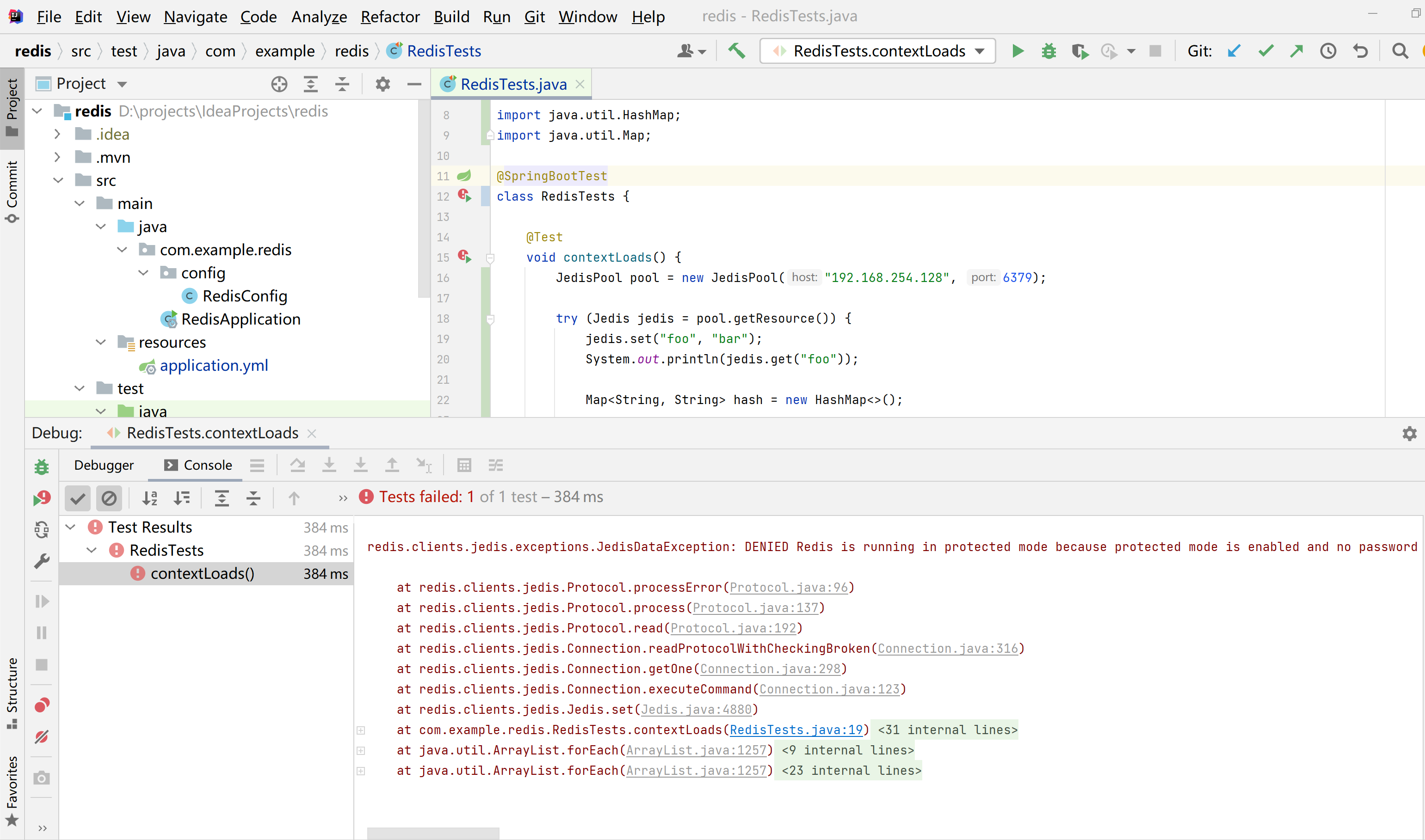
以下是控制台打印的异常信息
- redis.clients.jedis.exceptions.JedisDataException: DENIED Redis is running in protected mode because protected mode is enabled and no password is set for the default user. In this mode connections are only accepted from the loopback interface. If you want to connect from external computers to Redis you may adopt one of the following solutions: 1) Just disable protected mode sending the command 'CONFIG SET protected-mode no' from the loopback interface by connecting to Redis from the same host the server is running, however MAKE SURE Redis is not publicly accessible from internet if you do so. Use CONFIG REWRITE to make this change permanent. 2) Alternatively you can just disable the protected mode by editing the Redis configuration file, and setting the protected mode option to 'no', and then restarting the server. 3) If you started the server manually just for testing, restart it with the '--protected-mode no' option. 4) Set up an authentication password for the default user. NOTE: You only need to do one of the above things in order for the server to start accepting connections from the outside.
- at redis.clients.jedis.Protocol.processError(Protocol.java:96)
- at redis.clients.jedis.Protocol.process(Protocol.java:137)
- at redis.clients.jedis.Protocol.read(Protocol.java:192)
- at redis.clients.jedis.Connection.readProtocolWithCheckingBroken(Connection.java:316)
- at redis.clients.jedis.Connection.getOne(Connection.java:298)
- at redis.clients.jedis.Connection.executeCommand(Connection.java:123)
- at redis.clients.jedis.Jedis.set(Jedis.java:4880)
- at com.example.redis.RedisTests.contextLoads(RedisTests.java:19)
- at sun.reflect.NativeMethodAccessorImpl.invoke0(Native Method)
- at sun.reflect.NativeMethodAccessorImpl.invoke(NativeMethodAccessorImpl.java:62)
- at sun.reflect.DelegatingMethodAccessorImpl.invoke(DelegatingMethodAccessorImpl.java:43)
- at java.lang.reflect.Method.invoke(Method.java:498)
- at org.junit.platform.commons.util.ReflectionUtils.invokeMethod(ReflectionUtils.java:688)
- at org.junit.jupiter.engine.execution.MethodInvocation.proceed(MethodInvocation.java:60)
- at org.junit.jupiter.engine.execution.InvocationInterceptorChain$ValidatingInvocation.proceed(InvocationInterceptorChain.java:131)
- at org.junit.jupiter.engine.extension.TimeoutExtension.intercept(TimeoutExtension.java:149)
- at org.junit.jupiter.engine.extension.TimeoutExtension.interceptTestableMethod(TimeoutExtension.java:140)
- at org.junit.jupiter.engine.extension.TimeoutExtension.interceptTestMethod(TimeoutExtension.java:84)
- at org.junit.jupiter.engine.execution.ExecutableInvoker$ReflectiveInterceptorCall.lambda$ofVoidMethod$0(ExecutableInvoker.java:115)
- at org.junit.jupiter.engine.execution.ExecutableInvoker.lambda$invoke$0(ExecutableInvoker.java:105)
- at org.junit.jupiter.engine.execution.InvocationInterceptorChain$InterceptedInvocation.proceed(InvocationInterceptorChain.java:106)
- at org.junit.jupiter.engine.execution.InvocationInterceptorChain.proceed(InvocationInterceptorChain.java:64)
- at org.junit.jupiter.engine.execution.InvocationInterceptorChain.chainAndInvoke(InvocationInterceptorChain.java:45)
- at org.junit.jupiter.engine.execution.InvocationInterceptorChain.invoke(InvocationInterceptorChain.java:37)
- at org.junit.jupiter.engine.execution.ExecutableInvoker.invoke(ExecutableInvoker.java:104)
- at org.junit.jupiter.engine.execution.ExecutableInvoker.invoke(ExecutableInvoker.java:98)
- at org.junit.jupiter.engine.descriptor.TestMethodTestDescriptor.lambda$invokeTestMethod$6(TestMethodTestDescriptor.java:210)
- at org.junit.platform.engine.support.hierarchical.ThrowableCollector.execute(ThrowableCollector.java:73)
- at org.junit.jupiter.engine.descriptor.TestMethodTestDescriptor.invokeTestMethod(TestMethodTestDescriptor.java:206)
- at org.junit.jupiter.engine.descriptor.TestMethodTestDescriptor.execute(TestMethodTestDescriptor.java:131)
- at org.junit.jupiter.engine.descriptor.TestMethodTestDescriptor.execute(TestMethodTestDescriptor.java:65)
- at org.junit.platform.engine.support.hierarchical.NodeTestTask.lambda$executeRecursively$5(NodeTestTask.java:139)
- at org.junit.platform.engine.support.hierarchical.ThrowableCollector.execute(ThrowableCollector.java:73)
- at org.junit.platform.engine.support.hierarchical.NodeTestTask.lambda$executeRecursively$7(NodeTestTask.java:129)
- at org.junit.platform.engine.support.hierarchical.Node.around(Node.java:137)
- at org.junit.platform.engine.support.hierarchical.NodeTestTask.lambda$executeRecursively$8(NodeTestTask.java:127)
- at org.junit.platform.engine.support.hierarchical.ThrowableCollector.execute(ThrowableCollector.java:73)
- at org.junit.platform.engine.support.hierarchical.NodeTestTask.executeRecursively(NodeTestTask.java:126)
- at org.junit.platform.engine.support.hierarchical.NodeTestTask.execute(NodeTestTask.java:84)
- at java.util.ArrayList.forEach(ArrayList.java:1257)
- at org.junit.platform.engine.support.hierarchical.SameThreadHierarchicalTestExecutorService.invokeAll(SameThreadHierarchicalTestExecutorService.java:38)
- at org.junit.platform.engine.support.hierarchical.NodeTestTask.lambda$executeRecursively$5(NodeTestTask.java:143)
- at org.junit.platform.engine.support.hierarchical.ThrowableCollector.execute(ThrowableCollector.java:73)
- at org.junit.platform.engine.support.hierarchical.NodeTestTask.lambda$executeRecursively$7(NodeTestTask.java:129)
- at org.junit.platform.engine.support.hierarchical.Node.around(Node.java:137)
- at org.junit.platform.engine.support.hierarchical.NodeTestTask.lambda$executeRecursively$8(NodeTestTask.java:127)
- at org.junit.platform.engine.support.hierarchical.ThrowableCollector.execute(ThrowableCollector.java:73)
- at org.junit.platform.engine.support.hierarchical.NodeTestTask.executeRecursively(NodeTestTask.java:126)
- at org.junit.platform.engine.support.hierarchical.NodeTestTask.execute(NodeTestTask.java:84)
- at java.util.ArrayList.forEach(ArrayList.java:1257)
- at org.junit.platform.engine.support.hierarchical.SameThreadHierarchicalTestExecutorService.invokeAll(SameThreadHierarchicalTestExecutorService.java:38)
- at org.junit.platform.engine.support.hierarchical.NodeTestTask.lambda$executeRecursively$5(NodeTestTask.java:143)
- at org.junit.platform.engine.support.hierarchical.ThrowableCollector.execute(ThrowableCollector.java:73)
- at org.junit.platform.engine.support.hierarchical.NodeTestTask.lambda$executeRecursively$7(NodeTestTask.java:129)
- at org.junit.platform.engine.support.hierarchical.Node.around(Node.java:137)
- at org.junit.platform.engine.support.hierarchical.NodeTestTask.lambda$executeRecursively$8(NodeTestTask.java:127)
- at org.junit.platform.engine.support.hierarchical.ThrowableCollector.execute(ThrowableCollector.java:73)
- at org.junit.platform.engine.support.hierarchical.NodeTestTask.executeRecursively(NodeTestTask.java:126)
- at org.junit.platform.engine.support.hierarchical.NodeTestTask.execute(NodeTestTask.java:84)
- at org.junit.platform.engine.support.hierarchical.SameThreadHierarchicalTestExecutorService.submit(SameThreadHierarchicalTestExecutorService.java:32)
- at org.junit.platform.engine.support.hierarchical.HierarchicalTestExecutor.execute(HierarchicalTestExecutor.java:57)
- at org.junit.platform.engine.support.hierarchical.HierarchicalTestEngine.execute(HierarchicalTestEngine.java:51)
- at org.junit.platform.launcher.core.EngineExecutionOrchestrator.execute(EngineExecutionOrchestrator.java:108)
- at org.junit.platform.launcher.core.EngineExecutionOrchestrator.execute(EngineExecutionOrchestrator.java:88)
- at org.junit.platform.launcher.core.EngineExecutionOrchestrator.lambda$execute$0(EngineExecutionOrchestrator.java:54)
- at org.junit.platform.launcher.core.EngineExecutionOrchestrator.withInterceptedStreams(EngineExecutionOrchestrator.java:67)
- at org.junit.platform.launcher.core.EngineExecutionOrchestrator.execute(EngineExecutionOrchestrator.java:52)
- at org.junit.platform.launcher.core.DefaultLauncher.execute(DefaultLauncher.java:96)
- at org.junit.platform.launcher.core.DefaultLauncher.execute(DefaultLauncher.java:75)
- at com.intellij.junit5.JUnit5IdeaTestRunner.startRunnerWithArgs(JUnit5IdeaTestRunner.java:71)
- at com.intellij.rt.junit.IdeaTestRunner$Repeater.startRunnerWithArgs(IdeaTestRunner.java:33)
- at com.intellij.rt.junit.JUnitStarter.prepareStreamsAndStart(JUnitStarter.java:221)
- at com.intellij.rt.junit.JUnitStarter.main(JUnitStarter.java:54)
抓到其中的一个关键词:protected-mode,很显然,这应该是一个配置
'CONFIG SET protected-mode no'
于是我们到redis.conf下搜索一下这个设置,果然找到了,先把这个设置yes改成no

修改为no

然后重启一下redis
service redis-server restart重新运行代码
再次运行之前的代码,这一次成功了

然后接着往下看,redis还提供了不用写try...catch块的方式操作redis,这样代码看起来更简洁了

同样,复制代码运行一次,也运行成功了

最后,通过Another Redis Desktop Manager连接虚拟机上的redis,能看到刚刚运行设置的key

没有用过Another Redis Desktop Manager的童鞋,可以通过以下文章了解一下:
redis桌面连接工具Another Redis Desktop Manager使用介绍
 https://blog.csdn.net/heyl163_/article/details/133007448
好了,关于安装和使用redis的介绍就到这里了,看完不要忘了点赞+收藏哦~
-
相关阅读:
TypeScript常见面试题第十一节
Linux--共享内存
SpringBoot与MongoDB的集成使用
如何让Java项目兼容更多的客户端设备(二)
【C++】vector的介绍与使用
docker镜像存储在哪里
【若依(ruoyi)】Java---如何在Apifox上传params参数--延伸--如何在Apifox上传Map类型参数
golang基础 :waitgroup用法及使用要点
[PyQt] Pycharm 配置 PyQt 开发环境
性能测试-基础理论知识
- 原文地址:https://blog.csdn.net/heyl163_/article/details/132981470
