-
H3C交换机如何重置console口密码
环境:
H3C S5024X-EI
version 7.1.070, Release 6329Xshell: 7.0.0009
问题描述:
H3C交换机如何重置console口密码,时间长了密码忘记了
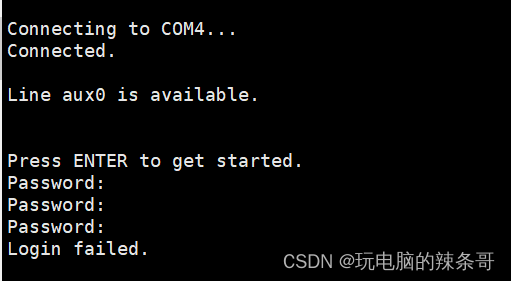
解决方案:
1.console线连接好交换机和电脑,打开交换机电源,Xshell界面看到,“Press Ctrl+B to access EXTENDED BOOT MENU…0”出现时马上按Ctrl和B键(3秒内按),这样就可以进入启动菜单

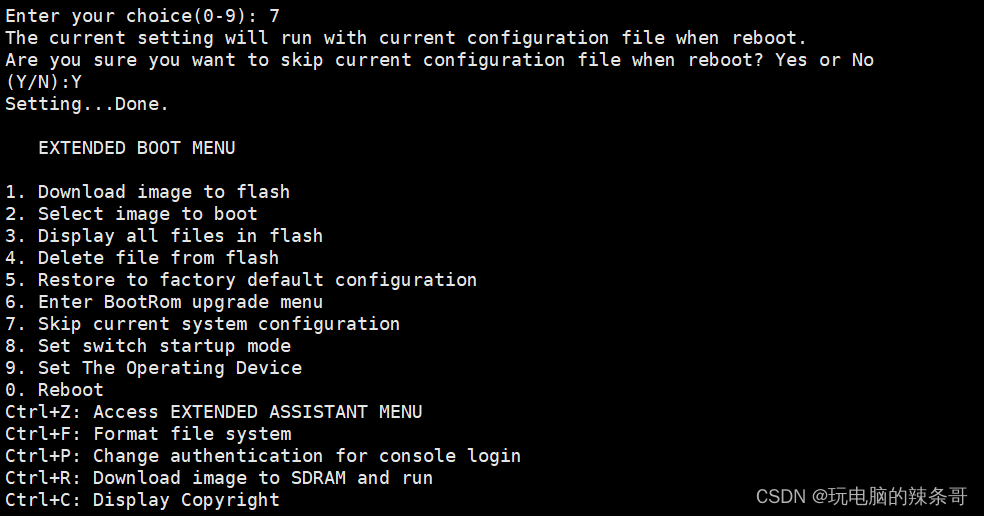
1. Download image to flash 将图像下载到flash 2. Select image to boot 选择要启动的映像 3. Display all files in flash 显示所有flash文件 4. Delete file from flash 从flash中删除文件 5. Restore to factory default configuration 恢复到出厂默认配置 6. Enter BootRom upgrade menu 进入BootRom升级菜单 7. Skip current system configuration 跳过当前系统配置 8. Set switch startup mode 设置开关启动模式 9. Set The Operating Device 设置操作设备 0. Reboot 重启- 1
- 2
- 3
- 4
- 5
- 6
- 7
- 8
- 9
- 10
- 11
2.选7 Skip current system configuration 跳过当前系统配置,继续选择0 reboot来重新启动交换机,启动后将不加载当前的configuration file配置文件,之前设置的密码会无效

3.交换机自检完毕后就会显示Configuration file is skipped.
Line aux0 is available的信息,表明之前的配置文件没有加载,按回车就可以进了aux0配置界面

4.系统试图下通过user-interface aux 0进入console设置模式,输入authentication-mode none将aux0密码取消
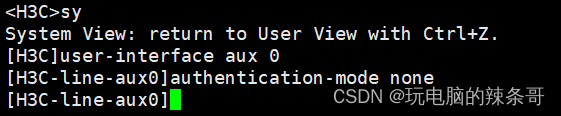 save将修改保存,然后reboot

reboot Start to check configuration with next startup configuration file, please wait.........DONE! This command will reboot the device. Continue? [Y/N]:y Now rebooting, please wait....%Jan 1 00:08:10:734 2013 H3C DEV/5/SYSTEM_REBOOT: System is rebooting now. 更改配置,后保存测试正常
System is starting... Cryptographic algorithms tests passed. Line aux0 is available. Press ENTER to get started. ****************************************************************************** * Copyright (c) 2004-2021 New H3C Technologies Co., Ltd. All rights reserved.* * Without the owner's prior written consent, * * no decompiling or reverse-engineering shall be allowed. * ****************************************************************************** <H3C> <H3C> <H3C> <H3C>%Jan 1 00:52:34:476 2013 H3C SHELL/5/SHELL_LOGIN: TTY logged in from aux0. <H3C> <H3C>dis cu # version 7.1.070, Release 6329 # sysname H3C # irf mac-address persistent timer irf auto-update enable undo irf link-delay irf member 1 priority 1- 1
- 2
- 3
- 4
- 5
- 6
- 7
- 8
- 9
- 10
- 11
- 12
- 13
- 14
- 15
- 16
- 17
- 18
- 19
- 20
- 21
- 22
- 23
- 24
- 25
- 26
- 27
- 28
- 29
- 30
- 31
- 32
5.如果要清除之前配置输入reset saved-configuration ,然后reboot
-
相关阅读:
【选修课】Python 实现-附ChatGPT解析
【C++】红黑树插入过程详解
.NET Worker Service 作为 Windows 服务运行及优雅退出改进
等待风起——京东.Vision项目参与实录分享
Java feign方式对同一个服务编写多个远程调用实例报错及3种解决办法
PostgreSQL的学习心得和知识总结(一百一十二)|语法级自上而下完美实现PostgreSQL数据库的 EXCHANGE PARTION 的实现方案
k8s部署metrics-server
物联网与 Linux 的相爱相生
JAVA计算机毕业设计读书网络社区设计Mybatis+系统+数据库+调试部署
Java:如何选择一个好的Java外包合作伙伴?
- 原文地址:https://blog.csdn.net/weixin_42672685/article/details/132977014