-
MyBatisPlus中使用Mybatis方式操作数据库。
说明
MyBatisPlus中,可以使用Mybatis方式操作数据库。在Mapper.xml中,编写 SQL 来实现比较复杂的操作。一般比较复杂的逻辑,需要多表联合查询,比较适合直接写SQL。
MybatisPlus比较适合单表操作。PS:本示例只是简单演示使用
Mapper.xml,所以没有在其中添加复杂逻辑。项目架构示例

代码
Mapper扫描
@MapperScan(basePackages = {"com.example.web.mapper"})- 1
示例:
package com.example; import org.mybatis.spring.annotation.MapperScan; import org.springframework.boot.SpringApplication; import org.springframework.boot.autoconfigure.SpringBootApplication; @SpringBootApplication @MapperScan(basePackages = {"com.example.web.mapper"}) public class MybatisPlusDemoApplication { public static void main(String[] args) { SpringApplication.run(MybatisPlusDemoApplication.class, args); } }- 1
- 2
- 3
- 4
- 5
- 6
- 7
- 8
- 9
- 10
- 11
- 12
- 13
- 14
- 15
- 16
Mapper.java
package com.example.web.mapper; import com.example.web.entity.User; import java.util.List; public interface MybatisMapper { List<User> selectListByName(String name); }- 1
- 2
- 3
- 4
- 5
- 6
- 7
- 8
- 9
- 10
- 11
- 12
Mapper.xml
<?xml version="1.0" encoding="UTF-8"?> <!DOCTYPE mapper PUBLIC "-//mybatis.org//DTD Mapper 3.0//EN" "http://mybatis.org/dtd/mybatis-3-mapper.dtd"> <mapper namespace="com.example.web.mapper.MybatisMapper"> <select id="selectListByName" resultType="com.example.web.entity.User"> select * from user where name = #{value} </select> </mapper>- 1
- 2
- 3
- 4
- 5
- 6
- 7
- 8
- 9
- 10
- 11
- 12
Test
package com.example; import com.example.web.entity.User; import com.example.web.mapper.MybatisMapper; import org.junit.jupiter.api.Test; import org.springframework.beans.factory.annotation.Autowired; import org.springframework.boot.test.context.SpringBootTest; import java.util.List; @SpringBootTest class MybatisMapperTest { @Autowired private MybatisMapper mapper; @Test void selectListByName() { List<User> users = mapper.selectListByName("张三"); System.out.println(users); } }- 1
- 2
- 3
- 4
- 5
- 6
- 7
- 8
- 9
- 10
- 11
- 12
- 13
- 14
- 15
- 16
- 17
- 18
- 19
- 20
- 21
- 22
- 23
- 24
- 25
查询效果

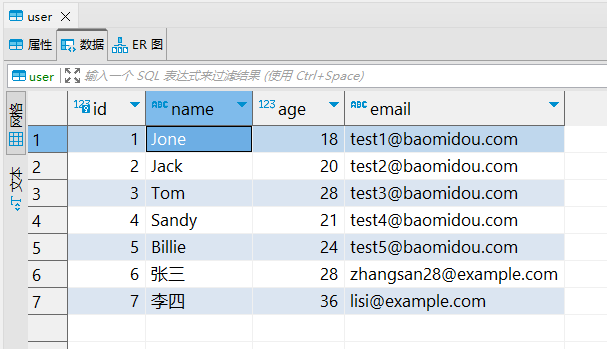
数据库中的数据
-
相关阅读:
windows 安装mysql
leetcode.864 获取所有钥匙的最短路径 - bfs+状态压缩+最短路+位运算
数据结构系列-堆排序
2104. 子数组范围和
java计算机毕业设计科院垃圾分类系统源码+数据库+系统+lw文档+mybatis+运行部署
【微信小程序】最新隐私弹窗组件
错误:ReferenceError: OSS is not defined
KNN分类算法
基于粒子(Points)模拟雨雪天气效果
双向认证配置
- 原文地址:https://blog.csdn.net/sgx1825192/article/details/132949549
