-
JAVA医药进销存管理系统(附源码+调试)
JAVA医药进销存管理系统
功能描述
(1)登录模块:登录信息等存储在数据库中
(2)基本信息模块:分为药品信息模块、客户情况模块、供应商情况模块;
(3)业务管理模块:分为药品采购模块、药品销售模块、库存盘点模块、销售退货模块、客户回款模块;
(4)业务查询模块:分为基本信息模块、入库明细模块、销售明细模块、回款明细模块;
(5)用户管理模块:分为增加用户模块、维护用户模块;
(6)窗口管理:更适应更多使用者的前端需求。代码链接:https://pan.baidu.com/s/1F7dEBfny5aAU_AKpLpwCiA
提取码:3pxo功能截图
1、登录模块

2、医药进销存管理系统主界面

3、药品情况模块

4、供应商基本信息情况模块

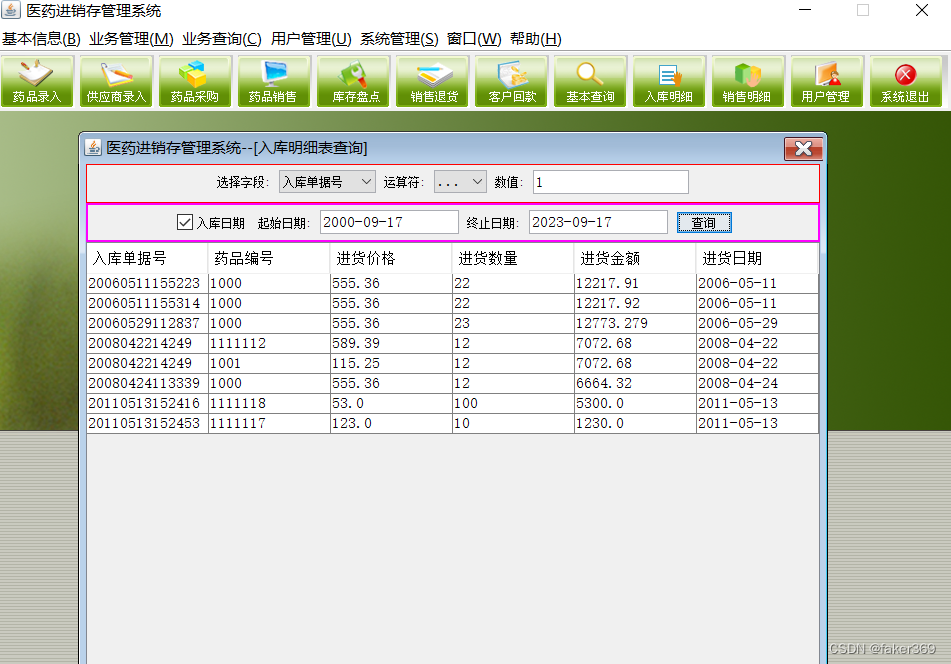
5、入库明细模块
部分关键代码
package com.lzw; import java.awt.Color; import java.awt.Dimension; import java.awt.Font; import java.awt.Rectangle; import java.awt.Toolkit; import java.awt.event.ActionEvent; import java.awt.event.ActionListener; import java.awt.event.KeyAdapter; import java.awt.event.KeyEvent; import java.io.FileInputStream; import java.io.FileNotFoundException; import java.io.FileOutputStream; import java.io.PrintStream; import java.util.Iterator; import java.util.List; import java.util.Scanner; import javax.swing.ImageIcon; import javax.swing.JButton; import javax.swing.JFrame; import javax.swing.JLabel; import javax.swing.JOptionPane; import javax.swing.JPasswordField; import javax.swing.JTextField; import javax.swing.UIManager; import javax.swing.border.BevelBorder; import com.lzw.dao.AdapterDao; import com.lzw.model.Obj_UserName; import com.lzw.view.JF_main; public class LoginDialog extends JFrame { private static final long serialVersionUID = 8107215375516572660L; private LoginPanel loginPanel = null; private JLabel jLabel = null; private JTextField userField = null; private JLabel jLabel1 = null; private JPasswordField passwordField = null; private JButton loginButton = null; private JButton exitButton = null; private JF_main mainFrame; /** * @param owner */ public LoginDialog() { try { UIManager.setLookAndFeel(UIManager.getSystemLookAndFeelClassName()); mainFrame = new JF_main(); initialize(); } catch (Exception e) { e.printStackTrace(); } } /** * 初始化loginPanel登录面板的方法 * * @return com.lzw.login.LoginPanel */ private LoginPanel getLoginPanel() { if (loginPanel == null) { jLabel1 = new JLabel(); jLabel1.setFont(new Font("", Font.BOLD, 12)); jLabel1.setBounds(new Rectangle(101, 147, 55, 18)); jLabel1.setText("密 码:"); jLabel = new JLabel(); jLabel.setFont(new Font("", Font.BOLD, 12)); jLabel.setText("用户名:"); jLabel.setBounds(new Rectangle(100, 117, 56, 18)); loginPanel = new LoginPanel(); loginPanel.setLayout(null); loginPanel.setBackground(new Color(0xD8DDC7)); loginPanel.add(jLabel); loginPanel.add(getUserField()); loginPanel.add(jLabel1); loginPanel.add(getPasswordField()); loginPanel.add(getLoginButton()); loginPanel.add(getExitButton()); } return loginPanel; } /** * This method initializes userField * * @return javax.swing.JTextField */ private JTextField getUserField() { if (userField == null) { userField = new JTextField(); userField.setBorder(new BevelBorder(BevelBorder.LOWERED)); userField.setBounds(new Rectangle(157, 115, 127, 22)); } return userField; } /** * This method initializes passwordField * * @return javax.swing.JPasswordField */ private JPasswordField getPasswordField() { if (passwordField == null) { passwordField = new JPasswordField(); passwordField.setBorder(new BevelBorder(BevelBorder.LOWERED)); passwordField.setBounds(new Rectangle(158, 145, 125, 22)); passwordField.addKeyListener(new KeyAdapter() { @Override public void keyTyped(KeyEvent e) { if (e.getKeyChar() == '\n') loginButton.doClick(); } }); } return passwordField; } /** * This method initializes loginButton * * @return javax.swing.JButton */ private JButton getLoginButton() { if (loginButton == null) { loginButton = new JButton(); loginButton.setContentAreaFilled(false); loginButton.setBounds(new Rectangle(155, 175, 58, 25)); loginButton.setIcon(new ImageIcon(getClass().getResource("/images/loginButton.png"))); loginButton.addActionListener(new ActionListener() { private Obj_UserName user; @Override public void actionPerformed(ActionEvent e) { String id = getUserField().getText().trim(); if (id == null || id.length() <= 0) { JOptionPane.showMessageDialog(null, "输入用户ID不能为空,请重新输入!!!", "系统提示", JOptionPane.ERROR_MESSAGE); getUserField().requestFocus(); return; } String sqlStr = "from Obj_UserName where id = '" + id + "'"; List list = null; list = AdapterDao.QueryObject(sqlStr); if (list.size() > 0) { Iterator iterator = list.iterator(); user = (Obj_UserName) iterator.next(); String pass = new String(getPasswordField().getPassword()); if (!user.getPassword().equals(pass)) { JOptionPane.showMessageDialog(LoginDialog.this, "用户名或密码错误,无法登录", "登录失败", JOptionPane.ERROR_MESSAGE); return; } } Dimension screenSize = Toolkit.getDefaultToolkit().getScreenSize(); Dimension frameSize = mainFrame.getSize(); if (frameSize.height > screenSize.height) { frameSize.height = screenSize.height; } if (frameSize.width > screenSize.width) { frameSize.width = screenSize.width; } mainFrame.setLocation((screenSize.width - frameSize.width) / 2, (screenSize.height - frameSize.height) / 2); mainFrame.setVisible(true); LoginDialog.this.setVisible(false); } }); } return loginButton; } /** * This method initializes exitButton * * @return javax.swing.JButton */ private JButton getExitButton() { if (exitButton == null) { exitButton = new JButton(); exitButton.setContentAreaFilled(false); exitButton.setBounds(new Rectangle(230, 175, 58, 25)); exitButton.setIcon(new ImageIcon(getClass().getResource("/images/exitButton.png"))); exitButton.addActionListener(new java.awt.event.ActionListener() { @Override public void actionPerformed(java.awt.event.ActionEvent e) { System.exit(0); } }); } return exitButton; } /** * 界面初始化方法 * * @return void */ private void initialize() { Dimension size = getToolkit().getScreenSize(); setLocation((size.width - 296) / 2, (size.height - 188) / 2); setSize(389, 256); this.setTitle("系统登录"); setContentPane(getLoginPanel()); } public static void main(String[] args) { try { new Thread() { private FileInputStream fis; private Scanner scanner; private LoginDialog jf_login; @Override public void run() { try { initAndRecLog(); // 初始化并记录日志 fis = new FileInputStream("APPJXC.log"); scanner = new Scanner(fis); while (scanner.hasNextLine()) { String str = scanner.nextLine(); int startInt = str.indexOf('-') + 1; if (startInt == -1) startInt = 0; str = "启动信息:" + str.substring(startInt); Thread.sleep(100); } scanner.close(); fis.close(); jf_login.setVisible(true); } catch (Exception e) { e.printStackTrace(); } } // 初始化系统,并记录日志 private void initAndRecLog() throws FileNotFoundException { FileOutputStream fop = new FileOutputStream("APPJXC.log", false); PrintStream ps = new PrintStream(fop); System.setOut(ps); AdapterDao dao = new AdapterDao(); if (!dao.getdao()) return; jf_login = new LoginDialog(); } }.start(); } catch (Exception e) { e.printStackTrace(); } } }- 1
- 2
- 3
- 4
- 5
- 6
- 7
- 8
- 9
- 10
- 11
- 12
- 13
- 14
- 15
- 16
- 17
- 18
- 19
- 20
- 21
- 22
- 23
- 24
- 25
- 26
- 27
- 28
- 29
- 30
- 31
- 32
- 33
- 34
- 35
- 36
- 37
- 38
- 39
- 40
- 41
- 42
- 43
- 44
- 45
- 46
- 47
- 48
- 49
- 50
- 51
- 52
- 53
- 54
- 55
- 56
- 57
- 58
- 59
- 60
- 61
- 62
- 63
- 64
- 65
- 66
- 67
- 68
- 69
- 70
- 71
- 72
- 73
- 74
- 75
- 76
- 77
- 78
- 79
- 80
- 81
- 82
- 83
- 84
- 85
- 86
- 87
- 88
- 89
- 90
- 91
- 92
- 93
- 94
- 95
- 96
- 97
- 98
- 99
- 100
- 101
- 102
- 103
- 104
- 105
- 106
- 107
- 108
- 109
- 110
- 111
- 112
- 113
- 114
- 115
- 116
- 117
- 118
- 119
- 120
- 121
- 122
- 123
- 124
- 125
- 126
- 127
- 128
- 129
- 130
- 131
- 132
- 133
- 134
- 135
- 136
- 137
- 138
- 139
- 140
- 141
- 142
- 143
- 144
- 145
- 146
- 147
- 148
- 149
- 150
- 151
- 152
- 153
- 154
- 155
- 156
- 157
- 158
- 159
- 160
- 161
- 162
- 163
- 164
- 165
- 166
- 167
- 168
- 169
- 170
- 171
- 172
- 173
- 174
- 175
- 176
- 177
- 178
- 179
- 180
- 181
- 182
- 183
- 184
- 185
- 186
- 187
- 188
- 189
- 190
- 191
- 192
- 193
- 194
- 195
- 196
- 197
- 198
- 199
- 200
- 201
- 202
- 203
- 204
- 205
- 206
- 207
- 208
- 209
- 210
- 211
- 212
- 213
- 214
- 215
- 216
- 217
- 218
- 219
- 220
- 221
- 222
- 223
- 224
- 225
- 226
- 227
- 228
- 229
- 230
- 231
- 232
- 233
- 234
- 235
- 236
- 237
- 238
- 239
- 240
- 241
- 242
- 243
- 244
- 245
- 246
- 247
- 248
- 249
- 250
- 251
-
相关阅读:
设计模式学习
& 和 && 的区别。| 和 || 的区别
基于MindSpore的llama微调在OpenI平台上运行
【C/C++】判断路径为目录还是文件,并确定目录下是否存在指定格式(*.*)的文件
es6 语法,在个别浏览器中不兼容的处理办法
HTML之file控件、hidden控件、列表、div
score_inverse_problems运行环境,pycharm重新安装,jax,jaxlib的GPU版本安装-230831
SpringBoot学习小结之Swagger
支持JDK19虚拟线程的web框架,之五(终篇):兴风作浪的ThreadLocal
【算法】游戏中的学习,使用c#面向对象特性控制游戏角色移动
- 原文地址:https://blog.csdn.net/faker369/article/details/132954370
