-
UE5_OpenCV库的加载方式
UE5使用opencv库要在系统中添加opencv的环境变量

在项目文件夹下新建ThirdParty,拷贝bin,新建OpenCV文件夹,拷贝include、lib


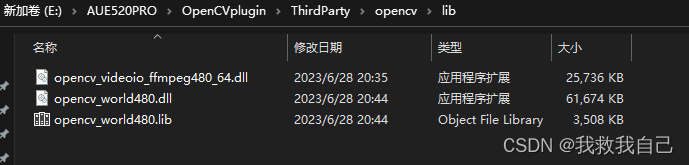
打开项目,找到source目录下的build.cs文件

修改build.cs内容,添加头文件路径,dll路径,lib路径
- // Copyright Epic Games, Inc. All Rights Reserved.
- using UnrealBuildTool;
- using System.IO;
- public class newopencv : ModuleRules
- {
- private string ModulePath
- {
- get
- {
- return ModuleDirectory;
- }
- }
- private string ThirPartyPath
- {
- get
- {
- return Path.GetFullPath(Path.Combine(ModulePath, "../../ThirdParty/"));
- }
- }
- public bool loadopencv(ReadOnlyTargetRules Target)
- {
- string OpenCVPath = Path.Combine(ThirPartyPath, "OpenCV");
- string libpath = "";
- if (Target.Platform == UnrealTargetPlatform.Win64)
- {
- PublicIncludePaths.AddRange(new string[]{Path.Combine(OpenCVPath,"include")});
- libpath = Path.Combine(OpenCVPath, "lib");
- PublicSystemLibraryPaths.Add(libpath);
- PublicAdditionalLibraries.Add("opencv_world480.lib");
- RuntimeDependencies.Add(Path.Combine("$(BinaryOutputDir)","opencv_world320.dll"),Path.Combine(libpath,"opencv_videoio_ffmpeg480_64.dll"));
- RuntimeDependencies.Add(Path.Combine("$(BinaryOutputDir)","opencv_ffmpeg320_64.dll"),Path.Combine(libpath,"opencv_world480.dll"));
- return true;
- }
- return false;
- }
- public newopencv(ReadOnlyTargetRules Target) : base(Target)
- {
- PCHUsage = PCHUsageMode.UseExplicitOrSharedPCHs;
- PublicDependencyModuleNames.AddRange(new string[] { "Core", "CoreUObject", "Engine", "InputCore","RenderCore","RHI" });
- //PrivateDependencyModuleNames.AddRange(new string[] { "OpenVDB" });
- //PublicDependencyModuleNames.Add("UMG");
- loadopencv(Target);
- // Uncomment if you are using Slate UI
- PrivateDependencyModuleNames.AddRange(new string[] { "Slate", "SlateCore" });
- // Uncomment if you are using online features
- // PrivateDependencyModuleNames.Add("OnlineSubsystem");
- // To include OnlineSubsystemSteam, add it to the plugins section in your uproject file with the Enabled attribute set to true
- }
- }
OpenCV库加载完成,以下是opencv读取外部png设置给ui的方法
- // Fill out your copyright notice in the Description page of Project Settings.
- #include "userwidgetClass.h"
- #include
- #include
- #include
- #include
- #include "Windows/WindowsTextInputMethodSystem.h"
- void UuserwidgetClass::NativeConstruct()
- {
- Super::NativeConstruct();
- openCV_RW_png();
- }
- void UuserwidgetClass::openCV_RW_png()
- {
- cv::Mat img;
- img = cv::imread("E:\\mlao.PNG");
- // 确保图像是BGR格式
- if (img.channels() == 3)
- {
- cv::cvtColor(img, img, cv::COLOR_BGR2RGBA);
- }
- // 确保图像是8位无符号整数类型
- if (img.depth() != CV_8U)
- {
- img.convertTo(img, CV_8U);
- }
- UTexture2D* texture = UTexture2D::CreateTransient(img.cols,img.rows,PF_R8G8B8A8);
- void* texturedata = texture->PlatformData->Mips[0].BulkData.Lock(LOCK_READ_WRITE);
- FMemory::Memcpy(texturedata,img.data,img.total()*img.elemSize());
- texture->PlatformData->Mips[0].BulkData.Unlock();
- texture->UpdateResource();
- FSlateBrush Brush;
- Brush.SetResourceObject(texture);
- Image_abc->SetBrush(Brush);
- }
-
相关阅读:
Centos7如何扩容未做lvm的GPT硬盘
plumelog介绍与应用-一个简单易用的java分布式日志系统
微信支付申请
系列文章之一文纵览【机器学习】(5) 常见评估方法:混淆矩阵、正确率、精确率、召回率、F值、预测概率、ROC曲线和AUC | 均方误差、决定系数、SVR | 超参数的设置 | 模型的过拟合与防止
春秋云境CVE-2018-20604
Vue Router 路由动态缓存组件
全向移动机器人运动参数校准
redux最佳实战(一)
QGIS下载各种DEM的插件(SRTM 90m/30m -ALOS 30m -Cop 30m/90m-NASADEM Global DEM)
TSINGSEE青犀AI智能分析+视频监控工业园区周界安全防范方案
- 原文地址:https://blog.csdn.net/weixin_42318094/article/details/132946767
