-
怎么实现一个登录时需要输入验证码的功能
今天给项目换了一个登录页面,而这个登录页面设计了验证码,于是想着把这个验证码功能实现一下。
这篇文章就如何实现登录时的验证码的验证功能结合代码进行详细地介绍,以及介绍功能实现的思路,文章不是一次写成的,中间考虑可能出现的问题,最后给出了一个比较稳定的版本。
目录
一、页面效果

登录的时候会把用户名、密码和验证码一起传到后端,并对验证码进行验证,只有验证码正确才能登录。
二、实现思路
那么,具体是如何实现的呢,首先大概介绍一下我实现这个功能的思路:
- 验证码图片的url由后端的一个Controller生成,前端请求这个Controller接口的时候根据当前时间生成一个uuid,并把这个uuid在前端使用localStorage缓存起来,下一次还是从缓存中获取。
- Controller生成验证码之后,把前端传过来的uuid通过redis缓存起来,这里分两次缓存
- 缓存uuid
- 以uuid为key,缓存验证码
- 这样,当点击登录按钮将数据提交到后台登录接口时,会从redis中获取uuid,然后通过这个uuid去获取验证码,和前端用户输入的验证码进行比较。
潜在问题:这样的设计可能会导致以下问题
- 多个用户同一时间访问登录页面,导致生成的uuid一样,数据会互相覆盖;
- uuid这个key被其他用户修改;
改进方案
- 前端生成随机的uuid,并缓存到localStorage,登陆的时候也把这个uuid传到后端,这样就解决了key重复和key被覆盖的问题。
三、具体代码实现
1、准备工作
创建项目
为了保存代码,在idea中新建一个springboot项目
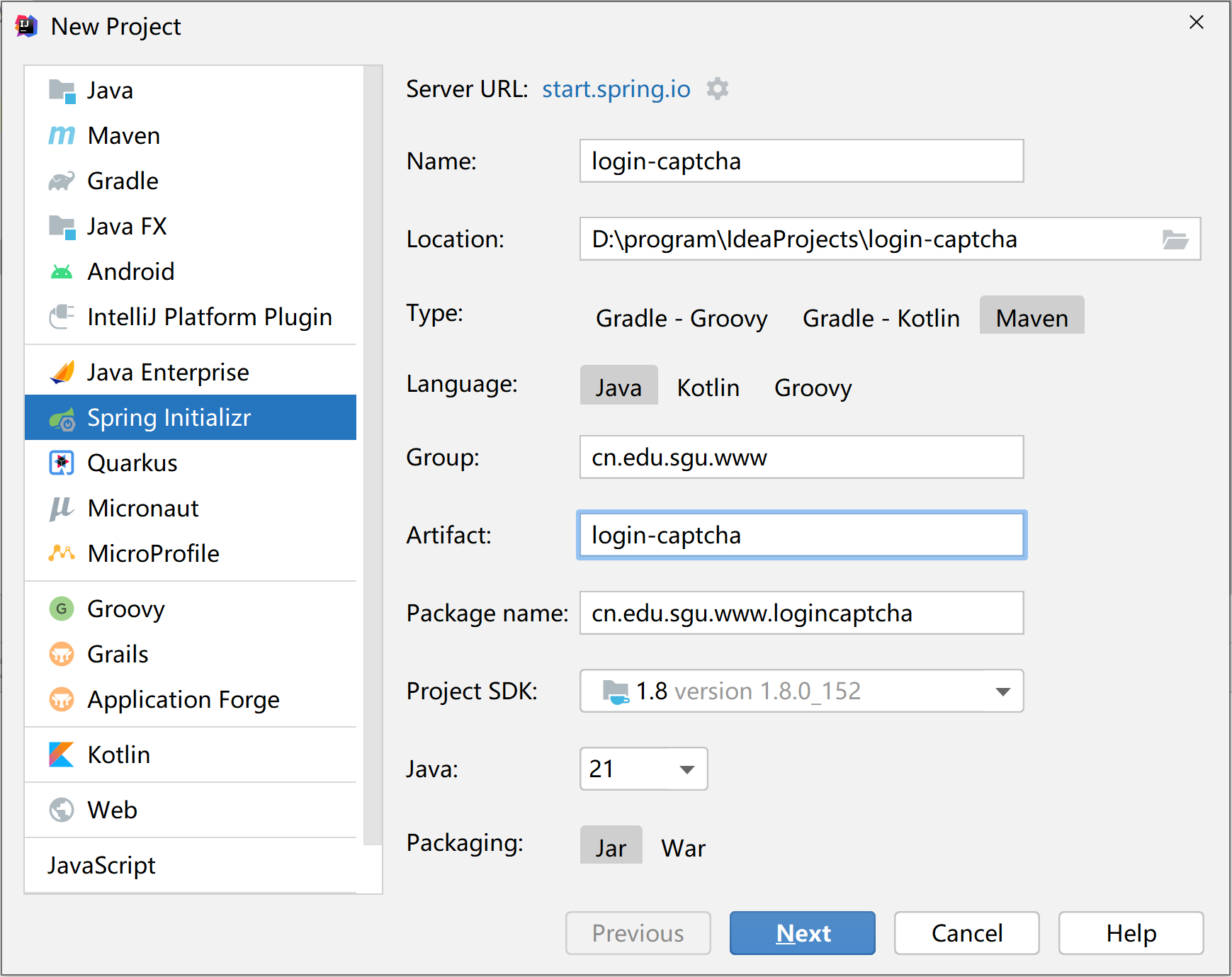
创建好的项目目录结构

添加依赖
删除多余的文件及文件夹(可选),在pom.xml中添加必要的依赖~
- "1.0" encoding="UTF-8"?>
- <project xmlns="http://maven.apache.org/POM/4.0.0" xmlns:xsi="http://www.w3.org/2001/XMLSchema-instance"
- xsi:schemaLocation="http://maven.apache.org/POM/4.0.0 https://maven.apache.org/xsd/maven-4.0.0.xsd">
- <modelVersion>4.0.0modelVersion>
- <parent>
- <groupId>org.springframework.bootgroupId>
- <artifactId>spring-boot-starter-parentartifactId>
- <version>2.5.9version>
- <relativePath />
- parent>
- <groupId>cn.edu.sgu.wwwgroupId>
- <artifactId>login-captchaartifactId>
- <version>0.0.1-SNAPSHOTversion>
- <name>login-captchaname>
- <description>Java实现登录验证码功能description>
- <properties>
- <java.version>1.8java.version>
- properties>
- <dependencies>
- <dependency>
- <groupId>org.springframework.bootgroupId>
- <artifactId>spring-boot-starter-webartifactId>
- dependency>
- <dependency>
- <groupId>org.springframework.bootgroupId>
- <artifactId>spring-boot-starter-validationartifactId>
- dependency>
- <dependency>
- <groupId>org.springframework.bootgroupId>
- <artifactId>spring-boot-starter-data-redisartifactId>
- dependency>
- <dependency>
- <groupId>org.projectlombokgroupId>
- <artifactId>lombokartifactId>
- <version>1.18.22version>
- dependency>
- <dependency>
- <groupId>com.github.whvcsegroupId>
- <artifactId>easy-captchaartifactId>
- <version>1.6.2version>
- dependency>
- dependencies>
- <build>
- <plugins>
- <plugin>
- <groupId>org.springframework.bootgroupId>
- <artifactId>spring-boot-maven-pluginartifactId>
- plugin>
- plugins>
- build>
- project>
修改配置
修改application.yml
- server:
- port: 8888
- logging:
- level:
- springfox: error
- cn.edu.sgu.www.logincaptcha: debug
- spring:
- application:
- name: login-captcha
- redis:
- port: 6379
- host: localhost
- timeout: PT5s
- # password: mhxy1218
- # 验证码图片设置
- captcha:
- image:
- width: 66
- height: 22
最后,把必要的一些基础类复制过来。

2、功能实现
后端代码
CaptchaController.java
给前端登录页面生成随机验证码的控制器类。
- package cn.edu.sgu.www.logincaptcha.controller;
- import cn.edu.sgu.www.logincaptcha.consts.RedisKeyPrefixes;
- import cn.edu.sgu.www.logincaptcha.exception.GlobalException;
- import cn.edu.sgu.www.logincaptcha.property.CaptchaImageProperties;
- import cn.edu.sgu.www.logincaptcha.redis.StringRedisUtils;
- import cn.edu.sgu.www.logincaptcha.restful.ResponseCode;
- import com.wf.captcha.GifCaptcha;
- import com.wf.captcha.SpecCaptcha;
- import com.wf.captcha.base.Captcha;
- import lombok.extern.slf4j.Slf4j;
- import org.springframework.beans.factory.annotation.Autowired;
- import org.springframework.web.bind.annotation.RequestMapping;
- import org.springframework.web.bind.annotation.RequestMethod;
- import org.springframework.web.bind.annotation.RequestParam;
- import org.springframework.web.bind.annotation.RestController;
- import org.springframework.web.context.request.RequestAttributes;
- import org.springframework.web.context.request.RequestContextHolder;
- import org.springframework.web.context.request.ServletRequestAttributes;
- import javax.servlet.http.HttpServletResponse;
- import java.io.IOException;
- import java.util.concurrent.TimeUnit;
- /**
- * @author heyunlin
- * @version 1.0
- */
- @Slf4j
- @RestController
- @RequestMapping(value = "/captcha", produces = "application/json;charset=utf-8")
- public class CaptchaController {
- private final StringRedisUtils stringRedisUtils;
- private final CaptchaImageProperties captchaImageProperties;
- @Autowired
- public CaptchaController(StringRedisUtils stringRedisUtils, CaptchaImageProperties captchaImageProperties) {
- this.stringRedisUtils = stringRedisUtils;
- this.captchaImageProperties = captchaImageProperties;
- }
- /**
- * 生成验证码
- * @param type 验证码图片类型
- * @param uuid 前端生成的uuid
- */
- @RequestMapping(value = "/generate", method = RequestMethod.GET)
- public void generate(@RequestParam String type, @RequestParam String uuid) throws IOException {
- Captcha captcha;
- Integer width = captchaImageProperties.getWidth();
- Integer height = captchaImageProperties.getHeight();
- switch (type) {
- case "png":
- captcha = new SpecCaptcha(width, height);
- break;
- case "gif":
- captcha = new GifCaptcha(width, height);
- break;
- default:
- throw new GlobalException(ResponseCode.BAD_REQUEST, "不合法的验证码类型:" + type);
- }
- captcha.setLen(4);
- captcha.setCharType(Captcha.TYPE_DEFAULT);
- String code = captcha.text();
- log.debug("生成的验证码:{}", code);
- // 根据uuid拼接前缀得到验证码的key
- String key = RedisKeyPrefixes.PREFIX_CAPTCHA + uuid;
- // 缓存验证码
- stringRedisUtils.set(key , code);
- // 设置验证码3分钟后过期
- stringRedisUtils.expire(key, 3, TimeUnit.MINUTES);
- // 获取HttpServletResponse对象
- HttpServletResponse response = getResponse();
- // 设置响应头
- response.setContentType("image/" + type);
- response.setDateHeader("Expires", 0);
- response.setHeader("Pragma", "No-cache");
- response.setHeader("Cache-Control", "no-cache");
- // 输出图片流
- captcha.out(response.getOutputStream());
- }
- /**
- * 获取HttpServletResponse对象
- * @return HttpServletResponse
- */
- private HttpServletResponse getResponse() {
- RequestAttributes attributes = RequestContextHolder.getRequestAttributes();
- if (attributes != null ) {
- HttpServletResponse response = ((ServletRequestAttributes) attributes).getResponse();
- if (response != null) {
- // 设置内容类型为json
- response.setContentType("application/json;charset=utf-8");
- return response;
- }
- }
- throw new GlobalException(ResponseCode.ERROR, "获取response对象失败");
- }
- }
UserLoginDTO.java
在项目根目录下创建dto包,然后新建一个UserLoginDTO.java来接受前端的数据。
- package cn.edu.sgu.www.logincaptcha.dto;
- import lombok.Data;
- import javax.validation.constraints.NotEmpty;
- import java.io.Serializable;
- /**
- * @author heyunlin
- * @version 1.0
- */
- @Data
- public class UserLoginDTO implements Serializable {
- private static final long serialVersionUID = 18L;
- /**
- * uuid:随机字符串
- */
- @NotEmpty(message = "验证码已过期,请重新获取")
- private String uuid;
- /**
- * 验证码
- */
- @NotEmpty(message = "验证码不允许为空")
- private String code;
- /**
- * 用户名
- */
- @NotEmpty(message = "用户名不允许为空")
- private String username;
- /**
- * 密码
- */
- @NotEmpty(message = "密码不允许为空")
- private String password;
- }
UserController.java
- package cn.edu.sgu.www.logincaptcha.controller;
- import cn.edu.sgu.www.logincaptcha.dto.UserLoginDTO;
- import cn.edu.sgu.www.logincaptcha.restful.JsonResult;
- import cn.edu.sgu.www.logincaptcha.service.UserService;
- import org.springframework.beans.factory.annotation.Autowired;
- import org.springframework.validation.annotation.Validated;
- import org.springframework.web.bind.annotation.RequestMapping;
- import org.springframework.web.bind.annotation.RequestMethod;
- import org.springframework.web.bind.annotation.RestController;
- /**
- * @author heyunlin
- * @version 1.0
- */
- @RestController
- @RequestMapping(path = "/user", produces="application/json;charset=utf-8")
- public class UserController {
- private final UserService userService;
- @Autowired
- public UserController(UserService userService) {
- this.userService = userService;
- }
- /**
- * 登录认证
- * @param loginDTO UserLoginDTO
- * @return JsonResult
- */
- @RequestMapping(value = "/login", method = RequestMethod.POST)
- public JsonResult
login(@Validated UserLoginDTO loginDTO) { - userService.login(loginDTO);
- return JsonResult.success();
- }
- }
UserService.java
- package cn.edu.sgu.www.logincaptcha.service;
- import cn.edu.sgu.www.logincaptcha.dto.UserLoginDTO;
- /**
- * @author heyunlin
- * @version 1.0
- */
- public interface UserService {
- void login(UserLoginDTO loginDTO);
- }
UserServiceImpl.java
- package cn.edu.sgu.www.logincaptcha.service.impl;
- import cn.edu.sgu.www.logincaptcha.consts.RedisKeyPrefixes;
- import cn.edu.sgu.www.logincaptcha.dto.UserLoginDTO;
- import cn.edu.sgu.www.logincaptcha.exception.GlobalException;
- import cn.edu.sgu.www.logincaptcha.redis.StringRedisUtils;
- import cn.edu.sgu.www.logincaptcha.restful.ResponseCode;
- import cn.edu.sgu.www.logincaptcha.service.UserService;
- import org.springframework.beans.factory.annotation.Autowired;
- import org.springframework.stereotype.Service;
- /**
- * @author heyunlin
- * @version 1.0
- */
- @Service
- public class UserServiceImpl implements UserService {
- private final StringRedisUtils stringRedisUtils;
- @Autowired
- public UserServiceImpl(StringRedisUtils stringRedisUtils) {
- this.stringRedisUtils = stringRedisUtils;
- }
- @Override
- public void login(UserLoginDTO loginDTO) {
- // 得到用户输入的验证码
- String code = loginDTO.getCode();
- // 获取正确的验证码
- String key = getCaptchaKey(loginDTO.getUuid());
- String realCode = stringRedisUtils.get(key);
- // 得到的验证码为空,则获取验证码到登录之间的时间已经过了3分钟,验证码过期已经被删除
- if (realCode == null) {
- throw new GlobalException(ResponseCode.BAD_REQUEST, "验证码已失效,请重新获取~");
- }
- // 验证码校验
- if (!code.equalsIgnoreCase(realCode)) {
- throw new GlobalException(ResponseCode.BAD_REQUEST, "验证码错误~");
- }
- /* 其它代码... */
- }
- /**
- * 拼接得到验证码的key
- * @param uuid 前端随机生成的uuid
- * @return String 验证码的key
- */
- private String getCaptchaKey(String uuid) {
- return RedisKeyPrefixes.PREFIX_CAPTCHA + uuid;
- }
- }
前端代码
login.html
- html>
- <html>
- <head>
- <meta http-equiv="Content-Type" content="text/html; charset=UTF-8">
- <title>登录页面title>
- <link rel="stylesheet" href="/css/login.css">
- <script src="/js/jquery.min.js">script>
- <script src="/js/ajaxUtils.js">script>
- <script src="/js/localStorage.js">script>
- <script src="/js/login.js">script>
- head>
- <body style="overflow:hidden">
- <div class="pagewrap">
- <div class="main">
- <div class="header">div>
- <div class="content">
- <div class="con_left">div>
- <div class="con_right">
- <div class="con_r_top">
- <a href="javascript:" class="left">下载游戏a>
- <a href="javascript:" class="right">登录管理a>
- div>
- <ul>
- <li class="con_r_left" style="display:none;">
- <div class="erweima">
- <div class="qrcode">
- <div id="output">
- <img src="/images/mhxysy.png" />
- div>
- div>
- div>
- <div style="height:70px;">
- <p>扫码下载梦幻西游手游p>
- div>
- li>
- <li class="con_r_right" style="display:block;">
- <div>
- <div class="user">
- <div>
- <span class="user-icon">span>
- <input type="text" id="username" />
- div>
- <div>
- <span class="mima-icon">span>
- <input type="password" id="password" />
- div>
- <div>
- <span class="yzmz-icon">span>
- <input type="text" id="code" />
- <img id="captcha" alt="看不清?点击更换" />
- div>
- div>
- <br>
- <button id="btn_Login" type="button">登 录button>
- div>
- li>
- ul>
- div>
- div>
- div>
- div>
- body>
- html>
login.js
- /**
- * 禁止输入空格
- */
- function preventSpace() {
- let event = window.event;
- if(event.keyCode === 32) {
- event.returnValue = false;
- }
- }
- /**
- * 生成随机字符串
- * @param length 字符串的长度,默认11
- * @returns {string}
- */
- function generateRandomString(length = 11) {
- let charset = "abcdefghijklmnopqrstuvwxyz-_ABCDEFGHIJKLMNOPQRSTUVWXYZ0123456789";
- let values = new Uint32Array(length);
- window.crypto.getRandomValues(values);
- let str = "";
- for (let i = 0; i < length; i++) {
- str += charset[values[i] % charset.length];
- }
- return str;
- }
- /**
- * 登录
- */
- function login() {
- let username = $("#username").val();
- let password = $("#password").val();
- let code = $("#code").val();
- if (!username) {
- alert("请输入用户名!");
- $("#username").focus();
- } else if (!password) {
- alert("请输入密码!");
- $("#password").focus();
- } else if (!code) {
- alert("请输入验证码!");
- } else {
- ajaxPost("/user/login", {
- username: username,
- password: password,
- code: code,
- uuid: getStorage("uuid")
- }, function() {
- location.href = "/index.html";
- }, function (res) {
- if (res && res.responseJSON) {
- let response = res.responseJSON;
- if (res.status && res.status === 404) {
- let message;
- if(response.path) {
- message = "路径" + response.path + "不存在。";
- } else {
- message = response.message;
- }
- alert(message);
- } else {
- alert(response.message);
- }
- } else {
- alert("请求无响应~");
- }
- });
- }
- }
- $(function() {
- $("#username").keydown(function() {
- preventSpace();
- }).attr("placeholder", "请输入用户名");
- $("#password").keydown(function() {
- preventSpace();
- }).attr("placeholder", "请输入密码");
- /**
- * 给验证码输入框绑定回车登录事件
- */
- $("#code").keydown(function() {
- let event = window.event;
- if(event.keyCode === 32) {
- event.returnValue = false;
- } else if(event.keyCode === 13) {
- login();
- }
- }).attr("placeholder", "验证码");
- /******************************************************************************************************/
- /*
- * 验证码初始化
- */
- // 从localStorage中获取uuid
- let uuid = getStorage("uuid");
- // uuid为空,则生成后保存到localStorage中
- if (!uuid) {
- // 生成uuid
- uuid = generateRandomString();
- // 保存uuid到localStorage
- storage("uuid", uuid);
- }
- let captcha_ = $("#captcha");
- // 设置验证码的图片路径
- captcha_.attr("src", "/captcha/generate?type=png&uuid=" + uuid);
- // 设置验证码的title
- captcha_.attr("title", "看不清?换一张");
- // 点击验证码刷新
- captcha_.click(function () {
- // 生成uuid
- uuid = generateRandomString();
- // 保存uuid到localStorage
- storage("uuid", uuid);
- // 重新设置验证码图片的路径
- $("#captcha").attr("src", "/captcha/generate?v=" + new Date().getTime() + "&type=png&uuid=" + uuid);
- });
- /******************************************************************************************************/
- // 点击登录按钮
- $("#btn_Login").click(function () {
- login();
- });
- $(".content .con_right .left").on("click", function () {
- $(this).css({
- "color": "#333333",
- "border-bottom": "2px solid #2e558e"
- });
- $(".content .con_right .right").css({
- "color": "#999999",
- "border-bottom": "2px solid #dedede"
- });
- $(".content .con_right ul .con_r_left").css("display", "block");
- $(".content .con_right ul .con_r_right").css("display", "none");
- });
- $(".content .con_right .right").on("click", function () {
- $(this).css({
- "color": "#333333",
- "border-bottom": "2px solid #2e558e"
- });
- $(".content .con_right .left").css({
- "color": "#999999",
- "border-bottom": "2px solid #dedede"
- });
- $(".content .con_right ul .con_r_right").css("display", "block");
- $(".content .con_right ul .con_r_left").css("display", "none");
- });
- });
好了,这篇文章就分享到这里了,看完如果觉得对你有所帮助,不要忘了点赞+收藏哦~
最新的代码已经保存到git仓库,可按需获取~
-
相关阅读:
高精度绝对角度传感器应用高速度角度监测
3D视觉 之 线激光3D相机
低代码搭建高效管理房屋检测系统案例分析
小程序用vue编写,保存表单出错
2023年中国大学生留学现状及未来发展规划分析:直接就业仍是毕业后的主流选择[图]
10 Deployment:让应用永不宕机
程序员眼中的中秋
【机器学习】回归问题实例(李宏毅老师作业1)
libxml2库使用示例
测试环境要多少?从成本与效率说起
- 原文地址:https://blog.csdn.net/heyl163_/article/details/132918102

 https://gitee.com/he-yunlin/login-captcha.git