-
SpringBoot:返回响应,统一封装
版本更新
本文为旧版,新版博客进行了优化和完善,链接如下:
接口返回响应,统一封装(ResponseBodyAdvice + Result)(SpringBoot)
说明
接口的返回响应,封装成统一的数据格式,再返回给前端。
返回响应,统一封装实体,数据结构如下。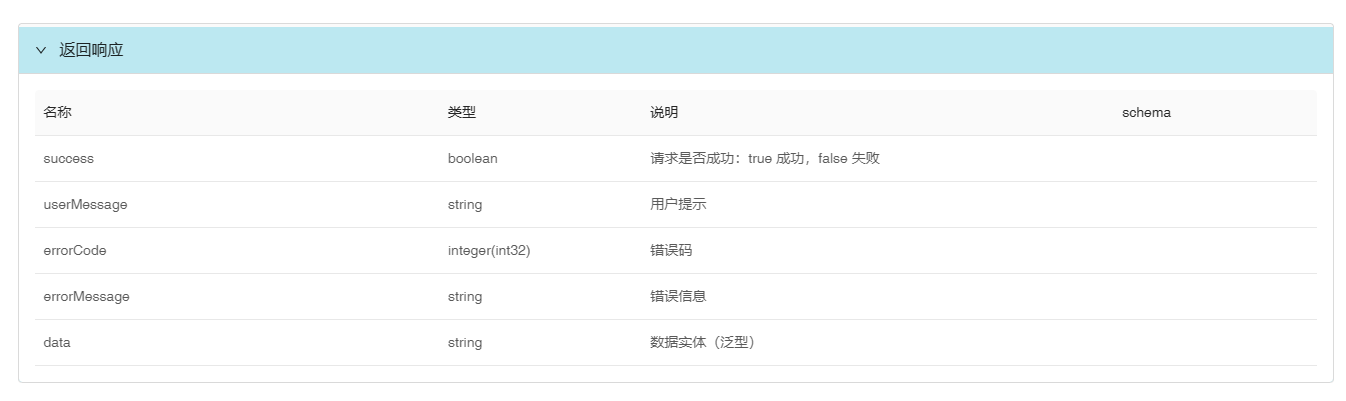
代码
package com.example.core.model; import io.swagger.v3.oas.annotations.media.Schema; import lombok.*; /** * 返回响应,统一封装实体 * * @param数据实体泛型 */ @Getter @ToString @EqualsAndHashCode @AllArgsConstructor(access = AccessLevel.PRIVATE) @Schema(name = "返回响应", description = "返回响应,统一封装实体") public class Result<T> { @Schema(description = "请求是否成功:true 成功,false 失败", example = "true") private Boolean success; @Schema(description = "用户提示", example = "操作成功!") private String userMessage; /** * 错误码
* 调用成功时,为 null。
* 示例:10001 */ @Schema(description = "错误码") private Integer errorCode; /** * 错误信息
* 调用成功时,为 null。
* 示例:"验证码无效" */ @Schema(description = "错误信息") private String errorMessage; /** * 数据实体(泛型)
* 当接口没有返回数据时,为 null。 */ @Schema(description = "数据实体(泛型)") private T data; public static <T> Result<T> success() { return success(null); } public static <T> Result<T> success(T data) { return new Result<>(true, "操作成功!", null, null, data); } public static <T> Result<T> fail(String userMessage, Integer errorCode, String errorMessage) { return new Result<>(false, userMessage, errorCode, errorMessage, null); } }- 1
- 2
- 3
- 4
- 5
- 6
- 7
- 8
- 9
- 10
- 11
- 12
- 13
- 14
- 15
- 16
- 17
- 18
- 19
- 20
- 21
- 22
- 23
- 24
- 25
- 26
- 27
- 28
- 29
- 30
- 31
- 32
- 33
- 34
- 35
- 36
- 37
- 38
- 39
- 40
- 41
- 42
- 43
- 44
- 45
- 46
- 47
- 48
- 49
- 50
- 51
- 52
- 53
- 54
- 55
- 56
- 57
- 58
- 59
- 60
- 61
- 62
- 63
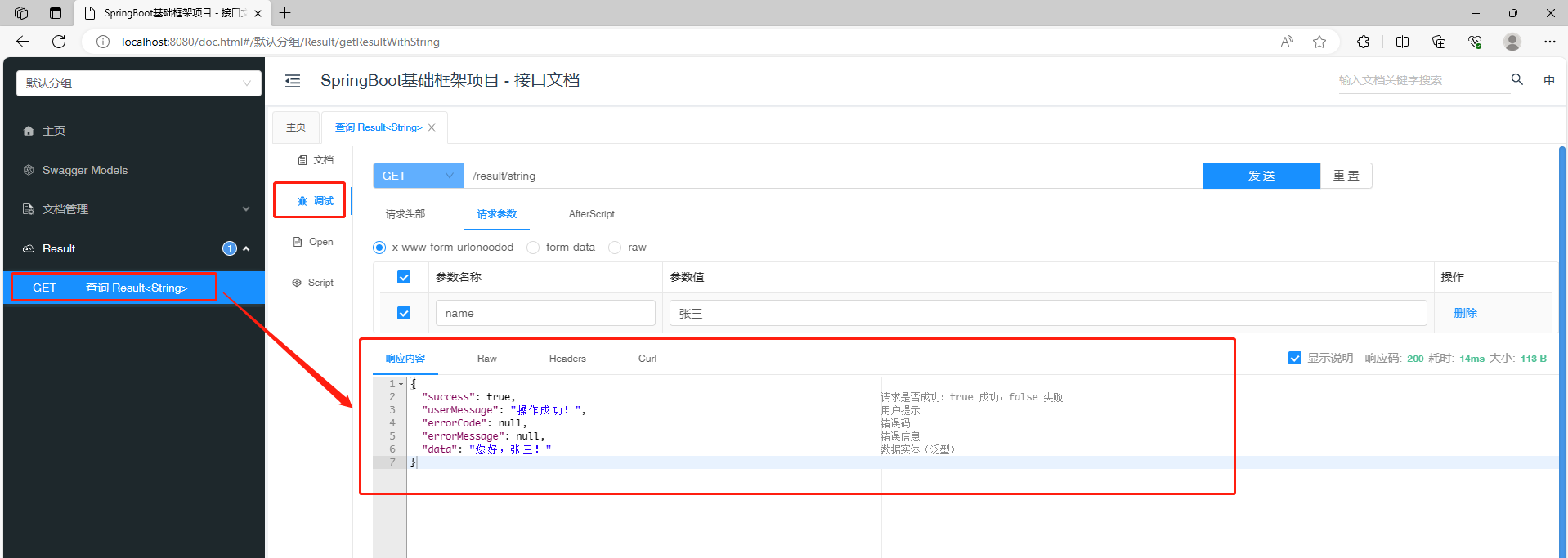
接口测试
代码
package com.example.web; import com.example.core.model.Result; import io.swagger.v3.oas.annotations.Operation; import io.swagger.v3.oas.annotations.Parameter; import io.swagger.v3.oas.annotations.tags.Tag; import org.springframework.lang.Nullable; import org.springframework.web.bind.annotation.GetMapping; import org.springframework.web.bind.annotation.RequestMapping; import org.springframework.web.bind.annotation.RestController; @RestController @RequestMapping("result") @Tag(name = "Result") public class ResultController { @Operation(summary = "查询 Result" ) @Parameter(name = "name", description = "姓名") @GetMapping("/string") public Result<String> getResultWithString(@Nullable String name) { String text = "您好," + name + "!"; return Result.success(text); } }- 1
- 2
- 3
- 4
- 5
- 6
- 7
- 8
- 9
- 10
- 11
- 12
- 13
- 14
- 15
- 16
- 17
- 18
- 19
- 20
- 21
- 22
- 23
- 24
- 25
- 26
- 27
接口文档效果
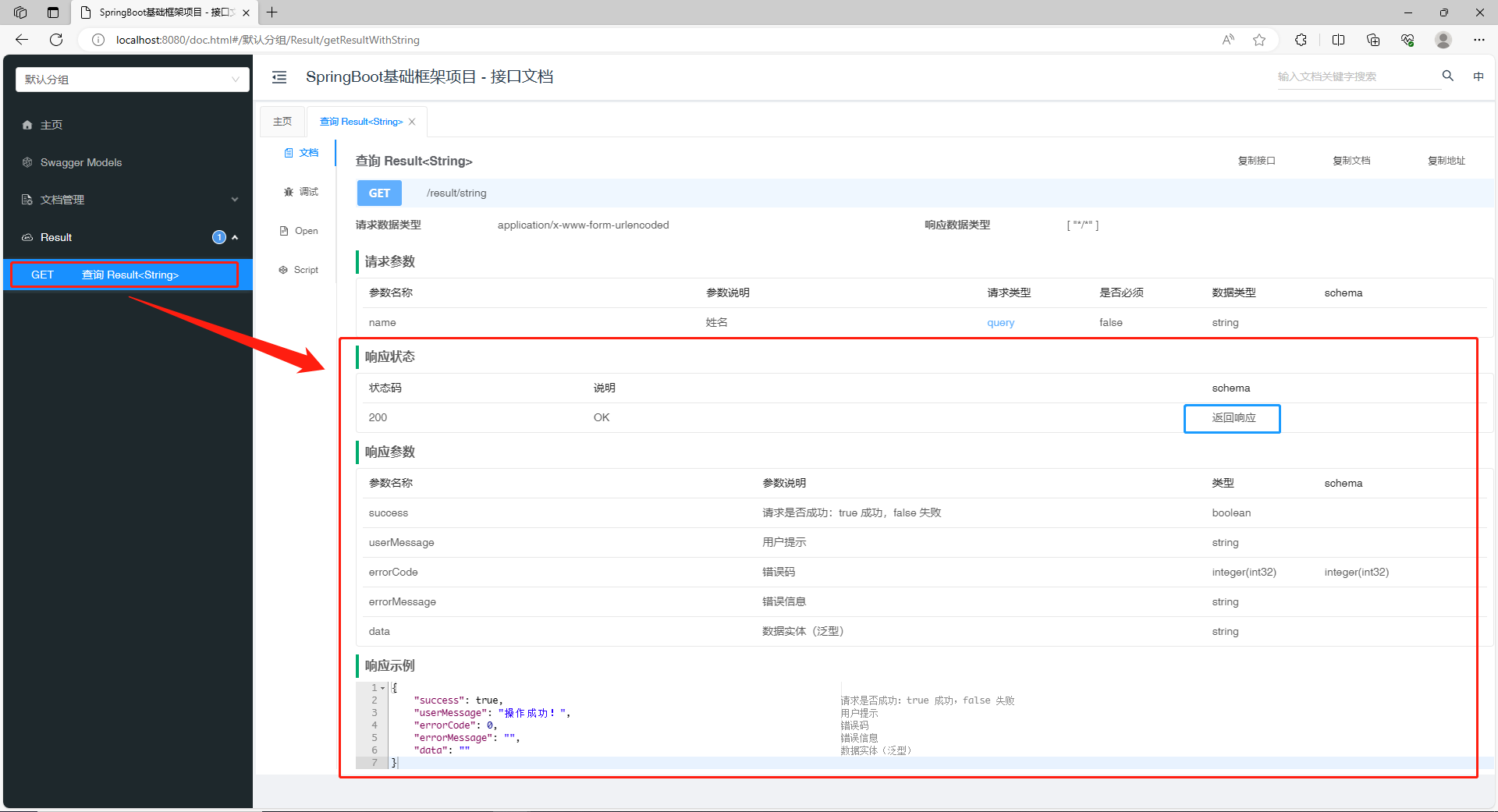
接口调用效果
-
相关阅读:
AR人脸美颜特效解决方案,打造全方位美颜美妆新时代
基于android的 rk3399 同时支持多个USB摄像头
在 Java 中解析 Apache 访问日志
go语法基础二(结构体,协程,锁,xml,io)
网络通信深入解析:探索TCP/IP模型
深入解析PHP函数
Pytorch中的梯度知识总结
【uniapp】Dcloud的uni手机号一键登录,具体实现及踩过的坑,调用uniCloud.getPhoneNumber(),uni.login()等
Hadoop:模板虚拟机的创建
@Accessors 注解作用
- 原文地址:https://blog.csdn.net/sgx1825192/article/details/132895034
