-
Java-day14(多线程)
多线程
0.基本概念
程序:为完成特定任务,用某种编程语言编写的一组指令的集合(
静态)进程:程序的一次执行过程,或正在执行的一个程序(
动态过程)线程:程序内部的一条执行路径,若某个程序支持同一时间执行多个线程,即支持多线程
1.多线程的创建和使用
继承Thread类创建多线程
- 一个线程只能执行一次
start() - 不能通过
Thread类的run方法去启动一个线程
例:
package thead; //1.创建继承于Thread的子类 class SubThread extends Thread{ //2.重写Thread类的run方法,方法内实现此子类线程要完成的功能 public void run() { for(int i = 1;i <= 100;i++) { System.out.println(Thread.currentThread().getName() + ":" + i); } } } public class test1 { public static void main(String[] args) { //4.创建子类对象 SubThread s = new SubThread(); //5.调用start()方法,启动线程;再调用相应的run方法 s.start(); //主线程执行 for(int i = 1;i <= 100;i++) { System.out.println(Thread.currentThread().getName() + ":" + i); } } } 实现Runnable接口创建多线程 package thead; //创建多线程的方式二:通过实现的方式 //1.创建实现Runnable接口的类 class PrintNum implements Runnable{ //2.重写run的方法 public void run() { for(int i = 1;i <= 100;i++) { System.out.println(Thread.currentThread().getName() + ":" + i); } } } public class test4 { public static void main(String[] args) { //3.创建一个Runnable接口的实现类的对象 PrintNum p = new PrintNum(); //4.将此对象作为形参传递给Thread类的构造器中 Thread t1 = new Thread(p);//想启动多线程,必须调用start() t1.start(); Thread t2 = new Thread(p); t2.start(); } }- 1
- 2
- 3
- 4
- 5
- 6
- 7
- 8
- 9
- 10
- 11
- 12
- 13
- 14
- 15
- 16
- 17
- 18
- 19
- 20
- 21
- 22
- 23
- 24
- 25
- 26
- 27
- 28
- 29
- 30
- 31
- 32
- 33
- 34
- 35
- 36
- 37
- 38
- 39
- 40
- 41
- 42
- 43
- 44
- 45
- 46
- 47
- 48
- 49
- 50
- 51
- 52
- 53
- 54
- 55
继承Thread类与实现Runnable接口的区别
- 1.都继承
了Runnable接口(Thread类实现Runnable接口) - 2.实现的方式优于继承的方式(避免Java单线程的局限性;如果多个线程要操作同一份资源(或数据),更合适使用实现的方式)
案例:模拟火车站售票,开启三个窗口,总票数100张
继承
package project; //模拟火车站售票,开启三个窗口,总票数100张 class Window extends Thread{ static int ticket = 100; //总票数 public void run() { while(true) { if(ticket > 0) { System.out.println(Thread.currentThread().getName() + "售票口:票号为:" + ticket--); }else { break; } } } } public class test1 { public static void main(String[] args) { Window w1 = new Window(); Window w2 = new Window(); Window w3 = new Window(); w1.setName("1号"); w2.setName("2号"); w3.setName("3号"); w1.start(); w2.start(); w3.start(); } }- 1
- 2
- 3
- 4
- 5
- 6
- 7
- 8
- 9
- 10
- 11
- 12
- 13
- 14
- 15
- 16
- 17
- 18
- 19
- 20
- 21
- 22
- 23
- 24
- 25
- 26
- 27
- 28
- 29
- 30
- 31
实现
package project; //模拟火车站售票,开启三个窗口,总票数100张 class Window1 implements Runnable{ int ticket = 100; //总票数 public void run() { while(true) { if(ticket > 0) { System.out.println(Thread.currentThread().getName() + "售票口:票号为:" + ticket--); }else { break; } } } } public class test2 { public static void main(String[] args) { Window1 w = new Window1(); Thread t1 = new Thread(w); Thread t2 = new Thread(w); Thread t3 = new Thread(w); t1.setName("1号"); t2.setName("2号"); t3.setName("3号"); t1.start(); t2.start(); t3.start(); } }- 1
- 2
- 3
- 4
- 5
- 6
- 7
- 8
- 9
- 10
- 11
- 12
- 13
- 14
- 15
- 16
- 17
- 18
- 19
- 20
- 21
- 22
- 23
- 24
- 25
- 26
- 27
- 28
- 29
- 30
- 31
- 32
多线程的优点
- 1.提高应用程序的响应,对图形化界面更有意义,可增强用户体验
- 2.提供计算机CPU利用率
- 3.改善程序结构,将复杂的进程分为多个线程,独立运行,利于理解和修改
Thread类的主要方法与配置线程优先级


package thead; /* * 线程的主要方法 * 1.start():启动线程并执行相应的run()方法 * 2.run():子线程要执行的代码放入run()方法中 * 3.currentThread():静态的,调取当前的线程 * 4.getName():获取线程的名字 * 5.setName():设置线程名 * 6.yield():调用此方法的线程释放当前CPU的执行权 * 7.join():在A线程中调用B线程的join()方法,当执行到此方法时,A停止,B执行,等B全部执行完后,A再继续执行剩下的任务。 * 8.isAlive():检测线程是否存活 * 9.sleep(long l):显式的让当前线程睡眠l毫秒 * 10.线程通信:wait() notify() notifyAll()后续介绍 * 11.线程优先级(默认5,最大10,最小1):只是提高了抢到的CPU执行权的概率 * getPriority():返回线程的优先级 * setPriority(int newPriority):改变线程的优先级 */ class SubThread1 extends Thread{ public void run() { for(int i = 1;i <= 100;i++) { // try { // Thread.currentThread().sleep(1000); // } catch (InterruptedException e) { // // TODO Auto-generated catch block // e.printStackTrace(); // } System.out.println(Thread.currentThread().getName() + ":" + Thread.currentThread().getPriority() + ":" + i); } } } public class test2 { public static void main(String[] args) { SubThread1 s1 = new SubThread1(); s1.setName("线程1号"); s1.setPriority(Thread.MAX_PRIORITY); s1.start(); Thread.currentThread().setName("======主线程====="); for(int i = 1;i <= 100;i++) { System.out.println(Thread.currentThread().getName() + ":" + Thread.currentThread().getPriority() + ":" + i); // if(i % 10 == 0) { // Thread.currentThread().yield(); // } // if(i == 10) { // try { // s1.join(); // } catch (InterruptedException e) { // e.printStackTrace(); // } // } } System.out.println(s1.isAlive()); } }- 1
- 2
- 3
- 4
- 5
- 6
- 7
- 8
- 9
- 10
- 11
- 12
- 13
- 14
- 15
- 16
- 17
- 18
- 19
- 20
- 21
- 22
- 23
- 24
- 25
- 26
- 27
- 28
- 29
- 30
- 31
- 32
- 33
- 34
- 35
- 36
- 37
- 38
- 39
- 40
- 41
- 42
- 43
- 44
- 45
- 46
- 47
- 48
- 49
- 50
- 51
- 52
- 53
- 54
- 55
- 56
- 57
- 58
- 59
练习

package thead; class SuThread1 extends Thread{ //1-100奇数 public void run() { for(int i = 1;i <= 100;i = i + 2) { System.out.println(Thread.currentThread().getName() + " : " + i); } } } class SuThread2 extends Thread{ //1-100偶数 public void run() { for(int i = 2;i <= 100;i = i + 2) { System.out.println(Thread.currentThread().getName()+ " : " + i); } } } class test3{ public static void main(String[] args) { SuThread1 st1 = new SuThread1(); SuThread2 st2 = new SuThread2(); st1.setName("子线程1号"); st1.start(); st2.setName("子线程2号"); st2.start(); // //继承Thread类的匿名类的对象 // new Thread() { // public void run() { // for(int i = 2;i <= 100;i = i + 2) { // System.out.println(Thread.currentThread().getName()+ " : " + i); // } // } // }.start(); } }- 1
- 2
- 3
- 4
- 5
- 6
- 7
- 8
- 9
- 10
- 11
- 12
- 13
- 14
- 15
- 16
- 17
- 18
- 19
- 20
- 21
- 22
- 23
- 24
- 25
- 26
- 27
- 28
- 29
- 30
- 31
- 32
- 33
- 34
- 35
- 36
- 37
- 38
- 39
2.线程的生命周期
生命周期中通常要经历的5种状态
新建:当一个Thread类或子类的对象被声明并创建时,新生的线程对象处于新建状态
就绪:处于新建状态的线程被start()后,将进入线程队列等待CPU时间片,此时它已具备运行的条件
运行:当就绪的线程被调度并获得处理器资源时,便进入运行状态,run()方法定义了线程的操作和功能
阻塞:在某种特殊情况下,被人为挂起或执行输入输出操作时,让出CPU并临时中止自己的执行,进入阻塞状态
死亡:线程完成全部工作或线程被提前强制中止

3.线程的同步(重点)
在上面列举的火车售票案例中存在售错票,重票等的情况,存在线程安全问题
原因:由于线程在操作共享数据过程中,未执行完毕的情况下,另外的线程参与进来,导致共享的数据存在安全问题
解决:必须让一个线程操作共享数据完毕以后,其他线程才有机会参与共享数据的操作
Java利用线程同步来解决线程安全问题方法一:同步代码块
synchronized(同步监视器){ //需要同步的代码(即为操作共享数据的代码); }- 1
- 2
- 3
- 1.同步监视器:由一个任意类的对象来充当。哪个线程获此监视器,谁就执行括号中被同步的代码。俗称:锁
- 2.共享数据:多线程共同操作的同一个数据(变量)
- 要求:所有的线程必须共用同一把锁
例:
package project; //模拟火车站售票,开启三个窗口,总票数100张 class Window2 implements Runnable{ int ticket = 100; //总票数(共享数据) Object obj = new Object(); public void run() { while(true) { synchronized(obj){ if(ticket > 0) { try { Thread.currentThread().sleep(10); } catch (InterruptedException e) { // TODO Auto-generated catch block e.printStackTrace(); } System.out.println(Thread.currentThread().getName() + "售票口:票号为:" + ticket--); }else { break; } } } } } public class test4 { public static void main(String[] args) { Window2 w = new Window2(); Thread t1 = new Thread(w); Thread t2 = new Thread(w); Thread t3 = new Thread(w); t1.setName("1号"); t2.setName("2号"); t3.setName("3号"); t1.start(); t2.start(); t3.start(); } }- 1
- 2
- 3
- 4
- 5
- 6
- 7
- 8
- 9
- 10
- 11
- 12
- 13
- 14
- 15
- 16
- 17
- 18
- 19
- 20
- 21
- 22
- 23
- 24
- 25
- 26
- 27
- 28
- 29
- 30
- 31
- 32
- 33
- 34
- 35
- 36
- 37
- 38
- 39
- 40
注:在实现方式中可以用this表示当前对象(同步监视器),若在继承的方式中慎用this
方法二:同步方法
public synchronized void show() { //需要同步的代码(即为操作共享数据的代码); }- 1
- 2
- 3
例:
package project; class Window3 implements Runnable{ int ticket = 100; public void run() { while(true) { show(); } } public synchronized void show() { if(ticket > 0) { try { Thread.currentThread().sleep(10); } catch (InterruptedException e) { // TODO Auto-generated catch block e.printStackTrace(); } System.out.println(Thread.currentThread().getName() + "售票口:票号为:" + ticket--); } } } public class test3 { public static void main(String[] args) { Window3 w = new Window3(); Thread t1 = new Thread(w); Thread t2 = new Thread(w); Thread t3 = new Thread(w); t1.setName("1号"); t2.setName("2号"); t3.setName("3号"); t1.start(); t2.start(); t3.start(); } }- 1
- 2
- 3
- 4
- 5
- 6
- 7
- 8
- 9
- 10
- 11
- 12
- 13
- 14
- 15
- 16
- 17
- 18
- 19
- 20
- 21
- 22
- 23
- 24
- 25
- 26
- 27
- 28
- 29
- 30
- 31
- 32
- 33
- 34
- 35
- 36
- 37
互斥锁

单例之懒汉式的线程安全
例:
package thead; /* 单例之懒汉式的线程安全:使用同步机制 */ //对于静态方法而言,使用当前类本身充当锁 class Singletion{ private Singletion() { } private static Singletion instance = null; public static Singletion getInstance() { if(instance == null) { synchronized(Singletion.class) { if(instance == null) { instance = new Singletion(); } } } return instance; } } public class test5 { public static void main(String[] args) { // TODO Auto-generated method stub Singletion s1 = Singletion.getInstance(); Singletion s2 = Singletion.getInstance(); System.out.println(s1 == s2); } }- 1
- 2
- 3
- 4
- 5
- 6
- 7
- 8
- 9
- 10
- 11
- 12
- 13
- 14
- 15
- 16
- 17
- 18
- 19
- 20
- 21
- 22
- 23
- 24
- 25
- 26
- 27
- 28
- 线程同步的弊端:同一时间只能有一个线程访问共享数据,效率变低


练习

package project; //线程安全练习 //存在多线程,存在共享数据,需同步 class Account{ double balance;//余额 public Account() { } //存取 public synchronized void deposit(double amt) { balance += amt; try { Thread.currentThread().sleep(10); } catch (InterruptedException e) { e.printStackTrace(); } System.out.println(Thread.currentThread().getName() + ":" + balance ); } } class Customer extends Thread{ Account account; public Customer(Account account) { this.account = account; } public void run() { for(int i = 0;i < 3;i++) { account.deposit(1000); } } } public class test5{ public static void main(String[] args) { Account acct = new Account(); Customer c1 = new Customer(acct); Customer c2 = new Customer(acct); c1.setName("甲"); c2.setName("乙"); c1.start(); c2.start(); } }- 1
- 2
- 3
- 4
- 5
- 6
- 7
- 8
- 9
- 10
- 11
- 12
- 13
- 14
- 15
- 16
- 17
- 18
- 19
- 20
- 21
- 22
- 23
- 24
- 25
- 26
- 27
- 28
- 29
- 30
- 31
- 32
- 33
- 34
- 35
- 36
- 37
- 38
- 39
- 40
- 41
- 42
- 43
- 44
- 45
- 46
- 47
线程死锁
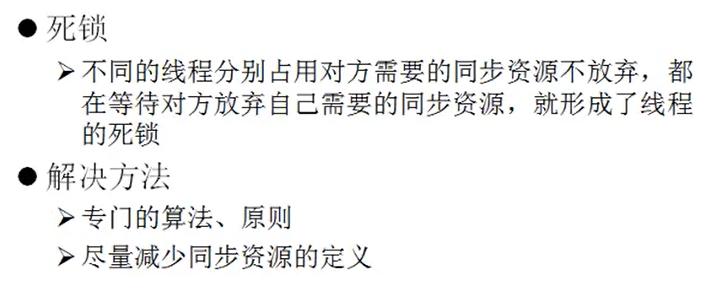
例:package thead; /* 死锁:处理线程同步时容易出现 */ //一个线程抓住一半锁,另一个线程抓住一半锁,互不相让 public class test6 { static StringBuffer sb1 = new StringBuffer(); static StringBuffer sb2 = new StringBuffer(); public static void main(String[] args) { new Thread() { public void run() { synchronized(sb1) { try { Thread.currentThread().sleep(10); }catch(InterruptedException e) { e.printStackTrace(); } } sb1.append("A"); synchronized(sb2){ sb2.append("B"); System.out.println(sb1); System.out.println(sb2); } } }.start(); new Thread() { public void run() { synchronized(sb2) { try { Thread.currentThread().sleep(10); }catch(InterruptedException e) { e.printStackTrace(); } } sb1.append("C"); synchronized(sb1){ sb2.append("D"); System.out.println(sb1); System.out.println(sb2); } } }.start(); } }- 1
- 2
- 3
- 4
- 5
- 6
- 7
- 8
- 9
- 10
- 11
- 12
- 13
- 14
- 15
- 16
- 17
- 18
- 19
- 20
- 21
- 22
- 23
- 24
- 25
- 26
- 27
- 28
- 29
- 30
- 31
- 32
- 33
- 34
- 35
- 36
- 37
- 38
- 39
- 40
- 41
- 42
- 43
- 44
- 45
- 46
4.线程的通信
wait()
让当前线程挂起并放弃CPU,同步资源,使用别的线程可访问并修改共享资源,而当前线程排队等候再次对资源的访问notify()
唤醒正在排队等待同步资源的线程中优先级最高者结束等待ontifyAll()
唤醒正在排队等待资源的所有线程结束等待以上三个方法(
Java.lang.Object提供)只有在synchronized()方法或synchronized代码块中才能使用,否则会报异常例1:
package thead; /* 两个线程交替打印1~100的数 */ //线程通信:wait(),让当前线程停止;notify(),notifyAll()唤醒wait()停止的1个或多个线程 class PrintfNum implements Runnable{ int num = 1; public void run() { while(true) { synchronized (this) {//解决线程安全问题 notify(); if (num <= 100) { try { Thread.currentThread().sleep(10); } catch (InterruptedException e) { // TODO Auto-generated catch block e.printStackTrace(); } //使隐藏的线程安全问题暴露处理 System.out.println(Thread.currentThread().getName() + ":" + num); num += 1; } else { break; } try { wait(); } catch (InterruptedException e) { e.printStackTrace(); } } } } } public class test7 { public static void main(String[] args) { PrintfNum p = new PrintfNum(); Thread t1 = new Thread(p); Thread t2 = new Thread(p); t1.setName("A"); t2.setName("B"); t1.start(); t2.start(); } }- 1
- 2
- 3
- 4
- 5
- 6
- 7
- 8
- 9
- 10
- 11
- 12
- 13
- 14
- 15
- 16
- 17
- 18
- 19
- 20
- 21
- 22
- 23
- 24
- 25
- 26
- 27
- 28
- 29
- 30
- 31
- 32
- 33
- 34
- 35
- 36
- 37
- 38
- 39
- 40
- 41
- 42
- 43
- 44
- 45
- 46
- 47
生产者/消费者问题
生产者(Productor)将产品交给店员(Clerk),而消费者(Customer)从店员处取走。店员一次只能持有一定数量的产品(如:20).如果生产者试图多生产会被叫停,如果店中有空位才会通知生产者生产;如果店中没有产品,店员会告诉消费者等一下,有产品后在通知消费者取走产品。
注:可能会出现的问题:-
1.生产者比消费者快,消费者会漏掉一些数据没有取到
-
2.消费者比生产者快,消费者会取到相同的数据
package thead; //生产者/消费者问题 //多线程:生产者,消费者;共享数据:产品数量;存在数据通信 //店员 class Clerk{ int product; public synchronized void addProduct() { if(product < 20) { product += 1; System.out.println(Thread.currentThread().getName() + ":生产到第" + product + "产品了!" ); notify(); }else try { wait(); } catch (InterruptedException e) { // TODO Auto-generated catch block e.printStackTrace(); } } public synchronized void consumProduct() { if(product <= 0) { try { wait(); } catch (InterruptedException e) { // TODO Auto-generated catch block e.printStackTrace(); } }else { System.out.println(Thread.currentThread().getName() + ":消费到第" + product + "产品了!" ); product -= 1; notify(); } } } //生产者 class Producer implements Runnable{ Clerk clerk; public Producer(Clerk clerk) { this.clerk = clerk; } public void run() { System.out.println("生产者开始生产产品"); while(true) { try { Thread.currentThread().sleep(100); } catch (InterruptedException e) { // TODO Auto-generated catch block e.printStackTrace(); } clerk.addProduct(); } } } //消费者 class Customer implements Runnable{ Clerk clerk; public Customer(Clerk clerk) { this.clerk = clerk; } public void run() { System.out.println("消费者开始消费产品"); while(true) { try { Thread.currentThread().sleep(100); } catch (InterruptedException e) { // TODO Auto-generated catch block e.printStackTrace(); } clerk.consumProduct(); } } } public class test8 { public static void main(String[] args) { // TODO Auto-generated method stub Clerk clerk = new Clerk(); Producer producer = new Producer(clerk); Customer customer = new Customer(clerk); Thread t1 = new Thread(producer);//一个生产者线程 Thread t3 = new Thread(producer);//一个生产者线程 Thread t2 = new Thread(customer);//一个生产者线程 t1.setName("生产1号"); t2.setName("消费者"); t3.setName("生产2号"); t1.start(); t2.start(); t3.start(); } }- 1
- 2
- 3
- 4
- 5
- 6
- 7
- 8
- 9
- 10
- 11
- 12
- 13
- 14
- 15
- 16
- 17
- 18
- 19
- 20
- 21
- 22
- 23
- 24
- 25
- 26
- 27
- 28
- 29
- 30
- 31
- 32
- 33
- 34
- 35
- 36
- 37
- 38
- 39
- 40
- 41
- 42
- 43
- 44
- 45
- 46
- 47
- 48
- 49
- 50
- 51
- 52
- 53
- 54
- 55
- 56
- 57
- 58
- 59
- 60
- 61
- 62
- 63
- 64
- 65
- 66
- 67
- 68
- 69
- 70
- 71
- 72
- 73
- 74
- 75
- 76
- 77
- 78
- 79
- 80
- 81
- 82
- 83
- 84
- 85
- 86
- 87
- 88
- 89
- 90
- 91
- 92
- 93
- 94
- 95
- 96
- 97
- 98
- 99
- 100
- 101
练习
在上次练习的基础上,实现交替存款package project; //线程安全练习 //存在多线程,存在共享数据,需同步 //扩展实现交替打印 class Account{ double balance;//余额 public Account() { } //存取 public synchronized void deposit(double amt) { notify(); balance += amt; try { Thread.currentThread().sleep(10); } catch (InterruptedException e) { e.printStackTrace(); } System.out.println(Thread.currentThread().getName() + ":" + balance ); try { wait(); } catch (InterruptedException e) { // TODO Auto-generated catch block e.printStackTrace(); } } } class Customer extends Thread{ Account account; public Customer(Account account) { this.account = account; } public void run() { for(int i = 0;i < 3;i++) { account.deposit(1000); } } } public class test5{ public static void main(String[] args) { Account acct = new Account(); Customer c1 = new Customer(acct); Customer c2 = new Customer(acct); c1.setName("甲"); c2.setName("乙"); c1.start(); c2.start(); } }- 1
- 2
- 3
- 4
- 5
- 6
- 7
- 8
- 9
- 10
- 11
- 12
- 13
- 14
- 15
- 16
- 17
- 18
- 19
- 20
- 21
- 22
- 23
- 24
- 25
- 26
- 27
- 28
- 29
- 30
- 31
- 32
- 33
- 34
- 35
- 36
- 37
- 38
- 39
- 40
- 41
- 42
- 43
- 44
- 45
- 46
- 47
- 48
- 49
- 50
- 51
- 52
- 53
- 54
- 55
- 56
感谢大家的支持,关注,评论,点赞!
参考资料:
尚硅谷宋红康20天搞定Java基础下部 - 一个线程只能执行一次
-
相关阅读:
Snagit 2024:让你的屏幕活动瞬间变得生动有力 mac/win版
[极客大挑战 2019]BuyFlag
Hive面试题系列第五题-Uv累加趋势图问题
【剑指offer系列】64. 翻转单词顺序
轻松学k8s的pod调度
【设计模式】中介者模式
照明用哪种灯比较护眼?推荐专业的护眼照明灯
Go 接口
MIT课程分布式系统学习02——RPC and threads
通过字符设备驱动分步注册方式编写LED驱动,完成设备文件和设备的绑定
- 原文地址:https://blog.csdn.net/weixin_51202460/article/details/132795549
