-
nginx配置-gzip
1、想看nginx配置的时候,发现没有nginx命令,是没有配置环境变量。
cd etc/
vim profile
加入
unset i
unset -f pathmunge
PATH=/usr/local/nginx/sbin:$JAVA_HOME/bin:$PATH //这一行
export JAVA_HOME=/usr/local/soft/jdk8
export PATH=$JAVA_HOME/bin:$PATH2、在http的里加入
gzip_static on;
nginx -v
报错:
nginx: [emerg] unknown directive "gzip_static" in /usr/local/nginx/conf/ngin.....
解决方案:
cp usr/loca/nginx/sbin usr/loca/sbin/nginx.bak //备份
./configure --prefix=/usr/local/nginx --with-http_gzip_static_module //添加模块
make
nginx -s reload //重载【不是重启】
注意!!!有些教程说了还要 ·make install· 如果已经安装了其他的模块,再重启就会覆盖掉原先的模块,先查看已经安装了哪些模块,然后在添加模块的时候把需要的模块都加上
nginx -V

3、验证
通过网页进入查看前端资源,F12查看响应
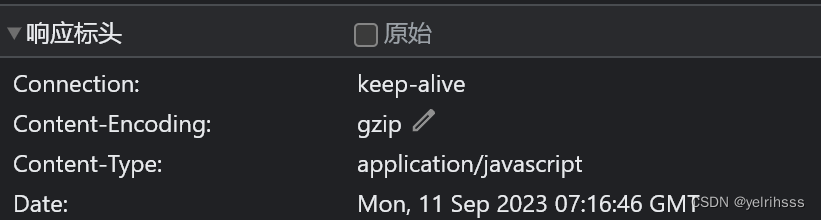
服务器端查看
curl -I -H "Accept-Encoding: gzip" http://127.0.0.1:9300
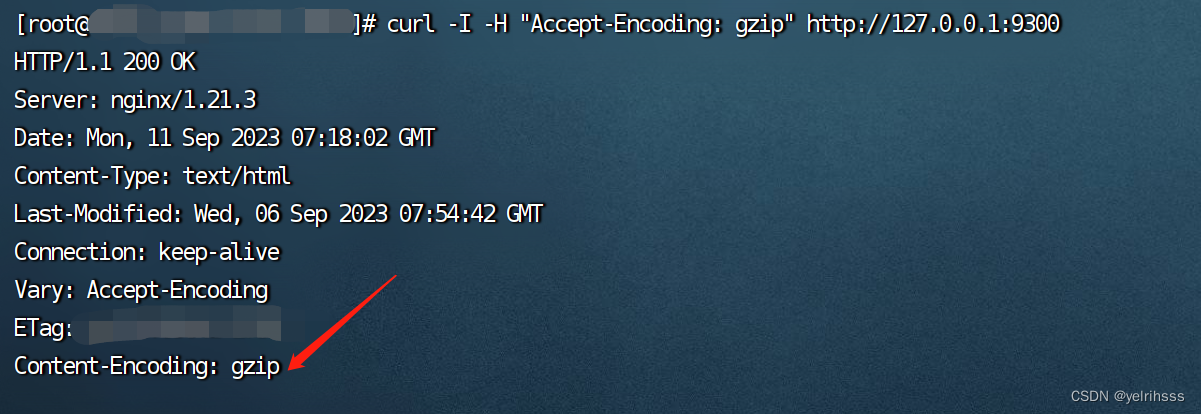
4、发现通过域名访问后,注解没有生效
需要在location里,添加
gzip_static on;
proxy_http_version 1.1;
proxy_set_header Accept-Encoding "gzip,deflate,br"; //需要哪些写哪些示例:
- worker_processes 1;
- events {
- worker_connections 1024;
- }
- http {
- include mime.types;
- default_type application/octet-stream;
- sendfile on;
- keepalive_timeout 65;
- client_max_body_size 100M;
- gzip_static on;
- upstream xxxxxxxx{
- server 127.0.0.1:8080;
- }
- server {
- listen 80;
- server_name name;
- rewrite ^(.*) https://$server_name$1 permanent;
- }
- server {
- listen 888;
- server_name server-name;
- location / {
- gzip_static on;
- proxy_http_version 1.1;
- proxy_set_header Accept-Encoding "gzip,deflate,br";
- proxy_pass http:xxxxxxxx;
- proxy_set_header HOST $host;
- proxy_set_header X-Forwarded-Proto $scheme;
- proxy_set_header X-Real-IP $remote_addr;
- proxy_set_header X-Forwarded-For $proxy_add_x_forwarded_for;
- }
- }
- }
-
相关阅读:
rust 获取命令行参数
spring boot项目一次性能测试的总结
FPGA纯vhdl实现XGMII接口10G万兆网UDP协议DMA传输 配合10G Ethernet PCS/PMA使用 提供工程源码和技术支持
Tomcat打包部署spring boot项目
OneDrive打不开了,怎么办?使用管理员身份也无效,分享解决办法如下
Linux系统编程学习 NO.9——git、gdb
Unity Raycast开启了新的性能时代
【Linux】IPC-信号
SQLite SQL教程之如何实现contains函数,left join 判断一个字符串包含另外一个(教程含源码)
『忘了再学』Shell基础 — 7、Bash基本功能(多命令顺序执行)
- 原文地址:https://blog.csdn.net/m0_63297646/article/details/132808010