-
43.MQ—RabbitMQ
目录
(3.4.2)基础消息队列(RabbitTemplate模板实现)。
一、MQ—RabbitMQ。
(1)同步调用与异步调用。
(1.1)同步调用。

(1.2)异步调用。
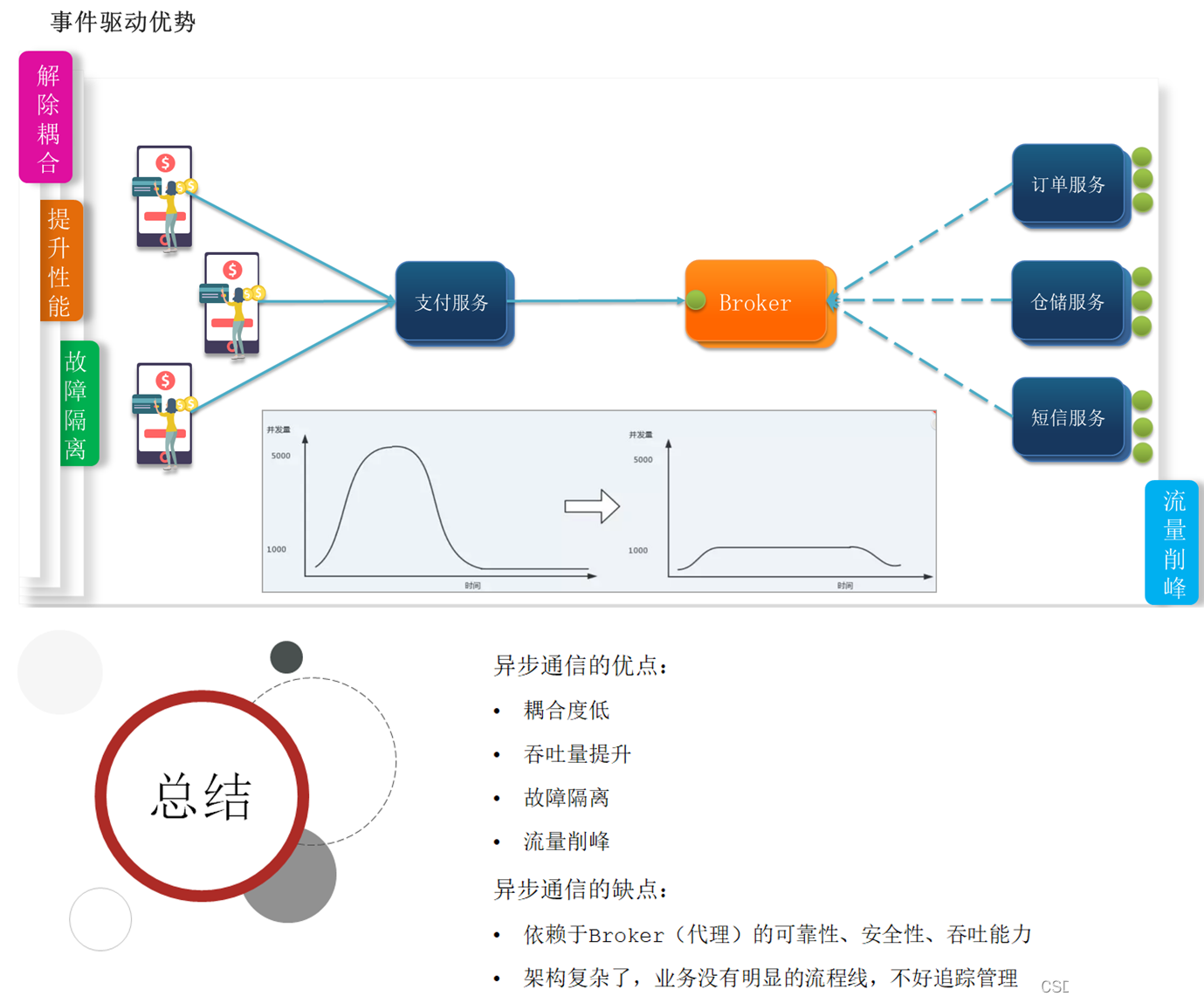
(2)MQ之间的区别。

(3)RabbitMQ学习。
(3.1)docker下载rabbitmq容器,并启动。
下载容器:
docker pull rabbitmq:3-management启动容器:
- docker run \
- -e RABBITMQ_DEFAULT_USER=itcast \
- -e RABBITMQ_DEFAULT_PASS=123321 \
- --name mq \
- --hostname mq1 \
- -p 15672:15672 \
- -p 5672:5672 \
- -d \
- rabbitmq:3-management
浏览器访问:

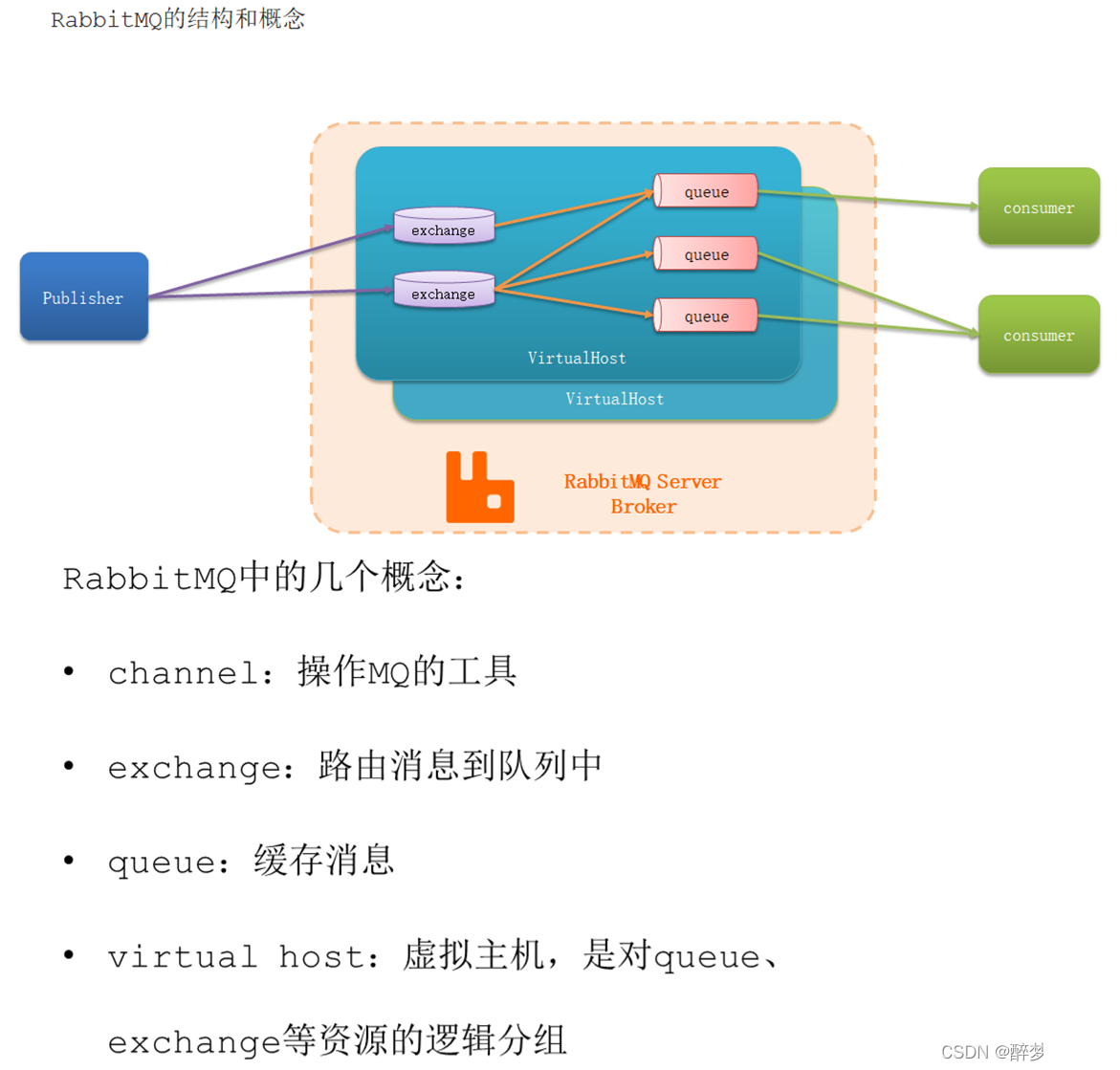
(3.2)RabbitMQ中的几个概念。
(3.3)常见消息模型。
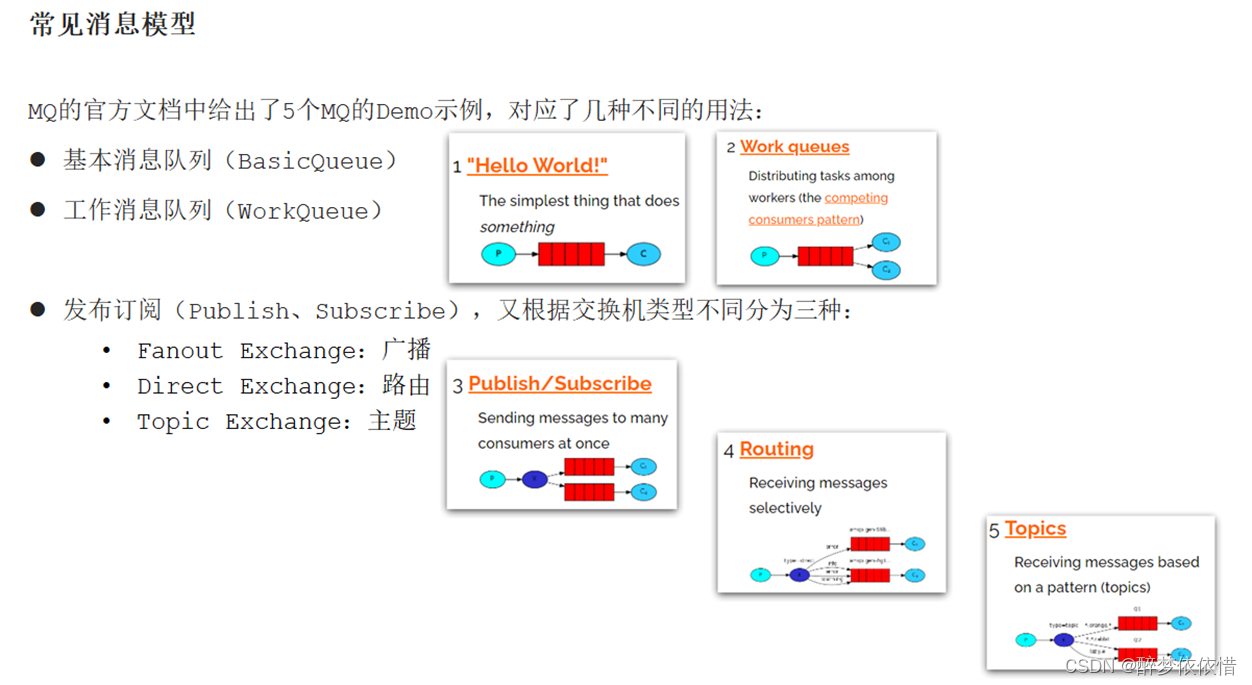
(3.4)常见消息模型学习。
提示:AMQP是协议,SpringAMQP是基于AMQP实现的一套API。

(3.4.1)基础消息队列(代码实现)。
消息发送:
- public class PublisherTest {
- @Test
- public void testSendMessage() throws IOException, TimeoutException {
- // 1.建立连接
- ConnectionFactory factory = new ConnectionFactory();
- // 1.1.设置连接参数,分别是:主机名、端口号、vhost、用户名、密码
- factory.setHost("192.168.150.101");
- factory.setPort(5672);
- factory.setVirtualHost("/");
- factory.setUsername("itcast");
- factory.setPassword("123321");
- // 1.2.建立连接
- Connection connection = factory.newConnection();
- // 2.创建通道Channel
- Channel channel = connection.createChannel();
- // 3.创建队列
- String queueName = "simple.queue";
- channel.queueDeclare(queueName, false, false, false, null);
- // 4.发送消息
- String message = "hello, rabbitmq!";
- channel.basicPublish("", queueName, null, message.getBytes());
- System.out.println("发送消息成功:【" + message + "】");
- // 5.关闭通道和连接
- channel.close();
- connection.close();
- }
- }
消息接收:
- public class ConsumerTest {
- public static void main(String[] args) throws IOException, TimeoutException {
- // 1.建立连接
- ConnectionFactory factory = new ConnectionFactory();
- // 1.1.设置连接参数,分别是:主机名、端口号、vhost、用户名、密码
- factory.setHost("192.168.150.101");
- factory.setPort(5672);
- factory.setVirtualHost("/");
- factory.setUsername("itcast");
- factory.setPassword("123321");
- // 1.2.建立连接
- Connection connection = factory.newConnection();
- // 2.创建通道Channel
- Channel channel = connection.createChannel()
- // 3.创建队列
- String queueName = "simple.queue";
- channel.queueDeclare(queueName, false, false, false, null);
- // 4.订阅消息
- channel.basicConsume(queueName, true, new DefaultConsumer(channel){
- @Override
- public void handleDelivery(String consumerTag, Envelope envelope,
- AMQP.BasicProperties properties, byte[] body) throws IOException {
- // 5.处理消息
- String message = new String(body);
- System.out.println("接收到消息:【" + message + "】");
- }
- });
- System.out.println("等待接收消息。。。。");
- }
- }

(3.4.2)基础消息队列(RabbitTemplate模板实现)。

(3.4.3)work Queue工作队列。
与simple的区别:多了一个设置消费预存限制。

(3.4.4)发布订阅-Fanout Exchange。
提示:绑定键使用空字符串,就可以完成广播(发给所有绑定该交换机的队列)。

(3.4.5)发布订阅-DirectExchange。
提示:需要提供绑定键(路由键),根据 交换机+绑定键 映射。

(3.4.6)发布订阅-TopicExchange。

(3.5)消息转换器。

-
相关阅读:
IO子系统(一) — 块设备驱动程序
低代码平台受欢迎度排行榜:揭秘市场热门之选
C++笔记 05
C#操作GridView控件绑定数据实例详解
ESP8266--Arduino开发(PWM)
操作系统文件管理-----索引分配
kubelets 1.20 证书更新
一项调查研究中,测量了50个研究生的身高和体重,同时记录了他们的饮食习惯包括在过去的三个月时间内,他们吃了多少次垃圾食品,数据在‘weight.txt‘中。
C语言RPG迷宫游戏
中科大计网学习记录笔记(十六):面向连接的传输:TCP
- 原文地址:https://blog.csdn.net/khmff/article/details/132702896
