-
博客系统(升级(Spring))(四)(完)基本功能(阅读,修改,添加,删除文章)(附带项目)
博客系统
博客系统是干什么的?
CSDN就是一个典型的博客系统。而我在这里就是通过模拟实现一个博客系统,这是一个较为简单的博客系统,但是主要功能一个不缺,不过就是 UI 有些 low,我学习前端是为了写后端更加顺手。不至于前后端完全分离,但是有个问题设计的 web 页面不是很好看。首先我将整体的业务流程展现
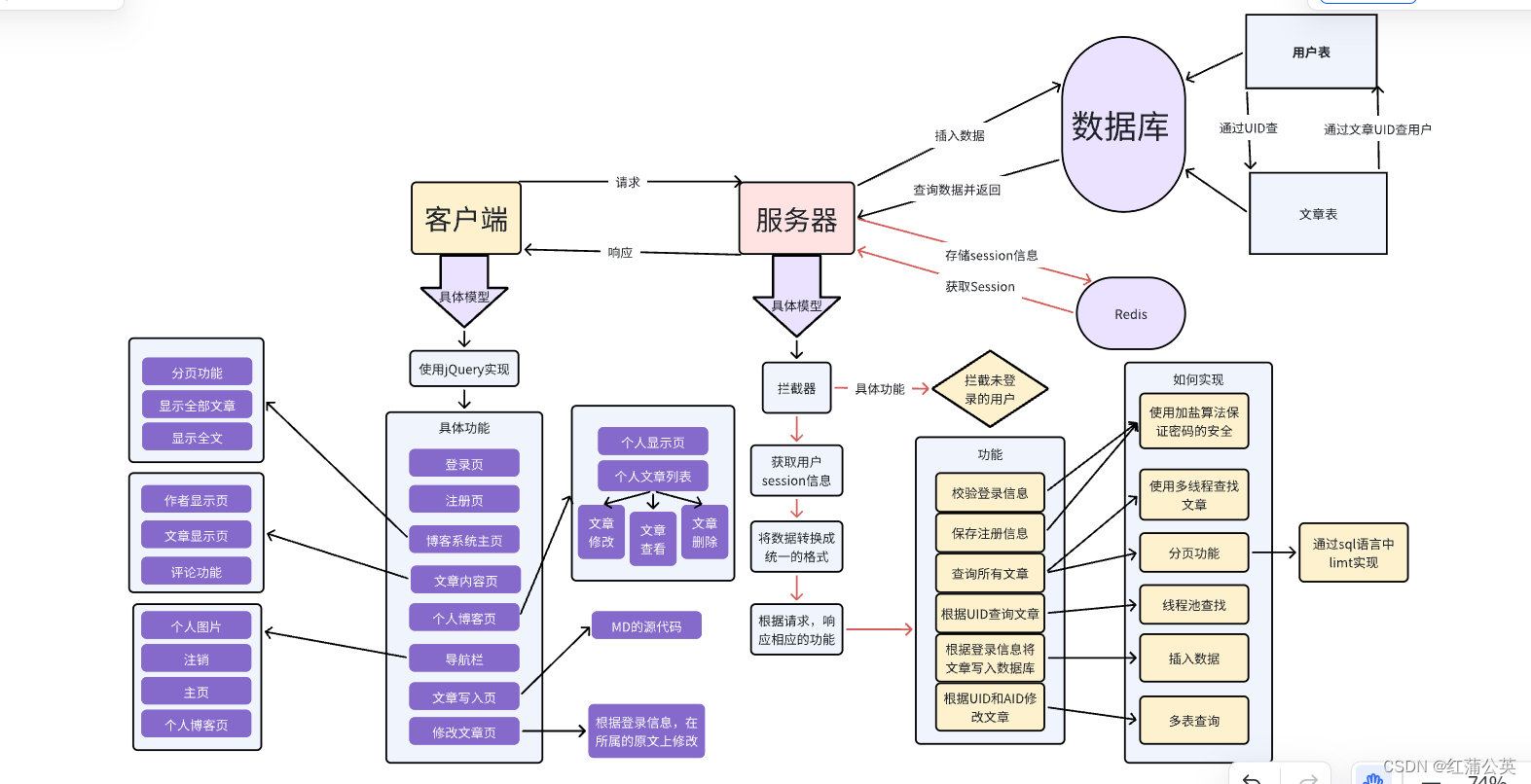
我们继博客系统(二)继续,编写,到了主页的业务逻辑了接下来的流程是通过,网页端,后端统一数据结构交互的数据结构。
博客主页
前端
DOCTYPE html> <html lang="en"> <head> <meta charset="UTF-8"> <meta http-equiv="X-UA-Compatible" content="IE=edge"> <meta name="viewport" content="width=device-width, initial-scale=1.0"> <title>博客列表title> <link rel="stylesheet" href="css/list.css"> <link rel="stylesheet" href="css/blog_list.css"> <link rel="stylesheet" href="css/conmmon.css">lin> <script src="js/jquery.min.js">script> <style> .nav{ position: fixed; top: 0; left: 0; right: 0; height: 50px; } .container{ padding-top: 80px; height: auto; } .container-right{ width: auto; } .blog-pagnation-wrapper{ height: 40px; margin: 16px 0; text-align: center; } .blog-pagnation-item{ display: inline-block; padding: 8px; border: 1px solid #d0d0d5; color: #333; } .blog-pagnation-item:hover{ background: #4e4eeb; color: #fff; } .blog-pagnation-item.actvie{ background: #4e4eeb; color: #fff; } style> <script src="js/urluitils.js">script> head> <body> <div class="nav"> <img src="img/sleep.jpg" alt=""> <span class="title">我的博客系统span> <span class="spacer">span> <a href="blog_list.html">主页a> <a href="blog_add.html">写博客a> <a href="myblog_list.html">我的博客a> <a href="javascript:logout()">注销a> div> <div class="container"> <div class="container-right" style="width: 100%;"> <div id="artListDiv"> div> <div class="blog-pagnation-wrapper"> <button class="blog-pagnation-item" onclick="doFirst()">首页button> <button class="blog-pagnation-item" onclick="doBefore()">上一页button> <button class="blog-pagnation-item" onclick="doNext()">下一页button> <button class="blog-pagnation-item" onclick="doLast()">末页button> 当前在第<span id="pindex">span>页 共:<span id="psize">span>页 div> div> div> <script> var psize=2; var pindex=1; var totalpage=1;//总页 //初始化数据 function init(){ //得到url中的分页参数 psize=getParamValue("psize"); if(psize==null){ psize=2; } pindex=getParamValue("pindex"); if(pindex==null){ pindex=1; } jQuery("#pindex").html(pindex); //请求后端接口 jQuery.ajax({ url:"/article/getlistbypage", type:"get", data:{ "pindex":pindex, "psize":psize }, success:function(res){ if(res.code==200&&res.data!=null){ var createHtml=""; if(res.data.list!=null&&res.data.list.length>0){ //文章 totalpage =res.data.list.szie; jQuery("#psize").html(totalpage); var artList=res.data.list; for(var i=0;i<artList.length;i++){ var art=artList[i]; createHtml+=''; createHtml+=''; } }else{ createHtml+=''+art.title+''; createHtml+=''+art.createtime+''; createHtml+=''+art.content+''; createHtml+=' +art.id+'" class="detail">查看全文 >>'; createHtml+='暂无文章!
'; } jQuery("#artListDiv").html(createHtml); }else{ alert("抱歉:查询失败"+res.msg); } } }); } init(); function doFirst(){ //判断是否在首页 if(pindex<=1){ alert("已经在首页了,不需跳转"); return false; } location.href="blog_list.html"; } function doLast(){ if(pindex>=totalpage){ alert("已经在末页了,不需跳转"); return false; } location.href="blog_list.html?pindex="+(parseInt(totalpage)); } function doBefore(){ if(pindex<=1){ alert("已经在首页了,不需跳转"); return false; } location.href="blog_list.html?pindex="+(parseInt(pindex-1)); } function doNext(){ if(pindex>=totalpage){ alert("已经在末页了,不需跳转"); return false; } location.href="blog_list.html?pindex="+(parseInt(pindex+1)); } script> body> html>- 1
- 2
- 3
- 4
- 5
- 6
- 7
- 8
- 9
- 10
- 11
- 12
- 13
- 14
- 15
- 16
- 17
- 18
- 19
- 20
- 21
- 22
- 23
- 24
- 25
- 26
- 27
- 28
- 29
- 30
- 31
- 32
- 33
- 34
- 35
- 36
- 37
- 38
- 39
- 40
- 41
- 42
- 43
- 44
- 45
- 46
- 47
- 48
- 49
- 50
- 51
- 52
- 53
- 54
- 55
- 56
- 57
- 58
- 59
- 60
- 61
- 62
- 63
- 64
- 65
- 66
- 67
- 68
- 69
- 70
- 71
- 72
- 73
- 74
- 75
- 76
- 77
- 78
- 79
- 80
- 81
- 82
- 83
- 84
- 85
- 86
- 87
- 88
- 89
- 90
- 91
- 92
- 93
- 94
- 95
- 96
- 97
- 98
- 99
- 100
- 101
- 102
- 103
- 104
- 105
- 106
- 107
- 108
- 109
- 110
- 111
- 112
- 113
- 114
- 115
- 116
- 117
- 118
- 119
- 120
- 121
- 122
- 123
- 124
- 125
- 126
- 127
- 128
- 129
- 130
- 131
- 132
- 133
- 134
- 135
- 136
- 137
- 138
- 139
- 140
- 141
- 142
- 143
- 144
- 145
- 146
- 147
- 148
- 149
- 150
- 151
- 152
- 153
- 154
- 155
- 156
- 157
- 158
- 159
- 160
- 161
- 162
- 163
- 164
- 165
- 166
- 167
- 168
- 169
- 170
后端
首先在主页中需要注意的是,我在这里添加了分页功能,如何解决分页问题,诺是将整个数据库里的文章全部读取到内存里,对于内存的消耗极大,所以这里我用sql语言中的 limt 语言进行分页读取(不知道的可以看我Mysql的文章)
通过mapper接口调用数据库
@Mapper public interface ArticleMapper { @Select("select * from articleinfo order by id desc limit #{psize} offset #{offset}") List<Articleinfo> getListByPage(@Param("pszie") int pszie,@Param("offset") int offset); }- 1
- 2
- 3
- 4
- 5
通过service层调用mapper接口
@Service public class ArticleService { @Autowired private ArticleMapper articleMapper; public List<Articleinfo> getListByPage (int psize,int offset){ return articleMapper.getListByPage(psize, offset); } }- 1
- 2
- 3
- 4
- 5
- 6
- 7
- 8
- 9
通过Controller层调用service层方法
@RestController @RequestMapping("/article") public class ArticleController { @Autowired private ArticleService articleService; @Resource private ThreadPoolTaskExecutor taskExecutor; public ResultAjax getListByPage(Integer pindex,Integer psize) throws ExecutionException, InterruptedException { if (pindex==null||pindex<1){ pindex=1; } if (psize==null||psize<1){ psize=1; } Integer finalPsize=psize; int offset=psize*(pindex-1); FutureTask<List<Articleinfo>> listFutureTask=new FutureTask<>(()->{ return articleService.getListByPage(finalPsize,offset); }); taskExecutor.submit(listFutureTask); FutureTask<Integer> sizeTask=new FutureTask<>(()->{ int count= articleService.getCount(); double sizeTemp=((count*1.0)/(finalPsize*1.0)); return (int)Math.ceil(sizeTemp); }); taskExecutor.submit(sizeTask); List<Articleinfo> articleinfos=listFutureTask.get(); int size=sizeTask.get(); HashMap<String ,Object> map=new HashMap<>(); map.put("list",articleinfos); map.put("szie",size); return ResultAjax.success(map); } }- 1
- 2
- 3
- 4
- 5
- 6
- 7
- 8
- 9
- 10
- 11
- 12
- 13
- 14
- 15
- 16
- 17
- 18
- 19
- 20
- 21
- 22
- 23
- 24
- 25
- 26
- 27
- 28
- 29
- 30
- 31
- 32
- 33
- 34
- 35
- 36
- 37
- 38
解释:
- 我在页面中每页所展示两个文章。而 limit finalPsize offset offset 我定位为 finalPsize 为第 几 行,offset 显示几个数据(具体原则在我的myslq 文章中有体现)(LIMIT [位置偏移量,] 行数)
- 使用多线程可以避开,有读者写数据,有读者读数据的情况。并且可以以最快速度反应的客户端
- 这个线程池Spring提供的,线程池,可以不需要去设置参数。
- 第一个线程池用来查找页面每页的内容,第二个线程池用来查找文章的总数。
个人博客
前端
DOCTYPE html> <html lang="en"> <head> <meta charset="UTF-8"> <meta http-equiv="X-UA-Compatible" content="IE=edge"> <meta name="viewport" content="width=device-width, initial-scale=1.0"> <title>博客列表title> <link rel="stylesheet" href="css/conmmon.css"> <link rel="stylesheet" href="css/blog_list.css"> <script src="js/jquery.min.js">script> <script src="js/logout.js">script> head> <body> <div class="nav"> <img src="img/sleep.jpg" alt=""> <span class="title">我的博客系统span> <span class="spacer">span> <a href="blog_list.html">主页a> <a href="blog_add.html">写博客a> <a href="myblog_list.html">我的博客a> <a href="javascript:logout()">注销a> div> <div class="container"> <div class="container-left"> <div class="card"> <img src="img/sleep.jpg" class="avtar" alt=""> <h3 id="username">h3> <a href="http:www.github.com">github 地址a> <div class="counter"> <span>文章span> div> <div class="counter"> <span id="artcount">span> div> div> div> <div id="artListDiv" class="container-right" > div> div> <script> function init(){ jQuery.ajax({ url:"/article/mylist", type:"get", data:{}, success:function(res){ if(res.code==200){ var creatHtml=""; var arrList=res.data.artList; if(res.code==200&&res.data!=null){ var user=res.data.user; var size=res.data.size; var art=res.data.artList; if(user!=null){ if(user.photo!=""){ jQuery("#photo").att("src",user.photo); } jQuery("#username").html(user.username); jQuery("#artcount").html(size); }else{ alert("抱歉查询失败"+res.msg); } } if(arrList!=null&&arrList.length>0){ for( var i=0;i<arrList.length;i++){ var art =arrList[i]; creatHtml+=''; } }else{ creatHtml+='暂无文章,请先添加添加
'; } jQuery("#artListDiv").html(creatHtml); }else{ alert("抱歉,操作失败"+res.msg); } } }); } init(); function del(aid){ //1.参数校验 if(aid=""||aid<=0){ alert("参数错误!"); return false; } jQuery.ajax({ url:"/art/del", type:"post", data:{ "aid":aid }, success:function(res){ if(res.code==200&& res.data==1){ alert("恭喜:删除成功"); location.href=location.href; }else{ alert("删除失败"+res.msg); } } }); } script> body> html>- 1
- 2
- 3
- 4
- 5
- 6
- 7
- 8
- 9
- 10
- 11
- 12
- 13
- 14
- 15
- 16
- 17
- 18
- 19
- 20
- 21
- 22
- 23
- 24
- 25
- 26
- 27
- 28
- 29
- 30
- 31
- 32
- 33
- 34
- 35
- 36
- 37
- 38
- 39
- 40
- 41
- 42
- 43
- 44
- 45
- 46
- 47
- 48
- 49
- 50
- 51
- 52
- 53
- 54
- 55
- 56
- 57
- 58
- 59
- 60
- 61
- 62
- 63
- 64
- 65
- 66
- 67
- 68
- 69
- 70
- 71
- 72
- 73
- 74
- 75
- 76
- 77
- 78
- 79
- 80
- 81
- 82
- 83
- 84
- 85
- 86
- 87
- 88
- 89
- 90
- 91
- 92
- 93
- 94
- 95
- 96
- 97
- 98
- 99
- 100
- 101
- 102
- 103
- 104
- 105
- 106
- 107
- 108
- 109
- 110
- 111
- 112
- 113
- 114
- 115
- 116
- 117
- 118
- 119
- 120
- 121
- 122
后端
显示个人文章
调用mapper层控制数据库
@Mapper public interface ArticleMapper { @Select("select * from articleinfo where uid=#{uid}") List<Articleinfo> getUidByArticle(@Param("uid") int uid); }- 1
- 2
- 3
- 4
- 5
- 6
调用service层调用mapper接口
@Service public class ArticleService { @Autowired private ArticleMapper articleMapper; public List<Articleinfo> getUidByArticle(int uid){ return articleMapper.getUidByArticle(uid); } }- 1
- 2
- 3
- 4
- 5
- 6
- 7
- 8
- 9
- 10
调用Controller 层调用service层
@RestController @RequestMapping("/article") public class ArticleController { @Autowired private ArticleService articleService; @Resource private ThreadPoolTaskExecutor taskExecutor; @Resource private UserinfoVO userinfoVO; @RequestMapping("/mylist") public ResultAjax getUidByArticle(HttpServletRequest request){ Userinfo userinfo= SessionUtis.getUser(request); if (userinfo==null){ return ResultAjax.fail(-1,"请先登录"); } List<Articleinfo> list =articleService.getUidByArticle(userinfo.getUid()); int size=articleService.getArtCountById(userinfo.getUid()); if (list!=null&&list.size()>0){ list.stream().forEach(articleinfo -> { if (articleinfo.getContent().length()>120){ articleinfo.setContent(articleinfo.getContent().substring(0,120)); } }); } HashMap<String ,Object> map=new HashMap<>(); map.put("artList",list); map.put("user",userinfo); map.put("size",size); return ResultAjax.success(map); } }- 1
- 2
- 3
- 4
- 5
- 6
- 7
- 8
- 9
- 10
- 11
- 12
- 13
- 14
- 15
- 16
- 17
- 18
- 19
- 20
- 21
- 22
- 23
- 24
- 25
- 26
- 27
- 28
- 29
- 30
- 31
- 32
- 33
- 34
- 35
删除文章
调用mapper层控制数据库
@Mapper public interface ArticleMapper { @Delete("delete from articleinfo where aid=#{aid} and uid=#{uid}") int delArt(@Param("aid")int aid,@Param("uid") int uid); }- 1
- 2
- 3
- 4
- 5
调用service层调用mapper接口
@Service public class ArticleService { @Autowired private ArticleMapper articleMapper; }- 1
- 2
- 3
- 4
- 5
- 6
- 7
Controller层调用service
这个代码太多了我只展示主要代码@RestController @RequestMapping("/article") public class ArticleController { @Autowired private ArticleService articleService; @Resource private ThreadPoolTaskExecutor taskExecutor; @RequestMapping("/del") public ResultAjax delArt(Integer aid,HttpServletRequest request){ if (aid==null||aid<=0){ return ResultAjax.fail(-1,"请先登录"); } Userinfo userinfo=SessionUtis.getUser(request); int result= articleService.delArt(aid,userinfo.getUid()); return ResultAjax.success(result); } }- 1
- 2
- 3
- 4
- 5
- 6
- 7
- 8
- 9
- 10
- 11
- 12
- 13
- 14
- 15
- 16
- 17
- 18
修改文章
前端
DOCTYPE html> <html lang="en"> <head> <meta charset="UTF-8"> <meta http-equiv="X-UA-Compatible" content="IE=edge"> <meta name="viewport" content="width=device-width, initial-scale=1.0"> <title>博客编辑title> <link rel="stylesheet" href="css/conmmon.css"> <link rel="stylesheet" href="css/blog_edit.css"> <link rel="stylesheet" href="editor.md/css/editormd.min.css" /> <script src="js/jquery.min.js">script> <script src="js/urluitils.js">script> <script src="editor.md/editormd.js">script> head> <body> <div class="nav"> <img src="img/sleep.jpg" alt=""> <span class="title">我的博客系统span> <span class="spacer">span> <a href="blog_list.html">主页a> <a href="javascript:logout()">注销a> div> <div class="blog-edit-container"> <div class="title"> <input type="text" placeholder="在这里写下文章标题" id="title"> <button onclick="doUpdate()">修改文章button> div> <div id="editorDiv"> <textarea id="editor-markdown" style="display:none;">textarea> div> div> <script> var editor; var aid=getParamValue("aid"); function initEdit(md){ // 编辑器设置 editor = editormd("editorDiv", { // 这里的尺寸必须在这里设置. 设置样式会被 editormd 自动覆盖掉. width: "100%", // 高度 100% 意思是和父元素一样高. 要在父元素的基础上去掉标题编辑区的高度 height: "calc(100% - 50px)", // 编辑器中的初始内容 markdown: md, // 指定 editor.md 依赖的插件路径 path: "editor.md/lib/", saveHTMLToTextarea: true // }); } initEdit("# 在这里写下一篇博客"); // 初始化编译器的值 // 提交 function doUpdate(){ var title=jQuery("#title"); if(title.val()==""){ alert("输入标题"); title.focus(); return false; } if(editor.getValue()==""){ alert("请先输入正文"); return false; } jQuery.ajax({ url:"/article/update", type:"post", data:{ "aid":aid, "title":title.val(), "content":editor.getValue() }, success:function(res){ if(res.code==200&&res.data==1){ alert("恭喜,修改成功"); location.href="myblog_list.html"; }else if(res.code==-2){ alert("未登录") location.href="login.html"; }else{ alert("抱歉,修改失败!"+res.msg); } } }); } //初始化页面 function init(){ //校验aid if(aid==null||aid<0){ alert("非法参数"); return false; } //查询文章详情 jQuery.ajax({ url:"/article/update_init", type:"get", data:{ "aid":aid }, success: function(res){ if(res.code==200&&res.data!=null&&res.data.id>0){ jQuery("#title").val(res.data.title); initEdit(res.data.content); }else if(res.code==-2){ alert("未登录") location.href="login.html"; }else{ alert("抱歉查询失败"+res.msg); } } }); //将文章内容展示到页面 } init(); script> body> html>- 1
- 2
- 3
- 4
- 5
- 6
- 7
- 8
- 9
- 10
- 11
- 12
- 13
- 14
- 15
- 16
- 17
- 18
- 19
- 20
- 21
- 22
- 23
- 24
- 25
- 26
- 27
- 28
- 29
- 30
- 31
- 32
- 33
- 34
- 35
- 36
- 37
- 38
- 39
- 40
- 41
- 42
- 43
- 44
- 45
- 46
- 47
- 48
- 49
- 50
- 51
- 52
- 53
- 54
- 55
- 56
- 57
- 58
- 59
- 60
- 61
- 62
- 63
- 64
- 65
- 66
- 67
- 68
- 69
- 70
- 71
- 72
- 73
- 74
- 75
- 76
- 77
- 78
- 79
- 80
- 81
- 82
- 83
- 84
- 85
- 86
- 87
- 88
- 89
- 90
- 91
- 92
- 93
- 94
- 95
- 96
- 97
- 98
- 99
- 100
- 101
- 102
- 103
- 104
- 105
- 106
- 107
- 108
- 109
- 110
- 111
- 112
- 113
- 114
- 115
- 116
- 117
- 118
- 119
- 120
- 121
- 122
- 123
- 124
- 125
- 126
- 127
- 128
- 129
- 130
- 131
后端
提取文章
调用mapper层控制数据库
@Mapper public interface ArticleMapper { @Select("select * from articleinfo where aid=#{aid} and uid=#{uid}") Articleinfo getArtByaidAnduid(@Param("aid")int aid,@Param("uid") int uid); }- 1
- 2
- 3
- 4
- 5
调用service层调用mapper接口
@Service public class ArticleService { @Autowired private ArticleMapper articleMapper; public Articleinfo getArtByaidAnduid(int aid,int uid){ return articleMapper.getArtByaidAnduid(aid,uid); } }- 1
- 2
- 3
- 4
- 5
- 6
- 7
- 8
- 9
Controller层调用service
@RestController @RequestMapping("/article") public class ArticleController { @Autowired private ArticleService articleService; @Resource private ThreadPoolTaskExecutor taskExecutor; @Resource private UserinfoVO userinfoVO; @RequestMapping("/update_init") public ResultAjax updataInti(Integer aid,HttpServletRequest request){ if (aid<=0||aid==null){ return ResultAjax.fail(-1,"参数有误"); } Userinfo userinfo=SessionUtis.getUser(request); if (userinfo==null){ return ResultAjax.fail(-2,"请先登录"); } Articleinfo articleinfo=articleService.getArtByaidAnduid(aid,userinfo.getUid()); return ResultAjax.success(articleinfo); } }- 1
- 2
- 3
- 4
- 5
- 6
- 7
- 8
- 9
- 10
- 11
- 12
- 13
- 14
- 15
- 16
- 17
- 18
- 19
- 20
- 21
- 22
- 23
- 24
- 25
- 26
修改文章
调用mapper层控制数据库
@Mapper public interface ArticleMapper { @Update("Update articleinfo set title=#{title},content=#{content} where aid=#{aid} and uid=#{uid}") int setArt(Articleinfo articleinfo); }- 1
- 2
- 3
- 4
- 5
- 6
调用service层调用mapper接口
@Service public class ArticleService { @Autowired private ArticleMapper articleMapper; public int setArt(Articleinfo articleinfo){ return articleMapper.setArt(articleinfo); } }- 1
- 2
- 3
- 4
- 5
- 6
- 7
- 8
- 9
Controller层调用service
@RestController @RequestMapping("/article") public class ArticleController { @Autowired private ArticleService articleService; @Resource private ThreadPoolTaskExecutor taskExecutor; @Resource private UserinfoVO userinfoVO; @RequestMapping("/update") public ResultAjax setArt(Articleinfo articleinfo,HttpServletRequest request){ if (articleinfo==null|| !StringUtils.hasLength(articleinfo.getContent())|| !StringUtils.hasLength(articleinfo.getTitle())){ return ResultAjax.fail(-1,"参数非法"); } Userinfo userinfo=SessionUtis.getUser(request); if (userinfo==null){ return ResultAjax.fail(-2,"请先登录"); } articleinfo.setUid(userinfo.getUid()); int result=articleService.setArt(articleinfo); return ResultAjax.success(result); } }- 1
- 2
- 3
- 4
- 5
- 6
- 7
- 8
- 9
- 10
- 11
- 12
- 13
- 14
- 15
- 16
- 17
- 18
- 19
- 20
- 21
- 22
- 23
- 24
- 25
- 26
- 27
显示正文内容
前端
DOCTYPE html> <html lang="en"> <head> <meta charset="UTF-8"> <meta http-equiv="X-UA-Compatible" content="IE=edge"> <meta name="viewport" content="width=device-width, initial-scale=1.0"> <title>博客正文title> <link rel="stylesheet" href="css/conmmon.css"> <link rel="stylesheet" href="css/blog_content.css"> <link rel="stylesheet" href="editor.md/css/editormd.preview.min.css" /> <script src="js/jquery.min.js">script> <script src="editor.md/editormd.js">script> <script src="editor.md/lib/marked.min.js">script> <script src="editor.md/lib/prettify.min.js">script> <script src="js/urluitils.js">script> head> <body> <div class="nav"> <img src="img/sleep.jpg" alt=""> <span class="title">我的博客系统span> <span class="spacer">span> <a href="blog_list.html">主页a> <a href="blog_edit.html">写博客a> <a href="myblog_list.html">我的博客a> <a href="login.html">登陆a> <a href="javascript:logout()">注销a> div> <div class="container"> <div class="container-left"> <div class="card"> <img src="img/sleep.jpg" class="avtar" id="photo"> <h3 id="username">h3> <a href="http:www.github.com">github 地址a> <div class="counter"> <span>文章span> div> <div class="counter"> <span id="artcount">span> div> div> div> <div class="container-right"> <div class="blog-content"> <h3 id="title">h3> <div class="date" > 发布时间: <span id="createtime">span> | 阅读量: <span id="rcount">span> div> <div id="editorDiv"> div> div> div> div> <script type="text/javascript"> var aid=getParamValue("aid"); var editormd; function initEdit(md){ editormd = editormd.markdownToHTML("editorDiv", { markdown : md, }); } //初始化页面 function init(){ if(aid==null||aid<=0){ alert("参数有误"); return false; } jQuery.ajax({ url:"/article/detail", type:"get", data:{ "aid":aid }, success:function(res){ if(res.code==200&&res.data!=null){ var user=res.data.user; var art=res.data.art; if(user!=null){ if(user.photo!=""){ jQuery("#photo").att("src",user.photo); } jQuery("#username").html(user.username); jQuery("#artcount").html(user.artCoout); }else{ alert("抱歉查询失败"+res.msg); } if(art!=null){ jQuery("#title").html(art.title); jQuery("#createtime").html(art.createtime); jQuery("#rcount").html(art.rcount); initEdit(art.content); }else{ alert("抱歉查询失败"+res.msg); } }else{ alert("抱歉查询失败"+res.msg); } } }); } init(); function incrementRCount(){ if (aid==null||aid<=0) { return false; } jQuery.ajax({ url:"/article/increment_rcount", type:"post", data:{ "aid":aid }, success:function(res){ } }) } incrementRCount(); script> body> html>- 1
- 2
- 3
- 4
- 5
- 6
- 7
- 8
- 9
- 10
- 11
- 12
- 13
- 14
- 15
- 16
- 17
- 18
- 19
- 20
- 21
- 22
- 23
- 24
- 25
- 26
- 27
- 28
- 29
- 30
- 31
- 32
- 33
- 34
- 35
- 36
- 37
- 38
- 39
- 40
- 41
- 42
- 43
- 44
- 45
- 46
- 47
- 48
- 49
- 50
- 51
- 52
- 53
- 54
- 55
- 56
- 57
- 58
- 59
- 60
- 61
- 62
- 63
- 64
- 65
- 66
- 67
- 68
- 69
- 70
- 71
- 72
- 73
- 74
- 75
- 76
- 77
- 78
- 79
- 80
- 81
- 82
- 83
- 84
- 85
- 86
- 87
- 88
- 89
- 90
- 91
- 92
- 93
- 94
- 95
- 96
- 97
- 98
- 99
- 100
- 101
- 102
- 103
- 104
- 105
- 106
- 107
- 108
- 109
- 110
- 111
- 112
- 113
- 114
- 115
- 116
- 117
- 118
- 119
- 120
- 121
- 122
- 123
- 124
- 125
- 126
- 127
- 128
- 129
- 130
- 131
- 132
- 133
- 134
- 135
- 136
- 137
- 138
后端
调用mapper层控制数据库
UserMapper@Mapper public interface UserMapper { @Select("select * from userinfo where uid=#{uid}") UserinfoVO getUserById(@Param("uid")int uid); }- 1
- 2
- 3
- 4
- 5
- 6
ArticleMapper
@Mapper public interface ArticleMapper { @Update("Update articleinfo set title=#{title},content=#{content} where aid=#{aid} and uid=#{uid}") int setArt(Articleinfo articleinfo); @Select("select * from articleinfo where aid=#{aid}") Articleinfo readDetail(@Param("aid")int aid); }- 1
- 2
- 3
- 4
- 5
- 6
- 7
- 8
- 9
- 10
调用service层调用mapper接口
UserServie@Service public class UserService { @Autowired private UserMapper userMapper; public UserinfoVO getUserByUid(int uid){ return userMapper.getUserById(uid); } }- 1
- 2
- 3
- 4
- 5
- 6
- 7
- 8
- 9
ArticleService
@Service public class ArticleService { @Autowired private ArticleMapper articleMapper; public Articleinfo readDetail(int aid){ return articleMapper.readDetail(aid); } }- 1
- 2
- 3
- 4
- 5
- 6
- 7
- 8
- 9
- 10
Controller层调用service
ArticleController
@RestController @RequestMapping("/article") public class ArticleController { @Autowired private ArticleService articleService; @Resource private ThreadPoolTaskExecutor taskExecutor; @Resource private UserService userService; @Resource private UserinfoVO userinfoVO; @RequestMapping("/detail") public ResultAjax readDetail(Integer aid) throws ExecutionException, InterruptedException { if (aid<=0||aid==null){ return ResultAjax.fail(-1,"非法参数"); } Articleinfo articleinfo=articleService.readDetail(aid); if (articleinfo==null){ return ResultAjax.fail(-1,"非法参数"); } FutureTask<UserinfoVO> userTask=new FutureTask<>(()->{ return userService.getUserByUid(articleinfo.getUid()); }); taskExecutor.submit(userTask); FutureTask<Integer> artCountTask=new FutureTask<>(()->{ return articleService.getArtCountById(articleinfo.getUid()); }); taskExecutor.submit(artCountTask); UserinfoVO userinfoVO=userTask.get(); int artCount=artCountTask.get(); userinfoVO.setArtCount(artCount); HashMap<String,Object> map=new HashMap<>(); map.put("user",userinfoVO); map.put("art",articleinfo); return ResultAjax.success(map); } }- 1
- 2
- 3
- 4
- 5
- 6
- 7
- 8
- 9
- 10
- 11
- 12
- 13
- 14
- 15
- 16
- 17
- 18
- 19
- 20
- 21
- 22
- 23
- 24
- 25
- 26
- 27
- 28
- 29
- 30
- 31
- 32
- 33
- 34
- 35
- 36
- 37
- 38
- 39
- 40
文章阅读量功能
调用mapper层控制数据库
@Mapper public interface ArticleMapper { @Update("upate articleinfo set readcount=readcount+1 where aid=#{aid}") int readArtCount(@Param("aid")int aid); }- 1
- 2
- 3
- 4
- 5
- 6
- 7
调用service层调用mapper接口
@Service public class ArticleService { @Autowired private ArticleMapper articleMapper; public int readArtCount(int aid){ return articleMapper.readArtCount(aid); } }- 1
- 2
- 3
- 4
- 5
- 6
- 7
- 8
- 9
Controller层调用service
@RestController @RequestMapping("/article") public class ArticleController { @Autowired private ArticleService articleService; @Resource private ThreadPoolTaskExecutor taskExecutor; @Resource private UserService userService; @Resource private UserinfoVO userinfoVO; @RequestMapping("/increment_rcount") public ResultAjax readArtCount(Integer aid){ if (aid==null||aid<=0){ return ResultAjax.fail(-1,"参数有误"); } int result = articleService.readArtCount(aid); return ResultAjax.success(result); } }- 1
- 2
- 3
- 4
- 5
- 6
- 7
- 8
- 9
- 10
- 11
- 12
- 13
- 14
- 15
- 16
- 17
- 18
- 19
- 20
- 21
- 22
- 23
添加文章
前端
<!DOCTYPE html> <html lang="en"> <head> <meta charset="UTF-8"> <meta http-equiv="X-UA-Compatible" content="IE=edge"> <meta name="viewport" content="width=device-width, initial-scale=1.0"> <title>博客编辑</title> <!-- 引入自己写的样式 --> <link rel="stylesheet" href="css/conmmon.css"> <link rel="stylesheet" href="css/blog_edit.css"> <!-- 引入 editor.md 的依赖 --> <link rel="stylesheet" href="editor.md/css/editormd.min.css" /> <script src="js/jquery.min.js"></script> <script src="editor.md/editormd.js"></script> </head> <body> <!-- 导航栏 --> <div class="nav"> <img src="img/sleep.jpg" alt=""> <span class="title">我的博客系统</span> <!-- 用来占据中间位置 --> <span class="spacer"></span> <a href="blog_list.html">主页</a> <a href="myblog_list.html">我的博客</a> <a href="javascript:logout()">注销</a> </div> <!-- 编辑框容器 --> <div class="blog-edit-container"> <!-- 标题编辑区 --> <div class="title" > <input type="text" placeholder="在这里写下文章标题" id="title"> <button onclick="mysub()" >发布文章</button> </div> <!-- 创建编辑器标签 --> <div id="editor"> <textarea id="editor-markdown" style="display:none;"></textarea> </div> </div> <script> var editor; function initEdit(md){ // 编辑器设置 editor = editormd("editor", { // 这里的尺寸必须在这里设置. 设置样式会被 editormd 自动覆盖掉. width: "100%", // 高度 100% 意思是和父元素一样高. 要在父元素的基础上去掉标题编辑区的高度 height: "calc(100% - 50px)", // 编辑器中的初始内容 markdown: md, // 指定 editor.md 依赖的插件路径 path: "editor.md/lib/", saveHTMLToTextarea: true // }); } initEdit("# 在这里写下一篇博客"); // 初始化编译器的值 // 提交 function mysub(){ //非空校验 var title=jQuery("#title"); if(title.val()==""){ alert("输入标题"); title.focus(); return false; } if(editor.getValue()==""){ alert("请先输入正文"); return false; } //将用户提交的数据传递给后端 jQuery.ajax({ url:"/article/add", type:"post", data:{ "title":title.val(), "content":editor.getValue() }, success:function(res){ if(res.code==200&&res.data==1){ if(confirm("恭喜:添加成功,是否继续添加文章")){ Location.href=Location.href; }else{ location.href="myblog_list.html"; } }else{ alert("抱歉:操作失败"+res.msg); } } }); //将返回的数据展现给用户 } </script> </body> </html>- 1
- 2
- 3
- 4
- 5
- 6
- 7
- 8
- 9
- 10
- 11
- 12
- 13
- 14
- 15
- 16
- 17
- 18
- 19
- 20
- 21
- 22
- 23
- 24
- 25
- 26
- 27
- 28
- 29
- 30
- 31
- 32
- 33
- 34
- 35
- 36
- 37
- 38
- 39
- 40
- 41
- 42
- 43
- 44
- 45
- 46
- 47
- 48
- 49
- 50
- 51
- 52
- 53
- 54
- 55
- 56
- 57
- 58
- 59
- 60
- 61
- 62
- 63
- 64
- 65
- 66
- 67
- 68
- 69
- 70
- 71
- 72
- 73
- 74
- 75
- 76
- 77
- 78
- 79
- 80
- 81
- 82
- 83
- 84
- 85
- 86
- 87
- 88
- 89
- 90
- 91
- 92
- 93
- 94
- 95
- 96
- 97
- 98
- 99
- 100
后端
mapper
@Insert("insert into articleinfo(title,content,uid) values(#{title},#{content},#{uid})") int add(Articleinfo articleinfo);- 1
- 2
Service
public int add(Articleinfo articleinfo) { return articleMapper.add(articleinfo); }- 1
- 2
- 3
Controller
@RequestMapping("/add") public ResultAjax add(Articleinfo articleinfo,HttpServletRequest request){ if (articleinfo==null||!StringUtils.hasLength(articleinfo.getTitle())|| !StringUtils.hasLength(articleinfo.getContent())){ return ResultAjax.fail(-1,"非法参数"); } Userinfo userinfo=SessionUtis.getUser(request); if (userinfo==null){ return ResultAjax.fail(-2,"请先登录"); } articleinfo.setUid(userinfo.getUid()); int result=articleService.add(articleinfo); return ResultAjax.success(result); }- 1
- 2
- 3
- 4
- 5
- 6
- 7
- 8
- 9
- 10
- 11
- 12
- 13
- 14
- 15
补充一点:
如何使用Redis
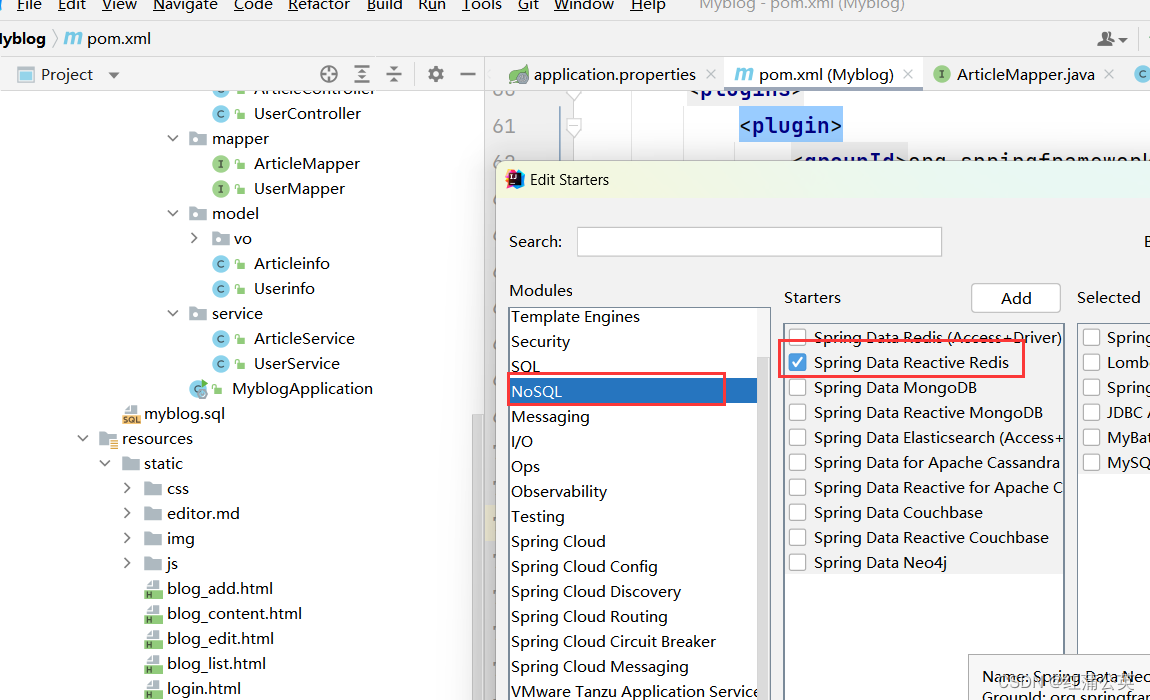
具体详情可以看我的Redis哪一章文章链接你会发现启动的并没有成功。原因我这里留了一个坑,关于拦截器的。
@Configuration public class MyConfig implements WebMvcConfigurer { @Override public void addInterceptors(InterceptorRegistry registry) { registry.addInterceptor(new LoginIntercpet()) .addPathPatterns("/**") .excludePathPatterns("/css/*") .excludePathPatterns("/js/*") .excludePathPatterns("/css") .excludePathPatterns("/img/*") .excludePathPatterns("/reg.html") .excludePathPatterns("/blog_list.html") .excludePathPatterns("/article/detail") .excludePathPatterns("/article/getlistbypage") .excludePathPatterns("/user/reg") .excludePathPatterns("/user/login") .excludePathPatterns("/editor.md/*") .excludePathPatterns("/blog_content.html") .excludePathPatterns("/login.html"); } }- 1
- 2
- 3
- 4
- 5
- 6
- 7
- 8
- 9
- 10
- 11
- 12
- 13
- 14
- 15
- 16
- 17
- 18
- 19
- 20
- 21
第二个启动这里要添加mapper映射否则会失败

@SpringBootApplication @MapperScan("com.example.myblog.mapper") public class MyblogApplication { public static void main(String[] args) { SpringApplication.run(MyblogApplication.class, args); } }- 1
- 2
- 3
- 4
- 5
- 6
- 7
- 8
- 9
- 10
项目地点:
项目的Gitee链接(实际调试完毕的项目)
-
相关阅读:
Iphone自带的邮箱 每次发完邮件在已发送里会显示重复发送了两封
程序员看看这是什么代码
useReducer+createContext真的可以代替Redux吗?
MindSpore在训练网络时报错
CSS3 animation 关键帧动画 keyframes
SQL中的group by使用注意事项
ELK集群 日志中心集群、kafka、logstash
【Kubernetes | Pod 系列】Pod的 YAML 清单文件详解
修改缺氧的存档-太空背景
Qt扩展-QCustomPlot 简介及配置
- 原文地址:https://blog.csdn.net/Cheer_RIO/article/details/132791655
