-
【SpringMVC】一行代码完成文件上传&JRebel的使用

目录
引言
在以往的写代码过程中,我们肯定会遇到客户有文件上传的需求,写过的同志都知道代码量是有的而且比较繁琐,今天这篇博客就来介绍一个Java库commons-fileupload,该库是Apache的一个开源Java库,它提供了一种简单的方式来上传和处理文件。它是Java Servlet API的一部分,可以方便地在Web应用程序中实现文件上传功能。
一、JRebel的使用
在讲解文件上传之前,先向大家推荐一下JRebel的使用,JRebel的主要功能是实现热部署,节省了大量重启时间,提高了个人开发效率。
1.1.安装JReble
我这里以IDEA为例,在Settings里点击Plugins在Marketplace处搜索jrebel,选择第一个安装即可。

安装后重启IDEA即可。
1.2.反向代理工具
这里会使用一个反向代理工具ReverseProxy_windows_amd64,而JRebel是一个Java虚拟机插件,它们之间没有直接的关系。但是,如果您在使用JRebel时遇到了问题,可以尝试先启动ReverseProxy_windows_amd64,然后再使用JRebel。
下载地址
Release v1.4 · ilanyu/ReverseProxy · GitHub下载完成后打开代理ReverseProxy_windows_amd64.exe再jrebel启动项目
(注意:激活成功前不要关闭反向代理程序)
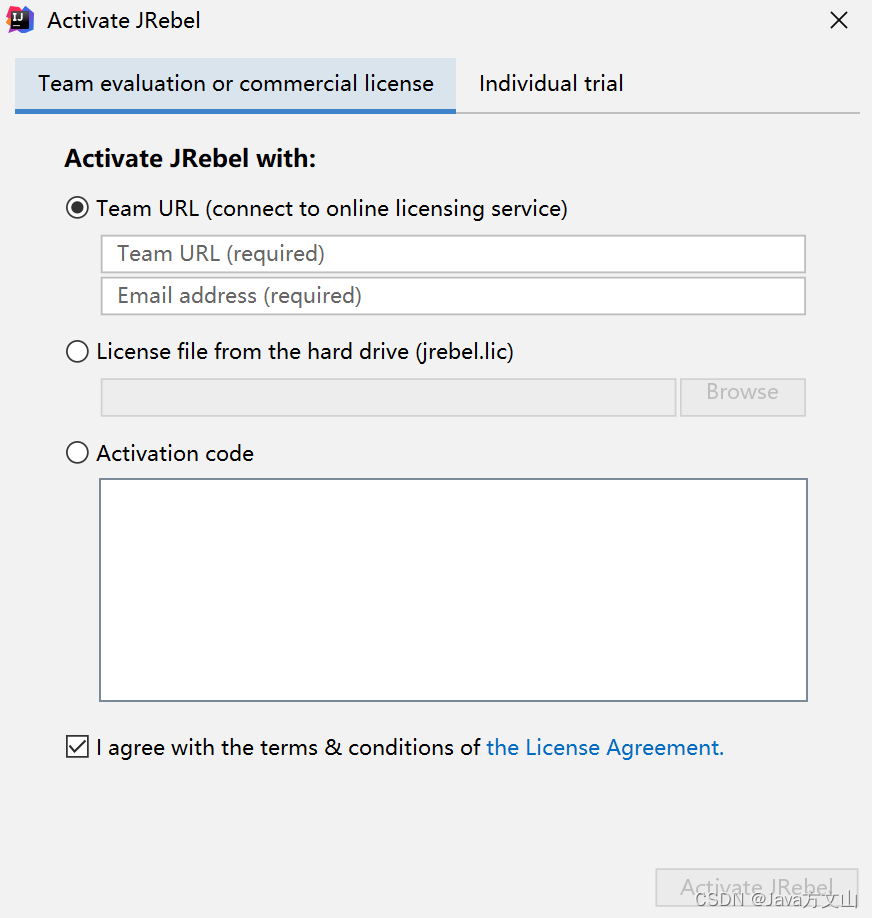
选择TeamURL激活
第一行输入http://127.0.0.1:8888/GUID
第二行输入电子邮箱即可。
https://www.guidgen.com/(生成GUID链接)
1.3.离线使用
激活后一定要手动切换到离线模式进行使用,过程如图 如下步骤进行操作:
File ➡Settings➡JRebel ➡Work offline ➡OK
(注意点击Work offline就会变为Work online)

下面就可以进行我们的SpringMVC文件上传讲解了。
二、文件上传
2.1.公共文件跳转
该类是方便我们少写重复跳转页面的代码需要跳什么页面jsp的请求上加上/page即可。
- @Controller
- @RequestMapping("/page")
- public class InputController {
- @RequestMapping("{page}")
- public String to(@PathVariable("page") String page){
- return page;
- }
- @RequestMapping("/{dir}/{page}")
- public String todir(@PathVariable("dir") String dir,
- @PathVariable("page") String page){
- return dir+"/"+page;
- }
- }
2.2.添加依赖
处理文件上传的Java库。
- <dependency>
- <groupId>commons-fileuploadgroupId>
- <artifactId>commons-fileuploadartifactId>
- <version>1.3.3version>
- dependency>
2.3.配置文件上传解析器
将配置文件放入Spring-mvc.xml中
- <bean id="multipartResolver" class="org.springframework.web.multipart.commons.CommonsMultipartResolver">
- <property name="defaultEncoding" value="UTF-8">property>
- <property name="maxUploadSize" value="52428800">property>
- <property name="resolveLazily" value="true"/>
- bean>
MultipartResolver是用于处理文件上传,当收到请求时DispatcherServlet的checkMultipart()方法会调用MultipartResolver的isMultipart()方法判断请求中是否包含文件,如果请求数据中包含文件,则调用MultipartResolver的resolverMultipart()方法对请求的数据进行解析,然后将文件数据解析MultipartFile并封装在MultipartHTTPServletRequest(继承了HTTPServletRequest)对象中,最后传递给Controller。
2.4.图片路径配置Tomcat
为了我们的后期维护,所以将本地图片路径与Tomcat访问路径进行配置文件的保存。
PropertiesUtil.java
- public class PropertiesUtil {
- public static String getValue(String key) throws IOException {
- Properties p = new Properties();
- InputStream in = PropertiesUtil.class.getResourceAsStream("/resource.properties");
- p.load(in);
- return p.getProperty(key);
- }
- }
resource.properties
- dir=E:/oa/idea/upload/
- server=/upload/
点击菜单栏上的Tomcat选择Edit Configurations

2.5.前端代码
list.jsp
- <%@ page contentType="text/html;charset=UTF-8" language="java" %>
- <%@ taglib uri="http://jsp.veryedu.cn" prefix="z"%>
- <%@ taglib uri="http://java.sun.com/jsp/jstl/core" prefix="c"%>
- <html>
- <head>
- <meta http-equiv="Content-Type" content="text/html; charset=UTF-8">
- <link
- href="https://cdn.bootcdn.net/ajax/libs/twitter-bootstrap/4.5.0/css/bootstrap.css"
- rel="stylesheet">
- <script
- src="https://cdn.bootcdn.net/ajax/libs/twitter-bootstrap/4.5.0/js/bootstrap.js">script>
- <title>学生管理首页title>
- <style type="text/css">
- .page-item input {
- padding: 0;
- width: 40px;
- height: 100%;
- text-align: center;
- margin: 0 6px;
- }
- .page-item input, .page-item b {
- line-height: 38px;
- float: left;
- font-weight: 400;
- }
- .page-item.go-input {
- margin: 0 10px;
- }
- style>
- head>
- <body>
- <form class="form-inline"
- action="${pageContext.request.contextPath }/student/list" method="post">
- <div class="form-group mb-2">
- <input type="text" class="form-control-plaintext" name="sname"
- placeholder="请输入学生名称">
- <%--<input name="pagination" value="false" type="hidden">--%>
- div>
- <button type="submit" class="btn btn-primary mb-2">查询button>
- <a class="btn btn-primary mb-2" href="${pageContext.request.contextPath }/student/PreSave">新增a>
- form>
- <table class="table table-striped ">
- <thead>
- <tr>
- <th scope="col">学生IDth>
- <th scope="col">学生名称th>
- <th scope="col">学生照片th>
- <th scope="col">学生性别th>
- <th scope="col">操作th>
- tr>
- thead>
- <tbody>
- <c:forEach var="s" items="${slist }">
- <tr>
- <td>${s.sid }td>
- <td>${s.sname }td>
- <td>
- <img src="${s.sage }" style="width: 50px;height: 50px;">
- td>
- <td>${s.ssex }td>
- <td>
- <a href="${pageContext.request.contextPath }/student/PreSave?sid=${s.sid}">修改a>
- <a href="${pageContext.request.contextPath }/student/del?sid=${s.sid}">删除a>
- <a href="${pageContext.request.contextPath }/page/student/upload?sid=${s.sid}">上传照片a>
- td>
- tr>
- c:forEach>
- tbody>
- table>
- <z:page pageBean="${pageBean }">z:page>
- <%--${pageBean }
- ${slist}--%>
- body>
- html>
upload.jsp
- <%@ page contentType="text/html;charset=UTF-8" language="java" %>
- <html>
- <head>
- <title>学生照片上传title>
- head>
- <body>
- <form action="${pageContext.request.contextPath }/student/upload" method="post" enctype="multipart/form-data">
- <label>学生编号:label><input type="text" name="sid" readonly="readonly" value="${param.sid}"/><br/>
- <label>学生图片:label><input type="file" name="simg"/><br/>
- <input type="submit" value="上传图片"/>
- form>
- body>
- html>
2.6.文件上传实现
StudentController.java
- @Controller
- @RequestMapping("/student")
- public class StudentController {
- @Autowired
- private StudentBiz stubiz;
- // 增
- @RequestMapping("/add")
- public String add(Student student){
- stubiz.insertSelective(student);
- return "redirect:list";
- }
- // 删
- @RequestMapping("/del")
- public String del(Student student){
- stubiz.deleteByPrimaryKey(student.getSid());
- return "redirect:list";
- }
- // 查
- @RequestMapping("/list")
- public String list(Student student, HttpServletRequest request){
- PageBean pageBean=new PageBean();
- pageBean.setRequest(request);
- List
students = stubiz.selectBySnamePager(student, pageBean); - request.setAttribute("slist",students);
- request.setAttribute("pageBean",pageBean);
- return "student/list";
- }
- // 改
- @RequestMapping("/edit")
- public String edit(Student student){
- stubiz.updateByPrimaryKeySelective(student);
- return "redirect:list";
- }
- // 模糊分页查询
- @RequestMapping("/PreSave")
- public String PreSave(Student student, HttpServletRequest request){
- if(student!=null && student.getSid()!=null){
- Student s = stubiz.selectByPrimaryKey(student.getSid());
- request.setAttribute("s",s);
- }
- return "student/edit";
- }
- //文件上传
- @RequestMapping("/upload")
- public String upload(MultipartFile simg,Student student) throws IOException {
- //将上传图片保存到服务器中的指定位置
- String dir= PropertiesUtil.getValue("dir");
- String server=PropertiesUtil.getValue("server");
- String filename = simg.getOriginalFilename();
- FileUtils.copyInputStreamToFile(simg.getInputStream(),new File(dir+filename));
- //将上传的图片保存到数据库
- student.setSage(server+ filename);
- stubiz.updateByPrimaryKeySelective(student);
- return "redirect:list";
- }
- }
效果展示:

这时候查看我们所配置的本地路径中也有图片了。

三、文件下载
3.1.Controller层
StudentController.java
- @Controller
- @RequestMapping("/student")
- public class StudentController {
- @Autowired
- private StudentBiz stubiz;
- // 增
- @RequestMapping("/add")
- public String add(Student student){
- stubiz.insertSelective(student);
- return "redirect:list";
- }
- // 删
- @RequestMapping("/del")
- public String del(Student student){
- stubiz.deleteByPrimaryKey(student.getSid());
- return "redirect:list";
- }
- // 查
- @RequestMapping("/list")
- public String list(Student student, HttpServletRequest request){
- PageBean pageBean=new PageBean();
- pageBean.setRequest(request);
- List
students = stubiz.selectBySnamePager(student, pageBean); - request.setAttribute("slist",students);
- request.setAttribute("pageBean",pageBean);
- return "student/list";
- }
- // 改
- @RequestMapping("/edit")
- public String edit(Student student){
- stubiz.updateByPrimaryKeySelective(student);
- return "redirect:list";
- }
- // 模糊分页查询
- @RequestMapping("/PreSave")
- public String PreSave(Student student, HttpServletRequest request){
- if(student!=null && student.getSid()!=null){
- Student s = stubiz.selectByPrimaryKey(student.getSid());
- request.setAttribute("s",s);
- }
- return "student/edit";
- }
- //文件上传
- @RequestMapping("/upload")
- public String upload(MultipartFile simg,Student student) throws IOException {
- //将上传图片保存到服务器中的指定位置
- String dir= PropertiesUtil.getValue("dir");
- String server=PropertiesUtil.getValue("server");
- String filename = simg.getOriginalFilename();
- FileUtils.copyInputStreamToFile(simg.getInputStream(),new File(dir+filename));
- //将上传的图片保存到数据库
- student.setSage(server+ filename);
- stubiz.updateByPrimaryKeySelective(student);
- return "redirect:list";
- }
- //文件下载
- @RequestMapping(value="/download")
- public ResponseEntity<byte[]> download(Student student, HttpServletRequest req){
- try {
- //先根据文件id查询对应图片信息
- Student students = this.stubiz.selectByPrimaryKey(student.getSid());
- String diskPath = PropertiesUtil.getValue("dir");
- String reqPath = PropertiesUtil.getValue("server");
- String realPath = students.getSage().replace(reqPath,diskPath);
- String fileName = realPath.substring(realPath.lastIndexOf("/")+1);
- //下载关键代码
- File file=new File(realPath);
- HttpHeaders headers = new HttpHeaders();//http头信息
- String downloadFileName = new String(fileName.getBytes("UTF-8"),"iso-8859-1");//设置编码
- headers.setContentDispositionFormData("attachment", downloadFileName);
- headers.setContentType(MediaType.APPLICATION_OCTET_STREAM);
- //MediaType:互联网媒介类型 contentType:具体请求中的媒体类型信息
- return new ResponseEntity<byte[]>(FileUtils.readFileToByteArray(file),headers, HttpStatus.OK);
- }catch (Exception e){
- e.printStackTrace();
- }
- return null;
- }
- }
3.2.前端代码
list.jsp
- <%@ page contentType="text/html;charset=UTF-8" language="java" %>
- <%@ taglib uri="http://jsp.veryedu.cn" prefix="z"%>
- <%@ taglib uri="http://java.sun.com/jsp/jstl/core" prefix="c"%>
- <html>
- <head>
- <meta http-equiv="Content-Type" content="text/html; charset=UTF-8">
- <link
- href="https://cdn.bootcdn.net/ajax/libs/twitter-bootstrap/4.5.0/css/bootstrap.css"
- rel="stylesheet">
- <script
- src="https://cdn.bootcdn.net/ajax/libs/twitter-bootstrap/4.5.0/js/bootstrap.js">script>
- <title>学生管理首页title>
- <style type="text/css">
- .page-item input {
- padding: 0;
- width: 40px;
- height: 100%;
- text-align: center;
- margin: 0 6px;
- }
- .page-item input, .page-item b {
- line-height: 38px;
- float: left;
- font-weight: 400;
- }
- .page-item.go-input {
- margin: 0 10px;
- }
- style>
- head>
- <body>
- <form class="form-inline"
- action="${pageContext.request.contextPath }/student/list" method="post">
- <div class="form-group mb-2">
- <input type="text" class="form-control-plaintext" name="sname"
- placeholder="请输入学生名称">
- <%--<input name="pagination" value="false" type="hidden">--%>
- div>
- <button type="submit" class="btn btn-primary mb-2">查询button>
- <a class="btn btn-primary mb-2" href="${pageContext.request.contextPath }/student/PreSave">新增a>
- form>
- <table class="table table-striped ">
- <thead>
- <tr>
- <th scope="col">学生IDth>
- <th scope="col">学生名称th>
- <th scope="col">学生照片th>
- <th scope="col">学生性别th>
- <th scope="col">操作th>
- tr>
- thead>
- <tbody>
- <c:forEach var="s" items="${slist }">
- <tr>
- <td>${s.sid }td>
- <td>${s.sname }td>
- <td>
- <img src="${s.sage }" style="width: 50px;height: 50px;">
- td>
- <td>${s.ssex }td>
- <td>
- <a href="${pageContext.request.contextPath }/student/PreSave?sid=${s.sid}">修改a>
- <a href="${pageContext.request.contextPath }/student/del?sid=${s.sid}">删除a>
- <a href="${pageContext.request.contextPath }/page/student/upload?sid=${s.sid}">上传照片a>
- <a href="${pageContext.request.contextPath }/student/download?sid=${s.sid}">下载照片a>
- td>
- tr>
- c:forEach>
- tbody>
- table>
- <z:page pageBean="${pageBean }">z:page>
- <%--${pageBean }
- ${slist}--%>
- body>
- html>
效果演示:

四、多文件上传
由于我的数据库表中没有存储多个图片的字段,就不过数据库演示了。
4.1.Controller层
- //多文件上传
- @RequestMapping("/uploads")
- public String uploads(HttpServletRequest req, Student student, MultipartFile[] files){
- try {
- StringBuffer sb = new StringBuffer();
- for (MultipartFile cfile : files) {
- //思路:
- //1) 将上传图片保存到服务器中的指定位置
- String dir = PropertiesUtil.getValue("dir");
- String server = PropertiesUtil.getValue("server");
- String filename = cfile.getOriginalFilename();
- FileUtils.copyInputStreamToFile(cfile.getInputStream(),new File(dir+filename));
- sb.append(filename).append(",");
- }
- System.out.println(sb.toString());
- } catch (Exception e) {
- e.printStackTrace();
- }
- return "redirect:list";
- }
4.2.前端代码
- <a href="${pageContext.request.contextPath }/page/student/uploads">多文件上传a>
- <%@ page contentType="text/html;charset=UTF-8" language="java" %>
- <html>
- <head>
- <title>Titletitle>
- head>
- <body>
- <form action="${pageContext.request.contextPath }/student/uploads" method="post" enctype="multipart/form-data">
- <input type="file" name="files" multiple>
- <button type="submit">上传button>
- form>
- body>
- html>
效果演示:

到这里我的分享就结束了,欢迎到评论区探讨交流!!
💖如果觉得有用的话还请点个赞吧 💖

-
相关阅读:
实战级详解Spring框架中引入阿里开源组件Nacos作配置中心
每个人都可以用的开源微信机器人
Zookeeper (四) --------- 服务器动态上下线监听案例
生鲜行业B2B电商平台解决方案,提高企业交易流程标准化和透明度
虹科Pico汽车示波器 | 免拆诊断案例 | 2016款保时捷911 GT3 RS车发动机异响
推荐系统实践读书笔记-05利用上下文信息
leetcode top100(10) 和为 K 的子数组
有人知道这个动作模型是哪里的吗?叫什么?
二叉搜索树
DDD.从引进到落地
- 原文地址:https://blog.csdn.net/weixin_74318097/article/details/132775259