-
模型推理后处理C++代码优化案例
项目场景:
经过推理的后处理运行时间的优化。
先来看下优化前后的时间对比:
优化前:
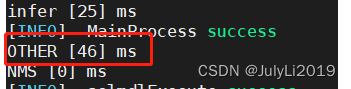
优化后:

提升还是很大的。
问题描述
模型推理后得到的数据后处理操作之前时间开销很大。
auto outputsf = pRealEngine->sampleProcess->outData; //postprogress std::vector<float> outputvtemp; std::vector<std::vector<BoundingBox>> preds(pRealEngine->num_class); //class-bboxes BoundingBox temp; auto n = pRealEngine->modelout_len*pRealEngine->nc; // int c=0; for(auto i=0;i<n;i++){ outputvtemp.push_back(outputsf[i]); if((i+1)%pRealEngine->nc==0) { if(outputvtemp[4]>pRealEngine->confidence_threshold){ auto cx = outputvtemp[0]; auto cy = outputvtemp[1]; auto w = outputvtemp[2]; auto h = outputvtemp[3]; temp.x = std::max(int((cx-w/2)),0); temp.y = std::max(int((cy-h/2)),0); temp.w = std::min(int(w),int(pImgInfo->i32Width-temp.x)); temp.h = std::min(int(h),int(pImgInfo->i32Height-temp.y)); temp.cx = int((cx-w/2)); temp.cy = int((cx-w/2)); temp.confidence = outputvtemp[4]; temp.classid = getfclassid(outputvtemp); preds[temp.classid].push_back(temp); } outputvtemp.clear(); } }- 1
- 2
- 3
- 4
- 5
- 6
- 7
- 8
- 9
- 10
- 11
- 12
- 13
- 14
- 15
- 16
- 17
- 18
- 19
- 20
- 21
- 22
- 23
- 24
- 25
- 26
- 27
- 28
- 29
- 30
原因分析:
不必要的数据复制:原始代码中使用outputvtemp.push_back(outputsf[i])将outputsf[i]添加到outputvtemp向量中。这将涉及内存的重新分配和数据复制。为了避免这种开销,可以直接在循环中访问outputsf数组,而无需使用额外的向量。重复计算:循环中计算的值cx - w/2和cy - h/2在多个地方重复使用。可以将这些计算移动到条件判断的外部,以避免重复计算。复杂的条件判断: 在循环中有一些条件判断,例如if (outputvtemp[4] > pRealEngine->confidence_threshold),这些条件判断可能会增加运行时间。确保这些条件判断是必要的,如果可能的话,尽量减少不必要的条件判断。
解决方案:
auto outputsf = pRealEngine->sampleProcess->outData; std::vector<std::vector<BoundingBox>> preds(pRealEngine->num_class); //class-bboxes BoundingBox temp; auto n = pRealEngine->modelout_len * pRealEngine->nc; // int elements_per_output = 5; // 每个输出元素包含 5 个值 for (auto i = 0; i < n; i +=pRealEngine->nc)// elements_per_output) { float confidence = outputsf[i + 4]; if (confidence > pRealEngine->confidence_threshold) { auto cx = outputsf[i]; auto cy = outputsf[i + 1]; auto w = outputsf[i + 2]; auto h = outputsf[i + 3]; temp.x = std::max(int((cx - w / 2)), 0); temp.y = std::max(int((cy - h / 2)), 0); temp.w = std::min(int(w), int(pImgInfo->i32Width - temp.x)); temp.h = std::min(int(h), int(pImgInfo->i32Height - temp.y)); temp.cx = int((cx - w / 2)); temp.cy = int((cy - h / 2)); temp.confidence = confidence; // 将数组转换为 std::vectorstd::vector<float> outputvtemp(outputsf + i, outputsf + i + pRealEngine->nc); // 调用 getfclassid 函数,并传递起始和结束索引 temp.classid = getfclassid(outputvtemp); // 传递起始和结束索引 preds[temp.classid].push_back(temp); } } - 1
- 2
- 3
- 4
- 5
- 6
- 7
- 8
- 9
- 10
- 11
- 12
- 13
- 14
- 15
- 16
- 17
- 18
- 19
- 20
- 21
- 22
- 23
- 24
- 25
- 26
- 27
- 28
- 29
- 30
- 31
- 32
小结
本文是自己项目中遇到的实际问题,由于刚刚上手C++相关的项目,特此记录!!!
C++任重而道远呀,加油呀!!!
2023年9月9日15:33:36 -
相关阅读:
234 基于matlab的萤火虫算法多变量寻优
计算机网络—概述
STM32H5开发(4)----开发板介绍
又发现了一个Jupyter Notebook的黑科技,Visual Python支持无代码开发!
从零开始,开发一个 Web Office 套件(8):状态管理 & 拖动鼠标选中文字
记账的目的和好处是什么
.cn是几级域名?
Android13系统启动异常,卡在动画界面
小啊呜产品读书笔记001:《邱岳的产品手记-12》第22讲 产品经理的图文基本功(上):产品文档 & 23讲产品经理的图文基本功(下):产品图例
Hive的数据存储格式
- 原文地址:https://blog.csdn.net/JulyLi2019/article/details/132777406
