-
三、创建各个展示模块组件
简介
在文件
components中创建轮播模块组件,引入App.vue展示。⭐️ 欢迎访问个人的简历网站预览效果本章涉及修改与新增的文件:
First.vue、Second.vue、Third.vue、Fourth.vue、Fifth.vue、App.vue、vite-env.d.ts、assets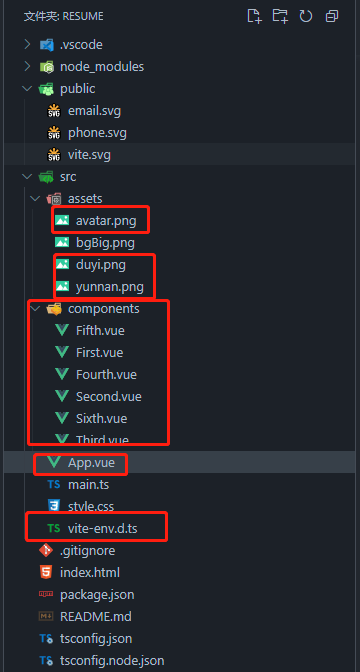
一、修改
vite-env.d.ts文件///// 引入自定义组件时需要的代码 declare module '*.vue' { import { ComponentOptions } from 'vue' const componentOptions: ComponentOptions export default componentOptions } - 1
- 2
- 3
- 4
- 5
- 6
- 7
- 8
二、新增组件
- 新建
First.vue个人首页
<template> <div class="container"> <!-- 头像 --> <el-avatar :size="120" :src="avatarImg" /> <!-- 座右铭 --> <div class="motto text-spacing"> <span> <span v-for="(item, index) of textArr" :key="index"> {{ item.text }} </span> </span> <el-divider /> </div> <!-- 简单信息 --> <div class="info"> <div class="margin-tb-xl">吴少繁</div> <div>全栈工程师</div> <div class="margin-tb-xl flex"> <div><img src="/email.svg" class="logo" alt="Email" />1195951949@qq.com</div> <div class="margin-lr"> | </div> <div><img src="/phone.svg" class="logo" alt="Phone" />18226193345</div> </div> <div>在职 · 浙江杭州</div> </div> </div> </template> <script setup lang="ts" name="First"> import avatarImg from '../assets/avatar.png' import { reactive } from 'vue' defineProps({ count: { type: Number }, }); const textArr = reactive([ { text: '知微知彰,', checked: false }, { text: '知柔知刚;', checked: false }, { text: '富在术数,', checked: false }, { text: '不在劳身;', checked: false }, { text: '利在势居,', checked: false }, { text: '不在力耕。', checked: false } ]) </script> <style scoped> .info { width: 60%; display: flex; flex-direction: column; justify-content: center; align-items: center; font-size: 18px; font-family: 'KaiTi', sans-serif; } .logo { margin-right: 5px; width: 18px; height: 18px; } </style>- 1
- 2
- 3
- 4
- 5
- 6
- 7
- 8
- 9
- 10
- 11
- 12
- 13
- 14
- 15
- 16
- 17
- 18
- 19
- 20
- 21
- 22
- 23
- 24
- 25
- 26
- 27
- 28
- 29
- 30
- 31
- 32
- 33
- 34
- 35
- 36
- 37
- 38
- 39
- 40
- 41
- 42
- 43
- 44
- 45
- 46
- 47
- 48
- 49
- 50
- 51
- 52
- 53
- 54
- 55
- 56
- 57
- 58
- 59
- 60
- 61
- 62
- 新建
Second.vue基本信息
<template> <div class="container"> <!-- 标题 --> <div class="motto"> <span style="font-size: 30px;">基本信息</span> <el-divider /> </div> <!-- 简介 --> <div class="intr text-spacing"> 毕业于云南大学软件工程专业,从业四年有余,熟习js和node前后端开发,熟习Vue和nestjs框架开发,熟习uniapp跨平台开发小程序及H5等。 </div> <div class="margin-top-xl flex padding-top family" style="width: 60%;"> <div class="flex justify-center" style="width: 40%;"> <el-avatar :size="220" :src="avatarImg" /> </div> <div style="width:30%"> <div>姓名 | 吴少繁</div> <div class="margin-tb-xl">性别 | 男</div> <div>出生 | 1996.01.13</div> <div class="margin-tb-xl">居住 | 浙江杭州西湖区</div> <div>学历 | 本科</div> <div class="margin-tb-xl">专业 | 软件工程</div> </div> <div style="width:30%"> <div>手机 | 18226193345</div> <div class="margin-tb-xl">邮箱 | 18226193345@163.com</div> <div>QQ号 | 1195951949</div> <div class="margin-tb-xl">户籍 | 安徽合肥</div> <div>学校 | 云南大学</div> </div> </div> </div> </template> <script setup lang="ts" name="Second"> import avatarImg from '../assets/avatar.png' defineProps({ count: { type: Number }, }); </script> <style scoped> .family { letter-spacing: 1px; line-height: 1.2; font-family: 'KaiTi', sans-serif; } </style>- 1
- 2
- 3
- 4
- 5
- 6
- 7
- 8
- 9
- 10
- 11
- 12
- 13
- 14
- 15
- 16
- 17
- 18
- 19
- 20
- 21
- 22
- 23
- 24
- 25
- 26
- 27
- 28
- 29
- 30
- 31
- 32
- 33
- 34
- 35
- 36
- 37
- 38
- 39
- 40
- 41
- 42
- 43
- 44
- 45
- 46
- 47
- 48
- 49
- 50
- 51
- 新建
Third.vue教育经历
<template> <div class="container"> <div class="motto"> <span style="font-size: 30px;">教育经历</span> <el-divider /> </div> <!-- 简介 --> <div class="intr text-spacing"> <span v-for="(item, index) of textArr" :key="index"> {{ item.text }} </span> </div> <div class="margin-top-xl flex padding-top" style="width: 60%;"> <div class="flex flex-direction justify-between align-center padding-tb" style="width:15%;min-width: 130px;"> <div class="yunnan sphere" /> <div class="duyi sphere" /> </div> <el-divider direction="vertical" style="height: 100%;" /> <div class="family padding-left-xl" style="width:85%"> <div class="square"> <div>学习时间:2015.09 - 2019.07</div> <div class="margin-tb-xs">学习技能:</div> <div>·计算机安全,程序设计语言,数据库,数据结构,软件开发工具,操作系统,设计模式等</div> <div class="margin-top-xs">·基本办公软件,Word文档,PPT,Excel,Ps,VScode</div> </div> <div class="square margin-top-xl"> <div>学习时间:2019.08 - 2019.12</div> <div class="margin-tb-xs">学习技能:</div> <div>·掌握了 HTML、HTML 5、CSS、CSS3、JavaScript 开发标准</div> <div class="margin-top-xs">·掌握了 Vue全家桶、Vuex 状态管理;Vue-Router路由前端搭建框架标准</div> </div> </div> </div> </div> </template> <script setup lang="ts" name="Third"> import { reactive } from 'vue' defineProps({ count: { type: Number }, }); const textArr = reactive([ { text: '夫学须志也,', checked: false }, { text: '才须学也。', checked: false }, { text: '非学无以广才,', checked: false }, { text: '非志无以成学。', checked: false }, ]) </script> <style scoped> .family { letter-spacing: 1px; line-height: 1.5; font-family: 'KaiTi', sans-serif; } .sphere { width: 120px; height: 120px; border-radius: 50%; background-size: 100% 100%; box-shadow: 3px 3px 3px 3px rgba(10, 10, 10, .2); } .square { position: relative; width: 100%; padding: 20px; border-radius: 10px; background-color: rgba(10, 10, 10, .3); box-shadow: 6px 5px 2px 2px rgba(10, 10, 10, .3); } .square::before { position: absolute; content: ''; z-index: 20; left: -30px; top: 50px; border: 15px solid transparent; border-bottom: 5px solid transparent; border-right: 15px solid rgba(10, 10, 10, .3); } .yunnan { background-image: url('../assets/yunnan.png'); // 学校图片 } .duyi { background-image: url('../assets/duyi.png'); // 培训图片 } </style>- 1
- 2
- 3
- 4
- 5
- 6
- 7
- 8
- 9
- 10
- 11
- 12
- 13
- 14
- 15
- 16
- 17
- 18
- 19
- 20
- 21
- 22
- 23
- 24
- 25
- 26
- 27
- 28
- 29
- 30
- 31
- 32
- 33
- 34
- 35
- 36
- 37
- 38
- 39
- 40
- 41
- 42
- 43
- 44
- 45
- 46
- 47
- 48
- 49
- 50
- 51
- 52
- 53
- 54
- 55
- 56
- 57
- 58
- 59
- 60
- 61
- 62
- 63
- 64
- 65
- 66
- 67
- 68
- 69
- 70
- 71
- 72
- 73
- 74
- 75
- 76
- 77
- 78
- 79
- 80
- 81
- 82
- 83
- 84
- 85
- 86
- 87
- 88
- 89
- 90
- 91
- 92
- 93
- 94
- 95
- 96
- 97
- 新建
Fourth.vue专业技能
<template> <div class="container"> <div class="motto"> <span style="font-size: 30px;">专业技能</span> <el-divider /> </div> <!-- 简介 --> <div class="intr text-spacing"> <span v-for="(item, index) of textArr" :key="index"> {{ item.text }} </span> </div> <div class="margin-top-xl flex padding-top" style="width: 60%;"> <div style="width: 40%;padding-right:50px"> <div class="margin-bottom"> <span style="font-style: italic;">JavaScript、TypeScript</span> <el-progress color="#F05D4B" :percentage="95" :text-inside="true" :stroke-width="15" striped striped-flow :duration="30" /> </div> <div class="margin-bottom"> <span style="font-style: italic;">HTML、HTML5</span> <el-progress color="#e03997" :percentage="96" :text-inside="true" :stroke-width="15" striped striped-flow :duration="30" /> </div> <div class="margin-bottom"> <span style="font-style: italic;">CSS、CSS3</span> <el-progress color="#fbbd08" :percentage="92" :text-inside="true" :stroke-width="15" striped striped-flow :duration="30" /> </div> <div class="margin-bottom"> <span style="font-style: italic;">Vue、Vue3</span> <el-progress color="#42b883" :percentage="98" :text-inside="true" :stroke-width="15" striped striped-flow :duration="30" /> </div> <div class="margin-bottom"> <span style="font-style: italic;">Uniapp、小程序</span> <el-progress color="#0081ff" :percentage="95" :text-inside="true" :stroke-width="15" striped striped-flow :duration="30" /> </div> <div class="margin-bottom"> <span style="font-style: italic;">Nodejs、Nestjs</span> <el-progress color="#39b54a" :percentage="93" :text-inside="true" :stroke-width="15" striped striped-flow :duration="30" /> </div> <div class="margin-bottom"> <span style="font-style: italic;">React</span> <el-progress color="#149eca" :percentage="90" :text-inside="true" :stroke-width="15" striped striped-flow :duration="30" /> </div> </div> <ul class="family"> <li>掌握 HTML、HTML 5、CSS、CSS3、JavaScript、TypeScript 标准;</li> <li class="margin-tb-lg">掌握 ES6,箭头函数、class 类、Promise 对象、ES6 模块化、异步async 等</li> <li>掌握 Vue2全家桶、Vue3全家桶、vite构建工具;Vuex 状态管理;Vue-Router路由;</li> <li class="margin-tb-lg">掌握 element-UI、AntD-UI、element-UI-Plus;Vant-UI、color-UI、uView-UI 等组件库;</li> <li>掌握 React全家桶、Redux状态管理、React-router-dom路由;</li> <li class="margin-tb-lg">uniapp、H5、微信、支付宝小程序开发技术等;</li> <li>掌握 Nodejs,Mysql,Java;nestjs、websockets后端接口开发框架等,宝塔服务器、Nginx代理相关操作;</li> <li class="margin-tb-lg">掌握 Electron 桌面应用开发;</li> <li>掌握打包工具 Webpack 的基本使用;</li> <li class="margin-top-lg">掌握Git,SVN 进行版本控制和代码托管;</li> </ul> </div> </div> </template> <script setup lang="ts" name="Fourth"> import { reactive } from 'vue' defineProps({ count: { type: Number }, }); const textArr = reactive([ { text: '生于忧患,', checked: false }, { text: '死于安乐;', checked: false }, { text: '力学如力耕,', checked: false }, { text: '勤惰尔自知;', checked: false } ]) </script> <style scoped> .family { font-family: 'KaiTi', sans-serif; letter-spacing: 1px; line-height: 1.2; } </style>- 1
- 2
- 3
- 4
- 5
- 6
- 7
- 8
- 9
- 10
- 11
- 12
- 13
- 14
- 15
- 16
- 17
- 18
- 19
- 20
- 21
- 22
- 23
- 24
- 25
- 26
- 27
- 28
- 29
- 30
- 31
- 32
- 33
- 34
- 35
- 36
- 37
- 38
- 39
- 40
- 41
- 42
- 43
- 44
- 45
- 46
- 47
- 48
- 49
- 50
- 51
- 52
- 53
- 54
- 55
- 56
- 57
- 58
- 59
- 60
- 61
- 62
- 63
- 64
- 65
- 66
- 67
- 68
- 69
- 70
- 71
- 72
- 73
- 74
- 75
- 76
- 77
- 78
- 79
- 80
- 81
- 82
- 83
- 84
- 85
- 86
- 87
- 88
- 89
- 90
- 91
- 92
- 新建
Fifth.vue工作经验
<template> <div class="container"> <div class="motto"> <span style="font-size: 30px;">工作经验</span> <el-divider /> </div> <div class="intr text-spacing"> <span v-for="(item, index) of textArr" :Key="index"> {{ item.text }} </span> </div> <div class="margin-top-xl flex padding-top" style="width: 60%;"> <div class="flex flex-direction justify-around align-center padding-tb" style="width:15%;min-width: 140px;"> <div class="sphere" style="backgroundColor: #F05D4B;"> <span>24个月 +</span> <span class="text18">浙江怡宁健康</span> </div> <div class="sphere" style="backgroundColor: #1cbbb4;"> <span>19个月</span> <span class="text18">杭州云号科技</span> </div> </div> <el-divider direction="vertical" style="height: 100%;" /> <div class="family padding-left-xl" style="width:85%"> <div class="square"> <div>工作时间:2021.10 - 至 今</div> <div class="margin-tb-xs">担任岗位:前端开发组长</div> <div>工作内容:</div> <div class="margin-tb-xs"> <div>·参与项目开发会议,召开组内会议,分配工作内容,跟进项目进度;</div> <div>·项目技术框架搭建,业务逻辑梳理,结构框架搭建,技术栈选型,研究新技术优化项目代码,不定期组内成员code review分享经验心得;</div> <div> <span>·开发维护</span> <el-link class="margin-left-sm text15" type="warning">智慧医院数据中心</el-link> <el-link class="margin-left-sm text15" type="warning">怡宁SaaS智慧医院</el-link> <el-link class="margin-left-sm text15" type="warning">康宁智慧医院</el-link> <el-link class="margin-left-sm text15" type="warning">怡宁心理智慧医院</el-link> </div> </div> <!-- 公司各类项目趋于稳定,实行降本增效,只留下领导层,被动离职。 --> <div>离职原因:</div> </div> <div class="square margin-top-xl"> <div>工作时间:2020.03 - 2021.10</div> <div class="margin-tb-sm">担任岗位:前端开发程序员</div> <div>工作内容:</div> <div class="margin-tb-xs"> <div>·完成每日规划的项目任务,同步及跟进任务进度,按时交付项目内容;</div> <div>·梳理业务逻辑,结构框架搭建,技术栈选型,UI模型设计,PC端后台开发,uniapp H5开发</div> <div> <span>·开发维护</span> <el-link class="margin-left-sm text15" type="warning">试客秀管理后台</el-link> <el-link class="margin-left-sm text15" type="warning">秀咖用户端</el-link> <el-link class="margin-left-sm text15" type="warning">智慧社区</el-link> </div> </div> <div>离职原因:初创公司,灰色边缘性业务,受到各平台打压管控,最终解散倒闭。</div> </div> </div> </div> </div> </template> <script setup lang="ts" name="Fifth"> import { reactive } from 'vue' defineProps({ count: { type: Number }, }); const textArr = reactive([ { text: '民生在勤,', checked: false }, { text: '勤则不匮。', checked: false }, { text: '勤劳一日,', checked: false }, { text: '可得一夜安眠;', checked: false }, { text: '勤劳一生,', checked: false }, { text: '可得幸福长眠。', checked: false } ]) </script> <style scoped> .family { letter-spacing: 1px; line-height: 1.5; font-family: 'KaiTi', sans-serif; } .sphere { min-width: 130px; min-height: 130px; border-radius: 50%; display: flex; flex-direction: column; justify-content: center; align-items: center; box-shadow: 3px 3px 3px 3px rgba(10, 10, 10, .2); } .square { position: relative; width: 100%; padding: 20px; border-radius: 10px; background-color: rgba(10, 10, 10, .3); box-shadow: 6px 5px 5px 5px rgba(10, 10, 10, .3); } .square::before { position: absolute; content: ''; z-index: 20; left: -30px; top: 80px; border: 15px solid transparent; border-bottom: 5px solid transparent; border-right: 15px solid rgba(10, 10, 10, .3); } </style>- 1
- 2
- 3
- 4
- 5
- 6
- 7
- 8
- 9
- 10
- 11
- 12
- 13
- 14
- 15
- 16
- 17
- 18
- 19
- 20
- 21
- 22
- 23
- 24
- 25
- 26
- 27
- 28
- 29
- 30
- 31
- 32
- 33
- 34
- 35
- 36
- 37
- 38
- 39
- 40
- 41
- 42
- 43
- 44
- 45
- 46
- 47
- 48
- 49
- 50
- 51
- 52
- 53
- 54
- 55
- 56
- 57
- 58
- 59
- 60
- 61
- 62
- 63
- 64
- 65
- 66
- 67
- 68
- 69
- 70
- 71
- 72
- 73
- 74
- 75
- 76
- 77
- 78
- 79
- 80
- 81
- 82
- 83
- 84
- 85
- 86
- 87
- 88
- 89
- 90
- 91
- 92
- 93
- 94
- 95
- 96
- 97
- 98
- 99
- 100
- 101
- 102
- 103
- 104
- 105
- 106
- 107
- 108
- 109
- 110
- 111
- 112
- 113
- 114
- 115
- 116
- 117
- 118
- 119
- 120
- 将组件引入
App.vue中展示
<template> <div class="app-background"> <el-carousel height="100vh" direction="vertical" :autoplay="false"> <el-carousel-item> <first /> </el-carousel-item> <el-carousel-item> <second /> </el-carousel-item> <el-carousel-item> <third /> </el-carousel-item> <el-carousel-item> <fourth /> </el-carousel-item> <el-carousel-item> <fifth /> </el-carousel-item> </el-carousel> </div> </template> <script setup lang="ts"> import first from './components/First.vue' import second from './components/Second.vue' import third from './components/Third.vue' import fourth from './components/Fourth.vue' import fifth from './components/Fifth.vue' </script> <style scoped> .app-background { position: relative; width: 100%; height: 100vh; background-image: url('./assets/bgBig.png'); background-repeat: no-repeat; background-position: center 0; background-size: cover; } .el-carousel__item { min-height: 100vh; background-color: rgba(10, 10, 10, 0.3); } </style>- 1
- 2
- 3
- 4
- 5
- 6
- 7
- 8
- 9
- 10
- 11
- 12
- 13
- 14
- 15
- 16
- 17
- 18
- 19
- 20
- 21
- 22
- 23
- 24
- 25
- 26
- 27
- 28
- 29
- 30
- 31
- 32
- 33
- 34
- 35
- 36
- 37
- 38
- 39
- 40
- 41
- 42
- 43
- 44
- 45
- 46
- 47
- 48
效果如下:


 => To Be Continued
点赞 评论 收藏 ~~ 留言讨论,如有错误,也希望大家不吝指出。 ~~ 点赞 评论 收藏 -
相关阅读:
生物素-磺酸-NHS 酯,119616-38-5,Biotin-Sulfo-NHS ester
Netty笔记
高分辨空间代谢组学的应用领域介绍
JSP核心技术的进阶(指令、标签、对象域)+JSTL+EL
5.Nacos
HBase表数据的读、写操作与综合操作
《三体》中的两大假说-射手与农场主
9.14号作业
一题带你写出图论算法模板!!!
算法训练营第50天|LeetCode 121. 买卖股票的最佳时机 122.买卖股票的最佳时机II
- 原文地址:https://blog.csdn.net/weixin_49175501/article/details/132761509
