-
微信最新更新隐私策略(2023-08-15)
1、manifest.json 配置修改
在mp-weixin: 参数修改(没有就添加)
"__usePrivacyCheck__": true,
***2、注意 微信开发者工具调整
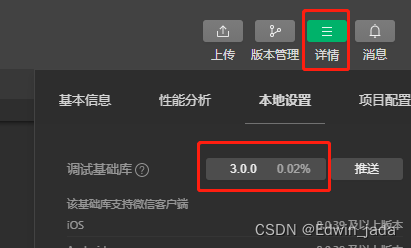
不然一直报错 找不到 getPrivacySetting
废话不多说 上代码
3、 编辑首页 或者用户授权界面
- <uni-popup ref="popup">
- <view class="popupWrap">
- <view class="popupTxt">
- 在你使用【********】之前,请仔细阅读<text class="blueColor" @click="handleOpenPrivacyContract">《隐私保护指引》</text>。如你同意《******隐私保护指引》,请点击“同意”开始使用【******】。
- </view>
- <view class="popupBot">
- <button id="disagree-btn" type="default" @click="handleDisagree">拒绝</button>
- <button id="agree-btn" type="primary" open-type="agreePrivacyAuthorization" @agreeprivacyauthorization="handleAgreePrivacyAuthorization">同意</button>
- </view>
- </view>
- </uni-popup>
- // onload 代码
- // #ifdef MP
- wx.getPrivacySetting({
- success: res => {
- console.log("是否需要授权:",res, res.needAuthorization, "隐私协议的名称为:", res.privacyContractName)
- //如果需要授权的话 显示弹窗
- if(res.needAuthorization){
- this.$refs.popup.open('center')
- }
- },
- fail: () => {},
- complete: () => {},
- })
- // #endif
- methods: {
- // 用户隐私
- handleDisagree(e) {
- this.$refs.popup.close()
- },
- handleAgreePrivacyAuthorization(res) {
- // 用户同意隐私协议事件回调
- // 用户点击了同意,之后所有已声明过的隐私接口和组件都可以调用了
- this.$refs.popup.close()
- console.log(res,"handleAgreePrivacyAuthorization");
- },
- handleOpenPrivacyContract(){
- // 打开隐私协议页面
- wx.openPrivacyContract({
- success: () => {}, // 打开成功
- fail: () => {}, // 打开失败
- complete: (res) => {
- console.log(res,"openPrivacyContract complete");
- }
- })
- },
- // end用户隐私
- }
css
- .popupWrap{
- width: 540rpx;
- box-sizing: border-box;
- padding:42rpx;
- background:white;
- border-radius: 30rpx;
- .blueColor{
- color: rgba(39, 152, 240, 1);
- }
- .popupTxt{
- line-height: 48rpx;
- }
- .popupBot{
- display: flex;
- justify-content: space-around;
- align-items: center;
- margin-top: 30rpx;
- }
- }
-
相关阅读:
数字信号处理——线性相位型(Ⅱ、Ⅳ型)FIR滤波器设计(2)
kafka系列七、kafka核心配置(转)
划片机是用于半导体芯片和其它电子元件切割的设备
HCIP--网络笔记(1)
ReactNative入门(二)——导航和路由
Linux学习之Redis集群部署
opencv之图像翻转、平移、缩放、旋转、仿射学习笔记
【论文笔记】基于动作空间划分的MAXQ自动分层方法
[附源码]java毕业设计二手车交易系统
阿尔萨斯监控平台&普罗米修斯监控平台对服务器资源的监控
- 原文地址:https://blog.csdn.net/Edwin_jade/article/details/132668564
