-
【Unity3D赛车游戏优化篇】【十】汽车粒子特效和引擎咆哮打造极速漂移

👨💻个人主页:@元宇宙-秩沅
👨💻 hallo 欢迎 点赞👍 收藏⭐ 留言📝 加关注✅!
👨💻 本文由 秩沅 原创
👨💻 收录于专栏:Unity游戏demo
⭐🅰️Unity3D赛车游戏⭐
⭐前言⭐
–
😶🌫️版本: Unity2021
😶🌫️适合人群:Unity初学者进阶
😶🌫️学习目标:3D赛车游戏的基础制作
😶🌫️技能掌握:Unity3D游戏制作片段【一】
🎶(A)烟雾粒子特效
😶🌫️初步添加


- 新建脚本
using System.Collections; using System.Collections.Generic; using UnityEngine; //------------------------------------- //————————————————————————————————————— //___________项目: ______________ //___________功能: 汽车特效管理 //___________创建者:_____梅西湖_____ //_____________________________________ //------------------------------------- public class CarEffect : MonoBehaviour { public ParticleSystem[] smoke; public CarMoveControl carControl; void Awake() { smoke = new ParticleSystem[4]; //给有烟雾数组初始化赋值 for (int i = 0; i < 4; i++) { smoke[i] = transform.GetChild(1).GetChild(i).GetComponent<ParticleSystem>(); } //初始化CarMoveContorl脚本 carControl = gameObject .GetComponent<CarMoveControl>(); StopSmoke(); } private void Update() { //如果烟雾判断开关开启-按下空格或者 烟雾开关开启 if(carControl.playPauseSmoke || InputManager.InputManagerment.handbanl ) StarSmoke(); else StopSmoke(); } //烟雾特效开始 public void StarSmoke() { for (int i = 0; i < 4; i++) { smoke[i].Play(); } } //烟雾特效停止 public void StopSmoke() { for (int i = 0; i < 4; i++) { smoke[i].Stop(); } } }- 1
- 2
- 3
- 4
- 5
- 6
- 7
- 8
- 9
- 10
- 11
- 12
- 13
- 14
- 15
- 16
- 17
- 18
- 19
- 20
- 21
- 22
- 23
- 24
- 25
- 26
- 27
- 28
- 29
- 30
- 31
- 32
- 33
- 34
- 35
- 36
- 37
- 38
- 39
- 40
- 41
- 42
- 43
- 44
- 45
- 46
- 47
- 48
- 49
- 50
- 51
- 52
- 53
- 54
- 55
- 56
- 57
- 58
- 59
- 60
- 61
- 62
- 63
- CarMoveContorl漂移板块中新增代码

- 相关参数官方解释
WheelHit.sidewaysSlip
WheelHit
😶🌫️漂移烟雾粒子参数设置和位置设置后的效果

- 参数设置

😶🌫️漂移烟雾排放量与速度关联
- 脚本修改
//烟雾特效开始 public void StarSmoke() { for (int i = 0; i < 4; i++) { //var自动变成需要的类型,“你变我也变” var emisiion = smoke[i].emission; emisiion.rateOverTime = carControl.Km_H * 10 >= 200 ? carControl.Km_H * 10 : 2000; smoke[i].Play(); } }- 1
- 2
- 3
- 4
- 5
- 6
- 7
- 8
- 9
- 10
- 11
- 12
- 13
😶🌫️最终脚本

using System.Collections; using System.Collections.Generic; using UnityEngine; //------------------------------------- //————————————————————————————————————— //___________项目: ______________ //___________功能: 汽车特效管理 //___________创建者:_____梅西湖_____ //_____________________________________ //------------------------------------- public class CarEffect : MonoBehaviour { public ParticleSystem[] smoke; public CarMoveControl carControl; void Awake() { smoke = new ParticleSystem[4]; //给有烟雾数组初始化赋值 for (int i = 0; i < 4; i++) { smoke[i] = transform.GetChild(1).GetChild(i).GetComponent<ParticleSystem>(); } //初始化CarMoveContorl脚本 carControl = gameObject .GetComponent<CarMoveControl>(); StopSmoke(); } private void Update() { //如果烟雾判断开关开启-按下空格或者 烟雾开关开启 if(carControl.playPauseSmoke || InputManager.InputManagerment.handbanl ) StarSmoke(); else StopSmoke(); } //烟雾特效开始 public void StarSmoke() { for (int i = 0; i < 4; i++) { //var自动变成需要的类型 var emisiion = smoke[i].emission; emisiion.rateOverTime = carControl.Km_H * 10 >= 200 ? carControl.Km_H * 10 : 2000; smoke[i].Play(); } } //烟雾特效停止 public void StopSmoke() { for (int i = 0; i < 4; i++) { smoke[i].Stop(); } } }- 1
- 2
- 3
- 4
- 5
- 6
- 7
- 8
- 9
- 10
- 11
- 12
- 13
- 14
- 15
- 16
- 17
- 18
- 19
- 20
- 21
- 22
- 23
- 24
- 25
- 26
- 27
- 28
- 29
- 30
- 31
- 32
- 33
- 34
- 35
- 36
- 37
- 38
- 39
- 40
- 41
- 42
- 43
- 44
- 45
- 46
- 47
- 48
- 49
- 50
- 51
- 52
- 53
- 54
- 55
- 56
- 57
- 58
- 59
- 60
- 61
- 62
- 63
- 64
- 65
- 66
- 67
- 68
- 69
- 70
🎶(B)引擎咆哮
😶🌫️资源下载


😶🌫️多普勒效应
生活中有这样一个有趣的现象:当声音由远及近或者由近及远时,我们会听到声音音调有高低的变化。这个现象就是“多普勒效应”。距离远的时候听到的声音比较低沉,距离近的时候,声音高频成分增加,听起来音调有所上升。
😶🌫️ 四声道代码资源导入
using System; using UnityEngine; using Random = UnityEngine.Random; //------------------------------------- //————————————————————————————————————— //___________项目: ______________ //___________功能: 汽车声道管理 //___________创建者:秩沅_______________ //_____________________________________ //------------------------------------- public class CarAudio : MonoBehaviour { //这个脚本读取汽车的一些当前属性,并相应地播放声音。 //发动机的声音可以是一个简单的循环和音调剪辑,或者 //可以是代表引擎音色的四个剪辑的交叉混合 //在不同的转速和节气门状态下。 //发动机夹子都应该是稳定的俯仰,而不是上升或下降。 //当使用四通道发动机交叉火力时,四个夹子应为: //lowAccelClip:发动机处于低转速,节气门打开(即在非常低的速度下开始加速) //highAccelClip:高转速下的Thenengine,节气门打开(即加速,但几乎处于最高速度) //lowDecelClip:发动机处于低转速,节气门处于最小值(即怠速或发动机在极低转速下制动) //highDecelClip:高转速下的Thenengine,节气门处于最小值(即发动机在非常高的速度下制动) //为了获得适当的交叉火力,剪辑的音高应该全部匹配,在低音和高音之间有一个八度偏移。 public enum EngineAudioOptions //发动机音频选项 { Simple, //单声道音频 FourChannel //四声道音频 } public EngineAudioOptions engineSoundStyle = EngineAudioOptions.FourChannel;//将默认音频选项设置为四声道 public AudioClip lowAccelClip; //用于低加速的音频 public AudioClip lowDecelClip; //用于低减速音频 public AudioClip highAccelClip; //用于高加速的音频 public AudioClip highDecelClip; //用于高减速的音频 public float pitchMultiplier = 1f; // 用于更改音频片段的音调 public float lowPitchMin = 1f; // 低音的最低音高 public float lowPitchMax = 6f; // 低音的最高音高 public float highPitchMultiplier = 0.25f; // 用于改变高音的音高 public float maxRolloffDistance = 500; // 开始发生翻滚的最大距离 public float dopplerLevel = 1; // 音频中使用的多普勒效应 public bool useDoppler = true; // 多普勒效应是否勾选 private AudioSource m_LowAccel; // 低加速度声音的来源 private AudioSource m_LowDecel; // 低减速声音的来源 private AudioSource m_HighAccel; // 高加速度声音的来源 private AudioSource m_HighDecel; // 高减速度声音的来源 private bool m_StartedSound; // 是否已开始发声的标志 //private CarController m_CarController; // Reference to car we are controlling public CarMoveControl m_CarController; // private AIcontroller aicontroler; //开始发声 private void StartSound() { //获取carcontroller(这不会为null,因为我们需要组件) //m_CarController=GetComponent<CarController>(); //设置单声道音频源 m_HighAccel = SetUpEngineAudioSource(highAccelClip); // 如果枚举选择了四声道音频,设置四个音频源 if (engineSoundStyle == EngineAudioOptions.FourChannel) { m_LowAccel = SetUpEngineAudioSource(lowAccelClip); m_LowDecel = SetUpEngineAudioSource(lowDecelClip); m_HighDecel = SetUpEngineAudioSource(highDecelClip); } //已开始发声的标志 m_StartedSound = true; } //停止发声 private void StopSound() { //销毁所有音频 foreach (var source in GetComponents<AudioSource>()) { Destroy(source); } //发声停止 m_StartedSound = false; } private void FixedUpdate() { //获取到主摄像头的距离 float camDist = (Camera.main.transform.position - transform.position).sqrMagnitude; //sqrMagnitude为单位平方毫米 //如果物体和相机的距离 超过最大滚降距离,则停止发声——模拟汽车事故损毁 if (m_StartedSound && camDist > maxRolloffDistance * maxRolloffDistance) { StopSound(); } //如果没有播放,相机的距离和最大距离较近,则启动声音 if (!m_StartedSound && camDist < maxRolloffDistance * maxRolloffDistance) { StartSound(); } if (m_StartedSound) { //根据汽车的转速,音高在最小值和最大值之间插值。. float pitch = ULerp(lowPitchMin, lowPitchMax, m_CarController.engineRPM / m_CarController.maxRPM); //取最小音高 pitch = Mathf.Min(lowPitchMax, pitch); if (engineSoundStyle == EngineAudioOptions.Simple) { // 单声道时, 高加速度声音的音频资源的音高 m_HighAccel.pitch = pitch * pitchMultiplier * highPitchMultiplier; m_HighAccel.dopplerLevel = useDoppler ? dopplerLevel : 0; m_HighAccel.volume = 1; } else { //4声道引擎声音 //根据乘数调整音高 m_LowAccel.pitch = pitch * pitchMultiplier; m_LowDecel.pitch = pitch * pitchMultiplier; m_HighAccel.pitch = pitch * highPitchMultiplier * pitchMultiplier; m_HighDecel.pitch = pitch * highPitchMultiplier * pitchMultiplier; float accFade = 0; // 获取基于加速度的声音衰减值 accFade = Mathf.Abs((InputManager.InputManagerment .vertical > 0 ? InputManager.InputManagerment.vertical : 0)); float decFade = 1 - accFade; //根据汽车转速获得高衰减值 float highFade = Mathf.InverseLerp(0.2f, 0.8f, m_CarController.engineRPM / 10000); float lowFade = 1 - highFade; // 调整一组值以使其更加现实 highFade = 1 - ((1 - highFade) * (1 - highFade)); lowFade = 1 - ((1 - lowFade) * (1 - lowFade)); accFade = 1 - ((1 - accFade) * (1 - accFade)); decFade = 1 - ((1 - decFade) * (1 - decFade)); //根据淡入度值修改音频资源 m_LowAccel.volume = lowFade * accFade; m_LowDecel.volume = lowFade * decFade; m_HighAccel.volume = highFade * accFade; m_HighDecel.volume = highFade * decFade; //调整多普勒水平值 m_HighAccel.dopplerLevel = useDoppler ? dopplerLevel : 0; m_LowAccel.dopplerLevel = useDoppler ? dopplerLevel : 0; m_HighDecel.dopplerLevel = useDoppler ? dopplerLevel : 0; m_LowDecel.dopplerLevel = useDoppler ? dopplerLevel : 0; } } } //设置新的音频源并将其添加到 对象 private AudioSource SetUpEngineAudioSource(AudioClip clip) { // 在游戏对象上创建新的音频源组件并设置其属性 AudioSource source = gameObject.AddComponent<AudioSource>(); source.clip = clip; source.volume = 0; source.spatialBlend = 1; source.loop = true; // 音频片段从随机点开始 source.time = Random.Range(0f, clip.length); source.Play(); source.minDistance = 5; source.maxDistance = maxRolloffDistance; source.dopplerLevel = 0; return source; } // 反转Lerp,允许值超过从a到b的范围 private static float ULerp(float from, float to, float value) { return (1.0f - value) * from + value * to; } }- 1
- 2
- 3
- 4
- 5
- 6
- 7
- 8
- 9
- 10
- 11
- 12
- 13
- 14
- 15
- 16
- 17
- 18
- 19
- 20
- 21
- 22
- 23
- 24
- 25
- 26
- 27
- 28
- 29
- 30
- 31
- 32
- 33
- 34
- 35
- 36
- 37
- 38
- 39
- 40
- 41
- 42
- 43
- 44
- 45
- 46
- 47
- 48
- 49
- 50
- 51
- 52
- 53
- 54
- 55
- 56
- 57
- 58
- 59
- 60
- 61
- 62
- 63
- 64
- 65
- 66
- 67
- 68
- 69
- 70
- 71
- 72
- 73
- 74
- 75
- 76
- 77
- 78
- 79
- 80
- 81
- 82
- 83
- 84
- 85
- 86
- 87
- 88
- 89
- 90
- 91
- 92
- 93
- 94
- 95
- 96
- 97
- 98
- 99
- 100
- 101
- 102
- 103
- 104
- 105
- 106
- 107
- 108
- 109
- 110
- 111
- 112
- 113
- 114
- 115
- 116
- 117
- 118
- 119
- 120
- 121
- 122
- 123
- 124
- 125
- 126
- 127
- 128
- 129
- 130
- 131
- 132
- 133
- 134
- 135
- 136
- 137
- 138
- 139
- 140
- 141
- 142
- 143
- 144
- 145
- 146
- 147
- 148
- 149
- 150
- 151
- 152
- 153
- 154
- 155
- 156
- 157
- 158
- 159
- 160
- 161
- 162
- 163
- 164
- 165
- 166
- 167
- 168
- 169
- 170
- 171
- 172
- 173
- 174
- 175
- 176
- 177
- 178
- 179
- 180
- 181
- 182
- 183
- 184
- 185
- 186
- 187
- 188
- 189
- 190
- 191
- 192
- 193
- 194
- 195
- 196
- 197
- 198
- 199
- 200
- 201
- 202
- 203
- 204
- 205
- 206
- 207
- 208
- 209
- 210
- 211
- 212
- 213
- 214
- 215
- 216
- 217
- 218
- 219
- 220
- 221
🎶(C)漂移轨迹
😶🌫️拖尾渲染器参数
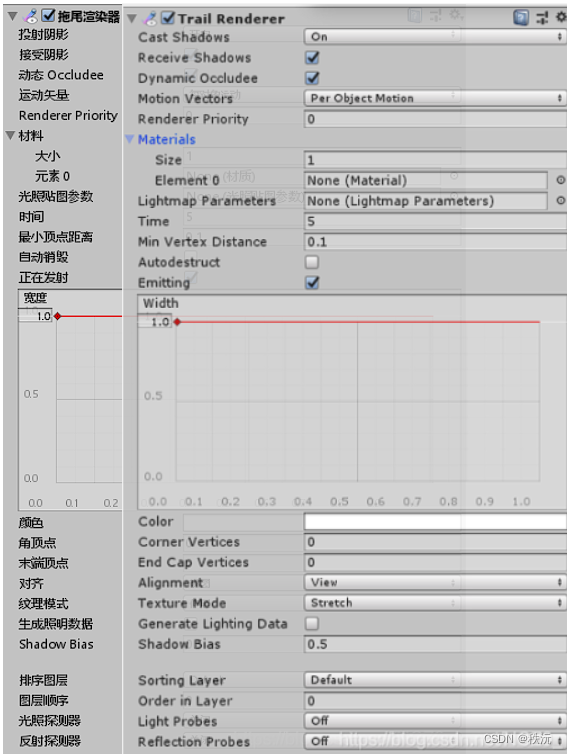
😶🌫️拖尾渲染器添加

- 将TrailRender的灯光关闭

- 选择拖尾的材质和设置宽度

😶🌫️核心代码:
using System.Collections; using System.Collections.Generic; using UnityEngine; //------------------------------------- //————————————————————————————————————— //___________项目: ______________ //___________功能: 汽车特效管理 //___________创建者:_____梅西湖_____ //_____________________________________ //------------------------------------- public class CarEffect : MonoBehaviour { public ParticleSystem[] smoke; //获取粒子特效数组 public TrailRenderer[] TrailArray; //获取漂移拖尾数组 public CarMoveControl carControl; //获取脚本CarMoveContorl void Awake() { //初始化两个数组 smoke = new ParticleSystem[4]; TrailArray = new TrailRenderer[4]; //给有烟雾数组 和 拖尾数组 初始化赋值 for (int i = 0; i < 4; i++) { smoke[i] = transform.GetChild(1).GetChild(i).GetComponent<ParticleSystem>(); TrailArray[i] = transform.GetChild(1).GetChild(i).GetComponent<TrailRenderer>(); } //初始化CarMoveContorl脚本 carControl = gameObject .GetComponent<CarMoveControl>(); //特效先停止 StopSmoke(); } private void Update() { //如果烟雾判断开关开启-按下空格或者 烟雾开关开启 和 漂移轨迹拖尾判断 if (carControl.playPauseSmoke || InputManager.InputManagerment.handbanl) { StarSmoke(); //开启烟雾 StartTrail(); //开启拖尾特效 } else { StopSmoke(); //关闭烟雾 StopTrail(); //关闭拖尾特效 } } //烟雾特效开始 public void StarSmoke() { for (int i = 0; i < 4; i++) { //var自动变成需要的类型 var emisiion = smoke[i].emission; emisiion.rateOverTime = carControl.Km_H * 10 >= 200 ? carControl.Km_H * 10 : 2000; smoke[i].Play(); } } //烟雾特效停止 public void StopSmoke() { for (int i = 0; i < 4; i++) { smoke[i].Stop(); } } //拖尾轨迹开启 public void StartTrail() { for (int i = 0; i < 4; i++) { TrailArray[i].emitting = true; } } //拖尾轨迹关闭 public void StopTrail() { for (int i = 0; i < 4; i++) { TrailArray[i].emitting = false; } } }- 1
- 2
- 3
- 4
- 5
- 6
- 7
- 8
- 9
- 10
- 11
- 12
- 13
- 14
- 15
- 16
- 17
- 18
- 19
- 20
- 21
- 22
- 23
- 24
- 25
- 26
- 27
- 28
- 29
- 30
- 31
- 32
- 33
- 34
- 35
- 36
- 37
- 38
- 39
- 40
- 41
- 42
- 43
- 44
- 45
- 46
- 47
- 48
- 49
- 50
- 51
- 52
- 53
- 54
- 55
- 56
- 57
- 58
- 59
- 60
- 61
- 62
- 63
- 64
- 65
- 66
- 67
- 68
- 69
- 70
- 71
- 72
- 73
- 74
- 75
- 76
- 77
- 78
- 79
- 80
- 81
- 82
- 83
- 84
- 85
- 86
- 87
- 88
- 89
- 90
- 91
- 92
- 93
- 94
- 95
- 96
- 97
- 98
- 99
- 100
- 101
- 102
- 103
- 104
- 105
- 106
- 107
😶🌫️添加漂移音效
- 关闭苏醒时激活,设置为3D,取消多普勒效应

音频源官方手册解释

😶🌫️最终代码
using System.Collections; using System.Collections.Generic; using UnityEngine; //------------------------------------- //————————————————————————————————————— //___________项目: ______________ //___________功能: 汽车特效管理 //___________创建者:_____梅西湖_____ //_____________________________________ //------------------------------------- public class CarEffect : MonoBehaviour { public ParticleSystem[] smoke; //获取粒子特效数组 public TrailRenderer[] TrailArray; //获取漂移拖尾数组 public CarMoveControl carControl; //获取脚本CarMoveContorl public AudioSource skipClip; //获取音频文件 void Awake() { //初始化两个数组 smoke = new ParticleSystem[4]; TrailArray = new TrailRenderer[4]; //获取音频资源 skipClip = GetComponent<AudioSource>(); //给有烟雾数组 和 拖尾数组 初始化赋值 for (int i = 0; i < 4; i++) { smoke[i] = transform.GetChild(1).GetChild(i).GetComponent<ParticleSystem>(); TrailArray[i] = transform.GetChild(1).GetChild(i).GetComponent<TrailRenderer>(); } //初始化CarMoveContorl脚本 carControl = gameObject .GetComponent<CarMoveControl>(); //特效先停止 StopSmoke(); //音效先停止 skipClip.Stop(); } private void Update() { //如果烟雾判断开关开启-按下空格或者 烟雾开关开启 和 漂移轨迹拖尾判断 if (carControl.playPauseSmoke || InputManager.InputManagerment.handbanl) StarSmoke(); //开启烟雾 else StopSmoke(); //关闭烟雾 //当按下空格时 if (InputManager.InputManagerment.handbanl) StartTrail(); //开启拖尾特效 else StopTrail(); //关闭拖尾特效 } //烟雾特效开始 public void StarSmoke() { for (int i = 0; i < 4; i++) { //var自动变成需要的类型 var emisiion = smoke[i].emission; emisiion.rateOverTime = carControl.Km_H * 10 >= 200 ? carControl.Km_H * 10 : 2000; smoke[i].Play(); } } //烟雾特效停止 public void StopSmoke() { for (int i = 0; i < 4; i++) { smoke[i].Stop(); } } //拖尾轨迹开启 public void StartTrail() { for (int i = 0; i < 4; i++) { TrailArray[i].emitting = true; } skipClip.Play(); } //拖尾轨迹关闭 public void StopTrail() { for (int i = 0; i < 4; i++) { TrailArray[i].emitting = false; } skipClip.Stop(); } }- 1
- 2
- 3
- 4
- 5
- 6
- 7
- 8
- 9
- 10
- 11
- 12
- 13
- 14
- 15
- 16
- 17
- 18
- 19
- 20
- 21
- 22
- 23
- 24
- 25
- 26
- 27
- 28
- 29
- 30
- 31
- 32
- 33
- 34
- 35
- 36
- 37
- 38
- 39
- 40
- 41
- 42
- 43
- 44
- 45
- 46
- 47
- 48
- 49
- 50
- 51
- 52
- 53
- 54
- 55
- 56
- 57
- 58
- 59
- 60
- 61
- 62
- 63
- 64
- 65
- 66
- 67
- 68
- 69
- 70
- 71
- 72
- 73
- 74
- 75
- 76
- 77
- 78
- 79
- 80
- 81
- 82
- 83
- 84
- 85
- 86
- 87
- 88
- 89
- 90
- 91
- 92
- 93
- 94
- 95
- 96
- 97
- 98
- 99
- 100
- 101
- 102
- 103
- 104
- 105
- 106
- 107
- 108
- 109
- 110
- 111
- 112
- 113
- 114
- 115
- 116
- 117
- 118
- 119
⭐🅰️⭐
你们的点赞👍 收藏⭐ 留言📝 关注✅是我持续创作,输出优质内容的最大动力!、

-
相关阅读:
TCP/IP 详解(第 2 版) 笔记 / 3 链路层 / 3.5 无线局域网 - IEEE 802.11 (Wi-Fi) / 3.5.1 802.11 帧
React + Antd 自定义Select选择框 全选、清空功能
SkyWalking快速上手(三)——架构剖析2
AI编码prompt编写及内在逻辑
一、mysql 5.7和8.0安装
软件测试|Python自动化测试实现的思路
tf.placeholder
【启扬方案】启扬多尺寸安卓屏一体机,助力仓储物料管理系统智能化管理
IP 基础
C# out参数out多个参数
- 原文地址:https://blog.csdn.net/m0_64128218/article/details/132676183