-
Android发布依赖到 Jitpack
前言
我们在日常开发中,经常会用到第三方开源的库文件,有的来自JCenter,Maven Central,google等。但是随着JCenter的弃用,现在用的最多的还是Maven Central,google。今天我们就自己亲自发布一个依赖。
现在网络上有很多的文章,是关于如何发布Android依赖到 Jitpack的,但是大多数都是比较早的,而且随着gradle版本的更新迭代,很多旧的插件已经不支持使用了。比如旧版本的 gradle 可以使用com.github.dcendents:android-maven-gradle-plugin:2.1,但是现在gradle 版本到 7.0 之后,这些插件就不适用了,而且坑很多,我创建了多个项目进行尝试,最终都失败了。也根据网络上的资料配置了jitpack.yml 文件,去指定在 Jitpack 需要编译的Jdk版本,可是还是失败。后来也参照了Jitpack官方文档以及官方项目jitpack.io还是失败,因为我发现Jitpack官方项目都是好几年前的版本,根本无法适用于gradle 版本到7.0 之后的,这一点还是希望,Jitpack官方可以随时更新维护一下项目和使用文档才好。
废话就不多说,下面开始我们创建自己的发布依赖之旅吧。
创建项目
首先,打开AS我们创建一个项目,这个很简单,如下图所示:

为了后面演示方便,我这里保留了lib模块以及app模块。
项目创建完毕后,就开始准备工作了,第一步就是要检查我的gradle版本以及gradle插件版本,以及sdk 的版本。
检查gradle版本
1、我的gradle版本是 gradle-7.5(项目根目录->gradle->wrapper->gradle-wrapper.properties)
  distributionUrl=https\://services.gradle.org/distributions/gradle-7.5-bin.zip

2、gradle 的插件版本 (项目根目录->build.gradle)
  classpath 'com.android.tools.build:gradle:7.4.2'

3、jdk 采用 1.8.0_221 (这个我们本地的不影响 jitpack 编译,到时候通过 jitpack.yml 去指定编译的 jdk 版本就可以了,提示:jitpack 默认是采用 1.8 的jdk进行编译的)

4、Android Studio Giraffe | 2022.3.1 Patch 1
Build #AI-223.8836.35.2231.10671973, built on August 17, 2023
Runtime version: 17.0.6+0-17.0.6b829.9-10027231 aarch64
VM: OpenJDK 64-Bit Server VM by JetBrains s.r.o.
macOS 13.5.1
GC: G1 Young Generation, G1 Old Generation
Memory: 1280M
Cores: 8
Metal Rendering is ON
Registry:
    external.system.auto.import.disabled=true
    debugger.new.tool.window.layout=true
    ide.text.editor.with.preview.show.floating.toolbar=false
    ide.experimental.ui=true
注意事项:注意gradle版本,Android studio版本,以及gradle 插件版本要相对应,具体版本对应关系可以参考Google的android开发平台的Android Gradle 插件版本说明。对照对应关系表修改三者的对应关系。如下图所示:
Android Gradle 插件版本所需的 Gradle 版本:

Android Gradle 插件和 Android Studio 兼容性

依赖库的配置
检查完本地的gradle相关的版本对应关系后,下面我们就可以开始配置依赖库。注意这里的依赖库shapeimageviewlib是我事先已经完善好了的功能模块,这里就以shapeimageviewlib来做依赖配置讲解。
在做依赖库的配置前,需要满足一下俩个要求。
1、需要有 jitpack 账号,可以去jitpack官网自行注册
2、需要有 github 账号 或者是 码云 gitee 账号,可以去码云titee或者github自行注册做为一个开发者,我想大家都有GitHub,Gitee,以及Jitpick账户吧,如果没有赶快去注册一个,注册流程很简单,这里就不做解说。
一:配置shapeimageviewlib的build.gradle
打开shapeimageviewlib 目录下的 build.gradle 文件,并在 plugins{} 标签中加入 id 'maven-publish'
- plugins {
- id 'com.android.library'
- id 'maven-publish'
- }
然后加入打包源码的task,如下所示:
- task generateSourcesJar(type: Jar){
- from android.sourceSets.main.java.srcDirs
- classifier 'sources'
- }
默认情况下,Gradle将每24小时刷新一次快照依赖项。
如果版本以
-SNAPSHOT后缀结尾,Gradle将自动将依赖项识别为快照。例如:- dependencies {
- compile group: "aGroup", name: "anArtifact", version: "1.0-SNAPSHOT"
- }
但是,如果依赖项的版本字符串不以
-SNAPSHOT结尾,则需要告知Gradle它是带有changing参数的快照。例如:- dependencies {
- compile group: "aGroup", name: "anArtifact", version: "1.0", changing: true
- }
覆盖Gradle下载快照的频率
覆盖默认的24小时策略的唯一机制是将Gradle配置为更频繁地使依赖项缓存无效(并因此下载新的SNAPSHOT)。例如:
- configurations.all {
- resolutionStrategy.cacheChangingModulesFor 0, 'seconds'
- }
动态版本化的依赖项缓存将需要单独配置
如果您使用任何动态版本,例如:- dependencies {
- compile group: "aGroup", name: "anArtifact", version: "1.+", changing: true
- }
您需要分别为这些依赖项配置缓存无效,如下所示:
- configurations.all {
- resolutionStrategy.cacheChangingModulesFor 0, 'seconds'
- resolutionStrategy.cacheDynamicVersionsFor 0, 'seconds'
- }
建立绩效影响:
需要注意的一件事是,缓存依赖项的时间越短,Gradle检索该 Artifact 的频率就越高。如果完全禁用了缓存,则它将在每次执行期间获取依赖项。关于maven - 有关快照的Gradle缓存问题的解决方案?,我在Stack Overflow上找到一个类似的问题: maven - Solution around gradle cache issues with snapshots? - Stack Overflow
至于是否使用快照,自己可以更具实际情况而定。
下面就是最核心的配置了,也就是发布上传配置。
二:配置上传publishing
同样操作,我们需要在shapeimageviewlib的build.gradle配置如下:
- afterEvaluate {
- publishing {
- publications {
- // Creates a Maven publication called "release".
- group = 'com.github.hirezy'
- version = '1.0.0'
- //发布release版本
- release(MavenPublication) {
- // Applies the component for the release build variant.
- from components.release
- //groupId通常是自己的gitee或者GitHub的账户地址
- groupId = group
- //artifactId通常是指待发布项目的名称,也就是别名
- artifactId = 'ShapeImageView'
- //version通常是指待发布项目的版本号,这里是写死的,通常我们取项目versionName
- version = version
- }
- //发布debug版本
- debug(MavenPublication) {
- // Applies the component for the release build variant.
- from components.debug
- groupId = group
- artifactId = 'ShapeImageView-debug'
- version = version
- }
- }
- }
- }
注意:网上有博主说,直接把afterEvaluate模块放在android{ //...todo}模块,这里我想特别提醒一下,不能放在android{ //...todo}模块,切记只能放在根模块,就是和android{ //...todo}同级。
本以为到了这里就万事大吉了,但是后来发布后遇到了下面的问题:
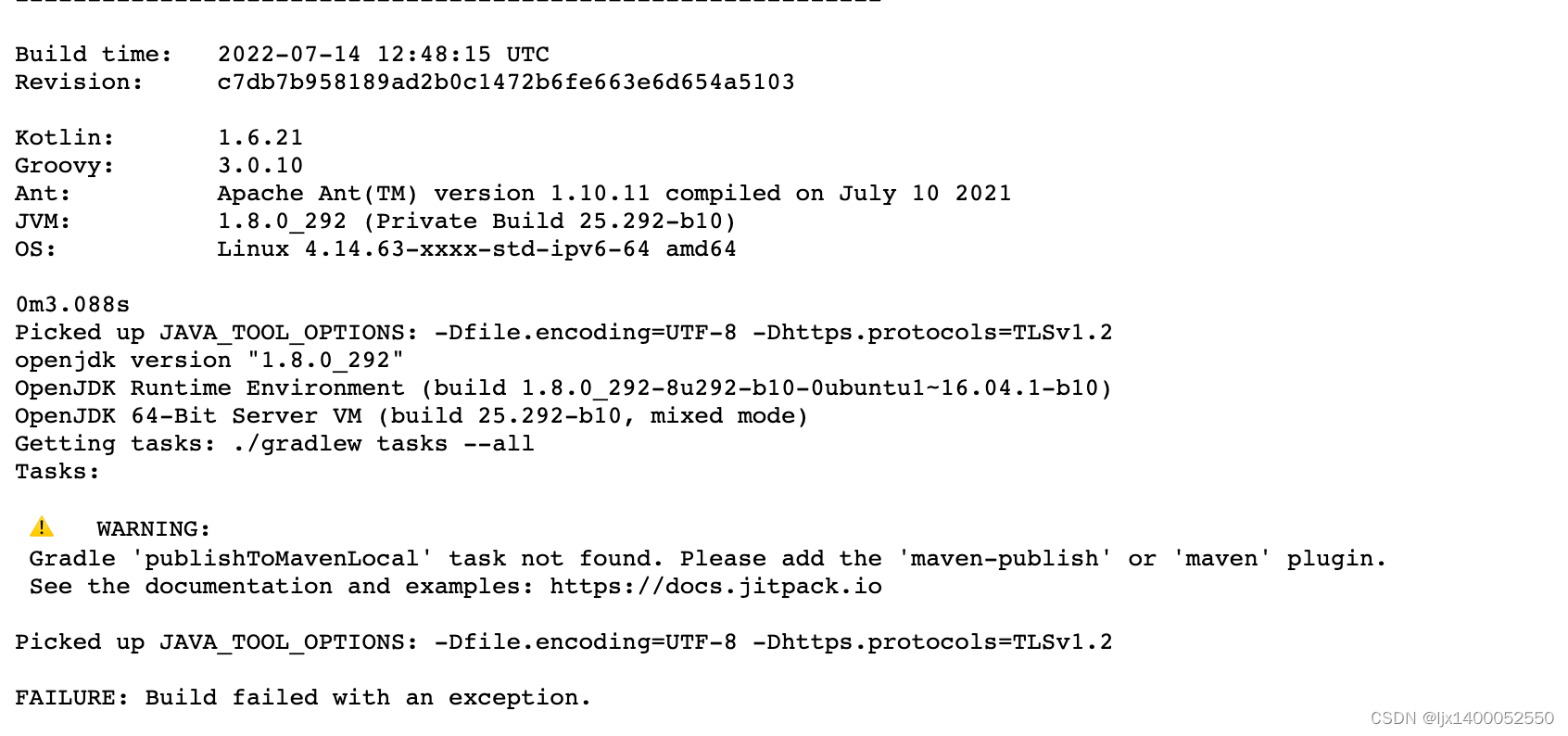

仔细分析报错日志,发现报了如下俩个错误
1:Gradle 'publishToMavenLocal' task not found. Please add the 'maven-publish' or 'maven' plugin.2: * What went wrong: A problem occurred configuring root project 'ShapeImageView'. > Could not resolve all files for configuration ':classpath'. > Could not resolve com.android.tools.build:gradle:7.4.2. Required by: project : > No matching variant of com.android.tools.build:gradle:7.4.2 was found. The consumer was configured to find a runtime of a library compatible with Java 8, packaged as a jar, and its dependencies declared externally, as well as attribute 'org.gradle.plugin.api-version' with value '7.5' but: - Variant 'apiElements' capability com.android.tools.build:gradle:7.4.2 declares a library, packaged as a jar, and its dependencies declared externally: - Incompatible because this component declares an API of a component compatible with Java 11 and the consumer needed a runtime of a component compatible with Java 8 - Other compatible attribute: - Doesn't say anything about org.gradle.plugin.api-version (required '7.5') - Variant 'javadocElements' capability com.android.tools.build:gradle:7.4.2 declares a runtime of a component, and its dependencies declared externally: - Incompatible because this component declares documentation and the consumer needed a library - Other compatible attributes: - Doesn't say anything about its target Java version (required compatibility with Java 8) - Doesn't say anything about its elements (required them packaged as a jar) - Doesn't say anything about org.gradle.plugin.api-version (required '7.5') - Variant 'runtimeElements' capability com.android.tools.build:gradle:7.4.2 declares a runtime of a library, packaged as a jar, and its dependencies declared externally: - Incompatible because this component declares a component compatible with Java 11 and the consumer needed a component compatible with Java 8 - Other compatible attribute: - Doesn't say anything about org.gradle.plugin.api-version (required '7.5') - Variant 'sourcesElements' capability com.android.tools.build:gradle:7.4.2 declares a runtime of a component, and its dependencies declared externally: - Incompatible because this component declares documentation and the consumer needed a library - Other compatible attributes: - Doesn't say anything about its target Java version (required compatibility with Java 8) - Doesn't say anything about its elements (required them packaged as a jar) - Doesn't say anything about org.gradle.plugin.api-version (required '7.5') * Try: > Run with --stacktrace option to get the stack trace. > Run with --info or --debug option to get more log output. > Run with --scan to get full insights. * Get more help at https://help.gradle.org BUILD FAILED in 533ms Build tool exit code: 0 Looking for artifacts... Picked up JAVA_TOOL_OPTIONS: -Dfile.encoding=UTF-8 -Dhttps.protocols=TLSv1.2 Picked up JAVA_TOOL_OPTIONS: -Dfile.encoding=UTF-8 -Dhttps.protocols=TLSv1.2 Looking for pom.xml in build directory and ~/.m2 2023-09-06T17:54:45.227812499Z Exit code: 0 ⚠️ ERROR: No build artifacts found可是我分明已经加入了maven-publish插件,为什么会报Gradle 'publishToMavenLocal' task not found。
而且我明明也指定了jdk版本为未java11啊,为什么说我是用的是java8了。这真的一度让我怀疑人生,不敢在相信Jitpack了。
- compileOptions {
- sourceCompatibility JavaVersion.VERSION_11
- targetCompatibility JavaVersion.VERSION_11
- }
可是本本着不服输的想法我再次查阅了jitpack.io文档,终于让我找到了解决办法。如下图所:

然后,我试着加入
jitpack.yml文件,内容如下:- jdk:
- - openjdk11
- before_install:
- - sdk install java 11.0.10-open
- - sdk use java 11.0.10-open
- install:
- - echo "Running a custom install command"
- - ./gradlew clean install -xtest
- env:
- MYVAR: "custom environment variable"
结果神奇的发现,问题2解决了,但是问题依然存在。
后来试着在android{ //...todo}模块加入如下指令,竟然神奇发现,编译竟然通过了:
- publishing {
- singleVariant("release")
- singleVariant("debug")
- }
- buildTypes {
- release {
- minifyEnabled false
- proguardFiles getDefaultProguardFile('proguard-android-optimize.txt'), 'proguard-rules.pro'
- }
- debug{
- minifyEnabled false
- proguardFiles getDefaultProguardFile('proguard-android-optimize.txt'), 'proguard-rules.pro'
- }
- }
走到这一步,我真的要吐血了,甚至有冲动不想在使用Jitpick了,在这里真心希望jitpack团队可以及时更新文档,更新simple。
三:将代码同步到 github/gitee上
我们只要按照以下步骤执行命令即可把我们工程上传到GitHub或者gitee上,这里不做过多讲解。
echo "”>>README.md
git init
git add .
git commit -m "first commit"
git remote add origin git@github.com:hirezy/ShapeImageView.git
git push -u origin master注意:
github 现在推送代码,是采用了 token 的形式,可以去后端生成 token,然后去 android studio 等工具使用,否则无法提交代码,原本的密码账号的形式,已经被废弃了。可以参考:GitHub不再支持密码验证解决方案:SSH免密与Token登录配置,讲解的非常详细。
代码同步完成后,我们就去创建一个 Releases 版本,如下所示图:

这里是我提前已经准备好的一个Releases,版本号是v.1.0.0,下面我带大家创建一个新的Release版本,版本是v1.0.1
四:创建Releases
创建Releases版本前,我们需要先创建一个Tag,创建Tag命令如下:
git tag v1.0.1提交这个tag到远程。
git push origin v1.0.1提交成功,就会看到下图所示信息,提示我们新创建的tag已经成功提交远程仓库:

如果,你对git的Tag操作不熟悉,可以参考Git优雅使用:git tag操作。
查看远程仓库,你会发现,远程会多了一个Tag,我们只需点击图上圈着的Release按钮,就会跳转到创建页面,如果非第一次创建,可以看到如下页面,点击【Draft a new release】按钮去创建一个版本。(注意:我这里你看见有Release有俩个,那是因为我我提交了一个配置文件,每当我提交Tag到远程,Github会自动帮我Releases出一个对应的版本,后面我会给大家分享这个config文件)。
当我们点击【Release】按钮,就会来到如下界面

因为不是第一次创建,所以点击【Draft a new release】按钮去创建一个版本,如下图所示:

五:如何快速生成Releases:
上面介绍了,生成Releases版本,除了通过打Tag方式来生产Releases,还可以通过配置config文件,在我们提交本地Tag到远程的时候系统自动帮我们快速生成对应版本的Releases
怎么做了,其实很简单,我们只需要在我们的项目的根目录新建这样的文件目录就好了,如下图所示:
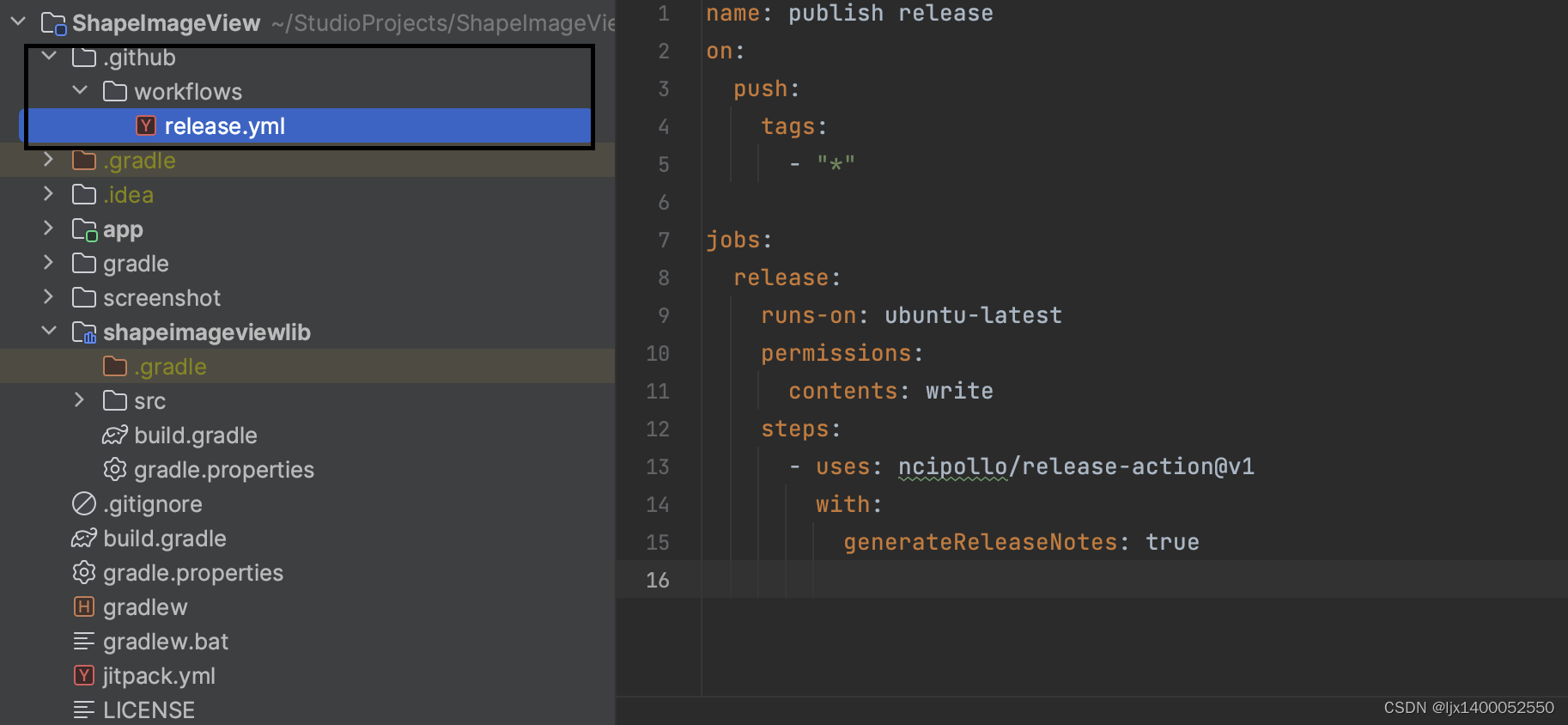
并在release.yml这个文件加入如下内容即可:
- name: publish release
- on:
- push:
- tags:
- - "*"
- jobs:
- release:
- runs-on: ubuntu-latest
- permissions:
- contents: write
- steps:
- - uses: ncipollo/release-action@v1
- with:
- generateReleaseNotes: true
注意:一定要在项目的根目录下的.github/workflows目录下新建release.yml文件,并加上面的内容方可自动快速帮我们创建releases.
六:将代码关联到 Jitpack,生成依赖库。
准备工作完毕后,我们直接登陆到Jitpack,然后复制我们的项目仓库地址,可以是https形式,也可以是SSH形式,如下图所示:

这里我采用ssh方式。复制地址后,来到Jitpack,在下图所示输入栏输入我们复制的项目地址信息,接着点击 【Loop up】 按钮,接着可以看到你Github上,最新的几个版本在这里(我这里是因为我之前上传过,所以有这么多),分别点击右侧的【Get it】按钮,如果没有看见loading,则多点几次,刷网页也可以。
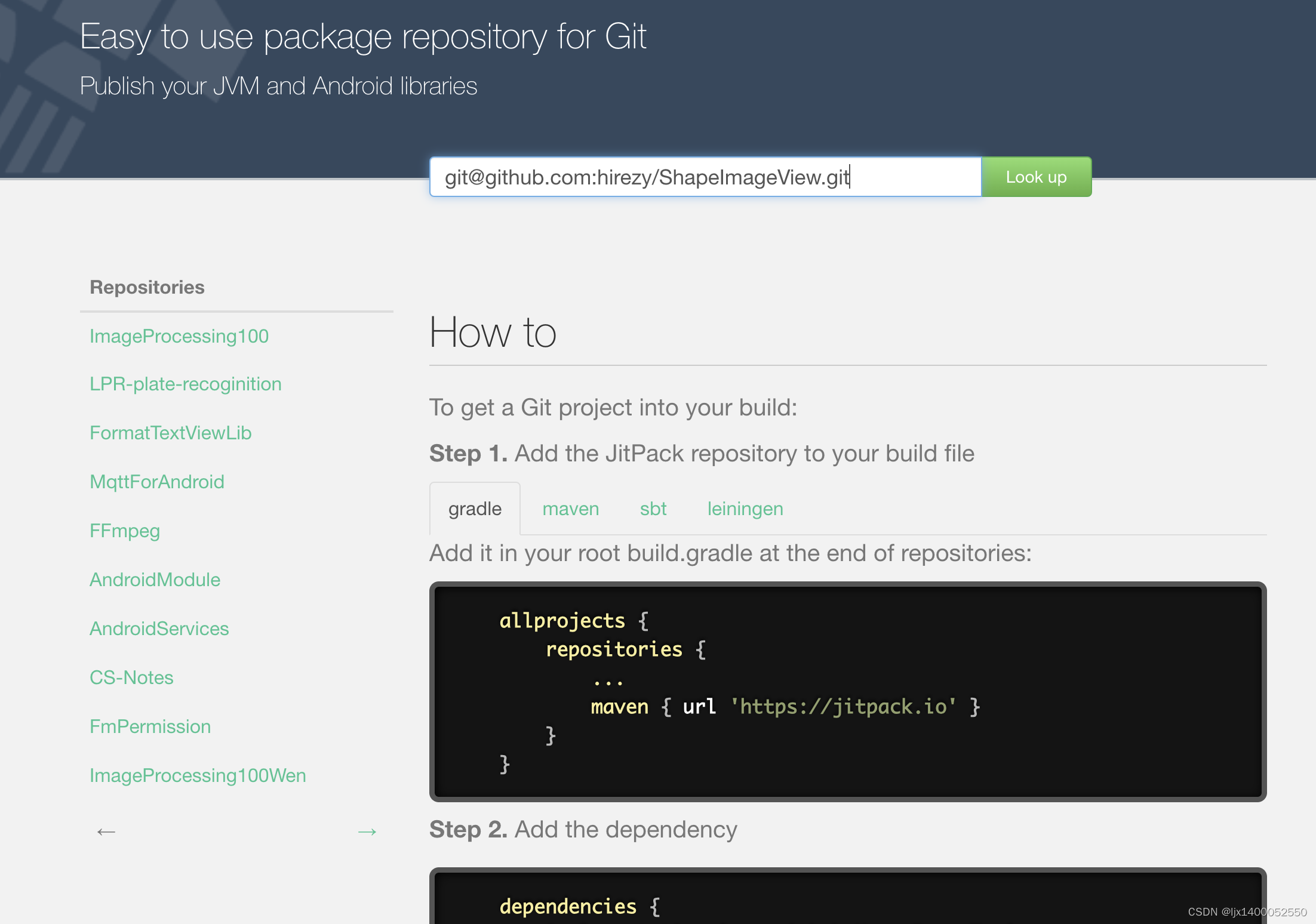
在依次点击【Loop up】 按钮 -》Get it】按钮,等待loading介绍即可:

编译结束,我们就会看到下图所示的结果,如果编译成功,就会看到log一列对应的版本就是绿色的,如果编译失败,就会看到log所在列会有红色失败提示,我们只需要点击那个像书籍一样的按钮,就可以看见相信的编译信息,如下图所示:
编译日志如下:
- Build starting...
- Start: Thu Sep 7 10:34:10 UTC 2023 91be4e2ca99f
- Git:
- v1.0.0-0-g9130e5c
- commit 9130e5cf40ee555c45bf763a07572fc166f2bece
- Author: hirezy
- Date: Thu Sep 7 11:29:26 2023 +0800
- rename file
- Init SDKMan
- Found Android manifest
- Android SDK version: . Build tools:
- Found gradle
- Gradle build script
- Found gradle version: 7.5.
- Using gradle wrapper
- Picked up JAVA_TOOL_OPTIONS: -Dfile.encoding=UTF-8 -Dhttps.protocols=TLSv1.2
- Downloading https://services.gradle.org/distributions/gradle-7.5-bin.zip
- .10%.20%.30%.40%.50%.60%.70%.80%.90%.100%
- ------------------------------------------------------------
- Gradle 7.5
- ------------------------------------------------------------
- Build time: 2022-07-14 12:48:15 UTC
- Revision: c7db7b958189ad2b0c1472b6fe663e6d654a5103
- Kotlin: 1.6.21
- Groovy: 3.0.10
- Ant: Apache Ant(TM) version 1.10.11 compiled on July 10 2021
- JVM: 11.0.2 (Oracle Corporation 11.0.2+9)
- OS: Linux 4.14.63-xxxx-std-ipv6-64 amd64
- 0m3.920s
- Picked up JAVA_TOOL_OPTIONS: -Dfile.encoding=UTF-8 -Dhttps.protocols=TLSv1.2
- openjdk version "11.0.2" 2019-01-15
- OpenJDK Runtime Environment 18.9 (build 11.0.2+9)
- OpenJDK 64-Bit Server VM 18.9 (build 11.0.2+9, mixed mode)
- Getting tasks: ./gradlew tasks --all
- Tasks: publishToMavenLocal,
- Running: ./gradlew clean -Pgroup=com.github.hirezy -Pversion=v1.0.1 -xtest -xlint assemble publishToMavenLocal
- Checking the license for package Android SDK Build-Tools 30.0.3 in /opt/android-sdk-linux/licenses
- License for package Android SDK Build-Tools 30.0.3 accepted.
- Preparing "Install Android SDK Build-Tools 30.0.3 (revision: 30.0.3)".
- "Install Android SDK Build-Tools 30.0.3 (revision: 30.0.3)" ready.
- Installing Android SDK Build-Tools 30.0.3 in /opt/android-sdk-linux/build-tools/30.0.3
- "Install Android SDK Build-Tools 30.0.3 (revision: 30.0.3)" complete.
- "Install Android SDK Build-Tools 30.0.3 (revision: 30.0.3)" finished.
- Checking the license for package Android SDK Platform 30 in /opt/android-sdk-linux/licenses
- License for package Android SDK Platform 30 accepted.
- Preparing "Install Android SDK Platform 30 (revision: 3)".
- "Install Android SDK Platform 30 (revision: 3)" ready.
- Installing Android SDK Platform 30 in /opt/android-sdk-linux/platforms/android-30
- "Install Android SDK Platform 30 (revision: 3)" complete.
- "Install Android SDK Platform 30 (revision: 3)" finished.
- > Task :clean UP-TO-DATE
- > Task :app:clean UP-TO-DATE
- > Task :shapeimageviewlib:clean UP-TO-DATE
- > Task :app:preBuild UP-TO-DATE
- > Task :app:preDebugBuild UP-TO-DATE
- > Task :shapeimageviewlib:preBuild UP-TO-DATE
- > Task :shapeimageviewlib:preDebugBuild UP-TO-DATE
- > Task :shapeimageviewlib:preReleaseBuild UP-TO-DATE
- > Task :app:preReleaseBuild UP-TO-DATE
- > Task :app:mergeDebugNativeDebugMetadata NO-SOURCE
- > Task :shapeimageviewlib:compileDebugAidl NO-SOURCE
- > Task :app:compileDebugAidl NO-SOURCE
- > Task :shapeimageviewlib:packageDebugRenderscript NO-SOURCE
- > Task :app:compileDebugRenderscript NO-SOURCE
- > Task :app:dataBindingMergeDependencyArtifactsDebug
- WARNING: [Processor] Library '/home/jitpack/.gradle/caches/modules-2/files-2.1/com.github.JessYanCoding/AndroidAutoSize/v1.2.1/a44df9822e0cb91242358f070ef813714fd81c05/AndroidAutoSize-v1.2.1.aar' contains references to both AndroidX and old support library. This seems like the library is partially migrated. Jetifier will try to rewrite the library anyway.
- Example of androidX reference: 'androidx/fragment/app/FragmentManager$FragmentLifecycleCallbacks'
- Example of support library reference: 'android/support/v4/app/FragmentManager$FragmentLifecycleCallbacks'
- > Task :app:generateDebugResValues
- > Task :app:generateDebugResources
- > Task :shapeimageviewlib:compileDebugRenderscript NO-SOURCE
- > Task :shapeimageviewlib:generateDebugResValues
- > Task :shapeimageviewlib:generateDebugResources
- > Task :shapeimageviewlib:packageDebugResources
- > Task :app:generateDebugBuildConfig
- > Task :app:javaPreCompileDebug
- > Task :app:mapDebugSourceSetPaths
- > Task :shapeimageviewlib:writeDebugAarMetadata
- > Task :app:createDebugCompatibleScreenManifests
- > Task :app:mergeDebugResources
- > Task :app:checkDebugAarMetadata
- > Task :app:dataBindingGenBaseClassesDebug
- > Task :app:extractDeepLinksDebug
- > Task :shapeimageviewlib:extractDeepLinksDebug
- > Task :shapeimageviewlib:processDebugManifest
- > Task :shapeimageviewlib:compileDebugLibraryResources
- > Task :app:processDebugMainManifest
- > Task :app:processDebugManifest
- > Task :shapeimageviewlib:generateDebugBuildConfig
- > Task :shapeimageviewlib:javaPreCompileDebug
- > Task :app:mergeDebugShaders
- > Task :app:compileDebugShaders NO-SOURCE
- > Task :app:generateDebugAssets UP-TO-DATE
- > Task :shapeimageviewlib:mergeDebugShaders
- > Task :shapeimageviewlib:compileDebugShaders NO-SOURCE
- > Task :shapeimageviewlib:generateDebugAssets UP-TO-DATE
- > Task :shapeimageviewlib:packageDebugAssets
- > Task :shapeimageviewlib:parseDebugLocalResources
- > Task :app:mergeDebugAssets
- > Task :app:processDebugManifestForPackage
- > Task :app:compressDebugAssets
- > Task :app:processDebugJavaRes NO-SOURCE
- > Task :shapeimageviewlib:processDebugJavaRes NO-SOURCE
- > Task :shapeimageviewlib:bundleLibResDebug NO-SOURCE
- > Task :shapeimageviewlib:generateDebugRFile
- > Task :app:checkDebugDuplicateClasses
- > Task :app:processDebugResources
- > Task :shapeimageviewlib:compileDebugJavaWithJavac
- > Task :shapeimageviewlib:bundleLibCompileToJarDebug
- > Task :app:desugarDebugFileDependencies
- > Task :app:compileDebugJavaWithJavac
- > Task :app:mergeDebugJavaResource
- > Task :shapeimageviewlib:bundleLibRuntimeToJarDebug
- > Task :app:mergeDebugJniLibFolders
- > Task :app:dexBuilderDebug
- > Task :shapeimageviewlib:mergeDebugJniLibFolders
- > Task :app:mergeLibDexDebug
- > Task :shapeimageviewlib:mergeDebugNativeLibs NO-SOURCE
- > Task :shapeimageviewlib:copyDebugJniLibsProjectOnly
- > Task :app:mergeProjectDexDebug
- > Task :app:validateSigningDebug
- > Task :app:mergeDebugNativeLibs NO-SOURCE
- > Task :app:stripDebugDebugSymbols NO-SOURCE
- > Task :app:writeDebugAppMetadata
- > Task :app:writeDebugSigningConfigVersions
- > Task :shapeimageviewlib:compileReleaseAidl NO-SOURCE
- > Task :shapeimageviewlib:mergeReleaseJniLibFolders
- > Task :shapeimageviewlib:mergeReleaseNativeLibs NO-SOURCE
- > Task :shapeimageviewlib:stripReleaseDebugSymbols NO-SOURCE
- > Task :shapeimageviewlib:copyReleaseJniLibsProjectAndLocalJars
- > Task :shapeimageviewlib:compileReleaseRenderscript NO-SOURCE
- > Task :shapeimageviewlib:generateReleaseResValues
- > Task :shapeimageviewlib:extractDeepLinksForAarRelease
- > Task :shapeimageviewlib:generateReleaseBuildConfig
- > Task :shapeimageviewlib:generateReleaseResources
- > Task :shapeimageviewlib:packageReleaseResources
- > Task :shapeimageviewlib:parseReleaseLocalResources
- > Task :shapeimageviewlib:javaPreCompileRelease
- > Task :shapeimageviewlib:mergeReleaseShaders
- > Task :shapeimageviewlib:compileReleaseShaders NO-SOURCE
- > Task :shapeimageviewlib:generateReleaseAssets UP-TO-DATE
- > Task :shapeimageviewlib:processReleaseManifest
- > Task :shapeimageviewlib:packageReleaseAssets
- > Task :shapeimageviewlib:packageReleaseRenderscript NO-SOURCE
- > Task :shapeimageviewlib:prepareLintJarForPublish
- > Task :shapeimageviewlib:prepareReleaseArtProfile
- > Task :shapeimageviewlib:generateReleaseRFile
- > Task :shapeimageviewlib:processReleaseJavaRes NO-SOURCE
- > Task :app:mergeExtDexDebug
- > Task :shapeimageviewlib:extractReleaseAnnotations
- > Task :shapeimageviewlib:compileReleaseJavaWithJavac
- > Task :shapeimageviewlib:mergeReleaseGeneratedProguardFiles
- > Task :shapeimageviewlib:mergeReleaseConsumerProguardFiles
- > Task :app:compileReleaseAidl NO-SOURCE
- > Task :shapeimageviewlib:writeReleaseAarMetadata
- > Task :shapeimageviewlib:mergeReleaseJavaResource
- > Task :app:compileReleaseRenderscript NO-SOURCE
- > Task :shapeimageviewlib:syncReleaseLibJars
- > Task :shapeimageviewlib:bundleReleaseLocalLintAar
- > Task :app:dataBindingMergeDependencyArtifactsRelease
- > Task :app:generateReleaseResValues
- > Task :app:generateReleaseResources
- > Task :app:generateReleaseBuildConfig
- > Task :app:mapReleaseSourceSetPaths
- > Task :app:createReleaseCompatibleScreenManifests
- > Task :app:extractDeepLinksRelease
- > Task :shapeimageviewlib:extractDeepLinksRelease
- > Task :app:checkReleaseAarMetadata
- > Task :app:javaPreCompileRelease
- > Task :app:processReleaseMainManifest
- > Task :app:processReleaseManifest
- > Task :app:extractProguardFiles
- > Task :shapeimageviewlib:bundleLibResRelease NO-SOURCE
- > Task :shapeimageviewlib:bundleLibRuntimeToJarRelease
- > Task :shapeimageviewlib:bundleLibCompileToJarRelease
- > Task :app:packageDebug
- > Task :shapeimageviewlib:compileReleaseLibraryResources
- > Task :app:createDebugApkListingFileRedirect
- > Task :app:assembleDebug
- > Task :shapeimageviewlib:createFullJarRelease
- > Task :shapeimageviewlib:writeReleaseLintModelMetadata
- > Task :app:mergeReleaseJniLibFolders
- > Task :shapeimageviewlib:copyReleaseJniLibsProjectOnly
- > Task :app:mergeReleaseNativeLibs NO-SOURCE
- > Task :app:stripReleaseDebugSymbols NO-SOURCE
- > Task :app:extractReleaseNativeSymbolTables NO-SOURCE
- > Task :app:mergeReleaseNativeDebugMetadata NO-SOURCE
- > Task :app:desugarReleaseFileDependencies
- > Task :app:checkReleaseDuplicateClasses
- > Task :app:mergeReleaseResources
- > Task :app:dataBindingGenBaseClassesRelease
- > Task :app:mergeReleaseShaders
- > Task :app:compileReleaseShaders NO-SOURCE
- > Task :app:generateReleaseAssets UP-TO-DATE
- > Task :app:mergeReleaseAssets
- > Task :app:compressReleaseAssets
- > Task :app:processReleaseJavaRes NO-SOURCE
- > Task :app:collectReleaseDependencies
- > Task :app:sdkReleaseDependencyData
- > Task :app:writeReleaseAppMetadata
- > Task :app:writeReleaseSigningConfigVersions
- > Task :shapeimageviewlib:stripDebugDebugSymbols NO-SOURCE
- > Task :shapeimageviewlib:copyDebugJniLibsProjectAndLocalJars
- > Task :shapeimageviewlib:extractDebugAnnotations
- > Task :shapeimageviewlib:extractDeepLinksForAarDebug
- > Task :shapeimageviewlib:mergeDebugGeneratedProguardFiles
- > Task :shapeimageviewlib:mergeDebugConsumerProguardFiles
- > Task :shapeimageviewlib:prepareDebugArtProfile
- > Task :app:processReleaseManifestForPackage
- > Task :shapeimageviewlib:mergeDebugJavaResource
- > Task :shapeimageviewlib:syncDebugLibJars
- > Task :app:mergeReleaseArtProfile
- > Task :shapeimageviewlib:bundleDebugAar
- > Task :shapeimageviewlib:assembleDebug
- > Task :shapeimageviewlib:bundleReleaseAar
- > Task :shapeimageviewlib:mapReleaseSourceSetPaths
- > Task :shapeimageviewlib:mergeReleaseResources
- > Task :shapeimageviewlib:generateMetadataFileForDebugPublication
- > Task :shapeimageviewlib:generatePomFileForDebugPublication
- > Task :shapeimageviewlib:publishDebugPublicationToMavenLocal
- > Task :shapeimageviewlib:generateMetadataFileForReleasePublication
- > Task :shapeimageviewlib:generatePomFileForReleasePublication
- > Task :shapeimageviewlib:publishReleasePublicationToMavenLocal
- > Task :shapeimageviewlib:publishToMavenLocal
- > Task :app:processReleaseResources
- > Task :shapeimageviewlib:verifyReleaseResources
- > Task :app:compileReleaseJavaWithJavac
- > Task :app:mergeExtDexRelease
- > Task :app:dexBuilderRelease
- > Task :shapeimageviewlib:assembleRelease
- > Task :shapeimageviewlib:assemble
- > Task :app:mergeReleaseJavaResource
- > Task :app:optimizeReleaseResources
- > Task :app:mergeDexRelease
- > Task :app:compileReleaseArtProfile
- > Task :app:packageRelease
- > Task :app:createReleaseApkListingFileRedirect
- > Task :app:lintVitalAnalyzeRelease
- > Task :app:lintVitalReportRelease
- > Task :app:lintVitalRelease
- > Task :app:assembleRelease
- > Task :app:assemble
- BUILD SUCCESSFUL in 1m 28s
- 137 actionable tasks: 134 executed, 3 up-to-date
- Picked up JAVA_TOOL_OPTIONS: -Dfile.encoding=UTF-8 -Dhttps.protocols=TLSv1.2
- Picked up JAVA_TOOL_OPTIONS: -Dfile.encoding=UTF-8 -Dhttps.protocols=TLSv1.2
- Picked up JAVA_TOOL_OPTIONS: -Dfile.encoding=UTF-8 -Dhttps.protocols=TLSv1.2
- Picked up JAVA_TOOL_OPTIONS: -Dfile.encoding=UTF-8 -Dhttps.protocols=TLSv1.2
- Note: Some input files use or override a deprecated API.
- Note: Recompile with -Xlint:deprecation for details.
- Note: [1] Wrote GeneratedAppGlideModule with: [com.bumptech.glide.integration.okhttp3.OkHttpLibraryGlideModule]
- Note: /home/jitpack/build/app/src/main/java/com/hirezy/shapeimageview/ScaleTypeActivity.java uses or overrides a deprecated API.
- Note: Recompile with -Xlint:deprecation for details.
- Note: /home/jitpack/build/app/src/main/java/com/hirezy/shapeimageview/MyImageLoader.java uses unchecked or unsafe operations.
- Note: Recompile with -Xlint:unchecked for details.
- Note: Some input files use or override a deprecated API.
- Note: Recompile with -Xlint:deprecation for details.
- Note: [1] Wrote GeneratedAppGlideModule with: [com.bumptech.glide.integration.okhttp3.OkHttpLibraryGlideModule]
- Note: /home/jitpack/build/app/src/main/java/com/hirezy/shapeimageview/ScaleTypeActivity.java uses or overrides a deprecated API.
- Note: Recompile with -Xlint:deprecation for details.
- Note: /home/jitpack/build/app/src/main/java/com/hirezy/shapeimageview/MyImageLoader.java uses unchecked or unsafe operations.
- Note: Recompile with -Xlint:unchecked for details.
- Picked up JAVA_TOOL_OPTIONS: -Dfile.encoding=UTF-8 -Dhttps.protocols=TLSv1.2
- Publication: com.github.hirezy:ShapeImageView-debug:1.0.0
- Publication: com.github.hirezy:ShapeImageView:1.0.0
- Build tool exit code: 0
- Looking for artifacts...
- Picked up JAVA_TOOL_OPTIONS: -Dfile.encoding=UTF-8 -Dhttps.protocols=TLSv1.2
- Picked up JAVA_TOOL_OPTIONS: -Dfile.encoding=UTF-8 -Dhttps.protocols=TLSv1.2
- Looking for pom.xml in build directory and ~/.m2
- Found artifact: com.github.hirezy:ShapeImageView-debug:1.0.0
- Found artifact: com.github.hirezy:ShapeImageView:1.0.0
- Found artifact: com.github.hirezy:ShapeImageView-debug:1.0.0
- Found artifact: com.github.hirezy:ShapeImageView:1.0.0
- 2023-09-07T10:36:21.971608584Z
- Exit code: 0
- ✅ Build artifacts:
- com.github.hirezy.ShapeImageView:ShapeImageView:v1.0.1
- com.github.hirezy.ShapeImageView:ShapeImageView-debug:v1.0.1
- Files:
- com/github/hirezy/ShapeImageView/ShapeImageView/v1.0.1
- com/github/hirezy/ShapeImageView/ShapeImageView/v1.0.1/ShapeImageView-v1.0.1.aar
- com/github/hirezy/ShapeImageView/ShapeImageView/v1.0.1/ShapeImageView-v1.0.1.module
- com/github/hirezy/ShapeImageView/ShapeImageView/v1.0.1/ShapeImageView-v1.0.1.pom
- com/github/hirezy/ShapeImageView/ShapeImageView/v1.0.1/ShapeImageView-v1.0.1.pom.md5
- com/github/hirezy/ShapeImageView/ShapeImageView/v1.0.1/ShapeImageView-v1.0.1.pom.sha1
- com/github/hirezy/ShapeImageView/ShapeImageView-debug/v1.0.1
- com/github/hirezy/ShapeImageView/ShapeImageView-debug/v1.0.1/ShapeImageView-debug-v1.0.1.aar
- com/github/hirezy/ShapeImageView/ShapeImageView-debug/v1.0.1/ShapeImageView-debug-v1.0.1.module
- com/github/hirezy/ShapeImageView/ShapeImageView-debug/v1.0.1/ShapeImageView-debug-v1.0.1.pom
- com/github/hirezy/ShapeImageView/ShapeImageView-debug/v1.0.1/ShapeImageView-debug-v1.0.1.pom.md5
- com/github/hirezy/ShapeImageView/ShapeImageView-debug/v1.0.1/ShapeImageView-debug-v1.0.1.pom.sha1

七:如何使用
首先,在要引用的项目的根目录的build.gradle文件下加入JitPack repository(Add the JitPack repository to your build file)
- allprojects {
- repositories {
- ...
- maven { url 'https://jitpack.io' }
- }
- }
接着Add the dependency:
- dependencies {
- implementation 'com.github.hirezy:ShapeImageView:Tag'
- }
注意:如果你使用的是1.0.0版本就是
- dependencies {
- implementation 'com.github.hirezy:ShapeImageView:1.0.0'
- }
使用1.0.1版本就是
- dependencies {
- implementation 'com.github.hirezy:ShapeImageView:1.0.1'
- }
依次类推。
总结:
要想成功顺利的将我们的lib发布到Jitpack,必须具备以下条件:
- 首先要注册相关账号,比如GitHub账号,Gitee账户,Jitpack账户
- 掌握基本的git命令,以及属性groovy编译工具的语法
- 正确配置gradle版本,gradle插件版本,Android studio 版本的对应关系
- 总重要的一点就是要有足够的耐心,发现问题,分析问题,解决问题
-
相关阅读:
程序员该如何理解javascript的单线程?
自定义对象_JavaScript
【javaEE】多线程进阶(Part2 JUC、线程安全、死锁)
Application of Intelligent Motor Protector in Yeme
(狂神)员工管理系统项目
AWS API gateway api CORS错误处理方法
css伪类元素使用技巧 表达input父级聚焦css实现
SpringMVC
SQL Server全套教程(基于SQL语句----预览版)
为什么电脑一用wps就卡住了?
- 原文地址:https://blog.csdn.net/ljx1400052550/article/details/132740197
