-
JAVA设计模式第十讲:SPI - 业务差异解决方案
JAVA设计模式第十讲:SPI - 业务差异解决方案
我们需要在不修改源代码的情况下,动态为程序提供一系列额外的特性。首先想到的是Spring的AOP技术来构建应用插件,但是在Java自带的插件中,就有完整的实现。SPI(Service Provider Interface),是JDK内置的一种 服务提供发现机制,可以用来启用框架扩展和替换组件,主要是被框架的开发人员使用。本文是设计模式第十讲,SPI - 业务差异解决方案。
文章目录
1、什么是原生SPI?
SPI(Service Provider Interface),是JDK内置的一种 服务提供发现机制,可以用来启用框架扩展和替换组件,主要是被框架的开发人员使用。
比如 java.sql.Driver 接口,其他不同厂商可以针对同一接口做出不同的实现,MySQL和PostgreSQL都有不同的实现提供给用户,而Java的SPI机制可以为某个接口寻找服务实现。Java中SPI机制主要思想是将装配的控制权移到程序之外,在模块化设计中这个机制尤其重要,其核心思想就是 解耦。
- 是一种规范
SPI整体机制图如下:
当服务的提供者提供了一种接口的实现之后,需要在classpath下的
META-INF/services/目录里创建一个以服务接口命名的文件,这个文件里的内容就是这个接口的具体的实现类。当其他的程序需要这个服务的时候,就可以通过查找这个jar包(一般都是以jar包做依赖)的META-INF/services/中的配置文件,配置文件中有接口的具体实现类名,可以根据这个类名进行加载实例化,就可以使用该服务了。JDK中查找服务的实现的工具类是:java.util.ServiceLoader。2、SPI机制的简单示例
案例:我们现在需要使用一个内容搜索接口,搜索的实现可能是基于文件系统的搜索,也可能是基于数据库的搜索。
- 先定义好接口
public interface Search { public List<String> searchDoc(String keyword); }- 1
- 2
- 3
- 文件搜索实现
public class FileSearch implements Search{ @Override public List<String> searchDoc(String keyword) { System.out.println("文件搜索 "+keyword); return null; } }- 1
- 2
- 3
- 4
- 5
- 6
- 7
- 8
- 数据库搜索实现
public class DatabaseSearch implements Search{ @Override public List<String> searchDoc(String keyword) { System.out.println("数据搜索 "+keyword); return null; } }- 1
- 2
- 3
- 4
- 5
- 6
- 7
- 8
- resources 接下来可以在resources下新建META-INF/services/目录,然后新建接口全限定名的文件:
com.cainiao.ys.spi.learn.Search,里面加上我们需要用到的实现类
com.cainiao.ys.spi.learn.FileSearch- 1
- 测试方法
public class TestCase { public static void main(String[] args) { ServiceLoader<Search> s = ServiceLoader.load(Search.class); Iterator<Search> iterator = s.iterator(); while (iterator.hasNext()) { Search search = iterator.next(); search.searchDoc("hello world"); } } }- 1
- 2
- 3
- 4
- 5
- 6
- 7
- 8
- 9
- 10
可以看到输出结果:文件搜索 hello world
如果在
com.cainiao.ys.spi.learn.Search文件里写上两个实现类,那最后的输出结果就是两行了。这就是因为
ServiceLoader.load(Search.class)在加载某接口时,会去META-INF/services下找接口的全限定名文件,再根据里面的内容加载相应的实现类。这就是spi的思想,接口的实现由provider实现,provider只用在提交的jar包里的
META-INF/services下根据平台定义的接口新建文件,并添加进相应的实现类内容就好。3、SPI机制的广泛应用
3.1、SPI机制在 JDBC DriverManager 的应用
在JDBC4.0之前,我们开发有连接数据库的时候,通常会用Class.forName(“com.mysql.jdbc.Driver”) 这句先加载数据库相关的驱动,然后再进行获取连接等的操作。而JDBC4.0之后不需要用 Class.forName(“com.mysql.jdbc.Driver”) 来加载驱动,直接获取连接就可以了,现在这种方式就是使用了Java的SPI扩展机制来实现。
JDBC接口定义
- 首先在java中定义了接口
java.sql.Driver,并没有具体的实现,具体的实现都是由不同厂商来提供的。
mysql实现
- 在mysql的jar包
mysql-connector-java-6.0.6.jar中,可以找到META-INF/services目录,该目录下会有一个名字为java.sql.Driver的文件,文件内容是com.mysql.cj.jdbc.Driver,这里面的内容就是针对Java中定义的接口的实现。 
postgresql实现
- 同样在postgresql的jar包
postgresql-42.0.0.jar中,也可以找到同样的配置文件,文件内容是org.postgresql.Driver,这是postgresql 对Java的java.sql.Driver的实现。 
使用方法
上面说了,现在使用SPI扩展来加载具体的驱动,我们在Java中写连接数据库的代码的时候,不需要再使用
Class.forName("com.mysql.jdbc.Driver")来加载驱动了,而是直接使用如下代码:String url = "jdbc:xxxx://xxxx:xxxx/xxxx"; Connection conn = DriverManager.getConnection(url,username,password); .....- 1
- 2
- 3
这里并没有涉及到spi的使用,接着看下面的解析。
源码实现
上面的使用方法,就是我们普通的连接数据库的代码,并没有涉及到SPI的东西,但是有一点我们可以确定的是,我们没有写有关具体驱动的硬编码
Class.forName("com.mysql.jdbc.Driver")!上面的代码可以直接获取数据库连接进行操作,但是跟SPI有啥关系呢?上面代码没有了加载驱动的代码,我们怎么去确定使用哪个数据库连接的驱动呢?这里就涉及到使用Java的SPI扩展机制来查找相关驱动的东西了,关于驱动的查找其实都在
DriverManager中,DriverManager是Java中的实现,用来获取数据库连接,在DriverManager中有一个静态代码块如下:public static Driver getDriver(String url) throws SQLException { println("DriverManager.getDriver(\"" + url + "\")"); ensureDriversInitialized(); ... }- 1
- 2
- 3
- 4
- 5
可以看到是加载实例化驱动的,接着看ensureDriversInitialized方法:
private static void ensureDriversInitialized() { if (driversInitialized) { return; } synchronized (lockForInitDrivers) { if (driversInitialized) { return; } String drivers; try { drivers = AccessController.doPrivileged(new PrivilegedAction<String>() { public String run() { // 从系统变量"jdbc.drivers"中获取有关驱动的定义 return System.getProperty(JDBC_DRIVERS_PROPERTY); } }); } catch (Exception ex) { drivers = null; } AccessController.doPrivileged(new PrivilegedAction<Void>() { public Void run() { // 使用SPI来获取驱动的实现 ServiceLoader<Driver> loadedDrivers = ServiceLoader.load(Driver.class); // 遍历使用SPI获取到的具体实现,实例化各个实现类 Iterator<Driver> driversIterator = loadedDrivers.iterator(); try { while (driversIterator.hasNext()) { driversIterator.next(); } } catch (Throwable t) { // Do nothing } return null; } }); println("DriverManager.initialize: jdbc.drivers = " + drivers); if (drivers != null && !drivers.equals("")) { String[] driversList = drivers.split(":"); println("number of Drivers:" + driversList.length); // 根据第一步获取到的驱动列表来实例化具体实现类 for (String aDriver : driversList) { try { println("DriverManager.Initialize: loading " + aDriver); Class.forName(aDriver, true, ClassLoader.getSystemClassLoader()); } catch (Exception ex) { println("DriverManager.Initialize: load failed: " + ex); } } } driversInitialized = true; println("JDBC DriverManager initialized"); } }- 1
- 2
- 3
- 4
- 5
- 6
- 7
- 8
- 9
- 10
- 11
- 12
- 13
- 14
- 15
- 16
- 17
- 18
- 19
- 20
- 21
- 22
- 23
- 24
- 25
- 26
- 27
- 28
- 29
- 30
- 31
- 32
- 33
- 34
- 35
- 36
- 37
- 38
- 39
- 40
- 41
- 42
- 43
- 44
- 45
- 46
- 47
- 48
- 49
- 50
- 51
- 52
- 53
- 54
- 55
上面的代码主要步骤是:
- 1、从系统变量"jdbc.drivers"中获取有关驱动的定义。
- 2、使用SPI来获取驱动的实现。
- 3、遍历使用SPI获取到的具体实现,实例化各个实现类。
- 4、根据第一步获取到的驱动列表来实例化具体实现类。
我们主要关注2,3步,这两步是SPI的用法,首先看第二步,使用SPI来获取驱动的实现,对应的代码是:
ServiceLoader<Driver> loadedDrivers = ServiceLoader.load(Driver.class);- 1
这里没有去
META-INF/services目录下查找配置文件,也没有加载具体实现类,做的事情就是封装了我们的接口类型和类加载器,并初始化了一个迭代器。接着看第三步,遍历使用SPI获取到的具体实现,实例化各个实现类,对应的代码如下:
//获取迭代器 Iterator<Driver> driversIterator = loadedDrivers.iterator(); //遍历所有的驱动实现 while(driversIterator.hasNext()) { driversIterator.next(); }- 1
- 2
- 3
- 4
- 5
- 6
在遍历的时候,首先调用
driversIterator.hasNext()方法,这里会搜索classpath下以及jar包中所有的META-INF/services目录下的java.sql.Driver文件,并找到文件中的实现类的名字,此时并没有实例化具体的实现类(ServiceLoader具体的源码实现在下面)。然后是调用
driversIterator.next();方法,此时就会根据驱动名字具体实例化各个实现类了。现在驱动就被找到并实例化了。可以看下截图,我在测试项目中添加了两个jar包,
mysql-connector-java-6.0.6.jar和postgresql-42.0.0.0.jar,跟踪到DriverManager中之后: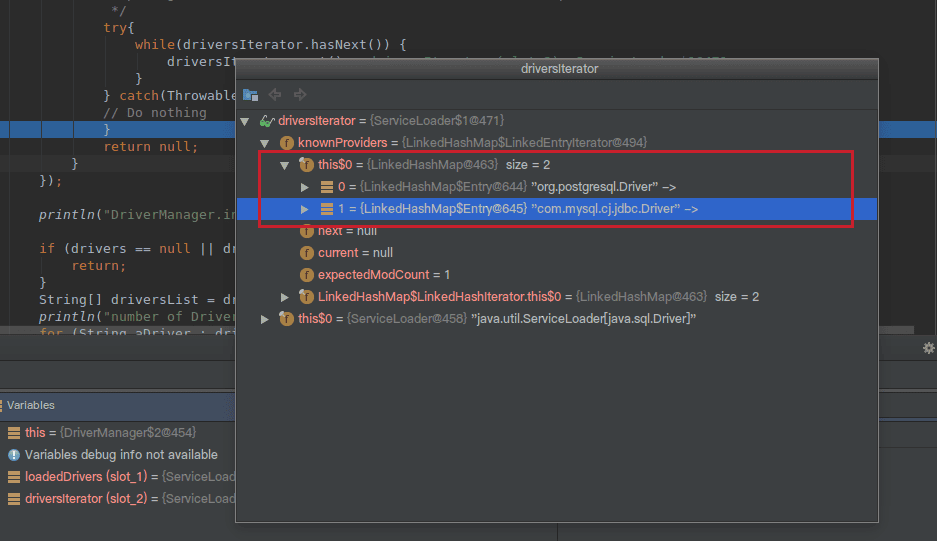
可以看到此时迭代器中有两个驱动,mysql和postgresql的都被加载了。
3.2、SPI机制 - Common-Logging
common-logging(也称Jakarta Commons Logging,缩写 JCL)是常用的日志库门面,具体日志库相关可以看这篇。我们看下它是怎么解耦的。
首先,日志实例是通过LogFactory的 getLog(String) 方法创建的:
public static getLog(Class clazz) throws LogConfigurationException { return getFactory().getInstance(clazz); }- 1
- 2
- 3
LogFatory是一个抽象类,它负责加载具体的日志实现,分析其Factory getFactory()方法:
public static org.apache.commons.logging.LogFactory getFactory() throws LogConfigurationException { // Identify the class loader we will be using ClassLoader contextClassLoader = getContextClassLoaderInternal(); if (contextClassLoader == null) { // This is an odd enough situation to report about. This // output will be a nuisance on JDK1.1, as the system // classloader is null in that environment. if (isDiagnosticsEnabled()) { logDiagnostic("Context classloader is null."); } } // Return any previously registered factory for this class loader org.apache.commons.logging.LogFactory factory = getCachedFactory(contextClassLoader); if (factory != null) { return factory; } if (isDiagnosticsEnabled()) { logDiagnostic( "[LOOKUP] LogFactory implementation requested for the first time for context classloader " + objectId(contextClassLoader)); logHierarchy("[LOOKUP] ", contextClassLoader); } // Load properties file. // // If the properties file exists, then its contents are used as // "attributes" on the LogFactory implementation class. One particular // property may also control which LogFactory concrete subclass is // used, but only if other discovery mechanisms fail.. // // As the properties file (if it exists) will be used one way or // another in the end we may as well look for it first. // classpath根目录下寻找commons-logging.properties Properties props = getConfigurationFile(contextClassLoader, FACTORY_PROPERTIES); // Determine whether we will be using the thread context class loader to // load logging classes or not by checking the loaded properties file (if any). // classpath根目录下commons-logging.properties是否配置use_tccl ClassLoader baseClassLoader = contextClassLoader; if (props != null) { String useTCCLStr = props.getProperty(TCCL_KEY); if (useTCCLStr != null) { // The Boolean.valueOf(useTCCLStr).booleanValue() formulation // is required for Java 1.2 compatibility. if (Boolean.valueOf(useTCCLStr).booleanValue() == false) { // Don't use current context classloader when locating any // LogFactory or Log classes, just use the class that loaded // this abstract class. When this class is deployed in a shared // classpath of a container, it means webapps cannot deploy their // own logging implementations. It also means that it is up to the // implementation whether to load library-specific config files // from the TCCL or not. baseClassLoader = thisClassLoader; } } } // 这里真正开始决定使用哪个factory // 首先,尝试查找vm系统属性org.apache.commons.logging.LogFactory,其是否指定factory // Determine which concrete LogFactory subclass to use. // First, try a global system property if (isDiagnosticsEnabled()) { logDiagnostic("[LOOKUP] Looking for system property [" + FACTORY_PROPERTY + "] to define the LogFactory subclass to use..."); } try { String factoryClass = getSystemProperty(FACTORY_PROPERTY, null); if (factoryClass != null) { if (isDiagnosticsEnabled()) { logDiagnostic("[LOOKUP] Creating an instance of LogFactory class '" + factoryClass + "' as specified by system property " + FACTORY_PROPERTY); } factory = newFactory(factoryClass, baseClassLoader, contextClassLoader); } else { if (isDiagnosticsEnabled()) { logDiagnostic("[LOOKUP] No system property [" + FACTORY_PROPERTY + "] defined."); } } } catch (SecurityException e) { if (isDiagnosticsEnabled()) { logDiagnostic("[LOOKUP] A security exception occurred while trying to create an" + " instance of the custom factory class" + ": [" + trim(e.getMessage()) + "]. Trying alternative implementations..."); } // ignore } catch (RuntimeException e) { // This is not consistent with the behaviour when a bad LogFactory class is // specified in a services file. // // One possible exception that can occur here is a ClassCastException when // the specified class wasn't castable to this LogFactory type. if (isDiagnosticsEnabled()) { logDiagnostic("[LOOKUP] An exception occurred while trying to create an" + " instance of the custom factory class" + ": [" + trim(e.getMessage()) + "] as specified by a system property."); } throw e; } // 第二,尝试使用java spi服务发现机制,载META-INF/services下寻找 org.apache.commons.logging.LogFactory 实现 // Second, try to find a service by using the JDK1.3 class // discovery mechanism, which involves putting a file with the name // of an interface class in the META-INF/services directory, where the // contents of the file is a single line specifying a concrete class // that implements the desired interface. if (factory == null) { if (isDiagnosticsEnabled()) { logDiagnostic("[LOOKUP] Looking for a resource file of name [" + SERVICE_ID + "] to define the LogFactory subclass to use..."); } try { // META-INF/services/org.apache.commons.logging.LogFactory, SERVICE_ID final InputStream is = getResourceAsStream(contextClassLoader, SERVICE_ID); if (is != null) { // This code is needed by EBCDIC and other strange systems. // It's a fix for bugs reported in xerces BufferedReader rd; try { rd = new BufferedReader(new InputStreamReader(is, "UTF-8")); } catch (java.io.UnsupportedEncodingException e) { rd = new BufferedReader(new InputStreamReader(is)); } String factoryClassName = rd.readLine(); rd.close(); if (factoryClassName != null && !"".equals(factoryClassName)) { if (isDiagnosticsEnabled()) { logDiagnostic("[LOOKUP] Creating an instance of LogFactory class " + factoryClassName + " as specified by file '" + SERVICE_ID + "' which was present in the path of the context classloader."); } factory = newFactory(factoryClassName, baseClassLoader, contextClassLoader); } } else { // is == null if (isDiagnosticsEnabled()) { logDiagnostic("[LOOKUP] No resource file with name '" + SERVICE_ID + "' found."); } } } catch (Exception ex) { // note: if the specified LogFactory class wasn't compatible with LogFactory // for some reason, a ClassCastException will be caught here, and attempts will // continue to find a compatible class. if (isDiagnosticsEnabled()) { logDiagnostic( "[LOOKUP] A security exception occurred while trying to create an" + " instance of the custom factory class" + ": [" + trim(ex.getMessage()) + "]. Trying alternative implementations..."); } // ignore } } // 第三,尝试从classpath根目录下的commons-logging.properties中查找org.apache.commons.logging.LogFactory属性指定的factory // Third try looking into the properties file read earlier (if found) if (factory == null) { if (props != null) { if (isDiagnosticsEnabled()) { logDiagnostic( "[LOOKUP] Looking in properties file for entry with key '" + FACTORY_PROPERTY + "' to define the LogFactory subclass to use..."); } String factoryClass = props.getProperty(FACTORY_PROPERTY); if (factoryClass != null) { if (isDiagnosticsEnabled()) { logDiagnostic( "[LOOKUP] Properties file specifies LogFactory subclass '" + factoryClass + "'"); } factory = newFactory(factoryClass, baseClassLoader, contextClassLoader); // TODO: think about whether we need to handle exceptions from newFactory } else { if (isDiagnosticsEnabled()) { logDiagnostic("[LOOKUP] Properties file has no entry specifying LogFactory subclass."); } } } else { if (isDiagnosticsEnabled()) { logDiagnostic("[LOOKUP] No properties file available to determine" + " LogFactory subclass from.."); } } } // 最后,使用后备factory实现,org.apache.commons.logging.impl.LogFactoryImpl // Fourth, try the fallback implementation class if (factory == null) { if (isDiagnosticsEnabled()) { logDiagnostic( "[LOOKUP] Loading the default LogFactory implementation '" + FACTORY_DEFAULT + "' via the same classloader that loaded this LogFactory" + " class (ie not looking in the context classloader)."); } // Note: unlike the above code which can try to load custom LogFactory // implementations via the TCCL, we don't try to load the default LogFactory // implementation via the context classloader because: // * that can cause problems (see comments in newFactory method) // * no-one should be customising the code of the default class // Yes, we do give up the ability for the child to ship a newer // version of the LogFactoryImpl class and have it used dynamically // by an old LogFactory class in the parent, but that isn't // necessarily a good idea anyway. factory = newFactory(FACTORY_DEFAULT, thisClassLoader, contextClassLoader); } if (factory != null) { /** * Always cache using context class loader. */ cacheFactory(contextClassLoader, factory); if (props != null) { Enumeration names = props.propertyNames(); while (names.hasMoreElements()) { String name = (String) names.nextElement(); String value = props.getProperty(name); factory.setAttribute(name, value); } } } return factory; }- 1
- 2
- 3
- 4
- 5
- 6
- 7
- 8
- 9
- 10
- 11
- 12
- 13
- 14
- 15
- 16
- 17
- 18
- 19
- 20
- 21
- 22
- 23
- 24
- 25
- 26
- 27
- 28
- 29
- 30
- 31
- 32
- 33
- 34
- 35
- 36
- 37
- 38
- 39
- 40
- 41
- 42
- 43
- 44
- 45
- 46
- 47
- 48
- 49
- 50
- 51
- 52
- 53
- 54
- 55
- 56
- 57
- 58
- 59
- 60
- 61
- 62
- 63
- 64
- 65
- 66
- 67
- 68
- 69
- 70
- 71
- 72
- 73
- 74
- 75
- 76
- 77
- 78
- 79
- 80
- 81
- 82
- 83
- 84
- 85
- 86
- 87
- 88
- 89
- 90
- 91
- 92
- 93
- 94
- 95
- 96
- 97
- 98
- 99
- 100
- 101
- 102
- 103
- 104
- 105
- 106
- 107
- 108
- 109
- 110
- 111
- 112
- 113
- 114
- 115
- 116
- 117
- 118
- 119
- 120
- 121
- 122
- 123
- 124
- 125
- 126
- 127
- 128
- 129
- 130
- 131
- 132
- 133
- 134
- 135
- 136
- 137
- 138
- 139
- 140
- 141
- 142
- 143
- 144
- 145
- 146
- 147
- 148
- 149
- 150
- 151
- 152
- 153
- 154
- 155
- 156
- 157
- 158
- 159
- 160
- 161
- 162
- 163
- 164
- 165
- 166
- 167
- 168
- 169
- 170
- 171
- 172
- 173
- 174
- 175
- 176
- 177
- 178
- 179
- 180
- 181
- 182
- 183
- 184
- 185
- 186
- 187
- 188
- 189
- 190
- 191
- 192
- 193
- 194
- 195
- 196
- 197
- 198
- 199
- 200
- 201
- 202
- 203
- 204
- 205
- 206
- 207
- 208
- 209
- 210
- 211
- 212
- 213
- 214
- 215
- 216
- 217
- 218
- 219
- 220
- 221
- 222
- 223
- 224
- 225
- 226
- 227
- 228
- 229
- 230
- 231
- 232
可以看出,抽象类LogFactory加载具体实现的步骤如下:
- 1、从vm系统属性
org.apache.commons.logging.LogFactory - 2、使用SPI服务发现机制,发现
org.apache.commons.logging.LogFactory的实现 - 3、查找classpath根目录commons-logging.properties的org.apache.commons.logging.LogFactory属性是否指定factory实现
- 4、使用默认factory实现,
org.apache.commons.logging.impl.LogFactoryImpl
LogFactory的getLog()方法返回类型是
org.apache.commons.logging.Log接口,提供了从trace到fatal方法。可以确定,如果日志实现提供者只要实现该接口,并且使用继承自org.apache.commons.logging.LogFactory的子类创建Log,必然可以构建一个松耦合的日志系统。3.3、SPI机制 - 插件体系
其实最具spi思想的应该属于插件开发,这里具体说一下eclipse的插件思想。
Eclipse使用OSGi作为插件系统的基础,动态添加新插件和停止现有插件,以动态的方式管理组件生命周期。
一般来说,插件的文件结构必须在指定目录下包含以下三个文件:
META-INF/MANIFEST.MF: 项目基本配置信息,版本、名称、启动器等build.properties: 项目的编译配置信息,包括,源代码路径、输出路径plugin.xml:插件的操作配置信息,包含弹出菜单及点击菜单后对应的操作执行类等
当eclipse启动时,会遍历plugins文件夹中的目录,扫描每个插件的清单文件
MANIFEST.MF,并建立一个内部模型来记录它所找到的每个插件的信息,就实现了动态添加新的插件。这也意味着是eclipse制定了一系列的规则,像是文件结构、类型、参数等。插件开发者遵循这些规则去开发自己的插件,eclipse并不需要知道插件具体是怎样开发的,只需要在启动的时候根据配置文件解析、加载到系统里就好了,是spi思想的一种体现。
3.4、SPI机制 - Spring中SPI机制
在springboot的自动装配过程中,最终会加载
META-INF/spring.factories文件,而加载的过程是由SpringFactoriesLoader加载的。从CLASSPATH下的每个Jar包中搜寻所有META-INF/spring.factories配置文件,然后将解析properties文件,找到指定名称的配置后返回。需要注意的是,其实这里不仅仅是会去ClassPath路径下查找,会扫描所有路径下的Jar包,只不过这个文件只会在Classpath下的jar包中。public static final String FACTORIES_RESOURCE_LOCATION = "META-INF/spring.factories"; // spring.factories文件的格式为:key=value1,value2,value3 // 从所有的jar包中找到META-INF/spring.factories文件 // 然后从文件中解析出key=factoryClass类名称的所有value值 public static List<String> loadFactoryNames(Class<?> factoryClass, ClassLoader classLoader) { String factoryClassName = factoryClass.getName(); // 取得资源文件的URL Enumeration<URL> urls = (classLoader != null ? classLoader.getResources(FACTORIES_RESOURCE_LOCATION) : ClassLoader.getSystemResources(FACTORIES_RESOURCE_LOCATION)); List<String> result = new ArrayList<String>(); // 遍历所有的URL while (urls.hasMoreElements()) { URL url = urls.nextElement(); // 根据资源文件URL解析properties文件,得到对应的一组@Configuration类 Properties properties = PropertiesLoaderUtils.loadProperties(new UrlResource(url)); String factoryClassNames = properties.getProperty(factoryClassName); // 组装数据,并返回 result.addAll(Arrays.asList(StringUtils.commaDelimitedListToStringArray(factoryClassNames))); } return result; }- 1
- 2
- 3
- 4
- 5
- 6
- 7
- 8
- 9
- 10
- 11
- 12
- 13
- 14
- 15
- 16
- 17
- 18
- 19
- 20
- 21
4、SPI机制深入理解
4.1、SPI机制通常怎么使用
看完上面的几个例子解析,应该都能知道大概的流程了:
- 有关组织或者公司定义标准。
- 具体厂商或者框架开发者实现。
- 程序员使用。
1、定义标准
定义标准,就是定义接口。比如接口
java.sql.Driver2、具体厂商或者框架开发者实现
厂商或者框架开发者开发具体的实现:
在
META-INF/services目录下定义一个名字为接口全限定名的文件,比如java.sql.Driver文件,文件内容是具体的实现名字,比如me.cxis.sql.MyDriver。写具体的实现
me.cxis.sql.MyDriver,都是对接口Driver的实现。3、程序猿使用
我们会引用具体厂商的jar包来实现我们的功能:
ServiceLoader<Driver> loadedDrivers = ServiceLoader.load(Driver.class); //获取迭代器 Iterator<Driver> driversIterator = loadedDrivers.iterator(); //遍历 while(driversIterator.hasNext()) { driversIterator.next(); //可以做具体的业务逻辑 }- 1
- 2
- 3
- 4
- 5
- 6
- 7
- 8
4、使用规范
最后总结一下jdk spi需要遵循的规范

4.2、SPI和API的区别是什么
SPI和API的区别是什么
这里实际包含两个问题,第一个SPI和API的区别?第二个什么时候用API,什么时候用SPI?
从面向接口编程说起

我们在“调用方”和“实现方”之间引入了“接口”,上图没有给出“接口”应该位于哪个“包”中,从纯粹的可能性上考虑,我们有三种选择:
- “接口”位于“调用方”所在的“包”中。
- “接口”位于“实现方”所在的“包”中。
- “接口”位于独立的“包”中。
下面让我们依次分析这三种可能性
场景1:“接口”位于“调用方”所在的“包”中

SPI - “接口”位于“调用方”所在的“包”中
- 概念上更依赖调用方。
- 组织上位于调用方所在的包中。
- 实现位于独立的包中。
- 常见的例子是:插件模式的插件。
场景2:“接口”位于“实现方”所在的“包”中

API - “接口”位于“实现方”所在的“包”中
- 概念上更接近实现方。
- 组织上位于实现方所在的包中。
- 实现和接口在一个包中。
参考:
场景3:“接口”位于独立的“包”中
- 如果一个“接口”在一个上下文是“API”,在另一个上下文是“SPI”,那么你就可以这么组织
4.3、SPI机制实现原理
不妨看下JDK中
ServiceLoader方法的具体实现://ServiceLoader实现了Iterable接口,可以遍历所有的服务实现者 public final class ServiceLoader<S> implements Iterable<S> { //查找配置文件的目录 private static final String PREFIX = "META-INF/services/"; //表示要被加载的服务的类或接口 private final Class<S> service; //这个ClassLoader用来 定位,加载,实例化服务提供者 private final ClassLoader loader; // 访问控制上下文 private final AccessControlContext acc; // 缓存已经被实例化的服务提供者,按照实例化的顺序存储 private LinkedHashMap<String,S> providers = new LinkedHashMap<>(); // 迭代器 private LazyIterator lookupIterator; // 重新加载,就相当于重新创建 ServiceLoader了,用于新的服务提供者安装到正在运行的Java虚拟机中的情况。 public void reload() { // 清空缓存中所有已实例化的服务提供者 providers.clear(); // 新建一个迭代器,该迭代器会从头查找和实例化服务提供者 lookupIterator = new LazyIterator(service, loader); } //私有构造器 //使用指定的类加载器和服务创建服务加载器 //如果没有指定类加载器,使用系统类加载器,就是应用类加载器。 private ServiceLoader(Class<S> svc, ClassLoader cl) { service = Objects.requireNonNull(svc, "Service interface cannot be null"); loader = (cl == null) ? ClassLoader.getSystemClassLoader() : cl; acc = (System.getSecurityManager() != null) ? AccessController.getContext() : null; reload(); } //解析失败处理的方法 private static void fail(Class<?> service, String msg, Throwable cause) throws ServiceConfigurationError { throw new ServiceConfigurationError(service.getName() + ": " + msg, cause); } private static void fail(Class<?> service, String msg) throws ServiceConfigurationError { throw new ServiceConfigurationError(service.getName() + ": " + msg); } private static void fail(Class<?> service, URL u, int line, String msg) throws ServiceConfigurationError { fail(service, u + ":" + line + ": " + msg); } //解析服务提供者配置文件中的一行 //首先去掉注释校验,然后保存 //返回下一行行号 //重复的配置项和已经被实例化的配置项不会被保存 private int parseLine(Class<?> service, URL u, BufferedReader r, int lc, List<String> names) throws IOException, ServiceConfigurationError { //读取一行 String ln = r.readLine(); if (ln == null) { return -1; } //#号代表注释行 int ci = ln.indexOf('#'); if (ci >= 0) ln = ln.substring(0, ci); ln = ln.trim(); int n = ln.length(); if (n != 0) { if ((ln.indexOf(' ') >= 0) || (ln.indexOf('\t') >= 0)) fail(service, u, lc, "Illegal configuration-file syntax"); int cp = ln.codePointAt(0); if (!Character.isJavaIdentifierStart(cp)) fail(service, u, lc, "Illegal provider-class name: " + ln); for (int i = Character.charCount(cp); i < n; i += Character.charCount(cp)) { cp = ln.codePointAt(i); if (!Character.isJavaIdentifierPart(cp) && (cp != '.')) fail(service, u, lc, "Illegal provider-class name: " + ln); } if (!providers.containsKey(ln) && !names.contains(ln)) names.add(ln); } return lc + 1; } //解析配置文件,解析指定的url配置文件 //使用parseLine方法进行解析,未被实例化的服务提供者会被保存到缓存中去 private Iterator<String> parse(Class<?> service, URL u) throws ServiceConfigurationError { InputStream in = null; BufferedReader r = null; ArrayList<String> names = new ArrayList<>(); try { in = u.openStream(); r = new BufferedReader(new InputStreamReader(in, "utf-8")); int lc = 1; while ((lc = parseLine(service, u, r, lc, names)) >= 0); } return names.iterator(); } //服务提供者查找的迭代器 private class LazyIterator implements Iterator<S> { Class<S> service;//服务提供者接口 ClassLoader loader;//类加载器 Enumeration<URL> configs = null;//保存实现类的url Iterator<String> pending = null;//保存实现类的全名 String nextName = null;//迭代器中下一个实现类的全名 private LazyIterator(Class<S> service, ClassLoader loader) { this.service = service; this.loader = loader; } private boolean hasNextService() { if (nextName != null) { return true; } if (configs == null) { try { String fullName = PREFIX + service.getName(); if (loader == null) configs = ClassLoader.getSystemResources(fullName); else configs = loader.getResources(fullName); } } while ((pending == null) || !pending.hasNext()) { if (!configs.hasMoreElements()) { return false; } pending = parse(service, configs.nextElement()); } nextName = pending.next(); return true; } private S nextService() { if (!hasNextService()) throw new NoSuchElementException(); String cn = nextName; nextName = null; Class<?> c = null; try { c = Class.forName(cn, false, loader); } if (!service.isAssignableFrom(c)) { fail(service, "Provider " + cn + " not a subtype"); } try { S p = service.cast(c.newInstance()); providers.put(cn, p); return p; } } public boolean hasNext() { if (acc == null) { return hasNextService(); } else { PrivilegedAction<Boolean> action = new PrivilegedAction<Boolean>() { public Boolean run() { return hasNextService(); } }; return AccessController.doPrivileged(action, acc); } } public S next() { if (acc == null) { return nextService(); } else { PrivilegedAction<S> action = new PrivilegedAction<S>() { public S run() { return nextService(); } }; return AccessController.doPrivileged(action, acc); } } public void remove() { throw new UnsupportedOperationException(); } } //获取迭代器 //返回遍历服务提供者的迭代器 //以懒加载的方式加载可用的服务提供者 // 懒加载的实现是:解析配置文件和实例化服务提供者的工作由迭代器本身完成 public Iterator<S> iterator() { return new Iterator<S>() { //按照实例化顺序返回已经缓存的服务提供者实例 Iterator<Map.Entry<String,S>> knownProviders = providers.entrySet().iterator(); public boolean hasNext() { if (knownProviders.hasNext()) return true; return lookupIterator.hasNext(); } public S next() { if (knownProviders.hasNext()) return knownProviders.next().getValue(); return lookupIterator.next(); } public void remove() { throw new UnsupportedOperationException(); } }; } // 为指定的服务使用指定的类加载器来创建一个ServiceLoader public static <S> ServiceLoader<S> load(Class<S> service, ClassLoader loader) { return new ServiceLoader<>(service, loader); } // 使用线程上下文的类加载器来创建ServiceLoader public static <S> ServiceLoader<S> load(Class<S> service) { ClassLoader cl = Thread.currentThread().getContextClassLoader(); return ServiceLoader.load(service, cl); } // 使用扩展类加载器为指定的服务创建ServiceLoader // 只能找到并加载已经安装到当前Java虚拟机中的服务提供者,应用程序类路径中的服务提供者将被忽略 public static <S> ServiceLoader<S> loadInstalled(Class<S> service) { ClassLoader cl = ClassLoader.getSystemClassLoader(); ClassLoader prev = null; while (cl != null) { prev = cl; cl = cl.getParent(); } return ServiceLoader.load(service, prev); } public String toString() { return "java.util.ServiceLoader[" + service.getName() + "]"; } }- 1
- 2
- 3
- 4
- 5
- 6
- 7
- 8
- 9
- 10
- 11
- 12
- 13
- 14
- 15
- 16
- 17
- 18
- 19
- 20
- 21
- 22
- 23
- 24
- 25
- 26
- 27
- 28
- 29
- 30
- 31
- 32
- 33
- 34
- 35
- 36
- 37
- 38
- 39
- 40
- 41
- 42
- 43
- 44
- 45
- 46
- 47
- 48
- 49
- 50
- 51
- 52
- 53
- 54
- 55
- 56
- 57
- 58
- 59
- 60
- 61
- 62
- 63
- 64
- 65
- 66
- 67
- 68
- 69
- 70
- 71
- 72
- 73
- 74
- 75
- 76
- 77
- 78
- 79
- 80
- 81
- 82
- 83
- 84
- 85
- 86
- 87
- 88
- 89
- 90
- 91
- 92
- 93
- 94
- 95
- 96
- 97
- 98
- 99
- 100
- 101
- 102
- 103
- 104
- 105
- 106
- 107
- 108
- 109
- 110
- 111
- 112
- 113
- 114
- 115
- 116
- 117
- 118
- 119
- 120
- 121
- 122
- 123
- 124
- 125
- 126
- 127
- 128
- 129
- 130
- 131
- 132
- 133
- 134
- 135
- 136
- 137
- 138
- 139
- 140
- 141
- 142
- 143
- 144
- 145
- 146
- 147
- 148
- 149
- 150
- 151
- 152
- 153
- 154
- 155
- 156
- 157
- 158
- 159
- 160
- 161
- 162
- 163
- 164
- 165
- 166
- 167
- 168
- 169
- 170
- 171
- 172
- 173
- 174
- 175
- 176
- 177
- 178
- 179
- 180
- 181
- 182
- 183
- 184
- 185
- 186
- 187
- 188
- 189
- 190
- 191
- 192
- 193
- 194
- 195
- 196
- 197
- 198
- 199
- 200
- 201
- 202
- 203
- 204
- 205
- 206
- 207
- 208
- 209
- 210
- 211
- 212
- 213
- 214
- 215
- 216
- 217
- 218
- 219
- 220
- 221
- 222
- 223
- 224
- 225
- 226
- 227
- 228
- 229
- 230
- 231
- 232
- 233
- 234
- 235
- 236
- 237
- 238
- 239
- 240
- 241
- 242
- 243
- 244
- 245
- 246
- 247
- 248
- 249
首先,ServiceLoader实现了
Iterable接口,所以它有迭代器的属性,这里主要都是实现了迭代器的hasNext和next方法。这里主要都是调用的lookupIterator的相应hasNext和next方法,lookupIterator是懒加载迭代器。其次,
LazyIterator中的hasNext方法,静态变量PREFIX就是”META-INF/services/”目录,这也就是为什么需要在classpath下的META-INF/services/目录里创建一个以服务接口命名的文件。最后,通过反射方法
Class.forName()加载类对象,并用newInstance方法将类实例化,并把实例化后的类缓存到providers对象中,(LinkedHashMap类型)然后返回实例对象。所以我们可以看到
ServiceLoader不是实例化以后,就去读取配置文件中的具体实现,并进行实例化。而是等到使用迭代器去遍历的时候,才会加载对应的配置文件去解析,调用hasNext方法的时候会去加载配置文件进行解析,调用next方法的时候进行实例化并缓存。所有的配置文件只会加载一次,服务提供者也只会被实例化一次,重新加载配置文件可使用
reload方法。4.4、原生SPI存在的问题?
优点:
- 实现解耦,应用程序可以根据实现业务情况启用或替换组件
缺点:
-
1、不能按需加载。虽然 ServiceLoader 做了延迟载入,但是基本只能通过遍历全部获取,也就是接口的实现类得全部载入并实例化一遍。如果你并不想用某些实现类,或者某些类实例化很耗时,它也被载入并实例化了,这就造成了浪费。
-
2、获取某个实现类的方式不够灵活,只能通过Iterator 形式获取,不能根据某个参数类获取对应的实现类。
-
3、多个并发多线程使用ServiceLoader 类的实例不安全。
- 不是线程安全的
-
4、加载不到实现类时抛出并不是真正原因的异常,错误难定位。
参考文章:探究 SPI 机制原理及优缺点
5、政采云对SPI的使用
5.1、背景,我们要解决的问题?

方案一、服务多态
// 判断校验对应的sku集合是否允许购买 switch (businessCode) { case NETSUPER: // 校验网超是否有协议限制 netsuperItemValidate(buyer, multiMap, ids); result.put(ItemTagEnum.NETSUPER.getTagName(),ids); break; case VACCINE: // 检查疫苗的禁售期, 禁售期内不可买 vaccineItemValidate(buyer,multiMap,ids); result.put(ItemTagEnum.VACCINE.getTagName(),ids); break; case BLOCKTRADE: // 检查大宗商品的下浮率 blockItemValidate(buyer, multiMap, ids); result.put(ItemTagEnum.BLOCKTRADE.getTagName(), ids); break; default: // 默认校验逻辑 defaultItemValidate(buyer, multiMap, ids); }- 1
- 2
- 3
- 4
- 5
- 6
- 7
- 8
- 9
- 10
- 11
- 12
- 13
- 14
- 15
- 16
- 17
- 18
- 19
- 20
- 21
存在的问题:
-
- 维护性的问题:冗长的if else会因为新业务的不断涌入让人看不懂,拓展性差;
-
- 业务隔离问题:某个业务的改动,可能会导致全局的出错,故障工单不断;
-
- 发版问题:不同团队都需要针对加购的服务做定制,代码合并冲突和发版冲突不断。
方案二、服务整合
-
订单基础参数校验,可以考虑使用Spring filter
-
pre-condition:
-
- 权限校验
-
-
订单商品可售校验
2.1 库存校验
2.2 协议校验
-
-
-
根据上下文透传信息获取订单流程的规则配置
1.1 拆单规则配置读取
-
-
enricher: 1. 设置店铺订单的上下文信息
-
enricher: 2. 生成分布式订单id 并设置
-
enricher: 3. 设置商品信息
-
设置价格信息(同步):
- 1、调用营销中心获取店铺/商品活动
- 2、调用价格中心获取商品价格
- 3、获取用户优惠券等使用信息
- 4、根据1,2,3最终确定订单总价
-
下单操作主流程(按服务稳定性升序):
- 1、锁库存(同步) - 要改为使用批量接口.
- 2、冻结采购计划(同步)
- 3、锁优惠券
- 4、创建订单
- 业务流程差异化,同样是下单业务,不同的渠道会使用不同的流程
- 我司还好,非主要痛点。最差的情况就是用代码去编排整合呗,后续开个EIP专题分享
方案三、规则配置 + 自动路由
方案三是方案二的优化,限制了更多,但对业务方更透明,对我们的业务来说,路由的上下文信息大部分是固定的。比如大部分行业馆都是靠渠道和区划进行路由的,可以在不自定义的前提下使用这种方案。主要对方案二的优化点如下:
- 避免大部分场景下业务方去写路由代码
- 一个完整的业务流程中,channel是恒定量,并且贯穿全局
- 业务抽象解决共性的80%问题,**系统架构开放性 **解决20%的个性化问题。
- 80%的路由都是根据channel,20%再写自定义路由来实现.
- channel的枚举:默认、网超、通用行业馆、湖南、通用定点
// 可以在dubbo嵌入渠道信息 String channelContext = "vaccine"; ThreadLocal.set(channelContext); ItemValidateStrategy auto = SpiProviderManager.getProvider(SimpleProvider.class); class SpiProviderManager { public <T> T getProvider(Class clazz){ String channel = ThreadLocal.get(); // getProvider 去读配置并根据 channel 加载实现 T provider = getProvider(clazz, channel); } }- 1
- 2
- 3
- 4
- 5
- 6
- 7
- 8
- 9
- 10
- 11
- 12
- 13
- 14
- 15
businessCode 功能点 实现类 vaccine SimpleProvider cn.gov.zcy.spi.test.framework.SimpleProviderImpl1 netsuper SimpleProvider cn.gov.zcy.spi.test.framework.SimpleProviderImpl2 方案三的优主要是针对自动路由带来的效果
- 开发少写了路由的代码, 还通过20%的自定义保证了灵活性
5.2、使用场景
6、业界如何使用SPI?
6.1、有赞对SPI的使用?
6.2、蘑菇街对SPI的使用
Todo
6.3、白龙马对SPI的使用?
todo
Action1:SPI开发记录
[1.3.0-SNAPSHOT] - 2019-06-06
- Changed
- 摒弃了原有的基于文件的扩展点加载形式,采用基于spring + 注解的容器对扩展点进行加载的形式,从而使得使用方不用再关心resources/META-INF/services文件的编写
- 添加升级对比器,业务团队可以快速验证升级版本的正确性
[1.2.1-SNAPSHOT] - 2018-09-13
- Changed
- @SpiProvider中的channel改为从String改为数组 并改名为channels,支持多渠道使用同一个SPI
- Removed
- @SpiProvider.name 变为可选字段,此字段不再有含义,仅用作展示
- 删除
SpiProviderManager.getProvider(String name)方法
[1.2.0-SNAPSHOT] - 2018-09-06
- Added
- spi-collector 新增 version 属性, 标识客户端版本
- Changed
- SpiProvider新增必填属性owner,表示服务的作者
- 为spi-core框架增加插件机制,扩展服务插件化,配置化
- spi-collector 改为使用 autoConfig
[1.1.0-SNAPSHOT] - 2018-08-22
- Added
- SPI元信息收集器,收集SPI信息至管理后台
- 通过切面生成SPI执行路径,为日后的调用地图提供基础数据。
- 新增模块cai-spi-admin,用于为SPI服务提供管理后台。
- 添加对SpiProvider 有多个接口类支持和解析
- Changed
- @SpiProvider 新增属性 channel, 用于框架在路由时根据 channel 和 接口实现多态.
- SpiProviderManamger 中新增多种路由方式
- Removed
- @SpiProvider 删除属性 asDefault. 此配置项已经通过 channel = default 进行替换.
[1.0.0-SNAPSHOT] - 2018-08-06
-
Added
-
RouterKey
spi路由的一种实现方式,为用户提供自定义路由键,通常需要根据业务上下文生成。结合功能点配置一起选择具体的实现类. 参考
spi路由 -
SpiProvider
扩展点实现类必须声明此注解,用于在项目启动时将spi实现的信息加载到框架.
-
SpiProviderManager
扩展加载及加载后的状态,元数据信息等均在此类进行管理。同时此类还提供了对外部实现的获取api。
-
Router
spi路由的另一种实现方式,通过由各扩展点定义自己实现的调用条件来进行路由,框架依次遍历实现,满足条件则执行功能点实现。目前暂未实现,考虑后续是否可以引进把路由代码分散在各个实现的思路。
-
Test case
-
Action2:说一说Java、Spring、Dubbo三者SPI机制的原理和区别
可以参考这篇文章:说一说Java、Spring、Dubbo三者SPI机制的原理和区别
-
相关阅读:
pdp部分依赖图
全方位解读「大数据」:定义、分析、工具、应用与案例
数据结构 | 【查找】例题
【Python深度学习】Python全栈体系(三十一)
大数据学长面试之OPPO面试题
java框架 Spring之 AOP 面向切面编程 切入点表达式 AOP通知类型 Spring事务
终极GPU互联技术探索:消失的内存墙
前端对用户名密码加密处理,后端解密
专访通过 OBCP V3 首位考生:V3 让知识更加结构化、体系化
神经网络和深度学习-后向传播back propagation
- 原文地址:https://blog.csdn.net/qq_28959087/article/details/127723989
