Flutter是谷歌出品的移动应用SDK,性能卓越、体验精美、跨平台、HotReload等等这些特点。
Dart是谷歌推出的编程语言。支持即时编译JIT(Just In Time)、HotReload(热加载)和事前编译AOT(Ahead of Time)。
所以搜索语法要用dart。
一、下载#
- git下载:https://git-scm.com/download/win
- android studio: https://developer.android.google.cn/studio
- Flutter SDK:https://docs.flutter.dev/get-started/install
二、环境变量#
PUB_HOSTED_URL=https://pub.flutter-io.cn
FLUTTER_STORAGE_BASE_URL=https://storage.flutter-io.cn
注意:这两个环境变量一定要加,否则可能导致后面 flutter doctor 命令连接不上服务
三、安装#
安装git#
略
安装android studio#
会让你下载SDK,记一下路径,然后配置到环境变量中。
ANDROID_HOME = Android sdk路径
如果忘记了或者没记或者跳过了安装安卓SDK的步骤:
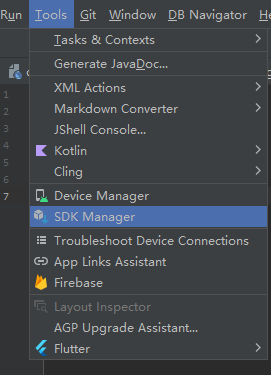
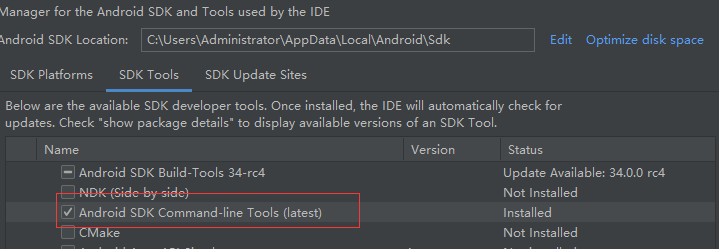
安装Flutter SDK#
把之前下载的SDK直接解压。
比如我的是:C:\sdk\flutter
然后把bin目录配置到环境变量中:
C:\sdk\flutter\bin
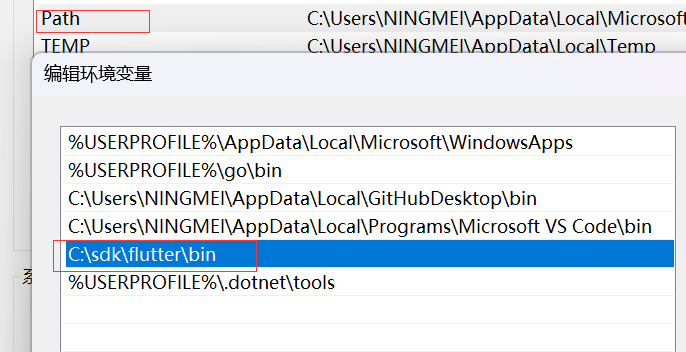
打开cmd检测下:
flutter --version 查看是否安装成功
flutter -h 能够展示指令,表示安装配置成功
四、flutter doctor 环境检测#
在前面都安装完后,才是正式安装的开始。
打开cmd,运行 flutter doctor:
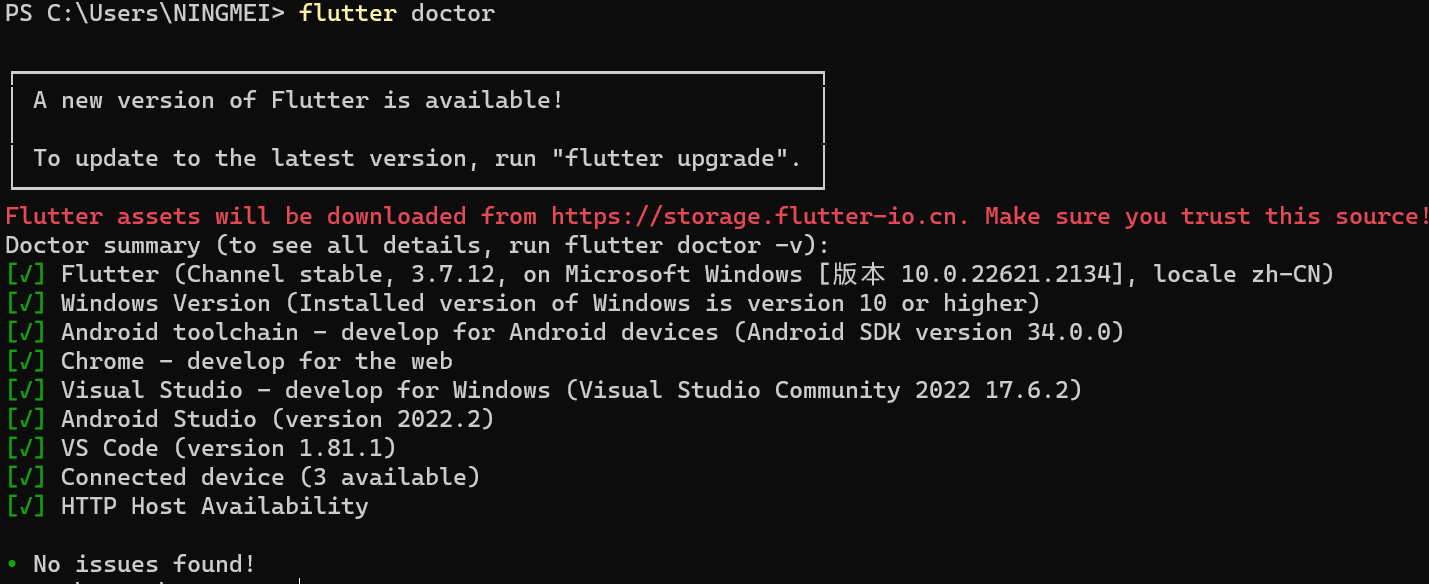
这是运行成功的例子,那么哪个不对改哪里。
4.1 安卓SDK下载不了#
AppData\\Roaming\\Google 下缓存删掉
4.2 HTTP Host availability check is taking a long time...#

- 找到flutter sdk的文件目录,依次找到
flutter/packages/flutter_tools/lib/src/http_host_validator.dart文件 - 将
https://maven.google.com/修改为https://dl.google.com/dl/android/maven2/ - 关闭所有打开了flutterSDK的程序,找到
flutter\bin目录下的flutter_tools.snapshot文件,删除。 - 重新打开cmd,再试。(注意要重新打开)
4.3 Windows Version (Unable to confirm if installed Windows version is 10 or greater)#
- 打开:
\packages\flutter_tools\lib\src\windows\windows_version_validator.dart - 直接替换:
// Copyright 2014 The Flutter Authors. All rights reserved.
// Use of this source code is governed by a BSD-style license that can be
// found in the LICENSE file.
import 'package:process/process.dart';
import '../base/io.dart';
import '../doctor_validator.dart';
// FIX #1 - Remove everything from line 10 to 20 in original source code.
/// Validator for supported Windows host machine operating system version.
class WindowsVersionValidator extends DoctorValidator {
const WindowsVersionValidator({required ProcessManager processManager})
: _processManager = processManager,
super('Windows Version');
final ProcessManager _processManager;
@override
Future validate() async {
// FIX #2 - Replace 'systeminfo' by 'ver' command
final ProcessResult result =
await _processManager.run(<String>['ver'], runInShell: true);
if (result.exitCode != 0) {
return const ValidationResult(
ValidationType.missing,
[],
statusInfo: 'Exit status from running `systeminfo` was unsuccessful',
);
}
final String resultStdout = result.stdout as String;
// FIX #3 - Remove brackets from output
final String resultAdjusted = resultStdout.replaceAll('[','').replaceAll(']','');
// FIX #4 - Split the output at spaces, and get Windows version at position 3.
// Split again at dots and get the major version at position 0.
// Cast the output to int.
final int winver = int.parse(resultAdjusted.split(' ').elementAt(3).split('.').elementAt(0));
// Use the string split method to extract the major version
// and check against the [kUnsupportedVersions] list
final ValidationType windowsVersionStatus;
final String statusInfo;
// FIX #5 - Check if Windows major version is greater than 10.
// Succeeds if true.
if (winver >= 10) {
windowsVersionStatus = ValidationType.installed;
statusInfo = 'Installed version of Windows is version 10 or higher';
} else {
windowsVersionStatus = ValidationType.missing;
statusInfo =
'Unable to confirm if installed Windows version is 10 or greater';
}
return ValidationResult(
windowsVersionStatus,
const [],
statusInfo: statusInfo,
);
}
}
- 删除文件:
\bin\cache\flutter_tools.stamp - 重新打开cmd,再试。(注意要重新打开)
4.4 如果不在PC上运行,Visual Studio 不用管。#
4.5 android-licenses#
这个是需要同意一下协议。
flutter doctor --android-licenses
然后全部同意就行了。
五、使用#
5.1 找不到dart sdk#
C:\\sdk\\flutter\\bin\\cache\\dart-sdk
5.2 卡在Running Gradle task 'assembleDebug'#
属于网络问题,国内对一些镜像是有墙的,换一下就行。你自己翻也行。
- 打开
flutter\packages\flutter_tools\gradle\flutter.gradle - 改:
private static final String DEFAULT_MAVEN_HOST = "https://storage.googleapis.com";
改成:
"https://storage.flutter-io.cn";
buildscript {
repositories {
maven { url 'https://maven.aliyun.com/repository/google' }
maven { url 'https://maven.aliyun.com/repository/jcenter' }
maven { allowInsecureProtocol = true
url 'http://maven.aliyun.com/nexus/content/groups/public' }
//google()
//mavenCentral()
}
dependencies {
classpath 'com.android.tools.build:gradle:7.2.0'
classpath "org.jetbrains.kotlin:kotlin-gradle-plugin:$kotlin_version"
}
}
allprojects {
repositories {
maven { url 'https://maven.aliyun.com/repository/google' }
maven { url 'https://maven.aliyun.com/repository/jcenter' }
maven { allowInsecureProtocol = true
url 'http://maven.aliyun.com/nexus/content/groups/public' }
//google()
//mavenCentral()
}
}
- 重新编译运行即可。
项目文件中android/build.gradle也有相关配置,改一下也可以,即只对项目生效。
5.3 Using insecure protocols with repositories, without explicit opt-in, is unsupported. Switch Maven...#
这是因为上一个问题中:allowInsecureProtocol = true没有加,或者路径没有加https。
六、总结#
Flutter使用的是谷歌生态,所以有很多网络不通的情况,如果编译卡住了,可以首先怀疑是网络墙了。
这是我个人安装过程中的一些问题,如果还有其他问题,欢迎评论补充。如果有不对的,或者试了没有效果的,也欢迎指正。