-
企业架构LNMP学习笔记11
Nginx配置文件的介绍:
- #nginx子进程启动用户
- #user nobody;
- #子进程数量 一般调整为cpu核数或者倍数
- worker_processes 1;
- #错误日志定义
- #error_log logs/error.log;
- #error_log logs/error.log notice;
- #error_log logs/error.log info;
- #进程pid 存储文件
- #pid logs/nginx.pid;
- #事件
- events {
- #每个子进程的连接数 nginx当前并发量 worker_processes * worker_connections
- worker_connections 1024;
- }
- #http协议段
- http {
- #引入 文件扩展名和与文件类型映射表
- include mime.types;
- #默认文件类型
- default_type application/octet-stream;
- #访问日志access.log的格式
- #log_format main '$remote_addr - $remote_user [$time_local] "$request" '
- # '$status $body_bytes_sent "$http_referer" '
- # '"$http_user_agent" "$http_x_forwarded_for"';
- #访问日志存储路径
- #access_log logs/access.log main;
- #linux内核 提供文件读写的机制
- sendfile on;
- #tcp_nopush on;
- #keepalive_timeout 0;
- #长连接超时时间 单位为s
- keepalive_timeout 65;
- #gzip压缩
- #gzip on;
- #server虚拟主机的配置
- server {
- #监听端口
- listen 80;
- #域名 可以有多个 用空格分隔
- server_name localhost;
- #默认编码
- #charset koi8-r;
- #access_log logs/host.access.log main;
- #location 用来匹配url
- location / {
- #默认访问的网站路径
- root html;
- #默认访问页面 从前往后的顺序查找
- index index.html index.htm;
- }
- #error_page 404 /404.html;
- # redirect server error pages to the static page /50x.html
- #
- error_page 500 502 503 504 /50x.html;
- location = /50x.html {
- root html;
- }
- # proxy the PHP scripts to Apache listening on 127.0.0.1:80
- #
- #location ~ \.php$ {
- # proxy_pass http://127.0.0.1;
- #}
- # pass the PHP scripts to FastCGI server listening on 127.0.0.1:9000
- #
- #location ~ \.php$ {
- # root html;
- # fastcgi_pass 127.0.0.1:9000;
- # fastcgi_index index.php;
- # fastcgi_param SCRIPT_FILENAME /scripts$fastcgi_script_name;
- # include fastcgi_params;
- #}
- # deny access to .htaccess files, if Apache's document root
- # concurs with nginx's one
- #
- #location ~ /\.ht {
- # deny all;
- #}
- }
- # another virtual host using mix of IP-, name-, and port-based configuration
- #
- #server {
- # listen 8000;
- # listen somename:8080;
- # server_name somename alias another.alias;
- # location / {
- # root html;
- # index index.html index.htm;
- # }
- #}
- # HTTPS server
- #
- #server {
- # listen 443 ssl;
- # server_name localhost;
- # ssl_certificate cert.pem;
- # ssl_certificate_key cert.key;
- # ssl_session_cache shared:SSL:1m;
- # ssl_session_timeout 5m;
- # ssl_ciphers HIGH:!aNULL:!MD5;
- # ssl_prefer_server_ciphers on;
- # location / {
- # root html;
- # index index.html index.htm;
- # }
- #}
- }
worker_processes 1:
子进程数量 一般调整为cpu核心数或者倍数。CPU同时只能做一个事情。CPU上下文切换。
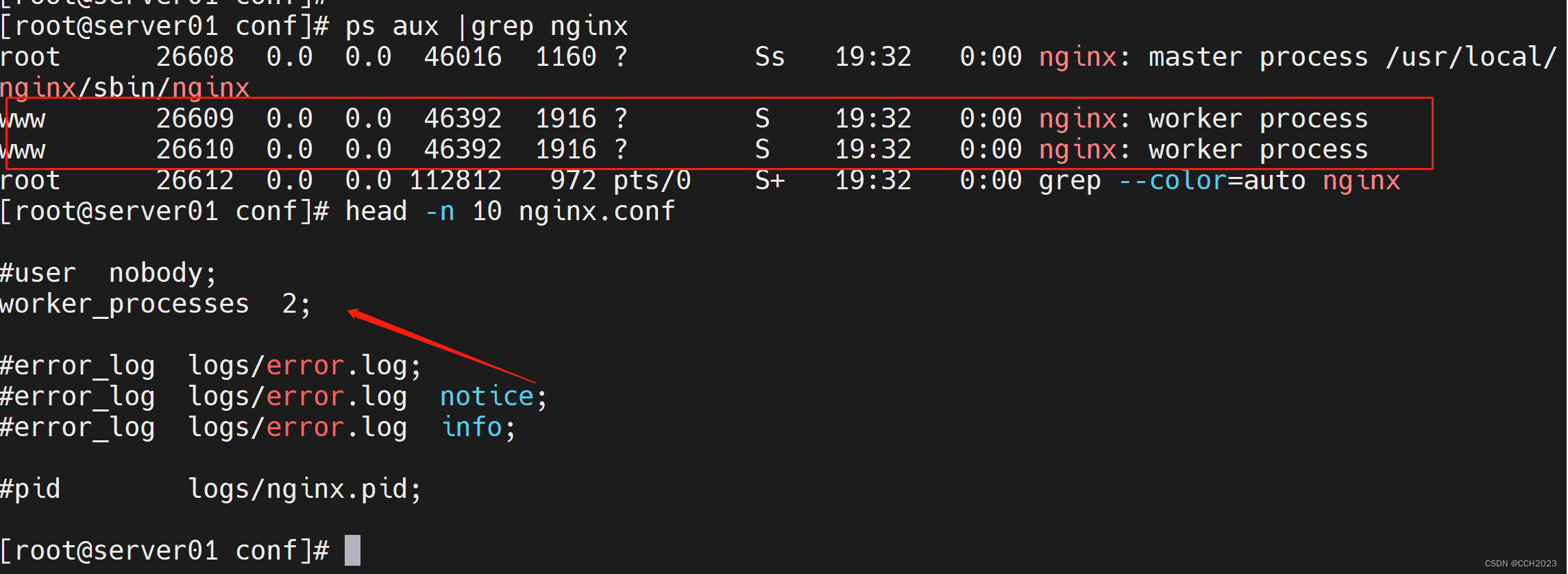


在这个地方,我还排除了一个错误。找不到/usr/local/nginx/log/nginx.pid文件了。然后我通过kill -TERM PID命令,然后再启动nginx进程。
#事件
events {
#每个子进程的连接数 nginx当前并发量 worker_processes * worker_connections
worker_connections 1024;
}说明:并发量的概念。并发量是多少?
include mime.types;
超文本所支持的格式。sendfile on;
是nginx内核加件读写IO的机制。默认是开启的。
#keepalive_timeout 0;
keepalive_timeout 65;
说明:长连接超时时间,单位为秒。当客户端与服务器端断开超过65秒,那么连接就断开了。回收资源。0 不会设置超时时间。
Server段:
Server虚拟主机的配置。
server_name:域名,可以有多个,用空格分隔。
location用来匹配URL:
root html;
默认访问的网站路径。
index index.html index.htm
默认访问页面,从前往后的顺序查找。
例子:index index.php index.html index.htm
# proxy the PHP scripts to Apache listening on 127.0.0.1:80
#
#location ~ \.php$ {
# proxy_pass http://127.0.0.1;
#}
这是一段代理。以.php文件结尾的,代理到本机的80端口。# pass the PHP scripts to FastCGI server listening on 127.0.0.1:9000
#
location ~ \.php$ {
# root html;
fastcgi_pass 127.0.0.1:9000;
fastcgi_index index.php;
fastcgi_param SCRIPT_FILENAME $document_root$fastcgi_script_name;
include fastcgi_params;
}
把PHP脚本发送给以php启动的FastCGI服务器php-fpm 9000端口。注意:
http=>==server===>location 递进关系
我们经常配置的是server端。
-
相关阅读:
【电力电子技术】电力电子器件:概述
数字集成电路设计(六、Verilog HDL高级程序设计举例)
Day02 Git命令【添加暂存区】
【网络编程】IO模型
【C++】智能指针
React项目搭建
vue3初尝试
前端开发综合指南:HTML、CSS和JavaScript详解
javafx02 Button
redis集群模式下key过期时间监听
- 原文地址:https://blog.csdn.net/chang_chunhua/article/details/132653882
