-
02 CSS技巧
02 CSS技巧
clip-path
自定义形状,或者使用自带的属性画圆等
circleHTML结构
<body> <div class="container">div> body>- 1
- 2
- 3
CSS结构
使用
*polygon*自定义形状.container { width: 300px; height: 300px; background-color: rebeccapurple; /* clip-path: polygon(13% 22%, 11% 59%, 54% 71%,12% 54%); */ clip-path: circle(10%); transition: all 2s ease; } .container:hover { clip-path: circle(100%); }- 1
- 2
- 3
- 4
- 5
- 6
- 7
- 8
- 9
- 10
- 11
 ## 02 perspective
HTML结构
<body> <div class="frame"> <div class="shape">div> div> body>- 1
- 2
- 3
- 4
- 5
CSS结构
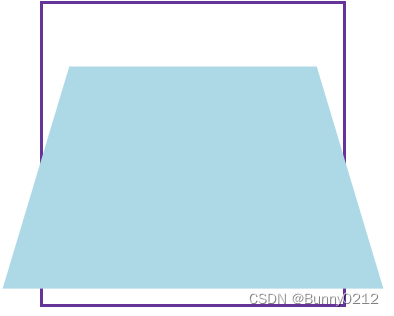
使用3D效果,
perspective需要卸载父类中,用来规定视口距离.frame { margin: 0 auto; width: 300px; height: 300px; border: 3px solid rebeccapurple; perspective: 500px; } .shape { width: 300px; height: 300px; background-color: lightblue; transform: rotateX(45deg); }- 1
- 2
- 3
- 4
- 5
- 6
- 7
- 8
- 9
- 10
- 11
- 12
- 13
03 aspect-ratio
HTML结构
<body> <div class="plaer">div> body>- 1
- 2
- 3
CSS结构
使用
aspect-ratio等比例缩放格式为分数形式/* 不要高度,等比例缩放 */ .plaer { width: 100%; background-color: lightblue; aspect-ratio: 16/9; }- 1
- 2
- 3
- 4
- 5
- 6

04 filter
HTML结构
<body> <img class="pic1" src="./cosplay.jpg" /> <img class="pic2" src="./cosplay.jpg" /> <p class="spoiler">一段话。。。。 p> body>- 1
- 2
- 3
- 4
- 5
CSS结构
设置模糊度
blur设置对比度
*saturate*亮度
brightnessimg { user-select: none; } .pic1 { margin: 0 auto; width: 300px; height: 300px; /* 设置模糊度-blur */ filter: blur(10px); } .pic1:active { filter: none; } .pic2 { margin: 0 auto; width: 300px; height: 300px; /* 设置对比度、曝光、灰度 */ /* filter: saturate(20); */ /* filter: brightness(20%); */ filter: grayscale(100%); transition: all 2s ease; } .pic2:active { filter: none; } .spoiler { user-select: none; filter: blur(20px); } .spoiler:active { filter: none; }- 1
- 2
- 3
- 4
- 5
- 6
- 7
- 8
- 9
- 10
- 11
- 12
- 13
- 14
- 15
- 16
- 17
- 18
- 19
- 20
- 21
- 22
- 23
- 24
- 25
- 26
- 27
- 28
- 29
- 30
- 31
- 32
- 33
- 34
- 35
- 36
- 37

05 input输入设置
HTML结构
<body> <input type="text" placeholder="搜索。。。" /> body>- 1
- 2
- 3
CSS结构
placeholder设置placeholderfocus当获取焦点时触发caret-color光标颜色input { padding: 20px; border: 1px solid red; /* 设置光标颜色 */ caret-color: red; } /* 当输入框获取焦点时,外边框设置红色 */ input:focus { outline: 1px solid red; } /* 设置 placeholder */ input::placeholder { color: red; }- 1
- 2
- 3
- 4
- 5
- 6
- 7
- 8
- 9
- 10
- 11
- 12
- 13
- 14
- 15
- 16

06 is、where、not等用法
HTML结构
<body> <div class="item"> <h1>哈哈哈哈哈h1> <h2>呵呵呵呵呵h2> <h4>拉拉阿拉啦h4> <p>placeholderplaceholderplaceholderplaceholderp> div> body>- 1
- 2
- 3
- 4
- 5
- 6
- 7
- 8
CSS结构
/* 如果想批量修改颜色,注意:类名后要有一个空格 */ .item :where(h1, h2, p) { color: red; } /* is 的优先级要高于where */ .item :is(h1, h2, p) { color: blue; } .item :not(h2, h4) { color: yellow; }- 1
- 2
- 3
- 4
- 5
- 6
- 7
- 8
- 9
- 10
- 11
- 12
- 13

07 字幕设置
HTML结构
<body> <video src="./1_01-尚优选项目简介_高清 1080P.mp4" controls> <track kind="captions" label="en" src="./01-尚优选项目简介.ass" /> video> body>- 1
- 2
- 3
- 4
- 5
CSS结构
video { width: 100%; aspect-ratio: 16/9; } /* 设置字母样式 */ ::cue { background-color: black; font-size: 50px; }- 1
- 2
- 3
- 4
- 5
- 6
- 7
- 8
- 9
- 10
- 1
- 2
CSS结构
video { width: 100%; aspect-ratio: 16/9; } /* 设置字母样式 */ ::cue { background-color: black; font-size: 50px; }- 1
- 2
- 3
- 4
- 5
- 6
- 7
- 8
- 9
- 10
-
相关阅读:
漏洞补丁:漏洞命名(CVE和CNNVD)及补丁查找
开发chromium你要知道的几个地址
MySQL增删查改(初阶)
4-甲氧基三苯胺,CAS号:4316-51-2
DOS之特殊符号讲解
Windows 11 中打印时提示打印机不兼容,都来是“+”惹的祸
四边形不等式
qt 读取txt文本内容时,中文乱码
数据可视化之交通可视化
MySQL -- 环境安装(CentOS7)
- 原文地址:https://blog.csdn.net/weixin_46533577/article/details/132716042
