-
springboot 下 activiti 7会签配置与实现
流程图配置
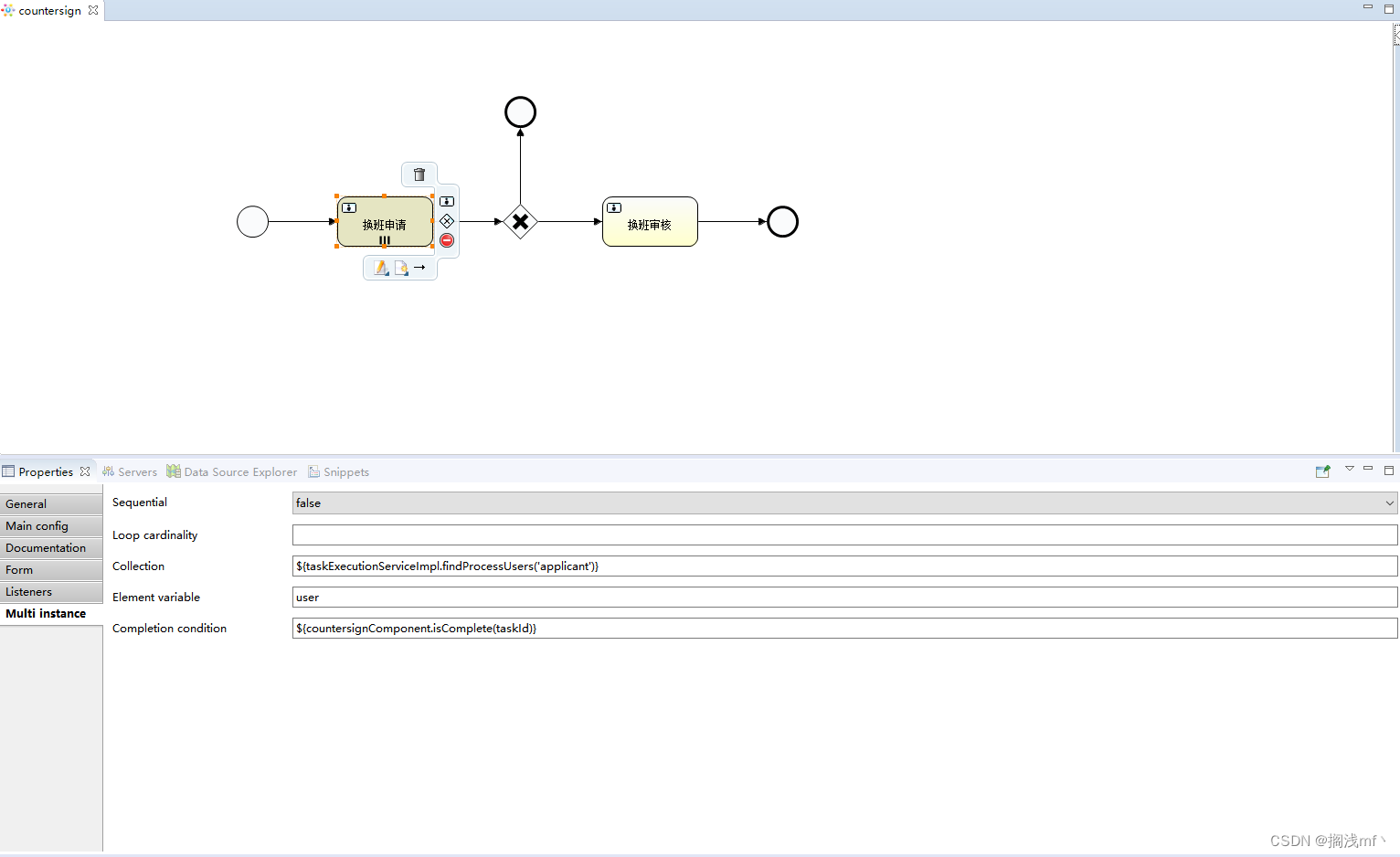
会签实现须在 userTask 节点下的 multi instance 中配置 collection 及 completion condition;- collection 会签人员列表;
- element variable 当前会签变量名称,类似循环中的 item;
- completion condition: 完成条件。
${taskExecutionServiceImpl.findProcessUsers(‘applicant’)} : spring 代理下的 activiti 项目可使用
bean 下配置方法。${countersignComponent.isComplete(taskId)} 会签实现方法,省略监听类。括号中的字符加单引号就是传递字符串,不加引号就是取当前任务中的变量。

会签配置图中的 user 变量需在此处使用。实现代码
会签实现代码
@Component @RequiredArgsConstructor public class CountersignComponent { private final TaskService taskService; public boolean isComplete(String taskId) { // 1、参数验证 if(StringUtils.isAnyEmpty(taskId)){ return false; } // 2、获取当前任务节点参数及会签判断后重新设置 // 获取流程参数 var,会签人员完成自己的审批任务时会添加流程参数 var,2 为拒绝,1 为同意 String variable = BeanUtil.nullOrUndefinedToEmptyStr(taskService.getVariableLocal(taskId, ActivitiCommonConstant.VAR.getValue())); // 当值为 2 证明已有人拒绝,返回 true if(DefaultConstant.TWO_CODE.getKey().equals(variable)){ //会签结束,设置参数 execType 为 4 进行下一步操作。 taskService.setVariableLocal(taskId, ActivitiCommonConstant.EXEC_TYPE.getValue(), DefaultConstant.FIVE_CODE.getKey()); return true; } // 当值为 1,判断会签是否结束 Integer complete = (Integer) taskService.getVariable(taskId, ActivitiCommonConstant.NR_OF_COMPLETED_INSTANCES.getValue()); if(complete == 0){ // 会签未结束,后续处理 } return false; } }- 1
- 2
- 3
- 4
- 5
- 6
- 7
- 8
- 9
- 10
- 11
- 12
- 13
- 14
- 15
- 16
- 17
- 18
- 19
- 20
- 21
- 22
- 23
- 24
- 25
- 26
- 27
- 28
- 29
- 30
- 31
用户动态获取代码
@Override public ListfindProcessUsers(String code) { // 1、参数验证 if(StringUtils.isEmpty(code)){ throw new BusinessException(ActivitiConstant.PROCESS_USER_NULL); } // 2、查询对应流程人员(具体取人逻辑,根据个人业务变更) ProcessParameterQuery processParameterQuery = new ProcessParameterQuery(); processParameterQuery.setCode(code); GostopResponseVo processParameter = dev.findProcessParameter(processParameterQuery); ProcessParameterVo processParameterVo = processParameter.getResult(); if(Objects.isNull(processParameterVo)){ throw new BusinessException(ActivitiConstant.PROCESS_USER_NULL); } List userInfos = processParameterVo.getUserInfos(); if(CollectionUtils.isEmpty(userInfos)){ throw new BusinessException(ActivitiConstant.PROCESS_USER_NULL); } return userInfos.stream().map(HospitalUserVo::getId).distinct().collect(Collectors.toList()); } - 1
- 2
- 3
- 4
- 5
- 6
- 7
- 8
- 9
- 10
- 11
- 12
- 13
- 14
- 15
- 16
- 17
- 18
- 19
- 20
- 21
开启流程
@Override public String startProcess(CommonTaskParamVo param) { // 1、参数验证 if(Objects.isNull(param) || StringUtils.isAnyEmpty(param.getProcessKey())){ throw new BusinessException(ActivitiConstant.EXEC_ERROR_PARAMS_NULL); } // 2、启动流程定义,返回流程实例 ProcessInstance pi; try { CustomParamVo customParamVo = param.getCustomParamVo(); String paramJson = JSONObject.toJSONString(customParamVo); Map paramMap = JSONObject.parseObject(paramJson, Map.class); pi = runtimeService .startProcessInstanceByKey(param.getProcessKey(), paramMap); } catch (Exception e) { log.error(e.getMessage()); throw new BusinessException(ActivitiConstant.PROCESS_NOT_DEPLOYED); } return pi.getId(); }- 1
- 2
- 3
- 4
- 5
- 6
- 7
- 8
- 9
- 10
- 11
- 12
- 13
- 14
- 15
- 16
- 17
- 18
- 19
- 20
- 21
任务执行
@Override public String complete(CommonTaskParamVo param) { // 1、参数验证 if(Objects.isNull(param) || StringUtils.isAnyEmpty(param.getProcessId(), param.getUserId())){ throw new BusinessException(ActivitiConstant.EXEC_ERROR_PARAMS_NULL); } // 2、查询当前人任务信息 String userId = param.getUserId(); //与正在执行的任务管理相关的Service Task task = taskService .createTaskQuery() //指定个人任务查询,指定办理人 .taskCandidateUser(userId) //使用流程实例ID查询 .processInstanceId(param.getProcessId()) //排序 .orderByTaskCreateTime().asc() //返回列表 .singleResult(); if (Objects.isNull(task)) { throw new BusinessException(ActivitiConstant.TASK_NULL_ERROR); } task.setDescription(param.getDescription()); task.setAssignee(userId); taskService.saveTask(task); // 2.1 设置执行人信息 HospitalUserCacheVo userInfo = activitComponent.getUserInfo(); CustomParamVo customParamVo = param.getCustomParamVo(); customParamVo.setExecUserId(userInfo.getId()); customParamVo.setExecUserName(userInfo.getDepartmentName()); customParamVo.setExecTime(DateUtil.date2String(LocalDateTime.now())); customParamVo.setTaskId(task.getId()); // 2.2 将自定义参数转为 map String paramJson = JSONObject.toJSONString(customParamVo); Map paramMap = JSONObject.parseObject(paramJson, Map.class); taskService.setVariablesLocal(task.getId(), paramMap); // 3、执行当前节点信息 taskService.complete(task.getId()); return task.getId(); }- 1
- 2
- 3
- 4
- 5
- 6
- 7
- 8
- 9
- 10
- 11
- 12
- 13
- 14
- 15
- 16
- 17
- 18
- 19
- 20
- 21
- 22
- 23
- 24
- 25
- 26
- 27
- 28
- 29
- 30
- 31
- 32
- 33
- 34
- 35
- 36
- 37
- 38
- 39
- 40
- 41
参数接收对象
@Data public class CommonTaskParamVo { /** * 用户 ID */ private String userId; /*** * 流程图定义 KEY */ private String processKey; /** * 流程 ID */ private String processId; /** * 描述 */ private String description; /** * 自定义参数类 */ private CustomParamVo customParamVo; } @Data public class CustomParamVo { /** * 操作类型 (1 同意, 2 回退, 3 驳回, 4 提交 5 删除) */ private String execType; /** * 节点类型 (1 申请节点 2 审批节点) */ private String nodeType; /** * 预留参数 */ private String var; /** * 执行人 ID */ private String execUserId; /** * 执行人名称 */ private String execUserName; /** * 执行时间 */ private String execTime; /** * 任务 ID */ private String taskId; }- 1
- 2
- 3
- 4
- 5
- 6
- 7
- 8
- 9
- 10
- 11
- 12
- 13
- 14
- 15
- 16
- 17
- 18
- 19
- 20
- 21
- 22
- 23
- 24
- 25
- 26
- 27
- 28
- 29
- 30
- 31
- 32
- 33
- 34
- 35
- 36
- 37
- 38
- 39
- 40
- 41
- 42
- 43
- 44
- 45
- 46
- 47
- 48
- 49
- 50
- 51
- 52
- 53
- 54
- 55
- 56
- 57
- 58
使用上述参数类及流程配置后,查询任务流水就变得非常简单。
流水查询
@Override public ListflowQueryProcess(FlowQuery param) { // 1、参数验证 if(Objects.isNull(param) || StringUtils.isAnyEmpty(param.getProcessId())){ return new ArrayList<>(); } // 2、查询任务执行节点信息 HistoricTaskInstanceQuery historicTaskInstanceQuery = historyService.createHistoricTaskInstanceQuery(); List taskInfoArr = historicTaskInstanceQuery.processInstanceId(param.getProcessId()).orderByTaskCreateTime().asc().list(); if(CollectionUtils.isEmpty(taskInfoArr)){ return new ArrayList<>(); } // 3、查询任务执行参数信息 HistoricVariableInstanceQuery historicVariableInstanceQuery = historyService.createHistoricVariableInstanceQuery(); List variableInstanceList = historicVariableInstanceQuery.processInstanceId(param.getProcessId()).list(); // 4、构建返回信息对象 List resultArr = taskInfoArr.stream().map(taskInfo -> { FlowDataVo flowDataVo = new FlowDataVo(); flowDataVo.setNodeName(taskInfo.getName()); flowDataVo.setDescription(taskInfo.getDescription()); List variableArr = variableInstanceList.stream().filter(e -> taskInfo.getId().equals(e.getTaskId())).collect(Collectors.toList()); if (CollectionUtils.isEmpty(variableArr)) { flowDataVo.setStatus(DefaultConstant.ONE_CODE.getKey()); return flowDataVo; } JSONObject flowDataJson = (JSONObject) JSONObject.toJSON(flowDataVo); variableArr.stream().forEach(var -> { String variableName = var.getVariableName(); String value = BeanUtil.nullOrUndefinedToEmptyStr(var.getValue()); flowDataJson.put(variableName, value); }); String flowDataJsonString = flowDataJson.toJSONString(); FlowDataVo afterFlowData = JSONObject.parseObject(flowDataJsonString, FlowDataVo.class); afterFlowData.setStatus(DefaultConstant.TWO_CODE.getKey()); return afterFlowData; }).collect(Collectors.toList()); return resultArr; } - 1
- 2
- 3
- 4
- 5
- 6
- 7
- 8
- 9
- 10
- 11
- 12
- 13
- 14
- 15
- 16
- 17
- 18
- 19
- 20
- 21
- 22
- 23
- 24
- 25
- 26
- 27
- 28
- 29
- 30
- 31
- 32
- 33
- 34
- 35
- 36
- 37
- 38
- 39
- 40
- 41
- 42
流水查询使用 bean 对象
@Data public class FlowQuery { /** * 流程 ID */ private String processId; /** * 用户 ID */ private String userId; } @Data public class FlowDataVo { /** * 操作类型 (1 同意, 2 回退, 3 驳回, 4 提交 5 删除) */ private String execType; /** * 节点类型 (1 申请节点 2 审批节点) */ private String nodeType; /** * 预留参数 */ private String var; /** * 节点名称 */ private String nodeName; /** * 执行状态 1 未执行 2 已执行 */ private String status; /** * 执行人 ID */ private String execUserId; /** * 执行人名称 */ private String execUserName; /** * 执行时间 */ private String execTime; /*** * 描述 */ private String description; }- 1
- 2
- 3
- 4
- 5
- 6
- 7
- 8
- 9
- 10
- 11
- 12
- 13
- 14
- 15
- 16
- 17
- 18
- 19
- 20
- 21
- 22
- 23
- 24
- 25
- 26
- 27
- 28
- 29
- 30
- 31
- 32
- 33
- 34
- 35
- 36
- 37
- 38
- 39
- 40
- 41
- 42
- 43
- 44
- 45
- 46
- 47
- 48
- 49
- 50
- 51
- 52
- 53
附:流程表释义
资源库流程规则表
act_re_deployment 部署信息表
act_re_model 流程设计模型信息表
act_re_procdef 流程定义数据表运行时数据库
act_ru_execution 运行时流程执行实例表
act_ru_identitylink 运行时流程人员表,主要存储任务节点与参与者的相关信息
act_ru_task 运行时任务节点表
act_ru_variable 运行时流程变量数据表历史数据库表
act_hi_actinst 历史节点表
act_hi_attachment 历史附件表
act_hi_comment 历史意见表
act_hi_identitylink 历史流程人员表
act_hi_detail 历史详情表,提供历史变量的查询
act_hi_procinst 历史流程实例表
act_hi_taskinst 历史任务实例表
act_hi_varinst 历史变量表组织机构表
act_id_group 用户组信息表 JBPM_ID_MEMBERSHIP
act_id_info 用户扩展信息表
act_id_membership 用户与用户组对应信息表
act_id_user 用户信息表
这四张表很常见,基本的组织机构管理,关于用户认证方面建议还是自己开发一套,组件自带的功能太简单,使用中有很多需求难以满足通用数据表
act_ge_bytearray 二进制数据表
act_ge_property 属性数据表存储整个流程引擎级别的数据,初始化表结构时,会默认插入三条记录。 -
相关阅读:
【高阶产品策略】设计有效的AB测试
FW Read protection in code level
【ROS入门】机器人运动控制以及里程计信息显示
动态sql和分页
中国超高分子量聚乙烯产业调研与投资前景报告(2022版)
力扣:153. 寻找旋转排序数组中的最小值(Python3)
孔乙己第一问之服务通信知多少?
【Python Web】Flask框架(九)MYSQL+python案例
技术20期:结构化数据与非结构化数据:有什么区别?
Win11蓝牙无法连接怎么办?可以试试这个方法。
- 原文地址:https://blog.csdn.net/weixin_42256765/article/details/132718699
