-
react-grapesjs——开源代码学习与修改(初出茅庐)

⭐前言
大家好,我是yma16,本文分享关于react-grapesjs——源码学习。
该系列往期文章:
react搭建在线编辑html的站点——引入grapes实现在线拖拉拽编辑html
结果演示:
https://yongma16.xyz/react-mjml/

⭐grapesjs初始化过程
源码:https://github.com/GrapesJS/grapesjs
目录结构
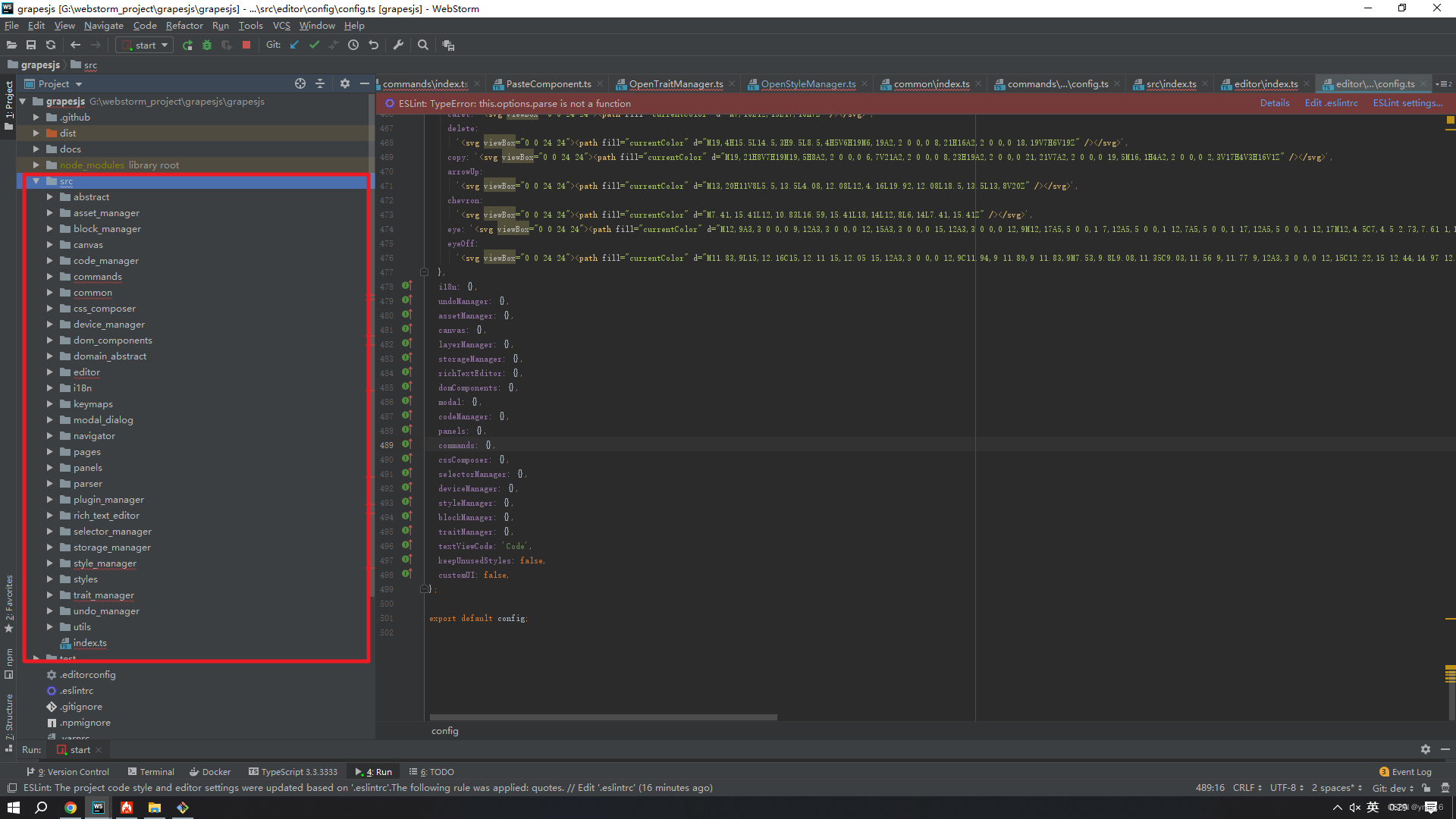
运行源码

💖 渲染大体流程
💖 Editor对象 创建
- new Editor进入 Editor对象
- class Editor implements IBaseModule
constructor(config: EditorConfig = {}, opts: any = {}) { this.config = { ...defaults, ...config, pStylePrefix: config.stylePrefix ?? defaults.stylePrefix, }; this.em = new EditorModel(this.config); this.$ = opts.$; this.em.init(this); this.editor = this.em; }- 1
- 2
- 3
- 4
- 5
- 6
- 7
- 8
- 9
- 10
- 11
💖 EditorModel 对象创建
- class EditorModel extends Model 执行构造函数
constructor(conf: EditorConfig = {}) { super(); this._config = conf; const { config } = this; this.set('Config', conf); this.set('modules', []); this.set('toLoad', []); this.set('storables', []); this.set('selected', new Selected()); this.set('dmode', config.dragMode); const { el, log } = config; const toLog = log === true ? keys(logs) : isArray(log) ? log : []; bindAll(this, 'initBaseColorPicker'); if (el && config.fromElement) { config.components = el.innerHTML; } this.attrsOrig = el ? toArray(el.attributes).reduce((res, next) => { res[next.nodeName] = next.nodeValue; return res; }, {} as Record<string, any>) : ''; // Move components to pages if (config.components && !config.pageManager) { config.pageManager = { pages: [{ component: config.components }] }; } // Load modules deps.forEach(constr => this.loadModule(constr)); storableDeps.forEach(constr => this.loadStorableModule(constr)); this.on('change:componentHovered', this.componentHovered, this); this.on('change:changesCount', this.updateChanges, this); this.on('change:readyLoad change:readyCanvas', this._checkReady, this); toLog.forEach(e => this.listenLog(e)); // Deprecations [{ from: 'change:selectedComponent', to: 'component:toggled' }].forEach(event => { const eventFrom = event.from; const eventTo = event.to; this.listenTo(this, eventFrom, (...args) => { this.trigger(eventTo, ...args); this.logWarning(`The event '${eventFrom}' is deprecated, replace it with '${eventTo}'`); }); }); }- 1
- 2
- 3
- 4
- 5
- 6
- 7
- 8
- 9
- 10
- 11
- 12
- 13
- 14
- 15
- 16
- 17
- 18
- 19
- 20
- 21
- 22
- 23
- 24
- 25
- 26
- 27
- 28
- 29
- 30
- 31
- 32
- 33
- 34
- 35
- 36
- 37
- 38
- 39
- 40
- 41
- 42
- 43
- 44
- 45
- 46
- 47
- 48
💖 load modules 加载定义的目录模块Module
deps的类型
const deps: (new (em: EditorModel) => IModule)[] = [ UtilsModule, I18nModule, KeymapsModule, UndoManagerModule, StorageManager, DeviceManager, ParserModule, StyleManager, SelectorManager, ModalModule, CodeManagerModule, PanelManager, RichTextEditorModule, TraitManager, LayerManager, CanvasModule, CommandsModule, BlockManager, ];- 1
- 2
- 3
- 4
- 5
- 6
- 7
- 8
- 9
- 10
- 11
- 12
- 13
- 14
- 15
- 16
- 17
- 18
- 19
- 20
// Load modules deps.forEach(constr => this.loadModule(constr));- 1
- 2
💖 StyleManager渲染过程
路径 src/style_manager

构造函数
constructor(em: EditorModel) { super(em, 'StyleManager', new Sectors([], { em }), stylesEvents, defaults); bindAll(this, '__clearStateTarget'); const c = this.config; const ppfx = c.pStylePrefix; if (ppfx) c.stylePrefix = ppfx + c.stylePrefix; this.builtIn = new PropertyFactory(); this.properties = new Properties([], { em, module: this }); this.sectors = this.all; // TODO check if (module: this) is required const model = new Model({ targets: [] }); this.model = model; // Triggers for the selection refresh and properties const ev = 'component:toggled component:update:classes change:state change:device frame:resized selector:type'; this.upAll = debounce(() => this.__upSel(), 0); model.listenTo(em, ev, this.upAll as any); // Clear state target on any component selection change, without debounce (#4208) model.listenTo(em, 'component:toggled', this.__clearStateTarget); // Triggers only for properties (avoid selection refresh) const upProps = debounce(() => { this.__upProps(); this.__trgCustom(); }, 0); model.listenTo(em, 'styleable:change undo redo', upProps); // Triggers only custom event const trgCustom = debounce(() => this.__trgCustom(), 0); model.listenTo(em, `${evLayerSelect} ${evTarget}`, trgCustom); // Other listeners model.on('change:lastTarget', () => em.trigger(evTarget, this.getSelected())); }- 1
- 2
- 3
- 4
- 5
- 6
- 7
- 8
- 9
- 10
- 11
- 12
- 13
- 14
- 15
- 16
- 17
- 18
- 19
- 20
- 21
- 22
- 23
- 24
- 25
- 26
- 27
- 28
- 29
- 30
- 31
- 32
- 33
⭐修改grapesjs配置项
屏蔽 views的两个按钮
原来的样式

panels/config配置

更改配置项 注释不需要的配置import { PanelProperties } from '../model/Panel'; const swv = 'sw-visibility'; const expt = 'export-template'; const osm = 'open-sm'; const otm = 'open-tm'; const ola = 'open-layers'; const obl = 'open-blocks'; const ful = 'fullscreen'; const prv = 'preview'; interface ButtonProps { id?: string; active?: boolean; togglable?: boolean; className?: string; command?: string | (() => any); context?: string; attributes?: Record<string, any>; } interface PanelProps extends Omit<PanelProperties, 'id' | 'buttons'> { id?: string; buttons?: ButtonProps[]; } export interface PanelsConfig { stylePrefix?: string; /** * Default panels. */ defaults?: PanelProps[]; } const config: PanelsConfig = { stylePrefix: 'pn-', defaults: [ { id: 'commands', buttons: [{}], }, { id: 'options', buttons: [ { active: true, id: swv, className: 'fa fa-square-o', command: 'core:component-outline', context: swv, attributes: { title: 'View components' }, }, { id: prv, className: 'fa fa-eye', command: prv, context: prv, attributes: { title: 'Preview' }, }, { id: ful, className: 'fa fa-arrows-alt', command: ful, context: ful, attributes: { title: 'Fullscreen' }, }, { id: expt, className: 'fa fa-code', command: expt, attributes: { title: 'View code' }, }, ], }, { id: 'views', buttons: [ { id: osm, className: 'fa fa-paint-brush', command: osm, active: true, togglable: false, attributes: { title: 'Open Style Manager' }, }, // { // id: otm, // className: 'fa fa-cog', // command: otm, // togglable: false, // attributes: { title: 'Settings' }, // }, // { // id: ola, // className: 'fa fa-bars', // command: ola, // togglable: false, // attributes: { title: 'Open Layer Manager' }, // }, { id: obl, className: 'fa fa-th-large', command: obl, togglable: false, attributes: { title: 'Open Blocks' }, }, ], }, ], }; export default config;- 1
- 2
- 3
- 4
- 5
- 6
- 7
- 8
- 9
- 10
- 11
- 12
- 13
- 14
- 15
- 16
- 17
- 18
- 19
- 20
- 21
- 22
- 23
- 24
- 25
- 26
- 27
- 28
- 29
- 30
- 31
- 32
- 33
- 34
- 35
- 36
- 37
- 38
- 39
- 40
- 41
- 42
- 43
- 44
- 45
- 46
- 47
- 48
- 49
- 50
- 51
- 52
- 53
- 54
- 55
- 56
- 57
- 58
- 59
- 60
- 61
- 62
- 63
- 64
- 65
- 66
- 67
- 68
- 69
- 70
- 71
- 72
- 73
- 74
- 75
- 76
- 77
- 78
- 79
- 80
- 81
- 82
- 83
- 84
- 85
- 86
- 87
- 88
- 89
- 90
- 91
- 92
- 93
- 94
- 95
- 96
- 97
- 98
- 99
- 100
- 101
- 102
- 103
- 104
- 105
- 106
- 107
- 108
- 109
- 110
- 111
- 112
- 113
- 114
修改成功!
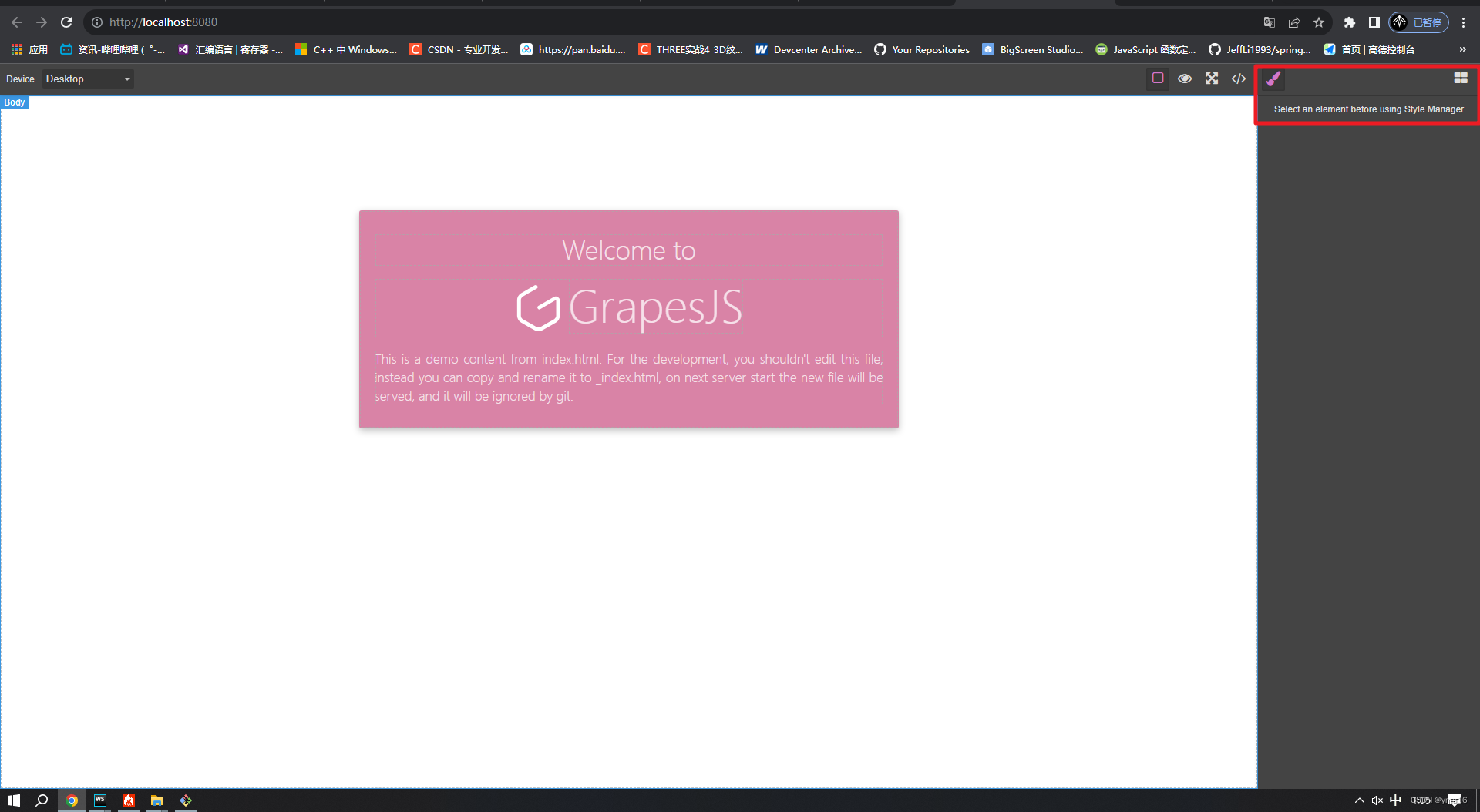
同理合并配置项也是合并配置module的代码可以实现⭐总结
⭐ 如何修改开源代码
修改开源代码的步骤如下:
-
首先要获取并安装开发环境。这包括编译器、文本编辑器和版本控制软件等。
-
Fork开源项目,即在GitHub或其他代码托管平台上复制一份项目,这样你就有了自己的独立分支。
-
在你的本地机器上克隆你所Fork的项目。通过clone命令将整个项目下载到你的本地机器上。
-
创建新的分支。你需要创建一个新的分支,以便你可以在不影响其他贡献者的情况下进行更改。
-
对代码进行修改。使用你的文本编辑器打开项目文件并进行所需的更改,完成后保存文件。
-
运行测试。运行项目的测试套件,确保你的修改没有破坏现有代码的功能。
-
提交修改。使用git提交修改到你的本地分支并将这些更改推送到你的Fork仓库。
-
发送一个合并请求。你可以向原始项目的所有者发送一个请求,请求将你的分支合并到他们的主分支上。
以上是修改开源代码的基本步骤,需要结合实际情况进行具体操作。在修改开源代码时,不仅要尊重原作者的版权,还要了解开源授权协议及相应的规定。
⭐如何高效阅读开源代码
阅读开源代码可以帮助你学习其他程序员的技术,尤其是在你遇到类似的问题时,可以参考开源代码中的解决方案。以下是一些高效阅读开源代码的技巧:
-
了解项目结构:先了解项目的目录结构和代码风格,可以帮助你更快地定位代码位置和理解代码。
-
建立索引:可以使用工具或者手动建立索引,以便于更快地查找关键代码和内容。
-
浅阅读:先快速浏览代码,了解项目的整体结构和大致流程。
-
深度阅读:对于关键的代码部分,进行深度阅读,仔细理解其实现和作用。
-
调试代码:在自己的环境中运行代码,通过调试来理解代码的执行过程和实际效果。
-
参考文档:阅读开源项目的文档和介绍,可以更好地理解代码和项目。
-
学习工具:学习使用开源代码的工具,如IDE、版本控制软件等,可以更好地理解和使用开源代码。
最重要的是,在阅读开源代码时,要注重理解代码的思路和设计方式,而不是仅仅复制代码。
⭐结束
本文分享到这结束,如有错误或者不足之处欢迎指出!

👍 点赞,是我创作的动力!
⭐️ 收藏,是我努力的方向!
✏️ 评论,是我进步的财富!
💖 最后,感谢你的阅读! -
相关阅读:
【打卡】牛客网:BM37 二叉搜索树的最近公共祖先
k8s敏感数据存储:Secret
Python自动化操作:简单、有趣、高效!解放你的工作流程!
react中遇到的分页问题
C++二要素认证,游戏实名认证接口、金融实名认证
【STM32】锁存器
后悔怎么没早点看到!腾讯T3整理实战书籍:(Spring MVC +MyBatis快速开发与项目实战pdf)
【谢希尔 计算机网络】第4章 网络层
DDoS介绍
NOIP 2012 普及组初赛 第28题 排列数
- 原文地址:https://blog.csdn.net/qq_38870145/article/details/132702829
