简介#
配置在asp.net core中可以说是我们必不可少一部分。
ASP.NET Core 中的应用程序配置是使用一个或多个配置提供程序执行的。 配置提供程序使用各种配置源从键值对读取配置数据,普通最常用的应该是下面几种:
配置优先级#
不同的配置提供程序有不同优先级,相同的配置项高优先级的会覆盖低优先级的配置内容。
默认的优先级顺序如下(从最高优先级到最低优先级):
- 使用命令行配置提供程序通过命令行参数提供。
- 使用非前缀环境变量配置提供程序通过非前缀环境变量提供。
- 应用在 环境中运行时的用户机密。
- 使用 JSON 配置提供程序通过 appsettings.{Environment}.json 提供。 例如,appsettings.Production.json 和 appsettings.Development.json。
- 使用 JSON 配置提供程序通过 appsettings.json 提供。
- 主机(Host)配置。
接下来我们来实操一下。
新建一个WebApi项目,查看lunchSettings.json文件,可以看到默认端口地址为http://localhost:5085。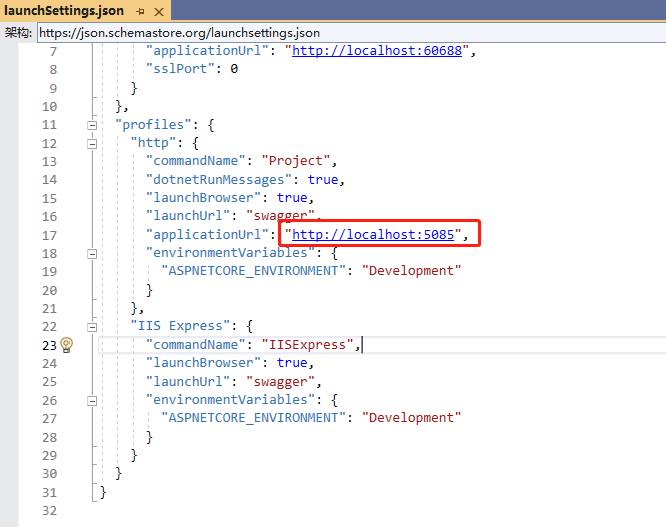
启动项目也可以看到端口地址是对应的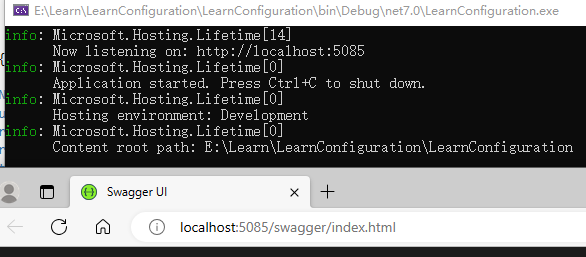
接下来我们在环境变量中添加一个ASPNETCORE_URLS变量,把端口改成5555,启动项目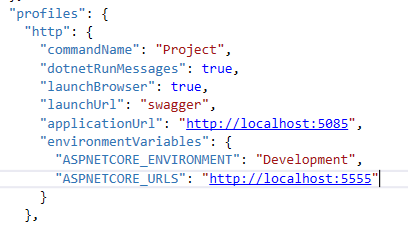
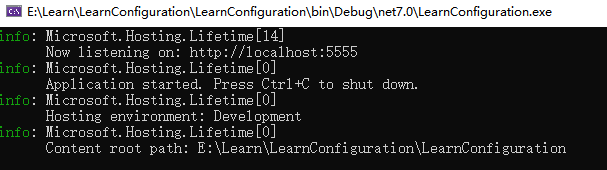
可以发现监听端口已经变成5555了。
接下来我们不删除上面改动的环境变量,在appsettings.json中添加一个urls配置,配置端口改成6666。
{
  "Logging": {
    "LogLevel": {
      "Default": "Information",
      "Microsoft.AspNetCore": "Warning"
    }
  },
  "AllowedHosts": "*",
  "urls": "http://localhost:6666"
}
再次启动项目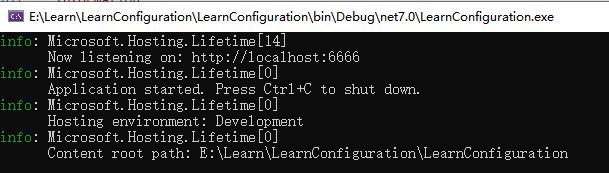
现在监听的端口变成了6666
接下来我们再次添加一个环境变量,叫做URLS,把端口改成7777,启动项目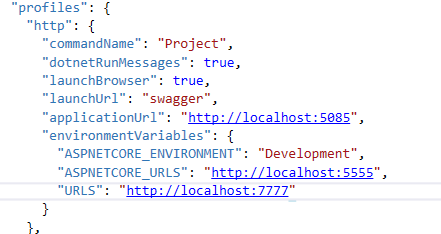
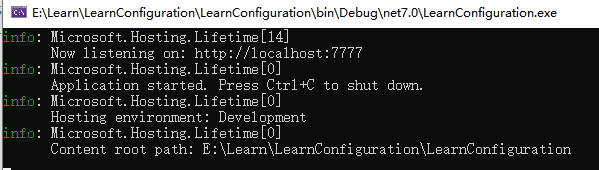
可以看到端口变成了7777。
接下来再试试用命令行启动,打开项目目录CMD,用dotnet run --urls=http://localhost:8888启动项目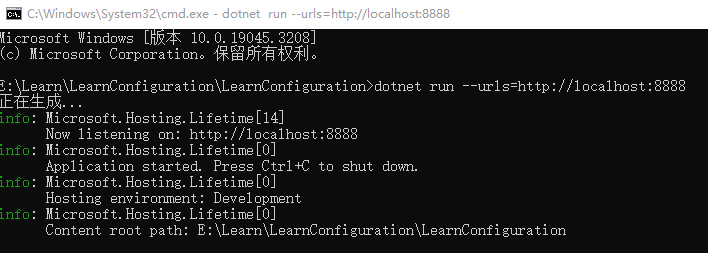
可以看到,我们端口又变成8888了。
很明显可以看到,相同配置会有不同的优先级。这里稍微提一下非前缀环境变量就是指不是以ASPNETCORE_ 或 DOTNET_ 为前缀的环境变量。
在我们上面两个环境变量中,ASPNETCORE_URLS的优先级没有URLS高,因为URLS就是非前缀环境变量。
其他的配置方式优先级 这里就不一一演示了,感兴趣的可以自行测试。
所以当我们有相同配置但使用不同配置提供程序时,需要注意配置的优先级,不然可能导致程序读取的配置内容不对。
配置提供程序#
ASP.NET Core自带的配置提供程序有很多个,如下图: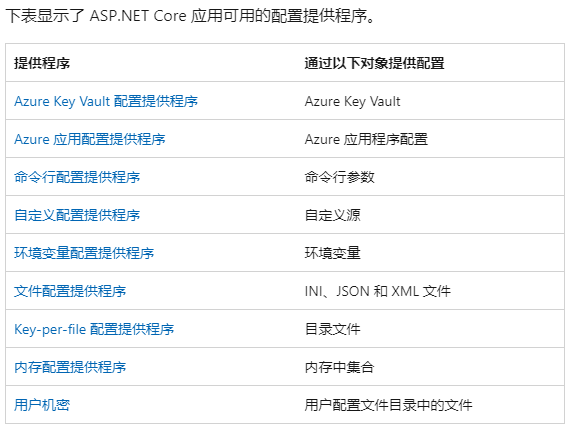
这里简单挑几个来了解一下。
MemoryConfigurationProvider#
MemoryConfigurationProvider是内存配置提供程序,使用内存中集合作为配置键值对。
下面来测试一下,在Program中添加如下代码。
var builder = WebApplication.CreateBuilder(args);
var dict = new Dictionary<string, string>
        {
           {"TestMemoryKey", "Memory"},
        };

builder.Configuration.AddInMemoryCollection(dict);
在控制器中注入IConfiguration,并在API中获取TestMemoryKey的值。
private readonly ILogger _logger;
private readonly IConfiguration Configuration;
public WeatherForecastController(ILogger logger, IConfiguration configuration )
{
_logger = logger;
Configuration = configuration;
}
[HttpGet(Name = "GetWeatherForecast")]
public IEnumerable Get()
{
var testMemory = Configuration["TestMemoryKey"];
return Enumerable.Range(1, 5).Select(index => new WeatherForecast
{
Date = DateOnly.FromDateTime(DateTime.Now.AddDays(index)),
TemperatureC = Random.Shared.Next(-20, 55),
Summary = Summaries[Random.Shared.Next(Summaries.Length)]
})
.ToArray();
}
启动项目并调用接口。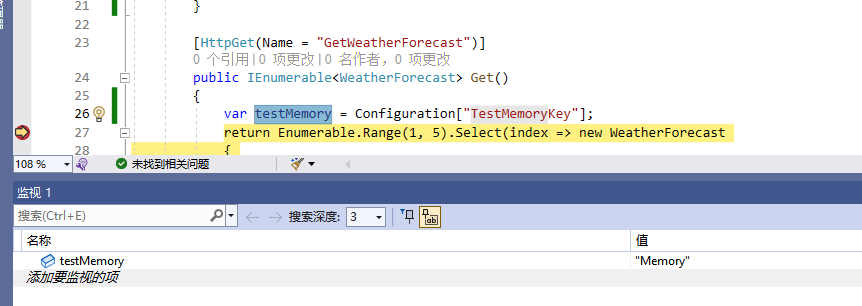
通过DEBUG可以看到,我们成功获取到了值。
FileConfigurationProvider#
FileConfigurationProvider是文件配置提供程序,也是我们最常用到的一种,就是我们的appsettings.json文件配置。
除了json文件,Asp.netCore还支持INI和XML文件的配置提供程序
他们分别是
JsonConfigurationProvider 从 JSON 文件键值对加载配置。
IniConfigurationProvider 在运行时从 INI 文件键值对加载配置。
XmlConfigurationProvider 在运行时从 XML 文件键值对加载配置。
我们来添加appsettings.ini和appsettings.xml文件。
appsettings.ini
TestIniKey="Ini Value"
appsettings.xml
<configuration>
	<TestXmlKey>XML ValueTestXmlKey>
configuration>
在Program中添加配置文件
builder.Configuration.AddIniFile("appsettings.ini");
builder.Configuration.AddXmlFile("appsettings.xml");
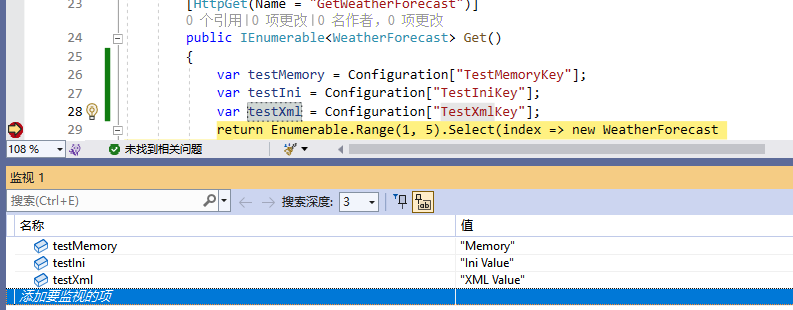
在控制器中测试读取配置。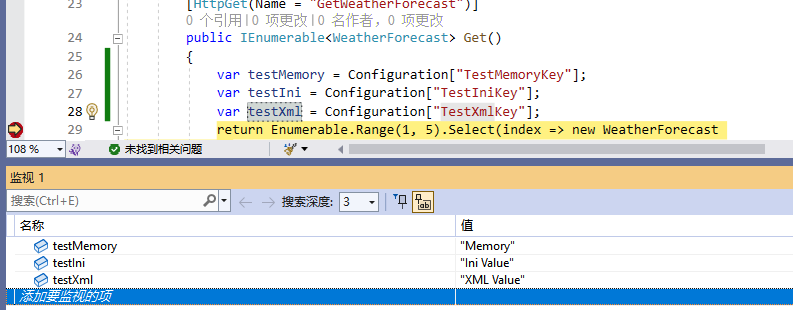
可以看到我们也成功读取了ini和xml文件中的配置内容。
自定义配置提供程序#
除了上面自带的配置提供程序以外,我们还可以自定义属于自己的配置提供程序。
自定义配置提供程序可以用于对接我们的一些配置中心,从配置中心读取/更新配置文件,常见的有我们熟悉的阿波罗配置中心,其中的SDK就提供了阿波罗配置提供程序。
我们可以通过实现IConfigurationSource接口和继承ConfigurationProvider来创建自定义配置提供程序。
这里我们就不自己写了,直接看看apollo.net中ApolloConfigurationProvider源码的实现。
using Com.Ctrip.Framework.Apollo.Core.Utils;
using Com.Ctrip.Framework.Apollo.Internals;

namespace Com.Ctrip.Framework.Apollo;

public class ApolloConfigurationProvider : ConfigurationProvider, IRepositoryChangeListener, IConfigurationSource, IDisposable
{
    internal string? SectionKey { get; }
    internal IConfigRepository ConfigRepository { get; }
    private Task? _initializeTask;
    private int _buildCount;

    public ApolloConfigurationProvider(string? sectionKey, IConfigRepository configRepository)
    {
        SectionKey = sectionKey;
        ConfigRepository = configRepository;
        ConfigRepository.AddChangeListener(this);
        _initializeTask = ConfigRepository.Initialize();
    }

    public override void Load()
    {
        Interlocked.Exchange(ref _initializeTask, null)?.ConfigureAwait(false).GetAwaiter().GetResult();

        SetData(ConfigRepository.GetConfig());
    }

    protected virtual void SetData(Properties properties)
    {
        var data = new Dictionary<string, string>(StringComparer.OrdinalIgnoreCase);

        foreach (var key in properties.GetPropertyNames())
        {
            if (string.IsNullOrEmpty(SectionKey))
                data[key] = properties.GetProperty(key) ?? string.Empty;
            else
                data[$"{SectionKey}{ConfigurationPath.KeyDelimiter}{key}"] = properties.GetProperty(key) ?? string.Empty;
        }

        Data = data;
    }

    void IRepositoryChangeListener.OnRepositoryChange(string namespaceName, Properties newProperties)
    {
        SetData(newProperties);

        OnReload();
    }

    IConfigurationProvider IConfigurationSource.Build(IConfigurationBuilder builder)
    {
        Interlocked.Increment(ref _buildCount);

        return this;
    }

    public void Dispose()
    {
        if (Interlocked.Decrement(ref _buildCount) == 0)
            ConfigRepository.RemoveChangeListener(this);
    }

    public override string ToString() => string.IsNullOrEmpty(SectionKey)
        ? $"apollo {ConfigRepository}"
        : $"apollo {ConfigRepository}[{SectionKey}]";
}
可以看到这里是通过IConfigRepository去获取和监听阿波罗配置中心中的配置,获取和监听到配置时,调用SetData更新配配置内容。
我们看一下IConfigRepository的实现。
using Com.Ctrip.Framework.Apollo.Util.Http;
#if NET40
using System.Reflection;
#else
using System.Runtime.ExceptionServices;
using System.Web;
#endif

namespace Com.Ctrip.Framework.Apollo.Internals;

internal class RemoteConfigRepository : AbstractConfigRepository
{
    private static readonly Funcstring, Exception?>> Logger = () => LogManager.CreateLogger(typeof(RemoteConfigRepository));
    private static readonly TaskFactory ExecutorService = new(new LimitedConcurrencyLevelTaskScheduler(5));

    private readonly ConfigServiceLocator _serviceLocator;
    private readonly HttpUtil _httpUtil;
    private readonly IApolloOptions _options;
    private readonly RemoteConfigLongPollService _remoteConfigLongPollService;

    private volatile ApolloConfig? _configCache;
    private volatile ServiceDto? _longPollServiceDto;
    private volatile ApolloNotificationMessages? _remoteMessages;
    private ExceptionDispatchInfo? _syncException;
    private readonly Timer _timer;

    public RemoteConfigRepository(string @namespace,
        IApolloOptions configUtil,
        HttpUtil httpUtil,
        ConfigServiceLocator serviceLocator,
        RemoteConfigLongPollService remoteConfigLongPollService) : base(@namespace)
    {
        _options = configUtil;
        _httpUtil = httpUtil;
        _serviceLocator = serviceLocator;
        _remoteConfigLongPollService = remoteConfigLongPollService;

        _timer = new(SchedulePeriodicRefresh);
    }

    public override async Task Initialize()
    {
        await SchedulePeriodicRefresh(true).ConfigureAwait(false);

        _timer.Change(_options.RefreshInterval, _options.RefreshInterval);

        _remoteConfigLongPollService.Submit(Namespace, this);
    }

    public override Properties GetConfig()
    {
        _syncException?.Throw();

        return TransformApolloConfigToProperties(_configCache);
    }

    private async void SchedulePeriodicRefresh(object _) => await SchedulePeriodicRefresh(false).ConfigureAwait(false);

    private async Task SchedulePeriodicRefresh(bool isFirst)
    {
        try
        {
            Logger().Debug($"refresh config for namespace: {Namespace}");

            await Sync(isFirst).ConfigureAwait(false);
        }
        catch (Exception ex)
        {
            _syncException = ExceptionDispatchInfo.Capture(ex);

            Logger().Warn($"refresh config error for namespace: {Namespace}", ex);
        }
    }

    private async Task Sync(bool isFirst)
    {
        var previous = _configCache;
        var current = await LoadApolloConfig(isFirst).ConfigureAwait(false);

        //reference equals means HTTP 304
        if (!ReferenceEquals(previous, current))
        {
            Logger().Debug("Remote Config refreshed!");
            _configCache = current;
            _syncException = null;
            FireRepositoryChange(Namespace, GetConfig());
        }
    }

    private async Task LoadApolloConfig(bool isFirst)
    {
        var appId = _options.AppId;
        var cluster = _options.Cluster;
        var dataCenter = _options.DataCenter;

        var configServices = await _serviceLocator.GetConfigServices().ConfigureAwait(false);

        Exception? exception = null;
        Uri? url = null;

        var notFound = false;
        for (var i = 0; i < (isFirst ? 1 : 2); i++)
        {
            IList randomConfigServices = configServices.OrderBy(_ => Guid.NewGuid()).ToList();

            //Access the server which notifies the client first
            var longPollServiceDto = Interlocked.Exchange(ref _longPollServiceDto, null);
            if (longPollServiceDto != null)
            {
                randomConfigServices.Insert(0, longPollServiceDto);
            }

            foreach (var configService in randomConfigServices)
            {
                url = AssembleQueryConfigUrl(configService.HomepageUrl, appId, cluster, Namespace, dataCenter, _remoteMessages!, _configCache!);

                Logger().Debug($"Loading config from {url}");

                try
                {
                    var response = await _httpUtil.DoGetAsync(url).ConfigureAwait(false);

                    if (response.StatusCode == HttpStatusCode.NotModified)
                    {
                        Logger().Debug("Config server responds with 304 HTTP status code.");
                        return _configCache!;
                    }

                    var result = response.Body;

                    Logger().Debug($"Loaded config for {Namespace}: {result?.Configurations?.Count ?? 0}");

                    return result;
                }
                catch (ApolloConfigStatusCodeException ex)
                {
                    var statusCodeException = ex;
                    //config not found
                    if (ex.StatusCode == HttpStatusCode.NotFound)
                    {
                        notFound = true;

                        var message = $"Could not find config for namespace - appId: {appId}, cluster: {cluster}, namespace: {Namespace}, please check whether the configs are released in Apollo!";
                        statusCodeException = new(ex.StatusCode, message);
                    }

                    Logger().Warn(statusCodeException);
                    exception = statusCodeException;
                }
                catch (Exception ex)
                {
                    Logger().Warn("Load apollo config fail from " + configService, ex);

                    exception = ex;
                }
            }
#if NET40
            await TaskEx.Delay(1000).ConfigureAwait(false);
#else
            await Task.Delay(1000).ConfigureAwait(false);
#endif
        }

        if (notFound)
            return null;

        var fallbackMessage = $"Load Apollo Config failed - appId: {appId}, cluster: {cluster}, namespace: {Namespace}, url: {url}";

        throw new ApolloConfigException(fallbackMessage, exception!);
    }

    private Uri AssembleQueryConfigUrl(string uri,
        string appId,
        string cluster,
        string? namespaceName,
        string? dataCenter,
        ApolloNotificationMessages? remoteMessages,
        ApolloConfig? previousConfig)
    {
        if (!uri.EndsWith("/", StringComparison.Ordinal))
        {
            uri += "/";
        }
        //Looks like .Net will handle all the url encoding for me...
        var path = $"configs/{appId}/{cluster}/{namespaceName}";
        var uriBuilder = new UriBuilder(uri + path);
#if NETFRAMEWORK
        //不要使用HttpUtility.ParseQueryString(),.NET Framework里会死锁
        var query = new Dictionary<string, string>();
#else
        var query = HttpUtility.ParseQueryString("");
#endif
        if (previousConfig != null)
        {
            query["releaseKey"] = previousConfig.ReleaseKey;
        }

        if (!string.IsNullOrEmpty(dataCenter))
        {
            query["dataCenter"] = dataCenter!;
        }

        var localIp = _options.LocalIp;
        if (!string.IsNullOrEmpty(localIp))
        {
            query["ip"] = localIp;
        }

        if (remoteMessages != null)
        {
            query["messages"] = JsonUtil.Serialize(remoteMessages);
        }
#if NETFRAMEWORK
        uriBuilder.Query = QueryUtils.Build(query);
#else
        uriBuilder.Query = query.ToString();
#endif
        return uriBuilder.Uri;
    }

    private static Properties TransformApolloConfigToProperties(ApolloConfig? apolloConfig) =>
        apolloConfig?.Configurations == null ? new() : new Properties(apolloConfig.Configurations);

    public void OnLongPollNotified(ServiceDto longPollNotifiedServiceDto, ApolloNotificationMessages remoteMessages)
    {
        _longPollServiceDto = longPollNotifiedServiceDto;
        _remoteMessages = remoteMessages;

        ExecutorService.StartNew(async () =>
        {
            try
            {
                await Sync(false).ConfigureAwait(false);
            }
            catch (Exception ex)
            {
                Logger().Warn($"Sync config failed, will retry. Repository {GetType()}, reason: {ex.GetDetailMessage()}");
            }
        });
    }

    private bool _disposed;
    protected override void Dispose(bool disposing)
    {
        if (_disposed)
            return;

        if (disposing)
        {
            _timer.Dispose();
        }

        //释放非托管资源

        _disposed = true;
    }

    public override string ToString() => $"remote {_options.AppId} {Namespace}";
}

#if NET40
internal sealed class ExceptionDispatchInfo
{
    private readonly object _source;
    private readonly string _stackTrace;

    private const BindingFlags PrivateInstance = BindingFlags.Instance | BindingFlags.NonPublic;
    private static readonly FieldInfo RemoteStackTrace = typeof(Exception).GetField("_remoteStackTraceString", PrivateInstance)!;
    private static readonly FieldInfo Source = typeof(Exception).GetField("_source", PrivateInstance)!;
    private static readonly MethodInfo InternalPreserveStackTrace = typeof(Exception).GetMethod("InternalPreserveStackTrace", PrivateInstance)!;

    private ExceptionDispatchInfo(Exception source)
    {
        SourceException = source;
        _stackTrace = SourceException.StackTrace + Environment.NewLine;
        _source = Source.GetValue(SourceException);
    }

    public Exception SourceException { get; }

    public static ExceptionDispatchInfo Capture(Exception source)
    {
        if (source == null) throw new ArgumentNullException(nameof(source));

        return new(source);
    }

    public void Throw()
    {
        try
        {
            throw SourceException;
        }
        catch
        {
            InternalPreserveStackTrace.Invoke(SourceException, new object[0]);
            RemoteStackTrace.SetValue(SourceException, _stackTrace);
            Source.SetValue(SourceException, _source);
            throw;
        }
    }
}

#endif
可以看到这里就是通过API从阿波罗拉取配置。
如果我们自己想实现一个配置中心,可以参考他实现一个自己的配置提供程序。
配置绑定#
通过Configuration Binding可以将配置值绑定到.NET对象的属性上,通过配置绑定,你可以将配置数据直接映射到应用程序中的对象,而不需要手动解析和转换配置值。
我们新建一个类
    public class TestConfig
    {
        public string TestConfigKey { get; set; }
    }
在appsettings.json中添加一个配置
  "TestConfig": {
    "TestConfigKey": "TEST"
  }
使用Configuration.Bind()进行我们的配置绑定。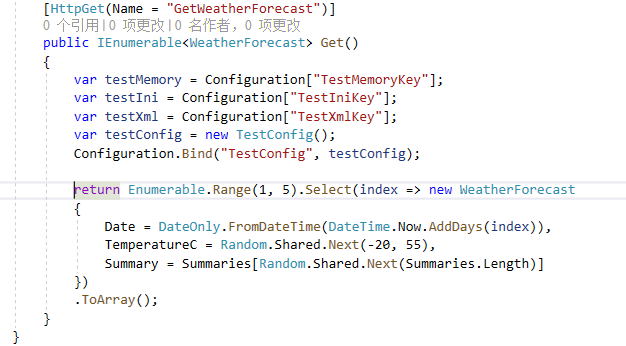
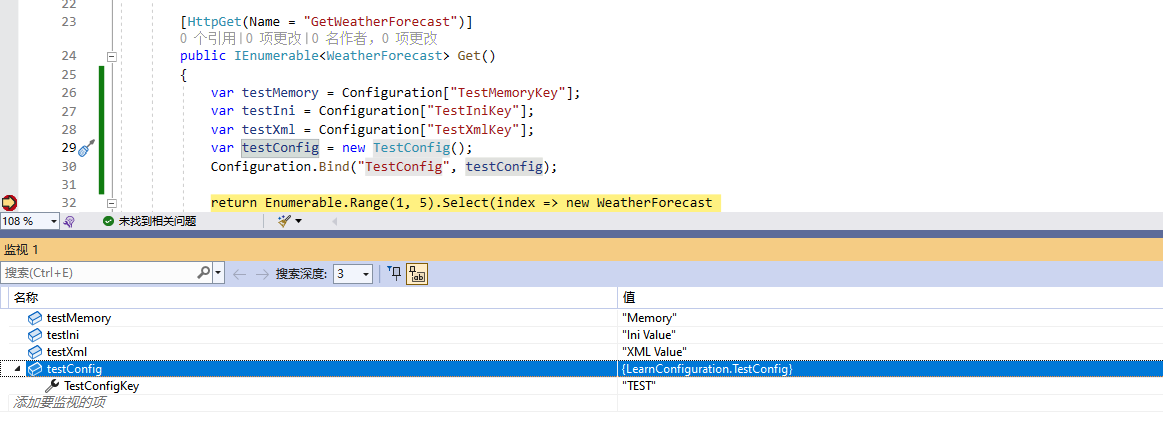
通过Debug我们可以清楚看到appsettings.json中的TestConfigKey的值已经成功绑定到我们的类实例中。
总结#
通过使用ASP.NET Core的Configuration组件,你可以轻松地管理应用程序的配置数据,并在不同环境中进行灵活的配置。它提供了一种统一的方式来加载、访问和更新配置数据,使得应用程序的配置变得更加简单和可维护。
欢迎进群催更。