我们是袋鼠云数栈 UED 团队,致力于打造优秀的一站式数据中台产品。我们始终保持工匠精神,探索前端道路,为社区积累并传播经验价值。
本文作者:霜序
前言
在前一篇文章中,我们详细的说了 react-router@3.x 升级到 @6.x 需要注意的问题以及变更的使用方式。
react-router 版本更新非常快,但是它的底层实现原理确是万变不离其中,在本文中会从前端路由出发到 react-router 原理总结与分享。
前端路由
在 Web 前端单页面应用 SPA(Single Page Application)中,路由是描述 URL 和 UI 之间的映射关系,这种映射是单向的,即 URL 的改变会引起 UI 更新,无需刷新页面
如何实现前端路由
实现前端路由,需要解决两个核心问题
- 如何改变 URL 却不引起页面刷新?
- 如何监测 URL 变化?
在前端路由的实现模式有两种模式,hash 和 history 模式,分别回答上述两个问题
hash 模式
- hash 是 url 中 hash(#) 及后面的部分,常用锚点在页面内做导航,改变 url 中的 hash 部分不会引起页面的刷新
- 通过 hashchange 事件监听 URL 的改变。改变 URL 的方式只有以下几种:通过浏览器导航栏的前进后退、通过
标签、通过window.location,这几种方式都会触发hashchange事件
history 模式
- history 提供了
pushState和replaceState两个方法,这两个方法改变 URL 的 path 部分不会引起页面刷新 - 通过 popchange 事件监听 URL 的改变。需要注意只在通过浏览器导航栏的前进后退改变 URL 时会触发
popstate事件,通过标签和pushState/replaceState不会触发popstate方法。但我们可以拦截标签的点击事件和pushState/replaceState的调用来检测 URL 变化,也是可以达到监听 URL 的变化,相对hashchange显得略微复杂
JS 实现前端路由
基于 hash 实现
由于三种改变 hash 的方式都会触发hashchange方法,所以只需要监听hashchange方法。需要在DOMContentLoaded后,处理一下默认的 hash 值
// 页面加载完不会触发 hashchange,这里主动触发一次 hashchange 事件,处理默认hash
window.addEventListener('DOMContentLoaded', onLoad);
// 监听路由变化
window.addEventListener('hashchange', onHashChange);
// 路由变化时,根据路由渲染对应 UI
function onHashChange() {
  switch (location.hash) {
    case '#/home':
      routerView.innerHTML = 'This is Home';
      return;
    case '#/about':
      routerView.innerHTML = 'This is About';
      return;
    case '#/list':
      routerView.innerHTML = 'This is List';
      return;
    default:
      routerView.innerHTML = 'Not Found';
      return;
  }
}
基于 history 实现
因为 history 模式下,标签和pushState/replaceState不会触发popstate方法,我们需要对的跳转和pushState/replaceState做特殊处理。
- 对
作点击事件,禁用默认行为,调用pushState方法并手动触发popstate的监听事件 - 对
pushState/replaceState可以重写 history 的方法并通过派发事件能够监听对应事件
var _wr = function (type) {
  var orig = history[type];
  return function () {
    var e = new Event(type);
    e.arguments = arguments;
    var rv = orig.apply(this, arguments);
    window.dispatchEvent(e);
    return rv;
  };
};
// 重写pushstate事件
history.pushState = _wr('pushstate');

function onLoad() {
  routerView = document.querySelector('#routeView');
  onPopState();
  // 拦截  标签点击事件默认行为
  // 点击时使用 pushState 修改 URL并更新手动 UI,从而实现点击链接更新 URL 和 UI 的效果。
  var linkList = document.querySelectorAll('a[href]');
  linkList.forEach((el) =>
    el.addEventListener('click', function (e) {
      e.preventDefault();
      history.pushState(null, '', el.getAttribute('href'));
      onPopState();
    }),
  );
}
// 监听pushstate方法
window.addEventListener('pushstate', onPopState());
// 页面加载完不会触发 hashchange,这里主动触发一次 popstate 事件,处理默认pathname
window.addEventListener('DOMContentLoaded', onLoad);
// 监听路由变化
window.addEventListener('popstate', onPopState);
// 路由变化时,根据路由渲染对应 UI
function onPopState() {
  switch (location.pathname) {
    case '/home':
      routerView.innerHTML = 'This is Home';
      return;
    case '/about':
      routerView.innerHTML = 'This is About';
      return;
    case '/list':
      routerView.innerHTML = 'This is List';
      return;
    default:
      routerView.innerHTML = 'Not Found';
      return;
  }
}
React-Router 的架构
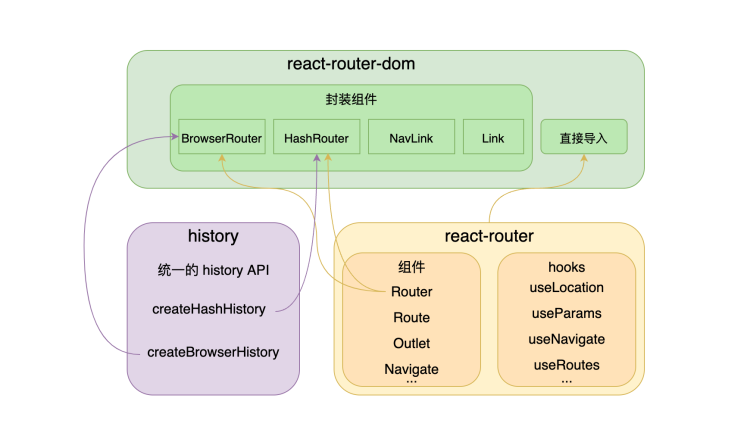
- history 库给 browser、hash 两种 history 提供了统一的 API,给到 react-router-dom 使用
- react-router 实现了路由的最核心能力。提供了
- react-router-dom 是对 react-router 更上一层封装。把 history 传入
这样给浏览器直接用的组件。同时把 react-router 直接导出,减少依赖
History 实现
history
在上文中说到,BrowserRouter使用 history 库提供的createBrowserHistory创建的history对象改变路由状态和监听路由变化。
❓ 那么 history 对象需要提供哪些功能讷?
- 监听路由变化的
listen方法以及对应的清理监听unlisten方法 - 改变路由的
push方法
// 创建和管理listeners的方法
export const EventEmitter = () => {
  const events = [];
  return {
    subscribe(fn) {
      events.push(fn);
      return function () {
        events = events.filter((handler) => handler !== fn);
      };
    },
    emit(arg) {
      events.forEach((fn) => fn && fn(arg));
    },
  };
};
BrowserHistory
const createBrowserHistory = () => {
  const EventBus = EventEmitter();
  // 初始化location
  let location = {
    pathname: '/',
  };
  // 路由变化时的回调
  const handlePop = function () {
    const currentLocation = {
      pathname: window.location.pathname,
    };
    EventBus.emit(currentLocation); // 路由变化时执行回调
  };
  // 定义history.push方法
  const push = (path) => {
    const history = window.history;
    // 为了保持state栈的一致性
    history.pushState(null, '', path);
    // 由于push并不触发popstate,我们需要手动调用回调函数
    location = { pathname: path };
    EventBus.emit(location);
  };

  const listen = (listener) => EventBus.subscribe(listener);

  // 处理浏览器的前进后退
  window.addEventListener('popstate', handlePop);

  // 返回history
  const history = {
    location,
    listen,
    push,
  };
  return history;
};
对于 BrowserHistory 来说,我们的处理需要增加一项,当我们触发 push 的时候,需要手动通知所有的监听者,因为 pushState 无法触发 popState 事件,因此需要手动触发
HashHistory
const createHashHistory = () => {
  const EventBus = EventEmitter();
  let location = {
    pathname: '/',
  };
  // 路由变化时的回调
  const handlePop = function () {
    const currentLocation = {
      pathname: window.location.hash.slice(1),
    };
    EventBus.emit(currentLocation); // 路由变化时执行回调
  };
  // 不用手动执行回调,因为hash改变会触发hashchange事件
  const push = (path) => (window.location.hash = path);
  const listen = (listener: Function) => EventBus.subscribe(listener);
  // 监听hashchange事件
  window.addEventListener('hashchange', handlePop);
  // 返回的history上有个listen方法
  const history = {
    location,
    listen,
    push,
  };
  return history;
};
在实现 hashHistory 的时候,我们只是对hashchange进行了监听,当该事件发生时,我们获取到最新的 location 对象,在通知所有的监听者 listener 执行回调函数
React-Router@6 丐版实现

- 绿色为 history 中的方法
- 紫色为 react-router-dom 中的方法
- 橙色为 react-router 中的方法
Router
🎗️ 基于 Context 的全局状态下发。Router 是一个 “Provider-Consumer” 模型
Router 做的事情很简单,接收navigator 和location,使用 context 将数据传递下去,能够让子组件获取到相关的数据
function Router(props: IProps) {
  const { navigator, children, location } = props;

  const navigationContext = React.useMemo(() => ({ navigator }), [navigator]);

  const { pathname } = location;

  const locationContext = React.useMemo(
    () => ({ location: { pathname } }),
    [pathname],
  );

  return (
    <NavigationContext.Provider value={navigationContext}>
      <LocationContext.Provider value={locationContext} children={children} />
    NavigationContext.Provider>
  );
}
HashRouter
基于不同的 history 调用 Router 组件。并且在 history 发生改变的时候,监听 history,能够在 location 发生改变的时候,执行回调改变 location。
在下面的代码中,能够发现监听者为 setState 函数,在上述 hashHistory 中,如果我们的 location 发生了改变,会通知到所有的监听者执行回调,也就是我们这里的 setState 函数,即我们能够拿到最新的 location 信息通过 LocationContext 传递给子组件,再去做对应的路由匹配
function HashRouter({ children }) {
  let historyRef = React.useRef();
  if (historyRef.current == null) {
    historyRef.current = createHashHistory();
  }
  let history = historyRef.current;
  let [state, setState] = React.useState({
    location: history.location,
  });

  React.useEffect(() => {
    const unListen = history.listen(setState);
    return unListen;
  }, [history]);

  return (
    <Router children={children} location={state.location} navigator={history} />
  );
}
Routes/Route
我们能够发现在 v6.0 的版本 Route 组件只是一个工具人,并没有做任何事情。
function Route(_props: RouteProps): React.ReactElement | null {
invariant(
false,
`A is only ever to be used as the child of element, ` +
`never rendered directly. Please wrap your in a .` ,
);
}
实际上处理一切逻辑的组件是 Routes,它内部实现了根据路由的变化,匹配出一个正确的组件。
const Routes = ({ children }) => {
  return useRoutes(createRoutesFromChildren(children));
};
useRoutes 为整个 v6 版本的核心,分为路由上下文解析、路由匹配、路由渲染三个步骤
<Routes>
  <Route path="/home" element={<Home />}>
    <Route path="1" element={<Home1 />}>
      <Route path="2" element={<Home2 />}>Route>
    Route>
  Route>
  <Route path="/about" element={<About />}>Route>
  <Route path="/list" element={<List />}>Route>
  <Route path="/notFound" element={<NotFound />} />
  <Route path="/navigate" element={<Navigate to="/notFound" />} />
Routes>
上述 Routes 代码中,通过 createRoutesFromChildren 函数将 Route 组件结构化。可以把

useRoutes
useRoutes 才是真正处理渲染关系的,其代码如下:
// 第一步:获取相关的 pathname
let location = useLocation();
let { matches: parentMatches } = React.useContext(RouteContext);
// 第二步:找到匹配的路由分支,将 pathname 和 Route 的 path 做匹配
const matches = matchRoutes(routes, location);
// 第三步:渲染真正的路由组件
const renderedMatches = _renderMatches(matches, parentMatches);

return renderedMatches;
matchRoutes
matchRoutes 中通过 pathname 和路由的 path 进行匹配
因为我们在 Route 中定义的 path 都是相对路径,所以我们在 matchRoutes 方法中,需要对 routes 对象遍历,对于 children 里面的 path 需要变成完整的路径,并且需要将 routes 扁平化,不在使用嵌套结构
const flattenRoutes = (
  routes,
  branches = [],
  parentsMeta = [],
  parentPath = '',
) => {
  const flattenRoute = (route) => {
    const meta = {
      relativePath: route.path || '',
      route,
    };
    const path = joinPaths([parentPath, meta.relativePath]);

    const routesMeta = parentsMeta.concat(meta);
    if (route.children?.length > 0) {
      flattenRoutes(route.children, branches, routesMeta, path);
    }
    if (route.path == null) {
      return;
    }
    branches.push({ path, routesMeta });
  };
  routes.forEach((route) => {
    flattenRoute(route);
  });
  return branches;
};

当我们访问/#/home/1/2的时候,获得的 matches 如下

我们得到的 match 顺序是从 Home → Home1 → Home2
_renderMatches
_renderMatches 才会渲染所有的 matches 对象
const _renderMatches = (matches, parentMatches = []) => {
  let renderedMatches = matches;
  return renderedMatches.reduceRight((outlet, match, index) => {
    let matches = parentMatches.concat(renderedMatches.slice(0, index + 1));
    const getChildren = () => {
      let children;
      if (match.route.Component) {
        children = <match.route.Component />;
      } else if (match.route.element) {
        children = match.route.element;
      } else {
        children = outlet;
      }
      return (
        <RouteContext.Provider
          value={{
            outlet,
            matches,
          }}
        >
          {children}
        RouteContext.Provider>
      );
    };
    return getChildren();
  }, null);
};
_renderMatches 这段代码我们能够明白 outlet 作为子路由是如何传递给父路由渲染的。matches 采用从右往左的遍历顺序,将上一项的返回值作为后一项的 outlet,那么子路由就作为 outlet 传递给了父路由

Outlet
实际上就是内部渲染 RouteContext 的 outlet 属性
function Outlet(props) {
  return useOutlet(props.context);
}

function useOutlet(context?: unknown) {
  let outlet = useContext(RouteContext).outlet; // 获取上一级 RouteContext 上面的 outlet
  if (outlet) {
    return (
      <OutletContext.Provider value={context}>{outlet}OutletContext.Provider>
    );
  }
  return outlet;
}
Link
在 Link 中,我们使用标签来做跳转,但是 a 标签会使页面重新刷新,所以需要阻止 a 标签的默认行为,调用 useNavigate 方法进行跳转
function Link({ to, children, onClick }) {
  const navigate = useNavigate();

  const handleClick = onClick
    ? onClick
    : (event) => {
        event.preventDefault();
        navigate(to);
      };

  return (
    <a href={to} onClick={handleClick}>
      {children}
    a>
  );
}
Hooks
function useLocation() {
  return useContext(LocationContext).location;
}

function useNavigate() {
  const { navigator } = useContext(NavigationContext);

  const navigate = useCallback(
    (to: string) => {
      navigator.push(to);
    },
    [navigator],
  );
  return navigate;
}
本文所有的代码链接可点击查看
参考链接
最后
欢迎关注【袋鼠云数栈UED团队】~
袋鼠云数栈UED团队持续为广大开发者分享技术成果,相继参与开源了欢迎star