本文旨在根据LOVE2D官方文档和教程实现打砖块的游戏,记录部分实现过程和重要知识点
- 目标摧毁所有砖块
- 玩家控制球拍左右滑动反弹小球
- 小球摧毁砖块
- 小球保持在屏幕内
- 小球碰到屏幕底部,GAME OVER
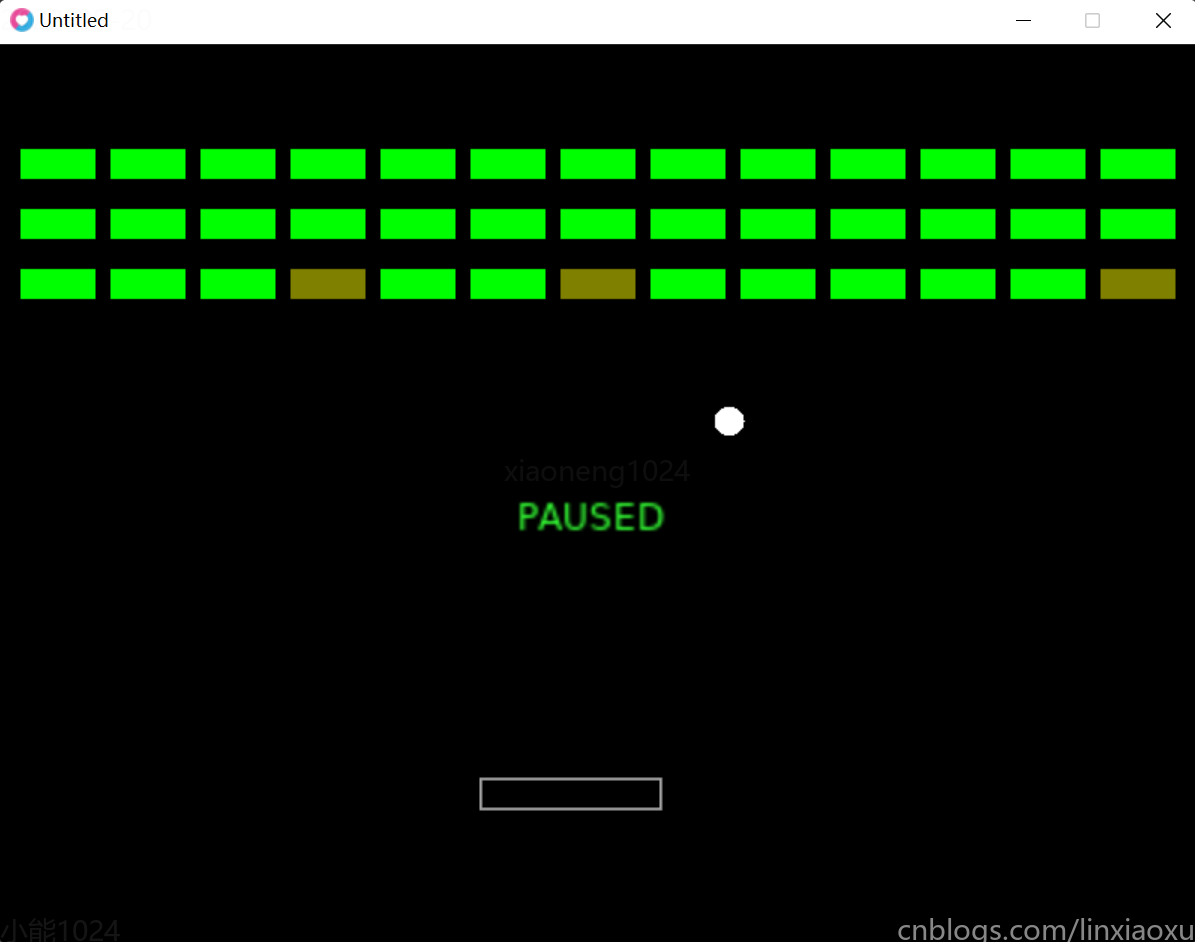
引擎配置
-- conf.lua
love.conf = function(t)
    t.console = true
    t.window.width = 800
    t.window.height = 600
end
在加载引擎的时候回调该函数修改引擎基本参数,默认参数可看Config Files - LOVE (love2d.org)
物理世界
-- world.lua
local begin_contact_callback = function(fixture_a, fixture_b, contact)
end

local end_contact_callback = function(fixture_a, fixture_b, contact)
end

local pre_solve_callback = function(fixture_a, fixture_b, contact)
end

local post_solve_callback = function(fixture_a, fixture_b, contact)
end

local world = love.physics.newWorld(0, 0)

world:setCallbacks(begin_contact_callback, end_contact_callback, pre_solve_callback, post_solve_callback)

return world
建立了一个无重力的物理世界,为世界的物理碰撞绑定了四个回调函数,这四个回调函数依次的作用是
- 两个物理实体开始接触
- 接触未解除,每帧碰撞处理计算前
- 接触未解除,每帧碰撞处理计算后
- 两个物理实体结束接触
单一职责
按单一职责角度,main.lua 只负责创建游戏运行所必须的回调函数,而以下行为不属于这个职责范围
- 加载和保存所有实体
- 解决各类实体的绘制
- 保存按键映射
举个例子:main.lua的love.draw的回调函数的函数体负责了解释各类实体如何绘制的操作,如
love.draw = function()
   local ball_x, ball_y = ball.body:getWorldCenter()
   love.graphics.circle('fill', ball_x, ball_y, ball.shape:getRadius())
end
可以通过修改实体结构,让每个实体有对自身绘制行为的描述,将love.draw的一部分职责分担到各个实体上。如下述代码为ball实体添加了draw方法实现对自身绘图行为的描述。
-- entities/ball.lua
local world = require 'world'

local entity = {}
-- 设置body位置,形状将以该位置为中心,设置动态还是静态,即会不会受到其他物理实体的影响
entity.body = love.physics.newBody(world, 200, 200, 'dynamic')
entity.body:setMass(32) -- 设置质量kg
entity.body:setLinearVelocity(300, 300) -- 右下角匀速加速度
entity.shape = love.physics.newCircleShape(10) -- 创建一个圆形形状
entity.fixture = love.physics.newFixture(entity.body, entity.shape) -- 将body和形状进行绑定
entity.fixture:setRestitution(1) -- 设置弹性系数
entity.fixture:setUserData(entity) -- 设置用户数据,用于在碰撞回调时获取用户自定义信息来判断操作

-- 实体对自身绘图行为的描述
function entity:draw()
    pos_x, pos_y = self.body:getWorldCenter() -- 获取body的位置(也是圆心的位置)
    love.graphics.circle('fill', pos_x, pos_y, self.shape:getRadius()) -- 绘制这个圆,还要从形状那获取半径
end

return entity
实体列表
考虑到实体创建和实体管理较难维护,可以用一个实体列表来进行统一管理。
修改示例 ball.lua
可以把每个实体脚本包裹进一个函数中,给定位置参数生成并返回这个实体,上述代码将修改为
-- entities/ball.lua
local world = require 'world'

-- 导出一个函数,这个函数需要x,y位置参数,返回一个对象
return function(x, y)
    local entity = {}
    -- 设置body位置,形状将以该位置为中心,设置动态还是静态,即会不会受到物理系统的影响
    entity.body = love.physics.newBody(world, x, y, 'dynamic')
    entity.body:setMass(32) -- 设置质量kg
    entity.body:setLinearVelocity(300, 300) -- 右下角匀速加速度
    entity.shape = love.physics.newCircleShape(10) -- 创建一个圆形形状
    entity.fixture = love.physics.newFixture(entity.body, entity.shape) -- 将body和形状进行绑定
    entity.fixture:setRestitution(1) -- 设置弹性系数
    entity.fixture:setUserData(entity) -- 设置用户数据,用于在碰撞回调时获取用户自定义信息来判断操作

    -- 实体对自身绘图行为的描述
    function entity:draw()
        pos_x, pos_y = self.body:getWorldCenter() -- 获取body的位置(也是圆心的位置)
        love.graphics.circle('fill', pos_x, pos_y, self.shape:getRadius()) -- 绘制这个圆,还要从形状那获取半径
    end

    return entity -- 返回对象
end
其他修改示例
再修改其他实体代码统一成上述形式
boundary-bottom.lua
-- entities/boundary-bottom.lua
local world = require 'world'

return function(x, y)
    local entity = {}
    entity.body = love.physics.newBody(world, x, y, 'static')
    entity.shape = love.physics.newRectangleShape(800, 10)
    -- 形状将以body的位置为中心
    entity.fixture = love.physics.newFixture(entity.body, entity.shape)
    entity.fixture:setUserData(eneity)
    function entity:draw()
        love.graphics.polygon('line', self.body:getWorldPoints(self.shape:getPoints()))
    end
    return entity
end
boundary-vertical.lua
-- entities/boundary-vertical.lua
local world = require 'world'

return function(x, y)
    local entity = {}
    entity.body = love.physics.newBody(world, x, y, 'static')
    entity.shape = love.physics.newRectangleShape(10, 600)
    -- 形状将以body的位置为中心
    entity.fixture = love.physics.newFixture(entity.body, entity.shape)
    entity.fixture:setUserData(eneity)
    function entity:draw()
        love.graphics.polygon('line', self.body:getWorldPoints(self.shape:getPoints()))
    end
    return entity
end
boundary-top.lua
-- entities/boundary-top.lua
local world = require 'world'

return function(x, y)
    local entity = {}
    entity.body = love.physics.newBody(world, x, y, 'static')
    entity.shape = love.physics.newRectangleShape(800, 10)
    -- 形状将以body的位置为中心
    entity.fixture = love.physics.newFixture(entity.body, entity.shape)
    entity.fixture:setUserData(eneity)
    function entity:draw()
        love.graphics.polygon('line', self.body:getWorldPoints(self.shape:getPoints()))
    end
    return entity
end
brick.lua
-- entities/boundary-top.lua
local world = require 'world'

return function(x, y)
    local entity = {}
    entity.body = love.physics.newBody(world, x, y, 'static')
    entity.shape = love.physics.newRectangleShape(50, 20)
    entity.fixture = love.physics.newFixture(entity.body, entity.shape)
    entity.fixture:setUserData(entity)
    function entity:draw()
        love.graphics.polygon('fill', self.body:getWorldPoints(self.shape:getPoints()))
    end
    return entity
end
paddle.lua
-- entities/boundary-paddle.lua
local world = require 'world'

return function(x, y)
    local entity = {}
    entity.body = love.physics.newBody(world, x, y, 'static')
    entity.shape = love.physics.newRectangleShape(180, 20) -- 生成一个长方体多边形
    entity.fixture = love.physics.newFixture(entity.body, entity.shape)
    entity.fixture:setUserData(entity)

    function entity:draw()
        love.graphics.polygon('line', self.body:getWorldPoints(self.shape:getPoints()))
    end
    return entity
end
创建实体列表
-- main.lua
local boundary_bottom = require('entities/boundary-bottom')
local boundary_vertical = require('entities/boundary-vertical')
local boundary_top = require('entities/boundary-top')
local paddle = require 'entities.paddle'
local ball = require 'entities.ball'
local brick = require 'entities.brick'
local world = require 'world'

local entities = {boundary_bottom(400, 606), boundary_vertical(-6, 300), boundary_vertical(806, 300), boundary_top(400, -6),
        paddle(300, 500), ball(200, 200), brick(100, 100), brick(200, 100), brick(300, 100)}
直接调用实体创建函数创建各个实体,并放在同一个实体列表内,再修改love.draw遍历这个实体列表调用各个实体的draw行为,代码量大大减少
love.draw = function()
    for _, entity in ipairs(entities) do
        entity:draw()
    end
end
代码拆分 entities.lua
此时创建实体列表的相关代码还在main.lua内,将它独立成entities.lua
-- entities.lua
local boundary_bottom = require 'entities/boundary-bottom'
local boundary_vertical = require 'entities/boundary-vertical'
local boundary_top = require 'entities/boundary-top'
local paddle = require 'entities.paddle'
local ball = require 'entities.ball'
local brick = require 'entities.brick'

return {boundary_bottom(400, 606), boundary_vertical(-6, 300), boundary_vertical(806, 300), boundary_top(400, -6),
        paddle(300, 500), ball(200, 200), brick(100, 100), brick(200, 100), brick(300, 100)}
main.lua 只需导入 entities.lua 并使用即可
-- main.lua
local world = require 'world'
local entities = require 'entities'

love.draw = function()
    for _, entity in ipairs(entities) do
        entity:draw()
    end
end

love.update = function(dt)
     world:update(dt)
end
输入处理
输入系统
专门新建一个文件input.lua用于输入处理
-- input.lua
-- 存放输入系统一切变量和操作的表
local input = {}

-- 各个按键对应回调函数的映射
local press_functions = {}
local release_functions = {}

-- 初始值
input.left = false
input.right = false
input.paused = false

-- 根据key触发对应的映射函数
input.press = function(key)
    if press_functions[key] then
        press_functions[key]()
    end
end

input.release = function(key)
    if release_functions[key] then
        release_functions[key]()
    end
end

-- 如果离开当前程序窗口则暂停
input.focused = function(f)
    if not focused then
        input.paused = true
    end
end

press_functions.left = function()
    input.left = true
end
press_functions.right = function()
    input.right = true
end
press_functions.escape = function()
    love.event.quit()
end
press_functions.space = function()
    input.paused = not input.paused
end

release_functions.left = function()
    input.left = false
end
release_functions.right = function()
    input.right = false
end

return input
然后在main.lua导入input.lua
-- main.lua
local world = require 'world'
local entities = require 'entities'
local input = require 'input'

love.draw = function()
    for _, entity in ipairs(entities) do
        entity:draw()
    end
end

love.update = function(dt)
    if not paused then
        world:update(dt)
    end
end

love.focus = input.focused

love.keypressed = input.press

love.keyreleased = input.release
更新实体位置
监测输入后需要根据输入系统的变量实时更新实体位置,修改love.update,查询各个实体的update方法,若有则执行
love.update = function(dt)
    if not input.paused then
        for _, entity in ipairs(entities) do
            if entity.update then
                entity:update(dt)
            end
        end
        world:update(dt)
    end
end
修改paddle.lua的代码
-- entities/boundary-paddle.lua
local world = require 'world'
local input = require 'input'

return function(x, y)
    local entity = {}
    entity.body = love.physics.newBody(world, x, y, 'static')
    entity.shape = love.physics.newRectangleShape(180, 20) -- 生成一个长方体多边形
    entity.fixture = love.physics.newFixture(entity.body, entity.shape)
    entity.fixture:setUserData(entity)

    function entity:draw()
        love.graphics.polygon('line', self.body:getWorldPoints(self.shape:getPoints()))
    end

    function entity:update(dt)
        -- 两个按键都按了或都不按是不会动的
        if input.left and input.right or not input.left and not input.right then
            return
        end
        local self_x, self_y = self.body:getPosition()
        if input.left then
            -- 用时间增量去计算位置
            self.body:setPosition(self_x - 250 * dt, self_y)
        elseif input.right then
            self.body:setPosition(self_x + 250 * dt, self_y)
        end
    end
    return entity
end
由于paddle在创建的时候是静态实体,是不受其他物理实体影响的,两边空气墙真如同空气,需要手动代码限制,修改如下
        if input.left then
            -- 用时间增量去计算位置
            local new_x = math.max(self_x - 400 * dt, 90)
            self.body:setPosition(new_x, self_y)
        elseif input.right then
            local new_x = math.min(self_x + 400 * dt, 710)
            self.body:setPosition(new_x, self_y)
        end
去除摩擦力
虽然小球实体的弹力系数设置为1,但是在碰撞过程中会越来越慢,这是默认有摩擦力的问题
print(entity.fixture:getFriction())
-- 0.20000000298023
摩擦力是 fixture 的属性,可以使用 fixture:setFriction 进行设置,修改ball.lua,在创建实体的过程中添加如下代码
entity.fixture:setFriction(0) -- 小球受到的摩擦力为0
暂停显示文字
把文字当做一个实体 pause-text.lua ,当暂停时绘制这个实体
-- entities/pause-text.lua
local input = require('input')

return function()
    -- https://love2d.org/wiki/love.window.getMode
    local window_width, window_height = love.window.getMode()

    local entity = {}

    entity.draw = function(self)
        if input.paused then
            -- https://love2d.org/wiki/love.graphics.print 用到了coloredtext表
            love.graphics.print({{0.2, 1, 0.2, 1}, 'PAUSED'}, math.floor(window_width / 2) - 54,
                math.floor(window_height / 2), 0, 2, 2)
        end
    end

    return entity
end
在entities.lua创建这个实体并添加至列表中。只有当游戏暂停时会执行打印函数
三大刚体
static
静态刚体,零质量,零速度,即不会受到重力或速度影响,但是可以设置他的位置来进行移动
- 物理引擎并不认为这种刚体在移动
- 适用于固定位置的对象,地面、墙壁、任何你不希望角色碰撞的游戏对象
dynamic
动态刚体,有质量,可以设置速度,会受到重力影响
- 与三种刚体都有物理效果
kinematic
运动刚体,零质量,可以设置速度,不会受到重力的影响,但是可以设置速度来进行移动
- 这种运动刚体完全由脚本控制
球拍改为运动刚体
将body类型修改为kinematic,删除原先的重新设置位置方式,修改为修改速度来达到移动效果
-- entities/boundary-paddle.lua
local world = require 'world'
local input = require 'input'

return function(x, y)
    local window_width = love.window.getMode()
    local entity_width = 120
    local entity_height = 20
    local entity_speed = 600
    -- 计算一次边界
    local left_boundary = entity_width / 2 + 2
    local right_boundary = window_width - entity_width / 2 - 2

    local entity = {}
    entity.body = love.physics.newBody(world, x, y, 'kinematic')
    entity.shape = love.physics.newRectangleShape(entity_width, entity_height)
    entity.fixture = love.physics.newFixture(entity.body, entity.shape)
    entity.fixture:setUserData(entity)

    function entity:draw()
        love.graphics.polygon('line', self.body:getWorldPoints(self.shape:getPoints()))
    end

    function entity:update(dt)
        -- 两个按键都按是不会动的
        if input.left and input.right then
            return
        end
        local self_x = self.body:getPosition()
        if input.left and self_x > left_boundary then
            self.body:setLinearVelocity(-entity_speed, 0)
        elseif input.right and self_x < right_boundary then
            self.body:setLinearVelocity(entity_speed, 0)
        else
            self.body:setLinearVelocity(0, 0)
        end
    end
    return entity
end
防止小球速度过快
-- entities/ball.lua
local world = require 'world'

-- 导出一个函数,这个函数需要x,y位置参数,返回一个对象
return function(x, y)
    local entity_max_speed = 880

    local entity = {}
    -- 设置body位置,形状将以该位置为中心,设置动态还是静态,即会不会受到其他物理实体的影响
    entity.body = love.physics.newBody(world, x, y, 'dynamic')
    entity.body:setMass(32) -- 设置质量kg
    entity.body:setLinearVelocity(300, 300) -- 右下角匀速加速度
    entity.shape = love.physics.newCircleShape(10) -- 创建一个圆形形状
    entity.fixture = love.physics.newFixture(entity.body, entity.shape) -- 将body和形状进行绑定
    entity.fixture:setRestitution(1) -- 设置弹性系数
    entity.fixture:setUserData(entity) -- 设置用户数据,用于在碰撞回调时获取用户自定义信息来判断操作
    entity.fixture:setFriction(0) -- 小球受到的摩擦力为0

    -- 实体对自身绘图行为的描述
    function entity:draw()
        pos_x, pos_y = self.body:getWorldCenter() -- 获取body的位置(也是圆心的位置)
        love.graphics.circle('fill', pos_x, pos_y, self.shape:getRadius()) -- 绘制这个圆,还要从形状那获取半径
    end

    function entity:update()
        v_x, v_y = self.body:getLinearVelocity()
        local speed = math.abs(v_x) + math.abs(v_y)
        print(speed)

        -- 看看小球反弹之后的速度是否过快
        local vel_x_is_critical = math.abs(v_x) > entity_max_speed * 2
        local vel_y_is_critical = math.abs(v_y) > entity_max_speed * 2
        -- 如果反弹后某一方向移动速度过快则减慢速度
        if vel_x_is_critical or vel_y_is_critical then
            self.body:setLinearVelocity(v_x * .75, v_y * .75)
        end
        -- 如果整体速度过大,则设置阻尼
        if speed > entity_max_speed then
            self.body:setLinearDamping(0.1)
        else
            self.body:setLinearDamping(0)
        end
    end

    return entity -- 返回对象
end
销毁砖块
需要做以下四件事情
- 修改
world.lua处理碰撞的函数 brick.lua实体添加碰撞后的处理函数brick.lua实体添加一个属性用于表示生命值,如entity.healthmain.lua检查并删除生命值为0的实体
修改两个物体实体离开接触时的函数 end_contact_callback,检查两个物理实体各自是否有end_contact方法,如果有则执行
local end_contact_callback = function(fixture_a, fixture_b, contact)
    local entity_a = fixture_a:getUserData()
    local entity_b = fixture_b:getUserData()
    if entity_a.end_contact then
        entity_a.end_contact()
    end
    if entity_b.end_contact then
        entity_b.end_contact()
    end
end
修改brick.lua 添加生命值与end_contact方法,并修改draw行为,使其能在不同生命的时候显示不同颜色
-- entities/boundary-top.lua
local world = require 'world'

return function(x, y)
    local entity = {}
    entity.body = love.physics.newBody(world, x, y, 'static')
    entity.shape = love.physics.newRectangleShape(50, 20)
    entity.fixture = love.physics.newFixture(entity.body, entity.shape)
    entity.fixture:setUserData(entity)

    entity.health = 2

    local step = 1 / entity.health
    function entity:draw()
        local r, g, b, a = love.graphics.getColor()
        love.graphics.setColor({1 - step * entity.health, step * entity.health, 0, 1})
        love.graphics.polygon('fill', self.body:getWorldPoints(self.shape:getPoints()))
        love.graphics.setColor(r, g, b, a)
    end

    function entity:end_contact()
        self.health = self.health - 1
    end

    return entity
end
然后修改 main.lua 添加对各个实体生命值的检查
love.update = function(dt)
    if not input.paused then
        -- 运行实体的update
        for i, entity in ipairs(entities) do
            if entity.update then
                entity:update(dt)
            end
        end
        -- 检测实体health
        local index = 1
        while index <= #entities do
            if entities[index].health == 0 then
                local entity = table.remove(entities, index)
                entity.fixture:destroy()
            else
                index = index + 1
            end
        end
        world:update(dt)
    end
end
批量生成砖块
每生成一个砖块实体,需要调用一次brick,可以用函数批量生成,修改entities.lua
-- entities.lua
local boundary_bottom = require 'entities/boundary-bottom'
local boundary_vertical = require 'entities/boundary-vertical'
local boundary_top = require 'entities/boundary-top'
local paddle = require 'entities.paddle'
local ball = require 'entities.ball'
local brick = require 'entities.brick'
local pause_text = require 'entities.pause-text'

local entities = {boundary_bottom(400, 606), boundary_vertical(-6, 300), boundary_vertical(806, 300),
                  boundary_top(400, -6), paddle(300, 500), ball(200, 200), pause_text()}

local row_width = love.window.getMode() - 20
for number = 0, 38 do
    local brick_x = ((number * 60) % row_width) + 40
    local brick_y = (math.floor((number * 60) / row_width) * 40) + 80
    entities[#entities + 1] = brick(brick_x, brick_y)
end

return entities
状态管理
是否暂停、游戏胜利或失败这种在程序生命期间会动态变化的变量都称为状态。由于状态会越来越多,需要一种方式进行有效管理。需要做到以下几点
- 很容易就能找到和访问状态。就像在
main.lua导入了entities实体列表一样,轻松可得 - 状态数据只能有一份。如只有一个
paused变量,而不是每个文件里都有paused - 状态数据只有有明确需求时才能访问。在
ball.lua获取paused是无意义的
现在有哪些状态
- entities.lua
- 导出的实体列表里的每个实体对各自的状态负责,如每块砖都存储着自己的健康情况
- input.lua
- 当前暂停状态,左右按键的状态
- world.lua
- 导出的world负责整个物理空间的状态
实现状态管理,新建一个state.lua文件,用于存储游戏的大部分状态,比如将input.lua中的状态迁移到此文件,使input.lua专心于捕获和映射用户输入。world.lua和entities.lua没有迁移的必要,避免代码过于臃肿
-- state.lua
return {
    left = false,
    right = false,
    game_over = false,
    palette = {{1.0, 0.0, 0.0, 1.0}, -- red
    {0.0, 1.0, 0.0, 1.0}, -- green
    {0.4, 0.4, 1.0, 1.0}, -- blue
    {0.9, 1.0, 0.2, 1.0}, -- yellow
    {1.0, 1.0, 1.0, 1.0} -- white
    },
    paused = false,
    stage_cleared = false
}
再修改 input.lua
-- input.lua
local state = require 'state'

-- 各个按键对应回调函数的映射
local press_functions = {}
local release_functions = {}

press_functions.left = function()
    state.left = true
end
press_functions.right = function()
    state.right = true
end
press_functions.escape = function()
    love.event.quit()
end
press_functions.space = function()
    state.paused = not state.paused
end

release_functions.left = function()
    state.left = false
end
release_functions.right = function()
    state.right = false
end

return {
    press = function(key)
        print(key)
        if press_functions[key] then
            press_functions[key]()
        end
    end,
    release = function(key)
        if release_functions[key] then
            release_functions[key]()
        end
    end,
    focused = function(f)
        if not f then
            state.paused = true
        end
    end
}
修改main.lua
love.update = function(dt)
    if state.game_over or state.paused or state.stage_cleared then
        return
    end
    -- 运行实体的update
    for i, entity in ipairs(entities) do
        if entity.update then
            entity:update(dt)
        end
    end
    -- 检测实体health
    local index = 1
    while index <= #entities do
        if entities[index].health == 0 then
            local entity = table.remove(entities, index)
            entity.fixture:destroy()
        else
            index = index + 1
        end
    end
    world:update(dt)
end
修改pause-text.lua
-- entities/pause-text.lua
local input = require 'input'
local state = require 'state'

return function()
    -- https://love2d.org/wiki/love.window.getMode
    local window_width, window_height = love.window.getMode()

    local entity = {}

    entity.draw = function(self)
        if state.paused then
            -- https://love2d.org/wiki/love.graphics.print 用到了coloredtext表
            love.graphics.print({{0.2, 1, 0.2, 1}, 'PAUSED'}, math.floor(window_width / 2) - 54,
                math.floor(window_height / 2), 0, 2, 2)
        end
    end

    return entity
end
使用调色板为砖块上色
        love.graphics.setColor(state.palette[entity.health + 1])
        love.graphics.polygon('fill', self.body:getWorldPoints(self.shape:getPoints()))
        love.graphics.setColor(state.palette[5])
胜利与失败
复制pause-text.lua为game-over-text.lua,修改判断条件为 state.game_over
-- entities/game-over-text.lua
local input = require 'input'
local state = require 'state'

return function()
    -- https://love2d.org/wiki/love.window.getMode
    local window_width, window_height = love.window.getMode()

    local entity = {}

    entity.draw = function(self)
        if state.game_over then
            -- https://love2d.org/wiki/love.graphics.print 用到了coloredtext表
            love.graphics.print({{0.2, 1, 0.2, 1}, 'GAME OVER'}, math.floor(window_width / 2) - 54,
                math.floor(window_height / 2), 0, 2, 2)
        end
    end

    return entity
end
复制pause-text.lua为stage-clear-text.lua,修改判断条件为 state.stage_cleared
-- entities/boundary-bottom.lua
local world = require 'world'

return function(x, y)
    local entity = {}
    entity.body = love.physics.newBody(world, x, y, 'static')
    entity.shape = love.physics.newRectangleShape(800, 10)
    -- 形状将以body的位置为中心
    entity.fixture = love.physics.newFixture(entity.body, entity.shape)
    entity.fixture:setUserData(entity)

    function entity:draw()
        love.graphics.polygon('line', self.body:getWorldPoints(self.shape:getPoints()))
    end
    return entity
end
将新增的两个实体添加至实体列表
修改boundary-bottom.lua,添加end_contact事件处理函数修改全局状态“是否失败”
-- entities/boundary-bottom.lua
local world = require 'world'
local state = require 'state'

return function(x, y)
    local entity = {}
    entity.body = love.physics.newBody(world, x, y, 'static')
    entity.shape = love.physics.newRectangleShape(800, 10)
    -- 形状将以body的位置为中心
    entity.fixture = love.physics.newFixture(entity.body, entity.shape)
    entity.fixture:setUserData(entity)

    function entity:draw()
        love.graphics.polygon('line', self.body:getWorldPoints(self.shape:getPoints()))
    end

    function entity:end_contact()
        state.game_over = true
    end
    return entity
end
修改brick.lua 添加 entity.type = "brick",然后修改main.lua判断当前帧是否还有砖块
love.update = function(dt)
    if state.game_over or state.paused or state.stage_cleared then
        return
    end
    -- 运行实体的update
    local isBrick = false
    for i, entity in ipairs(entities) do
        if entity.type == "brick" then
            isBrick = true
        end
        if entity.update then
            entity:update(dt)
        end
    end
    -- 检测实体health
    local index = 1
    while index <= #entities do
        if entities[index].health == 0 then
            local entity = table.remove(entities, index)
            entity.fixture:destroy()
        else
            index = index + 1
        end
    end
    world:update(dt)
    if not isBrick then
        state.stage_cleared = true
    end
end

__EOF__
