1.Spring Cloud Gateway编码实现任意地址跳转2.Java扩展Nginx之五:五大handler(系列最核心)3.quarkus依赖注入之七:生命周期回调4.Docker下elasticsearch8部署、扩容、基本操作实战(含kibana)5.docker-compose快速部署elasticsearch-8.x集群+kibana6.java与es8实战之一:以builder pattern开篇7.java与es8实战之二:实战前的准备工作8.20天等待,申请终于通过,安装和体验IntelliJ IDEA新UI预览版9.java与es8实战之三:Java API Client有关的知识点串讲10.java与es8实战之四:SpringBoot应用中操作es8(无安全检查)11.java与es8实战之五:SpringBoot应用中操作es8(带安全检查:https、账号密码、API Key)
12.java与es8实战之六:用JSON创建请求对象(比builder pattern更加直观简洁)
13.LeetCode46全排列(回溯入门)14.LeetCode952三部曲之一:解题思路和初级解法(137ms,超39%)15.LeetCode952三部曲之三:再次优化(122ms -> 96ms,超51% -> 超91%)欢迎访问我的GitHub
这里分类和汇总了欣宸的全部原创(含配套源码):https://github.com/zq2599/blog_demos
本篇概览
- 本文是《java与es8实战》系列的第六篇,经过前面的实战,咱们初步掌握了一些Java对ES的基本操作,通过发送请求对象(例如CreateIndexResponse)到ES服务端,达到操作ES的目的,但是细心的您可能发现了:请求对象可能很复杂,例如多层对象嵌套,那么用代码来创建这些请求对象也必然不会容易
- 今天的文章,咱们先来体验用代码创建请求对象的不便之处,再尝试ES官方给我们提供的解决之道:用JSON创建请求对象
- 接下来,咱们从一个假设的任务开始
任务安排
- 现在咱们要创建一个索引,此索引记录的是商品信息
- 有一个副本(属于setting部分)
- 共三个分片(属于setting部分)
- 共三个字段:商品名称name(keyword),商品描述description(text),价格price(integer)(属于mapping部分)
- name字段值长为256,超出此长度的字段将不会被索引,但是会存储
- 接下来,咱们在kibana上用JSON创建索引,再写代码创建相同索引,然后对比两种方式的复杂程度
kibana上创建索引
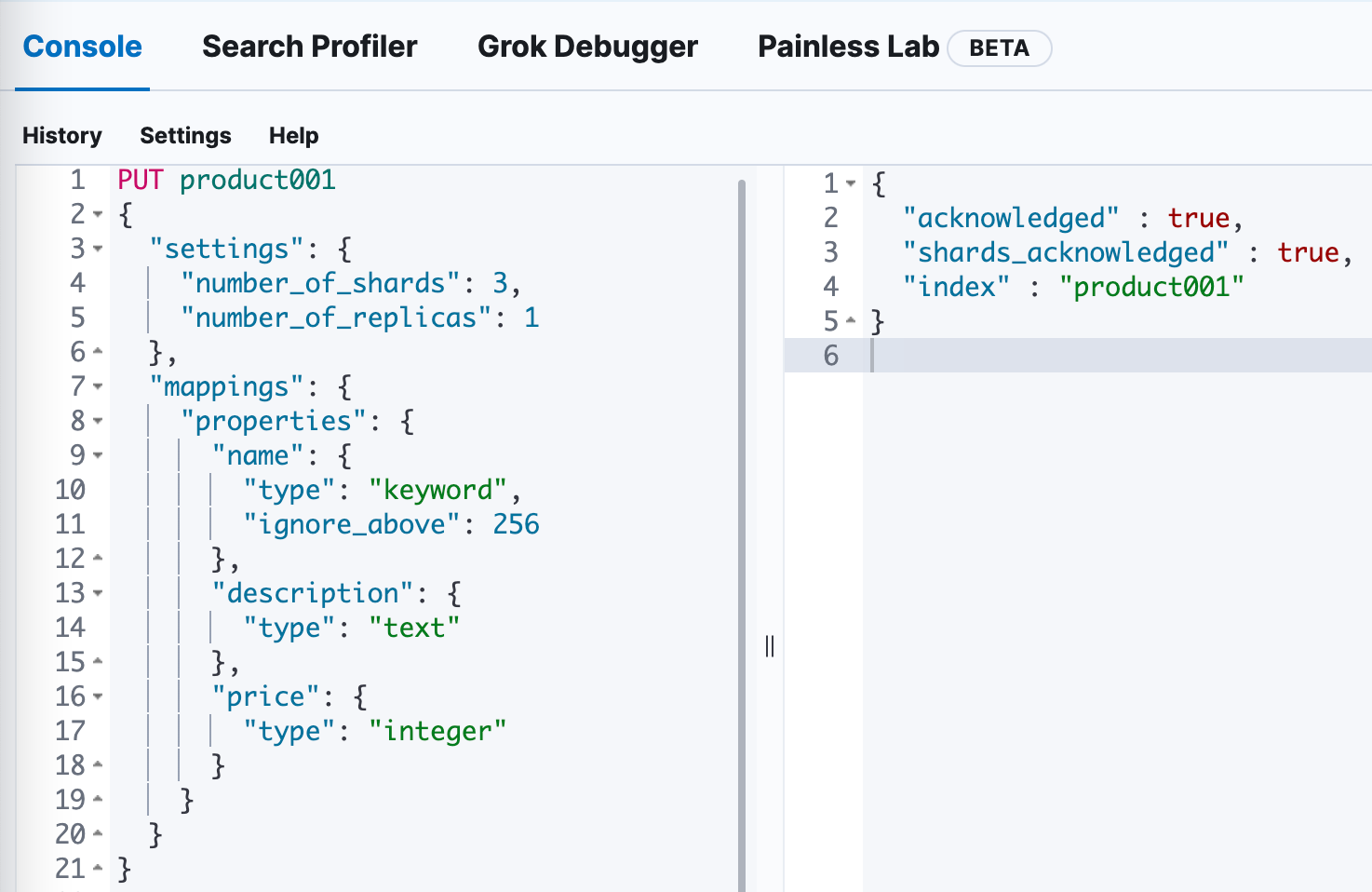
- 如果在kibana上用json来创建,请求内容如下,索引名是product001
PUT product001
{
  "settings": {
    "number_of_shards": 3,
    "number_of_replicas": 1
  },
  "mappings": {
    "properties": {
      "name": {
        "type": "keyword",
        "ignore_above": 256
      },
      "description": {
        "type": "text"
      },
      "price": {
        "type": "integer"
      }
    }
  }
}
- 效果如下,符合预期
- 通过eshead观察,也是符合预期

- 可见基于JSON的操作简单明了,接下来看看创建相通索引的代码是什么样子
基于代码创建
- 关于如何连接ES的代码并非本篇重点,而且前面的文章已有详细说明,就不多赘述了
- 首先创建一个API,可以接受外部传来的Setting和Mapping设定,然后用这些设定来创建索引
    @Autowired
    private ElasticsearchClient elasticsearchClient;

    @Override
    public void create(String name,
                       Function> settingFn,
                       Function> mappingFn) throws IOException {
        elasticsearchClient
                .indices()
                .create(c -> c
                        .index(name)
                        .settings(settingFn)
                        .mappings(mappingFn)
                );
    }
- 然后就是如何准备Setting和Mapping参数,再调用create方法完成创建,为了让代码顺利执行,我将调用create方法的代码写在单元测试类中,这样后面只需要执行单元测试即可调用create方法
@SpringBootTest
class EsServiceImplTest {

    @Autowired
    EsService esService;

    @Test
    void create() throws Exception {
        // 索引名
        String indexName = "product002";

        // 构建setting时,builder用到的lambda
        Function> settingFn = sBuilder -> sBuilder
                .index(iBuilder -> iBuilder
                        // 三个分片
                        .numberOfShards("3")
                        // 一个副本
                        .numberOfReplicas("1")
                );

        // 新的索引有三个字段,每个字段都有自己的property,这里依次创建
        Property keywordProperty = Property.of(pBuilder -> pBuilder.keyword(kBuilder -> kBuilder.ignoreAbove(256)));
        Property textProperty = Property.of(pBuilder -> pBuilder.text(tBuilder -> tBuilder));
        Property integerProperty = Property.of(pBuilder -> pBuilder.integer(iBuilder -> iBuilder));

        // // 构建mapping时,builder用到的lambda
        Function> mappingFn = mBuilder -> mBuilder
                .properties("name", keywordProperty)
                .properties("description", textProperty)
                .properties("price", integerProperty);

        // 创建索引,并且指定了setting和mapping
        esService.create(indexName, settingFn, mappingFn);

    }
}
- 由于Java API Client中所有对象都统一使用builder pattern的方式创建,这导致代码量略多,例如setting部分,除了setting自身要用Lambda表达式,设置分片和副本的代码也要用Lambda的形式传入,这种嵌套效果在编码中看起来还是有点绕的,阅读起来可能会有点不适应
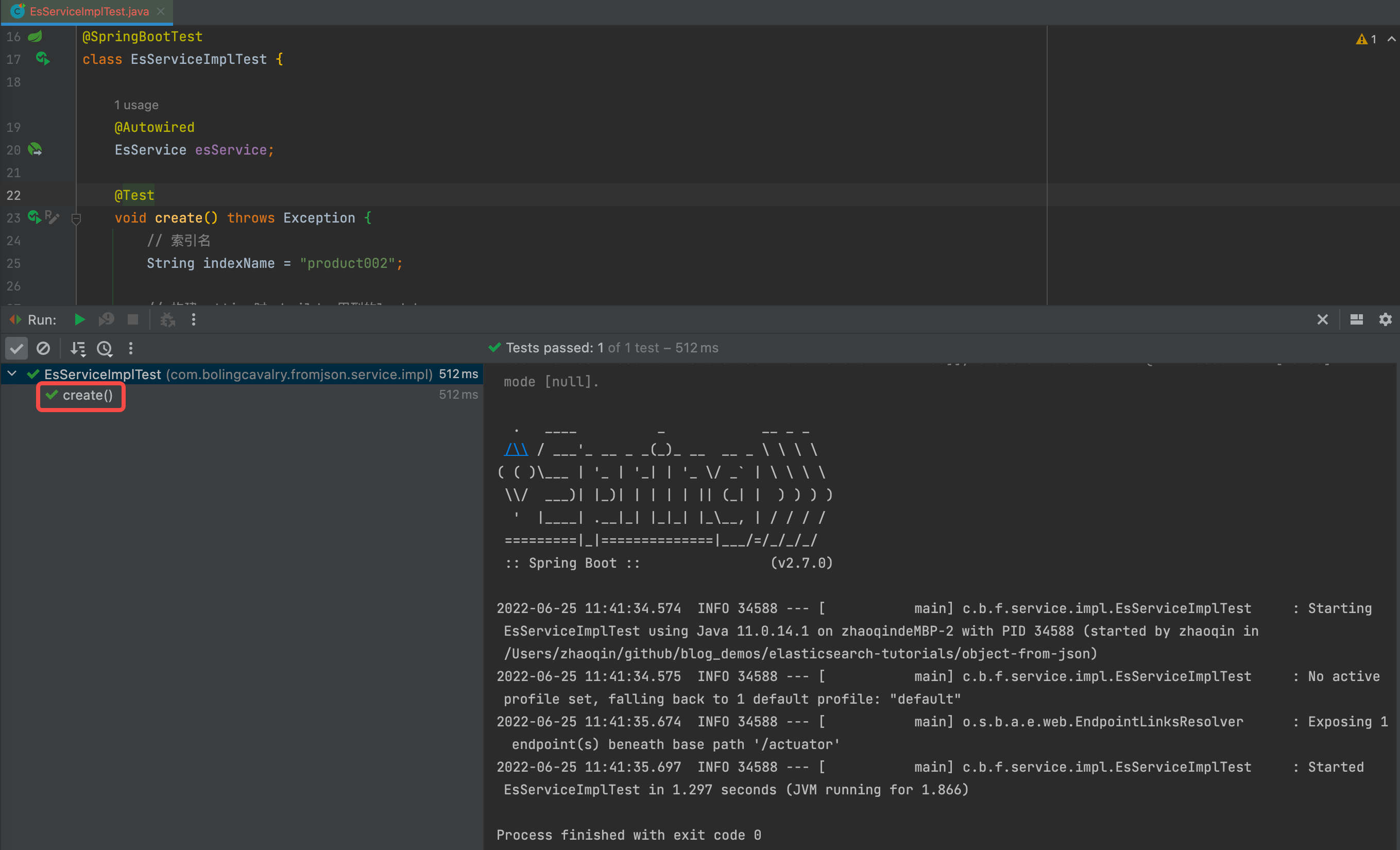
- 执行单元测试,如下图,未发生异常
- 用kibana查看新建的索引
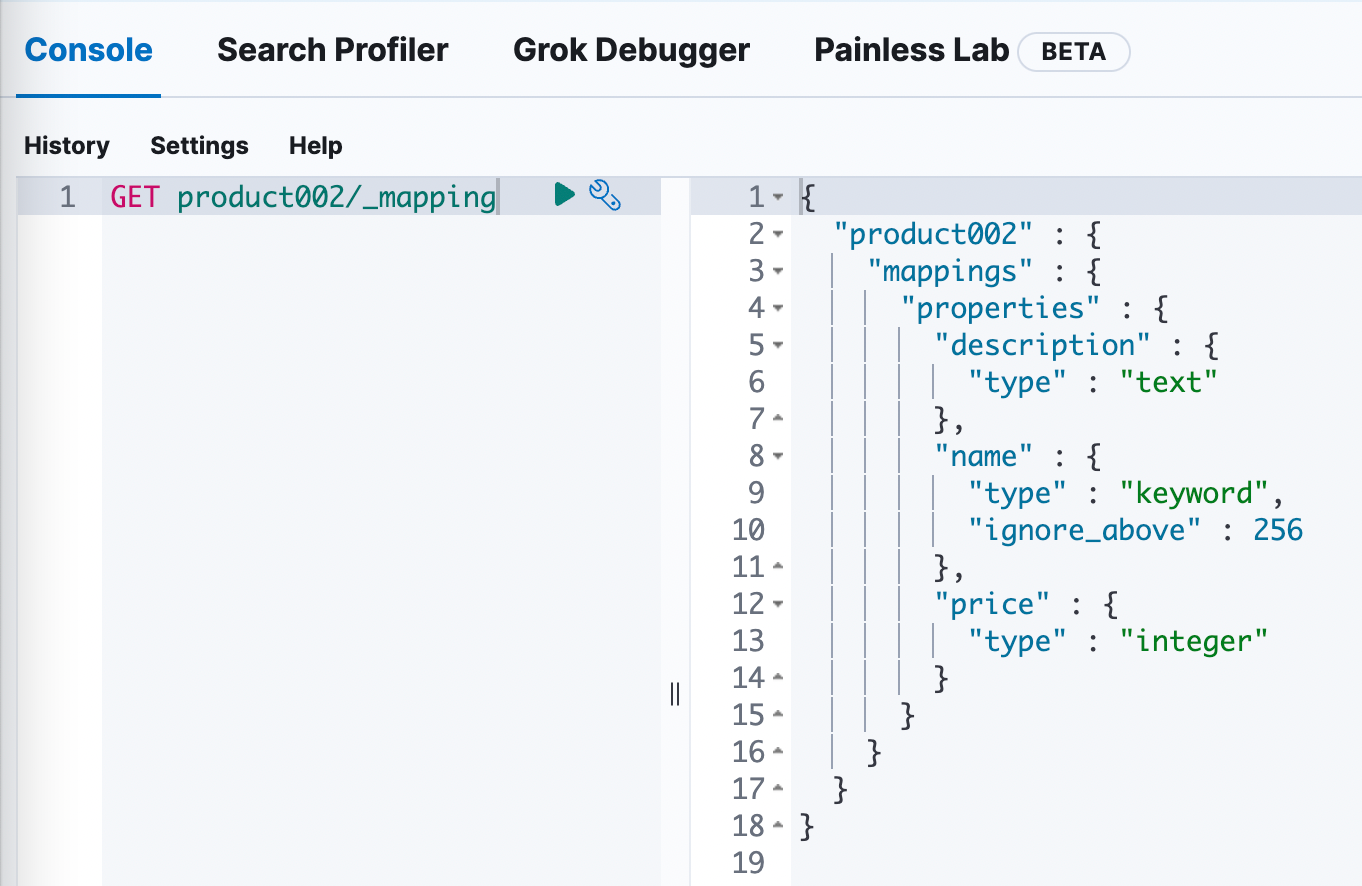
- 最后,将product001和product002的mapping放在一起对比,可见一模一样
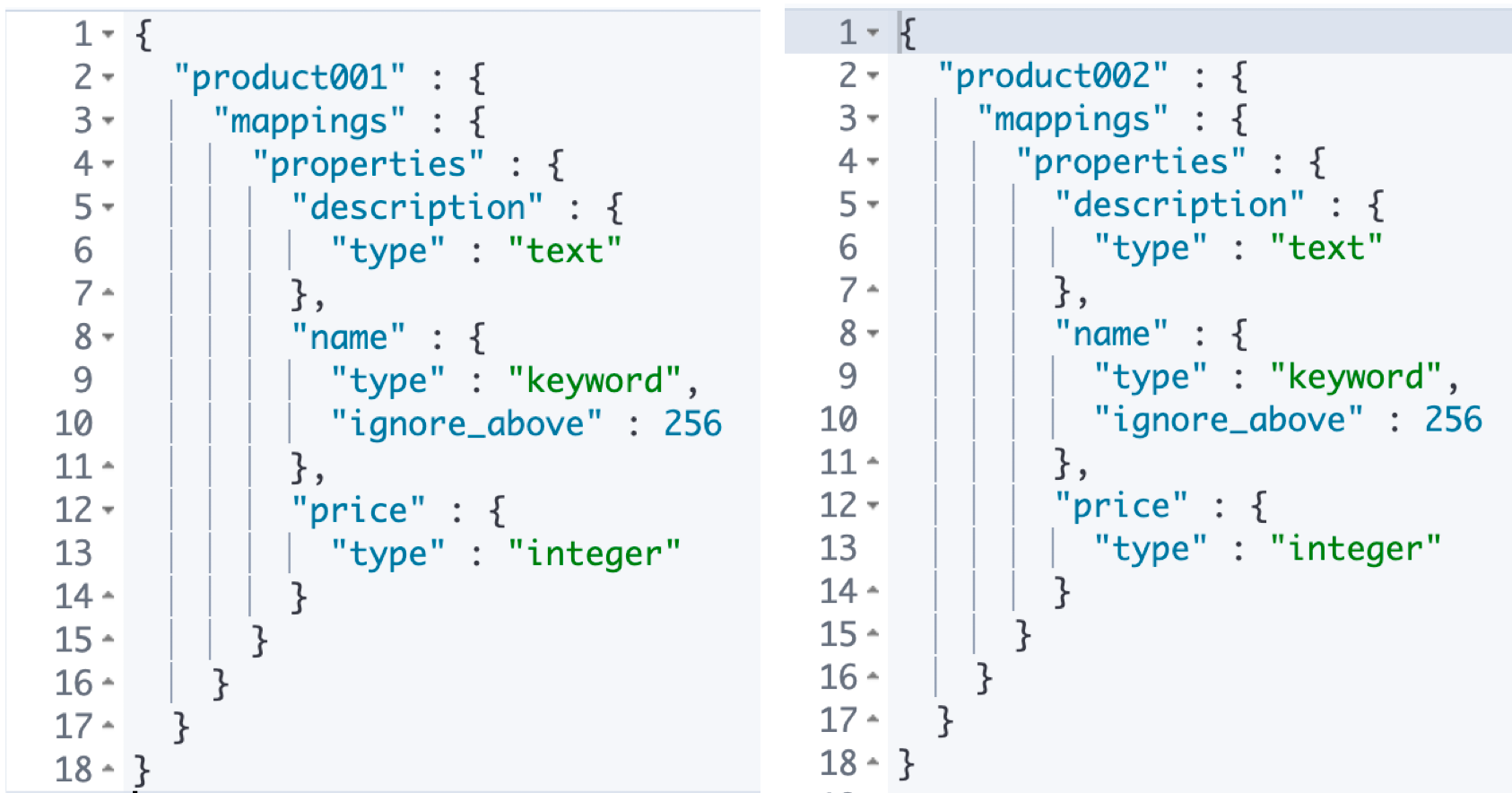
- 再用eshead对比分片和副本的效果,也是一模一样
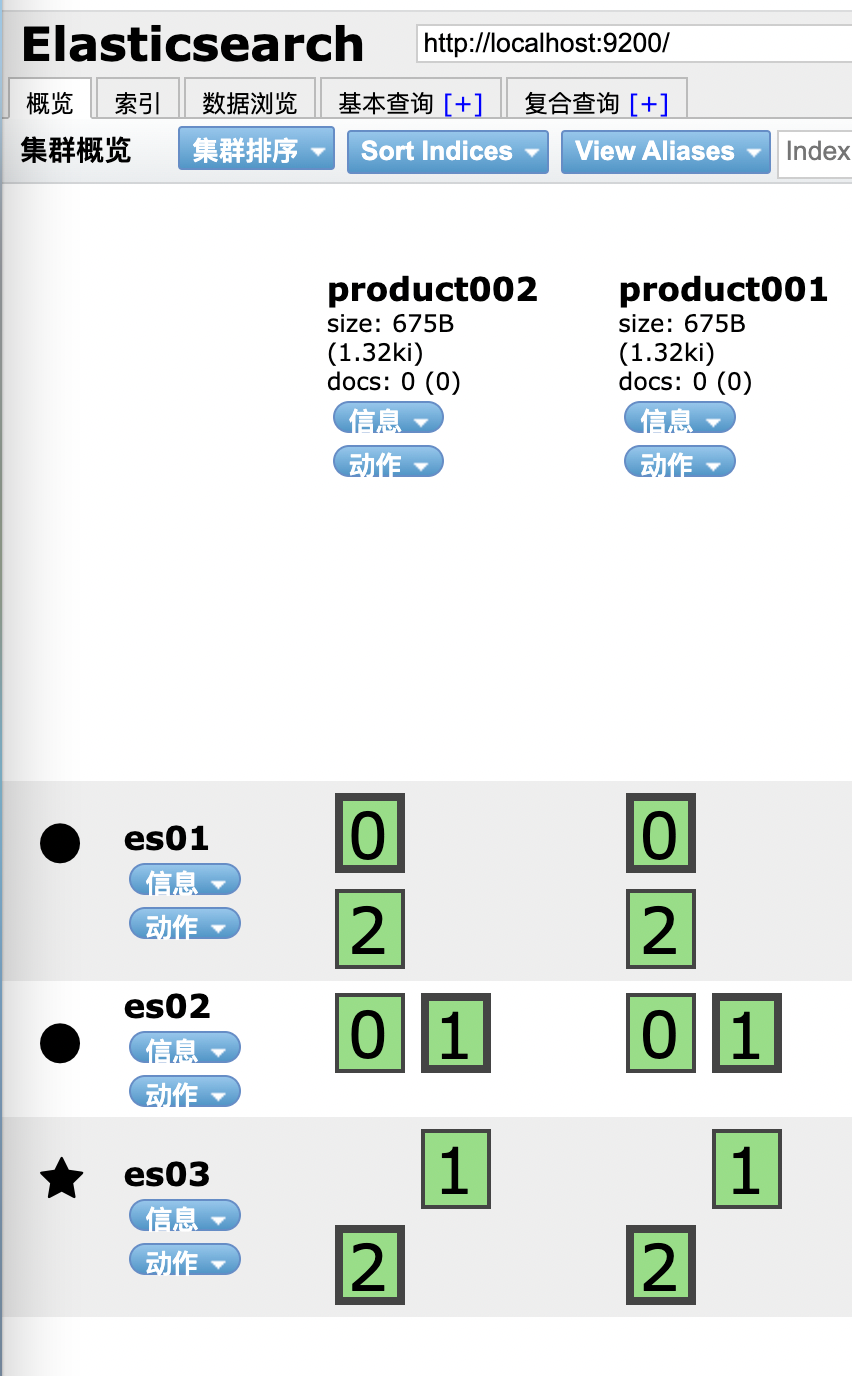
小结和感慨
- 至此,可以得出结论:
- Java API Client的对ES的操作,能得到kibana+JSON相同的效果
- 然而,用java代码来实现JSON的嵌套对象的内容,代码的复杂程度上升,可读性下降(纯属个人感觉)
- 另外,在开发期间,我们也常常先用kibana+JSON先做基本的测试和验证,然后再去编码
- 因此,如果能在代码中直接使用kibana的JSON,以此取代复杂的builder pattern代码去创建各种增删改查的请求对象,那该多好啊
- ES官方预判了我的预判,在Java API Client中支持使用JSON来构建请求对象

能用JSON的根本原因
-
动手实践之前,有个问题先思考一下
-
刚才咱们写了那么多代码,才能创建出CreateIndexResponse对象(注意代码:elasticsearchClient.indices().create),怎么就能用JSON轻易的创建出来呢?有什么直接证据或者关键代码吗?
-
来看看CreateIndexResponse的builder的源码,集成了父类,也实现了接口,
public static class Builder extends WithJsonObjectBuilderBase
			implements
				ObjectBuilder {
- 用IDEA查看类图的功能,Builder的继承和实现关系一目了然,注意红色箭头指向的WithJson接口,它是Builder父类实现的接口,也是让CreateIndexResponse可以通过JSON来创建的关键
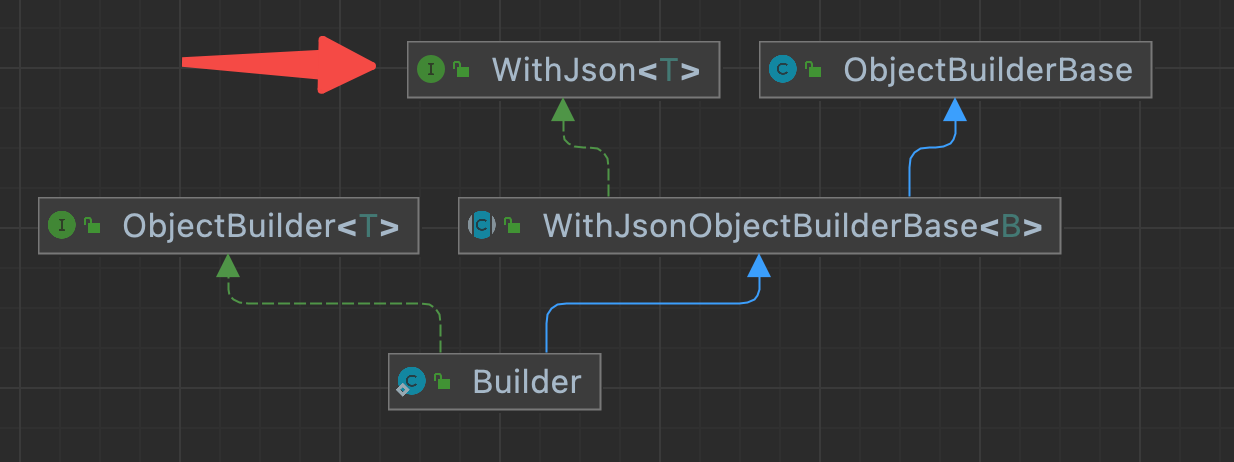
- 强大的IDEA,可以在上图直接展开WithJson接口的所有方法签名,如下图,一目了然,三个方法三种入参,证明了使用者可以用三种方式将JSON内容传给Builder,再由Builer根据传入的内容生成CreateIndexResponse实例

创建工程
- 在《java与es8实战之二:实战前的准备工作》中创建整了个系列共用的父工程elasticsearch-tutorials,今天新建的新工程名为object-from-json,也属于elasticsearch-tutorials的子工程,pom.xml如下
<project xmlns="http://maven.apache.org/POM/4.0.0" xmlns:xsi="http://www.w3.org/2001/XMLSchema-instance"
         xsi:schemaLocation="http://maven.apache.org/POM/4.0.0 http://maven.apache.org/xsd/maven-4.0.0.xsd">

    <parent>
        <artifactId>elasticsearch-tutorialsartifactId>
        <groupId>com.bolingcavalrygroupId>
        <version>1.0-SNAPSHOTversion>
        <relativePath>../pom.xmlrelativePath>
    parent>
    <modelVersion>4.0.0modelVersion>

    <artifactId>object-from-jsonartifactId>
    <packaging>jarpackaging>

    <name>object-from-jsonname>
    <url>https://github.com/zq2599url>


    <dependencyManagement>
        <dependencies>
            <dependency>
                <groupId>org.springframework.bootgroupId>
                <artifactId>spring-boot-dependenciesartifactId>

                <version>${springboot.version}version>
                <type>pomtype>
                <scope>importscope>
            dependency>
        dependencies>
    dependencyManagement>

    <dependencies>
        <dependency>
            <groupId>org.springframework.bootgroupId>
            <artifactId>spring-boot-starter-actuatorartifactId>
        dependency>


        <dependency>
            <groupId>org.springframework.bootgroupId>
            <artifactId>spring-boot-configuration-processorartifactId>
            <optional>trueoptional>
        dependency>

        <dependency>
            <groupId>org.projectlombokgroupId>
            <artifactId>lombokartifactId>
        dependency>

        <dependency>
            <groupId>org.springframework.bootgroupId>
            <artifactId>spring-boot-starter-webartifactId>
        dependency>

        <dependency>
            <groupId>org.springframework.bootgroupId>
            <artifactId>spring-boot-starter-testartifactId>
            <scope>testscope>


            <exclusions>
                <exclusion>
                    <groupId>junitgroupId>
                    <artifactId>junitartifactId>
                exclusion>
            exclusions>

        dependency>


        <dependency>
            <groupId>org.junit.jupitergroupId>
            <artifactId>junit-jupiter-apiartifactId>
            <scope>testscope>
        dependency>

        <dependency>
            <groupId>org.junit.jupitergroupId>
            <artifactId>junit-jupiter-engineartifactId>
            <scope>testscope>
        dependency>


        <dependency>
            <groupId>co.elastic.clientsgroupId>
            <artifactId>elasticsearch-javaartifactId>
        dependency>

        <dependency>
            <groupId>com.fasterxml.jackson.coregroupId>
            <artifactId>jackson-databindartifactId>
        dependency>


        <dependency>
            <groupId>jakarta.jsongroupId>
            <artifactId>jakarta.json-apiartifactId>
        dependency>

        <dependency>
            <groupId>org.springframework.bootgroupId>
            <artifactId>spring-boot-starter-webartifactId>
        dependency>
    dependencies>

    <build>
        <plugins>

            <plugin>
                <groupId>org.apache.maven.pluginsgroupId>
                <artifactId>maven-surefire-pluginartifactId>
                <version>3.0.0-M4version>
                <configuration>
                    <skipTests>falseskipTests>
                configuration>
            plugin>

            <plugin>
                <groupId>org.springframework.bootgroupId>
                <artifactId>spring-boot-maven-pluginartifactId>
                <configuration>
                    <excludes>
                        <exclude>
                            <groupId>org.projectlombokgroupId>
                            <artifactId>lombokartifactId>
                        exclude>
                    excludes>
                configuration>
            plugin>
        plugins>

        <resources>
            <resource>
                <directory>src/main/resourcesdirectory>
                <includes>
                    <include>**/*.*include>
                includes>
            resource>
        resources>
    build>
project>
- 是个普通的SpringBoot应用,入口类FromJsonApplication.java如下,非常简单
package com.bolingcavalry.fromjson;

import org.springframework.boot.SpringApplication;
import org.springframework.boot.autoconfigure.SpringBootApplication;

@SpringBootApplication
public class FromJsonApplication {
    public static void main(String[] args) {
        SpringApplication.run(FromJsonApplication.class, args);
    }
}
- 然后是连接ES的配置类ClientConfig.java,关于如何连接ES,在《java与es8实战之四》一文已经详细说明,不再赘述,直接使用配置类的elasticsearchClient方法创建的ElasticsearchClient对象即可操作ES
@ConfigurationProperties(prefix = "elasticsearch") //配置的前缀
@Configuration
public class ClientConfig {

    @Setter
    private String hosts;

    /**
     * 解析配置的字符串,转为HttpHost对象数组
     * @return
     */
    private HttpHost[] toHttpHost() {
        if (!StringUtils.hasLength(hosts)) {
            throw new RuntimeException("invalid elasticsearch configuration");
        }

        String[] hostArray = hosts.split(",");
        HttpHost[] httpHosts = new HttpHost[hostArray.length];
        HttpHost httpHost;
        for (int i = 0; i < hostArray.length; i++) {
            String[] strings = hostArray[i].split(":");
            httpHost = new HttpHost(strings[0], Integer.parseInt(strings[1]), "http");
            httpHosts[i] = httpHost;
        }

        return httpHosts;
    }

    @Bean
    public ElasticsearchClient elasticsearchClient() {
        HttpHost[] httpHosts = toHttpHost();
        RestClient restClient = RestClient.builder(httpHosts).build();
        RestClientTransport transport = new RestClientTransport(restClient, new JacksonJsonpMapper());
        // And create the API client
        return new ElasticsearchClient(transport);
    }
}
- 最后是配置文件application.yml
elasticsearch:
  # 多个IP逗号隔开
  hosts: 127.0.0.1:9200
- 现在工程已经建好,接下来开始实践如何通过JSON得到请求对象,通过刚才对WithJson接口的分析,JSON转请求对象共有三种方式
- ImputStream
- JSON字符串
- Parse
- 接下来逐个实践
第一种:InputStream作为入参
- 最简单的方式莫过通过InputStream转换,InputStream是大家常用到的IO类,相信您已经胸有成竹了,流程如下图

- 开始编码,首先创建一个接口EsService.java,里面有名为create的方法,这是创建索引用的,入参是索引名和包含有JSON内容的InputStream
public interface EsService {
    /**
     * 以InputStream为入参创建索引
     * @param name 索引名称
     * @param inputStream 包含JSON内容的文件流对象
     */
    void create(String name, InputStream inputStream) throws IOException;
}
- 接下来是重点:EsService接口的实现类EsServiceImpl.java,可见非常简单,只要调用builder的withJson方法,将InputStream作为入参传入即可
@Service
public class EsServiceImpl implements EsService {

    @Autowired
    private ElasticsearchClient elasticsearchClient;

    @Override
    public void create(String name, InputStream inputStream) throws IOException {
        // 根据InputStrea创建请求对象
        CreateIndexRequest request = CreateIndexRequest.of(builder -> builder
                .index(name)
                .withJson(inputStream));

        elasticsearchClient.indices().create(request);
    }
}
- 为了验证EsServiceImpl的create方法,先准备好json文件,文件名为product003.json,完整路径是:/Users/will/temp/202206/25/product003.json
{
  "settings": {
    "number_of_shards": 3,
    "number_of_replicas": 1
  },
  "mappings": {
    "properties": {
      "name": {
        "type": "keyword",
        "ignore_above": 256
      },
      "description": {
        "type": "text"
      },
      "price": {
        "type": "integer"
      }
    }
  }
}
- 最后写一个单元测试类,调用EsServiceImpl的create方法,将product003.json转成InputStream对象作为其入参,验证create方法的功能是否符合预期,如下所示,代码非常简单
    @Test
    void createByInputStream() throws Exception {
        // 文件名
        String filePath = "/Users/will/temp/202206/25/product003.json";
        // 索引名
        String indexName = "product003";
        // 通过InputStream创建索引
        esService.create(indexName, new FileInputStream(filePath));
    }
- 运行单元测试代码,一切正常

- 用kibana查看product003索引,如下所示,符合预期

- 再用eshead查看副本和分片,和之前的两个索引一致

分析Reader类
- 接下来尝试WithJson接口的第二个方法
default T withJson(Reader input) {
        JsonpMapper mapper = SimpleJsonpMapper.INSTANCE_REJECT_UNKNOWN_FIELDS;
        return withJson(mapper.jsonProvider().createParser(input), mapper);
    }
- 先来看看这个Reader的继承关系,本篇不会详细分析Reader代码,咱们重点关注它的两个比较重要的子类:StringReader和FileReader

- 接下来先用FileReader作为withJson方法的入参,验证用文件来创建请求对象,再用StringReader作为withJson方法的入参,验证用字符串来创建请求对象
第二种:FileReader作为入参
- 首先,给EsService接口新增一个方法
    /**
     * 以Reader为入参创建索引
     * @param name 索引名称
     * @param reader 包含JSON内容的文件流对象
     */
    void create(String name, Reader reader) throws IOException;
- 接下来是重点:EsService接口的实现类EsServiceImpl.java,可见非常简单,只要调用builder的withJson方法,将Reader作为入参传入即可
    @Override
    public void create(String name, Reader reader) throws IOException {
        // 根据Reader创建请求对象
        CreateIndexRequest request = CreateIndexRequest.of(builder -> builder
                .index(name)
                .withJson(reader));

        elasticsearchClient.indices().create(request);
    }
-
json文件继续使用刚才创建的product003.json文件
-
单元测试代码中也增加一个方法,用于验证刚才写的create方法
    @Test
    void createByReader() throws Exception {
        // 文件名
        String filePath = "/Users/will/temp/202206/25/product003.json";
        // 索引名
        String indexName = "product004";

        // 通过InputStream创建索引
        esService.create(indexName, new FileReader(filePath));
    }
- 接下来是执行单元测试方法,在kibana和eshead上验证product004索引和之前新建的几个索引是否一致,这里就不多占用篇幅了,结论是一模一样
- 其实吧,用InputStream或者Reader作为参数,内部实现是一回事,来看看FileReader构造方法的源码吧,里面是InputStream
public class FileReader extends InputStreamReader {

    public FileReader(String fileName) throws FileNotFoundException {
        super(new FileInputStream(fileName));
    }
第三种:字符串作为入参
-
接下来要验证的是用字符串来创建请求对象,这个比较实用,用字符串创建请求对象,给我们的应用开发提供了很大的自由度,废话少说,开始写代码
-
首先还是给EsService接口新增一个方法,入参是索引名称和JSON字符串
    /**
     * 以字符串为入参创建索引
     * @param name 索引名称
     * @param jsonContent 包含JSON内容的字符串
     */
    void create(String name, String jsonContent) throws IOException;
- 接下来是重点:EsService接口的实现类EsServiceImpl.java,可见非常简单,用字符串创建StringReader对象,然后只要调用builder的withJson方法,将StringReader对象作为入参传入即可
    @Override
    public void create(String name, String jsonContent) throws IOException {
        // 根据Reader创建请求对象
        CreateIndexRequest request = CreateIndexRequest.of(builder -> builder
                .index(name)
                .withJson(new StringReader(jsonContent)));

        elasticsearchClient.indices().create(request);
    }
- 为了验证上面的create方法,在单元测试类中新增一个方法来验证
    @Test
    void createByString() throws Exception {
        // 文件名
        String jsonContent = "{\n" +
                "  \"settings\": {\n" +
                "    \"number_of_shards\": 3,\n" +
                "    \"number_of_replicas\": 1\n" +
                "  },\n" +
                "  \"mappings\": {\n" +
                "    \"properties\": {\n" +
                "      \"name\": {\n" +
                "        \"type\": \"keyword\",\n" +
                "        \"ignore_above\": 256\n" +
                "      },\n" +
                "      \"description\": {\n" +
                "        \"type\": \"text\"\n" +
                "      },\n" +
                "      \"price\": {\n" +
                "        \"type\": \"integer\"\n" +
                "      }\n" +
                "    }\n" +
                "  }\n" +
                "}\n";

        // 索引名
        String indexName = "product005";

        // 通过InputStream创建索引
        esService.create(indexName, jsonContent);
    }
- 接下来是执行单元测试方法,在kibana和eshead上验证product004索引和之前新建的几个索引是否一致,这里就不多占用篇幅了,结论是一模一样
第四种:JsonParser和JsonpMapper作为入参
- 基于JSON创建ES请求对象的最后一种方法如下,入参是JsonParser和JsonpMapper
T withJson(JsonParser parser, JsonpMapper mapper)
- 前面三种方法,咱们都写了代码去验证,不过最后这种就不写代码验证了,原因很简单:没必要,咱们先来看看WithJson接口的源码
public interface WithJson {

    default T withJson(InputStream input) {
        JsonpMapper mapper = SimpleJsonpMapper.INSTANCE_REJECT_UNKNOWN_FIELDS;
        return withJson(mapper.jsonProvider().createParser(input), mapper);
    }

    default T withJson(Reader input) {
        JsonpMapper mapper = SimpleJsonpMapper.INSTANCE_REJECT_UNKNOWN_FIELDS;
        return withJson(mapper.jsonProvider().createParser(input), mapper);
    }

    T withJson(JsonParser parser, JsonpMapper mapper);
}
- 可见,前面使用过的withJson(InputStream input)和withJson(Reader input),其实都是在调用withJson(JsonParser parser, JsonpMapper mapper),所以,在实际使用中,掌握withJson(InputStream input)和withJson(Reader input)就已经够用了,如果一定要使用withJson(JsonParser parser, JsonpMapper mapper),就参考上面的代码去构造JsonParser即可
代码和JSON内容混用
- 有时候用代码和JSON混合使用来创建请求对象,既能用JSON省去大量代码工作,又能用代码保持该有的灵活性,如下所示,查询用JSON字符串,聚合参数用builder的API生成
Reader queryJson = new StringReader(
    "{" +
    "  \"query\": {" +
    "    \"range\": {" +
    "      \"@timestamp\": {" +
    "        \"gt\": \"now-1w\"" +
    "      }" +
    "    }" +
    "  }" +
    "}");

SearchRequest aggRequest = SearchRequest.of(b -> b
    .withJson(queryJson)
    .aggregations("max-cpu", a1 -> a1
        .dateHistogram(h -> h
            .field("@timestamp")
            .calendarInterval(CalendarInterval.Hour)
        )
        .aggregations("max", a2 -> a2
            .max(m -> m.field("host.cpu.usage"))
        )
    )
    .size(0)
);

Map aggs = client
    .search(aggRequest, Void.class)
    .aggregations();
- 另外,不光是请求对象,与请求对象有关的实例也能用JSON生成,回顾本文最开始的那段代码中,构造CreateIndexResponse对象时还要创建Property对象,实际上这个Property是可以通过JSON生成的,参考代码如下
String json = "{ " +
            "        \"type\": \"text\"," +
            "        \"fields\": {" +
            "          \"some_field\": { " +
            "            \"type\": \"keyword\"," +
            "            \"normalizer\": \"lowercase\"" +
            "          }" +
            "        }" +
            "      }";

        Property p = Property.of(b -> b
            .withJson(new StringReader(json))
        );
- 至此,基于JSON构造ES请求对象的实战就完成了,今后在kibana上验证通过的JSON请求体,可以直接放在代码中用于使用,这将有效的降低代码量,也提升了整体可读性
源码下载
- 本篇实战的完整源码可在GitHub下载到,地址和链接信息如下表所示(https://github.com/zq2599/blog_demos)
| 名称 | 链接 | 备注 |
|---|---|---|
| 项目主页 | https://github.com/zq2599/blog_demos | 该项目在GitHub上的主页 |
| git仓库地址(https) | https://github.com/zq2599/blog_demos.git | 该项目源码的仓库地址,https协议 |
| git仓库地址(ssh) | git@github.com:zq2599/blog_demos.git | 该项目源码的仓库地址,ssh协议 |
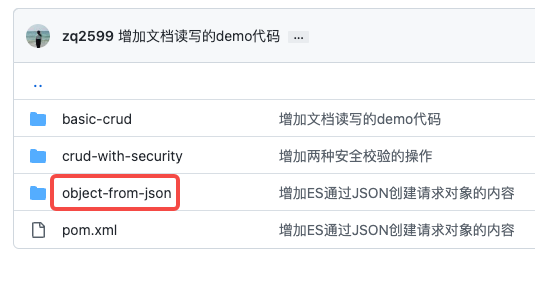
- 这个git项目中有多个文件夹,本次实战的源码在elasticsearch-tutorials文件夹下,如下图红框

- elasticsearch-tutorials是个父工程,里面有多个module,本篇实战的module是object-from-json,如下图红框