-
Go实现LogCollect:海量日志收集系统【上篇——LogAgent实现】
Go实现LogCollect:海量日志收集系统【上篇——LogAgent实现】
下篇:Go实现LogCollect:海量日志收集系统【下篇——开发LogTransfer】
项目架构图:

0 项目背景与方案选择
背景
当公司发展的越来越大,业务越来越复杂时,每个业务系统都有自己的日志。此时我们就应该将不同业务线的日志进行实时收集,存储到一个日志收集中心,最后再通过web页面展示出来。
- 解决方案:
- 把机器上的日志实时收集,统一的存储到中心系统
- 对这些日志建立索引,通过搜索即可以找到对应日志
- 提供界面友好的web界面,通过web即可以完成日志搜索
该系统可能会出现的问题:
- 实时日志量非常大,每天几十亿条
- 日志准实时收集 ,延迟控制在分钟级别
- 能够水平可扩展
方案选择与设计
①方案选择:
- 早期的ELK(Elasticsearch,Logstash, Kibana)到现在的EFK(Elasticsearch,FilebeatorFluentd, Kibana)。ELK在每台服务器上部署logstash,比较重量级,所以演化成客户端部署filebeat的EFK,由filebeat收集向logstash中写数据,最后落地到elasticsearch,通过kibana界面进行日志检索。其中Logstash主要用于收集、解析、转换
- 优:现成的解决方案,可以直接拿来使用
- 缺:运维成本高,每增加一个日志收集项都需要手动修改配置;无法准确获取logstash的状态,无法做到定制化开发与维护
方案设计:
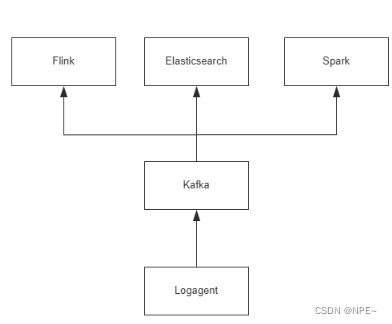
各个组件说明:
- Log Agent:日志收集客户端,用来收集服务器上的日志
- Kafka:高吞吐量的分布式消息队列
- Elasticsearch:开源搜索引擎框架,提供基于http RESTFul的web接口
- Flink、Spark:分布式计算框架,能够对大量数据进行分布式处理
1 开发
1.1 收集日志信息到Kafka
①docker-compose搭建kafka
vim docker-compose.yml- 1
docker-compose.yml:
version: '3' services: zookeeper: image: confluentinc/cp-zookeeper:6.2.0 ports: - "2181:2181" environment: ZOOKEEPER_CLIENT_PORT: 2181 ZOOKEEPER_TICK_TIME: 2000 kafka: image: confluentinc/cp-kafka:6.2.0 ports: - "9092:9092" environment: KAFKA_ZOOKEEPER_CONNECT: zookeeper:2181 #KAFKA_ADVERTISED_LISTENERS后面改为自己本地宿主机的ip,例如我本地mac的ip为192.168.0.101 KAFKA_ADVERTISED_LISTENERS: PLAINTEXT://192.168.0.101:9092 KAFKA_OFFSETS_TOPIC_REPLICATION_FACTOR: 1 depends_on: - zookeeper- 1
- 2
- 3
- 4
- 5
- 6
- 7
- 8
- 9
- 10
- 11
- 12
- 13
- 14
- 15
- 16
- 17
- 18
- 19
- 20
# 进入到docker-compose.yml所在目录,执行下面命令 docker-compose up -d # 查看部署结果,状态为up表明部署成功 docker-compose ps- 1
- 2
- 3
- 4

②创建topic并通过golang消费数据
# 1. 创建对应topic docker-compose exec kafka kafka-topics --create --topic nginx_log --partitions 1 --replication-factor 1 --bootstrap-server 192.168.0.101:9092 # 2. 查看topic列表 docker-compose exec kafka kafka-topics --list --zookeeper zookeeper:2181- 1
- 2
- 3
- 4
- 5
//golang中操作kafka的库 go get github.com/IBM/sarama- 1
- 2
package main import ( "fmt" "time" "github.com/IBM/sarama" ) func main() { config := sarama.NewConfig() config.Producer.RequiredAcks = sarama.WaitForAll // 发送完数据需要leader和follow都确认 config.Producer.Partitioner = sarama.NewRandomPartitioner // 新选出⼀个partition config.Producer.Return.Successes = true // 成功交付的消息将在success channel返回 // 连接kafka client, err := sarama.NewSyncProducer([]string{"localhost:9092"}, config) if err != nil { fmt.Println("producer close, err:", err) return } defer client.Close() for { // 构造⼀个消息 msg := &sarama.ProducerMessage{} msg.Topic = "nginx_log" msg.Value = sarama.StringEncoder("this is a good test, my message is good") // 发送消息 pid, offset, err := client.SendMessage(msg) if err != nil { fmt.Println("send message failed,", err) return } fmt.Printf("pid:%v offset:%v\n", pid, offset) time.Sleep(10 * time.Millisecond) } }- 1
- 2
- 3
- 4
- 5
- 6
- 7
- 8
- 9
- 10
- 11
- 12
- 13
- 14
- 15
- 16
- 17
- 18
- 19
- 20
- 21
- 22
- 23
- 24
- 25
- 26
- 27
- 28
- 29
- 30
- 31
- 32
- 33
- 34
- 35
- 36
- 37
- 38
- 39
- 40
- 41
1.2 简单版本LogAgent的实现
- 根据log_agent.conf的LogAgent配置,初始化LogAgent参数,确认LogAgent工作日志(log_agent.log)的存放位置
- tail读取nginx_log.log日志信息,将读取到的信息通过kafka连接发送到kafka中
- kafka消费对应的信息
①代码结构
. ├─conf │ log_agent.conf │ ├─kafka │ kafka.go │ ├─consumer │ consumer.go │ ├─logs │ log_agent.log │ ├─main │ config.go │ log.go │ main.go │ server.go │ ├─tailf │ tail.go │ go.mod └─ go.sum- 1
- 2
- 3
- 4
- 5
- 6
- 7
- 8
- 9
- 10
- 11
- 12
- 13
- 14
- 15
- 16
- 17
- 18
- 19
- 20
- 21
- 22
- 23

②代码
1. conf/log_agent.conf:LogAgent的配置文件
[logs] log_level = debug log_path = /Users/xxx/GolandProjects/LogAgent/log/log_agent.log [collect] log_path = /Users/xxx/GolandProjects/LogAgent/nginx_log.log topic = nginx_log chan_size = 100 [kafka] server_addr = localhost:9092- 1
- 2
- 3
- 4
- 5
- 6
- 7
- 8
- 9
- 10
- 11
2. kafka/consumer/consumer.go:创建kafka消费者
用于消费发送到kafka分区中的数据
package main import ( "fmt" "github.com/IBM/sarama" ) // kafka consumer func main() { consumer, err := sarama.NewConsumer([]string{"localhost:9092"}, nil) if err != nil { fmt.Printf("fail to start consumer, err:%v\n", err) return } partitionList, err := consumer.Partitions("nginx_log") // 根据topic取到所有的分区 if err != nil { fmt.Printf("fail to get list of partition:err%v\n", err) return } fmt.Println(partitionList) for partition := range partitionList { // 遍历所有的分区 // 针对每个分区创建一个对应的分区消费者 pc, err := consumer.ConsumePartition("nginx_log", int32(partition), sarama.OffsetNewest) if err != nil { fmt.Printf("failed to start consumer for partition %d,err:%v\n", partition, err) return } defer pc.AsyncClose() // 异步从每个分区消费信息 go func(sarama.PartitionConsumer) { for msg := range pc.Messages() { fmt.Printf("Partition:%d Offset:%d Key:%v Value:%v\n", msg.Partition, msg.Offset, msg.Key, string(msg.Value)) } }(pc) } //演示时使用 select {} }- 1
- 2
- 3
- 4
- 5
- 6
- 7
- 8
- 9
- 10
- 11
- 12
- 13
- 14
- 15
- 16
- 17
- 18
- 19
- 20
- 21
- 22
- 23
- 24
- 25
- 26
- 27
- 28
- 29
- 30
- 31
- 32
- 33
- 34
- 35
- 36
- 37
- 38
- 39
- 40
3. kafka/kafka.go:初始化kafka,向kafka中发送数据
package kafka import ( "github.com/IBM/sarama" "github.com/astaxie/beego/logs" ) var ( client sarama.SyncProducer ) func InitKafka(addr string) (err error) { // Kafka生产者配置 config := sarama.NewConfig() config.Producer.RequiredAcks = sarama.WaitForAll // 发送完数据需要leader和follow都确认 config.Producer.Partitioner = sarama.NewRandomPartitioner // 新选出⼀个partition config.Producer.Return.Successes = true // 成功交付的消息将在success channel返回 // 新建一个生产者对象 client, err = sarama.NewSyncProducer([]string{addr}, config) if err != nil { logs.Error("初识化Kafka producer失败:", err) return } logs.Debug("初始化Kafka producer成功,地址为:", addr) return } func SendToKafka(data, topic string) (err error) { msg := &sarama.ProducerMessage{} msg.Topic = topic msg.Value = sarama.StringEncoder(data) pid, offset, err := client.SendMessage(msg) if err != nil { logs.Error("发送信息失败, err:%v, data:%v, topic:%v", err, data, topic) return } logs.Debug("read success, pid:%v, offset:%v, topic:%v\n", pid, offset, topic) return }- 1
- 2
- 3
- 4
- 5
- 6
- 7
- 8
- 9
- 10
- 11
- 12
- 13
- 14
- 15
- 16
- 17
- 18
- 19
- 20
- 21
- 22
- 23
- 24
- 25
- 26
- 27
- 28
- 29
- 30
- 31
- 32
- 33
- 34
- 35
- 36
- 37
- 38
- 39
- 40
- 41
- 42
- 43
- 44
- 45
- 46
4. main/config.go:用于解析log_agent.conf文件
package main import ( "LogAgent/tailf" "errors" "fmt" "github.com/astaxie/beego/config" ) var ( logConfig *Config ) // 日志配置 type Config struct { logLevel string logPath string chanSize int KafkaAddr string CollectConf []tailf.CollectConf } // 日志收集配置 func loadCollectConf(conf config.Configer) (err error) { var c tailf.CollectConf c.LogPath = conf.String("collect::log_path") if len(c.LogPath) == 0 { err = errors.New("无效的 collect::log_path ") return } c.Topic = conf.String("collect::topic") if len(c.Topic) == 0 { err = errors.New("无效的 collect::topic ") return } logConfig.CollectConf = append(logConfig.CollectConf, c) return } // 导入解析LogAgent初始化配置 func loadInitConf(confType, filename string) (err error) { conf, err := config.NewConfig(confType, filename) if err != nil { fmt.Printf("初始化配置文件出错:%v\n", err) return } // 导入配置信息 logConfig = &Config{} // 日志级别 logConfig.logLevel = conf.String("logs::log_level") if len(logConfig.logLevel) == 0 { logConfig.logLevel = "debug" } // 日志输出路径 logConfig.logPath = conf.String("logs::log_path") if len(logConfig.logPath) == 0 { logConfig.logPath = "/Users/xxx/GolandProjects/LogAgent/log/log_agent.log" } // 管道大小 logConfig.chanSize, err = conf.Int("collect::chan_size") if err != nil { logConfig.chanSize = 100 } // Kafka logConfig.KafkaAddr = conf.String("kafka::server_addr") if len(logConfig.KafkaAddr) == 0 { err = fmt.Errorf("初识化Kafka失败") return } err = loadCollectConf(conf) if err != nil { fmt.Printf("导入日志收集配置错误:%v", err) return } return }- 1
- 2
- 3
- 4
- 5
- 6
- 7
- 8
- 9
- 10
- 11
- 12
- 13
- 14
- 15
- 16
- 17
- 18
- 19
- 20
- 21
- 22
- 23
- 24
- 25
- 26
- 27
- 28
- 29
- 30
- 31
- 32
- 33
- 34
- 35
- 36
- 37
- 38
- 39
- 40
- 41
- 42
- 43
- 44
- 45
- 46
- 47
- 48
- 49
- 50
- 51
- 52
- 53
- 54
- 55
- 56
- 57
- 58
- 59
- 60
- 61
- 62
- 63
- 64
- 65
- 66
- 67
- 68
- 69
- 70
- 71
- 72
- 73
- 74
- 75
- 76
- 77
- 78
- 79
- 80
- 81
- 82
5. main/log.go:初始化LogAgent的日志打印
package main import ( "encoding/json" "fmt" "github.com/astaxie/beego/logs" ) func convertLogLevel(level string) int { switch level { case "debug": return logs.LevelDebug case "warn": return logs.LevelWarn case "info": return logs.LevelInfo case "trace": return logs.LevelTrace } return logs.LevelDebug } func initLogger() (err error) { config := make(map[string]interface{}) config["filename"] = logConfig.logPath config["level"] = convertLogLevel(logConfig.logLevel) configStr, err := json.Marshal(config) if err != nil { fmt.Println("初始化日志, 序列化失败:", err) return } _ = logs.SetLogger(logs.AdapterFile, string(configStr)) return }- 1
- 2
- 3
- 4
- 5
- 6
- 7
- 8
- 9
- 10
- 11
- 12
- 13
- 14
- 15
- 16
- 17
- 18
- 19
- 20
- 21
- 22
- 23
- 24
- 25
- 26
- 27
- 28
- 29
- 30
- 31
- 32
- 33
- 34
- 35
- 36
- 37
6. main/main.go:服务入口
package main import ( "LogAgent/kafka" "LogAgent/tailf" "fmt" "github.com/astaxie/beego/logs" ) func main() { fmt.Println("开始") // 读取logAgent配置文件 filename := "/Users/xxx/GolandProjects/LogAgent/conf/log_agent.conf" err := loadInitConf("ini", filename) if err != nil { fmt.Printf("导入配置文件错误:%v\n", err) panic("导入配置文件错误") return } // 初始化日志信息 err = initLogger() if err != nil { fmt.Printf("导入日志文件错误:%v\n", err) panic("导入日志文件错误") return } // 输出成功信息 logs.Debug("导入日志成功%v", logConfig) // 初始化tailf(解析nginx_log日志文件所在路径等,管道大小) err = tailf.InitTail(logConfig.CollectConf, logConfig.chanSize) if err != nil { logs.Error("初始化tailf失败:", err) return } logs.Debug("初始化tailf成功!") // 初始化Kafka err = kafka.InitKafka(logConfig.KafkaAddr) if err != nil { logs.Error("初识化kafka producer失败:", err) return } logs.Debug("初始化Kafka成功!") // 运行 err = serverRun() if err != nil { logs.Error("serverRun failed:", err) } logs.Info("程序退出") }- 1
- 2
- 3
- 4
- 5
- 6
- 7
- 8
- 9
- 10
- 11
- 12
- 13
- 14
- 15
- 16
- 17
- 18
- 19
- 20
- 21
- 22
- 23
- 24
- 25
- 26
- 27
- 28
- 29
- 30
- 31
- 32
- 33
- 34
- 35
- 36
- 37
- 38
- 39
- 40
- 41
- 42
- 43
- 44
- 45
- 46
- 47
- 48
- 49
- 50
- 51
- 52
- 53
- 54
7. main/server.go:向kafka发送数据
package main import ( "LogAgent/kafka" "LogAgent/tailf" "fmt" "github.com/astaxie/beego/logs" "time" ) func serverRun() (err error) { for { msg := tailf.GetOneLine() err = sendToKafka(msg) if err != nil { logs.Error("发送消息到Kafka 失败, err:%v", err) time.Sleep(time.Second) continue } } } func sendToKafka(msg *tailf.TextMsg) (err error) { fmt.Printf("读取 msg:%s, topic:%s\n", msg.Msg, msg.Topic) // 将消息打印在终端 _ = kafka.SendToKafka(msg.Msg, msg.Topic) return }- 1
- 2
- 3
- 4
- 5
- 6
- 7
- 8
- 9
- 10
- 11
- 12
- 13
- 14
- 15
- 16
- 17
- 18
- 19
- 20
- 21
- 22
- 23
- 24
- 25
- 26
- 27
- 28
- 29
8. tailf/tail.go:用于读取nginx_log.log中的日志信息,并将信息发送到kafka
package tailf import ( "fmt" "github.com/astaxie/beego/logs" "github.com/hpcloud/tail" "time" ) // 将日志收集配置放在tailf包下,方便其他包引用 type CollectConf struct { LogPath string Topic string } // 存入Collect type TailObj struct { tail *tail.Tail conf CollectConf } // 定义Message信息 type TextMsg struct { Msg string Topic string } // 管理系统所有tail对象 type TailObjMgr struct { tailsObjs []*TailObj msgChan chan *TextMsg } // 定义全局变量 var ( tailObjMgr *TailObjMgr ) func GetOneLine() (msg *TextMsg) { msg = <-tailObjMgr.msgChan return } func InitTail(conf []CollectConf, chanSize int) (err error) { // 加载配置项 if len(conf) == 0 { err = fmt.Errorf("无效的log collect conf:%v", conf) return } tailObjMgr = &TailObjMgr{ msgChan: make(chan *TextMsg, chanSize), // 定义Chan管道 } // 循环导入 for _, v := range conf { // 初始化Tail fmt.Println(v) tails, errTail := tail.TailFile(v.LogPath, tail.Config{ ReOpen: true, Follow: true, Location: &tail.SeekInfo{Offset: 0, Whence: 0}, MustExist: false, Poll: true, }) if errTail != nil { err = errTail fmt.Println("tail 操作文件错误:", err) return } // 导入配置项 obj := &TailObj{ conf: v, tail: tails, } tailObjMgr.tailsObjs = append(tailObjMgr.tailsObjs, obj) go readFromTail(obj) } return } // 读入日志数据 func readFromTail(tailObj *TailObj) { for true { msg, ok := <-tailObj.tail.Lines if !ok { logs.Warn("Tail file close reopen, filename:%s\n", tailObj.tail.Filename) time.Sleep(100 * time.Millisecond) continue } textMsg := &TextMsg{ Msg: msg.Text, Topic: tailObj.conf.Topic, } // 放入chan里面 tailObjMgr.msgChan <- textMsg } }- 1
- 2
- 3
- 4
- 5
- 6
- 7
- 8
- 9
- 10
- 11
- 12
- 13
- 14
- 15
- 16
- 17
- 18
- 19
- 20
- 21
- 22
- 23
- 24
- 25
- 26
- 27
- 28
- 29
- 30
- 31
- 32
- 33
- 34
- 35
- 36
- 37
- 38
- 39
- 40
- 41
- 42
- 43
- 44
- 45
- 46
- 47
- 48
- 49
- 50
- 51
- 52
- 53
- 54
- 55
- 56
- 57
- 58
- 59
- 60
- 61
- 62
- 63
- 64
- 65
- 66
- 67
- 68
- 69
- 70
- 71
- 72
- 73
- 74
- 75
- 76
- 77
- 78
- 79
- 80
- 81
- 82
- 83
- 84
- 85
- 86
- 87
- 88
- 89
- 90
- 91
- 92
- 93
- 94
- 95
- 96
- 97
- 98
- 99
- 100
- 101
- 102
③效果

消费结果:

tailf读取nginx_log.log文件中的日志信息,并发送到kafka,由kakfa的消费者来进行消费

如果发现无法访问到docker中的kafka了,可能是因为你物理主机的ip更换了。docker-compose down暂停部署,然后重新修改docker-compose.yml中kafka绑定的物理主机IP即可,然后docker-compose up -d 重新部署。
1.3 引入etcd,创建多个tailtask
①环境准备:docker启动etcd与项目结构
1. docker启动etcd:搭建etcd集群
- 新建一个docker网络,方便etcd集群内部通信
docker network create etcd-network- 1
- 启动etcd1,etcd第一个节点
docker run -d --name etcd1 --network etcd-network -p 2379:2379 -p 2380:2380 quay.io/coreos/etcd:v3.4.13 etcd \ --name etcd1 \ --advertise-client-urls http://0.0.0.0:2379 \ --listen-client-urls http://0.0.0.0:2379 \ --initial-advertise-peer-urls http://0.0.0.0:2380 \ --listen-peer-urls http://0.0.0.0:2380 \ --initial-cluster-token etcd-cluster-1 \ --initial-cluster etcd1=http://0.0.0.0:2380 \ --initial-cluster-state new- 1
- 2
- 3
- 4
- 5
- 6
- 7
- 8
- 9
- 启动etcd2
docker run -d --name etcd2 --network etcd-network -p 22379:2379 -p 22380:2380 quay.io/coreos/etcd:v3.4.13 etcd \ --name etcd2 \ --advertise-client-urls http://0.0.0.0:22379 \ --listen-client-urls http://0.0.0.0:22379 \ --initial-advertise-peer-urls http://0.0.0.0:22380 \ --listen-peer-urls http://0.0.0.0:22380 \ --initial-cluster-token etcd-cluster-1 \ --initial-cluster etcd1=http://etcd1:2380,etcd2=http://0.0.0.0:22380 \ --initial-cluster-state existing- 1
- 2
- 3
- 4
- 5
- 6
- 7
- 8
- 9
- 启动etcd3
docker run -d --name etcd3 --network etcd-network -p 32379:2379 -p 32380:2380 quay.io/coreos/etcd:v3.4.13 etcd \ --name etcd3 \ --advertise-client-urls http://0.0.0.0:32379 \ --listen-client-urls http://0.0.0.0:32379 \ --initial-advertise-peer-urls http://0.0.0.0:32380 \ --listen-peer-urls http://0.0.0.0:32380 \ --initial-cluster-token etcd-cluster-1 \ --initial-cluster etcd1=http://etcd1:2380,etcd2=http://etcd2:2380,etcd3=http://0.0.0.0:32380 \ --initial-cluster-state existing- 1
- 2
- 3
- 4
- 5
- 6
- 7
- 8
- 9
这样,我们就成功在Docker中搭建了一个由3个etcd节点组成的集群,并分别暴露了端口2379、22379和32379。您可以使用docker ps命令来查看正在运行的容器,使用docker logs
命令来查看每个etcd容器的日志 2. 项目结构
. │ go.mod │ go.sum │ │ ├─conf │ log_agent.conf │ ├─kafka │ kafka.go │ ├─logs │ log_agent.log │ ├─main │ config.go │ etcd.go │ ip.go │ log.go │ main.go │ server.go │ ├─tailf │ tail.go │ └─tools └─SetConf main.go- 1
- 2
- 3
- 4
- 5
- 6
- 7
- 8
- 9
- 10
- 11
- 12
- 13
- 14
- 15
- 16
- 17
- 18
- 19
- 20
- 21
- 22
- 23
- 24
- 25
- 26
- 27
- 28
- 29
②代码
1. tools/SetConf/main.go:将配置信息存入etcd
package main import ( "LogAgent/tailf" "context" "encoding/json" "fmt" "go.etcd.io/etcd/client/v3" "time" ) // 定义etcd的前缀key const ( EtcdKey = "/backend/logagent/config/192.168.0.101" ) func SetLogConfToEtcd() { cli, err := clientv3.New(clientv3.Config{ Endpoints: []string{"localhost:2379", "localhost:22379", "localhost:32379"}, DialTimeout: 5 * time.Second, }) if err != nil { fmt.Println("connect failed, err:", err) return } fmt.Println("connect succ") defer cli.Close() var logConfArr []tailf.CollectConf logConfArr = append( logConfArr, tailf.CollectConf{ LogPath: "/Users/xxx/GolandProjects/LogAgent/mysql_log.log", Topic: "mysql_log", }, ) logConfArr = append( logConfArr, tailf.CollectConf{ LogPath: "/Users/xxx/GolandProjects/LogAgent/nginx_log.log", Topic: "nginx_log", }, ) // Json打包 data, err := json.Marshal(logConfArr) if err != nil { fmt.Println("json failed, ", err) return } ctx, cancel := context.WithTimeout(context.Background(), time.Second) _, err = cli.Put(ctx, EtcdKey, string(data)) cancel() if err != nil { fmt.Println("put failed, err:", err) return } ctx, cancel = context.WithTimeout(context.Background(), time.Second) resp, err := cli.Get(ctx, EtcdKey) cancel() if err != nil { fmt.Println("get failed, err:", err) return } for _, ev := range resp.Kvs { fmt.Printf("%s : %s\n", ev.Key, ev.Value) } } func main() { SetLogConfToEtcd() }- 1
- 2
- 3
- 4
- 5
- 6
- 7
- 8
- 9
- 10
- 11
- 12
- 13
- 14
- 15
- 16
- 17
- 18
- 19
- 20
- 21
- 22
- 23
- 24
- 25
- 26
- 27
- 28
- 29
- 30
- 31
- 32
- 33
- 34
- 35
- 36
- 37
- 38
- 39
- 40
- 41
- 42
- 43
- 44
- 45
- 46
- 47
- 48
- 49
- 50
- 51
- 52
- 53
- 54
- 55
- 56
- 57
- 58
- 59
- 60
- 61
- 62
- 63
- 64
- 65
- 66
- 67
- 68
- 69
- 70
- 71
- 72
- 73
- 74
- 75
注意📢:编写完之后,要先运行该代码,将对应的k-v存入etcd,然后再启动LogAgent,因为我们的LogAgent会从etcd中获取对应配置2. main/etcd.go
用于初始化连接etcd、从etcd中取出配置信息
package main import ( "LogAgent/tailf" "context" "encoding/json" "fmt" "github.com/astaxie/beego/logs" clientv3 "go.etcd.io/etcd/client/v3" "strings" "time" ) type EtcdClient struct { client *clientv3.Client } var ( etcdClient *EtcdClient ) func initEtcd(addr string, key string) (collectConf []tailf.CollectConf, err error) { // 初始化连接etcd cli, err := clientv3.New(clientv3.Config{ //Endpoints: []string{"localhost:2379", "localhost:22379", "localhost:32379"}, Endpoints: []string{addr}, DialTimeout: 5 * time.Second, }) if err != nil { logs.Error("连接etcd失败:", err) return } etcdClient = &EtcdClient{ client: cli, } // 如果Key不是以"/"结尾, 则自动加上"/" if strings.HasSuffix(key, "/") == false { key = key + "/" } for _, ip := range localIPArray { etcdKey := fmt.Sprintf("%s%s", key, ip) ctx, cancel := context.WithTimeout(context.Background(), time.Second) resp, err := cli.Get(ctx, etcdKey) if err != nil { logs.Error("etcd get请求失败:", err) continue } cancel() logs.Debug("resp from etcd:%v", resp.Kvs) for _, v := range resp.Kvs { if string(v.Key) == etcdKey { // 将从etcd中取出来的json格式反序列化为结构体 err = json.Unmarshal(v.Value, &collectConf) if err != nil { logs.Error("反序列化失败:", err) continue } logs.Debug("日志设置为%v", collectConf) } } } logs.Debug("连接etcd成功") return }- 1
- 2
- 3
- 4
- 5
- 6
- 7
- 8
- 9
- 10
- 11
- 12
- 13
- 14
- 15
- 16
- 17
- 18
- 19
- 20
- 21
- 22
- 23
- 24
- 25
- 26
- 27
- 28
- 29
- 30
- 31
- 32
- 33
- 34
- 35
- 36
- 37
- 38
- 39
- 40
- 41
- 42
- 43
- 44
- 45
- 46
- 47
- 48
- 49
- 50
- 51
- 52
- 53
- 54
- 55
- 56
- 57
- 58
- 59
- 60
- 61
- 62
- 63
- 64
- 65
- 66
- 67
- 68
3. main/ip.go
获取本机所有网卡ip去连接etcd
- 考虑到以后添加新服务器时,不需要手动添加ip,这里将ip信息全部存入localIPArray中
package main import ( "fmt" "net" ) var ( localIPArray []string ) func init() { addrs, err := net.InterfaceAddrs() if err != nil { panic(fmt.Sprintf("获取网卡ip失败, %v", err)) } for _, addr := range addrs { if ipnet, ok := addr.(*net.IPNet); ok && !ipnet.IP.IsLoopback() { if ipnet.IP.To4() != nil { localIPArray = append(localIPArray, ipnet.IP.String()) } } } fmt.Println(localIPArray) }- 1
- 2
- 3
- 4
- 5
- 6
- 7
- 8
- 9
- 10
- 11
- 12
- 13
- 14
- 15
- 16
- 17
- 18
- 19
- 20
- 21
- 22
- 23
- 24
- 25
- 26
4. main/config.go
package main import ( "LogAgent/tailf" "errors" "fmt" "github.com/astaxie/beego/config" ) var ( logConfig *Config ) // 日志配置 type Config struct { logLevel string logPath string chanSize int KafkaAddr string CollectConf []tailf.CollectConf etcdAddr string etcdKey string } // 日志收集配置 func loadCollectConf(conf config.Configer) (err error) { var c tailf.CollectConf c.LogPath = conf.String("collect::log_path") if len(c.LogPath) == 0 { err = errors.New("无效的 collect::log_path ") return } c.Topic = conf.String("collect::topic") if len(c.Topic) == 0 { err = errors.New("无效的 collect::topic ") return } logConfig.CollectConf = append(logConfig.CollectConf, c) return } // 导入解析LogAgent初始化配置 func loadInitConf(confType, filename string) (err error) { conf, err := config.NewConfig(confType, filename) if err != nil { fmt.Printf("初始化配置文件出错:%v\n", err) return } // 导入配置信息 logConfig = &Config{} // 日志级别 logConfig.logLevel = conf.String("logs::log_level") if len(logConfig.logLevel) == 0 { logConfig.logLevel = "debug" } // 日志输出路径 logConfig.logPath = conf.String("logs::log_path") if len(logConfig.logPath) == 0 { logConfig.logPath = "/Users/xxx/GolandProjects/LogAgent/log/log_agent.log" } // 管道大小 logConfig.chanSize, err = conf.Int("collect::chan_size") if err != nil { logConfig.chanSize = 100 } // Kafka logConfig.KafkaAddr = conf.String("kafka::server_addr") if len(logConfig.KafkaAddr) == 0 { err = fmt.Errorf("初识化Kafka失败") return } err = loadCollectConf(conf) if err != nil { fmt.Printf("导入日志收集配置错误:%v", err) return } // etcd logConfig.etcdAddr = conf.String("etcd::addr") if len(logConfig.etcdAddr) == 0 { err = fmt.Errorf("初识化etcd addr失败") return } logConfig.etcdKey = conf.String("etcd::configKey") if len(logConfig.etcdKey) == 0 { err = fmt.Errorf("初识化etcd configKey失败") return } return }- 1
- 2
- 3
- 4
- 5
- 6
- 7
- 8
- 9
- 10
- 11
- 12
- 13
- 14
- 15
- 16
- 17
- 18
- 19
- 20
- 21
- 22
- 23
- 24
- 25
- 26
- 27
- 28
- 29
- 30
- 31
- 32
- 33
- 34
- 35
- 36
- 37
- 38
- 39
- 40
- 41
- 42
- 43
- 44
- 45
- 46
- 47
- 48
- 49
- 50
- 51
- 52
- 53
- 54
- 55
- 56
- 57
- 58
- 59
- 60
- 61
- 62
- 63
- 64
- 65
- 66
- 67
- 68
- 69
- 70
- 71
- 72
- 73
- 74
- 75
- 76
- 77
- 78
- 79
- 80
- 81
- 82
- 83
- 84
- 85
- 86
- 87
- 88
- 89
- 90
- 91
- 92
- 93
- 94
- 95
- 96
- 97
- 98
5. tailf/tail.go
修改tail.go文件:添加json标签,用于反序列化
package tailf import ( "fmt" "github.com/astaxie/beego/logs" "github.com/hpcloud/tail" "time" ) // 将日志收集配置放在tailf包下,方便其他包引用 type CollectConf struct { LogPath string `json:"logpath"` Topic string `json:"topic"` } // 存入Collect type TailObj struct { tail *tail.Tail conf CollectConf } // 定义Message信息 type TextMsg struct { Msg string Topic string } // 管理系统所有tail对象 type TailObjMgr struct { tailsObjs []*TailObj msgChan chan *TextMsg } // 定义全局变量 var ( tailObjMgr *TailObjMgr ) func GetOneLine() (msg *TextMsg) { msg = <-tailObjMgr.msgChan return } func InitTail(conf []CollectConf, chanSize int) (err error) { // 加载配置项 if len(conf) == 0 { err = fmt.Errorf("无效的log collect conf:%v", conf) return } tailObjMgr = &TailObjMgr{ msgChan: make(chan *TextMsg, chanSize), // 定义Chan管道 } // 循环导入 for _, v := range conf { // 初始化Tail fmt.Println(v) tails, errTail := tail.TailFile(v.LogPath, tail.Config{ ReOpen: true, Follow: true, Location: &tail.SeekInfo{Offset: 0, Whence: 0}, MustExist: false, Poll: true, }) if errTail != nil { err = errTail fmt.Println("tail 操作文件错误:", err) return } // 导入配置项 obj := &TailObj{ conf: v, tail: tails, } tailObjMgr.tailsObjs = append(tailObjMgr.tailsObjs, obj) go readFromTail(obj) } return } // 读入日志数据 func readFromTail(tailObj *TailObj) { for true { msg, ok := <-tailObj.tail.Lines if !ok { logs.Warn("Tail file close reopen, filename:%s\n", tailObj.tail.Filename) time.Sleep(100 * time.Millisecond) continue } textMsg := &TextMsg{ Msg: msg.Text, Topic: tailObj.conf.Topic, } // 放入chan里面 tailObjMgr.msgChan <- textMsg } }- 1
- 2
- 3
- 4
- 5
- 6
- 7
- 8
- 9
- 10
- 11
- 12
- 13
- 14
- 15
- 16
- 17
- 18
- 19
- 20
- 21
- 22
- 23
- 24
- 25
- 26
- 27
- 28
- 29
- 30
- 31
- 32
- 33
- 34
- 35
- 36
- 37
- 38
- 39
- 40
- 41
- 42
- 43
- 44
- 45
- 46
- 47
- 48
- 49
- 50
- 51
- 52
- 53
- 54
- 55
- 56
- 57
- 58
- 59
- 60
- 61
- 62
- 63
- 64
- 65
- 66
- 67
- 68
- 69
- 70
- 71
- 72
- 73
- 74
- 75
- 76
- 77
- 78
- 79
- 80
- 81
- 82
- 83
- 84
- 85
- 86
- 87
- 88
- 89
- 90
- 91
- 92
- 93
- 94
- 95
- 96
- 97
- 98
- 99
- 100
- 101
- 102
- 103
6. main/main.go
将initEtcd放到InitTail函数之前,不然无法从etcd中获取值
package main import ( "LogAgent/kafka" "LogAgent/tailf" "fmt" "github.com/astaxie/beego/logs" ) func main() { fmt.Println("开始") // 读取初始化配置文件 filename := "/Users/xxx/GolandProjects/LogAgent/conf/log_agent.conf" err := loadInitConf("ini", filename) if err != nil { fmt.Printf("导入配置文件错误:%v\n", err) panic("导入配置文件错误") return } // 初始化日志信息 err = initLogger() if err != nil { fmt.Printf("导入日志文件错误:%v\n", err) panic("导入日志文件错误") return } // 输出成功信息 logs.Debug("导入日志成功%v", logConfig) // 初识化etcd collectConf, err := initEtcd(logConfig.etcdAddr, logConfig.etcdKey) if err != nil { logs.Error("初始化etcd失败", err) } logs.Debug("初始化etcd成功!") // 初始化tailf err = tailf.InitTail(collectConf, logConfig.chanSize) if err != nil { logs.Error("初始化tailf失败:", err) return } logs.Debug("初始化tailf成功!") // 初始化Kafka err = kafka.InitKafka(logConfig.KafkaAddr) if err != nil { logs.Error("初识化Kafka producer失败:", err) return } logs.Debug("初始化Kafka成功!") // 运行 err = serverRun() if err != nil { logs.Error("serverRun failed:", err) } logs.Info("程序退出") }- 1
- 2
- 3
- 4
- 5
- 6
- 7
- 8
- 9
- 10
- 11
- 12
- 13
- 14
- 15
- 16
- 17
- 18
- 19
- 20
- 21
- 22
- 23
- 24
- 25
- 26
- 27
- 28
- 29
- 30
- 31
- 32
- 33
- 34
- 35
- 36
- 37
- 38
- 39
- 40
- 41
- 42
- 43
- 44
- 45
- 46
- 47
- 48
- 49
- 50
- 51
- 52
- 53
- 54
- 55
- 56
- 57
- 58
- 59
- 60
- 61
效果

- 当没有对应日志文件存在时:

- 当对应日志文件存在并有对应内容时:

1.4 监听etcd配置项的变更
在真实生产环境中时会常常添加新的服务器, 这时我们需要借助之前的ip.go获取所有ip节点, 并且实时监控,修改EtcdClient结构体增加keys
①修改main/etcd.go
在main/etcd.go中添加initEtcdWatcher与watchKey函数并且在函数initEtcd中调用
package main import ( "LogAgent/tailf" "context" "encoding/json" "fmt" "github.com/astaxie/beego/logs" clientv3 "go.etcd.io/etcd/client/v3" "strings" "time" ) type EtcdClient struct { client *clientv3.Client keys []string } var ( etcdClient *EtcdClient ) func initEtcd(addr string, key string) (collectConf []tailf.CollectConf, err error) { // 初始化连接etcd cli, err := clientv3.New(clientv3.Config{ //Endpoints: []string{"localhost:2379", "localhost:22379", "localhost:32379"}, Endpoints: []string{addr}, DialTimeout: 5 * time.Second, }) if err != nil { logs.Error("连接etcd失败:", err) return } etcdClient = &EtcdClient{ client: cli, } // 如果Key不是以"/"结尾, 则自动加上"/" if strings.HasSuffix(key, "/") == false { key = key + "/" } for _, ip := range localIPArray { etcdKey := fmt.Sprintf("%s%s", key, ip) ctx, cancel := context.WithTimeout(context.Background(), time.Second) resp, err := cli.Get(ctx, etcdKey) if err != nil { logs.Error("etcd get请求失败:", err) continue } cancel() logs.Debug("resp from etcd:%v", resp.Kvs) for _, v := range resp.Kvs { if string(v.Key) == etcdKey { // 将从etcd中取出来的json格式反序列化为结构体 err = json.Unmarshal(v.Value, &collectConf) if err != nil { logs.Error("反序列化失败:", err) continue } logs.Debug("日志设置为%v", collectConf) } } } logs.Debug("连接etcd成功") initEtcdWatcher(addr) return } // 初始化多个watch监控etcd中配置节点 func initEtcdWatcher(addr string) { for _, key := range etcdClient.keys { go watchKey(addr, key) } } func watchKey(addr string, key string) { // 初始化连接etcd cli, err := clientv3.New(clientv3.Config{ //Endpoints: []string{"localhost:2379", "localhost:22379", "localhost:32379"}, Endpoints: []string{addr}, DialTimeout: 5 * time.Second, }) if err != nil { logs.Error("连接etcd失败:", err) return } logs.Debug("开始监控key:", key) // Watch操作 wch := cli.Watch(context.Background(), key) for resp := range wch { for _, ev := range resp.Events { fmt.Printf("Type: %v, Key:%v, Value:%v\n", ev.Type, string(ev.Kv.Key), string(ev.Kv.Value)) } } }- 1
- 2
- 3
- 4
- 5
- 6
- 7
- 8
- 9
- 10
- 11
- 12
- 13
- 14
- 15
- 16
- 17
- 18
- 19
- 20
- 21
- 22
- 23
- 24
- 25
- 26
- 27
- 28
- 29
- 30
- 31
- 32
- 33
- 34
- 35
- 36
- 37
- 38
- 39
- 40
- 41
- 42
- 43
- 44
- 45
- 46
- 47
- 48
- 49
- 50
- 51
- 52
- 53
- 54
- 55
- 56
- 57
- 58
- 59
- 60
- 61
- 62
- 63
- 64
- 65
- 66
- 67
- 68
- 69
- 70
- 71
- 72
- 73
- 74
- 75
- 76
- 77
- 78
- 79
- 80
- 81
- 82
- 83
- 84
- 85
- 86
- 87
- 88
- 89
- 90
- 91
- 92
- 93
- 94
- 95
- 96
- 97
- 98
- 99
- 100
- 101
②修改tailf/tail.go
package tailf import ( "github.com/astaxie/beego/logs" "github.com/hpcloud/tail" "time" ) // 定义常量 const ( StatusNormal = 1 // 正常状态 StatusDelete = 2 // 删除状态 ) // 将日志收集配置放在tailf包下,方便其他包引用 type CollectConf struct { LogPath string `json:"logpath"` Topic string `json:"topic"` } // 存入Collect type TailObj struct { tail *tail.Tail conf CollectConf status int exitChan chan int } // 定义Message信息 type TextMsg struct { Msg string Topic string } // 管理系统所有tail对象 type TailObjMgr struct { tailsObjs []*TailObj msgChan chan *TextMsg } // 定义全局变量 var ( tailObjMgr *TailObjMgr ) func GetOneLine() (msg *TextMsg) { msg = <-tailObjMgr.msgChan return } // 初始化tail func InitTail(conf []CollectConf, chanSize int) (err error) { tailObjMgr = &TailObjMgr{ msgChan: make(chan *TextMsg, chanSize), // 定义Chan管道 } // 加载配置项 if len(conf) == 0 { logs.Error("无效的日志collect配置: ", conf) } // 循环导入 for _, v := range conf { createNewTask(v) } return } // 读入日志数据 func readFromTail(tailObj *TailObj) { for true { select { case msg, ok := <-tailObj.tail.Lines: if !ok { logs.Warn("Tail file close reopen, filename:%s\n", tailObj.tail.Filename) time.Sleep(100 * time.Millisecond) continue } textMsg := &TextMsg{ Msg: msg.Text, Topic: tailObj.conf.Topic, } // 放入chan里 tailObjMgr.msgChan <- textMsg // 如果exitChan为1, 则删除对应配置项 case <-tailObj.exitChan: logs.Warn("tail obj 退出, 配置项为conf:%v", tailObj.conf) return } } } // 新增etcd配置项 func UpdateConfig(confs []CollectConf) (err error) { // 创建新的tailtask for _, oneConf := range confs { // 对于已经运行的所有实例, 路径是否一样 var isRuning = false for _, obj := range tailObjMgr.tailsObjs { // 路径一样则证明是同一实例 if oneConf.LogPath == obj.conf.LogPath { isRuning = true obj.status = StatusNormal break } } // 检查是否已经存在 if isRuning { continue } // 如果不存在该配置项 新建一个tailtask任务 createNewTask(oneConf) } // 遍历所有查看是否存在删除操作 var tailObjs []*TailObj for _, obj := range tailObjMgr.tailsObjs { obj.status = StatusDelete for _, oneConf := range confs { if oneConf.LogPath == obj.conf.LogPath { obj.status = StatusNormal break } } // 如果status为删除, 则将exitChan置为1 if obj.status == StatusDelete { obj.exitChan <- 1 } // 将obj存入临时的数组中 tailObjs = append(tailObjs, obj) } // 将临时数组传入tailsObjs中 tailObjMgr.tailsObjs = tailObjs return } func createNewTask(conf CollectConf) { // 初始化Tailf实例 tails, errTail := tail.TailFile(conf.LogPath, tail.Config{ ReOpen: true, Follow: true, Location: &tail.SeekInfo{Offset: 0, Whence: 2}, MustExist: false, Poll: true, }) if errTail != nil { logs.Error("收集文件[%s]错误: %v", conf.LogPath, errTail) return } // 导入配置项 obj := &TailObj{ conf: conf, exitChan: make(chan int, 1), } obj.tail = tails tailObjMgr.tailsObjs = append(tailObjMgr.tailsObjs, obj) go readFromTail(obj) }- 1
- 2
- 3
- 4
- 5
- 6
- 7
- 8
- 9
- 10
- 11
- 12
- 13
- 14
- 15
- 16
- 17
- 18
- 19
- 20
- 21
- 22
- 23
- 24
- 25
- 26
- 27
- 28
- 29
- 30
- 31
- 32
- 33
- 34
- 35
- 36
- 37
- 38
- 39
- 40
- 41
- 42
- 43
- 44
- 45
- 46
- 47
- 48
- 49
- 50
- 51
- 52
- 53
- 54
- 55
- 56
- 57
- 58
- 59
- 60
- 61
- 62
- 63
- 64
- 65
- 66
- 67
- 68
- 69
- 70
- 71
- 72
- 73
- 74
- 75
- 76
- 77
- 78
- 79
- 80
- 81
- 82
- 83
- 84
- 85
- 86
- 87
- 88
- 89
- 90
- 91
- 92
- 93
- 94
- 95
- 96
- 97
- 98
- 99
- 100
- 101
- 102
- 103
- 104
- 105
- 106
- 107
- 108
- 109
- 110
- 111
- 112
- 113
- 114
- 115
- 116
- 117
- 118
- 119
- 120
- 121
- 122
- 123
- 124
- 125
- 126
- 127
- 128
- 129
- 130
- 131
- 132
- 133
- 134
- 135
- 136
- 137
- 138
- 139
- 140
- 141
- 142
- 143
- 144
- 145
- 146
- 147
- 148
- 149
- 150
- 151
- 152
- 153
- 154
- 155
- 156
- 157
- 158
- 159
- 160
- 161
- 162
- 163
- 164
- 165
- 166
- 167
- 168
③测试etcd的watch机制
执行下面命令,将下面的key1换成自己真实的key,将value换成自己真实想要配置的value,比如:
docker exec etcd1 etcdctl put /backend/logagent/config/192.168.0.103 "[{\"logpath\":\"/Users/xxx/GolandProjects/LogCollect/LogAgent/mysql_log.log\",\"topic\":\"mysql_log\"},{\"logpath\":\"/Users/xxx/GolandProjects/LogCollect/LogAgent/nginx_log.log\",\"topic\":\"nginx_log\"}]"- 该命令是操作docker中的etcd,向etcd中新增一个key:/backend/logagent/config/192.168.0.101
value(注意转义): “[{“logpath”:”/Users/xxx/GolandProjects/LogCollect/LogAgent/mysql_log.log",“topic”:“mysql_log”},{“logpath”:“/Users/xxx/GolandProjects/LogCollect/LogAgent/nginx_log.log”,“topic”:“nginx_log”}]"
# 查看etcd中所有key docker exec etcd1 etcdctl get "" --prefix --keys-only # 向etcd中添加key-value对: docker exec etcd1 etcdctl put key1 value1 #从etcd中删除指定的key: docker exec etcd1 etcdctl del key1 #从etcd中获取指定的key的值: docker exec etcd1 etcdctl get key1- 1
- 2
- 3
- 4
- 5
- 6
- 7
- 8
- 9
- 10
- 11
执行对应操作后,观察日志信息:
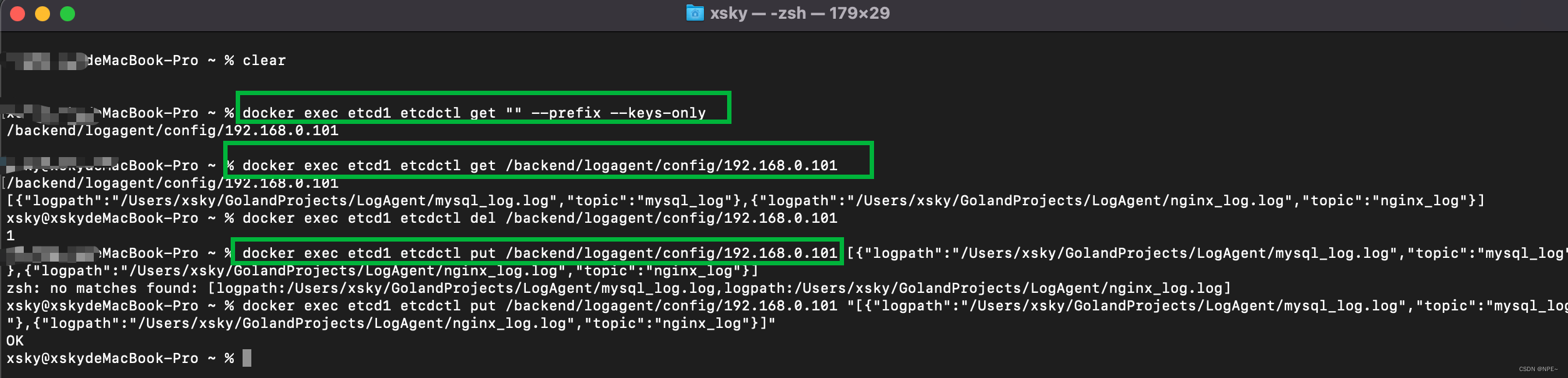

可以从LogAgent的日志中发现已经,成功监听到了etcd的变化
参考:https://blog.csdn.net/qq_43442524/article/details/105024906
-
相关阅读:
【漏洞挖掘】Xray+rad自动化批量漏洞挖掘
【软考经验分享】软考-中级-嵌入式备考
C#使用 AutoUpdater.NET 实现程序自动更新
【DL】Linux服务器安装CUDA和CUDNN
java.lang.ClassNotFoundException: org.apache.commons.logging.LogFactory 异常错误
Kettle【实践 06】使用 HTTP client 获取 GPC 全球商品分类代码 JSON 数据处理入库全流程(云资源分享:ktr+数据.sql)
Springboot毕设项目购物网站3ztkv(java+VUE+Mybatis+Maven+Mysql)
软文发布如何选择对应的媒体
Spring注解驱动之FactoryBean注册组件
在表格中循环插入表单
- 原文地址:https://blog.csdn.net/weixin_45565886/article/details/132390482
