-
Python实现Word、Excel、PPT批量转为PDF
今天看见了一个有意思的脚本Python批量实现Word、EXCLE、PPT转PDF文件。
因为我平时word用的比较的多,所以深有体会,具体怎么实现的我们就不讨论了,因为这个去学了也没什么提升,不然也不会当作脚本了。这里我将其放入了pyzjr库中,也方便大家进行调用。
你可以去下载pyzjr:
pip install pyzjr -i https://pypi.tuna.tsinghua.edu.cn/simple调用方法:
- import pyzjr as pz
- # 实例化对象
- Mpdf = pz.Microsoft2PDF()
- # 调用类的方法
- Mpdf.Word2Pdf() # word -> pdf
- Mpdf.Excel2Pdf() # excel -> pdf
- Mpdf.PPt2Pdf() # ppt -> pdf
- Mpdf.WEP2Pdf() # word,excel,ppt -> pdf
上面就是api的调用了,统一会将文件存放在目标文件夹下新建的名为pdf文件夹中。
pyzjr中的源码:
- import win32com.client, gc, os
- class Microsoft2PDF():
- """Convert Microsoft Office documents (Word, Excel, PowerPoint) to PDF format"""
- def __init__(self,filePath = ""):
- """
- :param filePath: 如果默认是空字符,就默认当前路径
- """
- self.flagW = self.flagE = self.flagP = 1
- self.words = []
- self.ppts = []
- self.excels = []
- if filePath == "":
- filePath = os.getcwd()
- folder = filePath + '\\pdf\\'
- self.folder = CreateFolder(folder,debug=False)
- self.filePath = filePath
- for i in os.listdir(self.filePath):
- if i.endswith(('.doc', 'docx')):
- self.words.append(i)
- if i.endswith(('.ppt', 'pptx')):
- self.ppts.append(i)
- if i.endswith(('.xls', 'xlsx')):
- self.excels.append(i)
- if len(self.words) < 1:
- print("\n[pyzjr]:No Word files\n")
- self.flagW = 0
- if len(self.ppts) < 1:
- print("\n[pyzjr]:No PPT file\n")
- self.flagE = 0
- if len(self.excels) < 1:
- print("\n[pyzjr]:No Excel file\n")
- self.flagP = 0
- def Word2Pdf(self):
- if self.flagW == 0:
- return 0
- else:
- print("\n[Start Word ->PDF conversion]")
- try:
- print("Open Word Process...")
- word = win32com.client.Dispatch("Word.Application")
- word.Visible = 0
- word.DisplayAlerts = False
- doc = None
- for i in range(len(self.words)):
- print(i)
- fileName = self.words[i] # file name
- fromFile = os.path.join(self.filePath, fileName) # file address
- toFileName = self.changeSufix2Pdf(fileName) # Generated file name
- toFile = self.toFileJoin(toFileName) # Generated file address
- print("Conversion:" + fileName + "in files...")
- try:
- doc = word.Documents.Open(fromFile)
- doc.SaveAs(toFile, 17)
- print("Convert to:" + toFileName + "file completion")
- except Exception as e:
- print(e)
- print("All Word files have been printed")
- print("End Word Process...\n")
- doc.Close()
- doc = None
- word.Quit()
- word = None
- except Exception as e:
- print(e)
- finally:
- gc.collect()
- def Excel2Pdf(self):
- if self.flagE == 0:
- return 0
- else:
- print("\n[Start Excel -> PDF conversion]")
- try:
- print("open Excel Process...")
- excel = win32com.client.Dispatch("Excel.Application")
- excel.Visible = 0
- excel.DisplayAlerts = False
- wb = None
- ws = None
- for i in range(len(self.excels)):
- print(i)
- fileName = self.excels[i]
- fromFile = os.path.join(self.filePath, fileName)
- print("Conversion:" + fileName + "in files...")
- try:
- wb = excel.Workbooks.Open(fromFile)
- for j in range(wb.Worksheets.Count): # Number of worksheets, one workbook may have multiple worksheets
- toFileName = self.addWorksheetsOrder(fileName, j + 1)
- toFile = self.toFileJoin(toFileName)
- ws = wb.Worksheets(j + 1)
- ws.ExportAsFixedFormat(0, toFile)
- print("Convert to:" + toFileName + "file completion")
- except Exception as e:
- print(e)
- # 关闭 Excel 进程
- print("All Excel files have been printed")
- print("Ending Excel process...\n")
- ws = None
- wb.Close()
- wb = None
- excel.Quit()
- excel = None
- except Exception as e:
- print(e)
- finally:
- gc.collect()
- def PPt2Pdf(self):
- if self.flagP == 0:
- return 0
- else:
- print("\n[Start PPT ->PDF conversion]")
- try:
- print("Opening PowerPoint process...")
- powerpoint = win32com.client.Dispatch("PowerPoint.Application")
- ppt = None
- for i in range(len(self.ppts)):
- print(i)
- fileName = self.ppts[i]
- fromFile = os.path.join(self.filePath, fileName)
- toFileName = self.changeSufix2Pdf(fileName)
- toFile = self.toFileJoin(toFileName)
- print("Conversion:" + fileName + "in files...")
- try:
- ppt = powerpoint.Presentations.Open(fromFile, WithWindow=False)
- if ppt.Slides.Count > 0:
- ppt.SaveAs(toFile, 32)
- print("Convert to:" + toFileName + "file completion")
- else:
- print("Error, unexpected: This file is empty, skipping this file")
- except Exception as e:
- print(e)
- print("All PPT files have been printed")
- print("Ending PowerPoint process...\n")
- ppt.Close()
- ppt = None
- powerpoint.Quit()
- powerpoint = None
- except Exception as e:
- print(e)
- finally:
- gc.collect()
- def WEP2Pdf(self):
- """
- Word, Excel and PPt are all converted to PDF.
- If there are many files, it may take some time
- """
- print("Convert Microsoft Three Musketeers to PDF")
- self.Word2Pdf()
- self.Excel2Pdf()
- self.PPt2Pdf()
- print(f"All files have been converted, you can find them in the {self.folder}")
- def changeSufix2Pdf(self,file):
- """将文件后缀更改为.pdf"""
- return file[:file.rfind('.')] + ".pdf"
- def addWorksheetsOrder(self,file, i):
- """在文件名中添加工作表顺序"""
- return file[:file.rfind('.')] + "_worksheet" + str(i) + ".pdf"
- def toFileJoin(self, file):
- """将文件路径和文件名连接为完整的文件路径"""
- return os.path.join(self.filePath, 'pdf', file[:file.rfind('.')] + ".pdf")
这里我对原先博主的代码进行了一定的优化,使其可供我们调用。
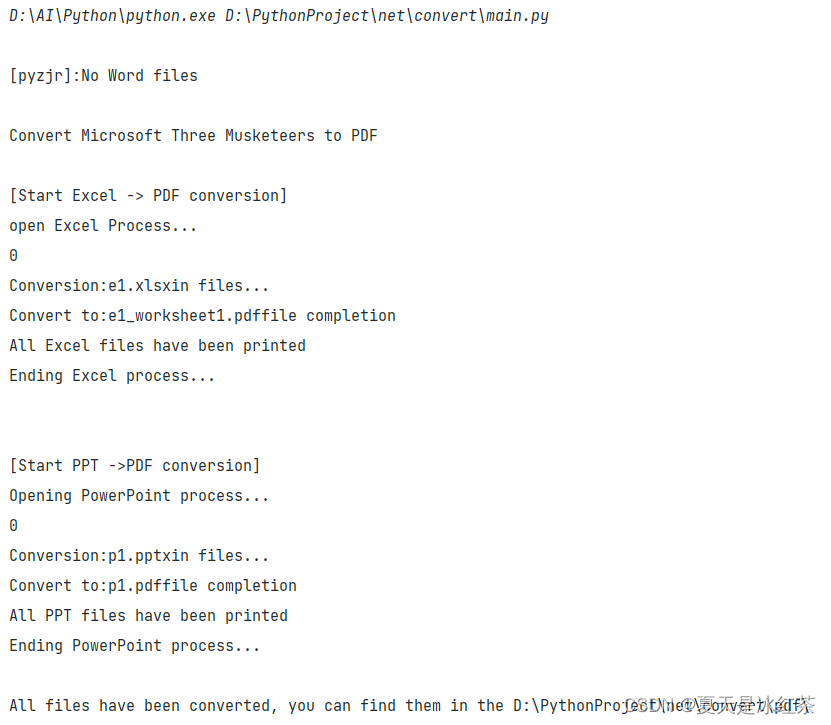
这是控制台打印出来的信息,我们可以发现在调用WEP2Pdf时,如果当前文件夹中没有word的文件也能继续去转换。
-
相关阅读:
Vue3表单组件el-form校验规则rules属性
什么是ETLT?他是新一代数据集成平台?
memcpy和memmove的模拟实现,思路详解+代码实现
python考研志愿填报模拟系统vue
【服务器数据恢复】raid5崩溃导致lvm信息和VXFS文件系统损坏的数据恢复案例
图像分割数据集的相关操作(二)—— albumentations 数据增强
人工智能、深度学习、机器学习常见面试题83~100
Ribbon 添加右侧区域菜单项
这应该是Linux用户与用户组最详细的知识了吧!
系统架构设计师(第二版)学习笔记----计算机系统基础
- 原文地址:https://blog.csdn.net/m0_62919535/article/details/132679590
