-
Android AGP8.1.0组件化初探
Android AGP8.1.0组件化初探
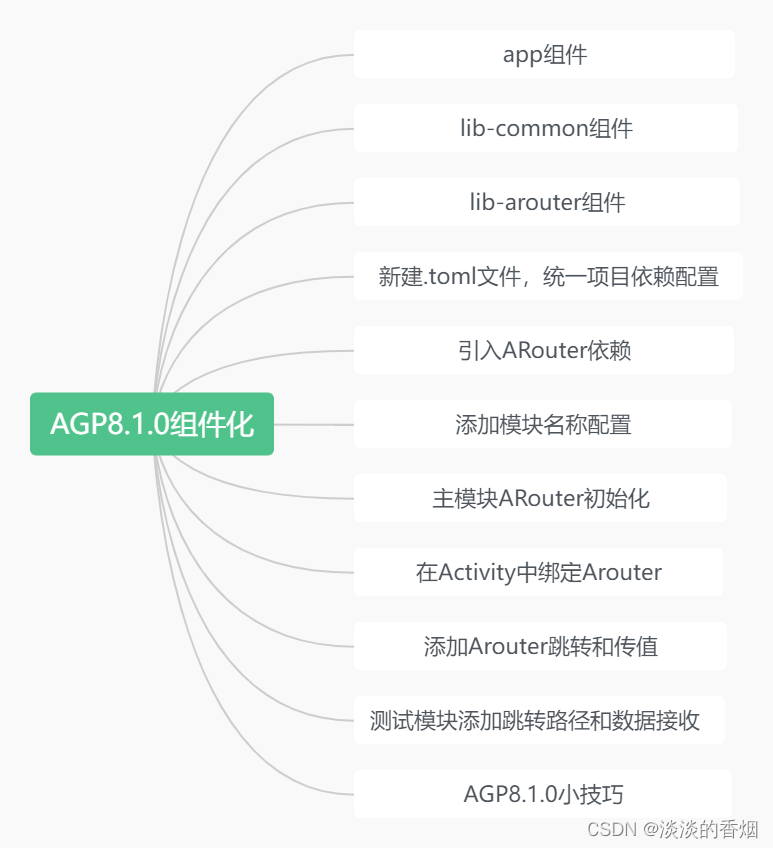
前言:
前面两篇完成了从AGP4.2到 AGP8.1.0的升级,本文是由于有哥们留言说在AGP8.0中使用ARouter组件化有问题,于是趁休息时间尝试了一下,写了几个demo,发现都没有问题,跳转和传值都是正常的,这里我也是直接从groovy转换成version-catalogs的依赖方式,由于之前升级过,所以这次很顺利,几分钟就完成了,直接上代码:
1.添加统一依赖:
[versions] agp = "8.1.0" androidx-espresso-core = "3.4.0" androidx-junit = "1.1.3" org-jetbrains-kotlin-android = "1.8.0" core-ktx = "1.10.1" junit = "4.13.2" androidx-test-ext-junit = "1.1.5" espresso-core = "3.5.1" appcompat = "1.6.1" material = "1.9.0" constraintlayout = "2.1.4" mmkv = "1.3.1" utilcodex = "1.31.1" arouter = "1.5.2" arouter-compiler = "1.5.2" org-jetbrains-kotlin-kapt = "1.8.0" [libraries] androidx-espresso-core-3_4_0 = { module = "androidx.test.espresso:espresso-core", version.ref = "androidx-espresso-core" } androidx-junit-1_1_3 = { module = "androidx.test.ext:junit", version.ref = "androidx-junit" } core-ktx = { group = "androidx.core", name = "core-ktx", version.ref = "core-ktx" } junit = { group = "junit", name = "junit", version.ref = "junit" } androidx-test-ext-junit = { group = "androidx.test.ext", name = "junit", version.ref = "androidx-test-ext-junit" } espresso-core = { group = "androidx.test.espresso", name = "espresso-core", version.ref = "espresso-core" } appcompat = { group = "androidx.appcompat", name = "appcompat", version.ref = "appcompat" } material = { group = "com.google.android.material", name = "material", version.ref = "material" } constraintlayout = { group = "androidx.constraintlayout", name = "constraintlayout", version.ref = "constraintlayout" } mmkv = { group = "com.tencent", name = "mmkv", version.ref = "mmkv" } utilcodex = {group = "com.blankj",name = "utilcodex",version.ref = "utilcodex"} arouter = {group = "com.alibaba",name = "arouter-api",version.ref = "arouter"} arouter-compiler = {group = "com.alibaba",name = "arouter-compiler",version.ref = "arouter-compiler"} [plugins] com-android-library = { id = "com.android.library", version.ref = "agp" } com-android-application = { id = "com.android.application", version.ref = "agp" } org-jetbrains-kotlin-android = { id = "org.jetbrains.kotlin.android", version.ref = "org-jetbrains-kotlin-android" } org-jetbrains-kotlin-kapt = {id = "org.jetbrains.kotlin.kapt",version.ref = "org-jetbrains-kotlin-kapt"} [bundles]- 1
- 2
- 3
- 4
- 5
- 6
- 7
- 8
- 9
- 10
- 11
- 12
- 13
- 14
- 15
- 16
- 17
- 18
- 19
- 20
- 21
- 22
- 23
- 24
- 25
- 26
- 27
- 28
- 29
- 30
- 31
- 32
- 33
- 34
- 35
- 36
- 37
- 38
- 39
- 40
2.添加lib-common组件配置:
@Suppress("DSL_SCOPE_VIOLATION") plugins { alias(libs.plugins.com.android.library) alias(libs.plugins.org.jetbrains.kotlin.android) alias(libs.plugins.org.jetbrains.kotlin.kapt) } dependencies { implementation(libs.core.ktx) implementation(libs.appcompat) implementation(libs.material) implementation(libs.arouter) kapt(libs.arouter.compiler) testImplementation(libs.junit) androidTestImplementation(libs.androidx.test.ext.junit) androidTestImplementation(libs.espresso.core) } kapt { arguments { arg("AROUTER_MODULE_NAME", project.name) } }- 1
- 2
- 3
- 4
- 5
- 6
- 7
- 8
- 9
- 10
- 11
- 12
- 13
- 14
- 15
- 16
- 17
- 18
- 19
- 20
- 21
- 22
完整配置:
@Suppress("DSL_SCOPE_VIOLATION") plugins { alias(libs.plugins.com.android.library) alias(libs.plugins.org.jetbrains.kotlin.android) alias(libs.plugins.org.jetbrains.kotlin.kapt) } android { namespace = "com.example.lib_cmmon" compileSdk = 33 defaultConfig { //applicationId = "com.example.lib_cmmon" minSdk = 23 targetSdk = 33 // versionCode = 1 // versionName = "1.0" testInstrumentationRunner = "androidx.test.runner.AndroidJUnitRunner" } buildTypes { release { isMinifyEnabled = false proguardFiles( getDefaultProguardFile("proguard-android-optimize.txt"), "proguard-rules.pro" ) } } compileOptions { sourceCompatibility = JavaVersion.VERSION_17 targetCompatibility = JavaVersion.VERSION_17 } kotlinOptions { jvmTarget = "17" } } dependencies { implementation(libs.core.ktx) implementation(libs.appcompat) implementation(libs.material) implementation(libs.arouter) kapt(libs.arouter.compiler) testImplementation(libs.junit) androidTestImplementation(libs.androidx.test.ext.junit) androidTestImplementation(libs.espresso.core) } kapt { arguments { arg("AROUTER_MODULE_NAME", project.name) } }- 1
- 2
- 3
- 4
- 5
- 6
- 7
- 8
- 9
- 10
- 11
- 12
- 13
- 14
- 15
- 16
- 17
- 18
- 19
- 20
- 21
- 22
- 23
- 24
- 25
- 26
- 27
- 28
- 29
- 30
- 31
- 32
- 33
- 34
- 35
- 36
- 37
- 38
- 39
- 40
- 41
- 42
- 43
- 44
- 45
- 46
- 47
- 48
- 49
- 50
- 51
- 52
- 53
- 54
- 55
3.lib-common添加ARouter初始化:
/** * @author: njb * @date: 2023/8/26 22:21 * @desc: */ public class BaseApp extends Application { @Override public void onCreate() { super.onCreate(); initARouter(); } private void initARouter() { ARouter.openDebug(); ARouter.openLog(); ARouter.init(this); } }- 1
- 2
- 3
- 4
- 5
- 6
- 7
- 8
- 9
- 10
- 11
- 12
- 13
- 14
- 15
- 16
- 17
- 18
4.添加lib-arouter组件配置:
@Suppress("DSL_SCOPE_VIOLATION") plugins { alias(libs.plugins.com.android.library) alias(libs.plugins.org.jetbrains.kotlin.android) alias(libs.plugins.org.jetbrains.kotlin.kapt) } android { namespace = "com.example.lib_arouter" compileSdk = 33 defaultConfig { // applicationId = "com.example.lib_arouter" minSdk = 23 targetSdk = 33 //versionCode = 1 // versionName = "1.0" testInstrumentationRunner = "androidx.test.runner.AndroidJUnitRunner" } buildTypes { release { isMinifyEnabled = false proguardFiles( getDefaultProguardFile("proguard-android-optimize.txt"), "proguard-rules.pro" ) } } compileOptions { sourceCompatibility = JavaVersion.VERSION_17 targetCompatibility = JavaVersion.VERSION_17 } } dependencies { implementation(libs.appcompat) implementation(libs.material) implementation(libs.constraintlayout) testImplementation(libs.junit) androidTestImplementation(libs.androidx.test.ext.junit) androidTestImplementation(libs.espresso.core) implementation(libs.arouter) kapt(libs.arouter.compiler) implementation(project(":lib-common")) } kapt { arguments { arg("AROUTER_MODULE_NAME", project.name) } }- 1
- 2
- 3
- 4
- 5
- 6
- 7
- 8
- 9
- 10
- 11
- 12
- 13
- 14
- 15
- 16
- 17
- 18
- 19
- 20
- 21
- 22
- 23
- 24
- 25
- 26
- 27
- 28
- 29
- 30
- 31
- 32
- 33
- 34
- 35
- 36
- 37
- 38
- 39
- 40
- 41
- 42
- 43
- 44
- 45
- 46
- 47
- 48
- 49
- 50
- 51
- 52
- 53
- 54
5.调用ARouter初始化:
/** * @author: njb * @date: 2023/8/26 22:21 * @desc: */ public class ARouterApp extends BaseApp { @Override public void onCreate() { super.onCreate(); } }- 1
- 2
- 3
- 4
- 5
- 6
- 7
- 8
- 9
- 10
- 11
- 12
6.主模块依赖配置:
@Suppress("DSL_SCOPE_VIOLATION") plugins { alias(libs.plugins.com.android.application) alias(libs.plugins.org.jetbrains.kotlin.android) alias(libs.plugins.org.jetbrains.kotlin.kapt) } android { namespace = "com.example.writelogdemo" compileSdk = 33 defaultConfig { applicationId = "com.example.writelogdemo" minSdk = 23 targetSdk = 33 versionCode = 1 versionName = "1.0" testInstrumentationRunner = "androidx.test.runner.AndroidJUnitRunner" } buildTypes { release { isMinifyEnabled = false proguardFiles( getDefaultProguardFile("proguard-android-optimize.txt"), "proguard-rules.pro" ) } } compileOptions { sourceCompatibility = JavaVersion.VERSION_17 targetCompatibility = JavaVersion.VERSION_17 } kotlinOptions { jvmTarget = "17" } } dependencies { implementation(libs.core.ktx) implementation(libs.appcompat) implementation(libs.material) implementation(libs.constraintlayout) testImplementation(libs.junit) androidTestImplementation(libs.androidx.test.ext.junit) androidTestImplementation(libs.espresso.core) implementation(libs.utilcodex) implementation(libs.arouter) kapt(libs.arouter.compiler) implementation(project(":lib-arouter")) implementation(project(":lib-common")) }- 1
- 2
- 3
- 4
- 5
- 6
- 7
- 8
- 9
- 10
- 11
- 12
- 13
- 14
- 15
- 16
- 17
- 18
- 19
- 20
- 21
- 22
- 23
- 24
- 25
- 26
- 27
- 28
- 29
- 30
- 31
- 32
- 33
- 34
- 35
- 36
- 37
- 38
- 39
- 40
- 41
- 42
- 43
- 44
- 45
- 46
- 47
- 48
- 49
- 50
- 51
- 52
- 53
- 54
- 55
7.添加ARouter组件化配置:
7.1 引入ARouter依赖:
这里我用的是catelog方式,所以使用kapt方式
@Suppress("DSL_SCOPE_VIOLATION") plugins { alias(libs.plugins.com.android.library) alias(libs.plugins.org.jetbrains.kotlin.android) alias(libs.plugins.org.jetbrains.kotlin.kapt) } implementation(libs.arouter) kapt(libs.arouter.compiler)- 1
- 2
- 3
- 4
- 5
- 6
- 7
- 8
- 9
7.2 添加模块名称配置:
kapt { arguments { arg("AROUTER_MODULE_NAME", project.name) } }- 1
- 2
- 3
- 4
- 5
7.3 主模块ARouter初始化:
/** * @author: njb * @date: 2023/8/25 22:36 * @desc: */ public class LogApp extends BaseApp { private static LogApp mInstance; @Override public void onCreate() { super.onCreate(); mInstance = this; } public static LogApp getInstance() { return mInstance; } }- 1
- 2
- 3
- 4
- 5
- 6
- 7
- 8
- 9
- 10
- 11
- 12
- 13
- 14
- 15
- 16
- 17
- 18
7.4 在Activity中绑定Arouter:
ARouter.getInstance().inject(this)- 1
7.5 添加Arouter跳转和传值:
userList = arrayListOf("年龄18","John","身高180","体重60kg","性别female") tvText.setOnClickListener { ARouter.getInstance().build("/test/TestSplashActivity").withString("name","test张三").withSerializable("userList", userList ).navigation()- 1
- 2
- 3
- 4
- 5
7.6 test模块添加跳转路径和数据接收:
@Route(path = "/test/TestSplashActivity") class TestSplashActivity : AppCompatActivity() { val TAG = "TestARouter" @Autowired(name = "name") @JvmField var name: String = "" @Autowired(name = "userList") @JvmField var mList:ArrayList<String> ?= null override fun onCreate(savedInstanceState: Bundle?) { super.onCreate(savedInstanceState) setContentView(R.layout.activity_test_splash) ARouter.getInstance().inject(this) initView() } private fun initView() { tvName.text = "测试ARouter跳转$name" tvTextView.text = mList.toString() } }- 1
- 2
- 3
- 4
- 5
- 6
- 7
- 8
- 9
- 10
- 11
- 12
- 13
- 14
- 15
- 16
- 17
- 18
- 19
- 20
- 21
- 22
- 23
- 24
- 25
8.完整使用示例:
package com.example.writelogdemo import androidx.appcompat.app.AppCompatActivity import android.os.Bundle import android.widget.TextView import com.alibaba.android.arouter.launcher.ARouter class MainActivity : AppCompatActivity() { private val tvText : TextView by lazy { findViewById(R.id.tvTest) } var userList:ArrayList<String> ?= null override fun onCreate(savedInstanceState: Bundle?) { super.onCreate(savedInstanceState) setContentView(R.layout.activity_main) ARouter.getInstance().inject(this) userList = arrayListOf("年龄18","John","身高180","体重60kg","性别female") tvText.setOnClickListener { ARouter.getInstance().build("/test/TestSplashActivity").withString("name","test张三").withSerializable("userList", userList ).navigation() } } }- 1
- 2
- 3
- 4
- 5
- 6
- 7
- 8
- 9
- 10
- 11
- 12
- 13
- 14
- 15
- 16
- 17
- 18
- 19
- 20
- 21
- 22
9.主模块布局:
<?xml version="1.0" encoding="utf-8"?> <androidx.constraintlayout.widget.ConstraintLayout xmlns:android="http://schemas.android.com/apk/res/android" xmlns:app="http://schemas.android.com/apk/res-auto" xmlns:tools="http://schemas.android.com/tools" android:layout_width="match_parent" android:layout_height="match_parent" tools:context=".MainActivity"> <TextView android:id="@+id/tvTest" android:layout_width="wrap_content" android:layout_height="wrap_content" android:text="Hello World!" app:layout_constraintBottom_toBottomOf="parent" app:layout_constraintEnd_toEndOf="parent" app:layout_constraintStart_toStartOf="parent" app:layout_constraintTop_toTopOf="parent" /> </androidx.constraintlayout.widget.ConstraintLayout>- 1
- 2
- 3
- 4
- 5
- 6
- 7
- 8
- 9
- 10
- 11
- 12
- 13
- 14
- 15
- 16
- 17
- 18
- 19
10.lib-arouter测试代码:
package com.example.lib_arouter import android.annotation.SuppressLint import android.os.Bundle import android.util.Log import android.widget.TextView import androidx.appcompat.app.AppCompatActivity import com.alibaba.android.arouter.facade.annotation.Autowired import com.alibaba.android.arouter.facade.annotation.Route import com.alibaba.android.arouter.launcher.ARouter @SuppressLint("CustomSplashScreen") @Route(path = "/test/TestSplashActivity") class TestSplashActivity : AppCompatActivity() { val TAG = "TestARouter" val tvName:TextView by lazy { findViewById(R.id.tv_name) } val tvTextView:TextView by lazy { findViewById(R.id.tv_test) } @Autowired(name = "name") @JvmField var name: String = "" @Autowired(name = "userList") @JvmField var mList:ArrayList<String> ?= null override fun onCreate(savedInstanceState: Bundle?) { super.onCreate(savedInstanceState) setContentView(R.layout.activity_test_splash) ARouter.getInstance().inject(this) Log.d(TAG, "测试ARouter数据传递$name$mList") initView() } private fun initView() { tvName.text = name tvTextView.text = mList.toString() } }- 1
- 2
- 3
- 4
- 5
- 6
- 7
- 8
- 9
- 10
- 11
- 12
- 13
- 14
- 15
- 16
- 17
- 18
- 19
- 20
- 21
- 22
- 23
- 24
- 25
- 26
- 27
- 28
- 29
- 30
- 31
- 32
- 33
- 34
- 35
- 36
- 37
- 38
11.lib-arouter布局代码:
- 1
- 2
- 3
- 4
- 5
- 6
- 7
- 8
- 9
- 10
- 11
- 12
- 13
- 14
- 15
- 16
- 17
- 18
- 19
- 20
- 21
- 22
- 23
- 24
- 25
- 26
- 27
- 28
- 29
12.日志打印如下:


13.实现效果如下:


14.遇到问题:
14.1 测试模块配置不对
由于我是直接新建的模块,所以当作完整项目配置的,这里如果只是测试组件化需要修改配置

解决方法修改libs.plugins.com.android.application为libs.plugins.com.android.library

修改完成后可以正常运行:
14.2 跳转时提示path找不到
解决方法:
a.按照上面7中的步骤配置主模块和其他组件模块,一个都不能少。b.同时在跳转时保证路径一致即可。
若配置完还有问题,请仔细检查每一步,直到正常跳转和数据传递,本人是亲自尝试了多个项目,基本上都没问题.
14.3 数据传递和接收问题
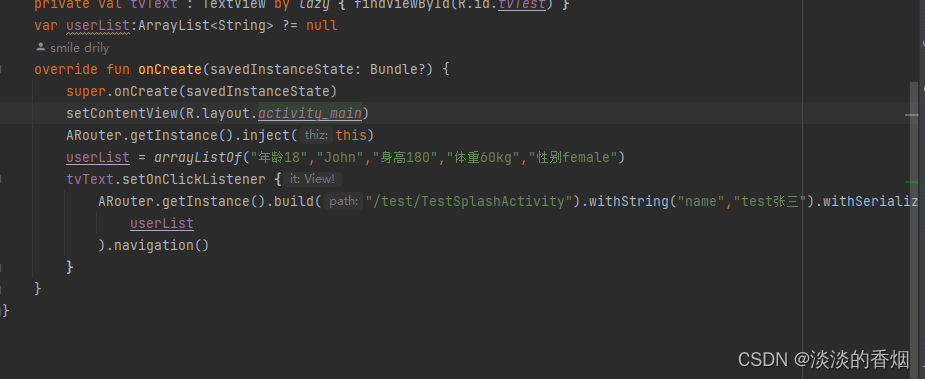
解决方法:
a.在kotlin中使用ARouter接收数据时需要使用@JvmField关键字
b.@Autowired(name = “name”),name一定要和传递时一致
c.传递数组时记得序列化,接收也是一样
15.AGP8.1.0小技巧:
15.1 在没有添加统一依赖时配置:
implementation("androidx.appcompat:appcompat:1.6.1") implementation("com.google.android.material:material:1.9.0") implementation("androidx.constraintlayout:constraintlayout:2.1.4") testImplementation("junit:junit:4.13.2") androidTestImplementation("androidx.test.ext:junit:1.1.5") androidTestImplementation("androidx.test.espresso:espresso-core:3.5.1") implementation("com.alibaba:arouter-api:1.5.2") kapt("com.alibaba:arouter-compiler:1.5.2") implementation(project(":lib-common"))- 1
- 2
- 3
- 4
- 5
- 6
- 7
- 8
- 9
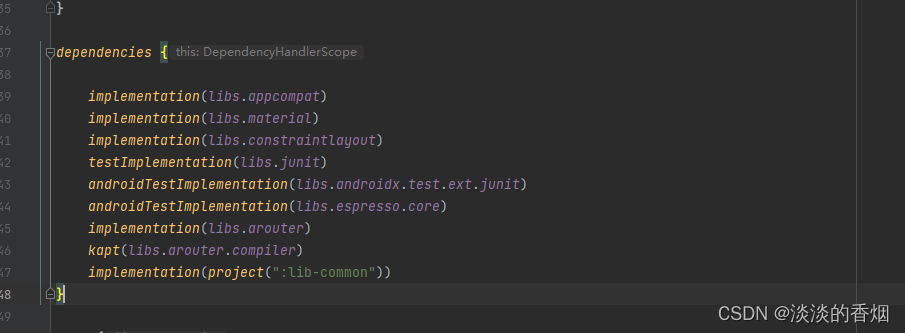
15.2 添加统一依赖库配置后:
如果添加了统一的catelog配置方式后导入依赖它会自动提示,不需要开发者手动导入,这点我感觉很爽,一键一直替换,用起来简直不要太安逸了,感兴趣的同学可以自行尝试,这里就简单举例。

16.总结:
以上就是今天博客的内容在AGP8.1.0中使用组件化和遇到问题,其实本文的目的不是在于如何使用,ARouter这个很简单,相信做过组件化的同学都会,只是需要遇到问题时学会分析和调试,要不然盲目猜测是不会有结果的。开发这条路任重而道远,希望大家都能上下求索,享受这个求索的过程,痛并快乐着,也很重要,新技术出来可以尝试,也可以根据自己需要调整,不一样说非得更新用这个新技术,只要能解决问题,咋好用咋来。
17.demo地址如下:
-
相关阅读:
【LeetCode力扣】86. 分隔链表
面试题库(七):Spring相关
LeetCode 每日一题 2022/11/21-2022/11/27
Redis-集群
指导与管理项目执行
Java 日志系列(一):详解主流日志框架Log4j、Log4j 2、JUL、Commons Logging和Slf4j&Logback
SK-Net eca注意力机制应用于ResNet (附代码)
Java Spring Boot----ruoyi项目部署 前后端分离
PPT幻灯片里的图片,批量提取
【yolox训练过程中遇到的问题集合】
- 原文地址:https://blog.csdn.net/u012556114/article/details/132579814
