-
【计算机网络】HTTP(上)
1.HTTP概念
应用层 典型的 协议 HTTP(超文本传输协议), 它是应用最广泛的协议
作用为:将任意内容拉取到本地浏览器,让浏览器进行解释

客户端client 把自己的"东西" 给别人
同时也想把 别人的"东西" 拿到自己本地
一般称为 CS 模式http中的网页文本 、图片 、视频、音频 统一称为资源
东西实际上就是资源2. URL
要访问服务器,就必须知道服务器的IP地址和端口号
需要有一个 域名解析服务
如: baidu.com (域名) 解析成 110.242.68.4(IP地址)
如:QQ官网
https 作为协议
www.qq.com 作为服务器地址server的端口号不能随意指定,必须是众所周知且不能随便更改的
端口号和成熟的应用层协议是 一 一对应的https 常用的端口号为443
http 常用的端口号为80
协议名称 和端口号之间是一对一 ,强相关
如:附近着火了,第一时间想起的就是打119 进行救火由于http是超文本传输协议,就需要告诉别人要访问什么资源

第一个 / 表示 web根目录
第二个 / 表示 路径分隔符
/ / 表示 URL想访问服务器的 什么资源? 表示区分 URL 左侧 和右侧的分隔符
? 后面跟的都是参数参数是KV的 ,=左边的 uid 可看作是K ,=右边的 1 可看作V
URL 被称为 统一资源定位符
urlencode 和 urldecode

- 只搜索 ?/#: 这些特殊符号 发现特殊符号被转化为16进制格式数字
因为URL本身用一些字符作为特殊字符,所以在使用特殊字符时,所以特殊符号被转化为16进制格式数字,用来和URL本身的特殊字符进行区分
转化的过程 被称之为 URL的 encode编码,用于解决 URL中特殊符号的问题 这个工作是由浏览器或者客户端 自动做的 - 服务器收到的就为 16进制格式,而不想要16进制格式,想要特殊符号 ,就需要进行 decode编码
转义规则
将需要转码的字符转为 16进制,然后从右到左,取4位(不足4位直接处理),每2位做一位,前面加上%,编码成%XY格式
点击查看:自动编码工具
在该网站上可以进行 urlencode 与urlencode 解码
3. HTTP的宏观理解
HTTP的请求

按照完整的说法,HTTP分为四部分
第一部分——请求行
HTTP的请求行,以行为单位,分为三部分 请求方法 URL 协议版本
请求方法: GET/ POST
URL:请求资源
协议版本:http/1.0 http/1.1 http/2.0
三部分之间用空格作为分隔符,把这三部分 分离开
第二部分——请求报头
由 Key:Value 所构成的多行结构
第三部分——空行
\r\n
第四部分——有效载荷
一般是用户可能提交的参数 (可以没有)HTTP的响应

状态行 分为 协议版本 状态码 状态码描述
三部分之间用空格作为分隔符,把这三部分 分离开
协议版本:http/1.0 http/1.1 http/2.0
状态码: 如404
状态码描述 : 404所对应的含义 如:Not Found
响应报头 也是 由Key:Value 所构成的多行结构
有效载荷 可能是 html /css的文件资源,也可能是请求对应的图片等
4. 见一见HTTP请求和响应
请求报头
当从浏览器输入 主机IP+端口号 ,Linux上显示如下数据

GET / HTTP/1.1
第一行作为 请求行
由 Key Value 构成的 多行结构 作为 请求报头
并没有包含 有效载荷
Host 表示 这次请求给哪台主机,一般为目标服务器的IP地址和端口号
Connection 表示 这次请求的链接模式 长/短链接
Cache-control 表示 双方在通信时 要建立缓存,最大缓存的生存时间默认为0(不缓存)
User_Agent 表示 HTTP请求的客户端信息
Accept_Encodong 表示 作为客户端,能接受的编码和压缩类型
Accept_Language 表示 作为客户端,能接受编码符号1. 模拟一个简单的响应response

创建一个Main.cc,通过调用 回调函数HandlerHttp的方式来实现整个过程

对于回调函数 HandlerHttp,在是一个完整的http请求报文的前提下,分别将状态行 分隔符 有效载荷 添加到 response响应中,并将 响应返回
有效载荷部分以网页部分呈现的响应报头
进行文本分析时,按行进行分割读取,直到找到一行是空行,则认为把报头读完了
报头中key 为 Content-Length ,Value 为 Body的长度(有效载荷的长度)

当在Linux上运行程序,并输入端口号时
浏览器上 输入 主机IP+端口号 ,就会使主函数 调用回调函数 打印 this a test
同时Linux会出现如下数据 响应的 状态行 响应报头 空行 有效载荷

由于有效载荷内部分为 图片、视频、音频 资源
为了便于区分 使用 Content_Type :Body的种类
图片、视频、音频 资源 这些资源本质都是文件
图片的后缀为.png
网页的后缀为.html
视频的后缀为.mp3
Linux资源都要有自己的后缀,需要告诉别人 ,就需要 Content-Type 对照表

若后缀为.html,则 Content-Type 对照表 为 text/html
若后缀为.png,则 Content-Type 对照表 为 image/png

在响应后 添加 网页的Content-Type 对照表 text/html,以及 SEP分隔符
2. 从路径中获取内容
给http维护一个自己的目录,即 wwroot
创建 index.html 里面放入这个网页中的所有资源
创建 Until.hpp
在Until这个类中,创建一个接口 ReadFile 用于读取整个文件内容
第一个参数 path 为指定的路径
第二个参数file_content 表示输出 即文件对应的内容

path表示路径,在wwwroot目录下的index.html中获取文件
将获取到的文件交给 字符串bodyReadFile函数的实现
1. 获取文件本身的大小
输入 man 2 stat
对指定的文件路径,获取它的struct stat 属性
成功返回0,失败返回-1

st_size 表示这个文件 按字节为单位的大小
st_mode: 匹配很多的宏

2. 调整string的空间 保证能够把文件全部放下

开辟size大小个空间
3. 读取

O_RDONLY 读取

path作为路径,可以找到对应 index.html的内容,再将内容传给body字符串中,作为有效载荷
3.不同资源进行区分

只有是请求,无脑响应的都是这些资源
若请求到不同的资源,应该加以区分
用户想要什么就给他什么,没有就返回404

把request 进行处理,进行反序列化,由字符串信息变成结构化字段
创建一个 HttpRequest 结构体
里面包含 状态行的请求方法、URL、请求版本以及请求报头

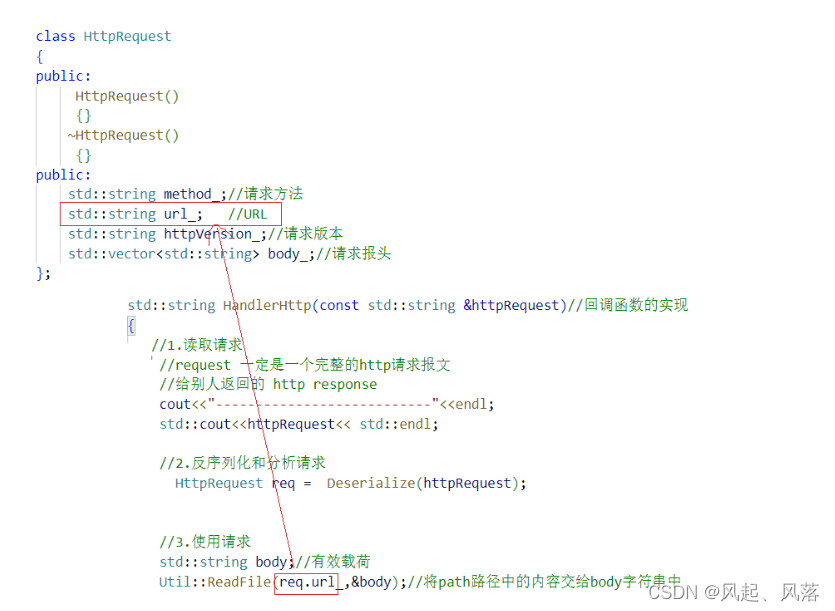
URL作为请求资源,所以将 path替换成 req.url_ 即可
反序列化的实现

在主函数Main.cc中
创建ReadOneLine函数,将message中的第一行的请求行取出
创建 ParseRequestLine函数,将 请求行解析成 请求方法、URL、协议版本两个函数都在Util.hpp中实现
ReadOneLine函数的实现

加上static修饰,是为了防止有隐藏的this指针存在
使用find函数寻找sep分隔符,若找到则返回pos位置的下标
使用substr函数 取出[0,pos]区间的子串 作为返回值
使用 erase函数 将下标从0开始 删除 pos+sep.size()个字符
ParseRequestLine函数的实现

sstream 流 按照空格作为分隔符,打印到三个string中
路径path的最终表示
路径path是需要加上 web根目录的

所以定义一个web根目录 webRoot

在使用请求时,先在路径path中 加入web根目录 ,再添加对应的 URL(请求资源)
4. 同时显示 文字 和 图片
点击查看:石榴花图片

在wwwroot中 创建 image文件,并进入inmage中
wget :远程获取资源的命令

使用 wget + 图片地址,获取图片

使用 mv 指令 ,将 原图片名字改为 1.jpg

此时在vscode中的 image 文件中,就可以显示图片了
一张网页包含很多要素资源,如:图片 文字 视频
每一个资源都要发起一次http请求在浏览器中搜索 w3cschool

在HTML教程中,找到HTML图像,其中寻找到 替换文本属性

第一个/表示 web根目录 即wwwroot
在wwroot目录下找到image文件中的 1.jpg若获取图片失败,则会显示文字 这是一张石榴花图片
由于这次资源既包含文字 又包含图片,所以类型不同,需要处理 Content-Type (body的种类)

添加成员变量,判断 要访问的是什么资源(如:图片 文字)

在反序列化函数中 使用 rfind 函数 ,从后往前 查找 字符 . ,再使用substr 函数 从下标 pos开始取len个字符
若没有给len,则一直取到path_字符串结束

在HandlerHttp函数的 使用请求中
将 Content-Type (body的种类) 进行封装成 一个GetContentType的接口GetContentType函数的实现

若后缀为.html,则 Content-Type 对照表 为 text/html
若后缀为.css,则 Content-Type 对照表 为 test/css
若后缀为.js,则 Content-Type 对照表 为 application/x-javascript
若后缀为.png,则 Content-Type 对照表 为 image/png
若后缀为.jpg,则 Content-Type 对照表 为 image/jpeg

在浏览器 输入 主机IP+端口号 ,发现图片并没有显示,而且出现了乱码

网页必须指明编码格式,否则就会出现乱码
所以修改index.html的内容

再次输入 主机IP 和端口号 就可以同时显示 文字 和图片了
5.模拟的完整代码
wwwroot
index.html(图片)
<!DOCTYPE html> <html lang="en"> <head> <meta charest="UTF-8"> <meta name="viewport" content="width=device-width" ,initial-scale=1.0"> <title>Document</title> </head> <body> <h1>this is a test </h1> <h1>this is a test </h1> <h1>this is a test </h1> <h1>this is a test </h1> <img src="/image/1.jpg" alt="这是一张石榴花图片"> </body> </html>- 1
- 2
- 3
- 4
- 5
- 6
- 7
- 8
- 9
- 10
- 11
- 12
- 13
- 14
- 15
- 16
- 17
- 18
Err.hpp(错误)
#pragma once enum { USAGE_ERR=1, SOCKET_ERR,//2 BIND_ERR,//3 LISTEN_ERR,//4 SETSID_ERR,//5 OPEN_ERR//6 };- 1
- 2
- 3
- 4
- 5
- 6
- 7
- 8
- 9
- 10
- 11
- 12
- 13
- 14
- 15
HttpServer.hpp(初始化和启动)
#include#include #include #include #include"Sock.hpp" static const uint16_t defaultport=8888;//默认端口号 class HttpServer; //定义 func_t 类型 为 返回值为string 参数为string的包装器 using func_t =std::function<std::string( std::string&)>; class ThreadData { public: ThreadData(int sock,std::string ip,const uint16_t& port,HttpServer*tsvrp)//构造 :_sock(sock),_ip(ip),_port(port),_tsvrp(tsvrp) {} ~ThreadData() {} public: int _sock;//套接字 HttpServer *_tsvrp;//指针指向Tcp服务器 std::string _ip; uint16_t _port; }; class HttpServer { public: HttpServer(func_t f,int port= defaultport) :func(f),port_(port) {} void InitServer()//初始化 { listensock_.Socket();//创建套接字 listensock_.Bind(port_);//绑定 listensock_.Listen();//监听 } void HandlerHttpRequest(int sock)// { char buffer[4096]; std::string request; //将套接字的数据读取到buffer中 ssize_t s=recv(sock,buffer,sizeof(buffer)-1,0); if(s>0)//读取成功 { buffer[s]=0;//将'\0'赋值给buffer中 request=buffer; std::string response =func(request);//回调函数 将request变为response send(sock,response.c_str(),response.size(),0);//发送 将respnse中的内容 发送到sock套接字中 } else { //读取失败 logMessage(Info,"client quit ...");//打印日志 } } static void* threadRoutine(void *args) { //线程分离 若不关心线程返回值 则提前告诉它 要进行分离 pthread_detach(pthread_self()); ThreadData* td=(ThreadData*)args; td->_tsvrp->HandlerHttpRequest(td->_sock); close(td->_sock); delete td; return nullptr; } void Start()//启动 { for(;;) { std::string clientip; uint16_t clientport; int sock=listensock_.Accept(&clientip,&clientport);//获取客户端IP和端口号 if(sock<0) { continue; } pthread_t tid; ThreadData *td =new ThreadData(sock,clientip,clientport,this); pthread_create(&tid,nullptr,threadRoutine,td); } } ~HttpServer() {} private: int port_; //端口号 Sock listensock_;//套接字 func_t func; //包装器类型的回调函数 }; - 1
- 2
- 3
- 4
- 5
- 6
- 7
- 8
- 9
- 10
- 11
- 12
- 13
- 14
- 15
- 16
- 17
- 18
- 19
- 20
- 21
- 22
- 23
- 24
- 25
- 26
- 27
- 28
- 29
- 30
- 31
- 32
- 33
- 34
- 35
- 36
- 37
- 38
- 39
- 40
- 41
- 42
- 43
- 44
- 45
- 46
- 47
- 48
- 49
- 50
- 51
- 52
- 53
- 54
- 55
- 56
- 57
- 58
- 59
- 60
- 61
- 62
- 63
- 64
- 65
- 66
- 67
- 68
- 69
- 70
- 71
- 72
- 73
- 74
- 75
- 76
- 77
- 78
- 79
- 80
- 81
- 82
- 83
- 84
- 85
- 86
- 87
- 88
- 89
- 90
- 91
- 92
- 93
- 94
- 95
- 96
- 97
- 98
- 99
- 100
- 101
- 102
- 103
- 104
- 105
- 106
- 107
Log.hpp(日志)
#pragma once #include#include #include #include #include #include #include #include const std::string filename="tecpserver.log"; //日志等级 enum{ Debug=0, // 用于调试 Info , //1 常规 Warning, //2 告警 Error , //3 一般错误 Tatal , //4 致命错误 Uknown//未知错误 }; static std::string tolevelstring(int level)//将数字转化为字符串 { switch(level) { case Debug : return "Debug"; case Info : return "Info"; case Warning : return "Warning"; case Error : return "Error"; case Tatal : return "Tatal"; default: return "Uknown"; } } std::string gettime()//获取时间 { time_t curr=time(nullptr);//获取time_t struct tm *tmp=localtime(&curr);//将time_t 转换为 struct tm结构体 char buffer[128]; snprintf(buffer,sizeof(buffer),"%d-%d-%d %d:%d:%d",tmp->tm_year+1900,tmp->tm_mon+1,tmp->tm_mday, tmp->tm_hour,tmp->tm_min,tmp->tm_sec); return buffer; } void logMessage(int level, const char*format,...) { //日志左边部分的实现 char logLeft[1024]; std::string level_string=tolevelstring(level); std::string curr_time=gettime(); snprintf(logLeft,sizeof(logLeft),"%s %s %d",level_string.c_str(),curr_time.c_str()); //日志右边部分的实现 char logRight[1024]; va_list p;//p可以看作是1字节的指针 va_start(p,format);//将p指向最开始 vsnprintf(logRight,sizeof(logRight),format,p); va_end(p);//将指针置空 //打印日志 printf("%s%s\n",logLeft,logRight); //保存到文件中 FILE*fp=fopen( filename.c_str(),"a");//以追加的方式 将filename文件打开 //fopen打开失败 返回空指针 if(fp==nullptr) { return; } fprintf(fp,"%s%s\n",logLeft,logRight);//将对应的信息格式化到流中 fflush(fp);//刷新缓冲区 fclose(fp); } - 1
- 2
- 3
- 4
- 5
- 6
- 7
- 8
- 9
- 10
- 11
- 12
- 13
- 14
- 15
- 16
- 17
- 18
- 19
- 20
- 21
- 22
- 23
- 24
- 25
- 26
- 27
- 28
- 29
- 30
- 31
- 32
- 33
- 34
- 35
- 36
- 37
- 38
- 39
- 40
- 41
- 42
- 43
- 44
- 45
- 46
- 47
- 48
- 49
- 50
- 51
- 52
- 53
- 54
- 55
- 56
- 57
- 58
- 59
- 60
- 61
- 62
- 63
- 64
- 65
- 66
- 67
- 68
- 69
- 70
- 71
- 72
- 73
- 74
- 75
Main.cc(回调函数调用)
#include#include #include"HttpServer.hpp" #include"Util.hpp" using namespace std; const std::string SEP="\r\n"; const std::string defaultHomePage ="index.html";//默认首页 const std::string webRoot="./wwwroot";//web根目录 class HttpRequest { public: HttpRequest() :path_(webRoot) {} ~HttpRequest() {} void Print() { logMessage(Debug,"method:%s,url:%s,version:%s",method_.c_str(),url_.c_str(),httpVersion_.c_str()); /*for(const auto&line:body_) { logMessage(Debug,"-%s",line.c_str()); } */ logMessage(Debug,"path:%s",path_.c_str()); logMessage(Debug,"suffix:%s",suffix_.c_str()); } public: std::string method_;//请求方法 std::string url_; //URL std::string httpVersion_;//请求版本 std::vector<std::string> body_;//请求报头 std::string path_; //想要访问的资源 std::string suffix_;//后缀 用于判断访问是什么资源 }; //反序列化 将字符串转化为 HttpRequest结构体 HttpRequest Deserialize(std::string &message) { HttpRequest req; std::string line=Util::ReadOneLine(message,SEP);//在message中根据分隔符读走状态行 //将请求行分为 请求方法 URL 协议版本 Util::ParseRequestLine(line,&req.method_,&req.url_,&req.httpVersion_);//解析请求行 logMessage(Info,"method:%s,url:%s,version:%s",req.method_.c_str(),req.url_.c_str(),req.httpVersion_.c_str()); //将状态行处理后,剩余请求报头,每一次取一行 将其放入body中 while(!message.empty()) { line=Util::ReadOneLine(message,SEP); req.body_.push_back(line); } req.path_ += req.url_; //path_在构造时,已经默认为web根目录了,所以只需加上资源即可 //只有一个'/',需加上默认首页 if(req.path_[req.path_.size()-1]=='/') { req.path_+= defaultHomePage; } auto pos=req.path_.rfind("."); if( pos==std::string::npos)//没找到 { req.suffix_=".html";//默认为html } else { req.suffix_=req.path_.substr(pos); } return req; } std::string GetContentType(std::string &suffix)//判断是哪一种资源的后缀 { std::string content_type =" Content-Type: "; if(suffix==".html"|| suffix==".htm") { content_type+="text/html"; } else if(suffix==".css ") { content_type+="text/css"; } else if(suffix==".js") { content_type+="application/x-javascript"; } else if(suffix==".png") { content_type+="image/png"; } else if(suffix==".jpg") { content_type+="image/jpeg"; } else {} return content_type+SEP; } std::string HandlerHttp( std::string &message)//回调函数的实现 { //1.读取请求 //request 一定是一个完整的http请求报文 //给别人返回的 http response cout<<"---------------------------"<<endl; //2.反序列化和分析请求 HttpRequest req = Deserialize(message); req.Print(); //3.使用请求 std::string body;//有效载荷 Util::ReadFile(req.path_,&body);//将path路径中的内容交给body字符串中 //做一次响应 //状态行 : 协议版本 状态码 状态码描述 //200表示请求是正确的 std::string response="HTTP/1.0 200 OK"+SEP;//状态码 //Content-Length获取有效载荷长度 response+="Content-Length: "+std::to_string(body.size())+SEP;//响应报头 response+=GetContentType(req.suffix_); response += SEP; //分隔符 response += body; //有效载荷 return response; } int main(int argc,char* argv[]) { if(argc!=2) { exit(USAGE_ERR); } uint16_t port=atoi(argv[1]); std::unique_ptr<HttpServer> tsvr(new HttpServer(HandlerHttp,port)); tsvr->InitServer(); tsvr->Start(); return 0; } - 1
- 2
- 3
- 4
- 5
- 6
- 7
- 8
- 9
- 10
- 11
- 12
- 13
- 14
- 15
- 16
- 17
- 18
- 19
- 20
- 21
- 22
- 23
- 24
- 25
- 26
- 27
- 28
- 29
- 30
- 31
- 32
- 33
- 34
- 35
- 36
- 37
- 38
- 39
- 40
- 41
- 42
- 43
- 44
- 45
- 46
- 47
- 48
- 49
- 50
- 51
- 52
- 53
- 54
- 55
- 56
- 57
- 58
- 59
- 60
- 61
- 62
- 63
- 64
- 65
- 66
- 67
- 68
- 69
- 70
- 71
- 72
- 73
- 74
- 75
- 76
- 77
- 78
- 79
- 80
- 81
- 82
- 83
- 84
- 85
- 86
- 87
- 88
- 89
- 90
- 91
- 92
- 93
- 94
- 95
- 96
- 97
- 98
- 99
- 100
- 101
- 102
- 103
- 104
- 105
- 106
- 107
- 108
- 109
- 110
- 111
- 112
- 113
- 114
- 115
- 116
- 117
- 118
- 119
- 120
- 121
- 122
- 123
- 124
- 125
- 126
- 127
- 128
- 129
- 130
- 131
- 132
- 133
- 134
- 135
- 136
- 137
- 138
- 139
- 140
- 141
- 142
- 143
- 144
- 145
- 146
- 147
- 148
- 149
- 150
- 151
- 152
- 153
- 154
- 155
- 156
- 157
- 158
- 159
- 160
makefile
httserver:Main.cc g++ -o $@ $^ -std=c++11 -lpthread .PHONY:clean clean: rm -f httserver- 1
- 2
- 3
- 4
- 5
Sock.hpp(TCP套接字)
#include#include #include #include #include #include #include #include"Log.hpp" #include"Err.hpp" static const int gbacklog=32; static const int defaultfd=-1; class Sock { public: Sock() //构造 :_sock(defaultfd) { } void Socket()//创建套接字 { _sock=socket(AF_INET,SOCK_STREAM,0); if(_sock<0)//套接字创建失败 { logMessage( Tatal,"socket error,code:%s,errstring:%s",errno,strerror(errno)); exit(SOCKET_ERR); } } void Bind(uint16_t port)//绑定 { struct sockaddr_in local; memset(&local,0,sizeof(local));//清空 local.sin_family=AF_INET;//16位地址类型 local.sin_port= htons(port); //端口号 local.sin_addr.s_addr= INADDR_ANY;//IP地址 //若小于0,则绑定失败 if(bind(_sock,(struct sockaddr*)&local,sizeof(local))<0) { logMessage( Tatal,"bind error,code:%s,errstring:%s",errno,strerror(errno)); exit(BIND_ERR); } } void Listen()//将套接字设置为监听状态 { //小于0则监听失败 if(listen(_sock,gbacklog)<0) { logMessage( Tatal,"listen error,code:%s,errstring:%s",errno,strerror(errno)); exit(LISTEN_ERR); } } int Accept(std::string *clientip,uint16_t * clientport)//获取连接 { struct sockaddr_in temp; socklen_t len=sizeof(temp); int sock=accept(_sock,(struct sockaddr*)&temp,&len); if(sock<0) { logMessage(Warning,"accept error,code:%s,errstring:%s",errno,strerror(errno)); } else { //inet_ntoa 4字节风格IP转化为字符串风格IP *clientip = inet_ntoa(temp.sin_addr) ; //客户端IP地址 //ntohs 网络序列转主机序列 *clientport= ntohs(temp.sin_port);//客户端的端口号 } return sock;//返回新获取的套接字 } int Connect(const std::string&serverip,const uint16_t &serverport )//发起链接 { struct sockaddr_in server; memset(&server,0,sizeof(server));//清空 server.sin_family=AF_INET;//16位地址类型 server.sin_port=htons(serverport);//端口号 //inet_addr 字符串风格IP转化为4字节风格IP server.sin_addr.s_addr=inet_addr(serverip.c_str());//IP地址 //成功返回0,失败返回-1 return connect(_sock, (struct sockaddr*)&server,sizeof(server)); } int Fd() { return _sock; } void Close() { if(_sock!=defaultfd) { close(_sock); } } ~Sock()//析构 { } private: int _sock; }; - 1
- 2
- 3
- 4
- 5
- 6
- 7
- 8
- 9
- 10
- 11
- 12
- 13
- 14
- 15
- 16
- 17
- 18
- 19
- 20
- 21
- 22
- 23
- 24
- 25
- 26
- 27
- 28
- 29
- 30
- 31
- 32
- 33
- 34
- 35
- 36
- 37
- 38
- 39
- 40
- 41
- 42
- 43
- 44
- 45
- 46
- 47
- 48
- 49
- 50
- 51
- 52
- 53
- 54
- 55
- 56
- 57
- 58
- 59
- 60
- 61
- 62
- 63
- 64
- 65
- 66
- 67
- 68
- 69
- 70
- 71
- 72
- 73
- 74
- 75
- 76
- 77
- 78
- 79
- 80
- 81
- 82
- 83
- 84
- 85
- 86
- 87
- 88
- 89
- 90
- 91
- 92
- 93
- 94
- 95
- 96
- 97
- 98
- 99
- 100
- 101
- 102
- 103
- 104
- 105
- 106
- 107
- 108
- 109
- 110
- 111
- 112
- 113
- 114
- 115
Until.hpp
#pragma once #include#include #include #include #include #include #include #include"Log.hpp" class Util { public: static bool ReadFile(const std::string &path,std::string *fileContent )//读取整个文件内容 { //1.获取文件本身的大小 struct stat st;//定义一个struct stat 类型的结构体 int n=stat(path.c_str(),&st); if(n<0)//读取失败 { return false; } int size = st.st_size; //2.调整string的空间 fileContent->resize(size); //3.读取 int fd=open(path.c_str(),O_RDONLY); if(fd<0)//读取失败 { return false; } read(fd,(char*)fileContent->c_str(),size);//从文件fd中读取,放到fileContent close(fd); logMessage( Info,"read file %s done ",path.c_str()); return true; } //在message中根据分隔符取出状态行 static std::string ReadOneLine( std:: string &message,const std::string &sep) { auto pos=message.find(sep);//查找sep分隔符,找到则返回pos位置的下标 while(pos==std::string::npos)//没找到 { return ""; } std::string s=message.substr(0,pos);//取[0,pos]区间作为子串 message.erase(0,pos+sep.size());从下标为0处开始 删除pos+sep.size()个字符 return s; } //将请求行分=解析为 请求方法 URL 协议版本 static bool ParseRequestLine(const std::string &line,std::string * method,std::string *url,std::string *httpVersion) { //以空格为单位,对内容做提取 std::stringstream ss(line); ss >> *method >> *url >> *httpVersion; return true; } }; - 1
- 2
- 3
- 4
- 5
- 6
- 7
- 8
- 9
- 10
- 11
- 12
- 13
- 14
- 15
- 16
- 17
- 18
- 19
- 20
- 21
- 22
- 23
- 24
- 25
- 26
- 27
- 28
- 29
- 30
- 31
- 32
- 33
- 34
- 35
- 36
- 37
- 38
- 39
- 40
- 41
- 42
- 43
- 44
- 45
- 46
- 47
- 48
- 49
- 50
- 51
- 52
- 53
- 54
- 55
- 56
- 57
- 58
- 59
- 60
- 61
- 62
- 63
- 64
- 65
- 66
- 67
- 68
- 69
- 70
- 71
- 只搜索 ?/#: 这些特殊符号 发现特殊符号被转化为16进制格式数字
-
相关阅读:
面试20场,我总结了面试问题及解答!激光+IMU融合定位方向
(其他) 剑指 Offer 64. 求1+2+…+n ——【Leetcode每日一题】
JVM类装载器详解
uniapp+vue3使用pinia,安卓端报错白屏
JavaScript-Ajax-axios-Xhr
JS基础语法
Codeforces Round 924 (Div. 2)---->B. Equalize
go-zero 微服务实战系列(一、开篇)
如何用 express 接收文件 formdata js
OSI体系结构和TCP/IP体系结构
- 原文地址:https://blog.csdn.net/qq_62939852/article/details/132650575