-
Unity 工具 之 Azure 微软语音合成普通方式和流式获取音频数据的简单整理
Unity 工具 之 Azure 微软语音合成普通方式和流式获取音频数据的简单整理
目录
Unity 工具 之 Azure 微软语音合成普通方式和流式获取音频数据的简单整理
一、简单介绍
Unity 工具类,自己整理的一些游戏开发可能用到的模块,单独独立使用,方便游戏开发。
本节介绍,这里在使用微软的Azure 进行语音合成的两个方法的做简单整理,这里简单说明,如果你有更好的方法,欢迎留言交流。
官网注册:
面向学生的 Azure - 免费帐户额度 | Microsoft Azure
官网技术文档网址:
官网的TTS:
文本转语音快速入门 - 语音服务 - Azure Cognitive Services | Microsoft Learn
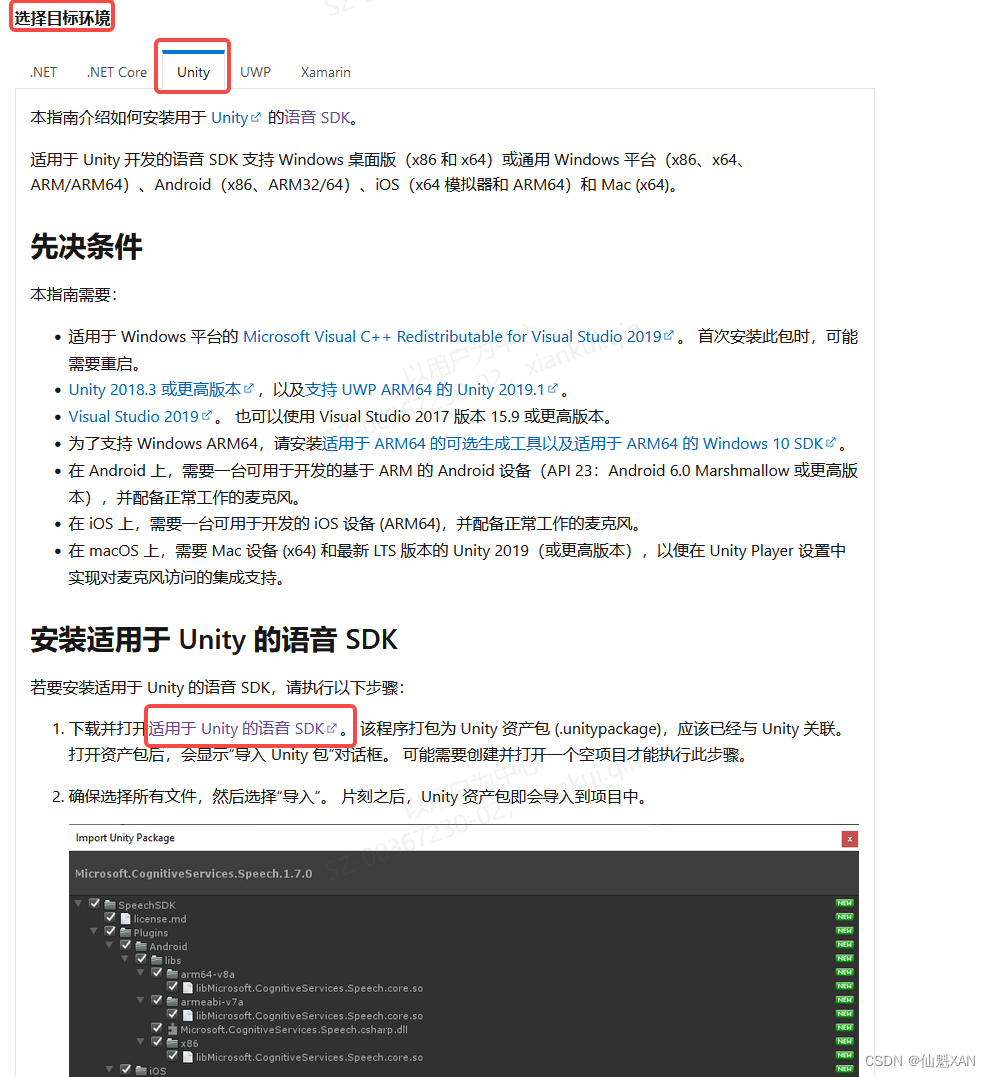
Azure Unity SDK 包官网:
安装语音 SDK - Azure Cognitive Services | Microsoft Learn
SDK具体链接:
https://aka.ms/csspeech/unitypackage
二、实现原理
1、官网申请得到语音合成对应的 SPEECH_KEY 和 SPEECH_REGION
2、然后对应设置 语言 和需要的声音 配置
3、使用 普通方式 和 流式获取得到音频数据,在声源中播放即可
三、注意实现
1、在合成语音文本较长的情况下,流式获取的速度明显会优于普通的方式
2、目前流式获取的方式,我是暂时没有好的方式管理网络错误和音频播放结束的事件
(如果有兄弟集美们知道,还请留言赐教哈)
四、实现步骤
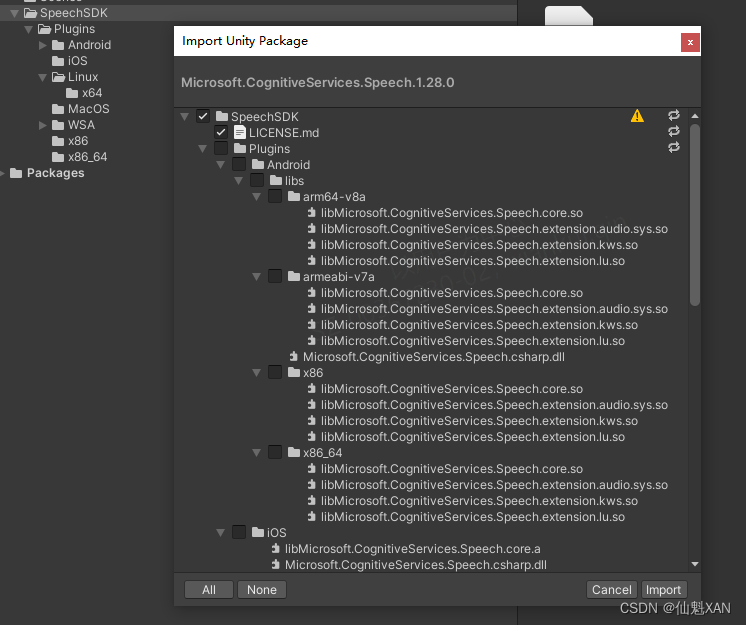
1、下载好SDK 导入
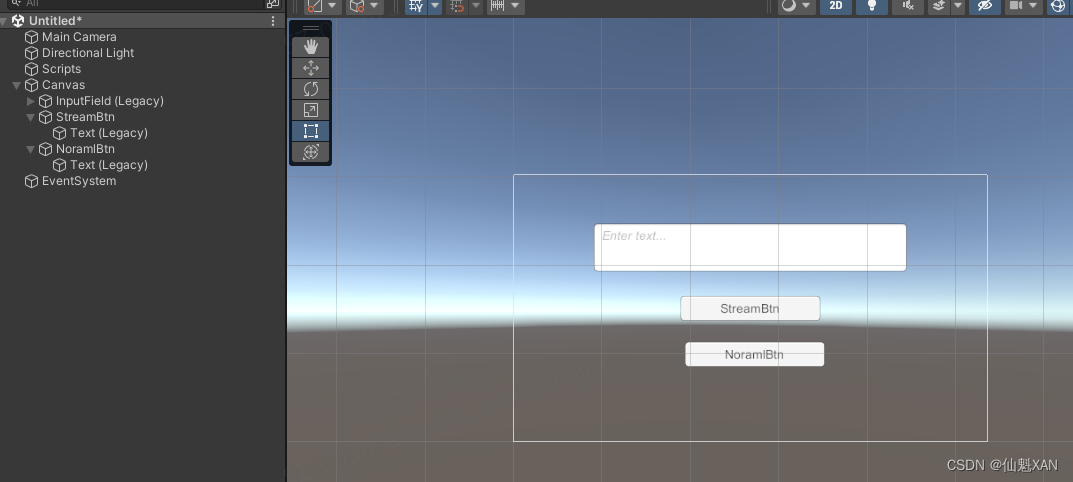
2、简单的搭建场景
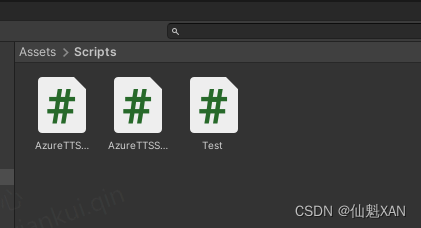
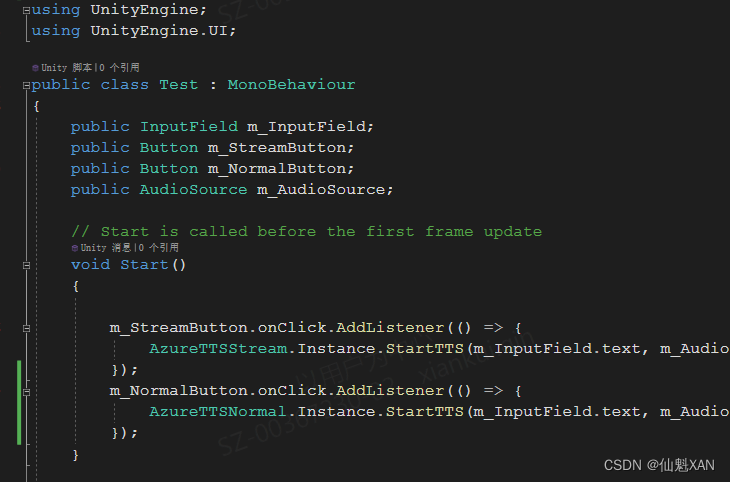
3、写测试脚本,和普通获取和流式获取方式
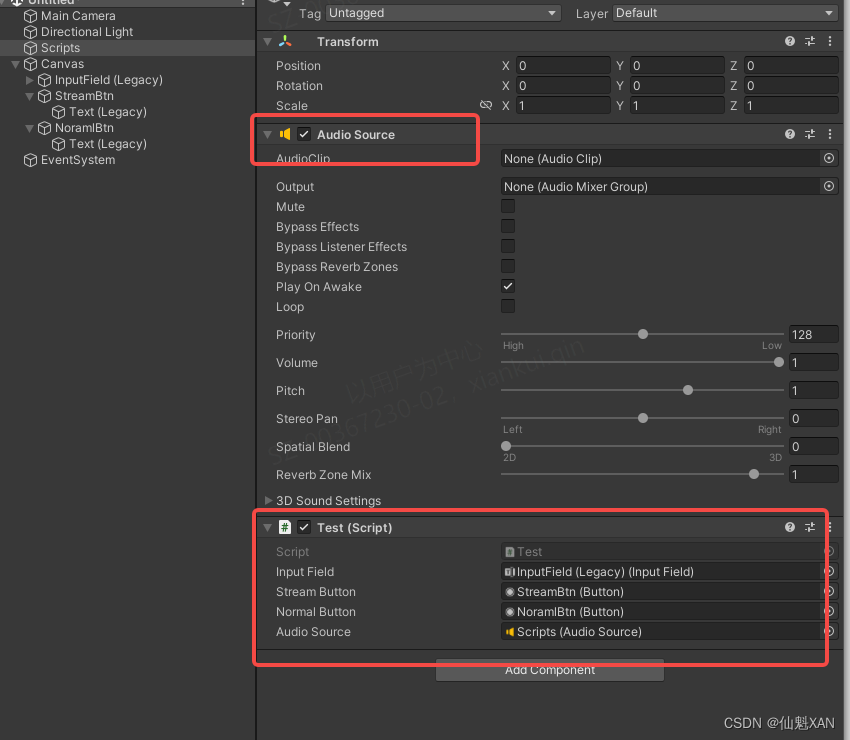
4、把测试脚本添加到场景中,并赋值
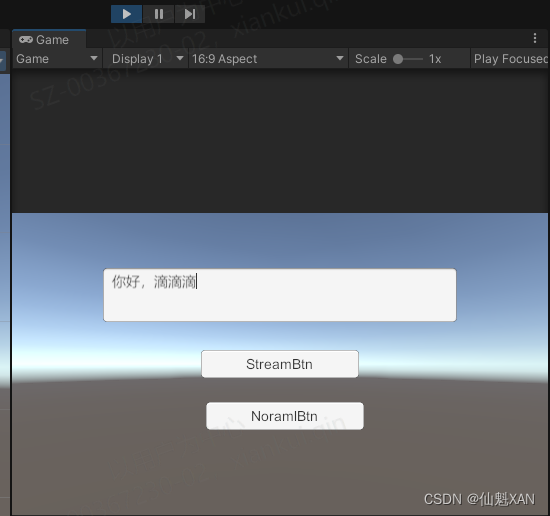
5、运行,输入文字,点击对应按钮即可
六、关键脚本
1、Test
- using UnityEngine;
- using UnityEngine.UI;
- public class Test : MonoBehaviour
- {
- public InputField m_InputField;
- public Button m_StreamButton;
- public Button m_NormalButton;
- public AudioSource m_AudioSource;
- // Start is called before the first frame update
- void Start()
- {
- m_StreamButton.onClick.AddListener(() => {
- AzureTTSStream.Instance.StartTTS(m_InputField.text, m_AudioSource);
- });
- m_NormalButton.onClick.AddListener(() => {
- AzureTTSNormal.Instance.StartTTS(m_InputField.text, m_AudioSource);
- });
- }
- }
2、AzureTTSNormal
- using Microsoft.CognitiveServices.Speech;
- using System;
- using System.Collections;
- using UnityEngine;
- public class AzureTTSNormal : MonoSingleton<AzureTTSNormal>
- {
- private AudioSource m_AudioSource;
- private string m_SubscriptionKey = "Your";
- private string m_Region = "Your";
- private string m_SpeechSynthesisLanguage = "zh-CN";
- private string m_SpeechSynthesisVoiceName = "zh-CN-XiaochenNeural";
- private Coroutine m_TTSCoroutine;
- ///
- /// 你的授权
- ///
- /// 子脚本的Key
- /// 地区
- public void SetAzureAuthorization(string subscriptionKey, string region)
- {
- m_SubscriptionKey = subscriptionKey;
- m_Region = region;
- }
- ///
- /// 设置语音和声音
- ///
- /// 语言
- /// 声音
- public void SetLanguageVoiceName(SpeechSynthesisLanguage language, SpeechSynthesisVoiceName voiceName)
- {
- m_SpeechSynthesisLanguage = language.ToString().Replace('_', '-');
- m_SpeechSynthesisVoiceName = voiceName.ToString().Replace('_', '-');
- }
- ///
- /// 设置音源
- ///
- ///
- public void SetAudioSource(AudioSource audioSource)
- {
- m_AudioSource = audioSource;
- }
- ///
- /// 开始TTS
- ///
- ///
- ///
- public void StartTTS(string spkMsg, Action<string> errorAction = null)
- {
- StopTTS();
- m_TTSCoroutine = StartCoroutine(SynthesizeAudioCoroutine(spkMsg, errorAction));
- }
- ///
- /// 开始TTS
- ///
- ///
- ///
- ///
- public void StartTTS(string spkMsg, AudioSource audioSource, Action<string> errorAction = null)
- {
- SetAudioSource(audioSource);
- StartTTS(spkMsg, errorAction);
- }
- ///
- /// 暂停TTS
- ///
- public void StopTTS()
- {
- if (m_TTSCoroutine != null)
- {
- StopCoroutine(m_TTSCoroutine);
- m_TTSCoroutine = null;
- }
- if (m_AudioSource != null)
- {
- m_AudioSource.Stop();
- m_AudioSource.clip = null;
- }
- }
- public IEnumerator SynthesizeAudioCoroutine(string spkMsg, Action<string> errorAction)
- {
- yield return null;
- var config = SpeechConfig.FromSubscription(m_SubscriptionKey, m_Region);
- config.SpeechSynthesisLanguage = m_SpeechSynthesisLanguage;
- config.SpeechSynthesisVoiceName = m_SpeechSynthesisVoiceName;
- // Creates a speech synthesizer.
- // Make sure to dispose the synthesizer after use!
- using (var synthsizer = new SpeechSynthesizer(config, null))
- {
- // Starts speech synthesis, and returns after a single utterance is synthesized.
- var result = synthsizer.SpeakTextAsync(spkMsg).Result;
- //print("after " + DateTime.Now);
- // Checks result.
- string newMessage = string.Empty;
- if (result.Reason == ResultReason.SynthesizingAudioCompleted)
- {
- // Since native playback is not yet supported on Unity yet (currently only supported on Windows/Linux Desktop),
- // use the Unity API to play audio here as a short term solution.
- // Native playback support will be added in the future release.
- var sampleCount = result.AudioData.Length / 2;
- var audioData = new float[sampleCount];
- for (var i = 0; i < sampleCount; ++i)
- {
- audioData[i] = (short)(result.AudioData[i * 2 + 1] << 8 | result.AudioData[i * 2]) / 32768.0F;
- }
- // The default output audio format is 16K 16bit mono
- var audioClip = AudioClip.Create("SynthesizedAudio", sampleCount, 1, 16000, false);
- audioClip.SetData(audioData, 0);
- m_AudioSource.clip = audioClip;
- Debug.Log(" audioClip.length " + audioClip.length);
- m_AudioSource.Play();
- }
- else if (result.Reason == ResultReason.Canceled)
- {
- var cancellation = SpeechSynthesisCancellationDetails.FromResult(result);
- newMessage = $"CANCELED:\nReason=[{cancellation.Reason}]\nErrorDetails=[{cancellation.ErrorDetails}]\nDid you update the subscription info?";
- Debug.Log(" newMessage "+ newMessage);
- if (errorAction!=null) { errorAction.Invoke(newMessage); }
- }
- }
- }
- }
3、AzureTTSStream
- using UnityEngine;
- using Microsoft.CognitiveServices.Speech;
- using System.IO;
- using System;
- using System.Collections;
- public class AzureTTSStream : MonoSingleton<AzureTTSStream>
- {
- private AudioSource m_AudioSource;
- private string m_SubscriptionKey = "Your";
- private string m_Region = "Your";
- private string m_SpeechSynthesisLanguage = "zh-CN";
- private string m_SpeechSynthesisVoiceName = "zh-CN-XiaochenNeural";
- public const int m_SampleRate = 16000;
- public const int m_BufferSize = m_SampleRate * 60; //最大支持60s音频,但是也可以调大,流式的无所谓
- public const int m_UpdateSize = m_SampleRate / 10; //采样容量,越大越卡
- private Coroutine m_TTSCoroutine;
- private int m_DataIndex = 0;
- private AudioDataStream m_AudioDataStream;
- private void OnEnable()
- {
- StopTTS();
- }
- private void OnDisable()
- {
- StopTTS();
- }
- ///
- /// 你的授权
- ///
- /// 子脚本的Key
- /// 地区
- public void SetAzureAuthorization(string subscriptionKey, string region)
- {
- m_SubscriptionKey = subscriptionKey;
- m_Region = region;
- }
- ///
- /// 设置语音和声音
- ///
- /// 语言
- /// 声音
- public void SetLanguageVoiceName(SpeechSynthesisLanguage language, SpeechSynthesisVoiceName voiceName)
- {
- m_SpeechSynthesisLanguage = language.ToString().Replace('_', '-');
- m_SpeechSynthesisVoiceName = voiceName.ToString().Replace('_', '-');
- }
- ///
- /// 设置音源
- ///
- ///
- public void SetAudioSource(AudioSource audioSource)
- {
- m_AudioSource = audioSource;
- }
- ///
- /// 开始TTS
- ///
- ///
- ///
- public void StartTTS(string spkMsg, Action<string> errorAction = null)
- {
- StopTTS();
- m_TTSCoroutine = StartCoroutine(SynthesizeAudioCoroutine(spkMsg, errorAction));
- }
- ///
- /// 开始TTS
- ///
- ///
- ///
- ///
- public void StartTTS(string spkMsg, AudioSource audioSource, Action<string> errorAction = null)
- {
- SetAudioSource(audioSource);
- StartTTS(spkMsg, errorAction);
- }
- ///
- /// 暂停TTS
- ///
- public void StopTTS()
- {
- // 释放流
- if (m_AudioDataStream != null)
- {
- m_AudioDataStream.Dispose();
- m_AudioDataStream = null;
- }
- if (m_TTSCoroutine != null)
- {
- StopCoroutine(m_TTSCoroutine);
- m_TTSCoroutine = null;
- }
- if (m_AudioSource != null)
- {
- m_AudioSource.Stop();
- m_AudioSource.clip = null;
- m_DataIndex = 0;
- }
- }
- ///
- /// 发起TTS
- ///
- /// TTS的文本
- /// 错误事件(目前没有好的判断方法)
- ///
- private IEnumerator SynthesizeAudioCoroutine(string speakMsg, Action<string> errorAction)
- {
- var config = SpeechConfig.FromSubscription(m_SubscriptionKey, m_Region);
- config.SpeechSynthesisLanguage = m_SpeechSynthesisLanguage;
- config.SpeechSynthesisVoiceName = m_SpeechSynthesisVoiceName;
- var audioClip = AudioClip.Create("SynthesizedAudio", m_BufferSize, 1, m_SampleRate, false);
- m_AudioSource.clip = audioClip;
- using (var synthesizer = new SpeechSynthesizer(config, null))
- {
- var result = synthesizer.StartSpeakingTextAsync(speakMsg);
- yield return new WaitUntil(() => result.IsCompleted);
- m_AudioSource.Play();
- using (m_AudioDataStream = AudioDataStream.FromResult(result.Result))
- {
- MemoryStream memStream = new MemoryStream();
- byte[] buffer = new byte[m_UpdateSize * 2];
- uint bytesRead;
- do
- {
- bytesRead = m_AudioDataStream.ReadData(buffer);
- memStream.Write(buffer, 0, (int)bytesRead);
- if (memStream.Length >= m_UpdateSize * 2)
- {
- var tempData = memStream.ToArray();
- var audioData = new float[m_UpdateSize];
- for (int i = 0; i < m_UpdateSize; ++i)
- {
- audioData[i] = (short)(tempData[i * 2 + 1] << 8 | tempData[i * 2]) / 32768.0F;
- }
- audioClip.SetData(audioData, m_DataIndex);
- m_DataIndex = (m_DataIndex + m_UpdateSize) % m_BufferSize;
- memStream = new MemoryStream();
- yield return null;
- }
- } while (bytesRead > 0);
- }
- }
- if (m_DataIndex == 0)
- {
- if (errorAction != null)
- {
- errorAction.Invoke(" AudioData error");
- }
- }
- }
- }
- ///
- /// 添加更多的其他语言
- /// 形式类似为 Zh_CN 对应 "zh-CN";
- ///
- public enum SpeechSynthesisLanguage
- {
- Zh_CN,
- }
- ///
- /// 添加更多的其他声音
- /// 形式类似为 Zh_CN_XiaochenNeural 对应 "zh-CN-XiaochenNeural";
- ///
- public enum SpeechSynthesisVoiceName
- {
- Zh_CN_XiaochenNeural,
- }
4、MonoSingleton
- using UnityEngine;
- public class MonoSingleton<T> : MonoBehaviour where T : MonoBehaviour
- {
- private static T instance;
- public static T Instance
- {
- get
- {
- if (instance == null)
- {
- // 查找存在的实例
- instance = (T)FindObjectOfType(typeof(T));
- // 如果不存在实例,则创建
- if (instance == null)
- {
- // 需要创建一个游戏对象,再把这个单例组件挂载到游戏对象上
- var singletonObject = new GameObject();
- instance = singletonObject.AddComponent
(); - singletonObject.name = typeof(T).ToString() + " (Singleton)";
- // 让实例不在切换场景时销毁
- DontDestroyOnLoad(singletonObject);
- }
- }
- return instance;
- }
- }
- }
优化流式读取数据的卡顿
- using FfalconXR;
- using Microsoft.CognitiveServices.Speech;
- using System;
- using System.Collections;
- using System.IO;
- using System.Threading.Tasks;
- using System.Threading;
- using UnityEngine;
- public class AzureTTSStream : MonoSingleton<AzureTTSStream>
- {
- const string TAG = "【Unity AzureTTS】";
- bool m_IsShowLog=true;
- private AudioSource m_AudioSource;
- private string m_SubscriptionKey = "YOUR_KEY";
- private string m_Region = "eastasia";
- private string m_SpeechSynthesisLanguage = "zh-CN"; //"zh-cn-sichuan";
- private string m_SpeechSynthesisVoiceName = "zh-CN-XiaochenNeural"; // "zh-cn-sichuan-YunxiNeural"; //"zh-cn-shaanxi-XiaoniNeural";
- public const int m_SampleRate = 16000;
- public const int m_BufferSize = m_SampleRate * 60; //最大支持60s音频,但是也可以调大,流式的无所谓
- public const int m_UpdateSize = m_SampleRate / 10; //采样容量,越大越卡
- private Coroutine m_TTSCoroutine;
- private int m_DataIndex = 0;
- private SpeechConfig m_SpeechConfig;
- private AudioDataStream m_AudioDataStream;
- private Task m_Task;
- private CancellationTokenSource m_CancellationTokenSource;
- private SpeechSynthesizer m_SpeechSynthesizer;
- private bool m_IsSpeechSynthesizerInitialized;
- protected override void Awake()
- {
- base.Awake();
- m_SpeechConfig = SpeechConfig.FromSubscription(m_SubscriptionKey, m_Region);
- m_SpeechConfig.SpeechSynthesisLanguage = m_SpeechSynthesisLanguage;
- m_SpeechConfig.SpeechSynthesisVoiceName = m_SpeechSynthesisVoiceName;
- }
- private void Start()
- {
- InitializeSpeechSynthesizer();
- }
- private void OnEnable()
- {
- StopTTS();
- }
- private void OnDisable()
- {
- StopTTS();
- }
- protected override void OnDestroy()
- {
- StopTTS();
- DisposeSpeechSynthesizer();
- }
- public void SetAzureAuthorization(string subscriptionKey, string region) {
- m_SubscriptionKey= subscriptionKey;
- m_Region= region;
- }
- public void SetLanguageVoiceName(SpeechSynthesisLanguage language, SpeechSynthesisVoiceName voiceName)
- {
- m_SpeechSynthesisLanguage = language.ToString().Replace('_','-');
- m_SpeechSynthesisVoiceName = voiceName.ToString().Replace('_', '-');
- Debug.Log(" m_SpeechSynthesisLanguage " + m_SpeechSynthesisLanguage);
- Debug.Log(" m_SpeechSynthesisVoiceName " + m_SpeechSynthesisVoiceName);
- }
- public void SetAudioSource(AudioSource audioSource)
- {
- m_AudioSource= audioSource;
- }
- public async void StartTTS(string spkMsg, Action startAction, Action<string> errorAction=null)
- {
- StopTTS();
- //m_TTSCoroutine = StartCoroutine(SynthesizeAudioCoroutine(spkMsg, startAction, errorAction));
- await SynthesizeAudioAsync(spkMsg, startAction, errorAction);
- }
- public void StartTTS(string spkMsg, AudioSource audioSource, Action startAction, Action<string> errorAction=null)
- {
- SetAudioSource(audioSource);
- StartTTS(spkMsg, startAction, errorAction);
- }
- public void StopTTS()
- {
- // 释放流
- if (m_AudioDataStream != null)
- {
- m_AudioDataStream.Dispose();
- m_AudioDataStream = null;
- }
- if (m_CancellationTokenSource != null)
- {
- m_CancellationTokenSource.Cancel();
- }
- if (m_TTSCoroutine != null)
- {
- StopCoroutine(m_TTSCoroutine);
- m_TTSCoroutine = null;
- }
- if (m_AudioSource!=null)
- {
- m_AudioSource.Stop();
- m_AudioSource.clip = null;
- m_DataIndex = 0;
- }
- }
- ///
- /// 发起TTS
- ///
- /// TTS的文本
- /// 错误事件(目前没有好的判断方法)
- ///
- private IEnumerator SynthesizeAudioCoroutine(string speakMsg, Action startAction,Action<string> errorAction)
- {
- var audioClip = AudioClip.Create("SynthesizedAudio", m_BufferSize, 1, m_SampleRate, false);
- m_AudioSource.clip = audioClip;
- startAction?.Invoke();
- using (var synthesizer = new SpeechSynthesizer(m_SpeechConfig, null))
- {
- var result = synthesizer.StartSpeakingTextAsync(speakMsg);
- yield return new WaitUntil(() => result.IsCompleted);
- m_AudioSource.Play();
- using (m_AudioDataStream = AudioDataStream.FromResult(result.Result))
- {
- MemoryStream memStream = new MemoryStream();
- byte[] buffer = new byte[m_UpdateSize * 2];
- uint bytesRead;
- do
- {
- bytesRead = m_AudioDataStream.ReadData(buffer);
- memStream.Write(buffer, 0, (int)bytesRead);
- if (memStream.Length >= m_UpdateSize * 2)
- {
- var tempData = memStream.ToArray();
- var audioData = new float[m_UpdateSize];
- for (int i = 0; i < m_UpdateSize; ++i)
- {
- audioData[i] = (short)(tempData[i * 2 + 1] << 8 | tempData[i * 2]) / 32768.0F;
- }
- audioClip.SetData(audioData, m_DataIndex);
- m_DataIndex = (m_DataIndex + m_UpdateSize) % m_BufferSize;
- memStream = new MemoryStream();
- yield return null;
- }
- } while (bytesRead > 0);
- }
- }
- if (m_DataIndex==0) {
- if (errorAction!=null)
- {
- errorAction.Invoke(" AudioData error");
- }
- }
- }
- ///
- /// async 方式
- ///
- ///
- ///
- ///
- private async Task SynthesizeAudioAsync(string speakMsg, Action startAction, Action<string> errorAction) {
- StopTTS();
- m_CancellationTokenSource = new CancellationTokenSource();
- if (!m_IsSpeechSynthesizerInitialized)
- {
- // 如果 SpeechSynthesizer 尚未初始化,则在需要时进行初始化
- InitializeSpeechSynthesizer();
- }
- try
- {
- using (var result = await m_SpeechSynthesizer.StartSpeakingTextAsync(speakMsg))
- {
- using (m_AudioDataStream = AudioDataStream.FromResult(result))
- {
- var audioClip = AudioClip.Create("SynthesizedAudio", m_BufferSize, 1, m_SampleRate, false);
- m_AudioSource.clip = audioClip;
- startAction?.Invoke();
- MemoryStream memStream = new MemoryStream();
- byte[] buffer = new byte[m_UpdateSize * 2];
- uint bytesRead = 0;
- do
- {
- if (m_CancellationTokenSource.IsCancellationRequested)
- {
- break; // 取消操作,退出循环
- }
- bytesRead = await Task.Run(() => m_AudioDataStream.ReadData(buffer));
- if (m_IsShowLog) Debug.Log(TAG + $"{bytesRead} bytes received.");
- await memStream.WriteAsync(buffer, 0, (int)bytesRead);
- if (memStream.Length >= m_UpdateSize * 2)
- {
- var tempData = memStream.ToArray();
- var audioData = new float[m_UpdateSize];
- for (int i = 0; i < m_UpdateSize; ++i)
- {
- audioData[i] = (short)(tempData[i * 2 + 1] << 8 | tempData[i * 2]) / 32768.0F;
- }
- audioClip.SetData(audioData, m_DataIndex);
- m_DataIndex = (m_DataIndex + m_UpdateSize) % m_BufferSize;
- if (m_AudioSource.isPlaying == false)
- {
- m_AudioSource.Play();
- }
- memStream = new MemoryStream();
- }
- await Task.Yield(); // 让出一帧的时间给主线程
- } while (bytesRead > 0);
- }
- }
- }
- catch (Exception e)
- {
- if (m_IsShowLog) Debug.Log(TAG + e.Message);
- }
- }
- private void InitializeSpeechSynthesizer()
- {
- var config = SpeechConfig.FromSubscription(m_SubscriptionKey, m_Region);
- config.SpeechSynthesisLanguage = m_SpeechSynthesisLanguage;
- config.SpeechSynthesisVoiceName = m_SpeechSynthesisVoiceName;
- m_SpeechSynthesizer = new SpeechSynthesizer(config, null);
- m_IsSpeechSynthesizerInitialized = true;
- }
- private void DisposeSpeechSynthesizer()
- {
- // 停止语音合成并释放资源
- if (m_SpeechSynthesizer != null)
- {
- m_SpeechSynthesizer.StopSpeakingAsync();
- m_SpeechSynthesizer.Dispose();
- m_SpeechSynthesizer = null;
- m_IsSpeechSynthesizerInitialized = false;
- }
- }
- }
- public enum SpeechSynthesisLanguage {
- Zh_CN,
- zh_cn_sichuan
- }
- public enum SpeechSynthesisVoiceName {
- Zh_CN_XiaochenNeural,
- }
附加:
声音设置相关
语言支持 - 语音服务 - Azure Cognitive Services | Azure Docs
中国部分声音选择设置:
wuu-CN中文(吴语,简体) wuu-CN-XiaotongNeural1,2(女)wuu-CN-YunzheNeural1,2(男)yue-CN中文(粤语,简体) yue-CN-XiaoMinNeural1,2(女)yue-CN-YunSongNeural1,2(男)zh-cn中文(普通话,简体) zh-cn-XiaochenNeural(女)zh-cn-XiaohanNeural(女)zh-cn-XiaomengNeural(女)zh-cn-XiaomoNeural(女)zh-cn-XiaoqiuNeural(女)zh-cn-XiaoruiNeural(女)zh-cn-XiaoshuangNeural(女性、儿童)zh-cn-XiaoxiaoNeural(女)zh-cn-XiaoxuanNeural(女)zh-cn-XiaoyanNeural(女)zh-cn-XiaoyiNeural(女)zh-cn-XiaoyouNeural(女性、儿童)zh-cn-XiaozhenNeural(女)zh-cn-YunfengNeural(男)zh-cn-YunhaoNeural(男)zh-cn-YunjianNeural(男)zh-cn-YunxiaNeural(男)zh-cn-YunxiNeural(男)zh-cn-YunyangNeural(男)zh-cn-YunyeNeural(男)zh-cn-YunzeNeural(男)zh-cn-henan中文(中原官话河南,简体) zh-cn-henan-YundengNeural2(男)zh-cn-liaoning中文(东北官话,简体) zh-cn-liaoning-XiaobeiNeural1,2(女)zh-cn-shaanxi中文(中原官话陕西,简体) zh-cn-shaanxi-XiaoniNeural1,2(女)zh-cn-shandong中文(冀鲁官话,简体) zh-cn-shandong-YunxiangNeural2(男)zh-cn-sichuan中文(西南普通话,简体) zh-cn-sichuan-YunxiNeural1,2(男)zh-HK中文(粤语,繁体) zh-HK-HiuGaaiNeural(女)zh-HK-HiuMaanNeural(女)zh-HK-WanLungNeural1(男)zh-TW中文(台湾普通话,繁体) zh-TW-HsiaoChenNeural(女)zh-TW-HsiaoYuNeural(女)zh-TW-YunJheNeural(男)zu-ZA祖鲁语(南非) zu-ZA-ThandoNeural2(女)zu-ZA-ThembaNeural2(男) -
相关阅读:
若依框架下首次写接口
汉语言文学类毕业论文,有什么好写的选题?
EasyExcel的使用
基于R和gephi做宏基因组与代谢组等多组学联合network相关性网络图
企业完善质量、环境、健康安全三体系认证的作用及其意义!
鸿蒙Harmony应用开发—ArkTS声明式开发(通用属性:形状裁剪)
Mac,Windows11,Windows10局域网互传共享文件
德博能源、西门子能源、霍尼韦尔等出席2023中国可持续生物燃料峰会
YOLOv7训练自己的数据集
高阶python | 装饰器
- 原文地址:https://blog.csdn.net/u014361280/article/details/130902485