Mybatis-注解sql
Demo
主启动类
public class MybatisHelloWorld {
    public static void main(String[] args) throws Exception {
        String resource = "org/mybatis/config.xml";
        InputStream inputStream = Resources.getResourceAsStream(resource);
        SqlSessionFactory sqlSessionFactory = new SqlSessionFactoryBuilder().build(inputStream);
        SqlSession session = sqlSessionFactory.openSession();
        UserMapper mapper = session.getMapper(UserMapper.class);
        List users = mapper.getUsers(1);
        session.close();
    }
}
userMapper.class
public interface UserMapper {
@Select({"select * from user where age=#{age}"})
List getUsers(int age) ;
}
config.xml
configuration PUBLIC "-//mybatis.org//DTD Config 3.0//EN"
        "http://mybatis.org/dtd/mybatis-3-config.dtd">
<configuration>

    <settings>
        //控制台输出sql
        <setting name="logImpl" value="STDOUT_LOGGING"/>
    settings>

    <environments default="development">
        <environment id="development">
            <transactionManager type="JDBC"/>
            <dataSource type="POOLED">
                <property name="driver" value="com.mysql.jdbc.Driver"/>
                <property name="url" value="jdbc:mysql://localhost:3306/mybatis?serverTimezone=UTC"/>
                <property name="username" value="root"/>
                <property name="password" value="root"/>
            dataSource>
        environment>
    environments>

    <mappers>
        <package name="org.mybatis.mapper"/>
    mappers>
configuration>
Mybatis通过session来进行数据库的操作,sqlSessionFactory封装了session的创建,而SqlSessionFactoryBuilder又封装了sqlSessionFactory的创建
从上面代码来看总共做了两件事
- 读取配置文件,通过SqlSessionFactoryBuilder创建sqlSessionFactory继而创建session
- 获取mapper进行读取数据库
先来看如何将xml配置文件封装为对象的
解析配置文件
new SqlSessionFactoryBuilder().build(inputStream);
这里使用构造者模式来创建一个sqlSessionFactory,里面使用重载
public SqlSessionFactory build(InputStream inputStream) {
    return build(inputStream, null, null);
}
最终调用
SqlSessionFactoryBuilder.java
public SqlSessionFactory build(InputStream inputStream, String environment, Properties properties) {
    try {
        //创建一个xml解析类
        XMLConfigBuilder parser = new XMLConfigBuilder(inputStream, environment, properties);
        //解析xml中配置,转换为configuration类
        return build(parser.parse());
    } catch (Exception e) {
        throw ExceptionFactory.wrapException("Error building SqlSession.", e);
    } finally {
        ErrorContext.instance().reset();
        try {
            inputStream.close();
        } catch (IOException e) {
            // Intentionally ignore. Prefer previous error.
        }
    }
}
mybatis是把一些配置类以及它自己需要使用的各种类封装成一个大的config对象
org.apache.ibatis.session.Configuration 里面有很多环境,mapper等等的信息,内容太多就不粘贴了
public XMLConfigBuilder(InputStream inputStream, String environment, Properties props) {
    this(new XPathParser(inputStream, true, props, new XMLMapperEntityResolver()), environment, props);
}

private XMLConfigBuilder(XPathParser parser, String environment, Properties props) {
    //创建了一个Configuration 对象
    super(new Configuration());
    ErrorContext.instance().resource("SQL Mapper Configuration");
    this.configuration.setVariables(props);
    this.parsed = false;
    //这一行设置环境id
    this.environment = environment;
    this.parser = parser;
}
XMlConfigBuilder类关系图
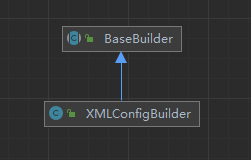
BaseBuilder.java
 public BaseBuilder(Configuration configuration) {
    this.configuration = configuration;
    this.typeAliasRegistry = this.configuration.getTypeAliasRegistry();
    this.typeHandlerRegistry = this.configuration.getTypeHandlerRegistry();
  }
解析主配置文件.xml
SqlSessionFactoryBuilder.java
public SqlSessionFactory build(InputStream inputStream, String environment, Properties properties) {
    //....
    return build(parser.parse());
    //....
}

public Configuration parse() {
    if (parsed) {
        throw new BuilderException("Each XMLConfigBuilder can only be used once.");
    }
    parsed = true;
    //读取configuration节点下的node传入
    parseConfiguration(parser.evalNode("/configuration"));
    return configuration;
}


private void parseConfiguration(XNode root) {
    try {
        //issue #117 read properties first
        //读取properties
        propertiesElement(root.evalNode("properties"));
        //读取一些setting设置
        Properties settings = settingsAsProperties(root.evalNode("settings"));
        loadCustomVfs(settings);
        //注册别名
        typeAliasesElement(root.evalNode("typeAliases"));
        //插件,进行增强-先略过
        pluginElement(root.evalNode("plugins"));
        //对象工厂,自定义实例化方法--略过
        objectFactoryElement(root.evalNode("objectFactory"));
        objectWrapperFactoryElement(root.evalNode("objectWrapperFactory"));
        reflectionFactoryElement(root.evalNode("reflectionFactory"));
        settingsElement(settings);
        // read it after objectFactory and objectWrapperFactory issue #631
        //配置环境
        environmentsElement(root.evalNode("environments"));
        //数据厂商表示--略过
        databaseIdProviderElement(root.evalNode("databaseIdProvider"));
        typeHandlerElement(root.evalNode("typeHandlers"));
        //配置mapper
        mapperElement(root.evalNode("mappers"));
    } catch (Exception e) {
        throw new BuilderException("Error parsing SQL Mapper Configuration. Cause: " + e, e);
    }
}
解析的东西很多,我们只先看environments和mapper
environmentsElement
XMLConfigBuilder.java
private void environmentsElement(XNode context) throws Exception {
    if (context != null) {
        if (environment == null) {
            environment = context.getStringAttribute("default");
        }
        for (XNode child : context.getChildren()) {
            String id = child.getStringAttribute("id");
            //可以配置多个环境,判断是不是指定的环境
            if (isSpecifiedEnvironment(id)) {
                //获取事物管理器,创建事物管理器工厂
                TransactionFactory txFactory = transactionManagerElement(child.evalNode("transactionManager"));
                //获取datasource工厂-UnpooledDataSourceFactory默认
                DataSourceFactory dsFactory = dataSourceElement(child.evalNode("dataSource"));
                DataSource dataSource = dsFactory.getDataSource();
                Environment.Builder environmentBuilder = new Environment.Builder(id)
                    .transactionFactory(txFactory)
                    .dataSource(dataSource);
                configuration.setEnvironment(environmentBuilder.build());
            }
        }
    }
}
进入发现第一件是就是判断环境,没有指定就使用this.environment = environment;将环境配置设置给了XMLConfigBuilder的environment 点我跳转到XMLConfigBuilder-有参构造
我们在使用时可以这样,在配置文件xml中,声明多个环境
    <environments default="development">
        <environment id="development">
            <transactionManager type="JDBC"/>
            <dataSource type="POOLED">
                <property name="driver" value="com.mysql.jdbc.Driver"/>
                <property name="url" value="jdbc:mysql://localhost:3306/mybatis?serverTimezone=UTC"/>
                <property name="username" value="root"/>
                <property name="password" value="root"/>
            dataSource>
        environment>

        <environment id="myTest">
            <transactionManager type="JDBC"/>
            <dataSource type="POOLED">
                <property name="driver" value="com.mysql.jdbc.Driver"/>
                <property name="url" value="jdbc:mysql://localhost:3306/mybatis?serverTimezone=UTC"/>
                <property name="username" value="root"/>
                <property name="password" value="root"/>
            dataSource>
        environment>
    environments>
主启动类中,手动指明一个配置环境
public static void main(String[] args) throws Exception {
    //....
    SqlSessionFactory sqlSessionFactory = new SqlSessionFactoryBuilder().build(inputStream,"myTest");
    //....
}
回到代码第一步就是判断用户选择的那个id的环境,之后创建事务管理器
XMLConfigBuilder.java
private void environmentsElement(XNode context) throws Exception {
    //..
    TransactionFactory txFactory = transactionManagerElement(child.evalNode("transactionManager"));
    //..
}
private TransactionFactory transactionManagerElement(XNode context) throws Exception {
    if (context != null) {
        //获取我们在xml中声明的事务管理类型,当前是JDBC
        String type = context.getStringAttribute("type");
        //获取节点下的子节点,当前案例没有子节点
        Properties props = context.getChildrenAsProperties();
        //这里只是创建工厂类
        TransactionFactory factory = (TransactionFactory) resolveClass(type).newInstance();
        factory.setProperties(props);
        return factory;
    }
    throw new BuilderException("Environment declaration requires a TransactionFactory.");
}
这里调用resolveClass()方法是父类BaseBuilder的方法
一直点进去最后如下
TypeAliasRegistry.java
public class TypeAliasRegistry {
	 private final Map> TYPE_ALIASES = new HashMap>();
    //.....
    public  Class resolveAlias(String string) {
        try {
            if (string == null) {
                return null;
            }
            // issue #748
            String key = string.toLowerCase(Locale.ENGLISH);
            Class value;
            if (TYPE_ALIASES.containsKey(key)) {
                value = (Class) TYPE_ALIASES.get(key);
            } else {
                value = (Class) Resources.classForName(string);
            }
            return value;
        } catch (ClassNotFoundException e) {
            throw new TypeException("Could not resolve type alias '" + string + "'.  Cause: " + e, e);
        }
    }
}
判断这个TYPE_ALIASES map中是否存在JDBC这个key,如果不存在,则去加载
按理来说这里应该是不存在的,因为你在TypeAliasRegistry中找不到任何一个地方对TYPE_ALIASES添加一个JDBC的key
但是实际它却存在这个key,在Configuration类的无参构造时,对这个TypeAliasRegistry进行的添加
 public Configuration() {
    typeAliasRegistry.registerAlias("JDBC", JdbcTransactionFactory.class);
     //...
    typeAliasRegistry.registerAlias("POOLED", PooledDataSourceFactory.class);
    languageRegistry.setDefaultDriverClass(XMLLanguageDriver.class);
	//......
  }
这个过程如下图
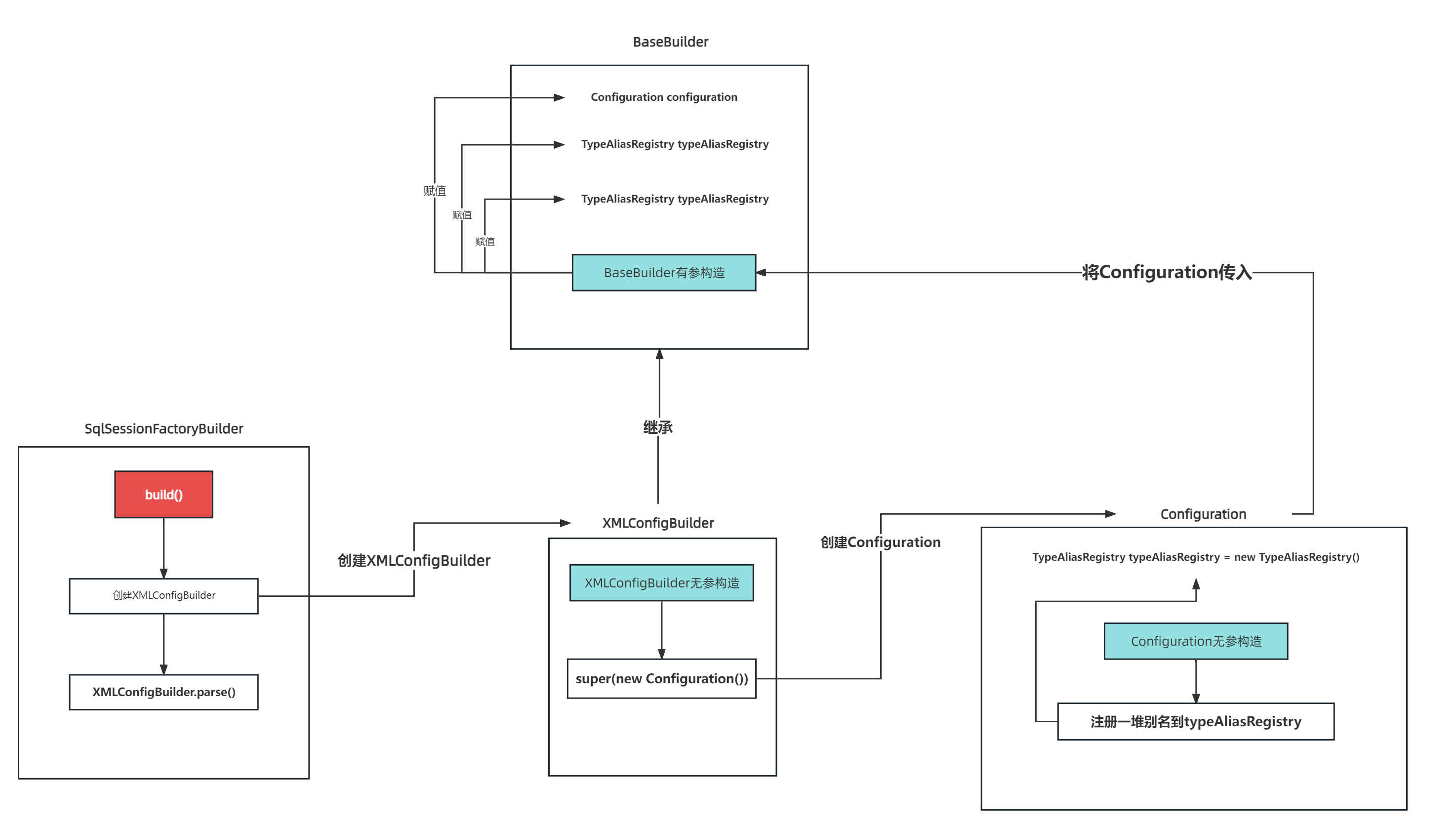
回到代码因为我们这次案例的配置为context.getChildrenAsProperties();返回的结果0个配置项,transactionManagerElement方法结束
之后去解析数据库配置文件
XMLConfigBulider.java
private void environmentsElement(XNode context) throws Exception {
    //...
    //获取datasource工厂-UnpooledDataSourceFactory默认
    DataSourceFactory dsFactory = dataSourceElement(child.evalNode("dataSource"));
    DataSource dataSource = dsFactory.getDataSource();
    //...
}
和解析环境基本一样的代码,不过解析dataSource的时候,子节点就不为空了
会有四个属性
<dataSource type="POOLED">
    <property name="driver" value="com.mysql.jdbc.Driver"/>
    <property name="url" value="jdbc:mysql://localhost:3306/mybatis?serverTimezone=UTC"/>
    <property name="username" value="root222"/>
    <property name="password" value="root222"/>
dataSource>
  private DataSourceFactory dataSourceElement(XNode context) throws Exception {
    if (context != null) {
      String type = context.getStringAttribute("type");
      Properties props = context.getChildrenAsProperties();
       //type为POOLED的默认实现是PooledDataSourceFactory
      DataSourceFactory factory = (DataSourceFactory) resolveClass(type).newInstance();
      factory.setProperties(props);
      return factory;
    }
    throw new BuilderException("Environment declaration requires a DataSourceFactory.");
  }
进入factory.setProperties(props);
public class UnpooledDataSourceFactory implements DataSourceFactory {

    private static final String DRIVER_PROPERTY_PREFIX = "driver.";
    private static final int DRIVER_PROPERTY_PREFIX_LENGTH = DRIVER_PROPERTY_PREFIX.length();

    protected DataSource dataSource;
	//无参默认将dataSource设置为UnpooledDataSource
    public UnpooledDataSourceFactory() {
        this.dataSource = new UnpooledDataSource();
    }

    @Override
    public void setProperties(Properties properties) {
        Properties driverProperties = new Properties();
        //将工厂对象进行包装
        MetaObject metaDataSource = SystemMetaObject.forObject(dataSource);
        for (Object key : properties.keySet()) {
            String propertyName = (String) key;
            //如果存在driver
            if (propertyName.startsWith(DRIVER_PROPERTY_PREFIX)) {
                String value = properties.getProperty(propertyName);
                driverProperties.setProperty(propertyName.substring(DRIVER_PROPERTY_PREFIX_LENGTH), value);
            //如果当前属性在类中有对应的可以写入的属性
            } else if (metaDataSource.hasSetter(propertyName)) {
                String value = (String) properties.get(propertyName);
                Object convertedValue = convertValue(metaDataSource, propertyName, value);
                metaDataSource.setValue(propertyName, convertedValue);
            } else {
                throw new DataSourceException("Unknown DataSource property: " + propertyName);
            }
        }
        //如果属性不为空,则设置给meatDataSource
        if (driverProperties.size() > 0) {
            metaDataSource.setValue("driverProperties", driverProperties);
        }
    }
	//......
}
一顿设置后回到XMLConfigurationBuilder中的environmentsElement方法
最后将读取出的配置封装为Environment,赋值给BaseBuilder中的environment
private void environmentsElement(XNode context) throws Exception {
	//.....
    DataSourceFactory dsFactory = dataSourceElement(child.evalNode("dataSource"));
    DataSource dataSource = dsFactory.getDataSource();
    Environment.Builder environmentBuilder = new Environment.Builder(id)
        .transactionFactory(txFactory)
        .dataSource(dataSource);
    configuration.setEnvironment(environmentBuilder.build());
	//.....
}
mapperElement
回到XMLConfigBuilder中的parseConfiguration
private void parseConfiguration(XNode root) {
    //.....
    //配置mapper
    mapperElement(root.evalNode("mappers"));

}
我们只看根据包扫描的,给Configuration中添加了mapper包名
private void mapperElement(XNode parent) throws Exception {
    if (parent != null) {
        for (XNode child : parent.getChildren()) {
            //使用包,默认查找指定包下位置
            if ("package".equals(child.getName())) {
                String mapperPackage = child.getStringAttribute("name");
                configuration.addMappers(mapperPackage);
            }
            //.....
        }
    }
}
Configuration.java
public void addMappers(String packageName) {
    mapperRegistry.addMappers(packageName);
}
MapperRegistry.java
public void addMappers(String packageName) {
    addMappers(packageName, Object.class);
}
//根据包名去查询该包下的类
public void addMappers(String packageName, Class superType) {
    ResolverUtil> resolverUtil = new ResolverUtil>();
    resolverUtil.find(new ResolverUtil.IsA(superType), packageName);
    Set>> mapperSet = resolverUtil.getClasses();
    for (Class mapperClass : mapperSet) {
        addMapper(mapperClass);
    }
}
之后就是动态代理对应的mapper
MapperRegistry.java
public  void addMapper(Class type) {
    if (type.isInterface()) {
        //判断是否已经存在
        if (hasMapper(type)) {
            throw new BindingException("Type " + type + " is already known to the MapperRegistry.");
        }
        boolean loadCompleted = false;
        try {
            knownMappers.put(type, new MapperProxyFactory(type));
            MapperAnnotationBuilder parser = new MapperAnnotationBuilder(config, type);
            parser.parse();
            loadCompleted = true;
        } finally {
            if (!loadCompleted) {
                knownMappers.remove(type);
            }
        }
    }
}
public class MapperProxyFactory<T> {

    private final Class mapperInterface;
    private final Map methodCache = new ConcurrentHashMap();

    public MapperProxyFactory(Class mapperInterface) {
        this.mapperInterface = mapperInterface;
    }

    public Class getMapperInterface() {
        return mapperInterface;
    }

    public Map getMethodCache() {
        return methodCache;
    }

    @SuppressWarnings("unchecked")
    protected T newInstance(MapperProxy mapperProxy) {
        return (T) Proxy.newProxyInstance(mapperInterface.getClassLoader(), new Class[] { mapperInterface }, mapperProxy);
    }

    public T newInstance(SqlSession sqlSession) {
        final MapperProxy mapperProxy = new MapperProxy(sqlSession, mapperInterface, methodCache);
        return newInstance(mapperProxy);
    }

}
主要来看这段
MapperAnnotationBuilder parser = new MapperAnnotationBuilder(config, type);
parser.parse();
MapperAnnotationBuilder.java
public class MapperAnnotationBuilder {
    private final Set> sqlAnnotationTypes = new HashSet>();
    private final Set> sqlProviderAnnotationTypes = new HashSet>();
    //....
    /**
    * 在构造时添加mybatis的注解
    */
    public MapperAnnotationBuilder(Configuration configuration, Class type) {
        String resource = type.getName().replace('.', '/') + ".java (best guess)";
        this.assistant = new MapperBuilderAssistant(configuration, resource);
        this.configuration = configuration;
        this.type = type;

        sqlAnnotationTypes.add(Select.class);
        sqlAnnotationTypes.add(Insert.class);
        sqlAnnotationTypes.add(Update.class);
        sqlAnnotationTypes.add(Delete.class);

        sqlProviderAnnotationTypes.add(SelectProvider.class);
        sqlProviderAnnotationTypes.add(InsertProvider.class);
        sqlProviderAnnotationTypes.add(UpdateProvider.class);
        sqlProviderAnnotationTypes.add(DeleteProvider.class);
    }


    public void parse() {
        String resource = type.toString();
        if (!configuration.isResourceLoaded(resource)) {
            loadXmlResource();
            configuration.addLoadedResource(resource);
            assistant.setCurrentNamespace(type.getName());
            parseCache();
            parseCacheRef();
            Method[] methods = type.getMethods();
            for (Method method : methods) {
                try {
                    // issue #237
                    if (!method.isBridge()) {
                        parseStatement(method);
                    }
                } catch (IncompleteElementException e) {
                    configuration.addIncompleteMethod(new MethodResolver(this, method));
                }
            }
        }
        parsePendingMethods();
    }
}
void parseStatement(Method method) {
    Class parameterTypeClass = getParameterType(method);
    LanguageDriver languageDriver = getLanguageDriver(method);
    SqlSource sqlSource = getSqlSourceFromAnnotations(method, parameterTypeClass, languageDriver);
   //...
}
首先第一步是获取参数类型-代码如下,如果mapper的入参数量大于1,则返回的就是ParamMap.class
private Class getParameterType(Method method) {
    Class parameterType = null;
    Class[] parameterTypes = method.getParameterTypes();
    for (int i = 0; i < parameterTypes.length; i++) {
        if (!RowBounds.class.isAssignableFrom(parameterTypes[i]) && !ResultHandler.class.isAssignableFrom(parameterTypes[i])) {
            if (parameterType == null) {
                parameterType = parameterTypes[i];
            } else {
                // issue #135
                parameterType = ParamMap.class;
            }
        }
    }
    return parameterType;
}
之后获取语言解析,没有指定就去找默认-默认的是XMLLanguageDriver.class 还是在Configuration类无参构造时添加进去的点我跳转到Configuration-无参构造
private LanguageDriver getLanguageDriver(Method method) {
    Lang lang = method.getAnnotation(Lang.class);
    Class langClass = null;
    if (lang != null) {
        langClass = lang.value();
    }
    return assistant.getLanguageDriver(langClass);
}
获取注解上的内容,以及封装sql就在这个方法
private SqlSource getSqlSourceFromAnnotations(Method method, Class parameterType, LanguageDriver languageDriver) {
    try {
        //获取是否存在@Select,@Insert....
        Class sqlAnnotationType = getSqlAnnotationType(method);
        //获取是否存在@SelectProvider,@InsertProvider...
        Class sqlProviderAnnotationType = getSqlProviderAnnotationType(method);
        if (sqlAnnotationType != null) {
            if (sqlProviderAnnotationType != null) {
                throw new BindingException("You cannot supply both a static SQL and SqlProvider to method named " + method.getName());
            }
            Annotation sqlAnnotation = method.getAnnotation(sqlAnnotationType);
            //获取注解上的值
            final String[] strings = (String[]) sqlAnnotation.getClass().getMethod("value").invoke(sqlAnnotation);
            //返回sqlSource
            //这个时候还没有进行填充值
            return buildSqlSourceFromStrings(strings, parameterType, languageDriver);
        } else if (sqlProviderAnnotationType != null) {
            Annotation sqlProviderAnnotation = method.getAnnotation(sqlProviderAnnotationType);
            return new ProviderSqlSource(assistant.getConfiguration(), sqlProviderAnnotation);
        }
        return null;
    } catch (Exception e) {
        throw new BuilderException("Could not find value method on SQL annotation.  Cause: " + e, e);
    }
}
此时的strings值还是 select * from user where age = #{age} 需要给替换为 select * from user where age =?
  private SqlSource buildSqlSourceFromStrings(String[] strings, Class parameterTypeClass, LanguageDriver languageDriver) {
    final StringBuilder sql = new StringBuilder();
    for (String fragment : strings) {
      sql.append(fragment);
      sql.append(" ");
    }
    return languageDriver.createSqlSource(configuration, sql.toString().trim(), parameterTypeClass);
  }
默认的语言驱动是XMLLanguageDriver
XMLLanguageDriver.java
首先判断注解上的内容是否存在脚本,在mybatis官网,动态SQL下的script有使用案例,使得在注解中可以像在xml中使用@Override
public SqlSource createSqlSource(Configuration configuration, String script, Class parameterType) {
// issue #3
if (script.startsWith("