MQTT(EMQX) - Linux CentOS Docker 安装
MQTT 概述
MQTT (Message Queue Telemetry Transport) 是一个轻量级传输协议,它被设计用于轻量级的发布/订阅式消息传输,MQTT协议针对低带宽网络,低计算能力的设备,做了特殊的优化。是一种简单、稳定、开放、轻量级易于实现的消息协议,在物联网的应用下的信息采集,工业控制,智能家居等方面具有广泛的适用性。
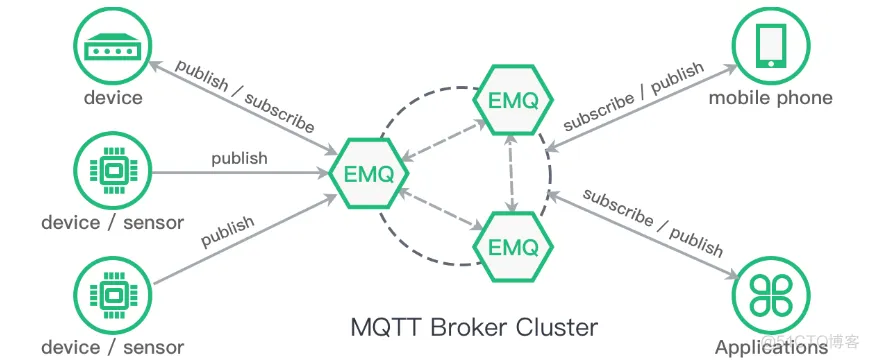
- MQTT更加简单:MQTT是一种消息队列协议,使用发布/订阅消息模式,提供一对多的消息发布,解除应用程序耦合,相对于其他协议,开发更简单;
- MQTT网络更加稳定:工作在TCP/IP协议上;由TCP/IP协议提供稳定的网络连接;
- 轻量级:小型传输,开销很小(固定长度的头部是 2 字节),协议交换最小化,以降低网络流量;适合低带宽,数据量较小的应用;
MQTT支持三种消息发布服务质量(QoS):
- “至多一次”(QoS==0):消息发布完全依赖底层 TCP/IP 网络。会发生消息丢失或重复。这一级别可用于如下情况,环境传感器数据,丢失一次读记录无所谓,因为不久后还会有第二次发送。
- “至少一次”(QoS==1):确保消息到达,但消息重复可能会发生。
- “只有一次”(QoS==2):确保消息到达一次。这一级别可用于如下情况,在计费系统中,消息重复或丢失会导致不正确的结果。小型传输,开销很小(固定长度的头部是 2 字节),协议交换最小化,以降低网络流量。
MQTT 三种身份
- 发布者、代理、订阅者,发布者和订阅者都为客户端,代理为服务器,同时消息的发布者也可以是订阅者(为了节约内存和流量发布者和订阅者一般都会定义在一起)。
- MQTT传输的消息分为主题(Topic,可理解为消息的类型,订阅者订阅后,就会收到该主题的消息内容(payload))和负载(payload,可以理解为消息的内容)两部分。


MQTT和Websocket的区别是什么?
MQTT是为了物联网场景设计的基于TCP的Pub/Sub协议,有许多为物联网优化的特性,比如适应不同网络的QoS、层级主题、遗言等等。
WebSocket是为了HTML5应用方便与服务器双向通讯而设计的协议,HTTP握手然后转TCP协议,用于取代之前的Server Push、Comet、长轮询等老旧实现。
两者之所有有交集,是因为一个应用场景:如何通过HTML5应用来作为MQTT的客户端,以便接受设备消息或者向设备发送信息,那么MQTT over WebSocket自然成了最合理的途径了。
语言支持
Java、C#、Python、C/C++、Objective-C、Node.js、Javascript、Ruby、Golang、PHP
应用场景
遥感数据、汽车、智能家居、智慧城市、医疗医护
即时通讯:MQ 可以通过订阅主题,轻松实现 1对1、1对多的通讯。

连接
- 登录IM服务
- 获取MQTT 服务器地址
- 建立MQTT连接
通讯
1、4. 发送者 向IM 服务发送消息
2、5. IM 服务,将消息持久化,并发给 MQTT
3、6. 消费者 从MQTT订阅到消息
本文 Demo 介绍
主要用到 InitializingBean、BasePooledObjectFactory、GenericObjectPool、GenericObjectPoolConfig
InitializingBean:实例化工厂、连接池,参考:Java SpringBoot Bean InitializingBean
GenericObjectPool:获取连接对象,如果池中没有,通过工厂创建 参考:Java GenericObjectPool 对象池化技术--SpringBoot sftp 连接池工具类
BasePooledObjectFactory::创建 MqttClient 连接 参考:Java BasePooledObjectFactory 对象池化技术
GenericObjectPoolConfig:GenericObjectPoolConfig是封装GenericObject池配置的简单“结构”,此类不是线程安全的;它仅用于提供创建池时使用的属性。大多数情况,可以使用GenericObjectPoolConfig提供的默认参数就可以满足日常的需求。

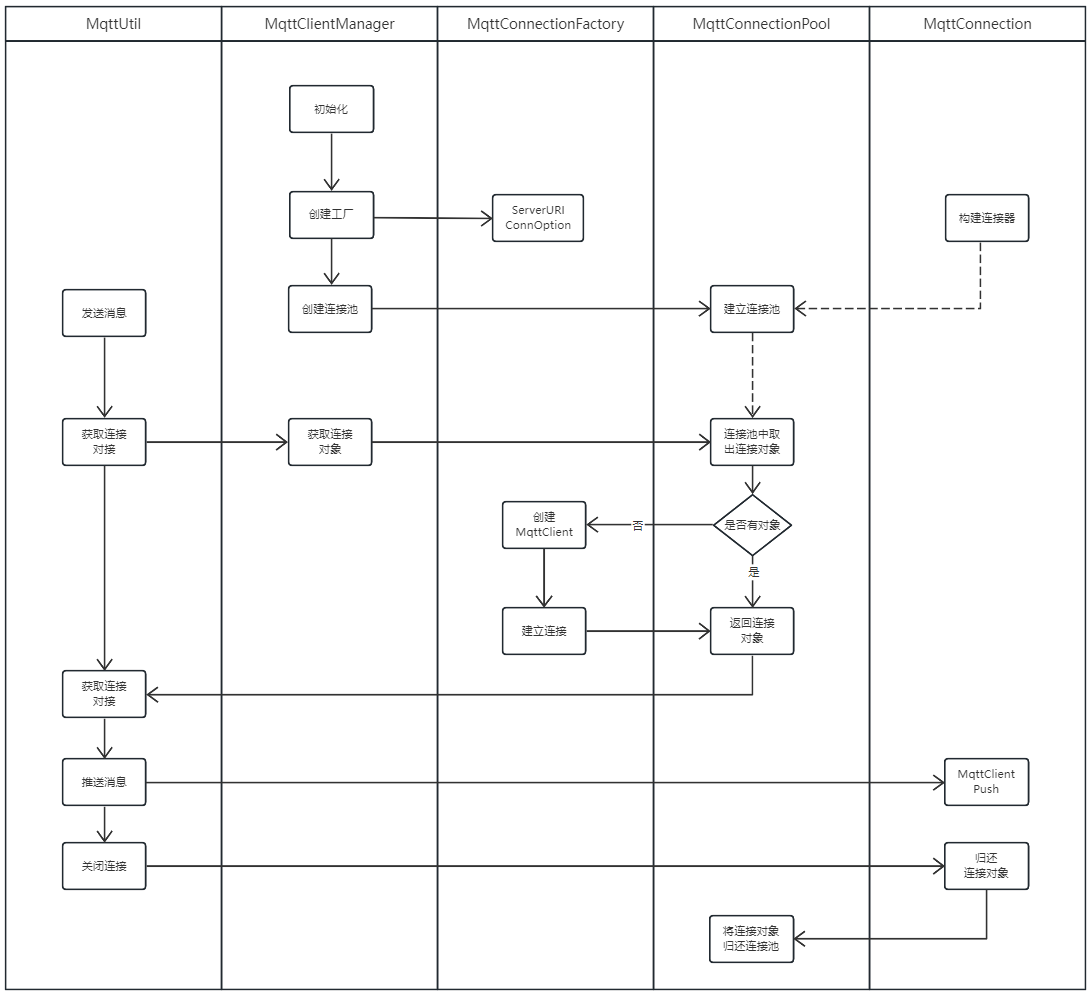
对象获取流程图

username(用户名)和password(密码)。这里的用户名和密码是用于客户端连接服务端时进行认证需要的。
有些MQTT服务端需要客户端在连接时提供用户名和密码。只有客户端正确提供了用户名和密码后,才能连接服务端。否则服务端将会拒绝客户端连接,那么客户端也就无法发布和订阅消息了。 当然,那些没有开启用户密码认证的服务端无需客户端提供用户名和密码认证信息。
Deom代码

POM
<project xmlns="http://maven.apache.org/POM/4.0.0"
         xmlns:xsi="http://www.w3.org/2001/XMLSchema-instance"
         xsi:schemaLocation="http://maven.apache.org/POM/4.0.0 http://maven.apache.org/xsd/maven-4.0.0.xsd">
    <parent>
        <artifactId>vipsoft-parentartifactId>
        <groupId>com.vipsoft.bootgroupId>
        <version>1.0-SNAPSHOTversion>
    parent>
    <modelVersion>4.0.0modelVersion>

    <artifactId>vipsoft-mqttartifactId>
    <version>1.0-SNAPSHOTversion>


    <dependencies>


        <dependency>
            <groupId>org.apache.commonsgroupId>
            <artifactId>commons-pool2artifactId>
            <version>2.7.0version>
        dependency>

        <dependency>
            <groupId>org.eclipse.pahogroupId>
            <artifactId>org.eclipse.paho.client.mqttv3artifactId>
            <version>1.2.5version>
        dependency>

        <dependency>
            <groupId>cn.hutoolgroupId>
            <artifactId>hutool-allartifactId>
            <version>5.3.6version>
        dependency>

        <dependency>
            <groupId>org.springframework.bootgroupId>
            <artifactId>spring-boot-starter-webartifactId>
        dependency>
        <dependency>
            <groupId>org.springframework.bootgroupId>
            <artifactId>spring-boot-starter-actuatorartifactId>
        dependency>
        <dependency>
            <groupId>org.springframework.bootgroupId>
            <artifactId>spring-boot-starter-testartifactId>
            <scope>testscope>
            <exclusions>
                <exclusion>
                    <groupId>org.junit.vintagegroupId>
                    <artifactId>junit-vintage-engineartifactId>
                exclusion>
            exclusions>
        dependency>

    dependencies>

    <build>
        <plugins>
            <plugin>
                <groupId>org.springframework.bootgroupId>
                <artifactId>spring-boot-maven-pluginartifactId>
            plugin>
        plugins>
    build>
project>
Resource
application.yml
server:
  port: 8088
  application:
    name: MQTT Demo

mqtt:
  host: tcp://172.16.0.88:1883
  clientId: VipSoft_MQTT
  poolConfig:
    customSet: false
    minIdle: 8
    maxIdle: 20
    maxTotal: 20
    lifo: false
Config
MqttConfig
用户名和密码除了有以上功能外,有些公用MQTT服务端也利用此信息来识别客户端属于哪一个用户,从而对客户端进行管理。比如用户可以拥有私人主题,这些主题只有该用户可以发布和订阅。对于私人主题,服务端就可以利用客户端连接时的用户名和密码来判断该客户端是否有发布订阅该用户私人主题的权限。
package com.vipsoft.mqtt.config;

import org.springframework.boot.context.properties.ConfigurationProperties;

@ConfigurationProperties(prefix = "mqtt")
public class MqttConfig {
    /**
     * MQTT host 地址
     */
    private String host;

    /**
     * 客户端Id
     */
    private String clientId;

    /**
     * 登录用户(可选)
     */
    private String userName;

    /**
     * 登录密码(可选)
     */
    private String password;

    /**
     * Mqtt Pool Config
     */
    private MqttPoolConfig poolConfig;

    public String getHost() {
        return host;
    }

    public void setHost(String host) {
        this.host = host;
    }

    public String getClientId() {
        return clientId;
    }

    public void setClientId(String clientId) {
        this.clientId = clientId;
    }

    public String getUserName() {
        return userName;
    }

    public void setUserName(String userName) {
        this.userName = userName;
    }

    public String getPassword() {
        return password;
    }

    public void setPassword(String password) {
        this.password = password;
    }

    public MqttPoolConfig getPoolConfig() {
        return poolConfig;
    }

    public void setPoolConfig(MqttPoolConfig poolConfig) {
        this.poolConfig = poolConfig;
    }

}
MqttPoolConfig
package com.vipsoft.mqtt.config;

public class MqttPoolConfig {

    /**
     * 是否启用自定义配置
     */
    private boolean customSet;
    /**
     * 最小的空闲连接数
     */
    private int minIdle;
    /**
     * 最大的空闲连接数
     */
    private int maxIdle;
    /**
     * 最大连接数
     */
    private int maxTotal;

    public boolean isCustomSet() {
        return customSet;
    }

    public void setCustomSet(boolean customSet) {
        this.customSet = customSet;
    }

    public int getMinIdle() {
        return minIdle;
    }

    public void setMinIdle(int minIdle) {
        this.minIdle = minIdle;
    }

    public int getMaxIdle() {
        return maxIdle;
    }

    public void setMaxIdle(int maxIdle) {
        this.maxIdle = maxIdle;
    }

    public int getMaxTotal() {
        return maxTotal;
    }

    public void setMaxTotal(int maxTotal) {
        this.maxTotal = maxTotal;
    }
}
Pool
MqttClientManager
package com.vipsoft.mqtt.pool;

import cn.hutool.core.util.StrUtil;
import com.vipsoft.mqtt.config.MqttConfig;
import com.vipsoft.mqtt.config.MqttPoolConfig;
import org.apache.commons.pool2.impl.GenericObjectPoolConfig;
import org.eclipse.paho.client.mqttv3.MqttConnectOptions;
import org.slf4j.Logger;
import org.slf4j.LoggerFactory;
import org.springframework.beans.factory.InitializingBean;
import org.springframework.stereotype.Service;


/**
 * 对类的创建之前进行初始化的操作,在afterPropertiesSet()中完成。
 */
@Service
public class MqttClientManager implements InitializingBean {
    private static Logger logger = LoggerFactory.getLogger(MqttClientManager.class);

    /**
     * mqtt连接配置
     */
    private final MqttConfig mqttConfig;

    private MqttConnectionPool mqttPool;

    public MqttClientManager(MqttConfig mqttConfig) {
        this.mqttConfig = mqttConfig;
    }

    /**
     * 创建连接池
     */
    @Override
    public void afterPropertiesSet() {
        try {
            // 连接池配置
            GenericObjectPoolConfig poolConfig = new GenericObjectPoolConfig();
            this.initPoolConfig(poolConfig);

            // mqtt连接配置
            MqttConnectOptions connOpts = new MqttConnectOptions();
            connOpts.setUserName(this.mqttConfig.getUserName());
            if (StrUtil.isNotEmpty(mqttConfig.getPassword())) {
                connOpts.setPassword(this.mqttConfig.getPassword().toCharArray());
            }

            // 创建工厂对象
            MqttConnectionFactory connectionFactory = new MqttConnectionFactory(mqttConfig.getHost(), connOpts);

            // 创建连接池
            mqttPool = new MqttConnectionPool<>(connectionFactory, poolConfig);

        } catch (Exception e) {
            logger.error(e.getMessage(), e);
        }
    }

    private void initPoolConfig(GenericObjectPoolConfig poolConfig) {

        MqttPoolConfig mqttConnectionPoolConfig = this.mqttConfig.getPoolConfig();

        if (mqttConnectionPoolConfig.isCustomSet()) {

            // 设置连接池配置信息
            poolConfig.setMinIdle(mqttConnectionPoolConfig.getMinIdle());
            poolConfig.setMaxIdle(mqttConnectionPoolConfig.getMaxIdle());
            poolConfig.setMaxTotal(mqttConnectionPoolConfig.getMaxTotal());
            // TODO 补全

        }
    }

    /**
     * 根据key找到对应连接
     */
    public MqttConnection getConnection() throws Exception {
        return this.mqttPool.borrowObject();
    }

}
MqttConnection
package com.vipsoft.mqtt.pool;

import org.apache.commons.pool2.impl.GenericObjectPool;
import org.eclipse.paho.client.mqttv3.MqttClient;
import org.eclipse.paho.client.mqttv3.MqttMessage;
import org.slf4j.Logger;
import org.slf4j.LoggerFactory;

public class MqttConnection {

    private Logger logger = LoggerFactory.getLogger(this.getClass());

    private MqttClient mqttClient;

    public MqttConnection(MqttClient mqttClient) {
        this.mqttClient = mqttClient;
    }

    /**
     * 隶属于的连接池
     */
    private GenericObjectPool belongedPool;


    /**
     * 推送方法消息
     */
    public void publish(String topic, String message) throws Exception {
        MqttMessage mqttMessage = new MqttMessage();
        mqttMessage.setPayload(message.getBytes());
        mqttClient.publish(topic, mqttMessage);
        System.out.println("对象:" + mqttClient + " " + "发送消息:" + message);
    }


    /**
     * 销毁连接
     */
    public void destroy() {
        try {
            if (this.mqttClient.isConnected()) {
                this.mqttClient.disconnect();
            }
            this.mqttClient.close();
        } catch (Exception e) {
            logger.error("MqttConnection destroy ERROR ; errorMsg={}", e.getMessage(), e, e);
        }
    }

    /**
     * 换回连接池
     */
    public void close() {
        if (belongedPool != null) {
            this.belongedPool.returnObject(this);
        }
    }


    public MqttClient getMqttClient() {
        return mqttClient;
    }

    public void setMqttClient(MqttClient mqttClient) {
        this.mqttClient = mqttClient;
    }

    public GenericObjectPool getBelongedPool() {
        return belongedPool;
    }

    public void setBelongedPool(GenericObjectPool belongedPool) {
        this.belongedPool = belongedPool;
    }
}
MqttConnectionFactory
package com.vipsoft.mqtt.pool;

import cn.hutool.core.date.DateUtil;
import cn.hutool.core.util.StrUtil;
import cn.hutool.system.HostInfo;
import org.apache.commons.pool2.BasePooledObjectFactory;
import org.apache.commons.pool2.PooledObject;
import org.apache.commons.pool2.impl.DefaultPooledObject;
import org.eclipse.paho.client.mqttv3.MqttClient;
import org.eclipse.paho.client.mqttv3.MqttConnectOptions;
import org.slf4j.Logger;
import org.slf4j.LoggerFactory;

import java.util.concurrent.atomic.AtomicInteger;

public class MqttConnectionFactory extends BasePooledObjectFactory {

    private static final Logger logger = LoggerFactory.getLogger(MqttConnectionFactory.class);


    // AtomicInteger是一个提供原子操作的Integer类,通过线程安全的方式操作加减
    private AtomicInteger counter = new AtomicInteger();

    /**
     * 连接地址
     */
    private String serverURI;
    /**
     * 当前服务IP
     */
    private String localHostIP;


    /**
     * mqtt连接配置
     */
    private MqttConnectOptions mqttConnectConfig;


    /**
     * 根据mqtt连接 配置创建工厂
     */
    public MqttConnectionFactory(String serverURI, MqttConnectOptions mqttConnectConfig) {
        this.serverURI = serverURI;
        this.mqttConnectConfig = mqttConnectConfig;
    }

    /**
     * 在对象池中创建对象
     *
     * @return
     * @throws Exception
     */
    @Override
    public MqttConnection create() throws Exception {
        // 实现线程安全避免在高并发的场景下出现clientId重复导致无法创建连接的情况
        int count = this.counter.addAndGet(1);

        // 根据ip+编号,生成唯一clientId
        String clientId = this.getLosthostIp() + "_" + DateUtil.thisMillsecond();

        // 创建MQTT连接对象
        MqttClient mqttClient = new MqttClient(serverURI, clientId);

        // 建立连接
        mqttClient.connect(mqttConnectConfig);

        // 构建mqttConnection对象
        MqttConnection mqttConnection = new MqttConnection(mqttClient);
        logger.info("在对象池中创建对象 {}", clientId);
        return mqttConnection;
    }

    /**
     * common-pool2 中创建了 DefaultPooledObject 对象对对象池中对象进行的包装。
     * 将我们自定义的对象放置到这个包装中,工具会统计对象的状态、创建时间、更新时间、返回时间、出借时间、使用时间等等信息进行统计
     *
     * @param mqttConnection
     * @return
     */
    @Override
    public PooledObject wrap(MqttConnection mqttConnection) {
        logger.info("封装默认返回类型 {}", mqttConnection.toString());
        return new DefaultPooledObject<>(mqttConnection);
    }

    /**
     * 销毁对象
     *
     * @param p 对象池
     * @throws Exception 异常
     */
    @Override
    public void destroyObject(PooledObject p) throws Exception {
        if (p == null) {
            return;
        }
        MqttConnection mqttConnection = p.getObject();
        logger.info("销毁对象 {}", p.getObject().getMqttClient());
        mqttConnection.destroy();
    }

    /**
     * 校验对象是否可用
     *
     * @param p 对象池
     * @return 对象是否可用结果,boolean
     */
    @Override
    public boolean validateObject(PooledObject p) {
        MqttConnection mqttConnection = p.getObject();
        boolean result = mqttConnection.getMqttClient().isConnected();
        logger.debug("validateObject serverURI {},client_id {},result {}", mqttConnection.getMqttClient().getServerURI(),
                mqttConnection.getMqttClient().getClientId(), result);
        return result;
    }

    /**
     * 激活钝化的对象系列操作
     *
     * @param p 对象池
     * @throws Exception 异常信息
     */
    @Override
    public void activateObject(PooledObject p) throws Exception {
        logger.info("激活钝化的对象 {}", p.getObject().getMqttClient());
    }

    /**
     * 钝化未使用的对象
     *
     * @param p 对象池
     * @throws Exception 异常信息
     */
    @Override
    public void passivateObject(PooledObject p) throws Exception {
        logger.info("钝化未使用的对象 {}", p.getObject().getMqttClient());
    }


    /**
     * 获取当前服务真实IP
     */
    private String getLosthostIp() {
        if (StrUtil.isNotBlank(this.localHostIP)) {
            return this.localHostIP;
        }
        HostInfo hostInfo = new HostInfo();
        this.localHostIP = hostInfo.getAddress();
        return this.localHostIP;
    }

}
MqttConnectionPool
package com.vipsoft.mqtt.pool;

import org.apache.commons.pool2.impl.GenericObjectPool;
import org.apache.commons.pool2.impl.GenericObjectPoolConfig;

public class MqttConnectionPool extends GenericObjectPool {

    public MqttConnectionPool(MqttConnectionFactory factory, GenericObjectPoolConfig config) {
        super(factory, config);
    }

    /**
     * 从对象池获得一个对象
     */
    @Override
    public MqttConnection borrowObject() throws Exception {
        MqttConnection conn = super.borrowObject();
        // 设置所属连接池
        if (conn.getBelongedPool() == null) {
            conn.setBelongedPool(this);
        }
        return conn;
    }

    /**
     * 归还一个连接对象
     * @param conn
     */
    @Override
    public void returnObject(MqttConnection conn) {
        if (conn!=null) {
            super.returnObject(conn);
        }
    }
}
utils
MqttClientManager
package com.vipsoft.mqtt.utils;

import com.vipsoft.mqtt.pool.MqttClientManager;
import com.vipsoft.mqtt.pool.MqttConnection;
import org.slf4j.Logger;
import org.slf4j.LoggerFactory;
import org.springframework.beans.factory.annotation.Autowired;
import org.springframework.stereotype.Service;


@Service
public class MqttUtil {

    private final Logger logger = LoggerFactory.getLogger(this.getClass());

    @Autowired
    MqttClientManager mqttManager;

    public void publish(String clientId, String message) {
        logger.info("publish INFO ; clientId={}, message={}", clientId, message);
        MqttConnection connection = null;
        try {
            connection = mqttManager.getConnection();
            logger.info("publish INFO ; clientId={},targetUrl={}", clientId, connection.getMqttClient().getServerURI());
            connection.publish(clientId, message);
        } catch (Exception e) {
            logger.error("publish ERROR ; clientId={},message={}", clientId, message, e, e);
        } finally {
            if (null != connection) {
                connection.close();
            }
        }
    }


}
test
PushCallback
package com.vipsoft.mqtt;

import cn.hutool.core.date.DateUtil;
import org.eclipse.paho.client.mqttv3.IMqttDeliveryToken;
import org.eclipse.paho.client.mqttv3.MqttCallback;
import org.eclipse.paho.client.mqttv3.MqttMessage;
import org.slf4j.Logger;
import org.slf4j.LoggerFactory;

public class PushCallback implements MqttCallback {
    private final Logger logger = LoggerFactory.getLogger(this.getClass());

    @Override
    public void connectionLost(Throwable cause) {
        // 连接丢失后进行重连
        System.out.println("连接断开,可以做重连");
        logger.info("掉线时间:{}", DateUtil.now());
    }

    @Override
    public void deliveryComplete(IMqttDeliveryToken token) {
        System.out.println("deliveryComplete---------" + token.isComplete());
    }

    @Override
    public void messageArrived(String topic, MqttMessage message) throws Exception {
        System.out.println("接收消息主题 : " + topic);
        System.out.println("接收消息Qos : " + message.getQos());
        System.out.println("接收消息内容 : " + new String(message.getPayload()));
    }
}
MqttProducerTest
package com.vipsoft.mqtt;

import cn.hutool.core.date.DateUtil;
import com.vipsoft.mqtt.utils.MqttUtil;
import org.junit.jupiter.api.Test;
import org.springframework.beans.factory.annotation.Autowired;
import org.springframework.boot.test.context.SpringBootTest;

import java.util.concurrent.CountDownLatch;

@SpringBootTest
public class MqttProducerTest {

    @Autowired
    MqttUtil mqttUtil;

    @Test
    void pushMessateTest() throws Exception {
        for (int i = 0; i < 50; i++) {
            String topic = "VipSoft_MQTT";
            mqttUtil.publish(topic, "发送消息:" + DateUtil.now());
            Thread.sleep(3000);
        }
        new CountDownLatch(1).await();
    }
}
MqttConsumerTest
package com.vipsoft.mqtt;

import com.vipsoft.mqtt.pool.MqttClientManager;
import org.eclipse.paho.client.mqttv3.MqttClient;
import org.junit.jupiter.api.Test;
import org.springframework.beans.factory.annotation.Autowired;
import org.springframework.boot.test.context.SpringBootTest;


@SpringBootTest
public class MqttConsumerTest {


    @Autowired
    MqttClientManager mqttManager;

    @Test
    void subscribeTest() throws Exception {
        String topic = "VipSoft_MQTT";
        MqttClient mqttClient = mqttManager.getConnection().getMqttClient();
        //这里的setCallback需要新建一个Callback类并实现 MqttCallback 这个类
        mqttClient.setCallback(new PushCallback());
        while (true) {
            mqttClient.subscribe(topic);
            Thread.sleep(1000);
        }
    }
}
运行方式
- MqttConsumerTest.subscribeTest()
- MqttProducerTest.pushMessateTest()


更多文章参考:
小程序mqtt实现聊天功能
Gitee 源码地址:https://gitee.com/VipSoft/VipBoot/