SpringBoot导出Word文档的三种方式
一、导出方案
-
1、直接在Java代码里创建Word文档,设置格式样式等,然后导出。(略)
-
2、富文本转换后的HTML下载为Word文档。相当于把HTML转为Word导出
-
3、使用模板技术导出。固定格式、可以写入不同数据
其他:
- springboot版本:2.7.11
- 导出”页面视图“参考:https://my.oschina.net/u/1045509/blog/1924024
- xml格式化:https://tool.ip138.com/xml/
- HTTP下载 常用的需要设置的MIME类型
.doc application/msword .dot application/msword .docx application/vnd.openxmlformats-officedocument.wordprocessingml.document .dotx application/vnd.openxmlformats-officedocument.wordprocessingml.template .docm application/vnd.ms-word.document.macroEnabled.12 .dotm application/vnd.ms-word.template.macroEnabled.12 .xls application/vnd.ms-excel .xlt application/vnd.ms-excel .xla application/vnd.ms-excel .xlsx application/vnd.openxmlformats-officedocument.spreadsheetml.sheet .xltx application/vnd.openxmlformats-officedocument.spreadsheetml.template .xlsm application/vnd.ms-excel.sheet.macroEnabled.12 .xltm application/vnd.ms-excel.template.macroEnabled.12 .xlam application/vnd.ms-excel.addin.macroEnabled.12 .xlsb application/vnd.ms-excel.sheet.binary.macroEnabled.12 .ppt application/vnd.ms-powerpoint .pot application/vnd.ms-powerpoint .pps application/vnd.ms-powerpoint .ppa application/vnd.ms-powerpoint .pptx application/vnd.openxmlformats-officedocument.presentationml.presentation .potx application/vnd.openxmlformats-officedocument.presentationml.template .ppsx application/vnd.openxmlformats-officedocument.presentationml.slideshow .ppam application/vnd.ms-powerpoint.addin.macroEnabled.12 .pptm application/vnd.ms-powerpoint.presentation.macroEnabled.12 .potm application/vnd.ms-powerpoint.template.macroEnabled.12 .ppsm application/vnd.ms-powerpoint.slideshow.macroEnabled.12 .mdb application/vnd.ms-access
二、富文本转换后的HTML下载为Word文档
1、准备
-
业务需求
- 前端使用富文本插件生成带HTML标签的word文档,然后需要下载这个word文档。
- 每个word文档的格式是可变的
-
扩展业务需求:
- 甚至可以去替换HTML的Word中的内容,然后导出需要的文档;缺点:替换字符串麻烦、而且HTML的Word的标签还需要研究。
- 基于上述的业务需求。建议使用模板技术导出(也就是“三”)
-
参考:
-
导出结果

2、实现
2.1、导包
<dependency> <groupId>org.apache.poigroupId> <artifactId>poiartifactId> <version>4.1.2version> dependency>
2.2、HTML的word文档
package com.cc.ewd.html; /** * @author CC * @since 2023/4/24 0024 */ public interface HtmlConstants { /** * 普通文档(富文本生成的) */ String HTML1 = "文章标题
一、标题1"
+ " 我是数据:{NUM}
"
+ "1.1、吾问无为谓" + "序号 " + " 第一列 " + " 第二列 " + " 第三列 " + " 第四列 " + " 1 " + " 11 " + " 22 " + " 33 " + " 44 " + " 2 " + " 11 " + " 22 " + " 33 " + " 44 " + " 3 " + " 11 " + " 22 " + " 33 " + " 44 "
"; /** * 带表格文档(可以富文本生成,也可以使用word文档另存为HTML文件,然后拷出来) */ String HTML2 = " +
"mso-hansi-font-family:Calibri;mso-bidi-font-family:'Times New Roman';mso-ansi-font-weight:bold;\n" + "font-size:22.0000pt;mso-font-kerning:22.0000pt;\" >标题 + "mso-hansi-font-family:Calibri;mso-bidi-font-family:'Times New Roman';mso-ansi-font-weight:bold;\n" + "font-size:22.0000pt;mso-font-kerning:22.0000pt;\" > +
"mso-hansi-font-family:Arial;mso-bidi-font-family:'Times New Roman';mso-ansi-font-weight:bold;\n" + "font-size:16.0000pt;mso-font-kerning:1.0000pt;\" >一、段落1 + "mso-bidi-font-family:'Times New Roman';mso-ansi-font-weight:bold;font-size:16.0000pt;\n" + "mso-font-kerning:1.0000pt;\" > +
"mso-hansi-font-family:Calibri;mso-bidi-font-family:'Times New Roman';font-size:10.5000pt;\n" + "mso-font-kerning:1.0000pt;\" >哒哒 + "mso-hansi-font-family:Calibri;mso-bidi-font-family:'Times New Roman';color:rgb(0,0,255);\n" + "font-weight:bold;font-size:10.5000pt;mso-font-kerning:1.0000pt;\" >哒哒哒 + "mso-hansi-font-family:Calibri;mso-bidi-font-family:'Times New Roman';font-size:10.5000pt;\n" + "mso-font-kerning:1.0000pt;\" >哒 + "mso-bidi-font-family:'Times New Roman';font-size:10.5000pt;mso-font-kerning:1.0000pt;\" > +
"mso-hansi-font-family:Calibri;mso-bidi-font-family:'Times New Roman';mso-ansi-font-weight:bold;\n" + "font-size:16.0000pt;mso-font-kerning:1.0000pt;\" >1.1、表格 + "mso-bidi-font-family:'Times New Roman';mso-ansi-font-weight:bold;font-size:16.0000pt;\n" + "mso-font-kerning:1.0000pt;\" > + "mso-border-top-alt:0.5000pt solid windowtext;mso-border-right-alt:0.5000pt solid windowtext;mso-border-bottom-alt:0.5000pt solid windowtext;\n" + "mso-border-insideh:0.5000pt solid windowtext;mso-border-insidev:0.5000pt solid windowtext;mso-padding-alt:0.0000pt 5.4000pt 0.0000pt 5.4000pt ;\" > + "mso-border-left-alt:0.5000pt solid windowtext;border-right:1.0000pt solid windowtext;mso-border-right-alt:0.5000pt solid windowtext;\n" + "border-top:1.0000pt solid windowtext;mso-border-top-alt:0.5000pt solid windowtext;border-bottom:1.0000pt solid windowtext;\n" + "mso-border-bottom-alt:0.5000pt solid windowtext;\" > +
"mso-bidi-font-family:'Times New Roman';font-size:10.5000pt;mso-font-kerning:1.0000pt;\" >序号 + "font-size:10.5000pt;mso-font-kerning:1.0000pt;\" > + "mso-border-left-alt:0.5000pt solid windowtext;border-right:1.0000pt solid windowtext;mso-border-right-alt:0.5000pt solid windowtext;\n" + "border-top:1.0000pt solid windowtext;mso-border-top-alt:0.5000pt solid windowtext;border-bottom:1.0000pt solid windowtext;\n" + "mso-border-bottom-alt:0.5000pt solid windowtext;\" > +
"mso-bidi-font-family:'Times New Roman';font-size:10.5000pt;mso-font-kerning:1.0000pt;\" >列1 + "font-size:10.5000pt;mso-font-kerning:1.0000pt;\" > + "mso-border-left-alt:0.5000pt solid windowtext;border-right:1.0000pt solid windowtext;mso-border-right-alt:0.5000pt solid windowtext;\n" + "border-top:1.0000pt solid windowtext;mso-border-top-alt:0.5000pt solid windowtext;border-bottom:1.0000pt solid windowtext;\n" + "mso-border-bottom-alt:0.5000pt solid windowtext;\" > +
"mso-bidi-font-family:'Times New Roman';font-size:10.5000pt;mso-font-kerning:1.0000pt;\" >列2 + "font-size:10.5000pt;mso-font-kerning:1.0000pt;\" > + "mso-border-left-alt:0.5000pt solid windowtext;border-right:1.0000pt solid windowtext;mso-border-right-alt:0.5000pt solid windowtext;\n" + "border-top:1.0000pt solid windowtext;mso-border-top-alt:0.5000pt solid windowtext;border-bottom:1.0000pt solid windowtext;\n" + "mso-border-bottom-alt:0.5000pt solid windowtext;\" > +
"mso-bidi-font-family:'Times New Roman';font-size:10.5000pt;mso-font-kerning:1.0000pt;\" >列3 + "font-size:10.5000pt;mso-font-kerning:1.0000pt;\" > + "mso-border-left-alt:0.5000pt solid windowtext;border-right:1.0000pt solid windowtext;mso-border-right-alt:0.5000pt solid windowtext;\n" + "border-top:none;mso-border-top-alt:0.5000pt solid windowtext;border-bottom:1.0000pt solid windowtext;\n" + "mso-border-bottom-alt:0.5000pt solid windowtext;\" > +
"mso-bidi-font-family:'Times New Roman';font-size:10.5000pt;mso-font-kerning:1.0000pt;\" >1 + "font-size:10.5000pt;mso-font-kerning:1.0000pt;\" > + "mso-border-left-alt:0.5000pt solid windowtext;border-right:1.0000pt solid windowtext;mso-border-right-alt:0.5000pt solid windowtext;\n" + "border-top:none;mso-border-top-alt:0.5000pt solid windowtext;border-bottom:1.0000pt solid windowtext;\n" + "mso-border-bottom-alt:0.5000pt solid windowtext;\" > +
"mso-bidi-font-family:'Times New Roman';font-size:10.5000pt;mso-font-kerning:1.0000pt;\" >11 + "font-size:10.5000pt;mso-font-kerning:1.0000pt;\" > + "mso-border-left-alt:0.5000pt solid windowtext;border-right:1.0000pt solid windowtext;mso-border-right-alt:0.5000pt solid windowtext;\n" + "border-top:none;mso-border-top-alt:0.5000pt solid windowtext;border-bottom:1.0000pt solid windowtext;\n" + "mso-border-bottom-alt:0.5000pt solid windowtext;\" > +
"mso-bidi-font-family:'Times New Roman';font-size:10.5000pt;mso-font-kerning:1.0000pt;\" >22 + "font-size:10.5000pt;mso-font-kerning:1.0000pt;\" > + "mso-border-left-alt:0.5000pt solid windowtext;border-right:1.0000pt solid windowtext;mso-border-right-alt:0.5000pt solid windowtext;\n" + "border-top:none;mso-border-top-alt:0.5000pt solid windowtext;border-bottom:1.0000pt solid windowtext;\n" + "mso-border-bottom-alt:0.5000pt solid windowtext;\" > +
"mso-bidi-font-family:'Times New Roman';font-size:10.5000pt;mso-font-kerning:1.0000pt;\" >33 + "font-size:10.5000pt;mso-font-kerning:1.0000pt;\" >
+
"mso-bidi-font-family:'Times New Roman';font-size:10.5000pt;mso-font-kerning:1.0000pt;\" > +
"mso-bidi-font-family:'Times New Roman';font-size:10.5000pt;mso-font-kerning:1.0000pt;\" > +
"mso-bidi-font-family:'Times New Roman';font-size:10.5000pt;mso-font-kerning:1.0000pt;\" > +
"mso-hansi-font-family:Arial;mso-bidi-font-family:'Times New Roman';mso-ansi-font-weight:bold;\n" + "font-size:16.0000pt;mso-font-kerning:1.0000pt;\" >二、段落2 + "mso-bidi-font-family:'Times New Roman';mso-ansi-font-weight:bold;font-size:16.0000pt;\n" + "mso-font-kerning:1.0000pt;\" > +
"mso-hansi-font-family:Calibri;mso-bidi-font-family:'Times New Roman';font-size:10.5000pt;\n" + "mso-font-kerning:1.0000pt;\" > +
"mso-hansi-font-family:Calibri;mso-bidi-font-family:'Times New Roman';font-size:10.5000pt;\n" + "mso-font-kerning:1.0000pt;\" > +
"mso-hansi-font-family:Calibri;mso-bidi-font-family:'Times New Roman';font-size:10.5000pt;\n" + "mso-font-kerning:1.0000pt;\" > "; }
2.3、导出
-
逻辑、注意事项看注释
-
代码:
package com.cc.ewd.web.controller; import com.cc.ewd.html.HtmlConstants; import org.apache.poi.poifs.filesystem.DirectoryEntry; import org.apache.poi.poifs.filesystem.POIFSFileSystem; import org.springframework.web.bind.annotation.GetMapping; import org.springframework.web.bind.annotation.RequestMapping; import org.springframework.web.bind.annotation.RestController; import javax.servlet.http.HttpServletResponse; import java.io.*; import java.net.URLEncoder; import java.nio.charset.StandardCharsets; /** 业务需求:前端使用富文本插件生成带HTML标签的word文档,然后需要下载这个word文档。 * @author CC * @since 2023/4/24 0024 */ @RestController @RequestMapping("/apachePoiExport") public class ApachePoiExport { /** 将HTML内容(富文本生成的HTML)转换为Word文档并下载 * @param response HTTP响应 */ @GetMapping public void getDoc(HttpServletResponse response) { String fileName = "Word文件名"; String html = HtmlConstants.HTML2; //导出word的方法 exportWord(fileName, html, response); } /** 将HTML内容(富文本生成的HTML)转换为Word文档并下载(word2007之后的_docx)
* - 参考:https://my.oschina.net/u/1045509/blog/1924024
* - 参考:https://blog.csdn.net/qq_42682745/article/details/120867432
* @param fileName 文件名 * @param html 富文本生成的HTML * @param response 响应 * @since 2023/4/25 0025 * @author CC **/ public static void exportWord(String fileName, String html, HttpServletResponse response) { //0、获取富文本的html: // HTML内容必须被包装;最好设置一下编码格式 // HTML在这里设置是为了让输入的文档是以"页面视图"。而不是"Web版式" String wrappedHtml = " + "xmlns:w=\"urn:schemas-microsoft-com:office:word\" xmlns:m=\"http://schemas.microsoft.com/office/2004/12/omml\"\n" + "xmlns=\"http://www.w3.org/TR/REC-html40\">" + "" + "" + "" + "%s" + ""; wrappedHtml = String.format(wrappedHtml, html); //1、将HTML转换为Word文档byte数组 byte[] bytes = wrappedHtml.getBytes(StandardCharsets.UTF_8); try (POIFSFileSystem poifsFileSystem = new POIFSFileSystem(); InputStream byteInputStream = new ByteArrayInputStream(bytes); // InputStream inputStream = new BufferedInputStream(byteInputStream); ByteArrayOutputStream outputStream = new ByteArrayOutputStream(); ){ //2、使用ApachePoi转换word并设置到输出流outputStream DirectoryEntry directory = poifsFileSystem.getRoot(); //WordDocument名称不允许修改 directory.createDocument("WordDocument", byteInputStream); //将Word文档写入POIFSFileSystem对象 poifsFileSystem.writeFilesystem(outputStream); //3、①将Word文档(输出流outputStream)写入HTTP响应并下载;②也可以上传到自己的文件服务器然后返回URL给前端下载。 response.setCharacterEncoding("utf-8"); //设置content-type就是告诉浏览器这是啥玩意儿 //"octet-stream" :通用二进制流; //"msword" :Microsoft Word文档 //"vnd.openxmlformats-officedocument.wordprocessingml.document" :响应的内容类型设置为Microsoft Word 2007及更高版本的docx格式。对应的文件名后缀需要改成”docx“ response.setContentType("application/vnd.openxmlformats-officedocument.wordprocessingml.document;charset=UTF-8"); //解决跨域不显示在header里面的问题 response.setHeader("Access-Control-Expose-Headers","Content-disposition"); //"attachment":让浏览器把响应视为附件并下载 //"inline": 让浏览器打开Word文档而不是下载它 response.setHeader("Content-disposition","attachment; filename=" + URLEncoder.encode(fileName.concat(".docx"), "UTF-8")); //BufferedOutputStream缓冲流:可以将数据缓存在内存中,以减少对底层IO的调用次数,从而提高性能。 //ServletOutputStream:用于向客户端发送数据的 //因为需要将数据写入HTTP响应,所以使用ServletOutputStream是更好的选择。 OutputStream out = new BufferedOutputStream(response.getOutputStream()); out.write(outputStream.toByteArray()); out.flush(); out.close(); } catch (Exception e) { e.printStackTrace(); } } }
三、使用模板技术导出
-
使用Thymeleaf模板技术(推荐,也是我使用的)。也可以使用FreeMarker
-
Word文件的格式是固定
-
可以根据需求写入不同的数据
1、准备工作
1.1、导包
<dependency> <groupId>org.springframework.bootgroupId> <artifactId>spring-boot-starter-thymeleafartifactId> dependency>
1.2、导出文件的预处理,Thymeleaf语法
- 使用WPS(建议使用微软的Word)新建一个需要导出Word文件

- 这个Word文件中,需要替换的值,最好使用单独的格式。因为单独的格式在HTML或者xml中才能区分

- 弄好Word文件,最后另存为xml格式或者HTML(单个文件)格式。就得到我们需要的xml或者HTML格式的Word文件。

-
使用Thymeleaf语法修改xml文件
-
参考:Thymeleaf更多语法见下面:
https://blog.csdn.net/weixin_45203607/article/details/120251923 https://blog.csdn.net/guoqigengxin/article/details/108674177普通文本 -
普通文本
-

- 循环

-----------------------------------------------------------------------------------------------------------------------------------------------------------------------------------------
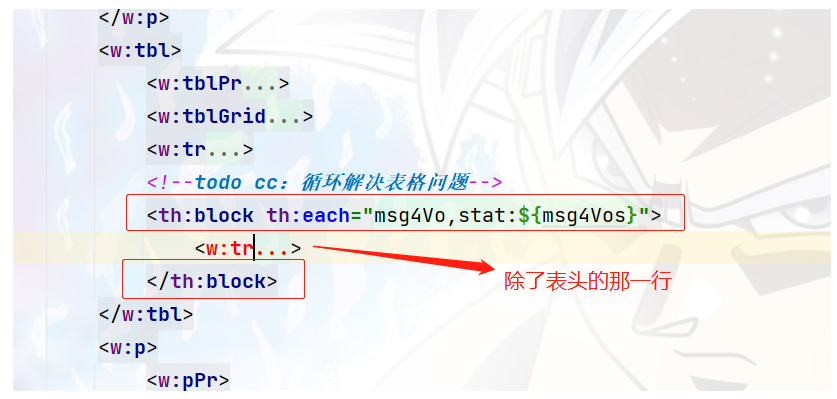
- 条件判断:if-else

1.3、把处理好的xml文件放到resources下

1.4、使用HTML的注意事项
-
见附件:thymeleaf_3_wps.html
-
另存为后,修改HTML的编码格式:utf-8

- 设置值,直接可以设置在:font 标签上

- “页面视图“修改:
- 参考导出页面视图见:一、导出方案


2、原理
- 可以使用xml导出、也可以使用HTML导出。
- 导出前需要预处理xml
- 可以使用下面的进行测试、导出。
2.1、原理
package com.cc.ewd.web.controller; import com.cc.ewd.vo.Msg4Vo; import org.springframework.web.bind.annotation.GetMapping; import org.springframework.web.bind.annotation.RequestMapping; import org.springframework.web.bind.annotation.RestController; import org.thymeleaf.context.Context; import org.thymeleaf.spring5.SpringTemplateEngine; import org.thymeleaf.templatemode.TemplateMode; import org.thymeleaf.templateresolver.ClassLoaderTemplateResolver; import javax.annotation.Resource; import javax.servlet.ServletOutputStream; import javax.servlet.http.HttpServletResponse; import java.io.ByteArrayInputStream; import java.io.ByteArrayOutputStream; import java.io.IOException; import java.net.URLEncoder; import java.nio.charset.StandardCharsets; import java.util.ArrayList; import java.util.HashMap; import java.util.List; import java.util.Map; /** thymeleaf导出的原理 * @author CC * @since 2023/4/25 0025 */ @RestController @RequestMapping("/thymeleafTheoryExport") public class ThymeleafTheoryExport { @Resource private SpringTemplateEngine springTemplateEngine; /** 原理
*
* - 相当于把word文件转为xml或者html,然后修改其中的值再以xml、html下载成word文件
* - 这个方法只能运行一次,因为对ClassLoaderTemplateResolver的设置是一次性的
* - 所以需要将ClassLoaderTemplateResolver设置成单例:配置Bean。
* - doc或docx的模板别使用WPS的文档,使用微软的office新建word文档,然后转为xml或html
* - 可以导出xml、也可以导出html:建议使用xml
* */ @GetMapping public void thymeleafExport(HttpServletResponse response){ String fileName = "第一个thy的文件"; //一、设置Thymeleaf模板 ClassLoaderTemplateResolver templateResolver = new ClassLoaderTemplateResolver(); //xml文件地址:自定义xml的文件夹:thymeleafcs/thymeleaf_1_wps.xml //xml文件地址:默认放在thymeleaf下就可以读取到 templateResolver.setPrefix("thymeleafcs/"); //设置文件的后缀 templateResolver.setSuffix(".xml"); // templateResolver.setSuffix(".html"); templateResolver.setCharacterEncoding("utf-8"); //模板模式:默认是HTML。改为xml // templateResolver.setTemplateMode(TemplateMode.XML); templateResolver.setTemplateMode(TemplateMode.HTML); //加载模板 springTemplateEngine.setTemplateResolver(templateResolver); //启用Spring EL编译器 springTemplateEngine.setEnableSpringELCompiler(true); //二、设置数据(可以用map,也可以用对象) Map map = new HashMap<>(); //1普通文本参数 map.put("msg1","我是参数1111"); map.put("msg2","我是参数2222"); map.put("msg3","我是参数3333"); //2if-else参数 map.put("thIf1","1"); map.put("thIf2","2"); //3循环:构建集合参数,用于表格:可以是Map;可以是对象 // List> msg4Vos = new ArrayList<>(); List msg4Vos = new ArrayList<>(); for (int i = 0; i < 10; i++) { //1map方式 // Map map4 = new HashMap<>(); // map4.put("l1","列1-" + i); // map4.put("l2","列2-" + i); // map4.put("l3","列3-" + i); // map4.put("l4","列4-" + i); // msg4Vos.add(map4); //2对象方式 Msg4Vo vo = new Msg4Vo(); vo.setL1("列1-" + i); vo.setL2("列2-" + i); vo.setL3("列3-" + i); vo.setL4("列4-" + i); msg4Vos.add(vo); } map.put("msg4Vos",msg4Vos); //4设置数据 Context context = new Context(); context.setVariables(map); //写入输入(模板名称,数据) String process = springTemplateEngine.process("thymeleaf_4_wps_final", context); //三、下载 //建议下载成doc的。不然微软的office可能打不开 try { byte[] bytes = process.getBytes(StandardCharsets.UTF_8); // ByteArrayInputStream inputStream = new ByteArrayInputStream(bytes); // ByteArrayOutputStream outputStream = getByteArrayOutputStream(inputStream); response.setCharacterEncoding("utf-8"); response.setContentType("application/msword"); response.setHeader("Access-Control-Expose-Headers","Content-disposition"); response.setHeader("Content-disposition","attachment; filename=" + URLEncoder.encode(fileName.concat(".doc"), "UTF-8")); ServletOutputStream out = response.getOutputStream(); //两种方式都可以:用bytes好些 // out.write(outputStream.toByteArray()); out.write(bytes); out.flush(); out.close(); }catch(Exception e){ e.printStackTrace(); } } /** 将 ByteArrayInputStream 拷贝成 ByteArrayOutputStream * 将 字节数组输入流 拷贝成 字节数组输出流 */ public static ByteArrayOutputStream getByteArrayOutputStream(ByteArrayInputStream inputStream) throws IOException { ByteArrayOutputStream outputStream = new ByteArrayOutputStream(); byte[] buffer = new byte[1024]; int length; while ((length = inputStream.read(buffer)) != -1) { outputStream.write(buffer, 0, length); } return outputStream; } }
2.2、导出后预览

3、实现
3.1、yml配置
server: port: 5555 spring: #thymeleaf的配置 thymeleaf: #关闭 Thymeleaf 的缓存开发过程中无需重启 #Thymeleaf默认会开启页面缓存,提高页面并发能力。但会导致我们修改页面不会立即被展现,因此我们关闭缓存 cache: false #设置thymeleaf页面的编码 encoding: UTF-8 #模型:XML/HTML5:HTML是默认值, 为了清楚起见, 在此处添加。 mode: XML #设置thymeleaf页面的后缀:.html是默认。 suffix: .xml #设置thymeleaf页面的存储路径 prefix: classpath:/thymeleafcs/ #使用Spring 4.2.4或更高版本启用SpringEL编译器 #可以加快大多数情况下的执行速度, 但是当一个模板中 #的表达式在不同数据类型之间重用时, #可能与特定情况不兼容, 因此该标志默认为“false” #以实现更安全的向后兼容性。 enable-spring-el-compiler: true
3.2、实现
package com.cc.ewd.web.controller; import com.cc.ewd.vo.Msg4Vo; import org.springframework.web.bind.annotation.GetMapping; import org.springframework.web.bind.annotation.RequestMapping; import org.springframework.web.bind.annotation.RestController; import org.thymeleaf.context.Context; import org.thymeleaf.spring5.SpringTemplateEngine; import javax.annotation.Resource; import javax.servlet.ServletOutputStream; import javax.servlet.http.HttpServletResponse; import java.io.ByteArrayInputStream; import java.io.ByteArrayOutputStream; import java.io.IOException; import java.net.URLEncoder; import java.nio.charset.StandardCharsets; import java.util.ArrayList; import java.util.HashMap; import java.util.List; import java.util.Map; /** thymeleaf导出的实现 * @author CC * @since 2023/5/4 0025 */ @RestController @RequestMapping("/thymeleafExport") public class ThymeleafExport { @Resource private SpringTemplateEngine springTemplateEngine; /** 原理
*
* - 相当于把word文件转为xml或者html,然后修改其中的值再以xml、html下载成word文件
* - 这个方法只能运行一次,因为对ClassLoaderTemplateResolver的设置是一次性的
* - 所以需要将ClassLoaderTemplateResolver设置成单例:配置Bean。
* - doc或docx的模板别使用WPS的文档,使用微软的office新建word文档,然后转为xml或html
* - 可以导出xml、也可以导出html:建议使用xml
* */ @GetMapping public void thymeleafExport(HttpServletResponse response){ String fileName = "第二个thy的文件"; //一、设置数据(可以用map,也可以用对象) Map map = new HashMap<>(); //1普通文本参数 map.put("msg1","我是参数1111"); map.put("msg2","我是参数2222"); map.put("msg3","我是参数3333"); //2if-else参数 map.put("thIf1","1"); map.put("thIf2","2"); //3循环:构建集合参数,用于表格:可以是Map;可以是对象 // List> msg4Vos = new ArrayList<>(); List msg4Vos = new ArrayList<>(); for (int i = 0; i < 10; i++) { //1map方式 // Map map4 = new HashMap<>(); // map4.put("l1","列1-" + i); // map4.put("l2","列2-" + i); // map4.put("l3","列3-" + i); // map4.put("l4","列4-" + i); // msg4Vos.add(map4); //2对象方式 Msg4Vo vo = new Msg4Vo(); vo.setL1("列1-" + i); vo.setL2("列2-" + i); vo.setL3("列3-" + i); vo.setL4("列4-" + i); msg4Vos.add(vo); } map.put("msg4Vos",msg4Vos); //4设置数据 Context context = new Context(); context.setVariables(map); //写入输入(模板名称,数据) String process = springTemplateEngine.process("thymeleaf_4_wps_final", context); //二、下载 //建议下载成doc的。不然微软的office可能打不开 try { byte[] bytes = process.getBytes(StandardCharsets.UTF_8); // ByteArrayInputStream inputStream = new ByteArrayInputStream(bytes); // ByteArrayOutputStream outputStream = getByteArrayOutputStream(inputStream); response.setCharacterEncoding("utf-8"); response.setContentType("application/msword"); response.setHeader("Access-Control-Expose-Headers","Content-disposition"); response.setHeader("Content-disposition","attachment; filename=" + URLEncoder.encode(fileName.concat(".doc"), "UTF-8")); ServletOutputStream out = response.getOutputStream(); //两种方式都可以:用bytes好些 // out.write(outputStream.toByteArray()); out.write(bytes); out.flush(); out.close(); }catch(Exception e){ e.printStackTrace(); } } /** 将 ByteArrayInputStream 拷贝成 ByteArrayOutputStream * 将 字节数组输入流 拷贝成 字节数组输出流 */ public static ByteArrayOutputStream getByteArrayOutputStream(ByteArrayInputStream inputStream) throws IOException { ByteArrayOutputStream outputStream = new ByteArrayOutputStream(); byte[] buffer = new byte[1024]; int length; while ((length = inputStream.read(buffer)) != -1) { outputStream.write(buffer, 0, length); } return outputStream; } }
3.3、不使用yml配置,使用配置bean方式
- 可以配置不同的bean,注入使用的时候,使用我们需要的bean。实现动态使用不同类型的模板的功能。
- 如果yml中配置了, 又配置了bean。yml中的配置会失效。
- 其中一个bean一定要添加:@Primary。来设置默认的bean
- config配置
package com.cc.ewd.config; import org.springframework.context.ApplicationContext; import org.springframework.context.annotation.Bean; import org.springframework.context.annotation.Configuration; import org.springframework.context.annotation.Primary; import org.thymeleaf.spring5.SpringTemplateEngine; import org.thymeleaf.spring5.templateresolver.SpringResourceTemplateResolver; import org.thymeleaf.templatemode.TemplateMode; import javax.annotation.Resource; /** ThymeLeaf单独的配置 * @since 2023/5/4 0004 * @author CC **/ @Configuration public class MyThymeLeafConfig { @Resource private ApplicationContext applicationContext; /** 自定义的bean * @return SpringTemplateEngine * @Primary :- 作用:指定使用名为“myTemplateEngine”的bean作为默认bean。
* - 这样,当您在需要使用SpringTemplateEngine的地方没有指定@Qualifier注释时,Spring将使用该默认bean。
* - 使用@Resource时,可直接设置名字。不用使用@Qualifier注释
*/ @Bean(name = "myTemplateEngine") @Primary public SpringTemplateEngine myTemplateEngine(){ // SpringTemplateEngine自动应用SpringStandardDialect // 并启用Spring自己的MessageSource消息解析机制。 SpringTemplateEngine templateEngine = new SpringTemplateEngine(); SpringResourceTemplateResolver templateResolver = myTemplateResolver(); templateEngine.setTemplateResolver(templateResolver); // 使用Spring 4.2.4或更高版本启用SpringEL编译器 // 可以加快大多数情况下的执行速度, 但是当一个模板中 // 的表达式在不同数据类型之间重用时, // 可能与特定情况不兼容, 因此该标志默认为“false” // 以实现更安全的向后兼容性。 templateEngine.setEnableSpringELCompiler(true); return templateEngine; } /** 自定义配置 * @return SpringResourceTemplateResolver */ @Bean("myTemplateResolver") public SpringResourceTemplateResolver myTemplateResolver(){ // SpringResourceTemplateResolver自动与Spring自己集成 // 资源解决基础设施, 强烈推荐。 SpringResourceTemplateResolver templateResolver = new SpringResourceTemplateResolver(); templateResolver.setApplicationContext(this.applicationContext); templateResolver.setPrefix("classpath:thymeleafcs/"); templateResolver.setSuffix(".html"); templateResolver.setCharacterEncoding("UTF-8"); // HTML是默认值, 为了清楚起见, 在此处添加。 templateResolver.setTemplateMode(TemplateMode.HTML); return templateResolver; } //---------------------------------------------- /** 自定义的bean2 * @return SpringTemplateEngine */ @Bean(name = "myTemplateEngine2") public SpringTemplateEngine myTemplateEngine2(){ // SpringTemplateEngine自动应用SpringStandardDialect // 并启用Spring自己的MessageSource消息解析机制。 SpringTemplateEngine templateEngine = new SpringTemplateEngine(); SpringResourceTemplateResolver templateResolver = myTemplateResolver2(); templateEngine.setTemplateResolver(templateResolver); // 使用Spring 4.2.4或更高版本启用SpringEL编译器 // 可以加快大多数情况下的执行速度, 但是当一个模板中 // 的表达式在不同数据类型之间重用时, // 可能与特定情况不兼容, 因此该标志默认为“false” // 以实现更安全的向后兼容性。 templateEngine.setEnableSpringELCompiler(true); return templateEngine; } /** 自定义配置2 * @return SpringResourceTemplateResolver */ @Bean("myTemplateResolver2") public SpringResourceTemplateResolver myTemplateResolver2(){ // SpringResourceTemplateResolver自动与Spring自己集成 // 资源解决基础设施, 强烈推荐。 SpringResourceTemplateResolver templateResolver = new SpringResourceTemplateResolver(); templateResolver.setApplicationContext(this.applicationContext); templateResolver.setPrefix("classpath:thymeleafcs/"); templateResolver.setSuffix(".xml"); templateResolver.setCharacterEncoding("UTF-8"); // HTML是默认值, 为了清楚起见, 在此处添加。 templateResolver.setTemplateMode(TemplateMode.XML); return templateResolver; } }
-
使用
-
@Resource注入:
@Resource(name = "myTemplateEngine") private SpringTemplateEngine springTemplateEngine; -
@Autowired注入:
@Autowired @Qualifier("myTemplateEngine") private SpringTemplateEngine springTemplateEngine1Html; -
配置文件会失效——配置类优先
-
使用:根据传入的type不同。使用的模板是不同的。
-
package com.cc.ewd.web.controller; import com.cc.ewd.vo.Msg4Vo; import org.springframework.beans.factory.annotation.Qualifier; import org.springframework.web.bind.annotation.GetMapping; import org.springframework.web.bind.annotation.RequestMapping; import org.springframework.web.bind.annotation.RequestParam; import org.springframework.web.bind.annotation.RestController; import org.thymeleaf.context.Context; import org.thymeleaf.spring5.SpringTemplateEngine; import javax.annotation.Resource; import javax.servlet.ServletOutputStream; import javax.servlet.http.HttpServletResponse; import java.io.ByteArrayInputStream; import java.io.ByteArrayOutputStream; import java.io.IOException; import java.net.URLEncoder; import java.nio.charset.StandardCharsets; import java.util.ArrayList; import java.util.HashMap; import java.util.List; import java.util.Map; /** thymeleaf导出的实现 * @author CC * @since 2023/5/4 0025 */ @RestController @RequestMapping("/thymeleafExport") public class ThymeleafExport { // @Resource // private SpringTemplateEngine springTemplateEngine; @Resource(name = "myTemplateEngine") private SpringTemplateEngine springTemplateEngine1Html; @Resource(name = "myTemplateEngine2") private SpringTemplateEngine springTemplateEngine2Xml; /** 原理
*
* - 相当于把word文件转为xml或者html,然后修改其中的值再以xml、html下载成word文件
* - 这个方法只能运行一次,因为对ClassLoaderTemplateResolver的设置是一次性的
* - 所以需要将ClassLoaderTemplateResolver设置成单例:配置Bean。
* - doc或docx的模板别使用WPS的文档,使用微软的office新建word文档,然后转为xml或html
* - 可以导出xml、也可以导出html:建议使用xml
* */ @GetMapping public void thymeleafExport(@RequestParam String type, HttpServletResponse response){ String fileName = "第二个thy的文件"; //一、设置数据(可以用map,也可以用对象) Map map = new HashMap<>(); //1普通文本参数 map.put("msg1","我是参数1111"); map.put("msg2","我是参数2222"); map.put("msg3","我是参数3333"); //2if-else参数 map.put("thIf1","1"); map.put("thIf2","2"); //3循环:构建集合参数,用于表格:可以是Map;可以是对象 // List> msg4Vos = new ArrayList<>(); List msg4Vos = new ArrayList<>(); for (int i = 0; i < 10; i++) { //1map方式 // Map map4 = new HashMap<>(); // map4.put("l1","列1-" + i); // map4.put("l2","列2-" + i); // map4.put("l3","列3-" + i); // map4.put("l4","列4-" + i); // msg4Vos.add(map4); //2对象方式 Msg4Vo vo = new Msg4Vo(); vo.setL1("列1-" + i); vo.setL2("列2-" + i); vo.setL3("列3-" + i); vo.setL4("列4-" + i); msg4Vos.add(vo); } map.put("msg4Vos",msg4Vos); //4设置数据 Context context = new Context(); context.setVariables(map); //写入输入(模板名称,数据):1:html;2:xml String process = ""; if ("1".equals(type)){ process = springTemplateEngine1Html.process("thymeleaf_3_wps", context); }else if ("2".equals(type)){ process = springTemplateEngine2Xml.process("thymeleaf_4_wps_final", context); } //二、下载 //建议下载成doc的。不然微软的office可能打不开 try { byte[] bytes = process.getBytes(StandardCharsets.UTF_8); // ByteArrayInputStream inputStream = new ByteArrayInputStream(bytes); // ByteArrayOutputStream outputStream = getByteArrayOutputStream(inputStream); response.setCharacterEncoding("utf-8"); response.setContentType("application/msword"); response.setHeader("Access-Control-Expose-Headers","Content-disposition"); response.setHeader("Content-disposition","attachment; filename=" + URLEncoder.encode(fileName.concat(".doc"), "UTF-8")); ServletOutputStream out = response.getOutputStream(); //两种方式都可以:用bytes好些 // out.write(outputStream.toByteArray()); out.write(bytes); out.flush(); out.close(); }catch(Exception e){ e.printStackTrace(); } } /** 将 ByteArrayInputStream 拷贝成 ByteArrayOutputStream * 将 字节数组输入流 拷贝成 字节数组输出流 */ public static ByteArrayOutputStream getByteArrayOutputStream(ByteArrayInputStream inputStream) throws IOException { ByteArrayOutputStream outputStream = new ByteArrayOutputStream(); byte[] buffer = new byte[1024]; int length; while ((length = inputStream.read(buffer)) != -1) { outputStream.write(buffer, 0, length); } return outputStream; } }
四、总结
- 甚至可以结合Thymeleaf模板技术和ApachePoi技术。
- 先使用Thymeleaf模板技术替换Word文档中的值。然后得到完整的HTML格式的Word文档
- 然后使用ApachePoi导出HTML格式的Word文档
- 文中使用到的文档: