-
利用pymupdf编辑修改pdf
利用pymupdf编辑修改pdf
本文背景
为了修改pdf的文本, 在pymupdf官方手册查了一通,没看到明显的说明,然后到github的讨论区看了发现了修改pdf的方案,在此记录一下
参考链接: https://github.com/pymupdf/PyMuPDF/discussions/1019

主要方法:
- 找到需要替换的文本块,然后添加修订注释(redaction annotation)
- 添加注释后,步骤1的文本块会被删除
- 在原位置添加新的文本块
注意事项:
- 字体问题: 要考虑被替换的文本块和新的文本块字体是否一致,否则可能看起来跟上下文显得突兀
- 文本长度问题: 最好文本长度差不多,不然可能跟周围的文本块有重叠或者留白太多
- 如果原文本是隐藏文本或者透明的, 文件信息是提取不到它的这个属性,新插入的文本将是可见的
修改PDF实践
1. 删除某些文本块
根据前文说明,我们发现使用修订注释可以删除文本块的,因此我们可以利用该方法进行一些文本块的删除操作,具体示例如下:
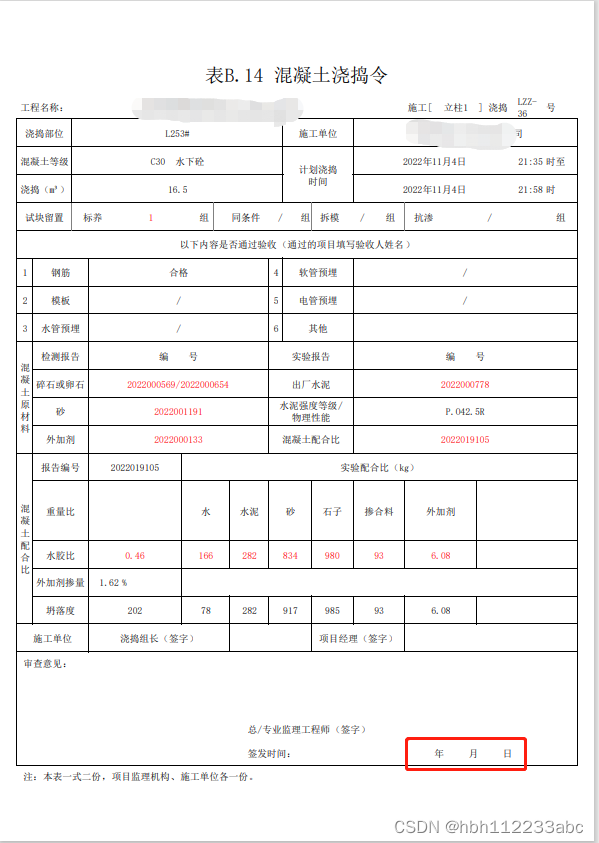
- 原文件如下,其中**" 年 月 日"**是我要删除的文本块
- 相关代码
import fitz doc = fitz.open("PDF文件路径") page = doc.load_page(0) # 遍历文本块,找到对应的文本块 def find_textbox(page:fitz.Page,keyword:str)->dict: info = page.get_text('dict') for block in info['blocks']: for line in block['lines']: for span in line['spans']: text = span.get('text','').replace(' ','') if text == keyword: return span target = find_textbox(page,'年月日') page.add_redact_annot(target['bbox']) page.apply_redactions() doc.save("保存文件路径")- 1
- 2
- 3
- 4
- 5
- 6
- 7
- 8
- 9
- 10
- 11
- 12
- 13
- 14
- 15
- 16
- 删除效果如下:

2. 修改文本块
修改文本块,就是在添加修订注释后,增加文本块即可
代码如下:import fitz doc = fitz.open("PDF文件路径") page = doc.load_page(0) # 遍历文本块,找到对应的文本块 def find_textbox(page:fitz.Page,keyword:str)->dict: info = page.get_text('dict') for block in info['blocks']: for line in block['lines']: for span in line['spans']: text = span.get('text','').replace(' ','') if text == keyword: return span target = find_textbox(page,'年月日') page.add_redact_annot(target['bbox'],'今夕复何夕',fontname='china-s',fontsize=target['size']) page.apply_redactions() doc.save("保存文件路径")- 1
- 2
- 3
- 4
- 5
- 6
- 7
- 8
- 9
- 10
- 11
- 12
- 13
- 14
- 15
- 16

-
相关阅读:
【算法与数据结构】--高级算法和数据结构--排序和搜索
免费数据 | 新库上线 | CnOpenData中国保险中介机构网点全集数据
汇编语言实验1:汇编语言环境的搭建与使用
叶子识别 颜色的特征提取 缺陷检测等
AQS常用组件
*表单显示、表单格式化、表单提交的细节、其他标签div、span、p
MySQL 怎么保证备份数据的一致性?
AI二次开发C#复合路径
C 风格文件输入/输出---直接输入/输出---(std::fread)---(std::fwrite)
防止员工拷贝公司终端电脑文件数据(如何防止企业数据文件被任意拷贝?)
- 原文地址:https://blog.csdn.net/hbh112233abc/article/details/128201653