-
Kotlin 开发Android app(十八):线程Thread和UI更新
多线程的好处是不言而喻的,它能帮我们刚更多的事情,同时干不同的事情在程序设计中是经常出现的,这种时候我们使用的是线程。
在
Kotlin中,使用的还是原先java的那一套,用的还是Thread,可能是在java中Thread就挺好用的,Kotlin没有做太多的变化。
线程Thread的使用
Thread是一个类,有几种用法,比较常规的是声明一个类,继承Thread,重载run()的方法,后建立一个变量,使用start的方法启动线程。inner class CountThread:Thread(){ var passc:Int = 0 override fun run() { super.run() while (true){ Thread.sleep(1000) passc ++ println("A second has passed,${passc}") } } }- 1
- 2
- 3
- 4
- 5
- 6
- 7
- 8
- 9
- 10
- 11
- 12
CountThread就是一个线程类,它负责数数,每隔一秒钟数一次,并打印出来,这里来启动他。var countT = CountThread() countT.start()- 1
- 2
这里每隔一秒钟,打印一次记录。
I/System.out: A second has passed,1 I/System.out: A second has passed,2 I/System.out: A second has passed,3 I/System.out: A second has passed,4 I/System.out: A second has passed,5 I/System.out: A second has passed,6 I/System.out: A second has passed,7 I/System.out: A second has passed,8 I/System.out: A second has passed,9 I/System.out: A second has passed,10- 1
- 2
- 3
- 4
- 5
- 6
- 7
- 8
- 9
- 10
同样的如果代码比较简洁,可以用如下的代码来定义和启动线程。
Thread { var passc:Int = 0 while (true){ Thread.sleep(1000) passc ++ println("A second has passed,${passc}") } }.start()- 1
- 2
- 3
- 4
- 5
- 6
- 7
- 8
- 9
在线程中更新UI
如果我们直接在线程中更新UI,会出现什么?我们想把数据直接显示在
TextView中,在线程中这样写:Thread { var passc:Int = 0 while (true){ Thread.sleep(1000) passc ++ println("A second has passed,${passc}") tv_count.setText("A second has passed,${passc}") } }.start()- 1
- 2
- 3
- 4
- 5
- 6
- 7
- 8
- 9
- 10
- 11
在线程中直接设置
tv_count.setText("A second has passed,${passc}"),但是很不幸,出现了如下的错误。Process: com.kotlin.kotlin_start_ch18, PID: 24758 android.view.ViewRootImpl$CalledFromWrongThreadException: Only the original thread that created a view hierarchy can touch its views. at android.view.ViewRootImpl.checkThread(ViewRootImpl.java:11131)- 1
- 2
- 3
这也是一个常见的错误,在很多的语言编程中,是不能直接在线程中更新ui界面的,因为界面有自己的ui线程,需要到他自己的线程中才能更新。
那怎么办呢?
把数据发送出来,在ui的线程中更新就可以了。在线程中,使用
Handler,相当于把消息发送到主线程中。inner class MessageHandler: Handler(){ override fun handleMessage(msg: Message) { super.handleMessage(msg) tv_count.setText(msg.obj.toString()) } }- 1
- 2
- 3
- 4
- 5
- 6
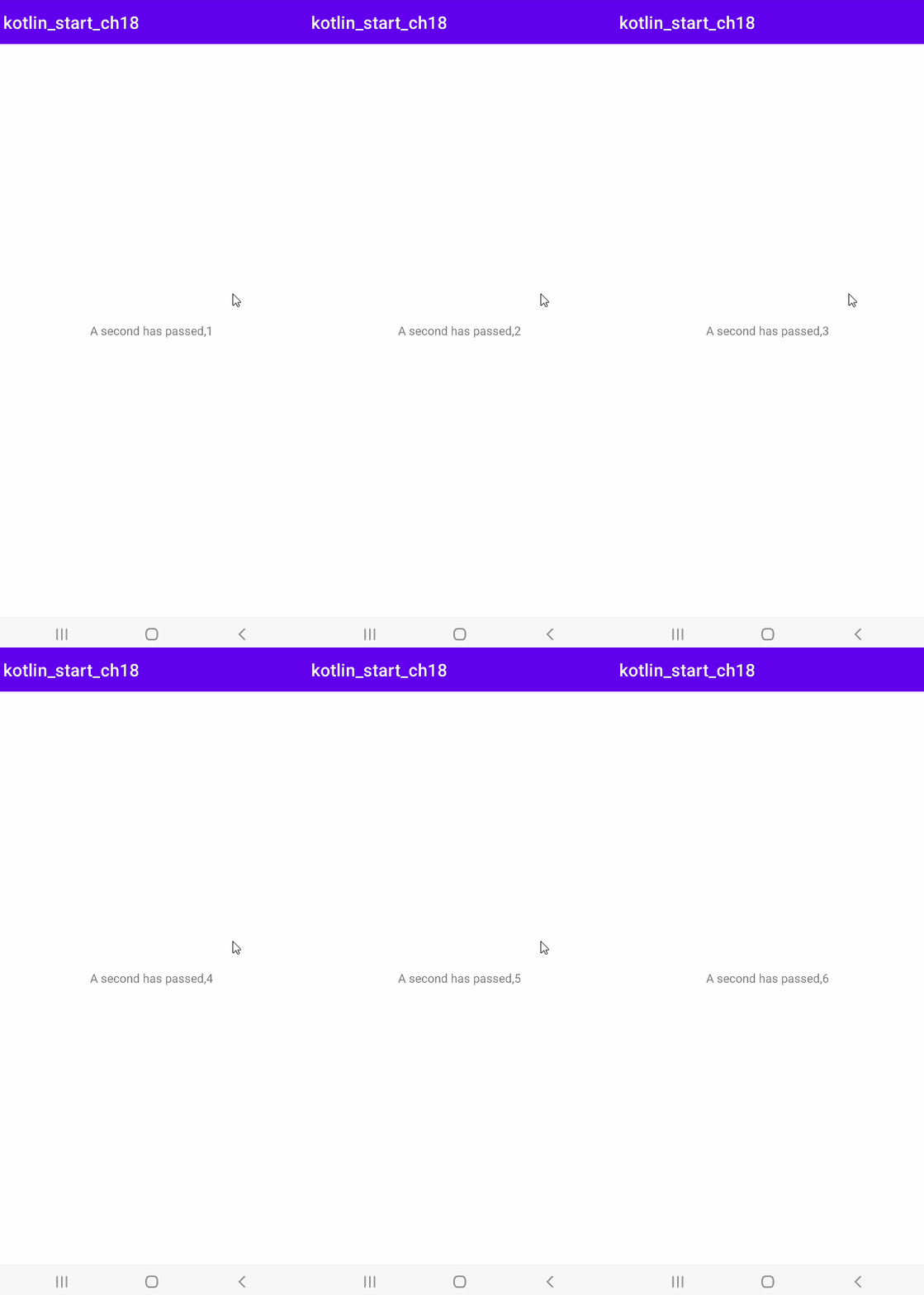
在线程中把数据发送出来:
Thread { var passc:Int = 0 while (true){ Thread.sleep(1000) passc ++ println("A second has passed,${passc}") //tv_count.setText("A second has passed,${passc}") var message = Message() message.obj = "A second has passed,${passc}" messageHandler.sendMessage(message) } }.start()- 1
- 2
- 3
- 4
- 5
- 6
- 7
- 8
- 9
- 10
- 11
- 12
- 13
- 14
- 15
- 16
- 17
这样就能成功的在界面上更新ui。
小结
线程是我们在多任务的时候,进程要考虑的一种方法,他又经常很ui界面挂钩,在大部分的编程语言里,更新ui都必须在ui线程里。这里的线程看起来都比较的简单,但是真正的在项目中使用线程的话,就务必要多注意了,因为他很容易出现资源互锁的情况。
-
相关阅读:
PC辉光效果一切正常,安卓辉光却没效果、显示异常(爆闪、黑屏等)
生成式 AI 落地制造业的关键是什么?亚马逊云科技给出答案
最新美国斯坦福大学2023全球前2%科学家(中国内地)榜单
24计算机考研调剂 | 山东科技大学
zeek学习笔记(一) —— 环境搭建
【数据结构与算法】之递归算法
AI 绘画极简教程
设计模式简介
学习Android的第二十七天
zookeeper节点类型
- 原文地址:https://blog.csdn.net/weixin_40425640/article/details/128032061
