-
【Python自然语言处理】文本向量化处理用户对不同类型服装评论问题(超详细 附源码)
需要源码和数据集请点赞关注收藏后评论区留言私信~~~
下面以文本向量化为目标,举例说明基于不同模型的实现过程,使用的数据集的主题是用户对不同类型的女性服装的评论,总共有23485条记录 实现步骤如下
一、导入库文件
首先导入需要的库文件,本实例设计词频-逆文档模型,N元模型以及词袋模型,并利用混淆矩阵直观描述各模型的预测能力 代码如下
- import gensim
- import nltk
- from sklearn.model_selection import train_test_split
- from sklearn import linear_model
- from sklearn.neighbors import KNeighborsClassifier
- from sklearn import linear_model
- from nltk.corpus import stopwords
- from sklearn.feature_extraction.text import CountVectorizer, TfidfVectorizer
- from sklearn.metrics import accuracy_score, confusion_matrix
- import matplotlib.pyplot as plt
- from gensim.models import Word2Vec
- import logging
- from smart_open import smart_open
- import pandas as pd
- import numpy as np
- from numpy import random
二、数据清洗
读入评论数据,删除空值,以空格符为基准对用户评论进行统计,针对数据的评论列进行分类统计,只分析用户关注度高且排名前五的用户评论,得到分类统计的图形比较结果如下


三、配置混淆矩阵
定义混淆矩阵以及参数设置并设定图形输出的主要特征 代码如下
- def confusion_matrix_definition(cm, title='混淆矩阵', cmap=plt.cm.Purples,ax=ax):
- plt.imshow(cm, interpolation='nearest', vmin = -1, vmax = 1, cmap=cmap, origin ='lower')
- plt.title(title,fontweight ="bold")
- plt.colorbar(plt.imshow(cm, interpolation='nearest', cmap=cmap, origin ='lower'))
- length = np.arange(len(categories))
- plt.xticks(length, categories, rotation=45)
- plt.yticks(length, categories)
- plt.rcParams['font.sans-serif']=['Microsoft YaHei']
- plt.rcParams['font.size']=14
- plt.rcParams['axes.unicode_minus'] = False
- plt.ylabel('真实值')
- plt.xlabel('预测值')
- #plt.tight_layout()
- plt.show()
四、预测结果
评估预测结果,通过正则化混淆矩阵方式显示预测值和期望值之间的关系,以客户评论数据为预测对象,选取排名前五的女性服饰类型,调用评估预测函数得到评估结果,并且剔除长度不符合要求的数据
五、结果展示
词袋模型结果

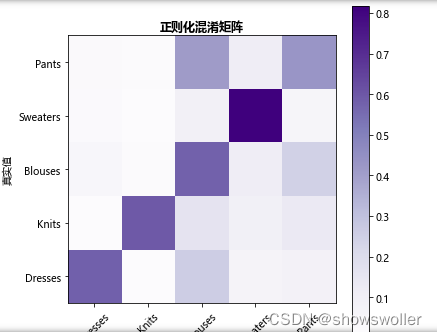
由上图可知,对角线上的值表示正确分类的结果,颜色越深数字越大,分类结果越正确,非对角线上的值表示模型错误分类结果,颜色越深数值越大,被错误分类的概率越大,可见模型对Sweaters类型的预测分类结果准确性最高,其他略低。
N元模型结果
N元模型的混淆矩阵评估结果如下图,分类最为准确的依然是Sweaters,其次是Blouses,而其他三种类型的预估结果比较接近,整个模型的准确性比词袋模型高,可以达到差不多0.7

词频-逆文档频率模型
词频-逆文档模型评估结果如下 预测精度的顺序基本没有改变

六、总结
从上面的实例中可以看出,分别使用三种文本向量评估模型,Sweaters的分类结果相对准确,Blouses准确性次之,而其他三种准确性相差不大,模型整体准确率而言,从高到低的顺序依次为N元模型,词袋模型以及词频-逆文档模型,因此针对不同的文本信息处理,不同的模型可能在评价结果的准确性排序上存在一定差异,准确性精度也可能有所区别
七、代码
- #导入各类库
- import gensim
- import nltk
- from sklearn.model_selection import train_test_split
- from sklearn import linear_model
- from sklearn.neighbors import KNeighborsClassifier
- from sklearn import linear_model
- from nltk.corpus import stopwords
- from sklearn.feature_extraction.text import CountVectorizer, TfidfVectorizer
- from sklearn.metrics import accuracy_score, confusion_matrix
- import matplotlib.pyplot as plt
- from gensim.models import Word2Vec
- import logging
- from smart_open import smart_open
- import pandas as pd
- import numpy as np
- from numpy import random
- get_ipython().run_line_magic('matplotlib', 'inline')
- # 统计数据特征
- #
- #
- # In[2]:
- #读入数据
- df = pd.read_csv('data/Reviews.csv')
- df = df.dropna()
- df['review'].apply(lambda y: len(y.split(' '))).sum()
- # In[3]:
- #分类
- #categories = ['Intimates' , 'Dresses', 'Pants', 'Blouses', 'Knits', 'Lounge', 'Jackets', 'Outwear','Skirts', 'Swim', 'Sleep','Fine gauge','Trend','Jeans','Blouses','Casual bottoms','Chemises','Layering','Legwear','Shorts']
- categories = ['Dresses', 'Knits', 'Blouses', 'Sweaters', 'Pants']
- df=df.groupby('category').filter(lambda x : len(x)>1000)
- #df=df.groupby(["category"]).get_group("Dresses", "Knits")
- #df=df[df['category'].value_counts()<1000]
- ax =df.category.value_counts().head(5).plot(kind="bar",figsize=(30,12),fontsize=35)
- ax.set_xlabel("服装类型",fontsize=35,fontfamily='Microsoft YaHei')
- ax.set_ylabel("频率统计",fontsize=35,fontfamily='Microsoft YaHei')
- #df=df['category'].value_counts(ascending=False).loc[lambda x : x>1000]
- print(df)
- # In[4]:
- #df
- # In[5]:
- def plot(indx):
- inx = df[df.index == indx][['review', 'category']].values[0]
- if len(inx) > 5:
- print(inx[0])
- print('Type:', inx[1])
- # In[6]:
- train_data, test_data = train_test_split(df, test_size=0.2, random_state=32)
- # In[7]:
- len(test_data)
- # In[8]:
- plt.figure(figsize=(30, 10))
- test_data.category.value_counts().head(5).plot(kind="bar", figsize=(30,12),fontsize=35)
- print(test_data)
- print(test_data['review'])
- # ## Model evaluation approach
- # We will use confusion matrices to evaluate all classifiers
- # In[9]:
- def confusion_matrix_definition(cm, title='混淆矩阵', cmap=plt.cm.Purples,ax=ax):
- plt.imshow(cm, interpolation='nearest', vmin = -1, vmax = 1, cmap=cmap, origin ='lower')
- plt.title(title,fontweight ="bold")
- plt.colorbar(plt.imshow(cm, interpolation='nearest', cmap=cmap, origin ='lower'))
- length = np.arange(len(categories))
- plt.xticks(length, categories, rotation=45)
- plt.yticks(length, categories)
- plt.rcParams['font.sans-serif']=['Microsoft YaHei']
- plt.rcParams['font.size']=14
- plt.rcParams['axes.unicode_minus'] = False
- plt.ylabel('真实值')
- plt.xlabel('预测值')
- #plt.tight_layout()
- plt.show()
- # In[10]:
- def predict_appraise(predict, mark, title="混淆矩阵"):
- print('准确率: %s' % accuracy_score(mark, predict))
- cm = confusion_matrix(mark, predict)
- N = len(cm[0])
- for i in range(N // 2):
- for j in range(i, N - i - 1):
- temp = cm[i][j]
- cm[i][j] = cm[N - 1 - j][i]
- cm[N - 1 - j][i] = cm[N - 1 - i][N - 1 - j]
- cm[N - 1 - i][N - 1 - j] = cm[j][N - 1 - i]
- cm[j][N - 1 - i] = temp
- print('混淆矩阵:\n %s' % cm)
- print('(行=期望值, 列=预测值)')
- for i in range(N // 2):
- for j in range(i, N - i - 1):
- temp = cm[i][j]
- cm[i][j] = cm[N - 1 - j][i]
- cm[N - 1 - j][i] = cm[N - 1 - i][N - 1 - j]
- cm[N - 1 - i][N - 1 - j] = cm[j][N - 1 - i]
- cm[j][N - 1 - i] = temp
- cmn = cm.astype('float') / cm.sum(axis=1)[:, np.newaxis]
- fig, ax = plt.subplots(figsize=(6, 6))
- confusion_matrix_definition(cmn, "正则化混淆矩阵")
- # In[11]:
- def predict(vectorizer, classifier, data):
- vt = vectorizer.transform(data['review'])
- forecast = classifier.predict(vt)
- mark = data['category']
- predict_appraise(forecast, mark)
- # ### Bag of words
- # In[12]:
- def tokenization(text):
- list = []
- for k in nltk.sent_tokenize(text):
- for j in nltk.word_tokenize(k):
- if len(j) < 5:
- continue
- list.append(j.lower())
- return list
- # In[13]:
- get_ipython().run_cell_magic('time', '', '#文本特征向量化\nbow = CountVectorizer(\n analyzer="word", encoding=\'utf-8\',tokenizer=nltk.word_tokenize,\n preprocessor=None, decode_error=\'strict\', strip_accents=None,stop_words=\'english\', max_features=4200) \ntrain_data_features = bow.fit_transform(train_data[\'review\'])\n#print(bow.get_feature_names())\n')
- # In[14]:
- get_ipython().run_cell_magic('time', '', "\nreg = linear_model.LogisticRegression(n_jobs=1, C=1e7)\nreg = reg.fit(train_data_features, train_data['category'])\n")
- # In[15]:
- bow.get_feature_names()[80:90]
- # In[16]:
- get_ipython().run_cell_magic('time', '', '\npredict(bow, reg, test_data)\n')
- # In[17]:
- def words_impact_evaluate(vectorizer, genre_index=0, num_words=10):
- features = vectorizer.get_feature_names()
- max_coef = sorted(enumerate(reg.coef_[genre_index]), key=lambda x:x[1], reverse=True)
- return [features[x[0]] for x in max_coef[:num_words]]
- # In[18]:
- # words for the fantasy genre
- id = 1
- print(categories[id])
- words_impact_evaluate(bow,id)
- # In[19]:
- train_data_features[0]
- # ### Character N-grams
- # In[1]:
- get_ipython().run_cell_magic('time', '', 'n_gram= CountVectorizer(\n analyzer="char",\n ngram_range=([3,6]),\n tokenizer=None, \n preprocessor=None, \n max_features=4200) \n\nreg = linear_model.LogisticRegression(n_jobs=1, C=1e6)\n\ntrain_data_features = n_gram.fit_transform(train_data[\'review\'])\n\nreg = reg.fit(train_data_features, train_data[\'category\'])\n')
- # In[2]:
- n_gram.get_feature_names()[70:90]
- # In[3]:
- predict(n_gram, reg, test_data)
- # ### TF-IDF
- #
- #
- # In[4]:
- get_ipython().run_cell_magic('time', '', "tf_idf = TfidfVectorizer(\n min_df=2, tokenizer=nltk.word_tokenize,\n preprocessor=None, stop_words='english')\ntrain_data_features = tf_idf.fit_transform(train_data['review'])\n\nreg = linear_model.LogisticRegression(n_jobs=1, C=1e6)\nreg = reg.fit(train_data_features, train_data['category'])\n")
- # In[5]:
- tf_idf.get_feature_names()[1000:1010]
- # In[6]:
- predict(tf_idf, reg, test_data)
- # In[ ]:
- words_impact_evaluate(tf_idf, 1)
创作不易 觉得有帮助请点赞关注收藏~~~
-
相关阅读:
对话框管理器第四章:对话框消息循环
内核进程的调度与进程切换
【ES】笔记-Set集合实践
nvidia-smi 报错
使用ARIMA进行时间序列预测|就代码而言
AIGC视频生成/编辑技术调研报告
Qt4中学习使用QtCharts绘图六:绘制动态曲线
37.普利姆(Prim)算法
Spark---持久化,共享变量和RDD之间的依赖关系详解
什么是DOM和DOM操作
- 原文地址:https://blog.csdn.net/jiebaoshayebuhui/article/details/128180932
