-
通过java代码实现对json字符串的格式美化(完整版)
一、前言
之前转载过一篇文章,也是有关于通过java代码实现对json字符串的格式美化,但是那篇文章的实现还不够完善,比如其对字符串中出现特殊字符时,会出现转换失败。因此博主本人也是闲暇时在那份代码的基础上做了完善和补充。好,废话不多说,上链接上代码。
本文参考于 https://blog.csdn.net/ardo_pass/article/details/78729978 ,并在其基础上做了完善,且往下看。
二、核心代码
package junjie; import javax.swing.filechooser.FileSystemView; import java.io.*; public class JsonFormatTool{ private String space = " "; private boolean existLeft = false; public static void main(String[] args) throws Exception { // JsonFormatTool tool = new JsonFormatTool(); // String path = FileSystemView.getFileSystemView().getHomeDirectory().getAbsolutePath()+"\\json.txt"; // String text = tool.readFile(path).replaceAll("\r\n",""); // String json = tool.formatJson(text); // tool.writeFile(path,json); JsonFormatTool tool = new JsonFormatTool(); String text ="{\"info\":[{\"code\":\"C\",\"key\":\"028\",\"nearest\":\"NO\",\"value\":\"好冷\"},{\"code\":\"N\",\"key\":\"0771\",\"nearest\":\"NO,\",\"value\":\"好{冷}\"},{\"code\":\"L\",\"key\":\"07[72\",\"nearest\":\"N]O\",\"value\":\"好冷\"},{\"code\":\"G\",\"key\":\"0773\",\"nearest\":\"NO\",\"value\":\"好冷\"}],\"resultCode\":\"0\",\"resultInfo\":\"SUCCESS\"}"; String json = tool.formatJson(text); System.out.println(json); } //写入文件 private void writeFile(String filePath,String text) throws Exception { File file = new File(filePath); if (!file.exists()){ file.createNewFile(); } BufferedWriter writer = new BufferedWriter(new OutputStreamWriter(new FileOutputStream(file), "UTF-8")); writer.write(text); writer.close(); } //读取文件 private String readFile(String filePath) throws Exception { BufferedReader reader = new BufferedReader(new InputStreamReader(new FileInputStream(filePath), "UTF-8")); String temp; String text = ""; while ((temp = reader.readLine()) != null){ text = text + temp.trim() + "\r\n"; } reader.close(); return text; } //格式化json public String formatJson(String json){ StringBuffer result = new StringBuffer(); int length = json.length(); int number = 0; char key = 0; for (int i = 0; i < length; i++){ key = json.charAt(i); if (isEffectSpecChr(i,key,json)){ if((key == '[') || (key == '{') ){ result.append(key); result.append('\n'); number++; result.append(indent(number)); continue; } if((key == ']') || (key == '}') ){ result.append('\n'); number--; result.append(indent(number)); result.append(key); continue; } if((key == ',')){ result.append(key); result.append('\n'); result.append(indent(number)); continue; } } result.append(key); } return result.toString(); } //过滤有效的特殊字符 private boolean isEffectSpecChr(int index, char key, String json) { boolean flag = false; if (isDouMark(index,String.valueOf(key),json)){ if (existLeft){ existLeft = false; }else { existLeft = true; } }else { if ((key == '[') || (key == '{') || (key == ']') || (key == '}') || (key == ',')){ if (!existLeft){ flag = true; } } } return flag; } //判断当前双引号是否为特殊字符 private boolean isDouMark(int index, String key, String json) { if (key.equals("\"") && index >= 0){ if (index == 0){ return true; } char c = json.charAt(index - 1); if (c != '\\'){ return true; } } return false; } //补充tab空格 private String indent(int number){ StringBuffer result = new StringBuffer(); for(int i = 0; i < number; i++){ result.append(space); } return result.toString(); } }- 1
- 2
- 3
- 4
- 5
- 6
- 7
- 8
- 9
- 10
- 11
- 12
- 13
- 14
- 15
- 16
- 17
- 18
- 19
- 20
- 21
- 22
- 23
- 24
- 25
- 26
- 27
- 28
- 29
- 30
- 31
- 32
- 33
- 34
- 35
- 36
- 37
- 38
- 39
- 40
- 41
- 42
- 43
- 44
- 45
- 46
- 47
- 48
- 49
- 50
- 51
- 52
- 53
- 54
- 55
- 56
- 57
- 58
- 59
- 60
- 61
- 62
- 63
- 64
- 65
- 66
- 67
- 68
- 69
- 70
- 71
- 72
- 73
- 74
- 75
- 76
- 77
- 78
- 79
- 80
- 81
- 82
- 83
- 84
- 85
- 86
- 87
- 88
- 89
- 90
- 91
- 92
- 93
- 94
- 95
- 96
- 97
- 98
- 99
- 100
- 101
- 102
- 103
- 104
- 105
- 106
- 107
- 108
- 109
- 110
- 111
- 112
- 113
- 114
- 115
- 116
- 117
- 118
- 119
- 120
- 121
- 122
- 123
- 124
- 125
- 126
- 127
- 128
- 129
- 130
- 131
- 132
- 133
- 134
- 135
三、执行结果
{ "info":[ { "code":"C", "key":"028", "nearest":"NO", "value":"好冷" }, { "code":"N", "key":"0771", "nearest":"NO,", "value":"好{冷}" }, { "code":"L", "key":"07[72", "nearest":"N]O", "value":"好冷" }, { "code":"G", "key":"0773", "nearest":"NO", "value":"好冷" } ], "resultCode":"0", "resultInfo":"SUCCESS" }- 1
- 2
- 3
- 4
- 5
- 6
- 7
- 8
- 9
- 10
- 11
- 12
- 13
- 14
- 15
- 16
- 17
- 18
- 19
- 20
- 21
- 22
- 23
- 24
- 25
- 26
- 27
- 28
- 29
- 30
四、与Notepad的json格式化工具比较
Notepad工具若是安装了json格式化工具也可以通过快捷键直接美化json的,其使用方法是:鼠标选中要美化的json字符串然后ctrl+shift+alt+m就可以美化json了(前提是你的notepad已经安装了该插件)
下面的演示,通过io流读取文件演示的,直接截图效果给大家看看:
4.1 含有特殊字符的字符串(这点和notepad没啥区别)
对于含有特殊字符的字符串,也能做格式美化,如{ } [ ] ,”

效果

4.2 混乱的换行回车处理(notepad没有对这点进行优化)


4.3 不完整的json字符串(notepad对这点也没有优化)
大多数情况下,咱们拷贝到的json字符串也是不完整的,也许缺个大括号小括号啥的,但即便这样,我们也想要美化的,下面演示一下:
这两个位置我们干掉了一个大括号和一个中括号
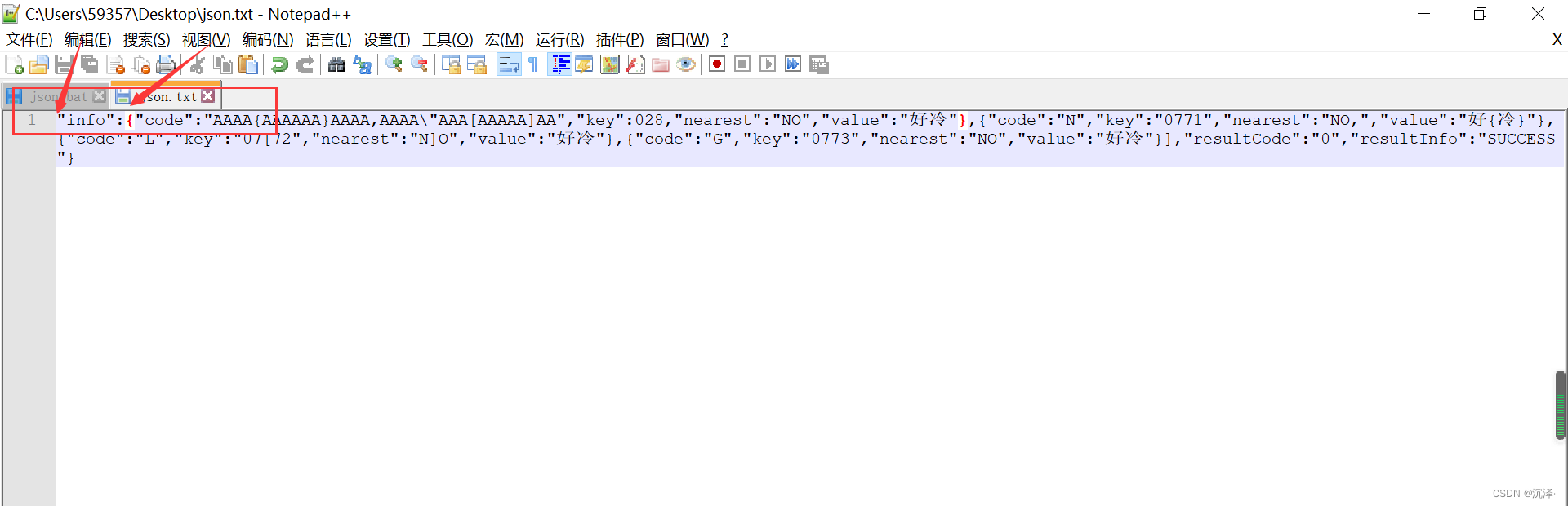
再看看格式化效果:

4.4 json缺失双引号?
有人问,能干掉一个双引号吗?当然不能,格式化json的核心点就是通过双引号去辨别的,若双引号都不对,这个json本身就很有问题,还请用眼睛看吧
五、制作一个批处理脚本
上述,咱们的功能已经完善了,但是咱们要想使用自己这个json格式化工具,难道每次都得打开自己的开发工具,再把json字符串拷贝进来,再点击执行?这个太low了。
咱们幸幸苦苦写完的代码,要费这么大劲才能使用它,那太麻烦了,下面我会教大家将自己的java代码打包成一个可以便捷使用的工具。要打包的main方法,操作步骤如下:


然根据我们设置的快捷键,就可以使用我们的工具了。
-
相关阅读:
安卓玩机搞机----不用刷第三方官改固件即可享受“高级设置”的操作 ChiMi安装使用步骤
ElasticSearch学习笔记(三)
CSI2与CDPHY学习
华为云云耀云服务器L实例评测|在云耀云服务器L实例上部署经典小游戏battle-city坦克大战
网络工程师回顾学习(第三部分)
gs_moment
cmake使用教程
JavaScript操作BOM
物联网通信协议-MQTT及使用python实现
从零开始学Spring Boot系列-集成MyBatis-Plus
- 原文地址:https://blog.csdn.net/weixin_41979002/article/details/128160841
