-
Intel OpenVINO 安装显卡驱动
背景:
使用集合诚KMDA-3301 OpenVINO CPU和GPU 算法加速,用GPU加速时,调动不起来。写下解决过程,以备后用。
过程:
调动GPU 报错:
terminate called after throwing an instance of 'InferenceEngine::GeneralError' what(): Failed to create plugin /opt/intel/openvino_2021/deployment_tools/inference_engine/lib/intel64/libclDNNPlugin.so for device GPU Please, check your environment [CLDNN ERROR]. clGetPlatformIDs error -1001- 1
- 2
- 3
- 4
先查 openvino环境配置
openvinotoolkit/openvino
得知没有显卡驱动:$ cd /opt/intel/openvino_2021/install_dependencies/ $ sudo -E ./install_NEO_OCL_driver- 1
- 2
使用原脚本下载时,所有 neo 目录下的文件可能下载不全,导致安装失败
这时修改下载方式_download_packages_ubuntu() { case $INSTALL_DRIVER_VERSION in "19.41.14441") curl -L -O https://github.com/intel/compute-runtime/releases/download/19.41.14441/intel-gmmlib_19.3.2_amd64.deb curl -L -O https://github.com/intel/compute-runtime/releases/download/19.41.14441/intel-igc-core_1.0.2597_amd64.deb curl -L -O https://github.com/intel/compute-runtime/releases/download/19.41.14441/intel-igc-opencl_1.0.2597_amd64.deb curl -L -O https://github.com/intel/compute-runtime/releases/download/19.41.14441/intel-opencl_19.41.14441_amd64.deb curl -L -O https://github.com/intel/compute-runtime/releases/download/19.41.14441/intel-ocloc_19.41.14441_amd64.deb ;; "20.35.17767") #curl -L -O https://github.com/intel/compute-runtime/releases/download/20.35.17767/intel-gmmlib_20.2.4_amd64.deb #curl -L -O https://github.com/intel/compute-runtime/releases/download/20.35.17767/intel-igc-core_1.0.4756_amd64.deb #curl -L -O https://github.com/intel/compute-runtime/releases/download/20.35.17767/intel-igc-opencl_1.0.4756_amd64.deb #curl -L -O https://github.com/intel/compute-runtime/releases/download/20.35.17767/intel-opencl_20.35.17767_amd64.deb #curl -L -O https://github.com/intel/compute-runtime/releases/download/20.35.17767/intel-ocloc_20.35.17767_amd64.deb #curl -L -O https://github.com/intel/compute-runtime/releases/download/20.35.17767/intel-level-zero-gpu_1.0.17767_amd64.deb wget https://github.com/intel/compute-runtime/releases/download/20.35.17767/intel-gmmlib_20.2.4_amd64.deb wget https://github.com/intel/compute-runtime/releases/download/20.35.17767/intel-igc-core_1.0.4756_amd64.deb wget https://github.com/intel/compute-runtime/releases/download/20.35.17767/intel-igc-opencl_1.0.4756_amd64.deb wget https://github.com/intel/compute-runtime/releases/download/20.35.17767/intel-opencl_20.35.17767_amd64.deb wget https://github.com/intel/compute-runtime/releases/download/20.35.17767/intel-ocloc_20.35.17767_amd64.deb wget https://github.com/intel/compute-runtime/releases/download/20.35.17767/intel-level-zero-gpu_1.0.17767_amd64.deb ;; "21.29.20389") return 0 ;; *) echo "ERROR: Unrecognized driver ${INSTALL_DRIVER_VERSION}." echo "Available values: ${AVAILABLE_DRIVERS[*]}" exit $EXIT_WRONG_ARG esac }- 1
- 2
- 3
- 4
- 5
- 6
- 7
- 8
- 9
- 10
- 11
- 12
- 13
- 14
- 15
- 16
- 17
- 18
- 19
- 20
- 21
- 22
- 23
- 24
- 25
- 26
- 27
- 28
- 29
- 30
- 31
- 32
- 33
- 34
and
_verify_checksum_ubuntu() { case $INSTALL_DRIVER_VERSION in "19.41.14441") curl -L -O https://github.com/intel/compute-runtime/releases/download/19.41.14441/ww41.sum sha256sum -c ww41.sum ;; "20.35.17767") #curl -L -O https://github.com/intel/compute-runtime/releases/download/20.35.17767/ww35.sum wget https://github.com/intel/compute-runtime/releases/download/20.35.17767/ww35.sum sha256sum -c ww35.sum ;; "21.29.20389") return 0 ;; *) echo "ERROR: Unrecognized driver ${INSTALL_DRIVER_VERSION}." echo "Available values: ${AVAILABLE_DRIVERS[*]}" exit $EXIT_WRONG_ARG esac }- 1
- 2
- 3
- 4
- 5
- 6
- 7
- 8
- 9
- 10
- 11
- 12
- 13
- 14
- 15
- 16
- 17
- 18
- 19
- 20
- 21
then:
groups sudo usermod -a -G video sudo usermod -a -G ls- 1
- 2
- 3
如果有原先的驱动,得先删除
参考OpenVINO安装之安装openCLsudo apt purge intel-opencl- 1
这时仍然不能调用GPU ,咨询Intel工程师得知内核得 5.8 以上,而原来内核是
$ uname -r 5.4.0-84-generic $ uname -a Linux t-Default-string 5.4.0-84-generic #94~18.04.1-Ubuntu SMP Thu Aug 26 23:17:46 UTC 2021 x86_64 x86_64 x86_64 GNU/Linux- 1
- 2
- 3
- 4
这时有两种方法解决内核问题:
一. 升级内核
参考 在ubuntu18.04上更新内核
ubuntu18.04.4更换内核版本- 更新内核,更新到5.10 这时报错
make[1]: *** No rule to make target 'debian/canonical-certs.pem', needed by 'certs/x509_certificate_list'. Stop. Makefile:1837: recipe for target 'certs' failed make: *** [certs] Error 2- 1
- 2
- 3
参考:
内核错误: No rule to make target ‘debian/canonical-certs.pem‘, needed by ‘certs/x509_certificate_list‘
- 报错:
Makefile:1194: recipe for target 'vmlinux' failed make: *** [vmlinux] Error 1- 1
- 2
sudo apt install dwarves- 1
- 报错:
sed: can't read modules.order: No such file or directory Makefile:1452: recipe for target '_modinst_' failed make: *** [_modinst_] Error 2- 1
- 2
- 3
参考 Linux内核编译错误
编译成功后重启
这时不能正常开机,只能升级系统。二. 升级系统
升级系统后按上面重装显卡驱动
编译代码时报错:CMake Error at CMakeLists.txt:3 (project) : No CMAKE_CXX_COMPILER could be found.- 1
- 2
参考:
ubuntu20.04 cmake编译出错:No CMAKE_CXX_COMPILER could be found.sudo apt install -y build-essential- 1
这时系统是
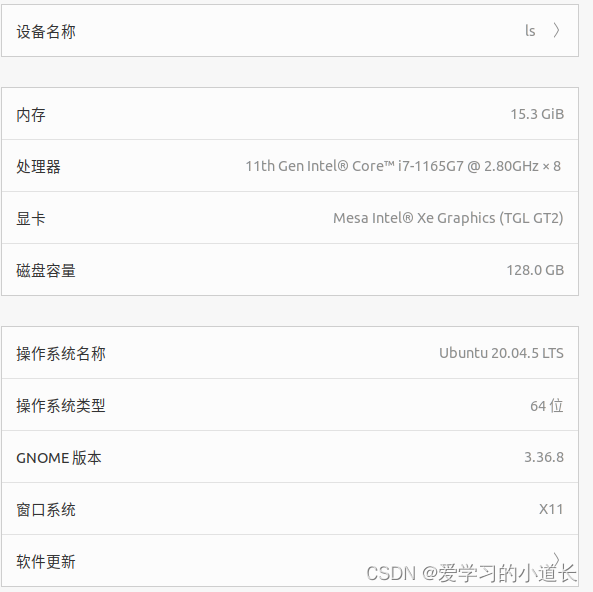
-
相关阅读:
工业智能网关BL110应用之六十八: 实现西门子S7-300 PLC接入Modbus TCP Server云平台
【无标题】
JVM之垃圾回收器
极客时间Kafka - 01 Kafka术语|生产者|消费者|主题|分区|副本|ISR|OSR|AR|HW|LEO|Offset
葡萄酒质量预测python
将中文名格式化输出为英文名
Docker 与 Linux Cgroups:资源隔离的魔法之旅
小黑宿舍楼边又有阳性了,纠结回不回家,不戴口罩又挨老黑说了的leetcode之旅:530. 二叉搜索树的最小绝对差
艾美捷PEG-2000 DMG解决方案
小班安全优质课教案《防止拥挤踩踏事故》
- 原文地址:https://blog.csdn.net/weixin_40378209/article/details/128143047
