-
自动化之路:telnet的自动登录脚本
前言
为了测试telnet,首先,要保证系统已经安装了telnet,并且还得有一个端口能用,就是1-65536那个PORT。
一 搭建telenet环境并测试
1 首先查看telnet运行状态:
- lkmao@ubuntu:~$ netstat -a | grep telnet
- lkmao@ubuntu:~$
输出为空,表示没有开启该服务
2 安装openbsd-inetd
sudo apt-get install openbsd-inetd如果已经安装过了,会提示已经安装过了,直接执行下面的步骤就可以了。
3 安装telnetd
sudo apt-get install telnetd安装完之后,查看/etc/inetd.conf的内容,我的是第23行
telnet stream tcp nowait telnetd /usr/sbin/tcpd /usr/sbin/in.telnetd
- # /etc/inetd.conf: see inetd(8) for further informations.
- 2 #
- 3 # Internet superserver configuration database
- 4 #
- 5 #
- 6 # Lines starting with "#:LABEL:" or "#
#" should not - 7 # be changed unless you know what you are doing!
- 8 #
- 9 # If you want to disable an entry so it isn't touched during
- 10 # package updates just comment it out with a single '#' character.
- 11 #
- 12 # Packages should modify this file by using update-inetd(8)
- 13 #
- 14 #
- 15 #
- 16 #:INTERNAL: Internal services
- 17 #discard stream tcp nowait root internal
- 18 #discard dgram udp wait root internal
- 19 #daytime stream tcp nowait root internal
- 20 #time stream tcp nowait root internal
- 21
- 22 #:STANDARD: These are standard services.
- 23 telnet stream tcp nowait telnetd /usr/sbin/tcpd /usr/sbin/in.telnetd
- 24
- 25 #:BSD: Shell, login, exec and talk are BSD protocols.
- 26
- 27 #:MAIL: Mail, news and uucp services.
- 28
- 29 #:INFO: Info services
- 30
- 31 #:BOOT: TFTP service is provided primarily for booting. Most sites
- 32 # run this only on machines acting as "boot servers."
- 33
- 34 #:RPC: RPC based services
- 35
- 36 #:HAM-RADIO: amateur-radio services
- 37
- 38 #:OTHER: Other services
- 39
使用grep搜索如下所示:
- lkmao@ubuntu:~$ cat /etc/inetd.conf | grep telnet
- telnet stream tcp nowait telnetd /usr/sbin/tcpd /usr/sbin/in.telnetd
- lkmao@ubuntu:~$
4 重启openbsd-inetd
- lkmao@ubuntu:~$ /etc/init.d/openbsd-inetd restart
- [....] Restarting openbsd-inetd (via systemctl): openbsd-inetd.service==== AUTHENTICATING FOR org.freedesktop.systemd1.manage-units ===
- 需要通过认证才能重启“inetd.service”。
- Authenticating as: lkmao,,, (lkmao)
- Password:
- ==== AUTHENTICATION COMPLETE ===
- . ok
- lkmao@ubuntu:~$
5 查看telnet运行状态,
如下所示,已经处于监听的状态了。此时表明已经开启了telnet服务。
- lkmao@ubuntu:~$ netstat -a | grep telnet
- tcp 0 0 *:telnet *:* LISTEN
- lkmao@ubuntu:~$
6 telnet登陆测试
输入telnet 127.0.0.1,如果连接成功,会提示输入用户名,输入密码,就可以成功登录了。
- lkmao@ubuntu:~$ telnet 127.0.0.1
- Trying 127.0.0.1...
- Connected to 127.0.0.1.
- Escape character is '^]'.
- Ubuntu 16.04.7 LTS
- ubuntu login:
完整过程如下所示:

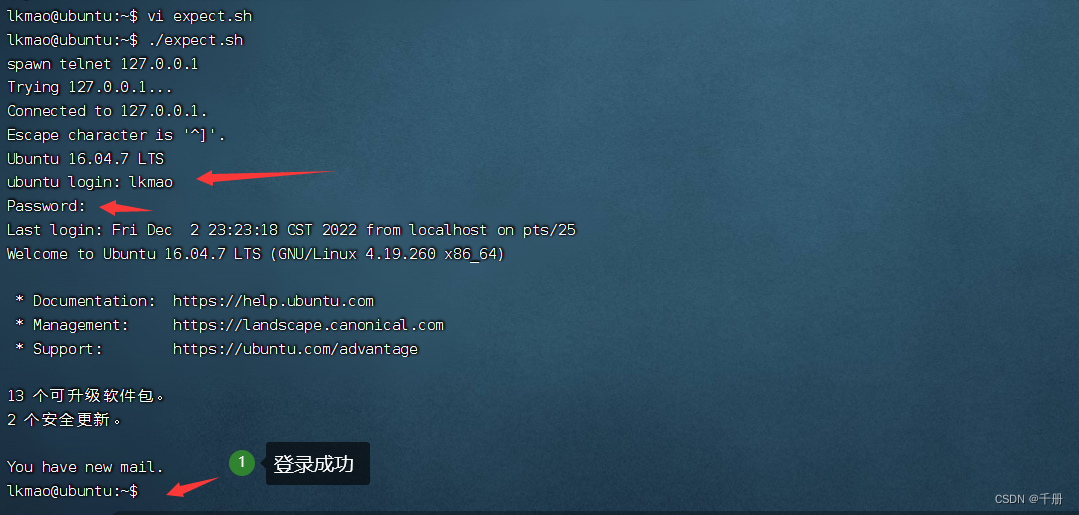
二 自动登录telnet的脚本:
- #!/usr/bin/expect
- spawn telnet 127.0.0.1
- expect {
- "login:" {
- send "lkmao\n";exp_continue
- }
- "assword" {
- send "lkmao\n"
- }
- }
- interact
执行效果:
小结
-
相关阅读:
http和tcp
树莓派4b通过docker安装部署jenkins
《数据结构-第一章》之顺序表
Idea 常用快捷键
[高性能] 关于如何高效的往本地写入视频
SpringCloudAlibaba-Nacos集群
Linux 安装 Gitlab
能让你薪资翻倍的性能优化大全,大厂必问的性能调优其实很简单
【日志】日志干什么的?日志工厂是什么?log4j 的配置和使用? log4j.properties 文件配置、log4j jar包坐标
split() 函数实现多条件转为数据为数组类型
- 原文地址:https://blog.csdn.net/yueni_zhao/article/details/128155967